Programming can look intimidating from the outside: unfamiliar symbols, long files, people talking about “frameworks” and “algorithms”. It’s easy to think: “Maybe I’m not technical enough.”
The reality is simpler: programming is writing instructions a computer can execute. This guide helps you build the right foundation: core concepts, the basic toolchain, a realistic practice strategy, and small projects that make everything “click”.
Outcome to aim for
By the end of your first month, you should be able to build a small program that takes input (file/keyboard), processes it with clear logic, handles errors, and produces output.
If you already know you want Python, follow the dedicated guide: Python Programming Basics. For clean habits that apply to any language, see: Clean Code Best Practices.
1. What Is Programming, Really?
Programming is the process of describing a solution as a sequence of steps. The computer is fast and consistent, but also literal: it executes exactly what you wrote.
- Problem-solving: breaking a big goal into smaller steps.
- Precision: expressing those steps with unambiguous rules.
- Automation: letting the machine do repetitive work reliably.
A beginner-friendly mental model
Think of code as instructions for a very literal robot. If you skip steps, it won’t “guess”. If you handle edge cases, your program becomes robust.
2. How Programs Run (In Plain English)
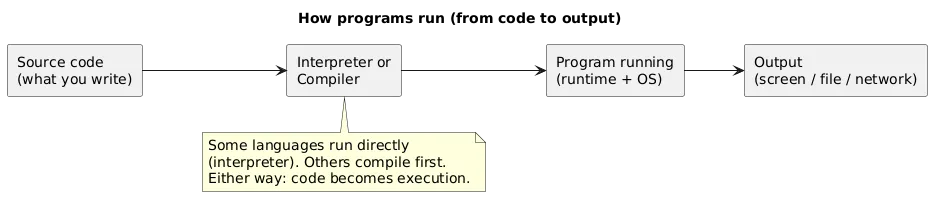
A program typically starts as source code (the text you write). That source code is then executed by an interpreter (common for Python/JavaScript) or compiled into a faster form (common for C/C++/Rust, and partly for others). Either way, the process is: you write instructions → the computer executes them → you get output.
This is why setup matters. If you install the wrong runtime version or mix dependencies between projects, you can get confusing errors that feel like “I’m bad at programming” when the real issue is environment tooling.
3. Choose Your First Language (Fast, No Overthinking)
Your first language should match your goals and be easy to practise consistently. There is no perfect choice—there is a practical choice.
- Python: readable, great for automation, scripting, data work, backend basics.
- JavaScript: the web’s language; best if you want interactive websites or web apps.
- Java / C#: structured, widely used in enterprise and larger codebases.
- Scratch: good for absolute zero confidence; teaches logic without syntax friction.
Decision shortcut
If you want web UI: start with JavaScript. If you want a general-purpose beginner path: start with Python. Commit for 6–10 weeks before switching.
4. Tools & Setup: Write and Run Your First Code
You need only three things to start: a place to write code, a way to run it, and a way to see output. Most beginners use a modern editor (VS Code) and a language runtime (Python/Node).
A simple beginner tool stack
- Editor: VS Code (or another editor you like).
- Runtime: Python or Node.js (depending on language).
- Terminal: run commands, see logs, install packages.
- Version control (soon): Git helps you save progress and undo mistakes.
Your first “real” win
Create a folder, write one file, run it from the terminal. Once that works, everything else becomes learnable.
5. Core Concepts You’ll Use Everywhere
Every programming language has different syntax, but the building blocks are the same. If you understand these concepts well, switching languages becomes dramatically easier.

Variables and types
Variables store values. Types tell you what kind of value it is (number, text, true/false, etc.). Beginner progress accelerates when you stop “guessing” types and start checking them.
Conditions (if/else)
Conditions let your program choose a path. Most real code is validation: “If input is invalid, show an error; otherwise, continue.”
Loops (repeat work)
Loops let you process lists of data: files, users, records, items in a cart, lines in a log. Learning loops is a major “unlock” moment for beginners.
Functions (reuse logic)
Functions package logic into reusable units. This makes programs easier to test and debug. A practical rule: functions should do one thing and return a result.
Data structures (lists, dictionaries, sets)
You rarely work with one value. You work with collections. Choosing the right structure (e.g., dictionary for fast lookup) keeps code simple and avoids messy manual searching.
6. Debugging: A Simple Loop That Works
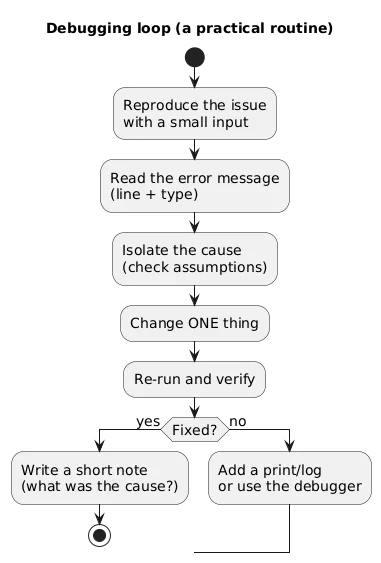
Debugging is not a “special skill” separate from programming. It is part of programming. Errors are feedback. The goal is to turn confusing errors into small, fixable problems.
Debugging checklist (copy/paste)
- Can I reproduce the problem with a small input?
- What does the error message say (line, file, type)?
- What did I expect vs what happened?
- Can I print/log intermediate values to confirm assumptions?
- Can I change one thing and rerun?
Beginner trap
If you copy-paste random fixes without understanding, you get short-term relief and long-term confusion. Always try to explain the fix in one sentence.
7. A 30-Day Plan (Realistic and Repeatable)
You don’t need 6 hours per day. You need a repeatable routine. A solid target is 5–7 focused hours per week.
Week 1: setup + tiny wins
- Install your runtime and editor
- Run “Hello, world” from the terminal
- Learn variables, printing, and simple input
Week 2: conditions + loops
- Write simple validation with if/else
- Loop over a list of items
- Build a tiny game (number guessing) or a converter
Week 3: functions + data structures
- Refactor repeated code into functions
- Use lists and dictionaries for real data
- Add basic error handling
Week 4: your first “real” project
- Choose a project with input → processing → output
- Write a short README (“how to run”)
- Iterate: add one small feature and one edge-case fix
Consistency strategy
If you miss a day, don’t “make up” by burning out. Resume the next day with a small task.
8. Beginner Projects You Can Actually Finish
Projects are where understanding forms. Pick projects that are small enough to finish in a weekend, then iterate (add one feature at a time).
- CLI calculator: parse input, validate, compute, print.
- To-do list (file-backed): store tasks in JSON/text, add/remove/list.
- File organizer: group files by extension/date.
- Unit converter: temperature, distance, weight.
- Website status checker: call a URL, report response codes and timing.
How to scope a beginner project
- Define input: keyboard, file, or API.
- Define output: printed summary or saved file.
- Define one “happy path”: the simplest case that works.
- Add 2 edge cases: invalid input, missing file, etc.
9. Common Beginner Mistakes (And Fixes)
- Tutorial hopping: watching endlessly without building. Fix: build tiny projects weekly.
- Projects too big: attempting “full app” too early. Fix: narrow scope to input → output.
- Ignoring errors: not reading messages. Fix: read bottom line, find your line number, isolate.
- Changing 10 things at once: no idea what worked. Fix: change one thing and retest.
- No repetition: learning once and forgetting. Fix: spaced practice (same concept, different examples).
10. Community & Feedback (How to Get Unstuck)
Learning can be solo, but you should not stay stuck alone for days. Communities help when you ask good questions.
How to ask for help effectively
- What are you trying to do?
- What did you expect to happen?
- What actually happened?
- Paste the exact error message and the minimal code snippet.
- List what you already tried.
11. FAQ
Can I learn programming from scratch with no background?
Yes. The main requirement is consistency. Expect confusion early and treat it as part of the process.
How many hours per week should I study?
A strong baseline is 5–7 focused hours per week. Short, frequent sessions beat rare marathons.
Should I start with Python or JavaScript?
Start with JavaScript if your goal is web UI. Start with Python if you want a general-purpose beginner path and fast scripting wins.
When should I learn Git?
As soon as you build your first project. Even basic “commit” history makes learning safer and less frustrating.
Key programming terms (quick glossary)
- Programming language
- A structured way of writing instructions a computer can execute (e.g., Python, JavaScript).
- Source code
- The text you write in a programming language.
- Interpreter
- A program that executes source code directly (common in Python/JavaScript runtimes).
- Compiler
- A tool that translates source code into another form that runs efficiently.
- Variable
- A named container for a value that can change while the program runs.
- Condition
- A decision point (if/else) that chooses which code to run.
- Loop
- A structure that repeats code multiple times.
- Function
- A reusable block of code that accepts inputs and returns outputs.
- Debugging
- Finding and fixing mistakes (bugs) so the program behaves as intended.
- Library / package
- Reusable code you can import instead of writing everything from scratch.
Worth reading
Recommended guides from the category.
