Python is popular because it’s readable, productive, and useful across many domains: automation, web development, scripting, data work, and developer tooling. The goal of this guide is to teach fundamentals you can apply immediately to real projects—not just memorize syntax.
You’ll learn core concepts (types, control flow, functions, and data structures) plus the workflow basics (virtual environments and packages) so your projects stay clean and reproducible. If you also want broader engineering habits that apply to Python codebases, see: Clean Code Best Practices .
Beginner goal
Aim to finish one useful script: it reads input (file/API), validates data, handles errors, transforms values, and writes output—then iterate.
1. Why Python (And What It’s Good For)
Python’s biggest advantage is that it reduces “ceremony”: you can express ideas with fewer lines of code, which makes it excellent for learning and for shipping small tools quickly.
- Automation: scripts for files, folders, and APIs.
- Web: backend services, integrations, internal tools.
- Data: analysis, ETL pipelines, notebooks and reporting.
- Dev tooling: CLIs, build scripts, test utilities.
Mini-exercise (5 minutes)
Write a script that prints the number of files in a folder and the total size in MB. You’ll practice: imports, loops, basic math, and printing.
2. Setup: Install Python, Editor, and a Virtual Environment
Use one virtual environment per project. This avoids dependency conflicts and makes your work reproducible (especially when you return to a project months later).
# Create and activate a virtual environment
python -m venv .venv

# macOS/Linux
source .venv/bin/activate

# Windows (PowerShell)
.venv\Scripts\Activate.ps1
Install packages inside the environment:
# Install a package
pip install requests

# Save dependencies (simple workflow)
pip freeze > requirements.txt
Common pitfall
Installing packages globally often breaks projects later. Use venv and keep dependencies recorded.
Quick environment checklist
-
Project folder contains
.venv(not committed to git). -
Dependencies are recorded (
requirements.txtorpyproject.toml). - You can recreate the environment on another machine.
3. Python Syntax Basics (Indentation, Comments, Printing)
Python uses indentation to define code blocks. Keep indentation consistent (4 spaces is the norm), and avoid mixing tabs/spaces.
- Indentation: whitespace defines blocks.
-
Comments: use
#for notes, but prefer clear code over long comments. -
Printing:
print()is the simplest debug tool.
is_member = True

if is_member:
    print("Welcome back!")
else:
    print("Create an account first.")
Readable output
Use f-strings for clean formatting:
print(f"Total: {total}").
4. Variables, Types, and Common Operations
Most Python beginner bugs come from assumptions about types (string vs number) and mutability (objects that can change in place). Learn these basics early and you’ll avoid a lot of confusion.
Core built-in types
-
Numbers:
int,float - Text:
str - Booleans:
bool - No value:
None
name = "Ada"
count = 3
price = 19.99
is_active = True
value = None
Type conversions (very common)
age_text = "42"
age = int(age_text)          # "42" -> 42
ratio = float("0.5")         # "0.5" -> 0.5
label = str(123)             # 123 -> "123"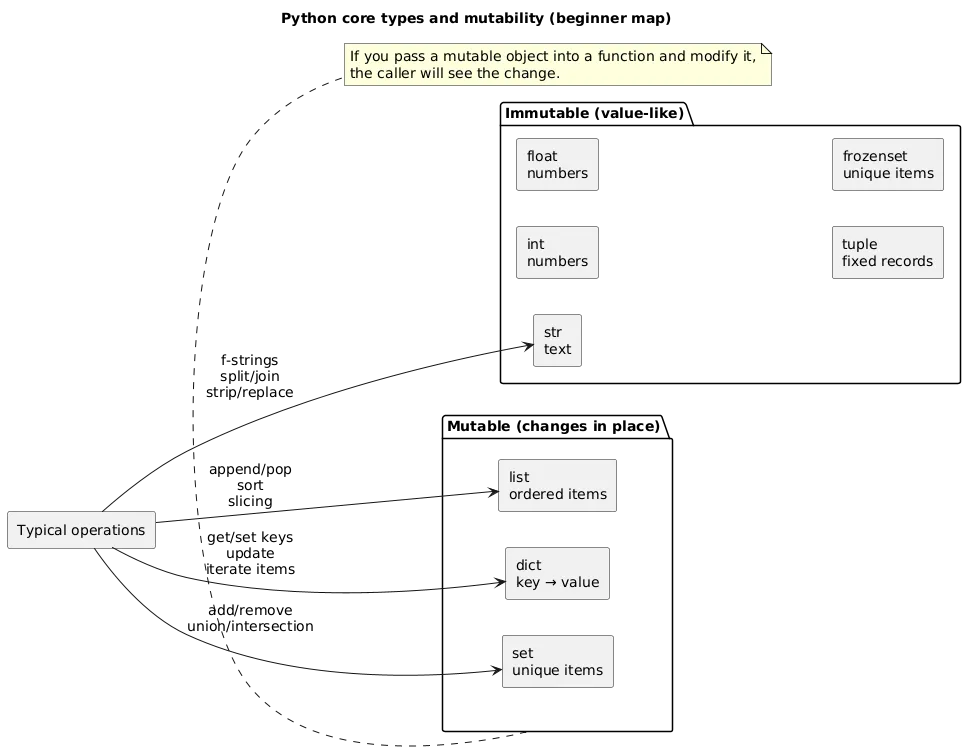
Mutability trap
Lists and dictionaries can change “in place”. If you pass them into a function and modify them, the caller will see those changes.
5. Control Flow: if/elif/else, for, while
Control flow is how you express decisions and repetition. In real projects, most logic is: validate input → choose a path → loop over data → produce output.
Conditionals
score = 82

if score >= 90:
    grade = "A"
elif score >= 80:
    grade = "B"
else:
    grade = "C"
Loops (for + while)
# for: iterate items
names = ["Ada", "Linus", "Grace"]
for name in names:
    print(name)

# while: repeat until condition changes
n = 3
while n > 0:
    print(n)
    n -= 1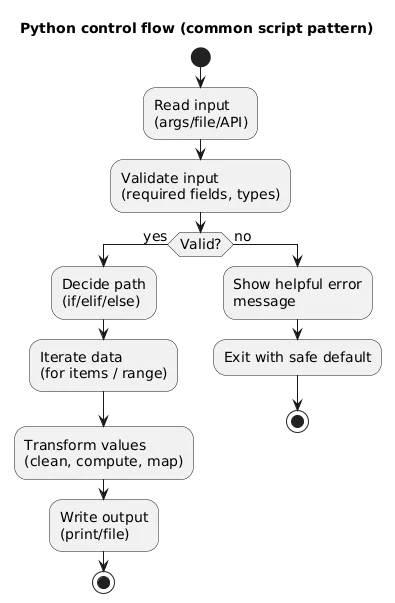
Mini-exercise
Loop through numbers 1–50 and print “Fizz”, “Buzz”, or “FizzBuzz” using if/elif/else. This builds comfort with branching logic.
6. Functions: Parameters, Return Values, Scope
Functions help you write code that is easy to test and easy to reuse. A practical rule: functions should compute and return results; printing should be done at the “edges” (CLI/UI).
def add(a, b):
    return a + b

total = add(2, 3)
print(total)
Default arguments and keyword arguments
def greet(name, greeting="Hello"):
    return f"{greeting}, {name}!"

print(greet("Ada"))
print(greet("Ada", greeting="Hi"))
Good habit
Prefer small functions that do one thing and return values—this makes debugging and testing much easier.
7. Core Data Structures: Lists, Tuples, Dicts, Sets
Data structures are the “containers” for your program’s information. Choose the right one and your code becomes simpler.
- List: ordered, mutable collection.
- Tuple: ordered, typically immutable (good for fixed records).
- Dict: key → value mapping (fast lookups).
- Set: unique items, fast membership checks.
items = ["a", "b", "c"]              # list
point = (10, 20)                     # tuple
config = {"retries": 3, "timeout": 10}  # dict
unique_ids = {1, 2, 3}               # set
Most useful dict pattern (safe lookup)
user = {"name": "Ada"}
email = user.get("email", "unknown@example.com")
Beginner mistake
Using a list when you really need a dictionary often creates slow and messy code (manual searching, duplicated logic).
8. Modules and Imports (Standard Library + Packages)
Python’s standard library covers common needs (dates, JSON, files). External packages extend it. The key idea: organize your code into modules so the file does not grow into an unmaintainable “god script”.
import json
from datetime import datetime

# Example: parse JSON text
data = json.loads('{"ok": true}')
print(data["ok"])
Suggested beginner project structure
my_project/
  .venv/
  src/
    main.py
    utils.py
  tests/
    test_utils.py
  requirements.txt
  README.md
9. Working with Files (Text, CSV, JSON) + Paths
Use context managers (with) so files close reliably. For
portability (Windows/macOS/Linux), prefer pathlib for
file paths.
from pathlib import Path

path = Path("data") / "input.txt"
text = path.read_text(encoding="utf-8")

out = Path("data") / "output.txt"
out.write_text(text.upper(), encoding="utf-8")
JSON read/write (safe baseline)
import json
from pathlib import Path

p = Path("data.json")

try:
    data = json.loads(p.read_text(encoding="utf-8"))
except FileNotFoundError:
    data = []
except json.JSONDecodeError:
    data = []

data.append({"event": "visited"})

p.write_text(json.dumps(data, indent=2), encoding="utf-8")
Encoding note
Specify UTF-8 when working with text files to avoid cross-platform encoding problems.
10. Errors and Exceptions + Debugging
Errors are normal. Good programs handle expected failures (missing
files, invalid data, network timeouts) and surface helpful messages.
Avoid bare except: unless you re-raise or log carefully.
def parse_int(text, default=0):
    try:
        return int(text)
    except ValueError:
        return default

print(parse_int("123"))
print(parse_int("not-a-number"))
How to read a traceback
- Start at the bottom: that’s the error type and message.
- Move upward to find your code file/line that triggered it.
- Fix the root cause (often a wrong type or missing key/path).
Debugging workflow
Reproduce the bug with a small input, add print/log statements, then use your editor’s debugger once you know where to look.
11. Good Habits: Formatting, Naming, Typing, Testing
Beginners level up fastest when they adopt a few habits that scale: consistent formatting, clear names, basic tests, and a simple project workflow.
Formatting and style
- Naming: snake_case for functions/variables; CapWords for classes.
- Consistency: auto-formatters remove style debates from code reviews.
- Docstrings: use them for public functions and important modules.
Type hints (optional, but useful)
def total_price(prices: list[float]) -> float:
    return sum(prices)
Testing basics
Start with tests for your “core logic” functions. Testing makes refactoring safe and helps you learn faster.
def is_even(n: int) -> bool:
    return n % 2 == 0

assert is_even(2) is True
assert is_even(3) is False
Practical rule
If you can’t explain what a function does in one sentence, it’s probably doing too much—split it.
12. First Project Ideas + A Build Checklist
You learn fastest by finishing small end-to-end projects. Choose a project with clear input/output, so you can verify progress and improve it incrementally.
Beginner-friendly project ideas
- Log cleaner: read a file, filter lines, write output.
- CSV to JSON converter: transform structured data.
- Website status checker: call an API and report results.
- CLI todo list: store tasks locally and update them.
- Folder organizer: move files into folders by extension/date.
End-to-end build checklist (copy/paste)
- Input: file, arguments, or API.
- Validation: handle missing/invalid values.
- Core logic: small functions with clear names.
- Errors: expected failures handled; messages are actionable.
- Output: write a file or print a clean summary.
- Reproducibility: venv + dependency list.
- Docs: README with how to run it.
- Stretch: add tests for core logic and one edge case.
Mini-project spec (ready to implement)
Build a “CSV summary” tool: read a CSV, validate required columns, compute totals/averages, write a JSON report. Add at least one test for the calculation function.
13. FAQ: Python Basics
Do I need to memorize Python syntax?
No. Focus on concepts and on learning to read errors and documentation. Syntax becomes natural with repetition.
Why should I use a virtual environment?
It keeps dependencies isolated per project so you don’t accidentally break other Python work on your machine.
What should I learn after basics?
Pick a direction and build: web (Flask/Django), data (pandas), automation (APIs + scripting), or tooling (CLI apps). The “next step” should be a project, not another tutorial playlist.
How do I debug Python code?
Start with print() for quick checks, then learn your editor’s debugger and read tracebacks carefully.
What’s the best way to practice?
Build small projects that read inputs and produce outputs. Finishing projects teaches more than collecting tutorials.
Key Python terms (quick glossary)
- Interpreter
-
The program that runs Python code (
pythoncommand). - Virtual environment (venv)
- An isolated Python environment for a specific project’s dependencies.
- pip
- The package installer used to add external libraries to your environment.
- Module
-
A Python file that can be imported (e.g.,
utils.py). - Package
- A collection of modules (often installed via pip).
- Exception
- A runtime error object that can be caught with try/except.
- Mutable
- A type whose contents can change (e.g., list, dict, set).
- Immutable
- A type whose value cannot change in place (e.g., int, str, tuple).
Worth reading
Recommended guides from the category.
