DevOps is often described using tool names (Docker, Kubernetes, Terraform) and job titles (“DevOps Engineer”), which makes it feel more mysterious than it is. In reality, DevOps is a set of practices that helps you ship changes safely and learn from production quickly.
This guide is written for developers who want the “operational minimum”: CI/CD that actually helps, deployments that don’t cause panic, environments that are repeatable, and enough observability to avoid flying blind.
Mental model (keep it simple)
DevOps = reduce friction (automation) + reduce risk (quality gates) + reduce surprises (observability and fast feedback).
1. What DevOps Actually Is (and isn’t)
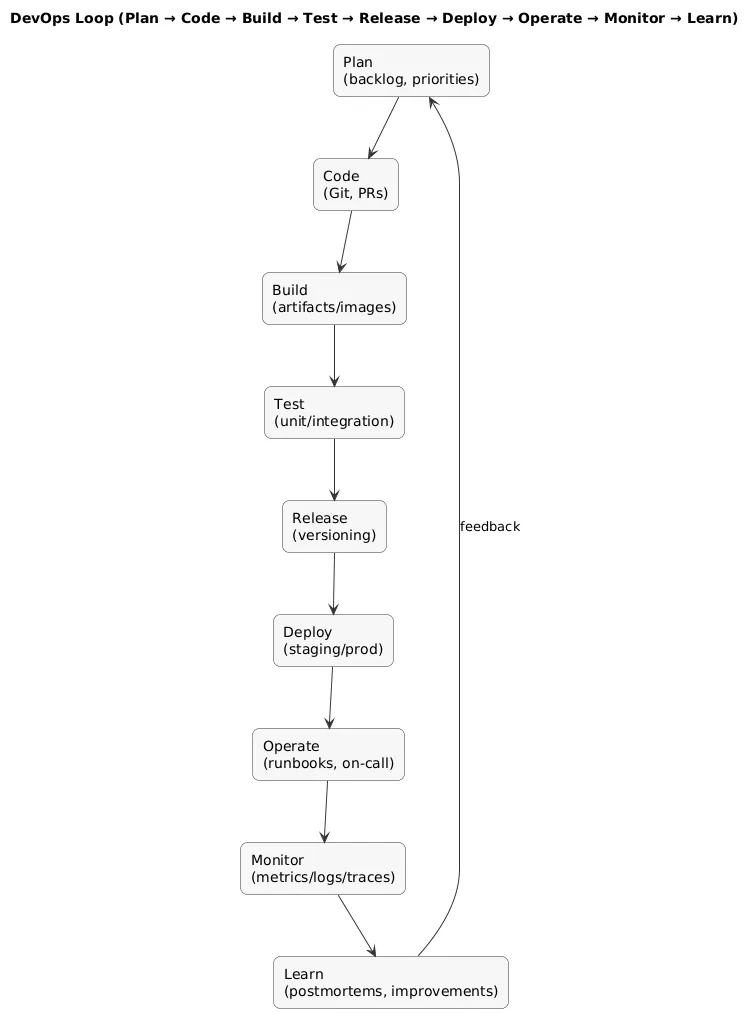
DevOps is a way of working that brings development and operations closer together to deliver software faster, more reliably, and with clear ownership. It’s not one tool, not one cloud provider, and not a specific architecture.
- DevOps is: collaboration, automation, and feedback loops.
- DevOps is not: “We bought Kubernetes” or “We hired one DevOps person to fix everything.”
DevOps flow (diagram)
A common trap
Teams sometimes implement “DevOps tooling” without changing ownership or habits. That usually produces slower pipelines, more complexity, and the same production surprises—just with more YAML.
2. Why DevOps Matters for Developers
DevOps improves developer life because it reduces recurring pain: environment drift, fragile deploys, long release cycles, and late discovery of defects.
- Less “works on my machine”: repeatable builds and environments.
- Faster feedback: tests run automatically and consistently.
- Safer releases: smaller deployments, easier rollbacks, fewer emergencies.
- Better debugging: logs and metrics help you understand real behavior.
- More time to build: fewer manual checklists and context switches.
The practical goal is to minimize two costs: cost of change (releasing is hard) and cost of failure (recovery is slow). DevOps addresses both.
3. CALMS + DORA: a simple model you can measure
If you want a beginner-friendly map of DevOps, use CALMS: Culture, Automation, Lean, Measurement, Sharing. It keeps the focus on outcomes rather than tools.
To make DevOps measurable, many teams track DORA metrics: deployment frequency, lead time for changes, change failure rate, and time to restore service. The point is not vanity metrics—it’s learning what improves delivery without harming reliability.
Developer-friendly takeaway
If your pipeline helps you merge and release faster without increasing incident rate, you’re doing DevOps well.
4. CI foundations: fast feedback without pipeline pain
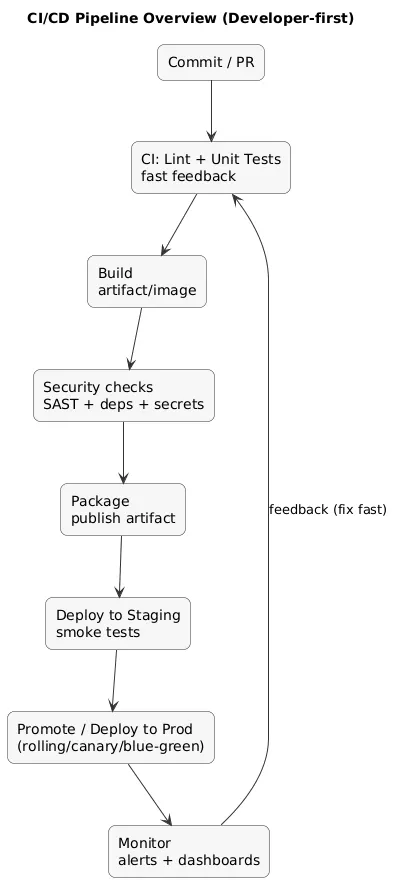
Continuous Integration (CI) means every change is integrated regularly and validated automatically. In practice, CI is a system that answers two questions quickly: “Does it still work?” and “Is it safe to merge?”
A practical CI pipeline shape
- Fast checks: lint + unit tests (minutes, not hours).
- Build: artifact or container image creation.
- Optional gates: coverage threshold, dependency scan, formatting check.
CI/CD pipeline overview (diagram)
Pipeline anti-pattern
A CI pipeline that takes 45 minutes becomes a “background chore” instead of a feedback loop. Keep the default PR pipeline short; move heavier tests to nightly or pre-release stages.
Minimal CI example (high-level)
# Minimal pipeline goals (conceptual)
1) install dependencies
2) run tests
3) build artifact
4) publish artifact for deployment
5. CD & deployment strategies: release without drama
Continuous Delivery (CD) means your software is always in a releasable state and deployments are repeatable. You do not need to deploy every hour to benefit; you need the ability to deploy safely when you choose.
Deployment strategies (what to use when)
- Rolling deployment: simplest default; update instances gradually.
- Blue-green: switch traffic between two environments; fast rollback.
- Canary: expose a small percentage first; expand if healthy.
- Feature flags: decouple deployment from release (ship code, enable later).
Developer perspective
Feature flags are one of the highest-leverage DevOps techniques for product teams: you can deploy early, test safely, and roll back a feature by toggling a flag—without redeploying the whole system.
6. IaC & environments: repeatability over hero work
DevOps becomes dramatically easier when environments are reproducible. That is the purpose of Infrastructure as Code (IaC): define infrastructure and configuration as versioned code so changes are reviewable, auditable, and repeatable.
- Environment parity: dev/staging/prod should differ intentionally, not accidentally.
- Config in code: track changes; avoid “mystery settings” in cloud consoles.
- Immutable artifacts: build once, deploy the same artifact across environments.
If you run servers yourself
Pair this guide with Linux Server Administration Basics to cover SSH hardening, patching, firewalls, backups, and monitoring fundamentals.
7. Observability & reliability: SLIs, SLOs, error budgets
Shipping code is not “done” until you can tell whether it’s healthy. Observability is the trio of logs, metrics, and traces that let you debug and improve systems.
Reliability vocabulary that actually helps
- SLI (indicator): what you measure (e.g., p95 latency, error rate).
- SLO (objective): the target (e.g., 99.9% requests succeed).
- Error budget: how much unreliability you can “spend” before pausing risky changes.
For beginners, start with a small set of signals that map to real incidents: availability, latency, error rate, and saturation (CPU/memory/disk).
If you can’t detect it, you can’t control it
Without monitoring and alerts, your incident notification system becomes “a user complains”. For production-facing apps, basic alerting is not optional.
8. DevSecOps: security that fits the workflow
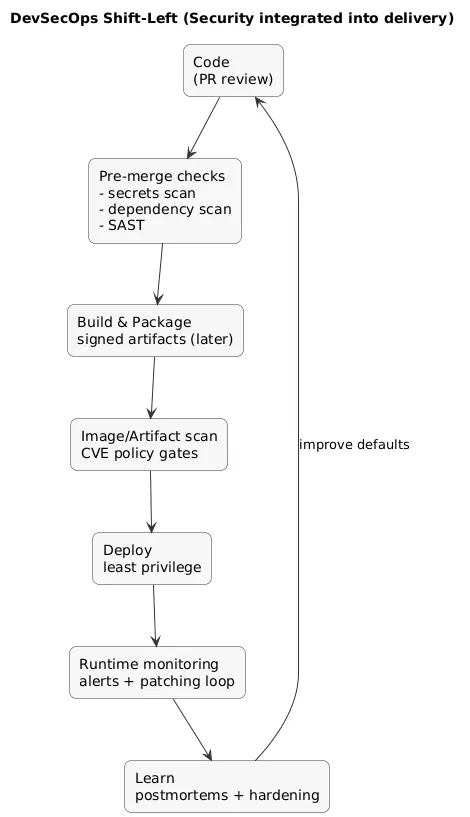
DevSecOps is security integrated into delivery. The developer-friendly goal is to catch common issues automatically (and early) without turning every PR into a compliance ceremony.
DevSecOps shift-left flow (diagram)
High ROI security checks for developers
- Dependency scanning: flag known vulnerable libraries.
- Secrets scanning: prevent accidental key/token commits.
- Least privilege: minimal permissions for apps and CI credentials.
- Artifact hygiene: signed/verified builds when your maturity grows.
- Patch discipline: routine updates reduce the attack surface.
Practical baseline
If you implement just two checks early: secrets scanning and dependency scanning, you prevent many common incidents.
9. A practical DevOps starter plan (solo & small teams)
You do not adopt DevOps by “choosing a tool stack”. You adopt DevOps by solving your biggest recurring bottleneck with automation and feedback loops. Here’s a staged plan that works for most projects.
Stage 1 (Day 1–2): make builds repeatable
- One command to run tests locally.
- One command to build artifacts (or container image).
- A short README: how to run, test, and build.
Stage 2 (Week 1): add CI as a default gate
- PR pipeline: lint + tests + build.
- Cache dependencies to keep it fast.
- Block merges on failures.
Stage 3 (Week 2): automate deployment to staging
- Deploy from a tagged build or a main branch merge.
- Store artifacts centrally; deploy the same artifact.
- Document rollback in one paragraph (even if manual).
Stage 4 (Week 3+): add observability and reliability controls
- Basic dashboards: errors, latency, traffic.
- Alerts that require action (not noise).
- Incident checklist + lightweight postmortems.
A realistic “small team” success definition
You can merge confidently because CI is fast and trustworthy, deployments are repeatable, rollbacks are understood, and production issues are visible before users report them.
10. Tooling overview (categories, not buzzwords)
Tools change; categories stay stable. If you understand the categories, switching vendors is much easier.
- Version control: Git platforms and PR workflows.
- CI/CD: pipelines that build, test, and deploy.
- Artifacts: container registries and package repositories.
- IaC: provisioning and configuration as code.
- Observability: logs, metrics, traces, error tracking.
- Security: scanning, secrets management, policy controls.
11. Common mistakes and how to avoid them
- Over-tooling too early: start with CI + repeatable deploys; add complexity later.
- Slow pipelines: keep PR checks short; move heavy tests to later stages.
- No rollback story: if you can’t roll back quickly, releases become risky by default.
- Ignoring state: databases and uploads need backups and restore drills, not hope.
- Alert noise: alerts must be actionable or they will be ignored.
12. FAQ
Is DevOps only for large companies?
No. Small teams benefit the most because automation removes repetitive work and reduces release stress. The key is keeping the implementation lightweight.
Do I need ops experience to start?
No. Start with CI, automated tests, and repeatable deployments. As your system grows, learn the operational basics (networking, logs, backups, monitoring) incrementally.
What should I learn first: Docker, Kubernetes, or Terraform?
Learn the delivery fundamentals first (CI, testing, deployment discipline, observability). Containers often help with reproducibility. Kubernetes and advanced IaC can come later when you need scale or stronger environment control.
Key DevOps terms (quick glossary)
- DevOps
- A culture and set of practices to deliver software quickly and safely through automation, collaboration, and feedback loops.
- CALMS
- A DevOps model: Culture, Automation, Lean, Measurement, Sharing.
- DORA metrics
- Delivery performance metrics: deployment frequency, lead time, change failure rate, time to restore service.
- CI (Continuous Integration)
- Automatic validation (tests/builds) for each change, typically on every push or pull request.
- CD (Continuous Delivery)
- Keeping software releasable with repeatable deployments and safe release practices.
- SLI/SLO
- Service Level Indicator (measure) and Objective (target) used to manage reliability in a measurable way.
- DevSecOps
- Integrating security into the delivery workflow through automated checks and secure defaults.
Worth reading
Recommended guides from the category.
