Most account takeovers do not happen because someone “breaks encryption.” They happen because passwords are reused, recovery settings are weak, phishing tricks people into handing over access, or attackers steal active sessions from compromised devices.
This guide gives you a prioritized, practical setup for 2025. The key idea is simple: secure the accounts that can reset everything else first (email, password manager, Apple/Google), then strengthen authentication (passkeys/MFA), then harden recovery paths and reduce phishing/session risk.
Best mental model
Protect the “keys” first: email + password manager + device access. If those are strong, most attacks fail or become recoverable quickly.
Related guides
For business environments, also read Small Business Cybersecurity Checklist.
1. How Accounts Get Hacked (In Real Life)
Common real-world paths attackers use:
- Credential stuffing: leaked passwords are tried on other sites.
- Phishing: fake login pages or fake “support” requests for codes.
- Weak recovery: old email/phone is used to reset your account.
- Session theft: malware steals cookies/session tokens from your device.
- SIM swap: attacker hijacks your phone number to receive SMS codes.
- Support social engineering: attacker convinces support to reset access.
The most expensive mistake
Password reuse turns one breach into many takeovers. A password manager eliminates this risk class almost entirely.
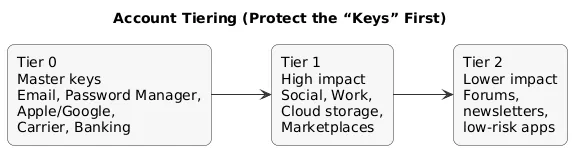
2. Account Tiering (Protect the “keys” first)
Not all accounts are equal. Prioritize by what an attacker gains if they take it over:
- Tier 0 (master keys): email, password manager, Apple ID/Google account, phone carrier account, banking.
- Tier 1 (high impact): social accounts, marketplaces, cloud storage, work accounts, domain/DNS/hosting (if applicable).
- Tier 2 (lower impact): newsletters, forums, low-risk apps (still use unique passwords).
Account tiering map (diagram)
Rule of thumb
Anything that can reset other accounts, move money, or impersonate you publicly belongs in Tier 0 or Tier 1.
3. The 80/20 Priorities (Do These First)
- Secure your email (MFA/passkeys + recovery audit + rule/forwarding review).
- Use a password manager and set unique passwords everywhere.
- Enable passkeys on Tier 0/Tier 1 accounts where available.
- Enable strong MFA (security keys/authenticator) and minimize SMS.
- Harden recovery (remove old phone/email, store backup codes, revoke app passwords and unknown sessions).
4. Step 1: Secure Your Email (Your Master Key)
Your email account is the reset channel for most services. If an attacker controls your email, they can often reset everything else. Treat email security like protecting your “root account.”
Email security checklist:
- Enable MFA/passkeys (prefer passkeys or authenticator; security key for admins/power users).
- Audit recovery email/phone and remove anything you don’t control.
- Review forwarding rules and filters (attackers use stealthy auto-forward).
- Remove unknown devices/sessions and sign out everywhere if needed.
- Turn on security alerts for new logins, new devices, and risky settings changes.
High-value setup
Consider a dedicated email address for Tier 0 accounts (banking, Apple/Google, password manager) and keep it private: do not use it for newsletters or random signups.
5. Step 2: Use a Password Manager Properly
A password manager is the most effective way to eliminate password reuse and weak passwords. Used correctly, it replaces dozens of fragile, human-memorable passwords with unique random credentials for every site.
Use it correctly:
- Master passphrase: long, memorable, and never reused anywhere else.
- Unique random passwords: generate a different password for every login.
- Secure notes: store backup codes and key recovery info safely.
- Protect the manager: MFA/passkeys enabled, device lock + encryption enabled.
- Emergency plan: keep an offline copy of Tier 0 recovery codes in a safe location.
Healthy sign
You should not know most of your passwords. If you can remember many of them, they are likely reused or too simple.
6. Step 3: Passkeys vs Passwords (What to Use in 2025)
Passkeys are designed to be phishing-resistant. They reduce (and often eliminate) the need to type a password, which is where many phishing attacks succeed. In practice:
- Enable passkeys for Tier 0 (email, Apple/Google, password manager) and Tier 1 accounts first.
- Keep a strong password as fallback (stored in your password manager) if the service requires it.
- Make sure you have at least two ways to recover if you lose a device (backup passkey device, security key, backup codes).
Device-loss reality
Passkeys are strong, but you still need a plan if you lose your phone. Backup codes and a second trusted device reduce lockout risk.
7. Step 4: MFA Done Right (Avoid SMS When You Can)
MFA adds a second proof beyond your password. The method matters. A practical hierarchy:
MFA strength ladder (diagram)
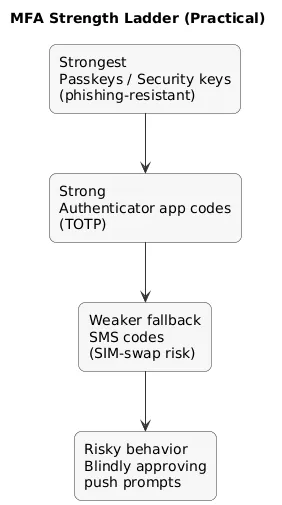
- Best: passkeys and hardware security keys (FIDO2/WebAuthn).
- Very good: authenticator apps (time-based codes).
- Fallback: SMS codes (more exposed to SIM swap and interception).
- Risky pattern: “push fatigue” approvals if you blindly tap “Approve”.
Practical setup tips:
- Use two MFA methods where possible (e.g., passkey + authenticator).
- Save backup codes offline (and optionally in the password manager’s secure notes).
- Enable “new device/login” alerts and review sign-in history monthly.
8. Step 5: Harden Account Recovery (Most Overlooked Part)
Attackers often don’t crack accounts—they reset them through recovery. Recovery hardening means: limiting weak recovery paths and removing attacker persistence mechanisms.
Recovery hardening checklist:
- Recovery email: must be secured to the same standard as your primary email.
- Recovery phone: remove it where not needed; avoid using SMS recovery for Tier 0 accounts.
- Security questions: never use real answers; treat them as extra passwords.
- Backup codes: store safely (offline + optionally password manager secure note).
- Connected apps (OAuth): remove third-party access you don’t actively use.
- App passwords: revoke any legacy “app passwords” that bypass MFA.
- Trusted devices: remove old phones/laptops you no longer control.
High-risk setup
A strong password does not help if recovery points to an old email account you forgot about—or a phone number you no longer own.
9. Step 6: Phishing & “Session” Defense
Phishing still works because it creates urgency. Session theft works because devices and browsers hold active logins. Combine habit + hygiene:
- Do not click login links from messages; open the site/app yourself.
- Check the domain before entering credentials (lookalike domains are common).
- Never share MFA codes; support will not need them.
- Be cautious with “Approve” prompts; deny unexpected prompts immediately.
- Use passkeys for Tier 0/Tier 1 where available to reduce phishing success.
Common scam pattern
“Unusual activity detected—confirm now.” The link leads to a fake login page that steals your password and MFA.
10. Step 7: Secure Your Devices (They hold your sessions)
A compromised device can leak saved passwords and active sessions. Minimum device baseline:
- Automatic updates: OS, browsers, and core apps.
- Encryption: verify on laptops; phones are typically encrypted by default.
- Lock screen: strong PIN/password + biometric; short idle timeout.
- Least privilege: avoid daily use of local admin accounts.
- Malware protection: built-in protection enabled; consider stronger tools if risk warrants.
11. Step 8: Browser & Extension Hygiene
Extensions can read page content and sometimes capture credentials. Keep your browser lean:
- Remove extensions you do not need.
- Only install from official stores and reputable vendors.
- Review permissions periodically; uninstall anything “overprivileged”.
- Consider separate browser profiles: one for banking/work, one for casual browsing.
12. Step 9: SIM Swap & Number Reuse Protection
If your phone number is used for account recovery or SMS MFA, a SIM swap can cascade into account takeovers. The defense is to reduce reliance on the phone number:
- Prefer non-SMS MFA (passkeys/authenticator/security key) for Tier 0 accounts.
- Carrier PIN: set a strong account PIN with your mobile provider.
- Minimize phone recovery: remove the number as a recovery method where possible.
- Watch for signals: sudden loss of service can indicate SIM swap—treat it as urgent.
If your phone suddenly loses service
Contact your carrier immediately and check your email and banking accounts for reset attempts and new sessions.
13. Step 10: Monitoring & Monthly Maintenance
Strong setup is only half the job. A simple monthly maintenance routine keeps you safe:
- Review active sessions/devices in email, Apple/Google, and password manager.
- Audit connected apps (OAuth) and remove unused access.
- Check recovery settings for changes you didn’t make.
- Enable and keep login alerts for Tier 0/Tier 1 accounts.
- Keep devices and browsers updated; remove unused extensions.
14. What To Do If You Get Hacked (Fast Recovery Plan)
If you suspect an account takeover, speed matters. The primary objective is to stop re-entry through recovery, existing sessions, connected apps, or compromised devices.
Fast recovery flow (diagram)

- Secure your email first: change password, reset MFA, remove forwarding rules, sign out unknown sessions.
- Secure your password manager: change master passphrase if compromise is plausible; review vault access.
- Revoke sessions: “sign out everywhere” on Tier 0/Tier 1 services.
- Rotate passwords: start with email, Apple/Google, banking, password manager, then the rest.
- Fix recovery: remove attacker-added phone/email, regenerate backup codes, remove old devices.
- Remove persistence: revoke connected OAuth apps and any legacy “app passwords.”
- Secure devices: update, scan for malware; if needed, reinstall and re-enroll passkeys/MFA.
- Notify impacted parties: if messages were sent from your account, warn contacts quickly.
- Financial safety: enable transaction alerts; contact your bank if you see unauthorized activity.
Containment goal
You are not done when you “change the password.” You are done when you remove unknown sessions, fix recovery paths, and revoke connected apps.
15. Account Security Checklist
- Tier 0 secured: email + password manager + Apple/Google + banking protected with strong MFA/passkeys.
- Unique passwords: generated by a password manager, no reuse.
- Passkeys: enabled where available; second device or backup option prepared.
- MFA: authenticator/security key preferred; SMS minimized.
- Recovery hardened: backup codes stored safely; old phone/email removed.
- Sessions reviewed: unknown devices removed; sign-in alerts enabled.
- Browser hygiene: minimal trusted extensions; separate profiles for high-risk activities.
- Device baseline: updates + encryption + lock screen enabled.
- Monthly review: sessions/devices, connected apps, recovery settings.
16. FAQ: Protecting Online Accounts
What is the single most important account to secure?
Your email account. It is the reset channel and alert channel for most services.
Are passkeys better than passwords?
In most cases, yes—passkeys are phishing-resistant and reduce exposure to credential theft.
What is the best type of two-factor authentication?
Passkeys and hardware security keys are strongest, followed by authenticator apps. SMS is weaker but better than nothing.
How do I spot stealthy persistence after a takeover?
Check forwarding rules, connected apps (OAuth), “app passwords,” and active sessions/devices. Attackers often leave one of these behind.
Key cybersecurity terms (quick glossary)
- Account Takeover (ATO)
- When an attacker gains control of your account, often via stolen passwords, phishing, or weak recovery.
- Session hijacking
- When an attacker steals an active login session (cookies/tokens) from a device or browser, bypassing password changes.
- Credential stuffing
- Automated attempts to log in using leaked username/password pairs from previous breaches.
- MFA / 2FA
- Multi-factor authentication: an additional proof beyond a password (passkey, key, authenticator code).
- Passkeys
- Phishing-resistant login method using cryptographic keys stored on a trusted device.
- SIM swap
- A fraud technique where an attacker hijacks your phone number to receive SMS codes or reset accounts.
- OAuth connected apps
- Third-party apps granted access to your account without a password; attackers may add or abuse these for persistence.
Worth reading
Recommended guides from the category.
