Small businesses are targeted because attackers expect weaker defenses, less monitoring, and slower response. The good news is that you do not need an enterprise budget to reduce risk significantly. You need a handful of high-impact controls implemented consistently and tested under realistic conditions.
This guide is a prioritized checklist you can implement in stages (30/60/90 days). It focuses on the controls that most often stop real incidents: identity security, email protection, patching, endpoint hardening, backups that actually restore, and an incident response plan you can execute when stressed.
What “good” looks like for a small business
You do not need perfect security. You need: MFA/passkeys everywhere, strong passwords managed centrally, secure email settings, patched devices, protected backups with restore tests, and clear ownership of access and response.
1. Why Small Businesses Get Targeted
Attackers typically exploit the simplest path to money or leverage: stolen credentials, phishing, exposed admin panels, unpatched devices, or weak backups. Small businesses frequently have at least one of these gaps.
- Weak or missing MFA on email and admin accounts
- Reused passwords across services
- Unpatched devices and plugins
- No reliable, tested backups
- No clear process to isolate and recover systems
Most incidents start with stolen credentials or phishing and then escalate through weak access controls. Your goal is to make that escalation hard and recovery fast.
2. A Simple Threat Model (so you prioritize correctly)
A threat model does not need to be academic. For most small teams, the top risks are:
- Account takeover: email, payroll, banking, domain/DNS, cloud hosting.
- Business email compromise (BEC): invoice fraud, payment redirect, vendor impersonation.
- Ransomware or destructive malware: downtime + expensive recovery.
- Data exposure: overshared drives, stolen laptops, misconfigured SaaS.
Use this model to decide what to do first: secure identities and email, reduce blast radius on devices, and make recovery reliable with backups and a response plan.
3. Quick Start: Highest-Impact Actions
If you want the biggest protection quickly, do this first:
- Enable MFA/passkeys everywhere (email, payroll, banking, domain/DNS, admin panels, password manager).
- Deploy a password manager and eliminate reused passwords.
- Secure email (anti-phishing settings, restrict forwarding, login alerts, SPF/DKIM/DMARC if you use your domain).
- Implement backups that are ransomware-resistant and run a real restore test.
- Patch consistently (OS, browsers, VPN, plugins, routers, key SaaS settings).
Priority map (diagram)

Common failure mode
Many companies have “backups” that have never been restored in a test. A backup you cannot restore quickly is not a backup.
4. Know What You Have: Accounts, Devices, Data
You cannot secure what you cannot see. Maintain a simple inventory (a spreadsheet is enough) with:
- Accounts: email, banking, payroll, CRM, hosting, domain/DNS, cloud, social.
- Devices: laptops, phones, tablets, office machines, any shared hardware.
- Data locations: cloud drives, file shares, databases, SaaS exports.
- Admins: who has admin access to what (and why).
Add two extra columns that reduce chaos during incidents: Owner (a person) and Recovery dependency (what breaks if this service is down).
5. Identity Security: MFA/Passkeys, Password Manager, Least Privilege
Identity is your control plane. If identity is weak, everything else becomes fragile. Minimum standards:
- Mandatory MFA on every mailbox and business-critical app.
- Prefer passkeys where available (phishing-resistant) and consider hardware keys for admins.
- Password manager for the whole team (unique random passwords; shared vaults for service accounts).
- No shared logins for humans: each person gets their own account and permissions.
- Least privilege and separate admin accounts when possible.
- Joiner/mover/leaver process with immediate revocation and periodic access reviews.
MFA priority order
Email, password manager, domain registrar/DNS, cloud hosting/admin panels, finance/payroll, and any tool that can export customer data.
6. Email Security: Your #1 Attack Surface
Email is where phishing, vendor impersonation, and account recovery attacks begin. Minimum controls you can implement quickly:
- MFA/passkeys for all mailboxes (no exceptions, including contractors).
- Restrict auto-forwarding to external addresses and audit mailbox rules regularly.
- External sender banners to help staff spot impersonation.
- High-risk attachment and link protections (use your mail provider’s built-in settings).
- Login alerts for new devices/locations and suspicious sign-in patterns.
Domain spoofing protection (SPF/DKIM/DMARC)
If you send email from your own domain, configure authentication records. In simple terms: SPF tells receivers which servers can send for your domain, DKIM signs messages, and DMARC tells receivers what to do if a message fails checks. This reduces brand spoofing risk and improves deliverability.
High-impact BEC control
Enforce out-of-band verification for invoice or bank detail changes (a phone call to a known number, not the email thread).
7. Device & Endpoint Protection (hardening that actually matters)
Devices hold sessions, cookies, and local files. A stolen laptop with weak protections can become an account takeover. Focus on a few controls that materially reduce risk:
- Automatic OS + browser updates enabled.
- Full disk encryption (BitLocker/FileVault; default on modern phones).
- Strong screen lock with short idle timeout.
- Standard user accounts for daily work (avoid local admin).
- Endpoint protection (built-in is better than none; managed EDR if risk/budget supports it).
- Remote wipe capability for lost devices, especially phones.
If you have many devices, consider basic device management (MDM) so you can enforce encryption, updates, and lock policies consistently.
8. Patch Management & Secure Defaults
Patching is one of the highest-ROI controls. Use a simple cadence you can maintain:
- Weekly: browsers, common apps, plugin/extension hygiene.
- Monthly: OS updates on all endpoints and servers.
- Quarterly: review SaaS admin settings, integrations, and dormant accounts.
Pair patching with secure defaults: disable unused services, remove old accounts, and ensure remote access is not exposed directly to the internet.
9. Backups & Ransomware Recovery (3-2-1 + restore tests)
Ransomware is ultimately a business continuity problem. Your goal is not only prevention, but reliable recovery. Apply 3-2-1:
- 3 copies of important data
- 2 different media (e.g., cloud + local)
- 1 offsite/isolated (offline or immutable so ransomware cannot encrypt it)
Minimum standard you should enforce:
- Backups run automatically and are monitored (success/failure alerts).
- Backup access is protected with MFA and least privilege.
- You run a restore test at least quarterly and measure time-to-restore.
Restore test scope
Test restoring one critical workflow end-to-end (not just a file): for example, restoring a shared drive plus the permissions that make it usable.
10. Network & Remote Work Basics
For most small businesses, Wi-Fi and remote access basics go a long way:
- Separate guest Wi-Fi from business devices.
- Update router firmware and secure the admin interface.
- Disable remote admin unless necessary.
- Protect remote access (avoid exposing admin panels; use VPN or managed access where appropriate).
- Restrict RDP/SSH exposure (allowlists, bastion hosts, or managed services).
11. Data Protection: Sharing, Encryption, and Access Hygiene
Data protection is mostly access control and reducing accidental exposure:
- Light classification: public, internal, confidential.
- Reduce “anyone with link” sharing for sensitive folders and use named access instead.
- Role-based access in SaaS tools; avoid everyone-as-admin.
- Encryption by default (modern platforms do this, but you still control access).
- Offboarding hygiene: revoke access immediately and rotate shared secrets.
12. Phishing Training That Works (and reduces real incidents)
Training works when it is short, practical, and repeated. Teach a few behaviors you can enforce:
- Never share MFA codes or approve unexpected MFA prompts.
- Verify payment changes via a second channel.
- Do not click login links in emails; open the site/app directly.
- Report suspicious messages quickly (make reporting easy and blame-free).
Simple fraud prevention rule
Two-person approval for payments above a threshold, plus out-of-band verification for vendor bank detail changes.
13. Vendor & SaaS Risk: The “Weak Link” Problem
Vendors and integrations extend your attack surface. Minimum vendor hygiene:
- Use MFA and unique named accounts (no shared admin logins).
- Review third-party integrations and remove unused ones.
- Check what data each vendor stores and who can export it.
- Prefer tools with audit logs and admin controls when handling sensitive data.
14. Incident Response Plan (simple but executable)
You do not need a 40-page plan. You need a plan you can run under stress. Define:
- Decision owner: who leads.
- Contacts: IT provider, cloud provider, bank, insurer, legal, key vendors.
- Isolation steps: how to disable accounts and disconnect devices quickly.
- Recovery order: what gets restored first and why.
- Communication: internal updates and customer messaging if needed.
Incident response flow (diagram)

Critical
Store incident contacts and recovery instructions somewhere accessible even if email is down (printed copy or offline document).
15. Compliance Basics (without enterprise overload)
Many clients simply want proof of “reasonable security”. Even without a formal framework, document:
- Access controls (MFA/passkeys, least privilege)
- Patching cadence
- Backup strategy and restore testing
- Incident response roles and steps
- Security awareness expectations
Lightweight written policies (1–2 pages each) often satisfy early-stage security questionnaires and improve internal consistency.
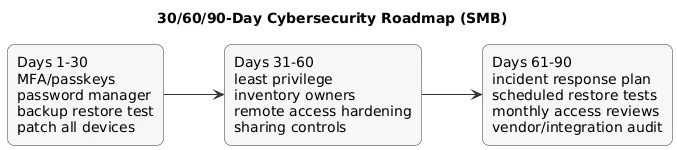
16. The Checklist: 30/60/90-Day Plan
30-day plan (highest impact)
- Turn on MFA/passkeys for email, password manager, finance/payroll, domain/DNS, and admin panels.
- Deploy a password manager; eliminate password reuse and shared human logins.
- Patch all devices; enable auto-updates.
- Set up backups and run your first restore test.
- Review email rules/forwarding and enable external sender warnings.
60-day plan (reduce blast radius)
- Implement least privilege and remove unnecessary admin access.
- Create and maintain a basic inventory of accounts/devices/data owners.
- Harden remote access (no exposed RDP; secure VPN/managed access as appropriate).
- Define a simple phishing reporting process and reinforce it weekly.
- Review vendor integrations and remove unused ones.
90-day plan (make it repeatable)
- Write a short incident response plan + offline contacts list.
- Schedule quarterly restore tests and monthly access reviews.
- Document basic policies (passwords, devices, backups, reporting).
- Consider stronger controls for admin accounts (hardware keys, MDM, managed EDR) if risk justifies it.
30/60/90 roadmap (diagram)
Make it stick
Assign an owner and a due date to each item. Security improves when it becomes routine, not a one-time project.
17. FAQ: Small Business Cybersecurity
What are the most important controls for a small business?
MFA/passkeys, password manager with unique passwords, tested backups, and consistent patching. Then add endpoint hardening, phishing defenses, and least privilege.
How often should we test backups?
At least quarterly, and more often for critical systems. A restore test should validate speed and completeness, not just “a file can be opened”.
Is antivirus enough to stop ransomware?
No. It helps, but resilient recovery requires patching, MFA, access controls, email hardening, and ransomware-resistant backups.
Do we need SPF/DKIM/DMARC?
If you send from your own domain, yes—these controls reduce spoofing and brand impersonation and improve deliverability.
Key cybersecurity terms (quick glossary)
- MFA / 2FA
- Multi-factor authentication: a second proof beyond a password (app prompt/code, passkey, hardware key).
- Passkeys
- Phishing-resistant login method based on public-key cryptography (often backed by biometrics or device unlock).
- Least Privilege
- Giving users only the access they need, reducing damage if an account is compromised.
- Business Email Compromise (BEC)
- Email-based fraud where attackers impersonate staff or vendors to request payments or sensitive data.
- Ransomware
- Malware that encrypts files and demands payment. Recovery depends heavily on isolation and backups you can restore.
- 3-2-1 Backups
- Three copies, two media types, one offsite/isolated copy.
- EDR
- Endpoint Detection and Response: monitoring and response tooling for suspicious activity on devices.
Worth reading
Recommended guides from the category.
