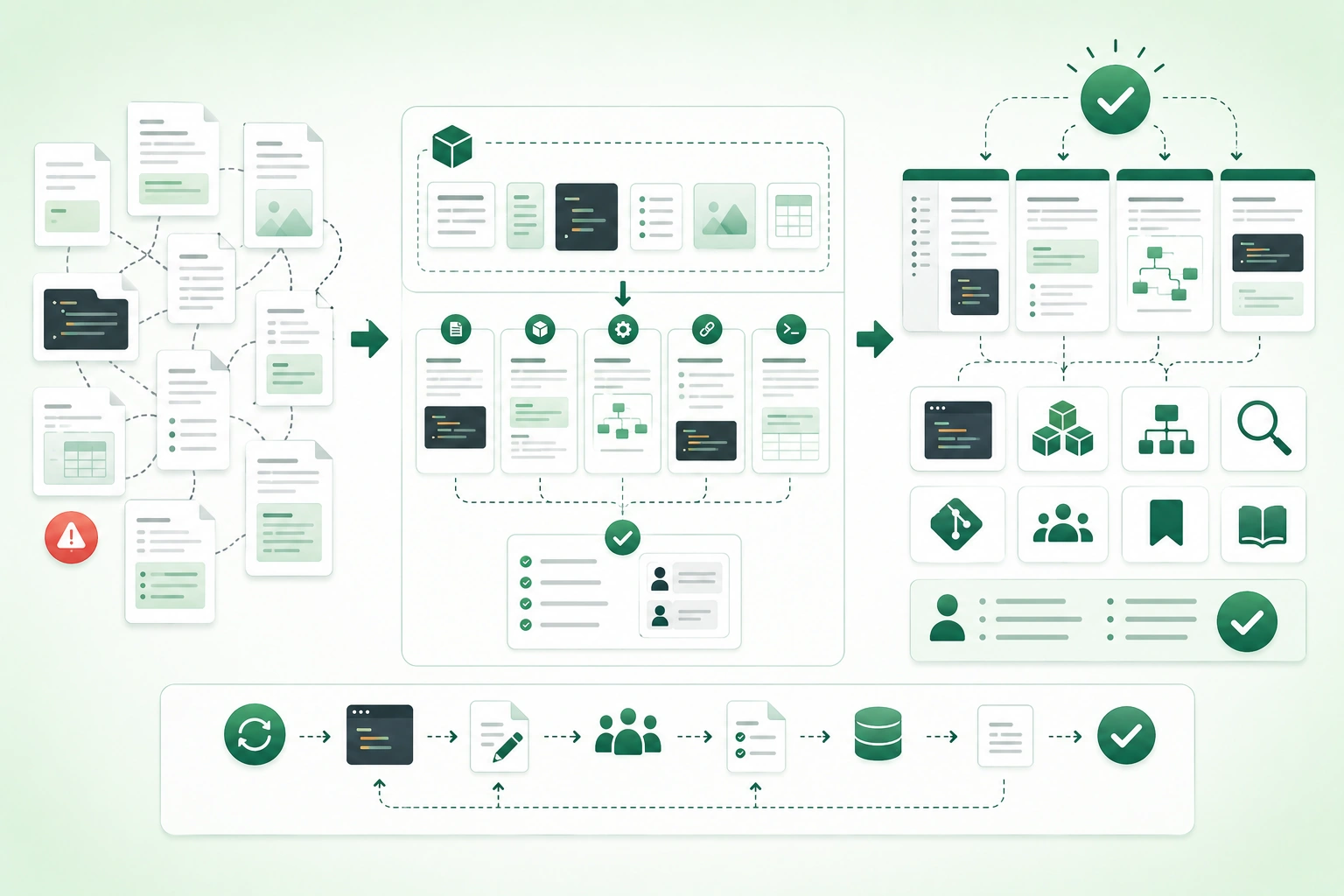
Developers do not need documentation merely because a system is complex. They need documentation when important knowledge cannot be recovered quickly and safely from the code itself.
Typical questions include:
How do I run this locally?

Which configuration values are required?

Why was this architecture chosen?

How do I deploy and roll back?

What does this API guarantee?

How do I diagnose this production symptom?
Useful documentation removes that uncertainty at the moment it blocks work.
A healthy documentation workflow looks like:
developer task
     ↓
choose document type
     ↓
write the shortest complete answer
     ↓
verify commands and examples
     ↓
review
     ↓
publish
     ↓
update with the software
Document what developers would otherwise have to rediscover
Do not mirror every class and function in prose. Prioritize setup, contracts, architecture boundaries, important decisions, deployment, incidents, troubleshooting, and other workflows where missing context creates real engineering risk.
1. Start with a developer task, not a blank page
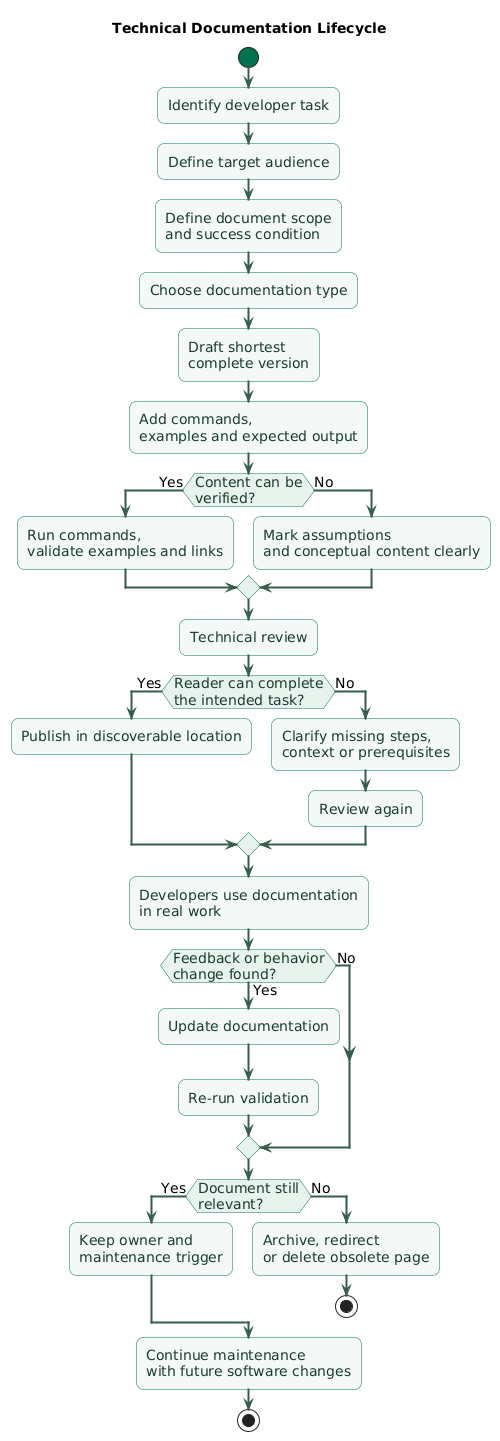
Technical documentation lifecycle (diagram)
A vague documentation goal looks like:
Document the payments service.It gives no indication of:
reader
task
scope
depth
success condition
Use task-oriented goals
Help a new developer start
the payments service locally.

Explain how payment retries
avoid duplicate charges.

Show an on-call engineer
how to pause settlement workers.

Explain why asynchronous
settlement was chosen.
Identify the audience
The same software can require different material for:
- New developers.
- Experienced maintainers.
- On-call engineers.
- API consumers.
- Release engineers.
- Security reviewers.
Identify the reader's intent
learn
do
reference
understand
decide
recover
Those intents usually lead to different document structures.
State scope early
For example:
This guide covers local development
on macOS and Linux.

Production deployment is documented
in docs/deployment.md.
Scope prevents a focused page from slowly becoming a dumping ground for every related topic.
2. Choose the right documentation type
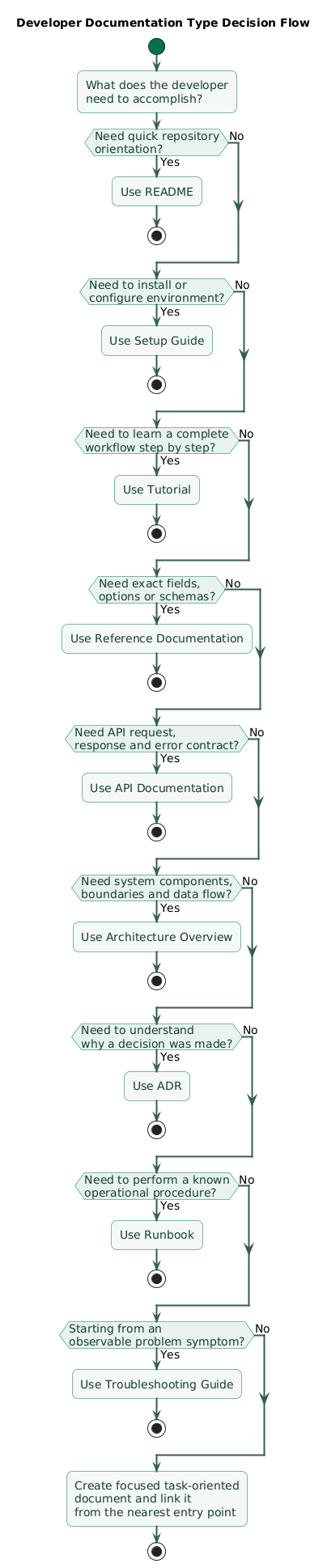
Developer documentation type decision flow (diagram)
README
Use a README as the project's front door.
What is this repository?

How do I start quickly?

Where are the deeper docs?
Setup guide
Use when a developer must complete:
prerequisites
configuration
installation
startup
verification
Tutorial
Use when teaching a complete workflow:
build your first plugin

create your first integration

deploy your first service
Reference documentation
Use for exact facts:
API fields
CLI options
configuration keys
error codes
schemas
Architecture overview
Use to explain:
components
responsibilities
boundaries
data flows
external systems
Architecture Decision Record
Use when developers need to know:
Why did we choose this?Runbook
Use for operational procedures:
deploy
rollback
rotate credentials
restart workers
recover a queue
fail over a dependency
Troubleshooting guide
Use when the reader begins with a symptom:
API returns 502

migration fails

worker is not consuming jobs
3. Use a README as the project front door
A developer arriving at a repository should not have to inspect package files and CI configuration merely to discover what the project does.
Start with purpose
Order API manages checkout,
pricing, and order lifecycle
for the storefront application.
List prerequisites
Required:

Docker
Node.js 24
development credentials
Provide a quick start
cp .env.example .env
docker compose up -d
npm ci
npm run dev
Show verification
curl http://localhost:3000/health

Expected:

{"status":"ok"}
List common commands
npm run dev

npm test

npm run lint

npm run build
Link to deeper documents
Architecture:
docs/architecture.md

Deployment:
docs/deployment.md

Runbooks:
docs/runbooks/

Troubleshooting:
docs/troubleshooting.md
The README should route readers rather than becoming the only document in the project.
4. Write setup guides that can actually be followed
A setup guide is successful only when a developer can execute it from a realistic clean starting state.
State prerequisites explicitly
Required:

Git
Docker
Node.js 24
development secret access
State supported environments
Tested:

macOS
Ubuntu

Windows:

use the WSL instructions below
Use exact commands
Weak:
Install dependencies.Better:
npm ciShow expected checkpoints
docker compose ps

Expected:

api       running
postgres  healthy
redis     healthy
Explain configuration
.env.example
     ↓
copy to .env
     ↓
supply development-only values
Never place real secrets in documentation
Instead explain:
where credentials come from

which variables are required

which secret manager is used
Include common failures
Symptom:
Port 5432 already in use.

Cause:
Another PostgreSQL instance is running.

Fix:
Stop that instance or change
the development port mapping.
Retest clean setup periodically
Existing machines hide missing steps because they already contain:
global tools
cached packages
old databases
credentials
environment variables
5. Document API contracts, not only endpoints
An API reference that only says:
POST /ordersleaves too many questions unanswered.
Authentication
Authorization:
Bearer token

Required scope:
orders.write
Request contract
customerId
string
required

currency
string
required

items
array
1 to 100 entries
Successful response
201 Created

{
  "id": "ord_123",
  "status": "pending"
}
Error contract
400 validation_failed

401 authentication_required

403 insufficient_scope

409 duplicate_order
Operational behavior
Document where relevant:
pagination
rate limits
idempotency
timeouts
eventual consistency
retry semantics
Compatibility
Clarify:
versioning
deprecated fields
enum evolution
unknown fields
breaking changes
Generated reference is useful, but not sufficient
Schema-generated documentation can keep field definitions synchronized, while hand-written material explains:
intent
workflow
realistic examples
failure recovery
6. Document architecture at the right level
Architecture documentation should explain stable system concepts rather than replicate source files.
Show major components
Browser
   ↓
API Gateway
   ↓
Application API
   ↓
PostgreSQL

Application API
   ↓
Queue
   ↓
Worker
   ↓
Payment Provider
Describe responsibilities
API:
validates requests
owns order state transitions

Worker:
performs asynchronous settlement

PostgreSQL:
source of truth for orders
Show trust boundaries
Internet
   ↓
authenticated boundary
   ↓
internal application services
Document important data flows
login

checkout

file upload

background processing

payment settlement
Document important constraints
Why does this service own this table?

Why is this operation asynchronous?

Why can this component not call
another service directly?
Avoid class-by-class architecture documentation
Those details change quickly and are usually easier to discover in code.
Focus documentation on:
ownership
boundaries
responsibilities
constraints
critical dependencies
7. Capture important decisions with ADRs
Architecture diagrams answer:
What exists?ADRs answer:
Why does it exist this way?Simple ADR structure
Title

Status

Context

Decision

Alternatives

Consequences
Context
Payment settlement can take
up to 30 seconds.

Keeping settlement inside the
HTTP request causes timeouts.
Decision
Use a durable queue and
background worker.
Alternatives
Increase HTTP timeout

Keep synchronous provider calls

Use periodic polling
Consequences
Positive:

predictable request latency

Negative:

eventual consistency
additional operational complexity
Preserve decision history
When a decision changes:
mark old ADR as superseded

create a new ADR
rather than rewriting history.
8. Make runbooks executable under pressure
Operational documentation may be used during an incident by someone who did not design the system.
Define when to use the runbook
Use this runbook when:

payment settlement queue depth
exceeds 50,000 for 10 minutes.
State access requirements
Required:

production monitoring access

For remediation:

worker-admin permission
Start with safety checks
Confirm environment:
production

Confirm queue:
payments-settlement
Use numbered steps
1. Open the queue dashboard.

2. Confirm consumer lag.

3. Check worker error rate.

4. If dependency errors are normal,
   increase worker capacity.
Show expected results
Expected:

queue depth decreases
for two consecutive intervals.
Define stop conditions
If payment-provider 5xx rate
exceeds 10%, do not scale workers.

Escalate to the payment incident
procedure.
Include rollback
Restore worker count to baseline
after backlog has cleared.
9. Organize troubleshooting around symptoms
Developers search for what they observe.
Good headings look like:
API returns 502

Worker remains pending

Migration reports duplicate key

Docker container restarts repeatedly
Give a diagnostic sequence
Symptom:
API returns 502.

Check:

1. Is the API process healthy?

2. Can the reverse proxy reach it?

3. Is the configured upstream port correct?

4. Did TLS or routing configuration change?
Explain what evidence means
If localhost:3000/health works
but the proxy still returns 502:

investigate proxy routing
rather than application startup.
Separate diagnosis from remediation
Diagnosis:
database is unavailable

Remediation:
restart or fail over only after
confirming database state
Feed incidents back into docs
If an engineer spends an hour discovering a missing diagnostic step, preserve that knowledge.
10. Treat examples as executable documentation
Developers often copy examples before reading the surrounding prose.
Use complete enough examples
const client = createClient({
  baseUrl: process.env.API_URL,
  token: process.env.API_TOKEN,
});

const order = await client.orders.create({
  currency: "EUR",
  items: [
    {
      productId: "prod_123",
      quantity: 2,
    },
  ],
});
Use fake credentials only
API_TOKEN=example-development-tokenShow expected output
{
  "id": "ord_123",
  "status": "pending"
}
Label pseudocode
Pseudocode:

if deployment fails:
    stop rollout
    restore previous version
Validate examples automatically where practical
CI can:
compile snippets

execute commands

validate JSON

check schemas

lint examples
Tested examples are less likely to decay silently.
11. Make documentation easy to find
Correct documentation has little value if nobody knows where it lives.
Use a predictable repository layout
README.md

docs/
  architecture/
  adr/
  api/
  development/
  runbooks/
  troubleshooting/
Use task-oriented names
Prefer:
Rotate API Credentialsover:
Security Notes 3Cross-link related material
README
  ↓
local setup
  ↓
architecture
  ↓
deployment
  ↓
runbooks
Avoid several sources of truth
If a timeout value is copied into:
README
wiki
runbook
architecture page
the copies will eventually disagree.
Link to canonical sources
Default values are defined in:

config/defaults.ts
Archive or remove obsolete pages
Do not leave two plausible deployment guides available without clearly identifying which one is current.
12. Keep documentation close to code
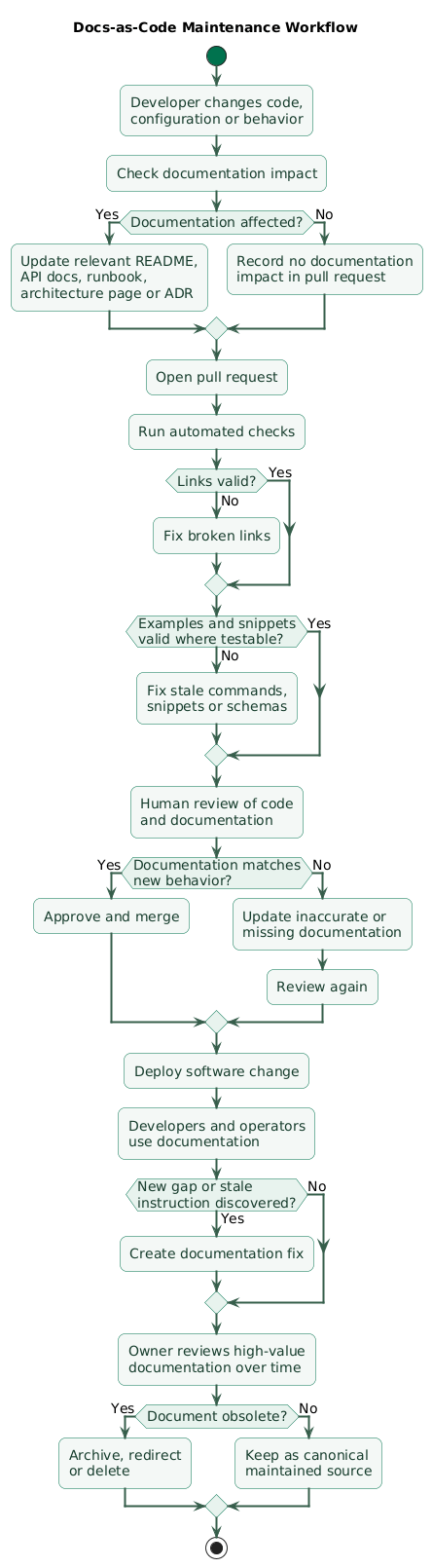
Docs-as-code maintenance workflow (diagram)
Repository-based documentation benefits from:
version control

pull requests

code review

CI

history

ownership
Update documentation in the same change
Example:
Code:

rename CLI option
--output
to
--destination

Same pull request:

update CLI reference
update examples
add deprecation note
Add a documentation-impact question to pull requests
Documentation impact:

[ ] none

[ ] README updated

[ ] API docs updated

[ ] runbook updated

[ ] architecture docs updated

[ ] ADR required
Automate cheap checks
broken links

Markdown validation

snippet compilation

example execution

schema validation
Keep diagram source where practical
A generated architecture image is easier to maintain when the source that produces it is stored with the documentation.
13. Give documentation ownership and freshness rules
Documentation becomes stale when everybody owns it abstractly but nobody is responsible for correcting it.
Assign ownership by system
Payments team:

payments architecture
payment runbooks
payment ADRs
payment integration docs
Ownership means responsibility
correctness
review
cleanup
escalation
It does not mean one person must write every page.
Prioritize high-risk documents
Review these more aggressively:
deployment instructions

incident runbooks

security procedures

migration guides

credential rotation procedures
Remove misleading documentation
Incorrect instructions are often worse than missing instructions because readers trust them.
Use recurring questions as signals
If developers repeatedly ask:
How do I reset the local database?either the documentation is missing or it is too difficult to find.
14. Use a lightweight documentation workflow
Step 1: define the task
Reader must be able to
deploy the API safely.
Step 2: choose the document type
runbookrather than a general architecture page.
Step 3: capture the real workflow
prerequisites
commands
permissions
failure cases
verification
rollback
Step 4: write the shortest complete version
Do not start by documenting everything anyone could theoretically want.
Step 5: execute the instructions
Follow the document from a realistic starting state.
Step 6: ask another developer to use it
Can the task be completed
without asking the author questions?
Step 7: automate validation
links
examples
commands
schemas
Step 8: assign ownership
system
team
review trigger
Step 9: update it with behavior changes
A code change that invalidates important documentation is not complete until the relevant documentation changes too.
Step 10: remove obsolete material
A healthy documentation system becomes smaller as obsolete pages are deleted or archived.
15. Copy/paste documentation templates
README template
# Project Name

One-sentence description.

## What this project does

- Responsibility 1
- Responsibility 2
- Responsibility 3

## Prerequisites

- Tool and version
- Required access
- Required local services

## Quick start

command 1
command 2
command 3

Expected result:

success output

## Common commands

development command
test command
lint command
build command

## Configuration

Variable:
EXAMPLE

Required:
yes

Default:
none

Description:
Purpose of the variable.

## Testing

test command

## Architecture

See docs/architecture.md.

## Deployment

See docs/deployment.md.

## Troubleshooting

See docs/troubleshooting.md.

## Contributing

See CONTRIBUTING.md.
Setup guide template
# Local Development Setup

## Goal

After this guide, the API should
be running locally and /health
should return success.

## Supported environments

- macOS
- Ubuntu
- Windows through WSL

## Prerequisites

- Git
- Docker
- Runtime version
- Development credentials

## 1. Clone repository

git clone ...
cd project

## 2. Configure environment

cp .env.example .env

Required values:

- API_TOKEN
- DATABASE_URL

## 3. Start dependencies

docker compose up -d

Expected:

postgres healthy
redis healthy

## 4. Install packages

npm ci

## 5. Start application

npm run dev

## 6. Verify

curl http://localhost:3000/health

Expected:

{"status":"ok"}

## Common problems

### Port already in use

Cause:
...

Fix:
...
ADR template
# ADR-XXX: Decision Title

Status:
Proposed | Accepted | Deprecated | Superseded

Date:
YYYY-MM-DD

## Context

What problem or constraint
requires a decision?

## Decision

What did we decide?

## Alternatives considered

### Option A

Benefits:
...

Drawbacks:
...

### Option B

Benefits:
...

Drawbacks:
...

## Consequences

Positive:
...

Negative:
...

Operational impact:
...

## Follow-up

- Task
- Migration
- Monitoring

## Related

- Issue
- Pull request
- Architecture document
Runbook template
# Runbook: Procedure Name

## When to use this

Use when:
...

Do not use when:
...

## Required access

- Permission
- Dashboard
- Environment

## Safety checks

1. Confirm environment.
2. Confirm target resource.
3. Confirm current state.
4. Confirm rollback capability.

## Procedure

### 1. Inspect current state

command

Expected:

output

### 2. Apply remediation

command

Expected:

output

### 3. Verify recovery

Check:

- metric
- health endpoint
- queue depth
- error rate

## Stop conditions

Stop and escalate if:
...

## Rollback

rollback command

## Escalation

Contact:
...

## Related dashboards

- Dashboard
- Logs
- Alerts
Troubleshooting template
# Troubleshooting: Symptom

## Symptom

What the developer sees.

## Common causes

1. Cause A
2. Cause B
3. Cause C

## Diagnostic steps

### Check 1

command

Expected:
...

If result is X:
...

If result is Y:
...

### Check 2

...

## Fix

Procedure:
...

## Verify

verification command

## Escalate when

- condition
- condition
API endpoint template
# Create Order

POST /orders

## Authentication

Bearer token

Required scope:
orders.write

## Request

{
  "customerId": "cus_123",
  "currency": "EUR"
}

## Fields

customerId
type: string
required: yes
description: Customer identifier

currency
type: string
required: yes
description: Currency code

## Response

201 Created

{
  "id": "ord_123",
  "status": "pending"
}

## Errors

400 validation_failed

401 authentication_required

403 insufficient_scope

## Notes

- Idempotency behavior
- Rate limits
- Versioning
16. Documentation quality checklist
Technical documentation checklist

Purpose
- Does the document solve a concrete task?
- Is the target reader known?
- Is the scope explicit?
- Is the document type appropriate?
- Is unnecessary information excluded?

Audience
- New developer?
- Maintainer?
- On-call engineer?
- API consumer?
- Operator?
- Security reviewer?
- Does terminology match reader knowledge?

README
- One-sentence project purpose.
- Prerequisites listed.
- Quick start works.
- Verification included.
- Common commands included.
- Configuration documented.
- Testing documented.
- Links to deeper docs.
- Contribution path linked.
- README remains scannable.

Setup
- Supported platforms listed.
- Required tools listed.
- Versions specified where important.
- Required access listed.
- Credentials source documented.
- Exact commands included.
- Expected output included.
- Clean-machine assumptions tested.
- Common failures documented.

API documentation
- Authentication documented.
- Authorization scopes documented.
- Request schema documented.
- Required fields documented.
- Constraints documented.
- Successful response documented.
- Error responses documented.
- Pagination documented.
- Limits documented.
- Idempotency documented where relevant.
- Versioning documented.
- Examples tested.

Architecture
- Major components shown.
- Responsibilities explained.
- Boundaries clear.
- External dependencies clear.
- Important data flows documented.
- Trust boundaries documented.
- Source-of-truth data stores identified.
- Implementation detail kept at useful level.
- Related ADRs linked.

ADRs
- Decision title clear.
- Status recorded.
- Context explained.
- Decision explicit.
- Alternatives captured.
- Consequences captured.
- Follow-up work recorded.
- Related issue or pull request linked.
- Superseded decisions preserved historically.

Runbooks
- Trigger defined.
- Required access defined.
- Environment defined.
- Safety checks first.
- Commands copyable.
- Expected output included.
- Verification included.
- Stop conditions included.
- Rollback included.
- Escalation included.
- Dashboards linked.
- Procedure tested.

Troubleshooting
- Symptom-first title.
- Common causes listed.
- Diagnostic order sensible.
- Commands included.
- Evidence interpreted.
- Fix separate from diagnosis.
- Verification included.
- Escalation conditions defined.
- Incident learning feeds back into guide.

Examples
- Examples realistic.
- Examples complete enough to run.
- Secrets fake.
- Required imports included.
- Required configuration shown.
- Expected output included.
- Conceptual pseudocode labeled.
- Examples tested where practical.
- Runtime or language version clear where needed.

Commands
- Commands copied from real workflow.
- No real secrets.
- Correct paths.
- Correct environment.
- Correct quoting.
- Destructive commands clearly marked.
- Verification follows destructive changes.

Configuration
- Required keys listed.
- Defaults listed.
- Secret keys marked.
- Source of values explained.
- Precedence explained.
- Example file linked.
- Production values excluded.
- Deprecated keys marked.

Security
- Never publish credentials.
- Never publish private keys.
- Avoid sensitive production data in examples.
- Redact logs.
- Document required permissions.
- Mark destructive procedures.
- Document safe secret source.
- Avoid insecure copy-paste examples.

Discoverability
- Predictable directory structure.
- Clear filenames.
- Task-oriented titles.
- README links to deeper docs.
- Related docs cross-linked.
- Search terms match developer vocabulary.
- Obsolete docs removed or archived.
- Canonical source identified.

Information architecture
- Tutorials separate from reference.
- Runbooks separate from architecture explanation.
- API reference separate from onboarding.
- Avoid giant all-purpose pages.
- Use index pages when collections become large.
- Group content consistently.

Docs as code
- Documentation version controlled.
- Docs reviewed in pull requests.
- Docs updated with behavior changes.
- Link checking automated.
- Formatting automated where useful.
- Examples tested where practical.
- Diagram source version controlled where practical.
- Ownership visible.

Pull requests
- Documentation impact considered.
- API change updates API docs.
- CLI change updates CLI docs.
- Config change updates config docs.
- Migration change updates runbook.
- Architecture change may require ADR.
- Incident fix may update troubleshooting.

Ownership
- High-value docs have owners.
- Owner is preferably a team or role.
- Review trigger known.
- Escalation path known.
- Stale docs have cleanup ownership.

Freshness
- High-risk procedures reviewed regularly.
- Setup tested from clean environment.
- Commands verified.
- Links checked.
- Screenshots reviewed after UI changes.
- Version references reviewed.
- Deprecated pages archived.
- Misleading docs deleted.

Duplication
- Avoid copying volatile configuration everywhere.
- Link to source of truth.
- Generate reference when appropriate.
- Reuse snippets where practical.
- Keep conceptual explanation human-written.
- Avoid parallel conflicting pages.

Diagrams
- Diagram has clear purpose.
- Components labeled.
- Arrows meaningful.
- Direction understandable.
- Detail appropriate to audience.
- Diagram source retained.
- Diagram updated with architecture changes.
- Avoid decorative complexity.

Style
- Use direct language.
- Prefer active voice.
- Use short paragraphs.
- Use headings for scanning.
- Use lists for steps.
- Use tables for structured reference.
- Avoid unnecessary jargon.
- Define unavoidable terms.
- Keep terminology consistent.

Procedures
- One action per numbered step where practical.
- State preconditions.
- Include commands.
- Include expected results.
- Include branching conditions.
- Include verification.
- Include rollback.
- Do not hide required actions in prose.

Conceptual documentation
- Explain why.
- Explain boundaries.
- Explain constraints.
- Include examples.
- Link to reference.
- Avoid duplicating implementation detail.
- Keep stable concepts central.

Reference documentation
- Optimize for lookup.
- Use consistent structure.
- Include exact names.
- Include types.
- Include defaults.
- Include constraints.
- Include errors.
- Keep generated portions synchronized.

Tutorials
- Start from defined baseline.
- Have one clear outcome.
- Use progressive steps.
- Explain only required concepts.
- Verify milestones.
- End with working result.
- Link to deeper reference.

Onboarding
- Explain repository map.
- Explain local setup.
- Explain testing.
- Explain deployment ownership.
- Explain where decisions live.
- Explain where runbooks live.
- Explain who owns systems.
- Avoid duplicating every other document.

Incident learning
- Add missing diagnostic steps.
- Fix misleading runbooks.
- Capture hidden dependencies.
- Remove obsolete recovery procedures.
- Turn tribal knowledge into shared documentation.

Documentation debt
- Identify obsolete pages.
- Identify conflicting pages.
- Identify unowned pages.
- Prioritize stale high-risk procedures.
- Schedule cleanup.
- Remove dead docs.
- Do not preserve everything forever.

Review
- Can another developer follow the procedure?
- Are assumptions explicit?
- Is terminology correct?
- Are examples safe?
- Are commands current?
- Is source of truth linked?
- Is scope clear?
- Is another document a better home?

Final review
- Can the target reader find this document?
- Does the title match the task?
- Is the scope clear?
- Are prerequisites explicit?
- Are steps complete?
- Are commands copyable?
- Are expected results shown?
- Are failure cases explained?
- Are examples realistic?
- Are secrets protected?
- Is the document linked from the right place?
- Is duplicated volatile information minimized?
- Is ownership clear?
- Can the content be reviewed with code changes?
- Are important checks automatable?
- Is obsolete material removed?
- Would a developer succeed without asking the author what the document meant?
17. FAQ
What is the most important rule for technical documentation?
Write for a concrete reader task. Documentation becomes easier to structure when you know whether the reader is trying to start the project, integrate an API, understand a decision, deploy a service, or recover from a failure.
How long should a README be?
Long enough to explain what the repository does, provide a working quick start, show common commands, and link to deeper material. If it becomes a full architecture reference, API manual, and runbook collection, split those topics into dedicated documents.
Should documentation live in the same repository as code?
Often yes for project-specific setup, architecture, runbooks, and developer workflows. Keeping documentation near code makes it easier to review and update both in the same pull request.
How do you stop developer documentation from becoming stale?
Assign ownership, update documentation with behavior changes, automate checks where practical, periodically review high-risk procedures, and remove obsolete pages instead of leaving conflicting instructions available.
What is the difference between a runbook and a troubleshooting guide?
A runbook describes a known operational procedure such as deployment, rollback, failover, or credential rotation. A troubleshooting guide begins with an observable symptom and helps determine which failure is occurring before selecting a remedy.
Should every architectural decision have an ADR?
No. ADRs are most useful for decisions that are expensive to reverse, affect several components, create meaningful tradeoffs, or are likely to be questioned later.
Should technical documentation include code examples?
Yes when examples shorten the path to a correct result. Keep them realistic, safe, and testable, and never include real credentials.
Key terms (quick glossary)
- Technical documentation
- Documentation that explains how software systems are built, configured, used, operated, integrated, or maintained.
- Developer documentation
- Technical material written primarily for developers who build, integrate, debug, deploy, or maintain software.
- README
- A repository-level introductory document explaining the project's purpose, quick start, common commands, and links to deeper information.
- Runbook
- An operational procedure describing when and how to perform a specific production or maintenance task safely.
- ADR
- Architecture Decision Record: a short document preserving the context, decision, alternatives, consequences, and status of an important design choice.
- Docs as code
- A workflow that applies version control, pull requests, automated checks, and engineering review practices to documentation.
- Source of truth
- The canonical location considered authoritative for a particular piece of information.
- Reference documentation
- Documentation optimized for looking up exact details such as fields, options, types, error codes, or configuration keys.
- Tutorial
- A learning-oriented document that takes a reader through a complete workflow toward a defined outcome.
- Troubleshooting guide
- Documentation organized around symptoms, evidence, diagnostic steps, and remediation.
- Documentation debt
- Maintenance cost and operational risk created by missing, stale, duplicated, conflicting, or poorly structured documentation.
- Information architecture
- The structure used to organize, name, connect, and make documentation discoverable.
- Executable documentation
- Documentation containing commands or examples that can be compiled, executed, validated, or otherwise checked automatically.
- Documentation owner
- The team or role responsible for the correctness, review, and lifecycle of a document or documentation area.
- Canonical documentation
- The authoritative document that related pages should link to instead of duplicating volatile information.
Worth reading
Recommended guides from the category.
