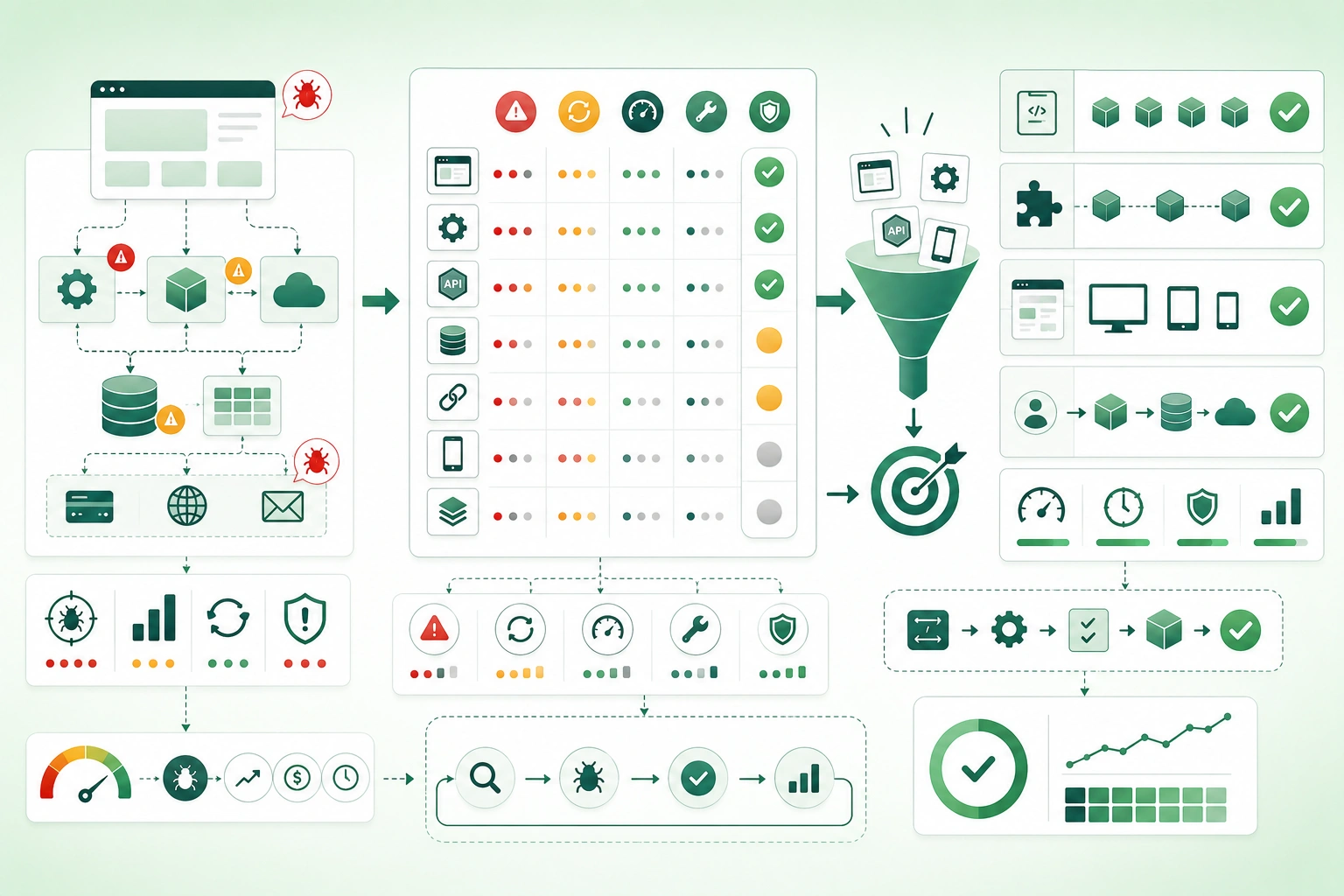
A weak testing strategy starts with:
We need 80% coverage.A stronger strategy starts with:
What could break?

How expensive would failure be?

How likely is regression?

Which test would detect it fastest?
Real projects have limited:
engineering time

CI time

test environments

maintenance capacity
so automation must be prioritized.
Optimize for confidence per unit of maintenance
The best test is not automatically the most realistic test. Prefer the cheapest stable test that can detect the failure you care about. Reserve expensive browser-level or full-system tests for behavior that genuinely needs those layers.
1. Start with risk instead of coverage
Risk-based test automation workflow (diagram)
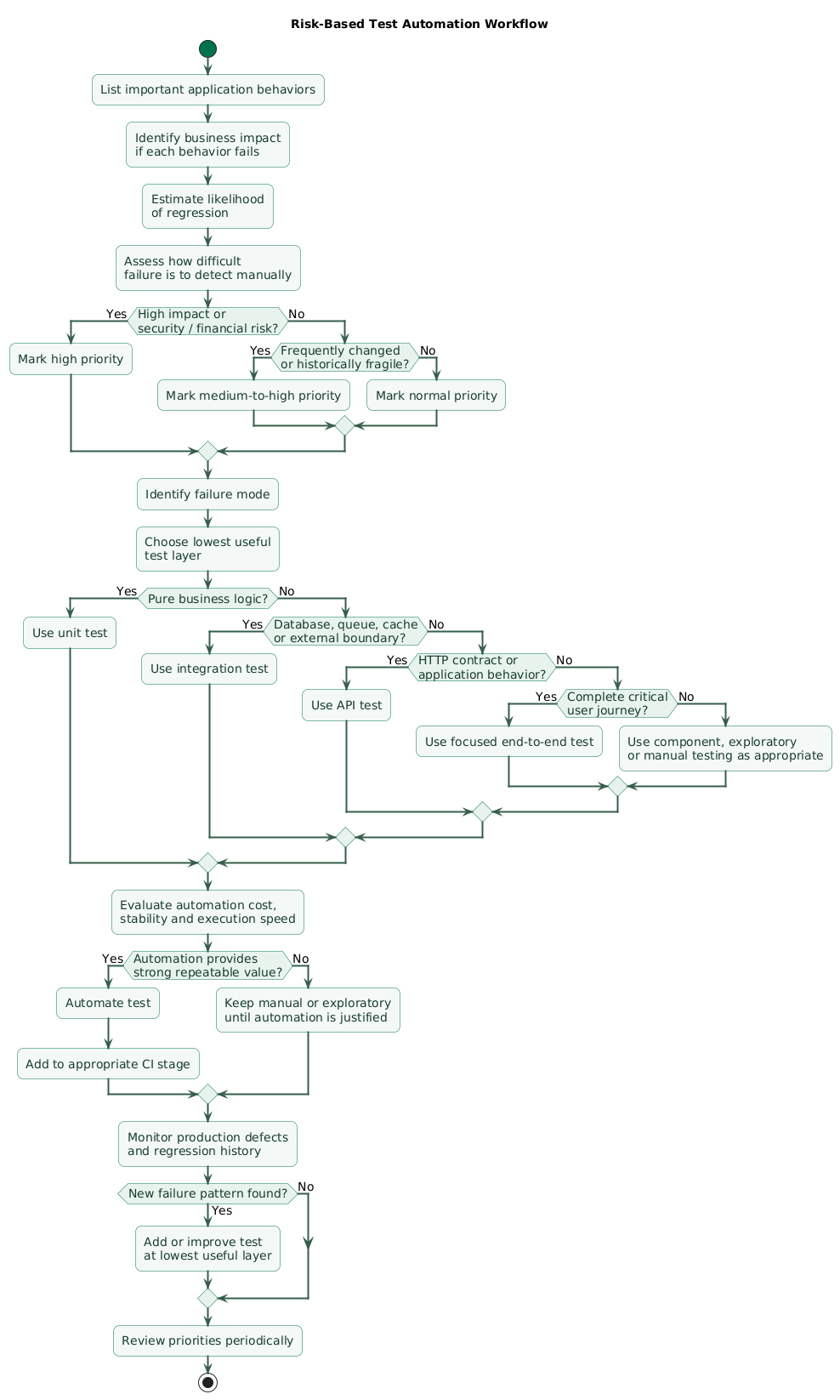
Start with a list of important workflows.
Example SaaS application
User signs up

User logs in

User creates project

User invites teammate

Subscription upgrades

Subscription cancels

Invoice generated

Data exported

Account deleted
Score impact
Ask:
If this fails in production,
what happens?
Possible consequences:
minor inconvenience

lost conversion

corrupted data

security exposure

incorrect billing

irreversible deletion
Score likelihood
Failures are more likely around:
complex logic

frequently changed code

external integrations

concurrency

permissions

data migrations
Score detectability
Some failures are obvious:
page crashes immediatelyothers remain hidden:
invoice totals wrong by 2%

permission leak affects
one rare account configuration
Prioritize high-impact hidden failures
High impact
+
likely regression
+
hard to detect manually
=
strong automation candidate
2. Choose the lowest useful test layer
Suppose you need to verify:
10% discount applies
to orders over EUR 100.
You could test it through:
browser

API

service

pure function
Prefer the narrow layer that proves the rule
If discount calculation is pure business logic:
unit testmay provide:
faster execution

clear failure

less setup

less flakiness
Use broader tests for boundaries
If the risk is:
discount saved incorrectly
to database
then an:
integration testis more valuable.
Use end-to-end when the whole path matters
customer applies coupon
     ↓
checkout updates
     ↓
payment amount correct
     ↓
confirmation displayed
may justify one focused end-to-end test.
Do not duplicate every assertion at every layer
Testing:
every discount edge casethrough:
unit
API
browser
creates maintenance without proportional confidence.
3. Automate critical business behavior first
High-priority examples
authentication

authorization

payments

orders

subscription changes

data writes

account deletion

permission changes
Protect money flows
amount calculation

currency

tax

discount

duplicate payment

refund

idempotency
Protect irreversible actions
delete account

delete workspace

remove organization

purge data
Protect access boundaries
A permission bug may allow:
User A
to access
User B data
That deserves direct automated coverage.
Protect critical state transitions
draft
  ↓
submitted
  ↓
approved
  ↓
paid
Tests should verify invalid transitions cannot silently occur.
Automate repeated manual regression checks
If every release requires someone to manually verify:
login
checkout
invoice download
password reset
those flows are strong automation candidates.
4. Use unit tests for fast business-logic feedback
Good unit-test targets
calculations

validation

parsing

state transitions

permission decisions

sorting rules

date logic

format conversion
Example
calculateShipping(
  weight,
  country,
  priority
)
can be tested against:
normal weight

boundary weight

international destination

priority shipping

unsupported country
Unit tests should be fast
Ideally they avoid:
real database

network

filesystem

browser

external API
Do not unit-test trivial implementation details
Weak:
getter returns fieldunless that behavior itself carries risk.
Avoid excessive mocking
A test with:
12 mocks

18 interaction assertions

no real business outcome
may simply duplicate the implementation.
Prefer observable results
Given input
     ↓
business operation
     ↓
expected output or state
5. Test real boundaries with integration tests
Testing layers and system boundaries (diagram)
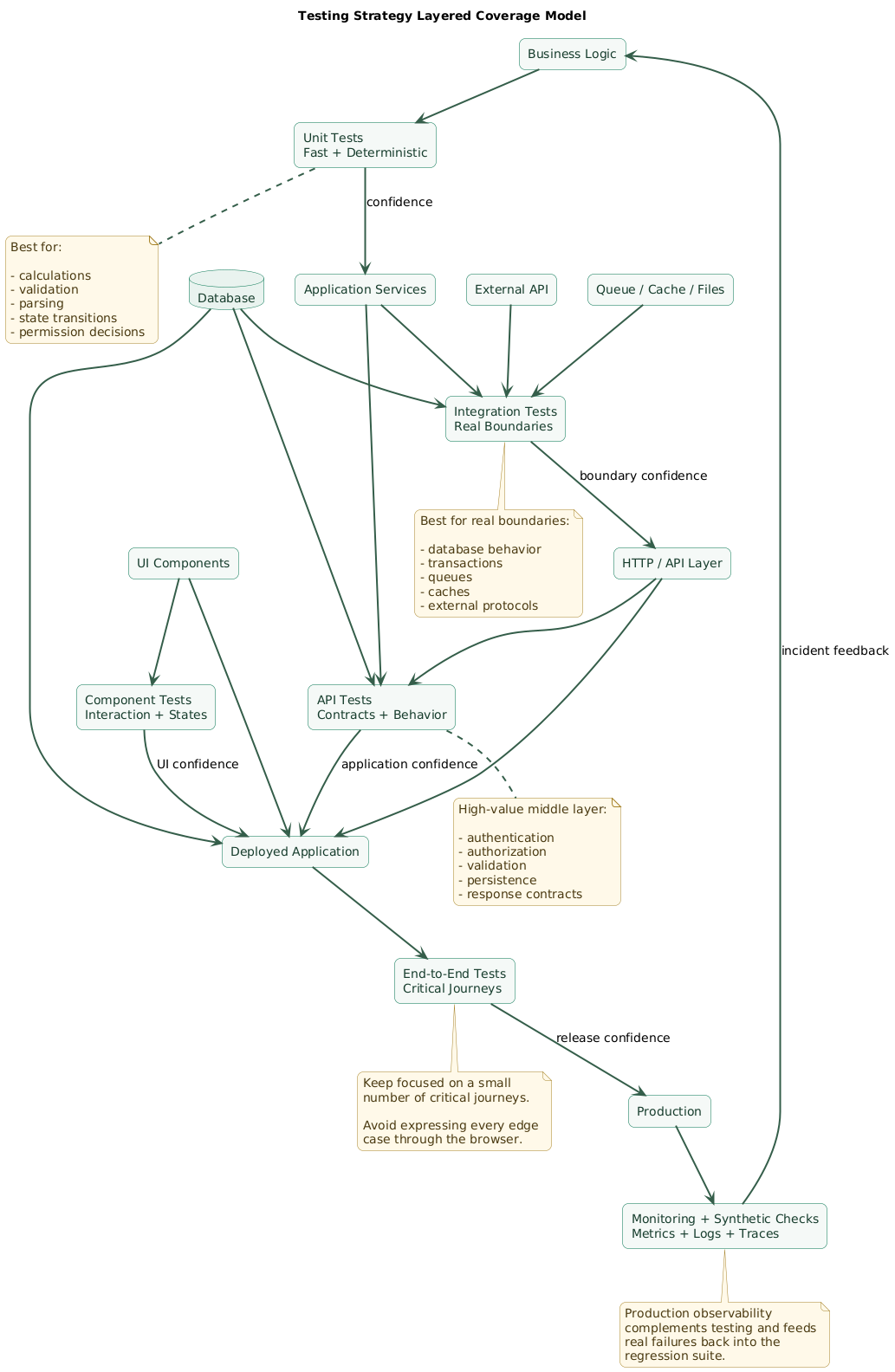
Many real defects happen at boundaries.
Database boundary
ORM mapping

constraint

transaction

migration

query
HTTP boundary
serialization

status code

authentication

timeout

error mapping
Queue boundary
message schema

retry behavior

acknowledgement

duplicate delivery
Cache boundary
key format

expiry

invalidation

serialization
Filesystem boundary
path handling

permissions

file format

cleanup
Use the real component where practical
A database integration test using the actual database engine can detect problems that an in-memory fake cannot:
SQL syntax

constraint behavior

transaction isolation

index assumptions

type differences
Keep integration scope controlled
You do not need:
entire production topologyto test:
repository writes
correct database rows
6. Use API tests as a high-value middle layer
API tests often provide an excellent balance:
more realistic than unit tests

faster and more stable
than browser tests
Test request validation
missing field

invalid type

invalid range

unknown enum
Test authentication
anonymous

valid token

expired token

invalid token
Test authorization
owner allowed

member denied

other tenant denied
Test response contracts
status code

body shape

error code

pagination

headers
Test persistence
Example:
POST /orders
     ↓
201 Created
     ↓
order stored correctly
API tests reduce UI duplication
Instead of testing:
20 validation rulesthrough the browser, test most of them through the API and keep only a few UI-level checks for:
form behavior

error presentation

critical journey
7. Keep UI and end-to-end tests focused
UI component tests
Good candidates:
conditional rendering

form interaction

keyboard behavior

loading state

error state

accessibility behavior
End-to-end tests
Reserve them for important complete journeys.
User registers

verifies email

logs in

creates project
Why not test everything end-to-end?
Full-system tests have more moving parts:
browser

frontend

backend

database

network

background worker

external dependencies
which means:
slower

harder to debug

more expensive

more failure modes
Use a small critical smoke suite
application loads

login works

critical API reachable

main transaction completes
can provide strong deployment confidence.
Avoid brittle selectors
Prefer selectors tied to:
role

accessible name

stable test identifier
rather than:
third div
inside fifth container
8. Turn production defects into regression tests
A bug report is valuable evidence about missing protection.
Example incident
Users with expired coupons
could still complete checkout
with discounted price.
Before fixing
Create a test that reproduces:
expired coupon
     ↓
checkout
     ↓
discount incorrectly applied
Then fix
The regression test should prove:
expired coupon rejectedChoose the lowest layer that captures the defect
If the bug came from:
discount date comparisona unit test may be enough.
If it came from:
database timezone conversionan integration test may be necessary.
Use incidents to improve strategy
Ask:
Why did existing tests miss this?

Was the behavior untested?

Was test data unrealistic?

Was wrong layer tested?

Was flaky test ignored?
9. Make test data deterministic and isolated
Tests should create what they need
Prefer:
create test user

create test order

run test

clean up or rollback
over:
assume user 123
already exists
in shared staging database
Avoid hidden dependencies between tests
Weak:
Test B works
only if Test A ran first.
Use builders or factories
createUser()

createOrder()

createSubscription()
can make setup readable.
Keep defaults realistic
A default test user should satisfy normal application invariants rather than require every test to configure:
20 unrelated fieldsMake special values explicit
createSubscription({
  status: "expired"
})
shows why the test differs.
Avoid production personal data
Test environments should use:
synthetic

anonymized

or explicitly approved test data
10. Treat flaky tests as defects
A flaky test sometimes:
passes

and sometimes

fails
without meaningful product change.
Common causes
timing assumptions

shared state

network dependency

random data

race condition

clock dependency

test-order dependency
Bad retry policy
test failed
     ↓
rerun automatically
     ↓
green
     ↓
ignore problem
can hide real defects.
Retries can help diagnosis, not replace repair
Track:
original failure

rerun result

flake frequency
Quarantine when necessary
If a flaky test cannot be repaired immediately:
remove it from release blocking

keep issue visible

assign owner

repair quickly
Trust matters
If developers think:
CI is probably just flakythen the suite has stopped serving its primary purpose.
11. Structure CI for fast feedback
Fast stage
format checks

static analysis

unit tests

fast component tests
Integration stage
database tests

API tests

contract tests

service integration
Slow stage
end-to-end

performance smoke tests

large compatibility suites
Fail fast
If:
unit test fails in 30 secondsdo not wait:
20 minutesfor the browser suite first.
Parallelize safely
unit shard 1

unit shard 2

integration shard 1

integration shard 2
can reduce feedback time if tests are isolated.
Keep pull-request feedback practical
Developers are more likely to respond quickly to a pipeline that gives useful results in:
minutesrather than:
an hourUse scheduled suites where appropriate
Extremely expensive tests may run:
nightly

before release

against staging
provided critical feedback is not delayed unnecessarily.
12. Use coverage as a diagnostic, not a goal
A suite can have:
95% line coveragewhile missing:
important assertionsExample
calculateInvoice()can be executed by a test without verifying:
tax

currency

rounding

total
Coverage is useful for finding suspicious gaps
If:
authorization module:
12% covered
investigate.
Branch coverage can expose missing paths
Example:
if user.isAdmin

else
testing only:
admin pathmay leave ordinary users unprotected.
Do not reward meaningless tests
Hard coverage targets can encourage:
assert true

tests without business value

testing generated code

testing trivial getters
Mutation testing can reveal weak assertions
A mutation tool may change:
total > 100to:
total >= 100and check whether tests detect the difference.
Use such techniques selectively where additional assurance justifies the cost.
13. Add security and performance tests where risk demands them
Security automation
Good candidates include:
authorization boundaries

tenant isolation

input validation

dependency scanning

secret scanning

security headers
Performance tests
Focus on known performance risks:
slow checkout

large export

high-volume API

database-heavy search

batch import
Do not performance-test everything equally
A settings page used:
20 times per daydoes not need the same load testing as:
public search endpointTest failure behavior
database unavailable

third-party timeout

queue backlog

disk full

API rate limit
may be more valuable than another happy-path test.
Production monitoring complements testing
Tests cannot predict every:
real data combination

traffic pattern

dependency failure

infrastructure issue
so combine testing with:
metrics

logs

traces

alerts

synthetic checks
14. Build a practical automation roadmap
Test automation priority decision flow (diagram)
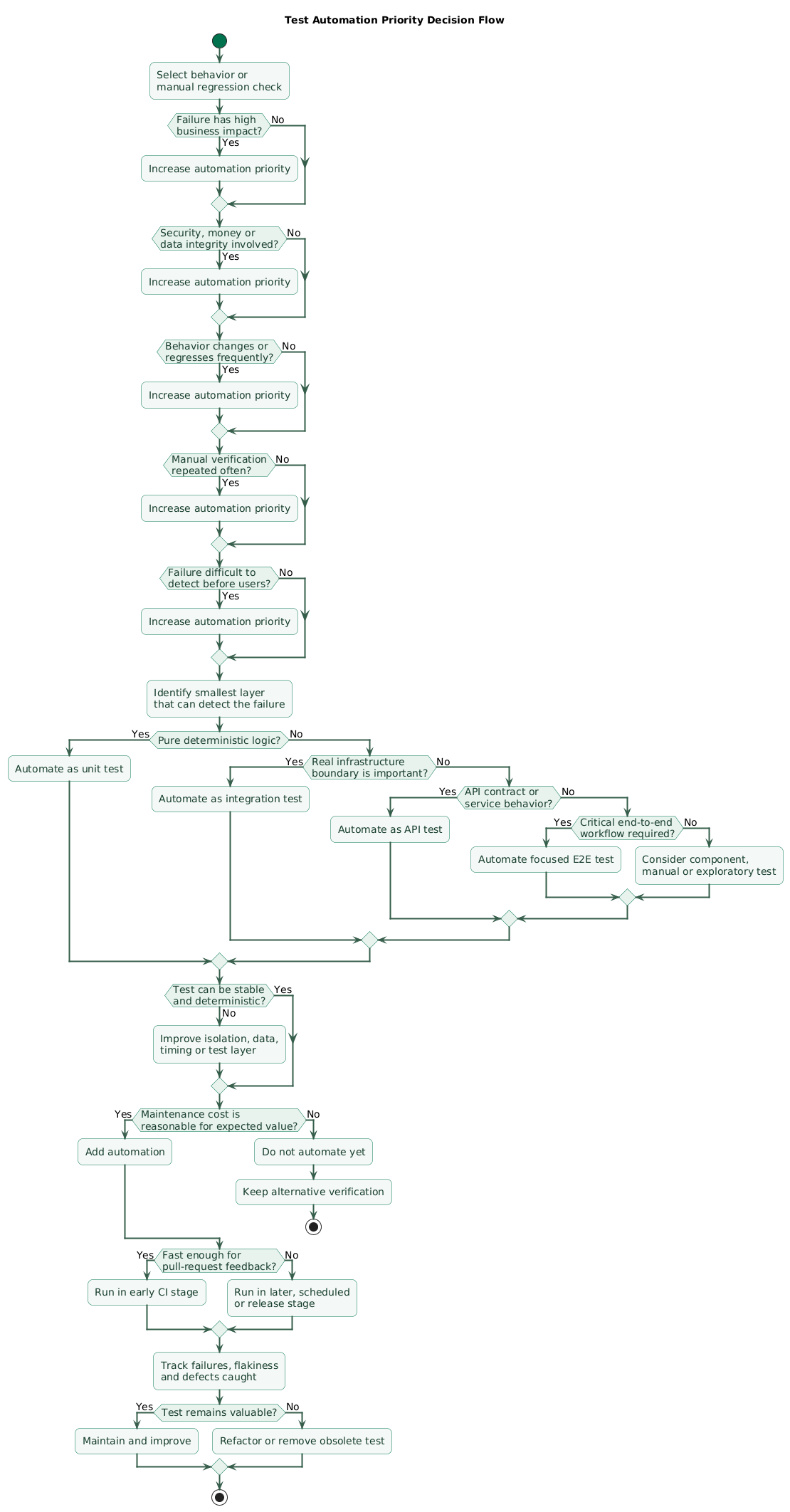
Step 1: list critical workflows
login

checkout

payment

subscription

permissions

data deletion
Step 2: list important failure modes
duplicate charge

unauthorized access

incorrect total

lost write

invalid state
Step 3: choose the cheapest useful layer
pure business rule
→ unit

database behavior
→ integration

HTTP contract
→ API

full journey
→ end-to-end
Step 4: automate frequent regressions
Use:
bug history

incident history

support tickets

release checklist
Step 5: automate repetitive manual checks
If a human repeatedly performs the same predictable verification:
automate itwhen automation is stable and economical.
Step 6: keep exploratory testing human
Humans are still valuable for:
unexpected workflows

new feature exploration

UX issues

visual inconsistencies

ambiguous behavior
Step 7: continuously prune
Delete or redesign tests that:
duplicate better coverage

never catch defects

are permanently flaky

test obsolete behavior
15. Copy/paste testing strategy checklist
Testing strategy checklist

Goals
- What failures matter most?
- What confidence does the team need?
- What release frequency is expected?
- What feedback time is acceptable?
- Which workflows are business-critical?
- Which defects would be expensive or dangerous?

Risk assessment
- Business impact.
- Failure probability.
- Regression probability.
- Detectability.
- Data-loss risk.
- Security risk.
- Financial risk.
- Compliance risk.
- Availability risk.

Critical workflows
- Authentication.
- Authorization.
- Signup.
- Checkout.
- Payments.
- Orders.
- Subscription changes.
- Permission changes.
- Data export.
- Data deletion.
- Administrative actions.

Automation priority
- High-impact behavior first.
- Frequently changed code.
- Frequently broken code.
- Repetitive manual checks.
- Hard-to-detect failures.
- Cross-service boundaries.
- Security-sensitive behavior.
- Money-sensitive behavior.

Choose lowest useful layer
- Pure logic -> unit test.
- Database behavior -> integration test.
- HTTP behavior -> API test.
- Component interaction -> component test.
- Critical full journey -> end-to-end test.
- Do not use browser when unit test proves the risk.
- Do not use mock when real boundary is the risk.

Unit tests
- Business rules.
- Calculations.
- Validation.
- Parsers.
- State transitions.
- Permission decisions.
- Date logic.
- Formatting.
- Deterministic.
- Fast.
- Independent.
- Clear assertions.

Avoid weak unit tests
- Trivial getters.
- Framework internals.
- Generated code.
- Exact internal call sequence without behavioral reason.
- Excessive mocks.
- Tests tightly coupled to implementation.

Integration tests
- Database writes.
- Database reads.
- Constraints.
- Transactions.
- Migrations.
- Repository behavior.
- HTTP integrations.
- Queue integrations.
- Cache behavior.
- File storage.
- Serialization.

Database integration
- Use real engine where practical.
- Test constraints.
- Test transaction boundaries.
- Test unique indexes.
- Test foreign keys.
- Test SQL behavior.
- Test migrations.
- Test realistic types.
- Clean test state.

API tests
- Authentication.
- Authorization.
- Validation.
- Status codes.
- Response schema.
- Error schema.
- Pagination.
- Filtering.
- Sorting.
- Persistence.
- Idempotency.
- Rate-limit behavior where needed.

Contract tests
- Consumer expectations explicit.
- Provider validates contract.
- Avoid implementation detail.
- Version contracts where necessary.
- Remove contracts for retired consumers.
- Test compatibility.

UI component tests
- Conditional rendering.
- Loading states.
- Error states.
- Form behavior.
- Keyboard interaction.
- Accessibility behavior.
- Important state transitions.
- Avoid testing CSS implementation details.

End-to-end tests
- Critical user journeys.
- Deployment wiring.
- Authentication flow.
- Checkout flow.
- Payment flow.
- Account creation.
- Critical administration.
- Keep suite small.
- Keep assertions focused.
- Keep data isolated.

End-to-end warning signs
- Hundreds of scenarios.
- Very slow execution.
- Many arbitrary sleeps.
- Shared accounts.
- Shared mutable data.
- External dependencies uncontrolled.
- Difficult local reproduction.
- Frequent random failures.

Smoke tests
- Application loads.
- Health endpoint.
- Login works.
- Critical API responds.
- Database reachable.
- Main transaction succeeds.
- Run after deployment where appropriate.

Regression tests
- Every important production bug reviewed.
- Reproduce failure first.
- Add regression test at lowest useful layer.
- Fix bug.
- Keep test.
- Link incident where useful.
- Review recurring defect categories.

Bug-driven strategy
- Which bugs repeat?
- Which modules regress?
- Which boundaries fail?
- Which manual checks catch bugs?
- Which defects escaped all environments?
- Improve strategy from evidence.

Test data
- Deterministic.
- Isolated.
- Synthetic where possible.
- Easy to create.
- Easy to clean.
- Minimal.
- Valid defaults.
- Special state explicit.
- No dependency on test order.
- Avoid production personal data.

Factories
- User factory.
- Order factory.
- Subscription factory.
- Workspace factory.
- Safe defaults.
- Override important fields explicitly.
- Avoid giant fixture graphs.

Fixtures
- Small.
- Understandable.
- Version controlled.
- Avoid stale shared fixtures.
- Avoid mysterious global state.
- Prefer purpose-specific data.

Time
- Control current time where useful.
- Test boundaries.
- Timezone behavior.
- Expiry.
- DST where relevant.
- Avoid real waiting.
- Use fake or injectable clock where appropriate.

Randomness
- Seed deterministic random tests.
- Log seed on failure.
- Avoid uncontrolled randomness.
- Property-based testing where useful.
- Keep reproduction possible.

External APIs
- Define contract.
- Use test doubles for routine local tests.
- Use sandbox for selected integration tests.
- Test timeout.
- Test invalid response.
- Test rate limit.
- Test retry.
- Test authentication failure.
- Avoid making every test depend on third party.

Mocks
- Use at clear boundaries.
- Keep behavior realistic.
- Avoid mocking code under test.
- Avoid mock chains.
- Avoid asserting every internal call.
- Prefer outcome assertions.
- Update mocks with contract changes.

Fakes
- Use when they preserve important semantics.
- Know differences from production service.
- Do not trust in-memory database as proof of real database behavior.
- Test critical boundaries with real implementation.

Flaky tests
- Treat as defects.
- Track flake rate.
- Investigate timing.
- Investigate shared state.
- Investigate races.
- Investigate test order.
- Investigate network dependency.
- Fix quickly.
- Quarantine temporarily if necessary.
- Do not normalize random failures.

Waiting
- Avoid arbitrary sleep.
- Wait for observable condition.
- Use bounded timeout.
- Poll intelligently.
- Keep reason explicit.
- Distinguish application latency from test instability.

CI structure
- Static checks first.
- Unit tests early.
- Fast component tests early.
- Integration tests next.
- API tests next.
- End-to-end later.
- Expensive suites scheduled if appropriate.
- Fail fast.

CI feedback
- Fast enough for pull requests.
- Clear failure output.
- Reproducible locally.
- Test artifacts available.
- Screenshots for UI failures.
- Logs available.
- Traces where useful.
- Failed test owner identifiable.

Parallelization
- Tests isolated.
- Data namespaces isolated.
- Ports isolated.
- Databases isolated or namespaced.
- Avoid global singleton state.
- Verify parallel-safe cleanup.

Coverage
- Use as signal.
- Inspect low-covered critical code.
- Review branch coverage.
- Do not optimize percentage blindly.
- Exclude generated code appropriately.
- Do not reward meaningless assertions.
- Combine with risk review.

High coverage does not prove
- Correct assertions.
- Correct requirements.
- Important edge cases.
- Integration correctness.
- Security.
- Performance.
- Production reliability.

Mutation testing
- Useful for critical pure logic.
- Check assertion quality.
- Run selectively.
- Control CI cost.
- Investigate surviving meaningful mutations.

Security tests
- Authentication.
- Authorization.
- Tenant isolation.
- Input validation.
- File upload rules.
- CSRF where relevant.
- Security headers.
- Dependency scanning.
- Secret scanning.
- Static analysis.
- Abuse limits.

Authorization tests
- Owner allowed.
- Admin allowed.
- Member denied where required.
- Anonymous denied.
- Cross-tenant access denied.
- Deleted resource denied.
- Revoked permission denied.

Payment tests
- Correct amount.
- Correct currency.
- Duplicate submission.
- Idempotency.
- Decline.
- Timeout.
- Retry.
- Refund.
- Partial failure.
- Webhook duplication.

Data-integrity tests
- Required constraints.
- Unique constraints.
- Foreign keys.
- Valid transitions.
- Transaction rollback.
- Concurrency.
- Migration behavior.
- Deletion rules.

Performance tests
- Define latency objective.
- Define throughput.
- Use representative data.
- Test high-risk endpoints.
- Test database-heavy queries.
- Test large imports.
- Test exports.
- Test concurrency.
- Avoid testing every endpoint equally.

Performance regression
- Establish baseline.
- Track important query latency.
- Track critical page/API latency.
- Investigate significant regression.
- Keep environment differences in mind.

Load testing
- Representative traffic.
- Representative data.
- Ramp gradually.
- Observe saturation.
- Monitor dependencies.
- Monitor database.
- Monitor queues.
- Define pass criteria.
- Avoid production-impacting tests without controls.

Failure testing
- Database unavailable.
- External API unavailable.
- Timeout.
- Cache unavailable.
- Queue backlog.
- Invalid message.
- Partial transaction.
- Disk or storage failure where relevant.
- Recovery behavior.

Resilience
- Retry bounded.
- Backoff tested.
- Circuit breaker where used.
- Fallback tested.
- Idempotency tested.
- Duplicate delivery tested.
- Graceful degradation tested.

Migration tests
- Upgrade from previous schema.
- Existing data preserved.
- Backfill.
- Constraint introduction.
- Mixed-version compatibility.
- Rollback where supported.
- Large-data performance.

Accessibility tests
- Automated semantic checks.
- Keyboard flows.
- Focus management.
- Accessible names.
- Form labels.
- Important contrast checks where tooling supports.
- Manual review still needed.

Visual tests
- Use selectively.
- Stable rendering.
- Important components.
- Review intentional changes.
- Avoid huge noisy screenshot suites.
- Keep environment consistent.

Exploratory testing
- New workflows.
- Ambiguous requirements.
- UX.
- Unexpected sequences.
- Boundary combinations.
- Human judgment.
- Keep alongside automation.

Manual testing
- Reserve for judgment-heavy work.
- New behavior exploration.
- Visual quality.
- Device-specific behavior.
- One-off migration verification.
- Do not repeatedly perform predictable regression checks forever.

Production monitoring
- Error rate.
- Latency.
- Availability.
- Business failures.
- Logs.
- Metrics.
- Traces.
- Synthetic checks.
- Alerts.
- Monitoring complements tests.

Synthetic checks
- Login.
- Critical API.
- Purchase or safe simulated transaction.
- Public page.
- Dependency health.
- Run continuously where useful.

Incident feedback loop
- Production defect discovered.
- Reproduce.
- Determine lowest useful test layer.
- Add regression test.
- Fix.
- Update observability if needed.
- Review similar risks.
- Document lesson.

Test ownership
- Team owns tests with code.
- Failing test has owner.
- Flaky test has owner.
- Obsolete tests removed.
- Test infrastructure maintained.
- Shared testing tools have maintainers.

Maintenance
- Refactor test code.
- Keep helpers readable.
- Remove duplication carefully.
- Avoid overly generic test frameworks.
- Delete obsolete tests.
- Keep intent obvious.

Test names
- Describe behavior.
- Describe condition.
- Describe expected outcome.
- Avoid generic names such as test1.
- Make failure understandable without opening implementation.

Assertions
- Assert meaningful outcome.
- Keep failure message clear.
- Avoid too many unrelated assertions.
- Verify side effects.
- Verify absence of forbidden side effects.
- Avoid assertion-free tests.

Test isolation
- No order dependency.
- No shared mutable user.
- No shared cart.
- No shared subscription.
- Cleanup reliable.
- Parallel execution safe.

Environment
- Match production where risk requires.
- Same database engine.
- Same protocol versions.
- Relevant configuration.
- Keep local setup easy.
- Make CI reproducible.

Test pyramid
- Use as heuristic.
- Many fast low-level tests.
- Fewer expensive high-level tests.
- Adapt to architecture.
- Do not follow ratios mechanically.

Testing trophy / portfolio thinking
- Emphasize useful integration confidence.
- Keep unit feedback fast.
- Keep end-to-end focused.
- Choose distribution from system risks.
- No universal ideal percentages.

Legacy project
- Start with critical regression paths.
- Characterize existing behavior.
- Add tests before risky refactor.
- Cover bugs when fixed.
- Test seams and boundaries.
- Do not wait for complete test rewrite.

New project
- Test critical domain rules immediately.
- Add integration harness early.
- Make CI fast.
- Keep test data easy.
- Add few critical end-to-end flows.
- Prevent flakiness culture early.

Small team
- Prefer high-signal automation.
- Avoid maintaining huge browser suite.
- Reuse existing CI.
- Use managed test infrastructure where useful.
- Focus on business-critical paths.

When not to automate
- One-time verification.
- Highly subjective visual judgment.
- Rapidly changing experiment.
- Automation cost exceeds repeated manual cost.
- Test would be more brittle than valuable.
- Risk is negligible.

Automation candidate scoring
- Business impact high?
- Regression likelihood high?
- Manual check frequent?
- Automation stable?
- Execution fast?
- Maintenance reasonable?
- Failure easy to diagnose?
- Test catches unique risk?

Strong automation candidate
- High impact.
- Repeated every release.
- Stable inputs.
- Deterministic result.
- Easy to run.
- Expensive manual verification.
- Frequent regression.

Weak automation candidate
- One-off workflow.
- Highly subjective.
- Constantly changing UI experiment.
- Low impact.
- Extremely expensive test harness.
- Already well-covered at cheaper layer.

Release gate
- Critical tests green.
- No unexplained flaky failures.
- Security checks appropriate.
- Migration checks appropriate.
- Smoke suite ready.
- Rollback understood.
- Monitoring ready.

Final review
- What are the highest-risk workflows?
- Which failures would cost money?
- Which failures could expose data?
- Which failures could corrupt state?
- Which workflows regress often?
- Which manual checks repeat every release?
- Is each risk tested at the lowest useful layer?
- Are pure business rules covered by fast tests?
- Are real integration boundaries tested?
- Are API contracts protected?
- Are end-to-end tests limited to critical journeys?
- Are test data and environments deterministic?
- Are flaky tests treated as defects?
- Does CI provide fast feedback?
- Is coverage used as a diagnostic rather than a target?
- Are production incidents converted into regression tests?
- Are security-sensitive paths explicitly tested?
- Are performance tests focused on real bottlenecks?
- Is production monitoring part of the quality strategy?
- Are obsolete tests removed?
- Does the test suite increase confidence more than maintenance cost?
16. FAQ
What should I automate first in a real project?
Start with high-risk behavior: authentication, authorization, important business rules, payments, critical data writes, irreversible actions, frequent regressions, and manual checks that are repeated every release.
Should every function have a unit test?
No. Unit-test behavior where fast isolated verification provides value. Simple wiring code may be better protected by integration or API tests rather than by duplicating implementation details in unit tests.
How many end-to-end tests do I need?
Enough to protect the most important complete journeys and verify that the deployed system works across layers. Keep detailed edge cases at cheaper layers whenever possible so the end-to-end suite remains fast and stable.
Is 100% test coverage worth pursuing?
Usually not as a universal objective. High coverage can coexist with weak assertions and missing critical scenarios. Use coverage to identify gaps, especially in risky code, rather than treating the percentage itself as proof of quality.
What should I do with flaky tests?
Fix them quickly. If immediate repair is impossible, quarantine them from release-blocking pipelines while keeping the defect visible and assigned. Repeated unexplained failures destroy trust in the test suite.
Are integration tests more valuable than unit tests?
They protect different risks. Unit tests are excellent for fast business logic feedback, while integration tests verify real boundaries such as databases, HTTP services, queues, and caches. A practical project normally needs both.
Should every production bug get an automated test?
Important regressions generally should. Add the test at the lowest layer that reliably reproduces the failure, then use the incident to review whether similar gaps exist elsewhere.
Key terms (quick glossary)
- Testing strategy
- A deliberate plan describing what risks should be tested, at which layers, with what degree of automation, and at what point in the delivery process.
- Unit test
- A fast isolated test of a small behavior or business rule without relying on major external infrastructure.
- Integration test
- A test that verifies interaction with real components or boundaries such as a database, queue, filesystem, or external protocol.
- API test
- A test that exercises application behavior through an HTTP or similar programmatic interface rather than through the graphical user interface.
- End-to-end test
- A test that exercises a complete workflow through several application layers, often including the user interface and deployed infrastructure.
- Regression test
- A test designed to prevent previously working behavior or a previously fixed defect from breaking again.
- Smoke test
- A small set of broad checks that verifies the most essential parts of an application are operational.
- Flaky test
- A test that can pass or fail without a meaningful change in the software behavior it is supposed to verify.
- Test fixture
- Prepared data, objects, configuration, or environment used to establish the starting state for a test.
- Test double
- A substitute for a real dependency used during testing, including mocks, stubs, fakes, and related techniques.
- Code coverage
- A metric describing which portions of code were executed while automated tests ran.
- Branch coverage
- A coverage metric that tracks whether different decision paths through conditional code have been executed.
- Mutation testing
- A technique that deliberately changes code in small ways and checks whether existing tests detect the incorrect behavior.
- Risk-based testing
- A testing approach that prioritizes scenarios according to failure impact, likelihood, detectability, and business importance.
- Exploratory testing
- Human-driven investigation where learning, test design, and execution happen together rather than following only predefined automated cases.
- Continuous integration
- A development practice where changes are integrated frequently and validated automatically using builds, tests, static checks, and related feedback.
Worth reading
Recommended guides from the category.
