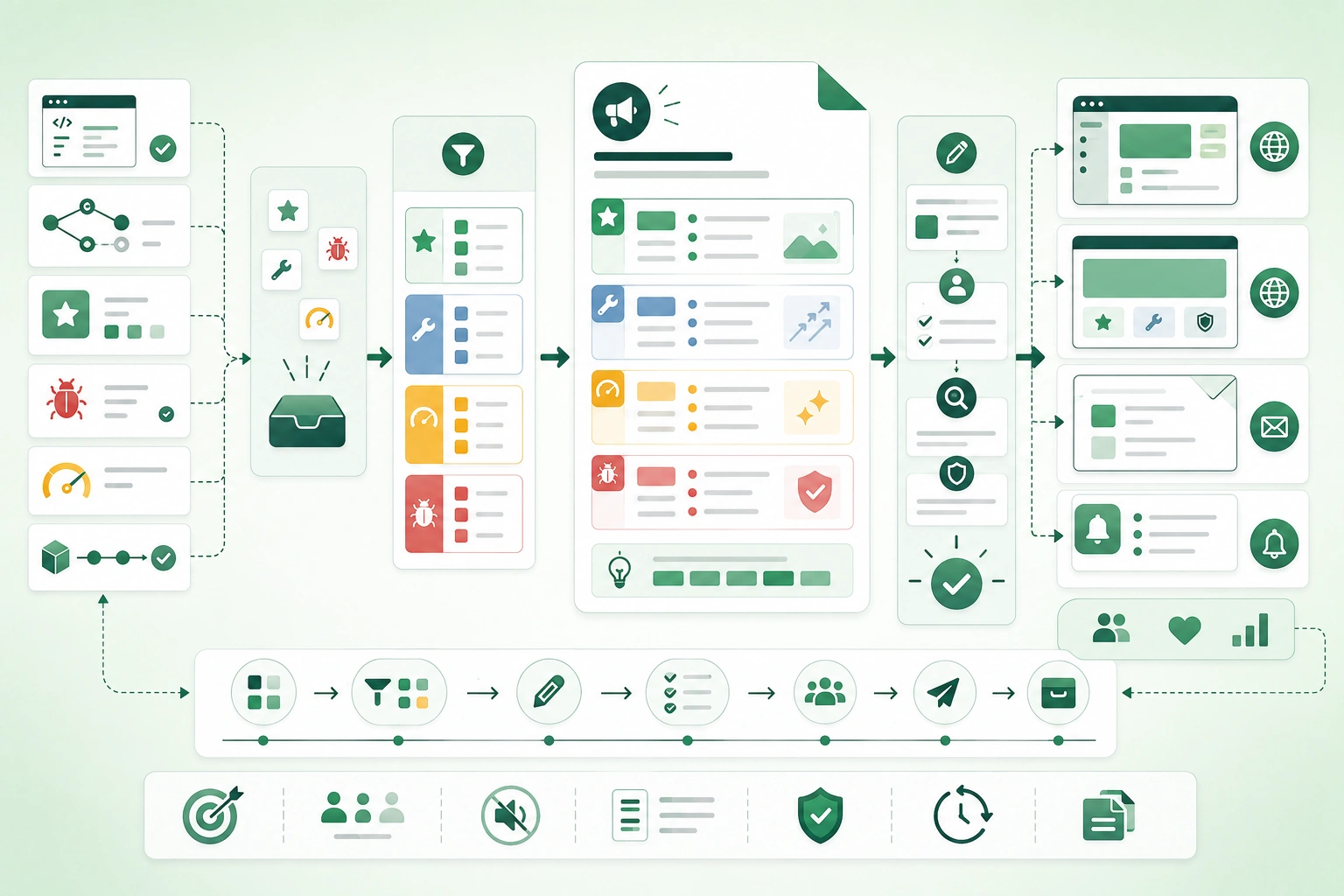
Bad release notes often look like this:
PROJ-1842 fixed

Refactored BillingService

Updated dependencies

Merged feature branch

Minor UI changes
A user reading that list still does not know:
What changed for me?

Do I need to do anything?

Is anything incompatible?

Was my problem fixed?

Where can I learn more?
Useful release notes translate:
engineering changesinto:
user consequencesTreat release notes as part of the release
If users need the information to adopt, migrate, troubleshoot, or safely operate the new version, the release is not complete until that information is available.
1. Write for the reader, not the commit history
Release notes information flow (diagram)
Internal development history answers:
What did engineers change?Release notes should answer:
What changed for the reader?Implementation-focused
Replaced legacy ExportService
with async worker.
User-focused
Large CSV exports now run
in the background, so you can
continue using the application
while the file is prepared.
Implementation detail can follow
If relevant to technical users:
Export requests now return
a job identifier and complete
asynchronously.
Do not publish every internal change
Often omit:
code formatting

dependency cleanup

internal rename

refactor with no observable effect

CI maintenance
Include invisible changes when they matter operationally
A change may have no visual effect but still deserve release notes:
API authentication changed

minimum runtime version changed

backup behavior changed

security policy tightened
2. Identify the audience and required action
One release can affect several audiences.
End users
new workflow

changed button

new limitation

fixed behavior
Administrators
configuration

permissions

rollout settings

migration
Developers
API change

SDK update

schema change

deprecated endpoint
Operators
deployment requirement

new environment variable

monitoring change

database migration
Ask whether action is required
Every high-impact entry should make this clear.
Action required:
No
or:
Action required:
Update API clients before
October 15.
Separate audiences when instructions differ
For example:
For users:
No action required.

For administrators:
Enable the new permission
before assigning project editors.

For API consumers:
Migrate from roleName
to roleId.
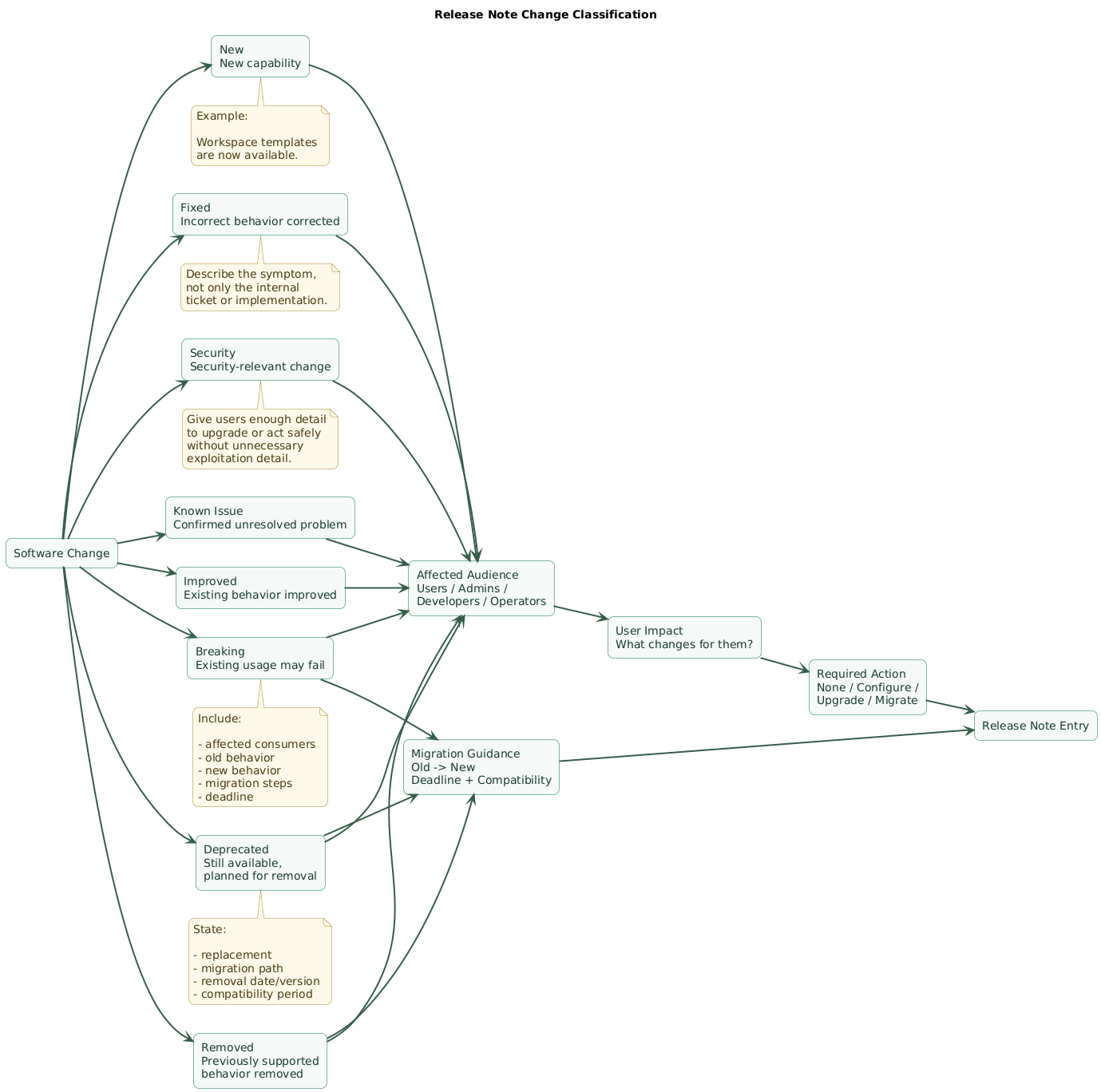
3. Use consistent change categories
New
New capability
that did not exist before.
Improved
Existing behavior
became faster, clearer,
more reliable, or easier.
Fixed
Incorrect behavior
was corrected.
Security
Security-related change
that users or operators
should understand.
Deprecated
Still available,
but planned for removal.
Breaking
Existing integration or workflow
may stop working without changes.
Removed
Previously supported behavior
is no longer available.
Known issues
Problem still exists
and users may encounter it.
Use categories consistently
Do not label:
API field removedas:
Improvementsimply because the implementation became cleaner.
4. Lead with observable user impact
Weak
Optimized query execution.Better
The customer list now loads
faster for accounts with
large contact histories.
Weak
Updated auth middleware.Better
Expired sessions are now
redirected to sign-in instead
of showing a generic error page.
Use the user's vocabulary
Internal term:
TenantMembershipBindinguser-facing term:
workspace membershipDescribe what changed from before
Before:
Exports blocked the page
until the file was ready.

Now:
Exports continue in the background
and appear in Downloads when complete.
Include scope
Affects:
Enterprise workspaces
with more than 50,000 records.
This prevents readers from assuming every change applies to them.
5. Give breaking changes and migrations extra space
Release-note change classification (diagram)
Breaking changes should not be hidden inside:
Other improvementsState what breaks
API clients using
GET /v1/reports
must migrate.
State the replacement
Use:
GET /v2/reports
Explain the important difference
v2 uses cursor pagination
instead of page numbers.
State the deadline
v1 will stop accepting
requests on October 15.
Give migration steps
1. Replace page with cursor.

2. Read nextCursor
   from each response.

3. Stop when nextCursor
   is null.

4. Update SDK to version
   that supports v2.
Include compatibility period
Both versions remain available
until October 15.
Link deeper documentation
Release notes should summarize the migration rather than becoming the only permanent technical reference.
6. Document deprecations before removal
Deprecation means:
still works

but

do not build new dependencies on it
Weak deprecation
Legacy API deprecated.Useful deprecation
Deprecated:
POST /v1/files/upload

Replacement:
POST /v2/uploads

Reason:
v2 supports resumable uploads
and larger files.

Action:
Migrate integrations before
November 30.
State whether existing users are affected today
Existing integrations continue
to work during the migration period.
Repeat important deprecations
A deprecation announced once six months ago may need reminders in later releases.
Report migration progress where useful
Most SDK integrations now
use the replacement endpoint.

Remaining v1 users should
complete migration before removal.
Removal deserves its own note
Removed:
GET /v1/reports

The endpoint was deprecated
in version 4.8 and is no longer
available in version 5.0.
7. Write useful bug-fix and security notes
Bug fix: describe the symptom
Weak:
Fixed invoice issue.Better:
Fixed an issue where invoices
could display the wrong billing
address after a customer updated
their organization profile.
State the affected scope
Affected:
Invoices generated after
an organization address change.
State whether existing data needs repair
Existing invoices are unchanged.

New invoices use the corrected address.
or:
Affected invoices will be
regenerated automatically.
Security notes require judgment
Communicate enough information for users to:
understand impact

upgrade safely

take required action
without publishing unnecessary exploitation detail before remediation is widely available.
Example
Security:
Improved authorization checks
for workspace exports.

Recommended action:
Upgrade self-hosted installations
to version 4.12 or later.
8. Add screenshots and examples when they reduce ambiguity
Useful screenshot cases
navigation moved

workflow redesigned

new configuration screen

new editor behavior
Before and after
Before:
Settings > Billing > Plan

Now:
Billing > Subscription
Use examples for APIs
Before:
{
  "role": "admin"
}
after:
{
  "roleId": "role_admin"
}
Use examples for configuration
Old:
UPLOAD_LIMIT=100new:
UPLOAD_LIMIT_MB=100Do not add screenshots as decoration
A screenshot is useful when it answers:
Where is it?

What changed?

What should I click?
not merely because release notes look more attractive with images.
9. Include technical detail at the right depth
User-facing release notes should not become:
architecture design documentInclude detail when it changes behavior
Requests now time out
after 30 seconds.
Include configuration changes
New environment variable:
WEBHOOK_RETRY_LIMIT
Include compatibility requirements
Minimum PostgreSQL version:
15
Include migration commands when appropriate
Run the database migration
before starting the new
application version.
Link architecture detail instead of duplicating it
Release notes can say:
Webhook delivery now uses
asynchronous retries.

See the webhook delivery guide
for retry timing and failure behavior.
Keep internal implementation detail optional
Users rarely need:
which class was renamed

which library method changed

which service was refactored
10. Separate release notes from raw changelogs
Commit log
abc123 fix login redirect

def456 refactor token service

ghi789 update tests
Changelog
4.12.0

Added
- Project templates

Fixed
- Login redirect
- Export timeout
Release notes
Project templates

You can now save a project
as a reusable template and use it
when creating future projects.

Who is affected:
Workspace administrators.

Action required:
None.
The artifacts can share a source
Pull requests may feed:
changelog

release notes

internal release report
while each output uses a different level of detail and audience.
Keep an archive
Users should be able to find:
what changed

when

in which version
months after the original announcement.
11. Capture release-note data during development
The worst time to ask:
What changed this month?is:
five minutes before releaseAdd release-note fields to pull requests
User-visible change?
Yes / No

Affected audience:
Users / Admins / Developers / Operators

Category:
New / Improved / Fixed /
Security / Deprecated /
Breaking / Removed

Action required?
Yes / No

Draft release-note text:
...
Add labels
release-note:new

release-note:fix

release-note:breaking

release-note:none
Use changelog fragments
A pull request can add a small file containing:
category

summary

audience

migration link
which is assembled during release.
Require explicit omission
Instead of assuming:
no release noterequire:
release-note:nonewhen a change intentionally has no user-facing entry.
This improves review
Reviewers can ask:
This changes authentication behavior.
Why is it marked release-note:none?
12. Build a repeatable review and publishing workflow
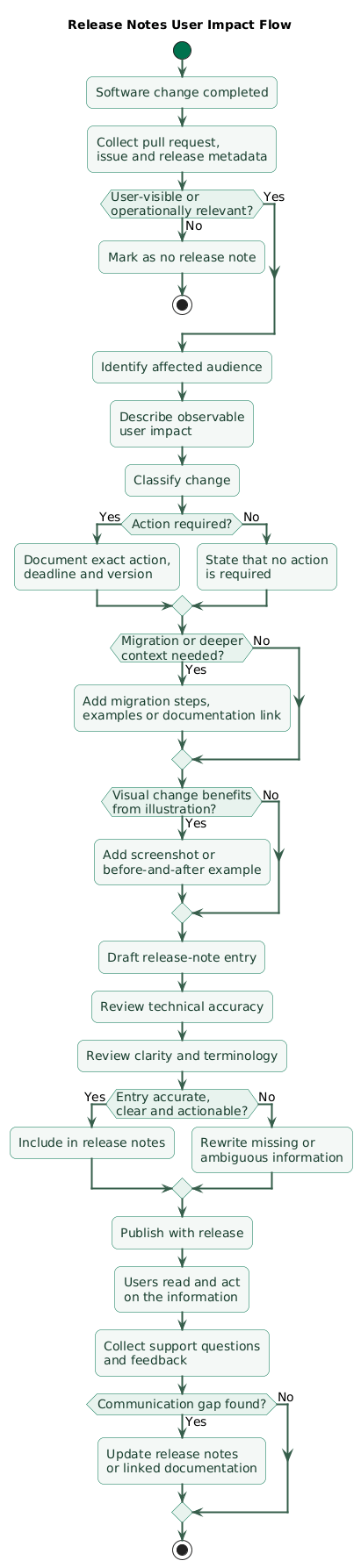
Release notes production workflow (diagram)

Step 1: collect candidate entries
pull requests

issue labels

changelog fragments

release metadata
Step 2: group related changes
Five pull requests implementing:
project templatesshould usually become:
one useful release-note entryrather than five engineering bullets.
Step 3: remove duplicates
backend support

frontend support

permission support
may all belong to one user-facing feature.
Step 4: verify accuracy
Confirm:
feature actually shipped

version correct

dates correct

links valid

migration commands correct
Step 5: review high-risk entries
Give extra attention to:
breaking changes

security changes

deprecations

data migrations

billing behavior
Step 6: publish with the release
Avoid publishing critical migration instructions:
days after deploymentStep 7: distribute through appropriate channels
release notes page

email

in-app notification

developer portal

status / admin channel
Step 8: collect feedback
Support questions such as:
Where did the setting move?

Do I need to migrate?

Which version removes this API?
reveal missing communication.
13. Automate collection without automating judgment
Useful automation
collect merged pull requests

collect labels

collect changelog fragments

calculate version

insert release date

verify links

detect missing metadata
Useful generated draft
New
- Bulk project export
- Workspace templates

Fixed
- Incorrect invoice address
- Login redirect after expiry
Human review should still decide
priority

wording

audience

duplication

required action

migration clarity
Do not publish raw pull-request titles automatically
Pull-request title:
Refactor auth refresh path
and fix stale closure
release note:
Sessions now refresh reliably
after a browser tab has been
inactive for an extended period.
Automation can enforce completeness
CI can reject a user-visible pull request when:
release-note category missingor:
breaking change has
no migration link
Keep generated artifacts reviewable
Release-note changes should ideally be visible:
before publicationrather than generated invisibly after deployment.
14. Use reusable templates for consistent releases
Basic release entry template
Title

What changed:
Describe the observable change.

Who is affected:
Describe the relevant users.

Action required:
Yes / No.

If yes:
Explain exactly what to do.

More information:
Link to documentation if needed.
Feature template
New: [Feature name]

What changed:
[Describe new user capability.]

Why it matters:
[Explain the benefit.]

Available to:
[Plans / roles / platforms.]

Action required:
[None or specific action.]

Learn more:
[Documentation link.]
Bug-fix template
Fixed: [User-visible problem]

Problem:
[Describe previous symptom.]

Now:
[Describe corrected behavior.]

Affected users:
[Scope.]

Action required:
[Usually none, or explain repair.]
Breaking-change template
Breaking change: [Short title]

Affected:
[Users / administrators /
developers / operators.]

Old behavior:
[Previous contract.]

New behavior:
[Replacement contract.]

Required action:
[Migration steps.]

Deadline:
[Date or version.]

Compatibility period:
[If applicable.]

Migration guide:
[Link.]
Deprecation template
Deprecated: [Feature / API]

Still available:
Yes.

Replacement:
[New feature / API.]

Why:
[Short explanation.]

Action:
[Migrate.]

Removal:
[Version or date.]

Migration guide:
[Link.]
Known-issue template
Known issue: [Problem]

Affected:
[Scope.]

Impact:
[What users may observe.]

Workaround:
[If available.]

Status:
[Investigating / fix planned /
resolved in next release.]
15. Copy/paste release notes checklist
Release notes checklist

Purpose
- Release notes explain user impact.
- Release notes are not raw commit logs.
- Release notes are not raw ticket lists.
- Internal implementation detail is minimized.
- Important operational changes are included.

Audience
- End users identified.
- Administrators identified.
- Developers identified.
- API consumers identified.
- Operators identified.
- Support teams identified.
- Different instructions separated where needed.

For every significant change
- What changed?
- Who is affected?
- Why does it matter?
- Is action required?
- When must action happen?
- Is migration needed?
- Is documentation linked?
- Is the version or date clear?

Categories
- New.
- Improved.
- Fixed.
- Security.
- Deprecated.
- Breaking.
- Removed.
- Known issues.
- Category terminology consistent.

New features
- User capability explained.
- Benefit explained.
- Availability explained.
- Plan restrictions explained where relevant.
- Role restrictions explained.
- Setup required?
- Documentation linked.

Improvements
- Existing behavior identified.
- Improvement observable.
- Performance claims specific where possible.
- Workflow difference clear.
- Action required stated.

Bug fixes
- Previous symptom described.
- Corrected behavior described.
- Affected scope described.
- Existing data impact described.
- Repair action described if necessary.
- Avoid vague "bug fixes" bullets.

Security
- User impact described safely.
- Required upgrade stated.
- Affected versions stated where appropriate.
- Required configuration stated.
- Sensitive exploit detail handled carefully.
- Security advisory linked where appropriate.

Breaking changes
- Clearly labeled.
- Not hidden under improvements.
- Affected audience.
- Old behavior.
- New behavior.
- Required migration.
- Effective date.
- Effective version.
- Compatibility period.
- Migration guide.
- Support path.

Deprecations
- Clearly labeled.
- Replacement named.
- Migration path.
- Deprecation date.
- Removal date or version.
- Existing behavior during transition.
- Reminder strategy.
- Documentation updated.

Removals
- Previous deprecation referenced.
- Removal version stated.
- Replacement stated.
- Migration link retained.
- Obsolete documentation redirected or archived.

Known issues
- Symptom.
- Scope.
- Impact.
- Workaround.
- Status.
- Expected resolution if known.
- Do not hide important known problems.

User impact
- Lead with observable result.
- Avoid internal class names.
- Avoid ticket-only descriptions.
- Avoid implementation-only descriptions.
- Use product vocabulary.
- Explain before / after where useful.

Action required
- Explicit Yes / No.
- Exact steps.
- Exact deadline.
- Exact version.
- Configuration names.
- Commands where necessary.
- Links to deeper guide.
- Rollback or compatibility information where useful.

Migration
- Old behavior.
- New behavior.
- Field mapping.
- Configuration mapping.
- API mapping.
- Data migration.
- SDK version.
- Deployment order.
- Compatibility window.
- Validation after migration.

API changes
- Endpoint.
- Method.
- Request changes.
- Response changes.
- Error changes.
- Authentication changes.
- Pagination changes.
- Rate-limit changes.
- Version changes.
- Deprecation timeline.

Configuration
- New variable.
- Removed variable.
- Renamed variable.
- Default changed.
- Required / optional.
- Example.
- Restart required?
- Migration required?

Database
- Migration required?
- Automatic or manual?
- Estimated impact?
- Downtime?
- Backup recommendation?
- Rollback?
- Minimum database version?

Permissions
- New permission.
- Changed default.
- Existing roles affected?
- Admin action required?
- Security implication?
- Migration behavior?

Billing
- Price behavior.
- Invoice behavior.
- Tax behavior.
- Subscription behavior.
- Effective date.
- Existing customers affected?
- Action required?

Performance
- Describe user-visible improvement.
- Identify affected workload.
- Avoid vague "faster" where possible.
- Do not publish unverifiable benchmark claims.
- State configuration dependency where relevant.

UI changes
- Navigation changed?
- Button moved?
- Terminology changed?
- Workflow reordered?
- Screenshot useful?
- Before / after useful?
- Accessibility behavior changed?

Screenshots
- Add only when informative.
- Current UI.
- Crop relevant area.
- Alt text.
- Avoid decorative screenshots.
- Update if UI changes again.

Examples
- Request example.
- Response example.
- Configuration example.
- Before / after.
- Migration example.
- Use fake credentials.
- Keep examples current.

Links
- Documentation.
- Migration guide.
- API reference.
- Security advisory.
- Issue / support page where appropriate.
- Links tested.
- Avoid internal-only links for external users.

Version metadata
- Version number.
- Release date.
- Platform.
- Edition.
- Deployment wave if relevant.
- Supported versions.
- Previous release link.
- Next release not promised without certainty.

Semantic versioning
- If used, version meaning consistent.
- Breaking release reflected appropriately.
- Do not rely on version number alone.
- Explain actual impact.

Commit history
- Useful as source.
- Not sufficient as user communication.
- Internal refactors filtered.
- Duplicate commits grouped.
- Reverts handled.
- Merge noise removed.

Changelog
- Historical record structured.
- Entries grouped.
- Versioned.
- Dated.
- Searchable.
- Linkable.
- Release notes can reference it.

Pull requests
- User-visible change field.
- Audience field.
- Category field.
- Action-required field.
- Draft note.
- Migration link.
- Release-note:none explicitly allowed.

Labels
- release-note:new.
- release-note:improved.
- release-note:fixed.
- release-note:security.
- release-note:deprecated.
- release-note:breaking.
- release-note:removed.
- release-note:none.
- Label definitions documented.

Changelog fragments
- Small.
- One change per fragment.
- Category included.
- Audience included.
- Summary included.
- Migration link where needed.
- Removed after release if workflow requires.

Collection
- Gather merged changes.
- Gather release-note fragments.
- Gather relevant issues.
- Gather deprecations.
- Gather known issues.
- Gather migration requirements.
- Gather security notes.

Editorial review
- Group related changes.
- Remove duplicates.
- Rewrite internal language.
- Prioritize high-impact entries.
- Check tone.
- Check terminology.
- Check action steps.
- Check migration clarity.

Technical review
- Shipped behavior verified.
- Version verified.
- Dates verified.
- Commands verified.
- API examples verified.
- Configuration verified.
- Links verified.
- Screenshots verified.

Breaking-change review
- Engineering review.
- Product review.
- Documentation review.
- Support review where appropriate.
- Migration guide exists.
- Timeline realistic.

Security review
- Security owner approves wording where needed.
- Disclosure timing appropriate.
- Affected versions accurate.
- Upgrade guidance accurate.
- Advisory linked when appropriate.

Release owner
- One owner coordinates publication.
- Ownership does not remove contributor responsibility.
- Missing entries chased before release.
- High-risk changes escalated.
- Final draft approved.

Automation
- Collect pull requests.
- Collect labels.
- Collect fragments.
- Generate draft sections.
- Insert version.
- Insert date.
- Verify metadata.
- Check links.
- Detect missing release-note classification.

Automation should not blindly decide
- User impact.
- Priority.
- Breaking severity.
- Required action.
- Migration completeness.
- Security disclosure.
- Final wording.

Generated drafts
- Reviewed before publishing.
- Duplicates removed.
- Pull-request jargon rewritten.
- Missing context added.
- Important changes promoted.
- Internal-only changes removed.

Publishing
- Publish with release.
- Stable URL.
- Searchable archive.
- Version anchor.
- Date anchor.
- Mobile readable.
- Accessible.
- RSS / feed integration where useful.

Distribution
- Release notes page.
- In-app announcement.
- Email.
- Developer portal.
- Admin notification.
- Community channel.
- Choose channels from audience.

Do not over-notify
- Minor fix does not need every channel.
- Breaking change may need several.
- Security upgrade may need targeted communication.
- Audience and urgency drive distribution.

Support readiness
- Support knows major changes.
- Migration questions anticipated.
- Known issues shared.
- Troubleshooting guide updated.
- Escalation path known.

Documentation synchronization
- Product docs updated.
- API docs updated.
- Runbooks updated.
- Migration guides updated.
- Screenshots updated.
- Deprecated pages marked.
- Removed pages redirected.

Release-note timing
- Draft during development.
- Review before release.
- Publish at release.
- Update after release if factual correction needed.
- Record correction transparently where important.

Feedback
- Support questions reviewed.
- Migration failures reviewed.
- User confusion reviewed.
- Search queries reviewed where available.
- Repeated questions reveal documentation gaps.

After release
- Check links.
- Check screenshots.
- Monitor migration questions.
- Update known issues.
- Add correction if needed.
- Archive superseded temporary notices appropriately.

Searchability
- Clear titles.
- Product terminology.
- Version.
- Date.
- Category.
- Stable anchor.
- Avoid vague headings such as "Various improvements."

Good title
- Bulk exports now run in the background.
- API v1 report endpoint deprecated.
- Fixed incorrect address on generated invoices.
- Workspace templates are now available.

Weak title
- Improvements.
- Fixes.
- Updates.
- Misc.
- Refactoring.
- Changes.

Tone
- Clear.
- Neutral.
- Specific.
- User-focused.
- Avoid marketing exaggeration for routine fixes.
- Avoid apologetic filler.
- Avoid internal jargon.

Conciseness
- Put essential impact first.
- Link deep detail.
- Do not repeat implementation history.
- Do not omit required migration detail merely to stay short.

Release summary
- Major highlights.
- Breaking changes prominent.
- Required action prominent.
- Known issues prominent.
- Detailed entries below.

Example release structure

Version 5.0
August 31, 2026

Highlights
- Workspace templates.
- Background exports.

Action required
- API v1 report users must migrate.

New
- Workspace templates.

Improved
- Large exports run asynchronously.

Fixed
- Invoice address after profile update.

Deprecated
- GET /v1/reports.

Known issues
- Safari export notification may be delayed.

Breaking change entry template

Breaking change:
[Short user-facing title]

Affected:
[Audience]

Old behavior:
[Previous behavior]

New behavior:
[New behavior]

Required action:
[Exact steps]

Deadline:
[Date]

Compatibility:
[Transition behavior]

Migration guide:
[Link]

Deprecation entry template

Deprecated:
[Feature / endpoint]

Replacement:
[Replacement]

Available until:
[Date / version]

Action:
[Migration]

Reason:
[Short context]

Guide:
[Link]

Bug-fix entry template

Fixed:
[Symptom]

Before:
[Observed incorrect behavior]

Now:
[Correct behavior]

Affected:
[Scope]

Action:
[None / specific action]

Feature entry template

New:
[Capability]

What it does:
[Observable behavior]

Why it helps:
[Benefit]

Available to:
[Audience / plans / roles]

Action:
[None / setup]

Learn more:
[Link]

Known issue template

Known issue:
[Short title]

Affected:
[Scope]

Impact:
[Symptom]

Workaround:
[Temporary solution]

Status:
[State]

Final review
- Does every entry explain user impact?
- Are audiences clear?
- Are required actions explicit?
- Are breaking changes prominent?
- Are deprecations prominent?
- Are removals linked to previous deprecation?
- Are migrations complete enough to follow?
- Are security notes accurate?
- Are important fixes specific?
- Are internal refactors removed?
- Are duplicates grouped?
- Are screenshots useful rather than decorative?
- Are examples current?
- Are links valid?
- Is the version correct?
- Is the date correct?
- Are known issues included?
- Has technical review happened?
- Has editorial review happened?
- Was release-note data captured during development?
- Is the release searchable later?
- Is the release distributed to the right audience?
- Can users understand what changed without reading commit history?
16. FAQ
What should good release notes contain?
They should explain what changed, who is affected, why the change matters, whether action is required, and where readers can find more detail. Breaking changes, deprecations, migrations, security changes, and known issues should be especially easy to find.
Should every commit appear in release notes?
No. Internal refactors, formatting, CI maintenance, dependency cleanup, and implementation details usually do not help users unless they change behavior, compatibility, security, configuration, or operational requirements.
What is the difference between a changelog and release notes?
A changelog is commonly a structured historical record of changes by version or date. Release notes are more audience-focused and emphasize highlights, impact, required actions, migration instructions, and context.
How should breaking changes be written?
Label them clearly and explain the affected audience, old behavior, new behavior, exact migration steps, deadline, compatibility window, and link to deeper migration documentation.
Should release notes include bug fixes?
Yes when the fix affects behavior users care about. Describe the symptom that was corrected instead of publishing an internal ticket number or a generic statement such as "fixed several bugs."
Can release notes be automated?
Collection can be automated effectively using pull requests, labels, changelog fragments, issue metadata, and version information. Final user-facing notes still benefit from editorial and technical review.
When should release notes be written?
Capture the source information while the change is being developed and reviewed. Assemble and edit the final release before deployment so important migration or compatibility information is available when the software ships.
Key terms (quick glossary)
- Release notes
- User-facing communication that summarizes the important changes, consequences, required actions, and known issues associated with a software release.
- Changelog
- A chronological record of software changes organized by version, date, or release.
- Breaking change
- A change that can cause an existing workflow, integration, configuration, or consumer to stop working without modification.
- Deprecation
- A lifecycle state indicating that a feature or interface still works but should no longer be adopted and is planned for later removal.
- Migration guide
- Documentation describing how to move from an old behavior, interface, or version to its replacement.
- Known issue
- A confirmed problem that remains present in a release and may require a workaround or future fix.
- User impact
- The observable consequence a software change has for users, administrators, developers, operators, or other consumers.
- Release-note fragment
- A small version-controlled piece of metadata or text contributed with a change and later assembled into release documentation.
- Semantic versioning
- A versioning convention that commonly uses major, minor, and patch numbers to communicate compatibility and release scope.
- Release owner
- The person or role responsible for coordinating release communication, completeness, review, and publication.
- Editorial review
- Review focused on clarity, prioritization, terminology, duplication, audience, and usefulness rather than only technical correctness.
- Technical review
- Verification that release-note claims, commands, versions, behavior, migration instructions, and links accurately match the shipped software.
- Release communication
- The broader process of informing affected audiences about a software release through notes, email, in-app messages, developer portals, and other channels.
- Required action
- A change a reader must make in response to a release, such as upgrading, migrating an API, changing configuration, or enabling a new permission.
- Compatibility window
- A period during which old and new behavior are both supported to allow users or integrations time to migrate safely.
Worth reading
Recommended guides from the category.
