The database question is often framed as:
SQL or NoSQL?That is usually too broad to be useful.
A better starting point is:
What data do we have?

How is it connected?

What must be read together?

What must be updated together?

Which queries must stay fast?

Which invariants must never break?
A database model is a set of tradeoffs around those questions.
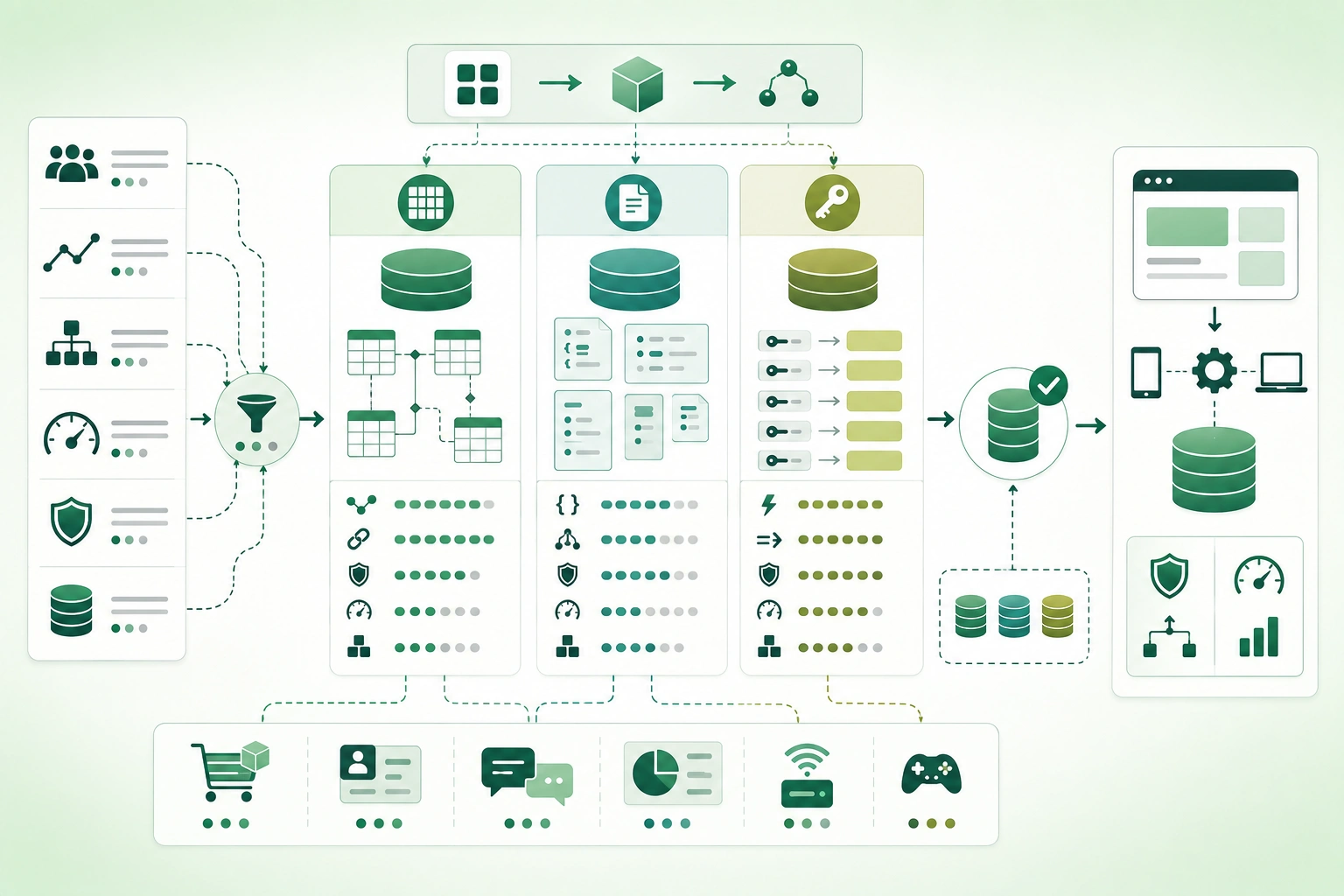
The three broad categories in this guide optimize for different shapes of work:
Relational:
connected structured data

Document:
aggregate-oriented flexible records

Key-value:
known lookup by key
Choose for the workload you actually have
Do not choose a database because the application might someday handle hundreds of millions of users. Model the current and credible future workload, identify the hardest access patterns, and prefer the simplest technology that meets those requirements safely.
1. Start with access patterns, not database labels
Database model comparison (diagram)
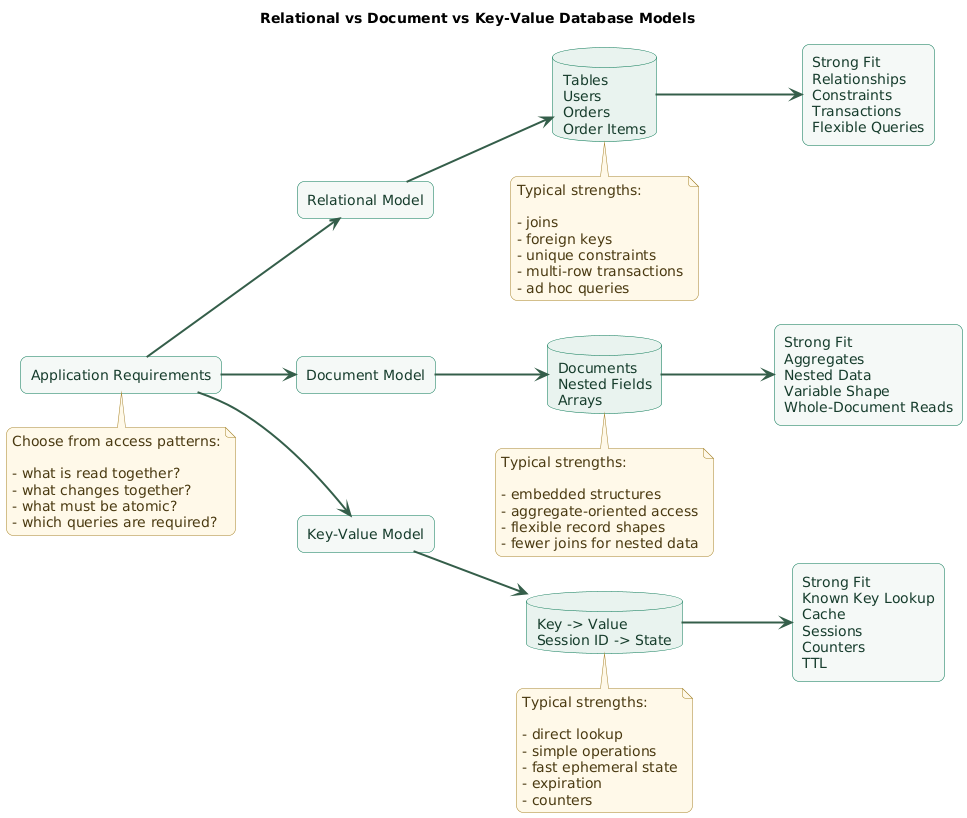
Before selecting a product, write down the important operations.
Example: online store
Create customer

Create order

Add order items

Reserve inventory

Find orders for customer

Find unpaid orders

Calculate monthly revenue

Cancel order atomically
Those operations reveal:
relationships

transactions

filtering

aggregation
which strongly favor a relational model for the core data.
Example: session store
Given session ID:
return session

Given session ID:
update expiry

Given session ID:
delete session
This is a natural key-value workload.
Example: product content
Product A:
size
color
weight

Product B:
screenSize
memory
battery

Product C:
author
pages
language
If products are usually loaded as complete aggregates and categories have substantially different fields, a document model may be attractive.
List queries before designing schema
read by ID

read by customer

filter by status

sort by date

aggregate by month

search nested attribute

expire after 30 minutes
The required queries often matter more than the shape of the object in your programming language.
2. Choose relational when relationships and integrity matter
Relational databases organize data into tables with explicit relationships.
Example model
users
  id
  email

orders
  id
  user_id
  status

order_items
  order_id
  product_id
  quantity
Relationships are first-class
user
  ↓
orders
  ↓
order items
  ↓
products
Joins allow those entities to be queried together without embedding every copy of the data into one record.
Constraints protect invariants
PRIMARY KEY

FOREIGN KEY

UNIQUE

NOT NULL

CHECK
The database can reject invalid states even if one application path contains a bug.
Transactions are a major strength
A checkout can require:
create order

insert order items

reserve inventory

record payment state
to behave as one logical transaction.
Flexible queries are useful as products evolve
Today:
find user by emailtomorrow:
find active customers
with more than 5 orders
in the last 90 days
Relational systems are strong when future query combinations are difficult to predict.
Relational does not mean rigid application development
Schemas can evolve through migrations:
add column

add table

add index

backfill

introduce constraint
Schema discipline can be valuable when important business data must remain valid for years.
3. Choose document when data behaves like aggregates
A document database commonly stores records similar to:
{
  "id": "product_123",
  "name": "Laptop",
  "specifications": {
    "memoryGb": 32,
    "storageGb": 1000,
    "screen": {
      "sizeInches": 14,
      "resolution": "2880x1800"
    }
  },
  "tags": [
    "portable",
    "developer"
  ]
}
Embedding can simplify aggregate reads
If the application almost always reads:
product
+
specifications
+
tags
together, storing them together can fit the workload naturally.
Documents can vary in shape
A book may contain:
author
pages
isbn
while a laptop contains:
memory
storage
screen
without forcing every record into an identical table shape.
Schema flexibility is not no schema
The application still needs expectations around:
required fields

field types

versions

nested structure

indexing

validation
Embedding creates duplication tradeoffs
Suppose an order embeds:
customerNameand the customer later changes their name.
Decide whether historical orders should:
keep original nameor:
show current customer namebecause document duplication makes this semantic choice explicit.
Documents work best with clear aggregate boundaries
Good fit:
blog post
with embedded sections and metadata
harder fit:
dense financial domain
with many cross-entity constraints
and arbitrary reporting
4. Choose key-value for simple, predictable access
The core key-value model is:
key
   ↓
value
Session example
Key:
session:8f12a

Value:
{
  "userId": "user_123",
  "expiresAt": "..."
}
Common key-value workloads
sessions

cache entries

rate limits

counters

temporary tokens

feature configuration

distributed coordination

queue state
Access pattern is usually known in advance
get by session ID

increment counter

set value with expiry

delete by key
What key-value stores usually do not optimize for
arbitrary joins

complex ad hoc filtering

multi-dimensional reporting

unknown future queries
Key design becomes architecture
For example:
rate:user_123:loginmay encode:
entity
scope
operation
because the system needs to know the key before it can retrieve the data.
Expiry can be a first-class capability
Temporary data such as:
password reset token

login challenge

cache entry
can benefit from automatic time-to-live behavior.
5. Model data around how it is read and changed
Relational modeling
Customer
   ↓
Order
   ↓
OrderItem
   ↓
Product
References preserve separate identities and allow flexible combinations.
Document modeling
Order document
  customer snapshot
  items[]
  shipping address
  totals
  status
can optimize retrieval of the complete order aggregate.
Key-value modeling
cart:user_123
     ↓
serialized cart state
works when retrieval is driven by a known unique key.
Ask what changes together
Does this nested data
belong to one aggregate?

Or does it have an independent
identity and lifecycle?
A shipping address captured on an order may reasonably be embedded as a historical snapshot.
A customer account referenced by thousands of orders usually has an independent lifecycle.
Do not model only from object shape
Application objects might naturally look nested:
User {
  orders: [...]
}
but embedding every order inside the user may be poor if orders are:
large

queried independently

updated frequently

retained for years
6. Decide what must change atomically
Database transaction and consistency boundaries (diagram)
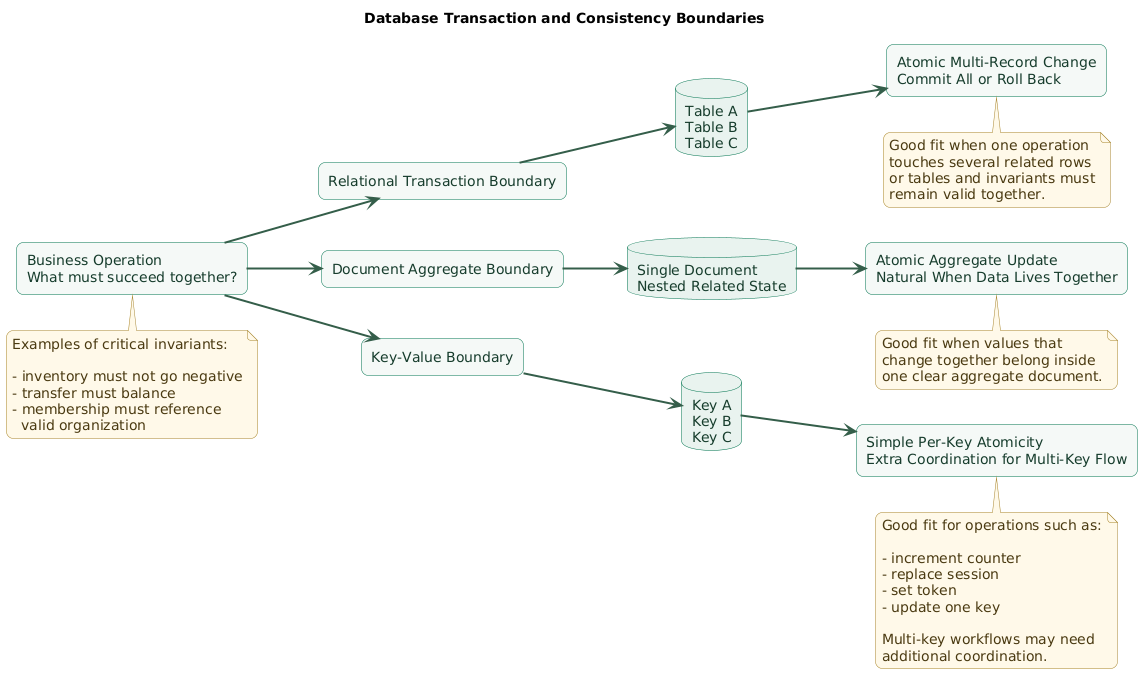
Ask:
Which values must never
temporarily disagree?
Financial example
debit account A

credit account B

write transfer record
If only part succeeds, the system may violate a critical invariant.
Inventory example
quantity available:
1

Customer A buys 1

Customer B buys 1
concurrency must not result in:
quantity:
-1
Relational databases make complex transactional workflows natural
Especially when transactions span:
several related rows

several tables

constraints
Document databases favor aggregate boundaries
When values that must change together live in:
one documentatomic updates are easier to reason about.
Cross-document coordination may require more careful modeling.
Key-value workloads should keep atomic scope simple
increment one counter

replace one session

set one lock key
are natural examples.
Do not choose weaker invariants only for theoretical scale
If the application needs strong transactional correctness, model that requirement explicitly instead of assuming the application layer can repair every partial failure later.
7. Let query flexibility influence the choice
Known query pattern
Get session by ID.Key-value is ideal.
Aggregate query pattern
Load article and all
embedded content blocks.
Document storage can be natural.
Flexible relational query
Find customers:

country = Belgium

and

at least 3 completed orders

and

no order in last 90 days

and

lifetime spend > threshold
relational querying is well suited to this kind of evolving analysis.
Ask whether future queries are predictable
Some domains naturally accumulate new reporting questions:
commerce

finance

CRM

subscriptions

inventory

administration
Flexible joins and aggregations can become strategically important.
Duplicating data can optimize reads
But every duplication creates a synchronization question:
Which copy is authoritative?

When is it refreshed?

Can stale data be tolerated?
Design for the hard queries
Ten trivial ID lookups should not hide one critical query that the chosen database model cannot support cleanly.
8. Treat indexes as part of the data model
A database can contain the correct data and still perform badly if the required access path is not indexed appropriately.
Example relational query
WHERE user_id = ?
AND status = ?
ORDER BY created_at DESC
may require an index designed around that access pattern.
Document indexes
Queries such as:
specifications.memoryGb >= 32may require indexes on nested document fields.
Key-value systems encode the access path into the key
session:user_123means lookup is direct, but arbitrary reverse queries may not exist unless additional structures are maintained.
Indexes have write cost
Every additional index may increase:
write work

storage

memory pressure

maintenance
Do not index every field automatically
Index:
real access patternsrather than:
everything just in caseMeasure query behavior with realistic data
Development databases with:
500 rowscan hide problems that appear at:
5 million rows9. Define consistency requirements explicitly
Ask:
After a write succeeds,
who must immediately see it?
Strong requirement
User purchases final item.

Next buyer must immediately
see that inventory is unavailable.
Weaker requirement
Analytics dashboard may show
data a few seconds late.
Different data can have different needs
payment state:
strong correctness

recommendation cache:
staleness acceptable
Replication can introduce read behavior decisions
If reads go to replicas, ask:
Can the user read stale data
immediately after writing?
Consistency is a business requirement
Do not select a consistency model only because:
it sounds more scalableor:
strong consistency sounds saferSpecify what the actual workflow requires.
10. Separate real scaling requirements from speculation
Weak requirement:
It needs to scale.Better:
Expected first year:

500,000 users

20 million orders

peak:
1,000 writes per second

read-to-write ratio:
8:1
Estimate data volume
records per day

record size

retention period

index size

growth rate
Estimate traffic shape
steady

business-hours peak

flash traffic

batch imports

nightly processing
Do not equate relational with single-server
Modern relational systems can use:
replication

partitioning

connection pooling

read replicas

sharding architectures

managed scaling features
Do not equate document or key-value with infinite scale
Every database still has:
partition limits

hot keys

network limits

index costs

storage limits

operational failure modes
Hot-key risk matters
A key-value architecture can distribute millions of keys well while one extremely popular key becomes:
the bottleneckBenchmark representative workloads
real record size

real indexes

real query distribution

real concurrency
instead of comparing marketing throughput numbers.
11. Include operational complexity in the decision
A database is not finished when:
INSERT worksBackups
Ask:
How is data backed up?

How often?

Where?

How is restore tested?
Recovery objectives
How much data can we lose?

How long can recovery take?
Monitoring
Track relevant signals such as:
latency

connections

storage

replication lag

cache hit rate

query errors
Migration tooling
Consider how you will perform:
schema changes

data backfills

index changes

field migrations
Security
Evaluate:
authentication

authorization

network controls

encryption

audit logging

secret rotation
Developer familiarity matters
A theoretically elegant database can become a poor choice if nobody on the team understands:
data modeling

failure modes

backups

performance tuning
Managed services can change the tradeoff
Operational burden may be lower when:
backup

patching

replication

failover

monitoring integrations
are handled by a mature managed platform.
12. Add specialized databases only when justified
An application might eventually use:
relational database:
business records

key-value store:
sessions and cache

search engine:
full-text search

analytics warehouse:
large reporting queries
This is sometimes called:
polyglot persistenceIt can be useful
because each workload receives a specialized store.
But each database adds costs
deployment

monitoring

backup

security

credentials

failure modes

developer knowledge

data synchronization
Start with one primary source of truth
For many applications:
relational primary databaseplus:
optional cache lateris simpler than choosing several stores before the workload exists.
Introduce specialization after measuring a limitation
Problem:
expensive repeated query

Possible solution:
cache
is stronger than:
We should add Redis
because modern architectures use it.
Define synchronization ownership
When data exists in several systems:
Which one is authoritative?

How are secondary copies updated?

What happens if synchronization fails?
13. Walk through common application examples
E-commerce core
Data:
customers

orders

payments

inventory

refunds
Important requirements:
relationships

constraints

transactions

reporting
Strong starting choice:
relational databaseContent management
Content types:
article

landing page

product page

FAQ
with varying nested blocks.
Possible fit:
document databaseespecially when content is normally loaded as one aggregate.
User sessions
session ID
     ↓
session state
     ↓
automatic expiry
Strong fit:
key-value databaseSaaS application
Core:
users
organizations
subscriptions
permissions
billing
likely relational.
Session and rate-limit state:
key-valuemay be added later if needed.
Product catalog with variable attributes
Possible options:
document model

or

relational model
with structured flexible fields
depending on:
filtering

relationships

reporting

validation
Chat application
Requirements may include:
users

conversations

membership

messages

unread counters

presence
One reasonable architecture may use:
relational:
users + conversations + durable records

key-value:
presence + ephemeral counters
but specialization should follow actual scale and latency requirements.
14. Use a repeatable database decision process
Database selection decision tree (diagram)
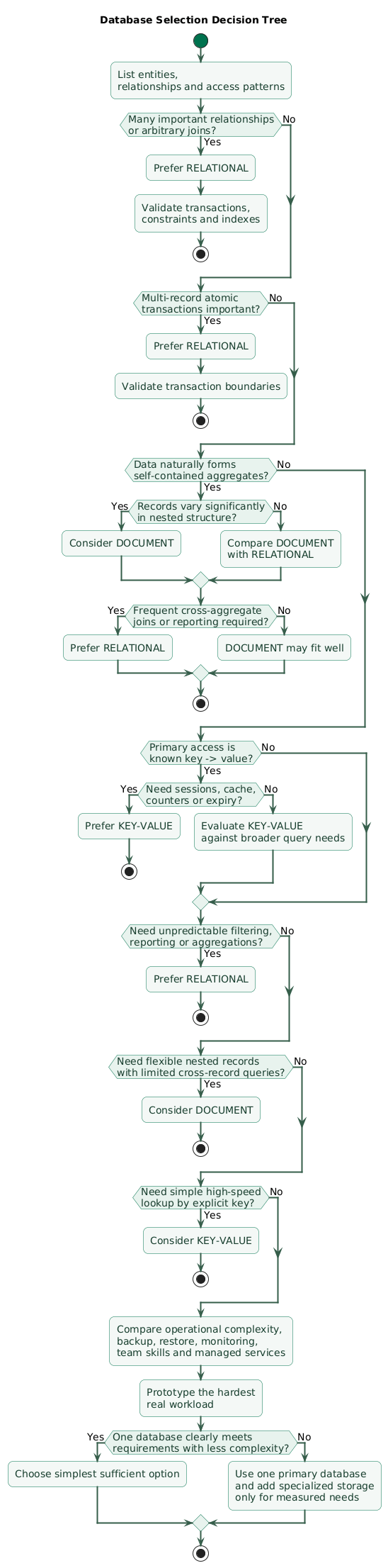
Step 1: list important entities
user

organization

invoice

device

article

session
Step 2: list relationships
user belongs to organization

invoice belongs to customer

device sends readings
Step 3: list critical reads
by ID

by owner

by status

by date range

aggregate

search
Step 4: list critical writes
single record

several related records

high-frequency counter

append-only event
Step 5: define transactional boundaries
What must succeed
or fail together?
Step 6: define invariants
email unique

inventory non-negative

membership references
existing organization
Step 7: estimate scale
records

record size

requests per second

growth

retention
Step 8: evaluate operations
backup

restore

monitoring

migrations

security

team skills
Step 9: prototype uncertain workloads
Test the hardest:
query

write pattern

transaction

index

data volume
Step 10: choose the simplest sufficient option
If two databases meet the requirements similarly, prefer the one that creates less:
operational complexity

learning cost

migration risk
15. Copy/paste database selection checklist
Database selection checklist

Application context
- What does the application do?
- Is the database the primary source of truth?
- Is the data temporary or durable?
- Is this a new application or migration?
- Is the workload operational, analytical, or both?

Entities
- List main entities.
- List entity identifiers.
- List ownership relationships.
- List lifecycle relationships.
- Identify aggregates.
- Identify independent records.
- Identify shared reference data.

Relationships
- One-to-one relationships?
- One-to-many relationships?
- Many-to-many relationships?
- Cross-entity constraints?
- Frequent joins?
- Hierarchical data?
- Graph-like relationships?
- Are relationships likely to increase?

Relational signals
- Connected business entities.
- Strong integrity constraints.
- Foreign keys useful.
- Unique constraints useful.
- Multi-record transactions.
- Ad hoc querying.
- Reporting.
- Aggregations.
- Flexible future query needs.
- Stable source-of-truth data.

Document signals
- Aggregate-oriented data.
- Nested structures.
- Records vary meaningfully in shape.
- Whole document commonly loaded.
- Whole document commonly updated.
- Few important cross-document joins.
- Duplication semantics acceptable.
- Aggregate boundaries clear.

Key-value signals
- Access primarily by known key.
- Simple get / set / delete.
- Sessions.
- Cache.
- Counters.
- Rate limits.
- Temporary tokens.
- Expiring state.
- Feature state.
- Fast lookup more important than flexible queries.

Access patterns
- Read by primary ID.
- Read by foreign ID.
- Filter by state.
- Filter by time.
- Sort by time.
- Aggregate by period.
- Search nested fields.
- Full-text search.
- Prefix search.
- Range query.
- Bulk lookup.
- Batch write.
- Streaming append.
- Expiring data.

Query predictability
- Are important queries known today?
- Will product teams add reporting later?
- Are ad hoc administrative queries expected?
- Will analysts query operational data?
- Can keys be known before lookup?
- Are cross-record filters important?

Write patterns
- Mostly reads?
- Mostly writes?
- Mixed workload?
- Append-only?
- Frequent updates?
- Hot counters?
- Bulk imports?
- Large documents?
- Many small records?
- Write bursts?

Transactions
- What must change atomically?
- One record only?
- Several records?
- Several tables?
- Several documents?
- Several keys?
- Can partial completion be tolerated?
- Can compensation repair failure?
- Is money involved?
- Is inventory involved?
- Is permission state involved?

Integrity
- Unique values?
- Required relationships?
- Non-negative values?
- Valid state transitions?
- Referential integrity?
- Database constraints useful?
- Application-only validation acceptable?
- How costly is corrupt data?

Concurrency
- Read-modify-write sequences?
- Competing updates?
- Inventory races?
- Duplicate creation?
- Counter updates?
- Optimistic locking?
- Pessimistic locking?
- Atomic per-key operation enough?

Relational modeling
- Normalize independent entities.
- Use foreign keys where appropriate.
- Add constraints.
- Design transactions.
- Add indexes from queries.
- Avoid unnecessary denormalization.
- Consider JSON fields only where useful.
- Plan migrations.

Document modeling
- Define aggregate boundary.
- Decide embed versus reference.
- Keep document size bounded.
- Decide duplication semantics.
- Define validation.
- Define document versions if needed.
- Index queried nested fields.
- Avoid giant growing documents.
- Avoid embedding unbounded collections.

Key-value modeling
- Define key format.
- Define namespace.
- Define value format.
- Define expiry.
- Define maximum value size.
- Define hot-key risk.
- Define invalidation.
- Define persistence expectations.
- Define eviction expectations.
- Define atomic operation requirements.

Embedding
- Is nested data owned by parent?
- Is nested data usually read with parent?
- Does nested data have independent lifecycle?
- Does nested data grow without bound?
- Is duplicated data acceptable?
- Is historical snapshot desired?

References
- Does entity exist independently?
- Is it shared by many records?
- Does it change independently?
- Must updates be reflected everywhere?
- Are cross-entity queries common?
- Is referential integrity important?

Schema
- Stable schema?
- Evolving schema?
- Many optional fields?
- Category-specific attributes?
- Strict validation needed?
- Schema migration tooling available?
- Versioned documents needed?
- Can old and new shapes coexist?

Schema flexibility
- Flexibility is not absence of schema.
- Define required fields.
- Define optional fields.
- Define types.
- Define nested shape.
- Define defaults.
- Define migration path.
- Validate important invariants.

Indexes
- List critical queries first.
- Identify equality predicates.
- Identify range predicates.
- Identify sort order.
- Identify composite indexes.
- Identify nested document indexes.
- Avoid indexing everything.
- Measure write cost.
- Measure storage cost.
- Test realistic cardinality.

Performance
- Define latency objective.
- Define throughput.
- Define concurrency.
- Define data size.
- Define record size.
- Define peak load.
- Define batch load.
- Use representative benchmark data.
- Measure p95 / p99 where appropriate.
- Avoid benchmark conclusions from tiny development data.

Scale
- Current user count.
- Expected user growth.
- Records per user.
- Records per day.
- Retention.
- Read requests per second.
- Write requests per second.
- Peak multiplier.
- Data growth per year.
- Credible future scale, not fantasy scale.

Horizontal scaling
- Is it actually required?
- Can vertical scaling solve near-term need?
- Can read replicas help?
- Can partitioning help?
- Can archival reduce active data?
- Is sharding complexity justified?
- How will keys distribute?
- Are hot partitions likely?

Partitioning
- Natural partition key?
- Balanced distribution?
- Cross-partition queries?
- Cross-partition transactions?
- Hot tenant?
- Hot key?
- Repartitioning strategy?
- Tenant isolation requirements?

Consistency
- Strong read-after-write required?
- Stale reads acceptable?
- How stale?
- Is eventual consistency understandable to users?
- Are conflicts possible?
- Who resolves conflicts?
- Does replica lag matter?
- Can critical reads go to primary?

Availability
- Required uptime?
- Multi-zone?
- Multi-region?
- Automatic failover?
- Read-only degradation acceptable?
- Write unavailability acceptable?
- What happens during partition?
- Recovery behavior understood?

Replication
- Synchronous or asynchronous?
- Replica lag?
- Failover behavior?
- Read routing?
- Write routing?
- Data loss window?
- Replication monitoring?
- Backup independent from replication?

Backups
- Automatic backups?
- Backup frequency?
- Retention?
- Encryption?
- Off-site copy?
- Point-in-time recovery?
- Restore tested?
- Restore time measured?

Recovery
- Recovery point objective.
- Recovery time objective.
- Documented restore process.
- Regular restore drills.
- Corruption scenario.
- Accidental delete scenario.
- Region-loss scenario if relevant.

Migrations
- Schema migrations?
- Document migrations?
- Backfills?
- Index builds?
- Zero-downtime requirement?
- Mixed-version compatibility?
- Rollback?
- Migration tooling?
- Large-data migration tested?

Operations
- Managed service available?
- Team experience?
- Monitoring available?
- Alerting available?
- Backup automation?
- Upgrade process?
- Scaling process?
- Incident runbooks?
- Capacity monitoring?
- Cost monitoring?

Security
- Authentication.
- Authorization.
- Network isolation.
- TLS.
- Encryption at rest.
- Audit logging.
- Secret rotation.
- Least privilege.
- Tenant isolation.
- Backup security.

Compliance
- Data residency?
- Retention rules?
- Deletion requirements?
- Audit requirements?
- Encryption requirements?
- Access logging?
- Backup retention restrictions?
- Regional deployment?

Cost
- Compute.
- Storage.
- Index storage.
- Backup storage.
- Network transfer.
- Replicas.
- Managed-service premium.
- Operational engineering cost.
- Licensing where applicable.
- Cost at expected scale.

Developer experience
- Team familiarity.
- Local development.
- Testing tools.
- Migration tools.
- Query tooling.
- ORM or driver maturity.
- Documentation.
- Debugging.
- Observability.
- Hiring and support availability.

Relational good-fit examples
- SaaS business data.
- Orders.
- Billing.
- Subscriptions.
- Inventory.
- Permissions.
- CRM.
- Financial records.
- Administration.
- Reporting-heavy operational systems.

Document good-fit examples
- Flexible content.
- Aggregate configuration.
- Product catalogs with variable attributes.
- Nested user preferences.
- Content blocks.
- Some event or metadata records.
- Aggregate-oriented application state.

Key-value good-fit examples
- Sessions.
- Cache.
- Rate limits.
- Counters.
- Temporary tokens.
- Presence.
- Ephemeral locks.
- Feature state.
- Fast lookup tables.

Relational warning signs
- Forcing every highly variable object into dozens of sparse tables.
- Excessive joins for one natural aggregate.
- Using relational model for purely ephemeral cache.
- Treating every JSON-like value as separate relational entity.

Document warning signs
- Heavy many-to-many relationships.
- Arbitrary reporting across entities.
- Frequent cross-document transactions.
- Large duplicated reference data.
- Unbounded arrays.
- Documents grow indefinitely.
- Application constantly simulates joins.

Key-value warning signs
- Need arbitrary filters.
- Need complex reports.
- Need many relationship queries.
- Need unknown future access patterns.
- Need rich multi-record transactions.
- Scanning keys becomes normal operation.
- Many secondary lookup structures required.

SQL vs NoSQL
- Do not decide from label alone.
- Evaluate actual product capabilities.
- Evaluate transactions.
- Evaluate indexes.
- Evaluate consistency.
- Evaluate replication.
- Evaluate scaling.
- Evaluate operations.
- Evaluate ecosystem.

Managed databases
- Backup quality.
- Restore capability.
- Failover.
- Upgrade policy.
- Monitoring.
- Scaling controls.
- Regional availability.
- Cost.
- Vendor portability.
- Operational simplicity.

Polyglot persistence
- Start simple.
- Define primary source of truth.
- Add specialization for measured need.
- Define data synchronization.
- Define failure behavior.
- Define consistency between stores.
- Add monitoring.
- Add backup procedures.
- Add security controls.
- Budget operational cost.

Caching
- What problem does cache solve?
- Which database remains authoritative?
- Cache key design.
- TTL.
- Invalidation.
- Stampede protection.
- Stale-data tolerance.
- Failure behavior.
- Do not introduce cache without measurable need.

Analytics
- Operational queries acceptable?
- Heavy analytics isolated?
- Need warehouse?
- Need replica?
- Need export pipeline?
- Avoid overloading primary production database.
- Define freshness requirement.

Search
- Basic indexed search enough?
- Need full-text relevance?
- Need fuzzy search?
- Need faceting?
- Need geospatial search?
- Specialized search engine justified?
- Keep source-of-truth ownership explicit.

Testing the choice
- Create representative schema.
- Load representative data.
- Run critical reads.
- Run critical writes.
- Test concurrency.
- Test transaction behavior.
- Test index behavior.
- Test failure scenarios.
- Measure latency.
- Measure operational complexity.

Prototype
- Focus on hardest requirement.
- Do not build complete application.
- Validate uncertain query.
- Validate scale assumption.
- Validate transaction.
- Validate document size.
- Validate hot-key behavior.
- Record evidence.

Decision record
- Workload described.
- Access patterns listed.
- Scale assumptions listed.
- Consistency requirements listed.
- Transaction requirements listed.
- Alternatives compared.
- Operational tradeoffs compared.
- Decision documented.
- Revisit trigger documented.

Revisit triggers
- Query patterns change materially.
- Scale changes by orders of magnitude.
- New consistency requirement.
- Operational cost becomes excessive.
- New workload cannot be served cleanly.
- Compliance requirement changes.
- Measured bottleneck appears.

Avoid premature migration
- Tune schema first.
- Tune indexes.
- Measure slow queries.
- Fix N+1 behavior.
- Add caching where justified.
- Archive old data.
- Scale infrastructure.
- Migrate database only for a concrete reason.

Final review
- What are the core entities?
- How are they related?
- What must be read together?
- What must be written together?
- What must be atomic?
- Which constraints must never break?
- Are future queries predictable?
- Are arbitrary joins important?
- Is aggregate embedding natural?
- Is lookup mostly by known key?
- Is expiry important?
- What consistency is required?
- What scale is actually expected?
- What indexes are required?
- What does backup and restore look like?
- Can the team operate this technology?
- Is a managed service mature enough?
- Is more than one database truly necessary?
- Has the hardest workload been tested?
- Are we choosing the simplest database that safely meets the real requirements?
16. FAQ
Which database type should a new application use by default?
A relational database is often a strong starting point when the application contains connected business data, transactions, integrity constraints, and evolving query requirements. Choose another model when the workload has a clear reason to benefit from it.
When is a document database a good choice?
It can be a good fit when data forms natural aggregates, nested structures are common, records vary in shape, and most important operations read or update those aggregates without extensive cross-record joins.
When should I use a key-value database?
Use it for workloads driven by simple known keys, such as sessions, caches, counters, rate limits, feature state, temporary tokens, and other fast lookup or expiring data.
Does NoSQL scale better than relational databases?
Not automatically. Scaling depends on the specific database, workload, indexes, partition keys, replication, query patterns, and architecture. Both relational and non-relational systems can scale well when designed for the workload.
Is a flexible document schema easier to maintain?
Sometimes, but flexibility transfers responsibility to application and data-model design. You still need validation, indexes, migration rules, compatibility decisions, and a strategy for old document shapes.
Should an app use both SQL and NoSQL databases?
Only when distinct workloads justify the additional complexity. A common pattern is one primary relational source of truth with a specialized key-value cache or another secondary store introduced after a concrete need appears.
What should I evaluate before changing database technology?
Measure the actual bottleneck first. Check schema design, indexes, query patterns, N+1 behavior, caching opportunities, data growth, infrastructure limits, and operational tuning before committing to a costly database migration.
Key terms (quick glossary)
- Relational database
- A database that organizes data into relations such as tables and supports structured queries, constraints, joins, and transactional operations.
- Document database
- A database that stores records as document-like structures, commonly containing nested fields and arrays that represent an application aggregate.
- Key-value database
- A database optimized around retrieving and modifying a value using a known unique key.
- SQL
- Structured Query Language, commonly used to define, query, modify, and manage data in relational database systems.
- NoSQL
- A broad label covering non-relational data models such as document, key-value, wide-column, and graph databases.
- Transaction
- A logical group of database operations that must satisfy defined atomicity and consistency behavior.
- Join
- A query operation that combines related data from separate relations or datasets.
- Index
- A data structure maintained by a database to accelerate particular lookup, filtering, sorting, or range access patterns.
- Aggregate
- A group of related data treated as one logical consistency and lifecycle boundary.
- Embedding
- Storing related nested data inside the same document or record rather than referencing it separately.
- Referential integrity
- The guarantee that relationships between records remain valid, such as a foreign key referencing an existing row.
- Consistency
- The rules that determine when reads observe writes and whether different copies of data may temporarily disagree.
- Replication
- Maintaining copies of database data on multiple nodes for availability, read scaling, disaster recovery, or geographic distribution.
- Partitioning
- Dividing data into separate partitions so storage or workload can be distributed across resources.
- Time to live
- A configured lifetime after which a database entry can expire automatically.
- Polyglot persistence
- Using several database technologies within one system so distinct workloads can use different storage models.
Worth reading
Recommended guides from the category.
