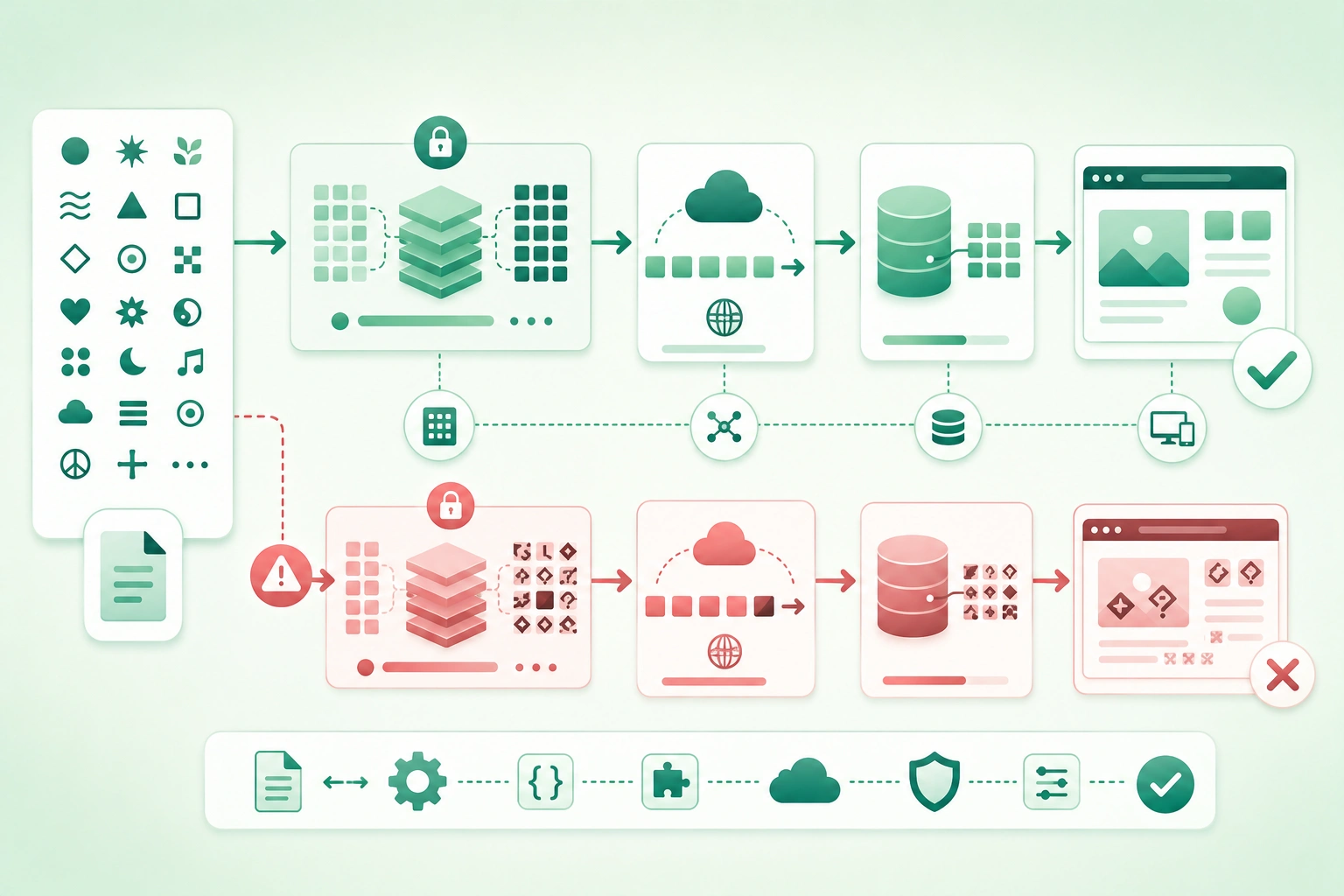
Many text bugs begin with one apparently harmless assumption:
one character
=
one byte
In modern software, that assumption is usually wrong.
Another common assumption is:
one visible symbol
=
one Unicode code point
That is also not always true.
Real text may contain:
- Characters from many writing systems.
- Combining marks.
- Emoji sequences.
- Right-to-left text.
- Different normalization forms.
- Multiple bytes per encoded value.
The safest mental model is:
user-visible text
      ↓
grapheme clusters
      ↓
Unicode code points
      ↓
encoding code units
      ↓
bytes
Keep text as text and bytes as bytes
Decode external bytes once when they enter your application, work with your language's string abstraction internally, and encode explicitly when text leaves through a file, socket, protocol, or other byte-oriented boundary. Many encoding bugs come from repeatedly guessing whether a value is already encoded or decoded.
1. Separate Unicode from character encodings
Unicode and UTF-8 are related, but they are not the same thing.
Unicode
Unicode assigns abstract values called:
code pointsto characters and other textual elements.
They are commonly written like:
U+0041
U+00E9
U+20AC
U+1F600
UTF-8
UTF-8 defines how Unicode values are represented as:
bytesUTF-16
UTF-16 represents Unicode values using:
16-bit code unitswith some values requiring a pair of code units.
Think in layers
Unicode:
what abstract value is this?

Encoding:
how is that value represented
for storage or transmission?
Why this matters
A string may contain:
€as one Unicode code point while its UTF-8 representation requires multiple bytes.
Therefore:
Unicode code-point count
!=
UTF-8 byte count
2. Distinguish graphemes, code points, code units, and bytes
Unicode text representation layers (diagram)
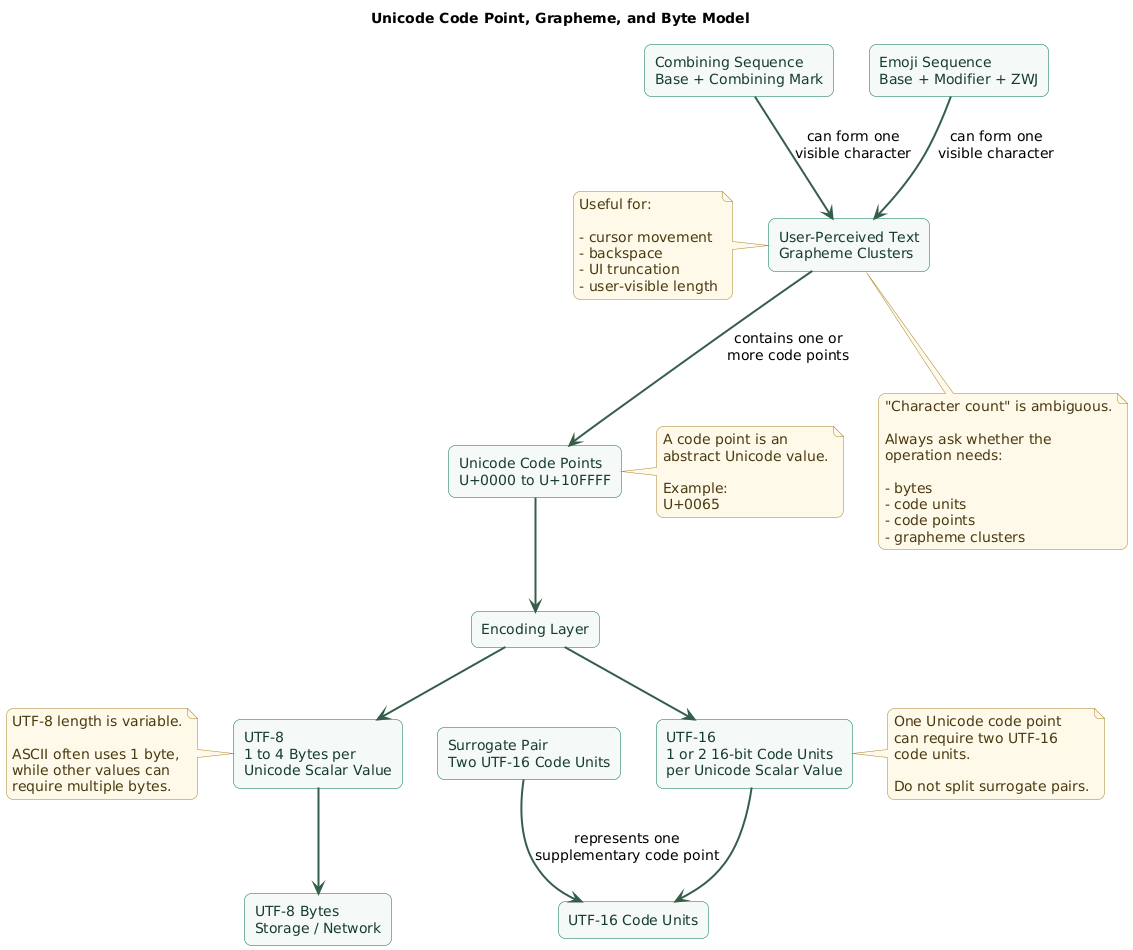
Grapheme cluster
A grapheme cluster is approximately what a user perceives as one character during text interaction.
Example:
émay be represented as:
one precomposed code pointor conceptually as:
e
+
combining acute accent
Two code points can therefore display as one user-perceived character.
Code point
A code point is a Unicode value such as:
U+0065Code unit
A code unit is the basic storage unit used by an encoding.
For example:
UTF-8:
8-bit code units

UTF-16:
16-bit code units
Byte
Bytes are the actual octets written to:
files
network sockets
database wire protocols
message queues
Do not use the word "character" when precision matters
Instead ask:
bytes?

code units?

code points?

grapheme clusters?
3. Understand why UTF-8 length is variable
UTF-8 uses:
1 to 4 bytesfor Unicode scalar values.
ASCII-compatible range
Basic ASCII characters use one byte.
Therefore:
Hellois easy to mistake for proof that:
character count
=
byte count
because that happens to be true for those characters.
International text breaks that assumption
Characters such as:
é
€
漢
😀
use different numbers of UTF-8 bytes.
Never truncate arbitrary UTF-8 bytes and assume the result is valid text
Suppose an encoded string ends with a multi-byte sequence.
Cutting:
first 100 bytesmay split the final encoded value halfway through.
Better:
decode text

truncate using the
appropriate text unit

encode again

verify byte limit
Protocol limits may still care about bytes
If a field allows:
255 UTF-8 bytesdo not validate only:
string.length <= 255unless that runtime's length semantics happen to match the protocol.
4. Understand UTF-16 and surrogate pairs
Many programming environments historically expose strings in units related to UTF-16.
Some Unicode values fit into:
one 16-bit code unitwhile values outside the Basic Multilingual Plane require:
two code unitscalled:
a surrogate pairThis creates another length trap
A visible emoji might be:
one code point

but

two UTF-16 code units
Indexing can split a pair
Code like:
take first code unitcan produce invalid or meaningless text if that unit is half of a surrogate pair.
Use Unicode-aware iteration
When you need code points, use the language or library API that iterates Unicode scalar values rather than raw UTF-16 units.
User-facing editing needs an even higher-level abstraction
Iterating code points still does not necessarily equal:
what the user sees
as one character
because combining sequences and emoji can contain multiple code points.
5. Encode and decode only at byte boundaries
Unicode data flow through an application (diagram)

A reliable architecture looks like:
external bytes
      ↓
decode using known encoding
      ↓
Unicode string
      ↓
application logic
      ↓
encode using required encoding
      ↓
external bytes
Bad boundary design
sometimes string

sometimes UTF-8 bytes

sometimes base64 string

sometimes already decoded
passed through the same variable or API.
Name representations clearly
For example:
requestBodyBytes

requestText

encodedPayload

decodedMessage
Specify encoding at file boundaries
Avoid:
read text using
platform default encoding
when the file format actually requires UTF-8.
Specify HTTP and protocol expectations
Know whether text arrives as:
UTF-8 JSON

UTF-8 CSV

legacy encoded file

binary protocol
instead of guessing from the content.
Do not encode text twice
A common failure:
Unicode text
      ↓
UTF-8 bytes
      ↓
treat bytes as text
      ↓
encode again
creates corrupted output.
6. Diagnose mojibake and replacement characters
Mojibake is garbled text produced when encoded bytes are interpreted using the wrong character encoding.
Classic failure
original text
      ↓
encode as UTF-8
      ↓
decode bytes as another encoding
      ↓
garbled text
Symptoms
You might see:
unexpected accented symbols

sequences of strange punctuation

question marks

replacement characters
U+FFFD replacement character
Many decoders use:
�to indicate that invalid input could not be decoded cleanly.
Seeing it is evidence that data may already have been lost.
Do not fix mojibake by string replacement
Weak:
replace "é" with "é"This only patches one visible symptom.
Find:
where were bytes created?

which encoding was used?

which encoding decoded them?
Inspect raw bytes when necessary
Logging:
hex bytesaround the failing boundary can distinguish:
correct bytes
decoded incorrectly
from:
already corrupted bytes7. Normalize text intentionally
Unicode can represent some visually equivalent strings using different code-point sequences.
Example
One string may contain:
éas a precomposed code point.
Another may contain:
e
+
combining acute accent
They can render identically while binary comparison says:
differentCanonical normalization
Common forms include:
NFC
NFD
which provide canonical normalization in composed or decomposed forms.
Compatibility normalization
Forms:
NFKC
NFKD
perform additional compatibility transformations.
That can be useful in some matching or identifier systems but can also intentionally collapse distinctions.
Do not normalize blindly
Decide:
which fields need normalization?

which form?

at which boundary?

for storage or only comparison?
Normalize consistently
A dangerous architecture:
mobile app:
NFC

API:
no normalization

search index:
NFKC

database:
binary equality
can produce inconsistent behavior.
Passwords and cryptographic input require explicit protocol rules
Do not silently transform security-sensitive input merely because ordinary display text is normalized elsewhere.
The exact transformation policy must be part of the authentication or cryptographic protocol.
8. Define what string length means
Asking:
How long is this string?is incomplete.
Byte length
Useful for:
wire protocols
storage quotas
encoded field limits
Code-unit length
Often exposed by low-level runtime string APIs.
Code-point length
Useful for certain Unicode algorithms.
Grapheme-cluster length
Often closer to:
how many characters
the user perceives
Input limits
Suppose a display name allows:
30 charactersDecide whether that really means:
30 code points

or

30 grapheme clusters

or

120 UTF-8 bytes
They are not equivalent.
Database columns
Verify whether limits are expressed in:
characters
bytes
code units
for the specific database and data type.
Do not truncate by low-level index for display
A UI showing:
first 10 code unitscan split:
surrogate pair
combining sequence
emoji sequence
9. Treat emoji and grapheme clusters as sequences
Emoji expose many hidden assumptions in string code.
One displayed emoji may contain multiple code points
Sequences can include:
- Base emoji.
- Skin-tone modifiers.
- Variation selectors.
- Zero-width joiners.
- Regional indicators.
Family-style emoji
What looks like:
one symbolmay be assembled from:
multiple person emoji
+
zero-width joiners
Flags
Many flags are represented using:
two regional indicator
code points
Skin tones
A displayed emoji may combine:
base emoji
+
modifier
Cursor movement should respect grapheme boundaries
If the user presses backspace once, they usually expect:
one visible character removednot:
half of an emoji sequenceUse text-segmentation APIs
For user-facing editing, truncation, selection, and cursor movement, use Unicode-aware grapheme segmentation provided by the platform or a mature library.
10. Handle casing, equality, sorting, and search carefully
Binary equality
Compares underlying representation.
Useful when exact identity matters.
Canonical equality
Some applications want canonically equivalent representations to compare the same after normalization.
Case-insensitive comparison
Avoid assuming:
lowercase(a)
==
lowercase(b)
is a universal Unicode case-insensitive algorithm.
Case folding
Unicode-aware libraries often provide:
case foldingfor case-insensitive matching.
Locale-sensitive casing
Some languages have casing behavior that depends on locale.
Therefore distinguish:
machine identifier comparison

from

human-language display casing
Sorting is not byte sorting
Human-language collation may depend on:
locale
accent handling
case handling
script-specific rules
Search needs a documented policy
Decide whether search is:
case sensitive?

accent sensitive?

normalization aware?

locale aware?
Regular expressions can have different text semantics
Depending on the language and regex engine:
.may represent:
a code unit
a code point
or another engine-defined unit
and usually should not be assumed to mean one grapheme cluster.
11. Audit databases, files, APIs, and external systems
Databases
Verify:
column encoding
collation
length semantics
index behavior
normalization policy
Unique constraints
A database might treat:
case variants

accent variants

canonically equivalent strings
differently depending on collation.
Do not assume application equality matches database equality.
Search indexes
Search systems may apply:
lowercasing
accent folding
tokenization
normalization
independently of the primary database.
Files
Explicitly define:
UTF-8
UTF-16
legacy encoding
rather than using machine-specific defaults.
Byte Order Mark
Some formats or tools may include a BOM.
Your parser should follow the format's requirements instead of treating the first unexpected bytes as ordinary text.
CSV
CSV interoperability involves more than encoding.
Also test:
delimiter
quotes
newlines
UTF-8
spreadsheet import behavior
APIs
Verify the encoding of:
request body
response body
headers
URL parameters
File names
Operating systems and filesystems may differ in:
normalization
case sensitivity
case preservation
Never assume a filename created on one platform compares byte-for-byte the same after transfer to another.
12. Consider Unicode in security-sensitive identifiers
Unicode allows many visually similar characters.
For example, characters from different scripts can sometimes resemble:
A
a
o
0
l
I
without being the same Unicode value.
Confusable identifiers
This matters for:
usernames
domains
security labels
package names
tenant identifiers
admin-visible account names
Do not solve this by banning all non-ASCII text everywhere
That damages legitimate international use.
Instead define field-specific policies.
Separate display name from security identifier
For example:
display name:
rich Unicode text

internal account ID:
stable opaque identifier
Authorization should rely on:
stable system identitynot a visually rendered name.
Normalization can affect identifiers
Define the normalization and comparison policy:
before users depend on itbecause changing identity semantics after millions of accounts exist can be difficult.
Log identifiers unambiguously
Security debugging may benefit from storing:
stable internal ID

plus

safe display representation
rather than relying only on a visually ambiguous username.
13. Debug text corruption systematically
Unicode debugging and normalization workflow (diagram)
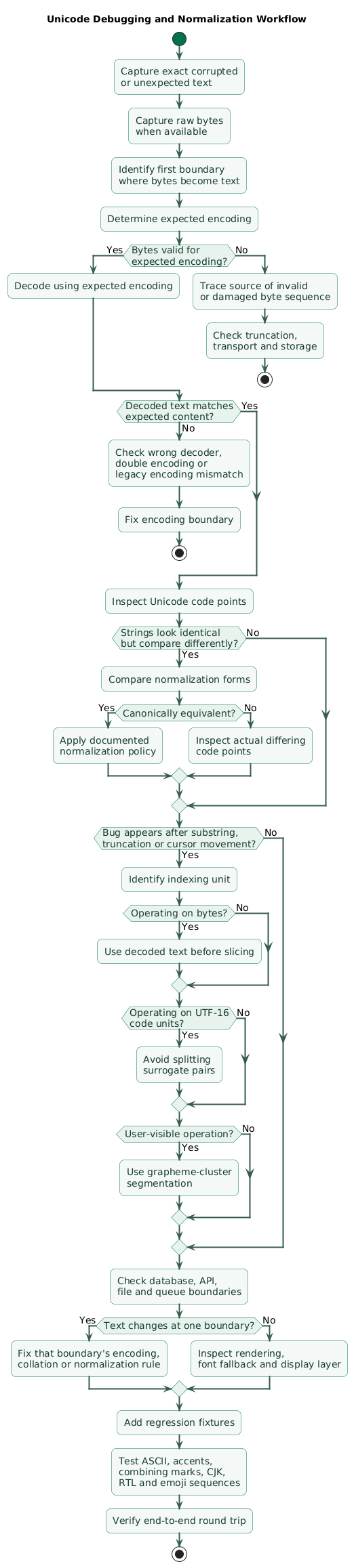
Step 1: preserve the exact input
Do not rewrite:
the strange-looking textmanually before investigation.
Capture:
exact string

raw bytes where available

source system
Step 2: identify the first byte boundary
Ask:
Where did bytes become text?Possible boundaries:
HTTP response

database driver

file reader

message queue consumer

CSV importer
Step 3: verify expected encoding
Compare:
actual bytes

expected UTF-8 bytes
or the encoding required by the source.
Step 4: inspect code points
When two strings look identical but compare differently, log:
code-point sequencerather than only the rendered text.
Step 5: inspect normalization
Compare:
raw equality

NFC-normalized equality
when canonical equivalence is relevant.
Step 6: inspect the unit used for slicing
If text becomes corrupted after:
substring
truncate
limit
cursor move
determine whether the code slices:
bytes
code units
code points
grapheme clusters
Step 7: inspect storage and retrieval independently
input correct?

database value correct?

database output correct?

API output correct?

client decode correct?
Find the first boundary where text changes.
Step 8: create a regression fixture
Include realistic cases such as:
é

e + combining acute

漢字

مرحبا

😀

emoji with skin tone

emoji ZWJ sequence
Step 9: fix the boundary, not the visible symptom
Prefer:
correct UTF-8 decoderover:
replace known mojibake strings14. Copy/paste Unicode developer checklist
Unicode and text encoding checklist

Mental model
- Separate Unicode from UTF-8.
- Separate code points from bytes.
- Separate code units from code points.
- Separate grapheme clusters from code points.
- Avoid using "character" when precision matters.
- Define which text unit each algorithm requires.

Unicode
- Treat text as Unicode internally.
- Understand code-point notation such as U+0041.
- Avoid assuming all Unicode fits into one byte.
- Avoid assuming all Unicode fits into one UTF-16 code unit.
- Use Unicode-aware libraries.

UTF-8
- Use UTF-8 for modern text interchange when protocol permits.
- Remember UTF-8 uses variable-length sequences.
- Basic ASCII uses one byte.
- Other characters can require multiple bytes.
- Do not slice UTF-8 arbitrarily by bytes.
- Validate protocol byte limits after encoding.
- Decode malformed input according to explicit policy.

UTF-16
- Understand surrogate pairs.
- Do not assume one UTF-16 code unit is one code point.
- Avoid splitting surrogate pairs.
- Use code-point iteration when needed.
- Use grapheme iteration for user-facing editing.

Encoding boundaries
- Know where bytes enter application.
- Decode once.
- Use explicit encoding.
- Keep decoded text as text.
- Encode when leaving byte boundary.
- Avoid double encoding.
- Avoid double decoding.
- Name byte and text variables clearly.

Files
- Specify file encoding.
- Avoid platform-default encoding.
- Document UTF-8 expectation.
- Handle BOM according to file format.
- Test files created by external tools.
- Test files from Windows, macOS, and Linux where relevant.
- Preserve newlines according to format requirements.

HTTP
- Know body encoding.
- Know content type.
- Decode response once.
- Encode request once.
- Test international request bodies.
- Test URL parameter encoding.
- Do not confuse percent encoding with text encoding.

JSON
- Treat JSON strings as Unicode text.
- Use UTF-8 for interoperable exchange.
- Let JSON library handle escaping.
- Do not manually escape Unicode unless required.
- Test emoji.
- Test combining marks.
- Test right-to-left text.
- Test invalid input handling.

CSV
- Define encoding.
- Define delimiter.
- Define quoting.
- Define newline behavior.
- Test Unicode headers.
- Test Unicode values.
- Test spreadsheet import/export.
- Test BOM expectations of external tools.
- Avoid assuming CSV means ASCII.

Databases
- Verify database character set.
- Verify column character set.
- Verify collation.
- Verify index behavior.
- Verify length semantics.
- Verify unique constraints.
- Test multilingual values.
- Test emoji.
- Test combining marks.
- Test normalization behavior.

Database equality
- Know whether comparison is binary.
- Know whether comparison is case insensitive.
- Know whether accents are significant.
- Know whether normalization differences matter.
- Keep application equality compatible with database semantics.

Search
- Define case sensitivity.
- Define accent sensitivity.
- Define normalization policy.
- Define locale behavior.
- Test multilingual queries.
- Test combining sequences.
- Test emoji.
- Test non-Latin scripts.

Normalization
- Understand NFC.
- Understand NFD.
- Understand NFKC.
- Understand NFKD.
- Choose normalization intentionally.
- Normalize at consistent boundaries.
- Avoid normalizing arbitrary security-sensitive input.
- Document identity normalization rules.
- Test canonically equivalent strings.

Canonical equivalence
- Test precomposed accented characters.
- Test decomposed base + combining mark.
- Do not rely on visual equality.
- Compare code points when debugging.
- Normalize where product semantics require it.

Compatibility normalization
- Use only when semantic collapsing is intended.
- Understand NFKC may change compatibility characters.
- Do not apply blindly to arbitrary stored text.
- Separate search normalization from display preservation where useful.

String length
- Decide byte length.
- Decide code-unit length.
- Decide code-point length.
- Decide grapheme-cluster length.
- Document field limit semantics.
- Test non-ASCII input.
- Test emoji sequences.
- Test combining marks.

Truncation
- Do not truncate UTF-8 mid-sequence.
- Do not split UTF-16 surrogate pair.
- Do not split combining sequence for user display.
- Do not split emoji ZWJ sequence.
- Use grapheme-aware truncation for UI.
- Re-check encoded byte length after truncation when protocol limits bytes.

Input validation
- Accept realistic Unicode where field allows it.
- Avoid ASCII-only validation without product reason.
- Test whitespace variants.
- Test combining marks.
- Test non-Latin digits where relevant.
- Test right-to-left scripts.
- Test long grapheme sequences.
- Test malformed byte input at boundaries.

Names
- Support international names.
- Avoid assuming first name + last name everywhere.
- Avoid ASCII-only letters.
- Avoid arbitrary short maximum lengths.
- Preserve user spelling.
- Do not normalize away meaningful distinctions casually.

Usernames
- Define allowed script policy.
- Define normalization policy.
- Define case policy.
- Define uniqueness policy.
- Consider confusable characters.
- Use stable internal account IDs.
- Do not use display name as authorization identity.

Passwords
- Preserve protocol-defined semantics.
- Do not trim silently unless specification says so.
- Do not lowercase.
- Do not normalize unless authentication design explicitly defines it.
- Ensure client and server use identical rules.
- Test Unicode passwords if supported.
- Apply byte limits carefully.

Email
- Do not invent simplistic Unicode validation.
- Use standards-aware email handling appropriate to system requirements.
- Preserve user input.
- Distinguish display from canonical account identity.
- Test internationalized domains if supported.

URLs
- Distinguish Unicode text from encoded URI components.
- Use URL library.
- Do not concatenate raw query values.
- Encode path segments correctly.
- Encode query values correctly.
- Test international text.
- Avoid double percent encoding.

Grapheme clusters
- Use for cursor movement.
- Use for backspace semantics.
- Use for display truncation.
- Use for character counters where user perception matters.
- Do not assume one cluster equals one code point.
- Use mature segmentation implementation.

Combining marks
- Test base + combining accents.
- Test multiple marks.
- Do not assume visual width from code-point count.
- Do not separate marks during UI truncation.
- Normalize when application policy requires it.

Emoji
- Test supplementary-plane emoji.
- Test skin-tone modifiers.
- Test variation selectors.
- Test ZWJ sequences.
- Test flags.
- Test keycap sequences.
- Do not assume emoji length equals one.
- Do not split emoji during truncation.

Zero-width joiner
- Treat as part of emoji / script sequence where applicable.
- Do not strip invisible characters blindly.
- Use segmentation libraries.
- Inspect code points during debugging.

Variation selectors
- Understand visual presentation can depend on selector.
- Avoid stripping without reason.
- Test emoji/text presentation differences where relevant.

Right-to-left text
- Test Arabic.
- Test Hebrew where relevant.
- Test mixed RTL + LTR content.
- Do not assume visual order equals logical code-point order.
- Use platform bidi support.
- Avoid manual string reversal.

Casing
- Do not assume lowercase is universal case-insensitive comparison.
- Use Unicode-aware case folding for caseless matching.
- Use locale-aware casing for human-language presentation where required.
- Test Turkish-style casing if locale-sensitive behavior matters.
- Keep machine identifiers separate from display casing.

Sorting
- Use locale-aware collation for human lists.
- Do not sort user-facing text by UTF-8 bytes.
- Document accent behavior.
- Document case behavior.
- Test multiple scripts.
- Use stable secondary key when needed.

Regular expressions
- Know whether engine is Unicode aware.
- Know what dot matches.
- Know what character classes mean.
- Do not assume one match unit equals one grapheme.
- Use Unicode properties where supported.
- Test supplementary characters.
- Test combining sequences.

Substrings
- Know indexing semantics of language.
- Avoid code-unit slicing for user-visible units.
- Avoid byte slicing of encoded text.
- Use grapheme segmentation when display semantics require it.

Mojibake
- Capture exact corrupted text.
- Capture raw bytes.
- Identify original encoding.
- Identify decoder encoding.
- Find first incorrect conversion.
- Do not repair with ad-hoc replacements.
- Add regression test after fixing boundary.

Replacement character
- Treat U+FFFD as evidence of decoding trouble.
- Find where invalid sequence appeared.
- Determine whether decoder replaced or rejected input.
- Preserve original bytes when diagnostics require it safely.
- Avoid repeatedly encoding already damaged text.

Double encoding
- Look for UTF-8 bytes treated as text.
- Look for repeated percent encoding.
- Look for repeated HTML escaping separately from encoding.
- Keep representation types distinct.
- Add type wrappers where useful.

Logging
- Log encoding name at important boundaries.
- Log safe byte length.
- Log safe code-point sequence for debugging where appropriate.
- Avoid dumping sensitive text.
- Use stable internal IDs.
- Preserve enough context to locate corruption boundary.

Diagnostics
- Compare rendered text.
- Compare raw bytes.
- Compare code points.
- Compare normalization form.
- Compare grapheme segmentation.
- Compare database value.
- Compare API value.
- Compare client value.

Security
- Consider confusable characters.
- Consider mixed-script identifiers.
- Avoid display-name authorization.
- Use opaque internal IDs.
- Normalize identifiers only according to explicit policy.
- Review security-sensitive equality.
- Log ambiguous identifiers with stable IDs.

File names
- Test normalization differences.
- Test case sensitivity.
- Test case preservation.
- Avoid using visual filename equality as identity.
- Use platform APIs.
- Sanitize path separators separately from Unicode.
- Test cross-platform synchronization.

Source code
- Save source as UTF-8.
- Configure compiler / editor consistently.
- Avoid invisible control characters in security-sensitive code.
- Review unusual identifier characters.
- Keep tooling capable of showing Unicode code points when debugging.

APIs
- Document encoding.
- Document normalization expectations.
- Document field length units.
- Document casing rules.
- Document identifier comparison.
- Reject invalid byte sequences according to protocol.
- Keep client and server behavior consistent.

Microservices
- Standardize text encoding.
- Standardize normalization policy where required.
- Test service-to-service Unicode.
- Avoid one service normalizing differently from another.
- Include Unicode fixtures in contract tests.
- Preserve text through queues and event buses.

Message queues
- Define payload encoding.
- Prefer structured format with explicit Unicode handling.
- Test producers and consumers independently.
- Avoid guessing encoding.
- Preserve message bytes for diagnostics where safe.
- Version payload contracts.

Caching
- Normalize cache keys only according to identity policy.
- Ensure cache equality matches application equality.
- Avoid duplicate cache entries from inconsistent normalization.
- Test mixed case.
- Test canonical equivalents.

Hashing
- Hash bytes, not an ambiguous text representation.
- Define encoding before hashing text.
- Use same normalization policy on all sides when protocol requires it.
- Never silently change established protocol rules.
- Test international input.

Cryptographic signatures
- Define exact byte representation.
- Define encoding.
- Define normalization if protocol requires it.
- Avoid signing display-rendered strings.
- Canonicalize structured data according to protocol specification.
- Test cross-platform output.

Testing
- Include ASCII.
- Include accented Latin.
- Include combining marks.
- Include Cyrillic.
- Include Greek where relevant.
- Include Arabic.
- Include CJK.
- Include emoji.
- Include ZWJ emoji.
- Include flags.
- Include large text.
- Include malformed byte input.

Test fixtures
- Store fixtures in UTF-8.
- Keep expected byte arrays where boundary behavior matters.
- Keep expected code-point sequences where normalization matters.
- Avoid copying corrupted text through tools that alter encoding.
- Version tricky fixtures.

Property testing
- Generate arbitrary Unicode strings.
- Include combining characters.
- Include supplementary code points.
- Include control characters where protocol permits.
- Verify encode -> decode round trip.
- Verify normalization invariants where required.
- Verify no crashes during segmentation.

Round trips
- Text -> UTF-8 -> text should preserve valid input.
- Database write -> read should preserve intended text.
- API serialize -> deserialize should preserve text.
- File write -> read should preserve text.
- Search indexing should preserve intended matching semantics.

UI
- Test font fallback.
- Test missing glyph behavior.
- Test clipping.
- Test mixed scripts.
- Test RTL.
- Test emoji.
- Test grapheme-aware deletion.
- Test user-visible character counters.

Fonts
- Unicode support does not guarantee glyph availability.
- Test platform fonts.
- Provide fallback fonts where required.
- Do not confuse missing glyph with encoding failure.
- Distinguish tofu box from corrupted text.

Performance
- Remember grapheme segmentation can cost more than byte indexing.
- Avoid repeatedly normalizing huge unchanged strings.
- Normalize at clear boundaries.
- Cache derived forms only when worthwhile.
- Measure before optimizing.

Code review
- Where are bytes decoded?
- Is encoding explicit?
- What does string length mean here?
- Could slicing split a Unicode sequence?
- Should this comparison normalize?
- Should this comparison case-fold?
- Is locale involved?
- Could this identifier be confusable?
- Are database and application collations compatible?
- Are tests ASCII-only?

Production debugging
- Capture exact release.
- Capture input source.
- Capture encoding metadata.
- Locate first corruption boundary.
- Compare raw bytes.
- Compare decoded text.
- Compare database representation.
- Compare API response.
- Compare client rendering.
- Fix boundary.
- Add regression test.

Final review
- Is Unicode separate from encoding in the design?
- Is UTF-8 explicit at byte-oriented boundaries?
- Are bytes decoded exactly once?
- Are strings encoded exactly once on output?
- Are byte and text variables clearly separated?
- Do field limits define bytes, code points, or grapheme clusters?
- Can truncation split UTF-8?
- Can truncation split UTF-16 surrogate pairs?
- Can truncation split combining sequences or emoji?
- Is normalization policy documented?
- Is casing policy documented?
- Does database equality match application expectations?
- Are search and sorting locale rules intentional?
- Are security-sensitive identifiers protected from visual ambiguity?
- Are multilingual and emoji fixtures included in tests?
- Can developers inspect raw bytes and code points when debugging?
- Does the system preserve international text end to end?
15. FAQ
What is the difference between Unicode and UTF-8?
Unicode defines characters and code points. UTF-8 defines how Unicode scalar values are represented as sequences of bytes. Unicode is the character model; UTF-8 is one encoding of that model.
Why is one visible character sometimes several code points?
Combining marks and emoji sequences allow multiple code points to form one user-perceived grapheme cluster. For that reason, code-point count and visible character count are not always the same.
What causes mojibake?
Mojibake usually appears when bytes encoded using one character encoding are decoded using another. The correct fix is to repair the encoding boundary rather than replacing individual corrupted-looking strings.
Why can identical-looking text fail equality checks?
Some text has canonically equivalent composed and decomposed representations. Binary comparison sees different code-point sequences unless the application normalizes them according to a consistent policy.
Should I normalize every string to NFC?
Not blindly. NFC is a useful general interoperability form for many text fields, but normalization is a product and protocol decision. Security, identity, cryptographic, and compatibility-sensitive fields require explicit rules.
How should I count characters in a UI field?
For user-facing limits, grapheme clusters often match user expectations better than bytes or code units. If a backend protocol also imposes a byte limit, validate the encoded byte length separately.
Why does an emoji sometimes have a string length greater than one?
Depending on the runtime, length may count UTF-16 code units or code points, while a displayed emoji can contain multiple code points joined into one grapheme cluster.
Key terms (quick glossary)
- Unicode
- A standard that defines a large repertoire of characters and assigns numeric code points used across writing systems, symbols, and emoji.
- Code point
- A numeric value in the Unicode codespace, commonly written in notation such as U+0041.
- Unicode scalar value
- A Unicode code point excluding the surrogate code-point range reserved for UTF-16 encoding mechanics.
- UTF-8
- A variable-length Unicode encoding that represents scalar values using sequences of one to four bytes.
- UTF-16
- A Unicode encoding based on 16-bit code units, with supplementary values represented using surrogate pairs.
- Code unit
- The basic storage element used by a character encoding, such as an 8-bit unit in UTF-8 or a 16-bit unit in UTF-16.
- Grapheme cluster
- A sequence of one or more Unicode code points treated approximately as one user-perceived character during text segmentation.
- Combining mark
- A Unicode character that combines with another character, such as an accent applied to a preceding base letter.
- Surrogate pair
- Two UTF-16 code units used together to represent a Unicode scalar value outside the Basic Multilingual Plane.
- Normalization
- Converting Unicode text into one of several standardized equivalent or compatibility-related representation forms.
- NFC
- A canonical normalization form that prefers composed representations where defined.
- NFD
- A canonical normalization form that decomposes characters into canonical component sequences where defined.
- NFKC
- A compatibility normalization form that performs compatibility decomposition followed by canonical composition.
- Mojibake
- Garbled text produced when encoded bytes are interpreted using an incorrect character encoding.
- Replacement character
- The Unicode character U+FFFD, often displayed when invalid byte input cannot be decoded into valid text.
- Case folding
- A Unicode operation intended to support caseless text matching more reliably than simple lowercase conversion.
- Collation
- Rules used to compare and sort text, often taking locale, case, accents, and other linguistic properties into account.
- Zero-width joiner
- An invisible Unicode character used in some writing-system behavior and many emoji sequences to request joined presentation.
Worth reading
Recommended guides from the category.
