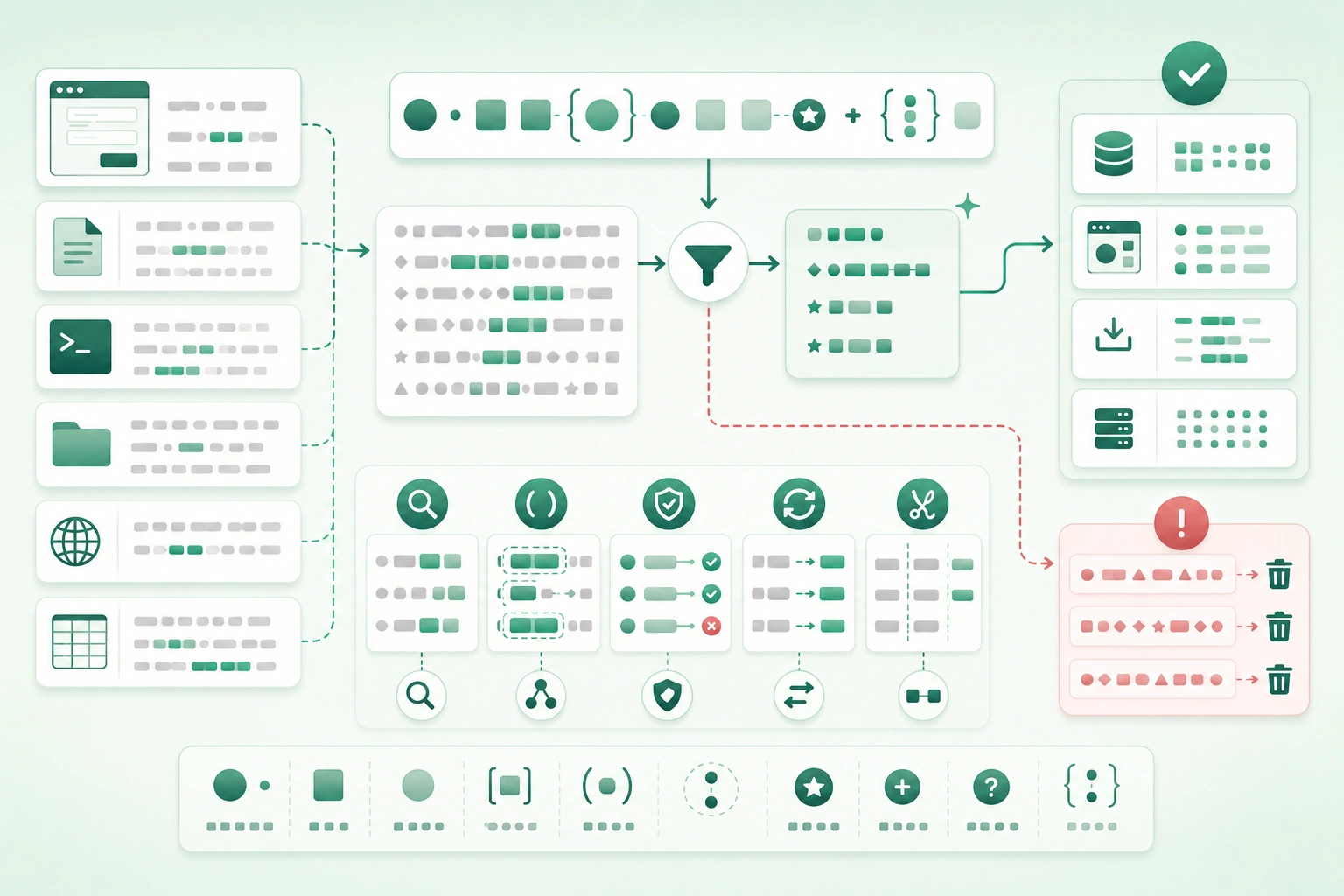
Regular expressions become painful when developers try to understand:
^(?=.*[A-Z])(?=.*\d)[A-Za-z\d._-]{8,32}$as one giant symbol.
A better approach is to read a regex as a sequence of small instructions:
^
start here

[A-Za-z]
match one letter

\d
match one digit

+
repeat one or more times

$
stop here
Once each token has a specific purpose, regex stops looking like punctuation soup.
Build the smallest pattern that solves the real problem
Do not begin by searching for a giant production-ready expression. Start with representative valid and invalid examples, match the stable structure first, and add constraints one at a time. The best regex is often shorter than the first one you imagine.
1. Build regex from small tokens
How a regex pattern matches text (diagram)
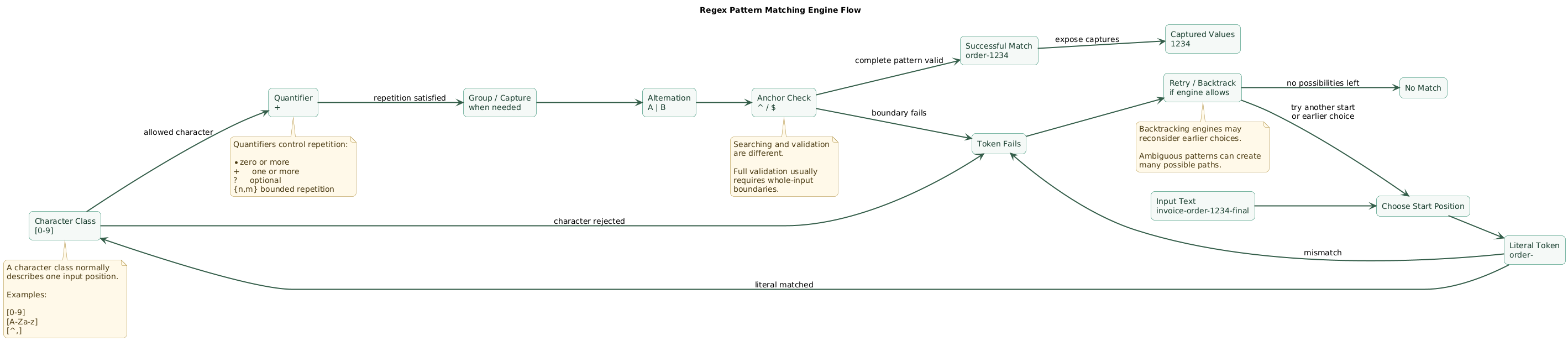
Suppose you want to find:
order-1234A simple pattern might be:
order-\d+Read it as:
order-
literal text

\d
one digit

+
one or more digits
A regex searches unless you tell it otherwise
Pattern:
\d+can find:
123inside:
invoice-123-finalThat is useful for extraction.
But if your requirement is:
the entire input
must contain only digits
you usually need boundaries:
^\d+$Search and validation are different jobs
search:
find a matching substring

validation:
prove the complete input
matches the contract
Test the intent before optimizing syntax
Write examples:
should match:
order-1
order-12345

should not match:
order-
order-ABC
prefix-order-12-suffix
Those examples become the specification for the pattern.
2. Start with literals and escaping
Ordinary letters and numbers usually match themselves.
catmatches the text:
catSome characters have special meaning
Common metacharacters include:
.
^
$
*
+
?
(
)
[
]
{
}
|
\
Escape a metacharacter when you mean the literal symbol
Pattern:
\.means:
literal periodwhereas:
.often means:
almost any single characterHost-language escaping creates another layer
The regex:
\d+may need to appear in source code as something resembling:
"\\d+"in languages where the string literal itself consumes backslashes.
Keep two parsers in mind
source-code string parser
        ↓
regex pattern
        ↓
regex engine
Raw-string syntax can reduce escaping where the language provides it.
Escape dynamic text before inserting it into a regex
Suppose user input is:
example.comand you build:
^ + userValue + $The period could be interpreted as regex syntax.
Use the runtime's:
regex escape
quote
literal-pattern helper
when inserting text that should remain literal.
3. Use character classes for one position
A character class usually describes:
one position
chosen from this set
Explicit choices
[abc]matches:
a
b
or
c
Ranges
[0-9]expresses one ASCII digit.
[A-Z]expresses one ASCII uppercase letter in common regex semantics.
Combine ranges
[A-Za-z0-9]matches one ASCII letter or digit.
Negated class
[^,]+means:
one or more characters
that are not comma
This is often better than:
.*?when parsing a simple delimiter-separated fragment because the exclusion is explicit.
Shorthand classes
Common engines provide tokens such as:
\d
digit-like character

\w
word-like character

\s
whitespace-like character
but their Unicode semantics can differ between engines and modes.
Use explicit ASCII ranges when ASCII is the requirement
If an identifier must contain only:
ASCII digits 0 through 9then:
[0-9]communicates that more explicitly than relying on engine-specific Unicode behavior of:
\d4. Control where matching is allowed
Anchors match positions rather than consuming ordinary characters.
Start anchor
^End anchor
$Validation example
^[A-Z]{3}-[0-9]{4}$matches:
ABC-1234but rejects:
prefix-ABC-1234Be careful with multiline mode
In many engines, a multiline flag changes:
^
and
$
so they can refer to line boundaries rather than only the entire input.
For strict whole-input validation, learn the exact anchoring primitives provided by your target engine.
Word boundaries
\bcat\bmay be useful when searching for:
catas a word rather than inside:
concatenatebut the engine's idea of:
word charactermatters, particularly with Unicode text.
5. Control repetition with quantifiers
Zero or more
*One or more
+Zero or one
?Exactly N
{3}Between N and M
{2,5}At least N
{2,}Example: four digits
[0-9]{4}Example: optional sign
[+-]?[0-9]+Read it as:
optional plus or minus

followed by

one or more digits
Greedy matching
A quantifier such as:
.*usually tries to consume as much as possible while still allowing the entire pattern to succeed.
Example
Input:
<b>one</b> and <b>two</b>Pattern:
<b>.*</b>may span from the first opening tag to the final closing tag.
Lazy matching
Many engines support:
.*?to prefer shorter matches.
But a precise class is often clearer
If the content cannot contain:
<then:
[^<]*communicates more about the intended structure than an unconstrained wildcard.
6. Group, capture, and name useful parts
Grouping controls scope
(ab)+means:
repeat "ab"
one or more times
Capturing groups expose matched substrings
Pattern:
([A-Z]{3})-([0-9]{4})Input:
ABC-1234captures conceptually:
group 1:
ABC

group 2:
1234
Named groups improve maintenance
Exact syntax differs by engine, but conceptually:
code = ABC
number = 1234
is easier to maintain than remembering:
group 1
group 2
group 3
Use non-capturing groups when grouping is structural only
Many engines support a form such as:
(?:...)when you need:
grouping
without capture
Example
^(?:jpg|jpeg|png|webp)$expresses alternatives without creating an unnecessary numbered result.
Capture only what application code actually needs
Too many captures make:
replacement
debugging
group numbering
unnecessarily fragile.
7. Use alternation without creating ambiguity
Alternation:
cat|dogmeans:
cat
or
dog
Group alternatives when surrounding tokens apply to all choices
Better:
^(cat|dog)s?$for:
cat
cats
dog
dogs
Watch operator scope
Pattern:
^cat|dog$may mean something closer to:
starts with cat

or

ends with dog
rather than:
entire input is cat or dogPrefer factoring common prefixes
Instead of:
https://example.com
|
https://example.org
consider:
https://example\.(com|org)where that improves readability.
Ordering can matter
In some backtracking engines:
foo|foobarmay match:
foobefore the longer alternative has a chance to win, depending on how the complete pattern is structured.
Test overlapping alternatives explicitly.
8. Use lookarounds only when they simplify the job
Lookarounds assert context without necessarily consuming that context.
Positive lookahead
Conceptually:
match X
only if Y follows
Negative lookahead
match X
only if Y does not follow
Lookbehind
Conceptually:
match X
only if Y precedes it
Example use case
Suppose you need digits:
100only when preceded by:
$A lookbehind-capable engine can sometimes assert the currency symbol without including it in the returned match.
But capture groups are often simpler
Instead of a complicated lookaround:
prefix-(value)-suffixmatch the full structure and capture:
valuePortability is a concern
Lookbehind support and allowed lookbehind forms differ substantially between regex implementations.
Use advanced assertions when they make the final solution:
clearer
not merely shorter
9. Build practical everyday patterns
Regex pattern-building decision flow (diagram)

Multiple spaces
Find repeated whitespace:
\s+Replace with:
single spacewhen that whitespace policy is appropriate.
ASCII integer
^[+-]?[0-9]+$Examples:
42
-7
+18
Simple decimal
^[+-]?[0-9]+(?:\.[0-9]+)?$Useful when your product deliberately wants:
12
12.5
-0.75
but not:
.5
12.
1e5
If those should be accepted, adjust the grammar deliberately.
Slug-like identifier
^[a-z0-9]+(?:-[a-z0-9]+)*$Accepts:
my-page
release-2026
api-v2
Rejects:
-leading
trailing-
two--hyphens
Simple application username
^[A-Za-z0-9_]{3,20}$if the product explicitly defines usernames as:
ASCII letters
digits
underscore
3 to 20 characters
Do not describe this as a universal username regex.
Hex color
^#[0-9A-Fa-f]{6}$for a six-digit color such as:
#00724EFile extension extraction
\.([A-Za-z0-9]+)$can capture a simple final extension.
But filenames such as:
.gitignore
archive.tar.gz
filename.
demonstrate why application semantics still matter.
Simple key=value log field
userId=([^\s]+)can extract a whitespace-delimited value from a stable log format.
Date-shaped string
^[0-9]{4}-[0-9]{2}-[0-9]{2}$verifies only the shape:
YYYY-MM-DDIt does not prove:
2026-02-31is a real calendar date.
Use a date parser after the regex
regex:
shape

date library:
calendar semantics
Simple CSV-like splitting is risky
Pattern:
,cannot correctly parse:
"Sowinski, Norbert",developerbecause quoted fields have grammar.
Use a CSV parser.
10. Know when regex validation is enough
Good regex validation targets
Regex works well for constrained lexical rules such as:
product code

simple slug

fixed-format ID

hex string

simple date shape

filename convention

log prefix
Regex should not pretend to prove semantics
Pattern:
^[0-9]{1,3}$can prove:
1 to 3 ASCII digitsbut not:
valid TCP portbecause:
999is syntactically valid digits but port validation requires a numeric range.
Use two-stage validation
regex:
is the shape acceptable?

application code:
does the value make sense?
Email validation
If your product needs only:
obviously contains
local part
@
domain-like part
a deliberately simplified check can be useful.
But attempting to reproduce every legal email-address grammar rule with one expression often makes the regex:
harder to read
harder to maintain
easy to get wrong
Real ownership should be verified by:
sending confirmationURLs
Prefer a URL parser when you need to understand:
scheme
host
port
path
query
fragment
internationalized hostnames
Nested syntax
Use a dedicated parser for:
JSON
HTML
XML
programming languages
SQL
complex configuration grammars
rather than forcing all nesting and semantics into a regex.
11. Extract and replace with capture groups
Regex is especially useful when the match is not merely yes or no.
Extract fields
Input:
2026-08-30Pattern:
^([0-9]{4})-([0-9]{2})-([0-9]{2})$Captures:
year  = 2026
month = 08
day   = 30
Reorder values
Replacement APIs can use captured values to convert:
2026-08-30into:
30/08/2026Exact replacement syntax differs between languages.
Named captures help replacement code
Instead of remembering:
$1
$2
$3
a runtime may support names conceptually equivalent to:
year
month
day
Replace repeated delimiters
Pattern:
-{2,}can convert:
one---two--threetoward:
one-two-threeTrim with string APIs when possible
Regex can remove leading or trailing whitespace, but:
trim()or the language's equivalent is usually clearer.
Prefer ordinary string operations for ordinary string problems
If you only need:
startsWith
endsWith
contains
split on fixed delimiter
replace exact text
a regex may add complexity without adding value.
12. Respect differences between regex engines
There is no single universal regex feature set.
Engines can differ in
- Named-group syntax.
- Lookbehind support.
- Unicode properties.
- Word-boundary semantics.
- Case-insensitive matching.
- Backreference syntax.
- Replacement syntax.
- Possessive quantifiers.
- Atomic groups.
- Free-spacing or verbose mode.
Always record the target environment
A useful comment says:
Regex target:
JavaScript runtime used by web client
rather than:
works on regex websiteOnline testers can use a different engine
A pattern may pass in:
PCRE-style testerand fail in:
JavaScript
Go
Rust
Java
Python
.NET
depending on the feature.
Unicode support varies
If you need:
Unicode letters
Unicode scripts
Unicode categories
use the specific capabilities and flags supported by your engine.
Test the compiled regex
A source-code string may produce a different final pattern than the one you typed mentally because of:
string escapingLog or inspect the final pattern during debugging when necessary.
13. Avoid pathological backtracking
Some regex engines use backtracking to explore alternative ways a pattern might match.
Usually this is convenient.
Poorly structured patterns can create a huge number of possibilities.
Risky shape
(something+)+especially when:
inner and outer repetitions
can consume the same text
in many different ways
Near-miss inputs can be expensive
A pattern may be fast when the input matches immediately but slow when a long input:
almost matches
until the final character
This can become ReDoS
Regular Expression Denial of Service is the risk that attacker-controlled input causes excessive regex evaluation time.
Reduce ambiguity
Prefer:
[^,]+when you specifically mean:
characters until commainstead of:
.*?without a clear reason.
Bound repetition where the domain has a limit
If username length is at most 32:
[A-Za-z0-9_]{3,32}communicates more than:
[A-Za-z0-9_]+Bound input size outside regex too
If a field is supposed to be:
100 characters maximumdo not accept:
10 MBand depend on regex alone to reject it cheaply.
Test adversarial cases
short valid

short invalid

long valid

long invalid

long almost-valid
Use engine-specific protections where appropriate
Some environments provide:
regex timeout

non-backtracking engine

atomic groups

possessive quantifiers
or other ways to reduce backtracking risk.
14. Debug regex systematically
Regex debugging and performance workflow (diagram)

Step 1: save the exact failing input
Avoid debugging:
something like this stringwhen whitespace, Unicode, line endings, or escaping may matter.
Step 2: identify the regex engine
JavaScript?
Python?
Java?
.NET?
Go?
Rust?
PCRE-compatible tool?
Step 3: inspect the actual pattern after source-string escaping
Confirm whether:
\\din source becomes:
\dinside the regex engine as intended.
Step 4: remove half the pattern
Reduce:
huge expressionto:
smallest section
that still fails
Step 5: test token by token
literal works?

class works?

quantifier works?

group works?

anchor works?
Step 6: inspect flags
Check:
case insensitive

multiline

dot-all

Unicode

global matching
according to your runtime.
Step 7: check greedy behavior
If the match is too long:
which quantifier consumed
more than intended?
Prefer a more precise class before automatically making everything lazy.
Step 8: check anchors
If invalid input passes validation:
did the pattern match
only a substring?
Step 9: check alternation scope
Compare:
^cat|dog$with:
^(cat|dog)$Step 10: check Unicode assumptions
If:
\w
\d
\b
.
behaves unexpectedly, inspect your engine's Unicode mode and semantics.
Step 11: test performance
Generate:
long input that almost matchesand measure whether evaluation time grows unexpectedly.
Step 12: add regression tests
Keep:
positive cases

negative cases

boundary cases

long near-miss case
next to the pattern.
15. Copy/paste regex checklist
Regex checklist

Before writing regex
- Write the real requirement in plain language.
- Collect valid examples.
- Collect invalid examples.
- Decide search vs full validation.
- Identify target regex engine.
- Decide whether ordinary string APIs are simpler.
- Decide whether a dedicated parser is more appropriate.

Literal text
- Start with literal structure.
- Escape regex metacharacters when literal.
- Remember host-language string escaping.
- Prefer raw-string syntax where supported and clearer.
- Escape dynamic user-controlled text before inserting into regex.

Metacharacters
- Know what dot means.
- Know what caret means.
- Know what dollar means.
- Know what star means.
- Know what plus means.
- Know what question mark means.
- Know what parentheses mean.
- Know what brackets mean.
- Know what braces mean.
- Know what pipe means.
- Know what backslash means.

Character classes
- Use class for one position from a set.
- Use [0-9] when ASCII digits are specifically required.
- Use explicit ASCII letter ranges when ASCII is the requirement.
- Use negated classes to describe delimiters precisely.
- Understand hyphen behavior inside classes.
- Understand caret behavior inside classes.
- Escape closing bracket where required by engine syntax.
- Test class behavior with Unicode input.

Shorthand classes
- Verify \d semantics.
- Verify \w semantics.
- Verify \s semantics.
- Check Unicode mode.
- Do not assume shorthand classes are identical across engines.
- Use explicit classes when the contract is explicit.

Anchors
- Use start anchor for full-prefix requirement.
- Use end anchor for full-suffix requirement.
- Use both for whole-input validation.
- Understand multiline-mode changes.
- Know whether engine provides absolute input anchors.
- Test trailing newline behavior where relevant.

Word boundaries
- Use only when word semantics match requirement.
- Understand relation to \w.
- Test Unicode words.
- Test punctuation.
- Do not use word boundary as a universal linguistic tokenizer.

Quantifiers
- Use * for zero or more.
- Use + for one or more.
- Use ? for optional.
- Use {n} for exact repetition.
- Use {n,m} for bounded repetition.
- Use {n,} only when unbounded upper limit is really acceptable.
- Bound user-facing fields according to domain limits.

Greedy matching
- Assume ordinary quantifiers are greedy unless engine says otherwise.
- Check whether wildcard crosses too much input.
- Prefer explicit terminator classes where practical.
- Test multiple delimiters.

Lazy matching
- Use when shortest acceptable match is the intended behavior.
- Do not use laziness to hide an imprecise pattern.
- Test nested delimiters.
- Test missing closing delimiters.

Groups
- Group alternatives.
- Group repeated sequences.
- Capture only values application code needs.
- Use non-capturing groups when capture is unnecessary.
- Avoid unstable numeric group indexes where named captures help.

Named groups
- Use descriptive names.
- Verify syntax in target engine.
- Keep replacement syntax engine-specific.
- Avoid duplicate names unless target engine explicitly supports and design requires them.

Alternation
- Group alternation with surrounding anchors.
- Check overlapping alternatives.
- Factor common prefixes when clearer.
- Order alternatives deliberately where engine semantics make it relevant.
- Avoid huge ambiguous alternative sets where another parser is clearer.

Backreferences
- Use only when equality with earlier matched text is actually required.
- Verify syntax.
- Avoid making patterns unnecessarily stateful.
- Test performance.
- Consider application-level comparison if clearer.

Lookahead
- Use for context that should not be consumed.
- Prefer ordinary grouping when simpler.
- Avoid stacking many assertions without tests.
- Check performance.
- Verify engine support.

Lookbehind
- Verify target engine supports it.
- Verify variable-length rules.
- Prefer capture groups if more portable.
- Test start-of-input cases.
- Avoid relying on an online tester with different support.

Flags
- Document case-insensitive mode.
- Document multiline mode.
- Document dot-all mode.
- Document Unicode mode.
- Document global / repeated-match behavior.
- Avoid hidden global state in regex objects where runtime exposes it.

Case insensitive
- Know whether matching is ASCII-only or Unicode-aware.
- Do not assume locale-sensitive behavior.
- Use application-level comparison for linguistic semantics where needed.

Unicode
- Test accented text.
- Test non-Latin scripts.
- Test emoji when field can contain them.
- Verify Unicode-property support.
- Verify word boundary behavior.
- Verify dot behavior.
- Avoid assuming regex character equals grapheme cluster.

Searching
- Decide first match vs all matches.
- Decide overlapping-match requirements.
- Record capture groups.
- Handle no-match result explicitly.
- Bound input size where untrusted.

Validation
- Anchor whole input.
- Validate length.
- Validate allowed characters.
- Keep semantic validation separate.
- Avoid enormous specification-reimplementation regexes.
- Return useful validation messages.
- Test negative cases.

Simple IDs
- Define allowed alphabet.
- Define separator.
- Define length.
- Decide case sensitivity.
- Anchor entire input.
- Avoid accepting invisible whitespace accidentally.

Slugs
- Define lowercase policy.
- Define digit policy.
- Define hyphen policy.
- Reject leading separator if required.
- Reject trailing separator if required.
- Reject repeated separator if required.
- Normalize separately if product requires it.

Numbers
- Decide optional sign.
- Decide decimal point.
- Decide leading zeros.
- Decide exponent notation.
- Decide whitespace.
- Parse numerically after regex.
- Validate numeric range separately.

Dates
- Regex can validate shape.
- Date library validates real calendar date.
- Decide timezone separately.
- Do not create giant calendar regex unnecessarily.
- Test leap years with date library.

Emails
- Decide product-level acceptance policy.
- Keep regex intentionally simple if used.
- Do not claim simple regex implements full email specification.
- Verify address ownership separately.
- Avoid rejecting legitimate addresses without product reason.

URLs
- Prefer URL parser.
- Use regex only for narrow URL-like matching.
- Avoid parsing complete URL grammar with a giant expression.
- Validate schemes with parser.
- Validate hosts and ports semantically.

Files
- Prefer path library for paths.
- Regex can check naming convention.
- Escape literal period in extension.
- Test dotfiles.
- Test multiple extensions.
- Test trailing period.
- Test path separators separately.

Logs
- Use regex for stable lexical log patterns.
- Prefer structured logging when you control producer.
- Name captures.
- Avoid unrestricted .* between repeated fields where a class is clearer.
- Test malformed lines.
- Bound line length.

Extraction
- Capture only needed fields.
- Verify optional groups.
- Handle missing group.
- Prefer named captures for many fields.
- Convert extracted strings to typed values separately.

Replacement
- Verify replacement-group syntax.
- Escape replacement text if runtime requires it.
- Test literal dollar or backslash behavior.
- Avoid assuming replacement syntax matches regex syntax.
- Test optional captures.

Splitting
- Prefer fixed-string split for fixed delimiter.
- Use regex split when delimiter itself is a pattern.
- Test empty fields.
- Test leading delimiter.
- Test trailing delimiter.
- Use CSV parser for CSV grammar.

Whitespace
- Decide ASCII vs Unicode whitespace.
- Use trim function when trimming is all you need.
- Use regex for repeated or patterned whitespace.
- Avoid normalizing whitespace in data where spaces are meaningful.

Dynamic regex
- Escape literal dynamic fragments.
- Do not concatenate trusted regex syntax and untrusted text carelessly.
- Separate pattern fragments from user text.
- Limit input size.
- Compile once when appropriate.
- Cache only when useful.

Readability
- Prefer shorter explicit pattern.
- Use named groups.
- Use verbose / free-spacing mode when engine supports it.
- Add comment explaining intent.
- Keep examples next to pattern.
- Avoid clever syntax without benefit.

Portability
- Document engine.
- Test in production runtime.
- Verify named-group syntax.
- Verify lookbehind.
- Verify Unicode features.
- Verify flags.
- Verify replacement behavior.
- Verify atomic / possessive features before using them.

Performance
- Avoid ambiguous nested quantifiers.
- Avoid unnecessary .* sections.
- Avoid overlapping repetition when possible.
- Bound repetition.
- Bound input length.
- Test long near-match.
- Measure on real engine.
- Use timeout or safer engine when available.

Backtracking
- Understand whether engine backtracks.
- Look for many equivalent ways to partition same text.
- Reduce ambiguity.
- Make delimiters explicit.
- Consider atomic or possessive techniques only where supported and understood.
- Test worst case.

ReDoS
- Treat regex over attacker-controlled input as a resource boundary.
- Limit input size.
- Avoid catastrophic backtracking patterns.
- Test adversarial strings.
- Set evaluation timeout where available.
- Monitor request latency.
- Avoid copying unknown internet regexes into critical input paths.

Testing
- Test smallest valid input.
- Test largest valid input.
- Test empty input.
- Test one invalid character.
- Test missing required part.
- Test extra prefix.
- Test extra suffix.
- Test multiple delimiters.
- Test Unicode.
- Test long input.

Negative tests
- Ensure validation regex rejects substrings.
- Ensure invalid separators fail.
- Ensure extra characters fail.
- Ensure wrong case fails when case-sensitive.
- Ensure excessive length fails.
- Ensure malformed near-matches fail quickly.

Debugging
- Save exact failing input.
- Identify engine.
- Inspect actual compiled pattern.
- Inspect flags.
- Remove parts of pattern.
- Add pieces back one by one.
- Check anchor scope.
- Check alternation scope.
- Check quantifier scope.
- Check greedy behavior.
- Check escaping.
- Check Unicode assumptions.

Production
- Compile pattern according to runtime best practices.
- Avoid recompiling in hot loops when unnecessary.
- Bound user input.
- Monitor slow requests.
- Keep tests with pattern.
- Review pattern changes like code changes.
- Document why advanced constructs exist.

When not to use regex
- Do not parse JSON with regex.
- Do not parse general HTML with regex.
- Do not parse nested programming-language grammar with regex.
- Do not replace URL parser with giant regex.
- Do not replace date parser with giant regex.
- Do not use regex when contains / split / startsWith is clearer.
- Do not use regex for semantic business rules.

Code review
- What exact text should match?
- What exact text should fail?
- Search or validation?
- Is the whole input anchored?
- Is dynamic text escaped?
- Are classes precise?
- Are quantifiers bounded?
- Is alternation grouped?
- Are captures necessary?
- Is Unicode behavior intentional?
- Is engine documented?
- Could backtracking explode?
- Is there a simpler parser or string API?

Final review
- Can another developer explain the pattern token by token?
- Are positive examples documented?
- Are negative examples documented?
- Is the target engine known?
- Is host-language escaping correct?
- Does validation cover the whole input?
- Are semantic checks performed outside regex?
- Are dynamic literal fragments escaped?
- Are Unicode assumptions tested?
- Are long near-miss inputs fast enough?
- Is untrusted input length bounded?
- Are capture groups stable and meaningful?
- Are advanced lookarounds genuinely improving clarity?
- Would an ordinary string function be simpler?
- Would a dedicated parser be safer?
- Is the regex maintainable six months from now?
16. FAQ
What does regex mean?
Regex is short for regular expression: a compact pattern language used to search, match, extract, split, and replace text according to structural rules.
What is the easiest way to learn regex?
Start with literal text, then learn character classes, anchors, quantifiers, groups, and alternation. Build patterns incrementally from real examples instead of memorizing large expressions.
What is the difference between * and +?
In common regex syntax, * means zero or more repetitions,
while + means one or more. For example,
[0-9]* can match an empty string, while
[0-9]+ requires at least one digit.
What is a capturing group?
A capturing group surrounds part of a pattern so the corresponding matched substring can be retrieved or referenced later. Named groups can make those values easier to use than numeric indexes.
What does greedy regex mean?
A greedy quantifier tries to consume as much input as possible while still allowing the complete expression to match. Lazy quantifiers generally prefer shorter matches.
Why does my regex work online but fail in code?
The tester may use a different regex engine, flags, or Unicode mode. Your source-language string escaping can also change the pattern before the regex engine sees it. Test the expression in the actual runtime.
When should I avoid regex?
Avoid it when a dedicated parser or simpler string API describes the problem more reliably. JSON, complex HTML, full URL grammar, nested programming languages, and semantic date validation are common examples.
Key terms (quick glossary)
- Regular expression
- A pattern that describes text to search, match, extract, split, or replace.
- Literal
- A pattern token that represents the exact character or text being matched rather than a special regex operation.
- Metacharacter
- A character with special regex meaning, such as a quantifier, anchor, group delimiter, or alternation operator.
- Character class
- A construct defining a set of characters that can match one position in the input.
- Anchor
- A zero-width assertion identifying a position such as the beginning or end of input or a line.
- Quantifier
- A construct controlling how many times the preceding atom or group may repeat.
- Greedy quantifier
- A quantifier that prefers to consume more input while still permitting the entire pattern to match.
- Lazy quantifier
- A quantifier variant that prefers a shorter match while still allowing the complete pattern to succeed.
- Capture group
- A grouped pattern whose matched substring is made available to the application or replacement operation.
- Non-capturing group
- A group used to control pattern structure without storing the matched substring as an ordinary capture.
- Alternation
- A regex operation representing alternative patterns, commonly written with a vertical bar.
- Lookahead
- An assertion that tests text after the current position without necessarily consuming it.
- Lookbehind
- An assertion that tests text before the current position without necessarily including that text in the consumed match.
- Backreference
- A pattern reference to text previously captured by a group.
- Backtracking
- An execution strategy used by many regex engines in which the engine can reconsider earlier matching choices when a later part fails.
- ReDoS
- Regular Expression Denial of Service, where an expensive regex and adversarial input cause excessive processing time.
- Regex engine
- The implementation that parses and executes regular expressions for a language, library, or runtime.
Worth reading
Recommended guides from the category.
