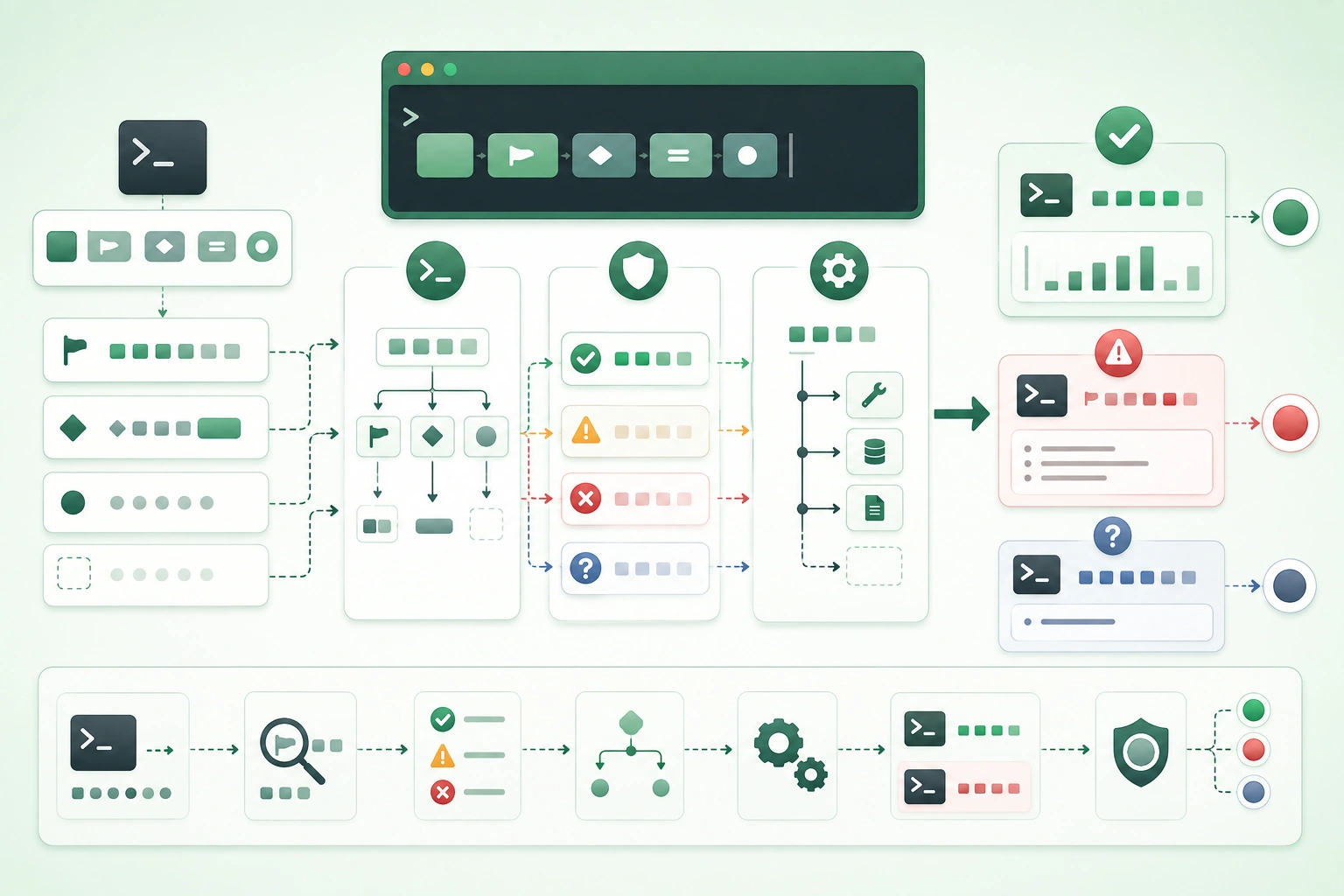
A command-line program can begin as:
read argv
do something
print result
but as soon as another person or script depends on it, the command becomes an interface.
Consider:
backup upload ./archive.zip --remote production --quietThe command communicates several contracts:
backup
program

upload
operation

./archive.zip
required input

--remote production
named configuration

--quiet
behavior flag
The tool must also communicate:
did it succeed?

where is the useful output?

where are errors written?

what does automation receive?
Design the command before writing the parser
Write several realistic command examples first. If the syntax is awkward when written on paper, a parsing library will not make the interface pleasant. Let the command grammar reflect user intent, then implement that grammar with the normal CLI library for your language.
1. Treat the CLI as a public interface
CLI command execution flow (diagram)
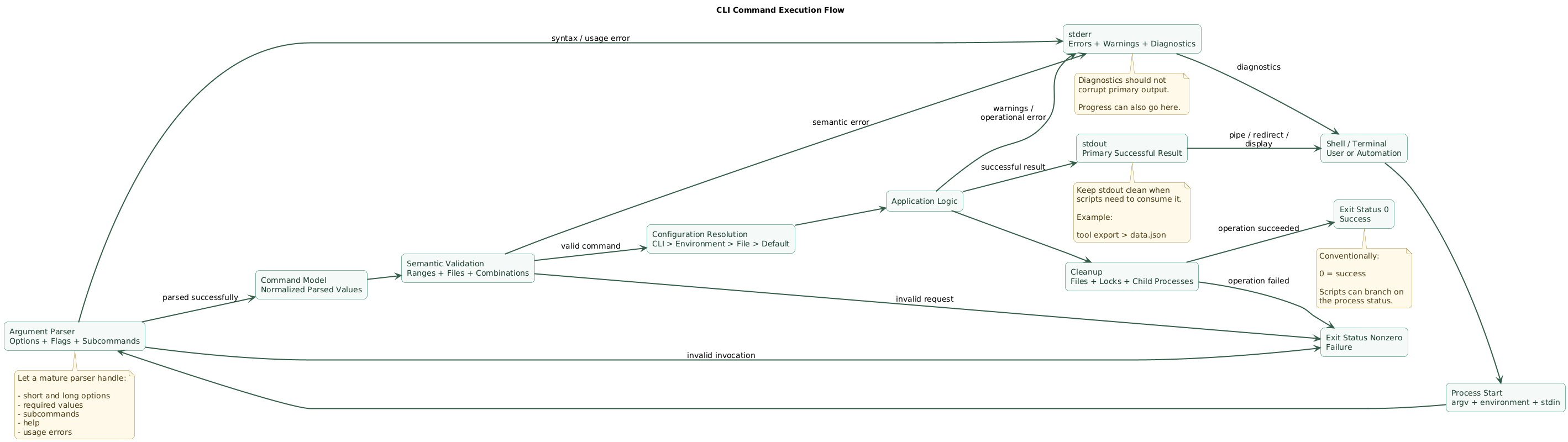
A useful CLI has two kinds of consumers:
human operators

and

automation
Humans care about
clear names
help
readable errors
progress
sensible defaults
Automation cares about
stable syntax
stable output
exit codes
non-interactive behavior
predictable errors
Good interfaces are unsurprising
Prefer:
tool delete project-42over an obscure syntax such as:
tool --action 7 --object project-42when the domain naturally has distinct operations.
Commands become compatibility contracts
Once CI contains:
tool build --output distcasually renaming:
--outputto:
--destinationcan break automation.
Version CLI behavior deliberately
Deprecate old options before removing them when users are likely to depend on them.
2. Separate positional arguments, options, and flags
Positional arguments
Positional arguments are identified by position.
tool copy source.txt backup.txtHere:
source.txt
destination
are naturally positional.
Use positional arguments for essential obvious values
Good:
tool inspect server.logLess clear:
tool inspect server.log production verbose jsonbecause positions become hard to remember.
Named options
--output report.json
--timeout 30
--format json
are useful when values are:
optional
configurable
easy to confuse by position
Boolean flags
--verbose
--force
--dry-run
usually work best as presence-based switches.
Prefer:
tool deploy --dry-runover:
tool deploy --dry-run=trueunless the framework or domain has a strong reason for explicit boolean values.
Short options
-v
-q
-o
are convenient for frequently typed commands.
Long options remain more self-documenting:
--verbose
--quiet
--output
Do not create short options for everything
A rarely used:
--preserve-metadatadoes not automatically need:
-pespecially if that letter may later be more useful elsewhere.
3. Add subcommands when operations are genuinely different
Suppose your application manages tasks.
task add
task list
task show
task delete
Subcommands communicate the operation directly.
Each subcommand can own its arguments
task add "Write report" --priority high

task list --status open

task delete 42 --force
Avoid one command with many incompatible flags
Weak:
task --add
task --delete
task --list
task --show
especially when each mode requires different arguments.
Do not overbuild command hierarchies
A tiny utility that does one thing:
checksum file.isodoes not need:
checksum calculate file.isomerely to imitate a large CLI.
Keep hierarchy shallow when possible
tool project member addmay be reasonable.
But deeply nested commands become hard to discover and type.
4. Let an argument parser handle syntax
Argument parsing design flow (diagram)
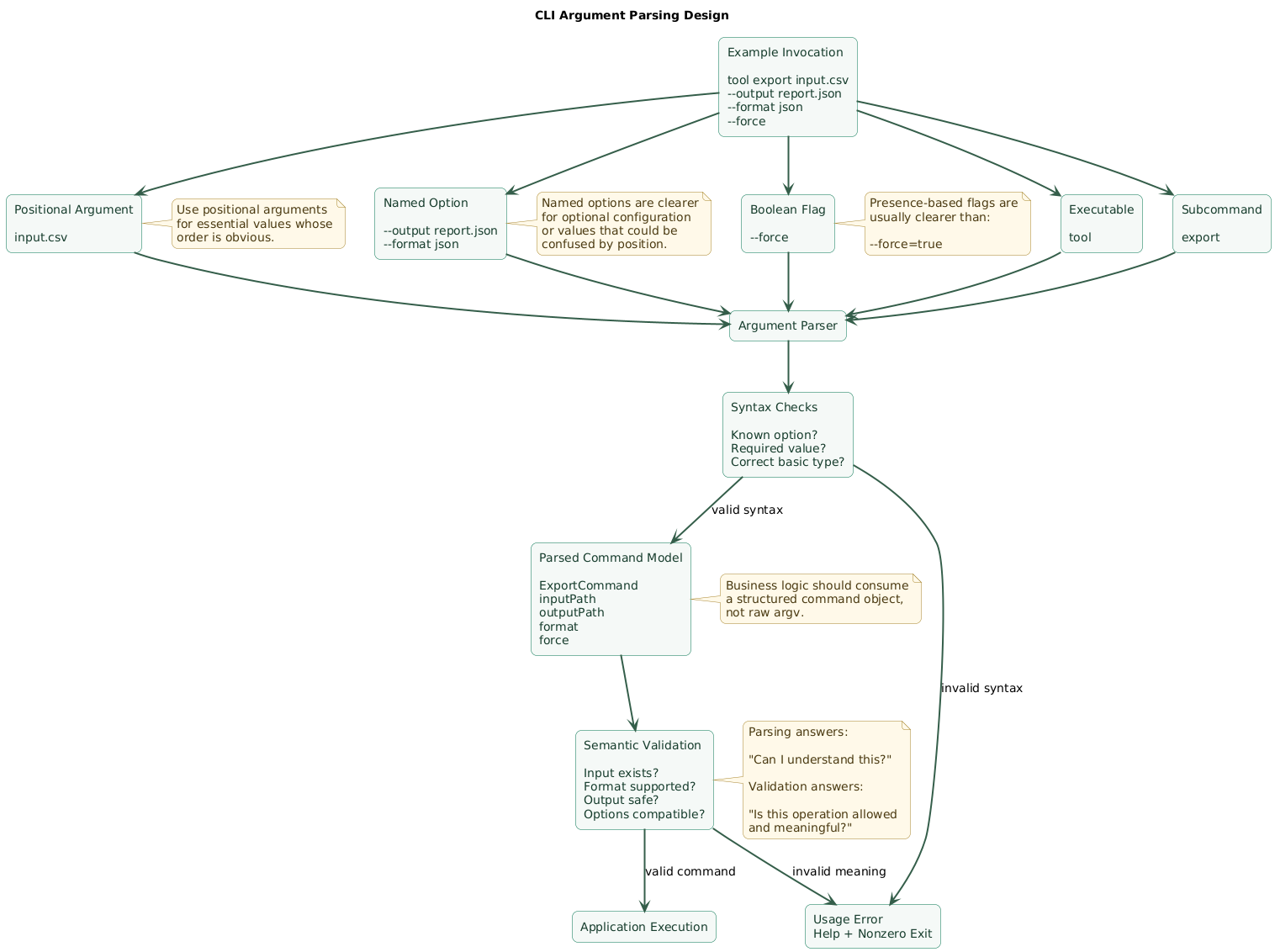
Most languages have a standard or mature CLI parsing ecosystem.
Use it for:
option recognition
short and long flags
required arguments
subcommands
type conversion
generated help
usage messages
Avoid manual argv parsing unless the grammar is trivial
Handwritten code quickly becomes:
if arg == "--output":
    read next arg
else if arg startsWith "--output=":
    split
else if arg == "-o":
    read next arg
...
and then must handle:
missing value
duplicate option
unknown flag
-- separator
quoted values
subcommands
Convert syntax into a command model
Instead of allowing business logic to inspect raw:
argvproduce something conceptual like:
ExportCommand {
    inputPath
    outputPath
    format
    overwrite
}
Then application logic ignores parsing syntax
shell text
    ↓
argument parser
    ↓
typed command
    ↓
application service
This makes both parsing and business logic easier to test.
5. Keep parsing separate from semantic validation
Argument parsing can determine:
--port 8080

is an integer
but application validation determines:
is this port acceptable?Syntax validation
--timeout expects integer

--output requires value

unknown option rejected
Semantic validation
timeout must be positive

source file must exist

destination must not equal source

format must support selected operation
Cross-option validation
Example:
--stdout
and
--output FILE
may be mutually exclusive.
Validation messages should explain recovery
Weak:
invalid argumentBetter:
error: --timeout must be greater than 0

Try 'tool sync --help' for usage.
Do not silently repair surprising input
If:
--threads -8is invalid, do not silently convert it to:
8unless that transformation is explicitly part of the interface.
6. Use stdout and stderr deliberately
Command-line programs commonly have two output streams:
stdout
stderr
stdout
Use standard output for the command's primary successful result.
tool list-usersmight write user records to stdout.
stderr
Use standard error for:
errors
warnings
diagnostics
progress information
when those messages are not part of the primary data stream.
Why separation matters
tool export > result.jsonshould ideally produce:
result.json
contains only exported data
not:
Loading...
Connected!
Exported 200 records
{actual JSON}
Progress can go to stderr
stdout:
actual data

stderr:
progress / diagnostics
Quiet mode
--quiet
-q
can suppress optional informational output while preserving:
actual errorsVerbose mode
--verbose
-v
can expose additional diagnostic context.
Avoid making ordinary successful execution excessively noisy.
7. Make exit codes useful to scripts
The shell needs a machine-readable answer to:
Did the command succeed?Success
exit 0Failure
exit nonzeroShell usage
if tool deploy; then
    echo "deployed"
else
    echo "failed"
fi
Do not print an error and still return success
Bad:
stderr:
"Deployment failed"

exit:
0
because automation may continue as though deployment succeeded.
A small exit-code taxonomy can help
For example, a tool may document:
0 success

2 usage / invalid arguments

3 requested resource not found

4 operation conflict

5 operational failure
if callers genuinely benefit from those distinctions.
Do not invent dozens of codes
41 network timeout
42 DNS failure
43 TLS failure
44 remote 500
45 remote 503
...
can create a brittle scripting API.
Keep codes stable once documented
If scripts branch on:
exit code 3changing its meaning later becomes a compatibility break.
8. Design help text around real tasks
A user should be able to run:
tool --helpwithout reading source code.
Useful top-level help
Usage:
  tool <command> [options]

Commands:
  add       Add an item
  list      List items
  delete    Delete an item

Options:
  -h, --help
  --version
Useful subcommand help
tool delete --helpshould describe:
required identifier
--force
examples
destructive behavior
Examples are high-value documentation
Examples:

  tool add "Prepare release"

  tool list --status open

  tool delete 42 --force
Make defaults visible
If:
--timeoutdefaults to:
30 secondssay so in help.
Do not dump internal implementation vocabulary
Prefer:
--format jsonover something like:
--serializer JsonResultSerializerV2unless the internal concept is genuinely part of the user contract.
9. Define configuration precedence
CLI tools frequently read configuration from several places:
built-in default

config file

environment variable

command-line option
Define one precedence rule
A common model is:
command-line option
        ↓
environment variable
        ↓
config file
        ↓
built-in default
but the important thing is consistency.
Example
default timeout:
30

config:
60

TOOL_TIMEOUT:
90

--timeout:
120
final value:
120Make effective configuration diagnosable
A:
--verbosemode might safely report:
timeout: 120
source: command line
Never print secrets casually
If configuration contains:
API token
password
private key
diagnostic output should redact it.
Avoid passwords directly on the command line when practical
Command arguments may be exposed through:
shell history
process inspection
CI logs
Prefer:
stdin
secret store
protected environment integration
credential helper
according to the platform and threat model.
10. Separate human and machine-readable output
Human output might be:
3 projects found

NAME        STATUS
website     active
mobile      active
legacy      archived
Scripts should not have to parse column spacing.
Machine-readable mode
tool projects --jsonmight produce:
[
  {
    "name": "website",
    "status": "active"
  }
]
Treat structured output as an API
Once users depend on:
name
status
casually renaming those fields can break scripts.
Do not mix progress into JSON output
Bad:
Connecting...
[
  {"name": "website"}
]
Done!
TTY-aware formatting can improve UX
When stdout is connected to a terminal:
color
table formatting
progress
can be useful.
When redirected:
tool list > output.txtsimpler stable output may be better.
Provide explicit overrides
--color=always
--color=never
or equivalent modes can be useful when automatic terminal detection is insufficient.
11. Make destructive commands safe without breaking automation
A command:
tool delete database productiondeserves more friction than:
tool list databasesInteractive confirmation
Delete production database?
[y/N]
can protect humans.
But prompts can break scripts
Automation should have an explicit way to declare intent:
--forceor:
--yesaccording to your convention.
Do not silently assume yes in non-interactive mode
Safer:
error:
confirmation required

Use --force for
non-interactive deletion.
Dry-run mode
--dry-runis useful when the tool can show:
what would changewithout performing the side effect.
Make destructive scope obvious
Print:
environment
resource ID
resource name
number of affected objects
before confirmation when practical.
12. Respect shell quoting, paths, and stdin
Your application usually receives arguments after the shell has already processed quoting.
Spaces require shell-level quoting
tool open "My Report.txt"should reach the application as one argument.
Do not write your own shell parser inside the CLI
Your argument parser should process:
the argument vector
provided by the runtime
rather than trying to reinterpret the original shell command line.
Support -- when positional values can look like options
A conventional pattern is:
tool remove -- -strange-filenamewhere:
--marks the end of options.
Use path libraries
Avoid manually concatenating:
directory + "/" + filenamewhen the runtime provides path-safe operations.
stdin enables composition
A CLI can accept:
tool format input.jsonand optionally:
cat input.json | tool formatwhere that design is natural.
Do not wait for interactive input unexpectedly
A command used in CI should not hang forever waiting for:
Enter your password:without a documented non-interactive strategy.
13. Handle interrupts and cleanup
Users expect:
Ctrl+Cto stop a running command.
Cancellation should reach long-running work
download
database operation
worker loop
subprocess
network request
Cleanup temporary resources
Before exiting, where safe and practical:
close files

remove temporary file

release lock

stop child process

rollback partial transaction
Do not leave a partially written target pretending to be complete
For file generation, a safer approach can be:
write temporary file
      ↓
flush and verify
      ↓
rename into final location
Interrupted operations need defined exit behavior
The exact status may depend on runtime and platform conventions, but the application should not accidentally convert cancellation into:
successful exit 0Respect the host environment
Signal behavior differs across:
Unix-like systems
Windows
containers
CI runners
so use the language's standard cancellation and signal mechanisms.
14. Test the CLI as users and scripts see it
CLI error and exit-code workflow (diagram)
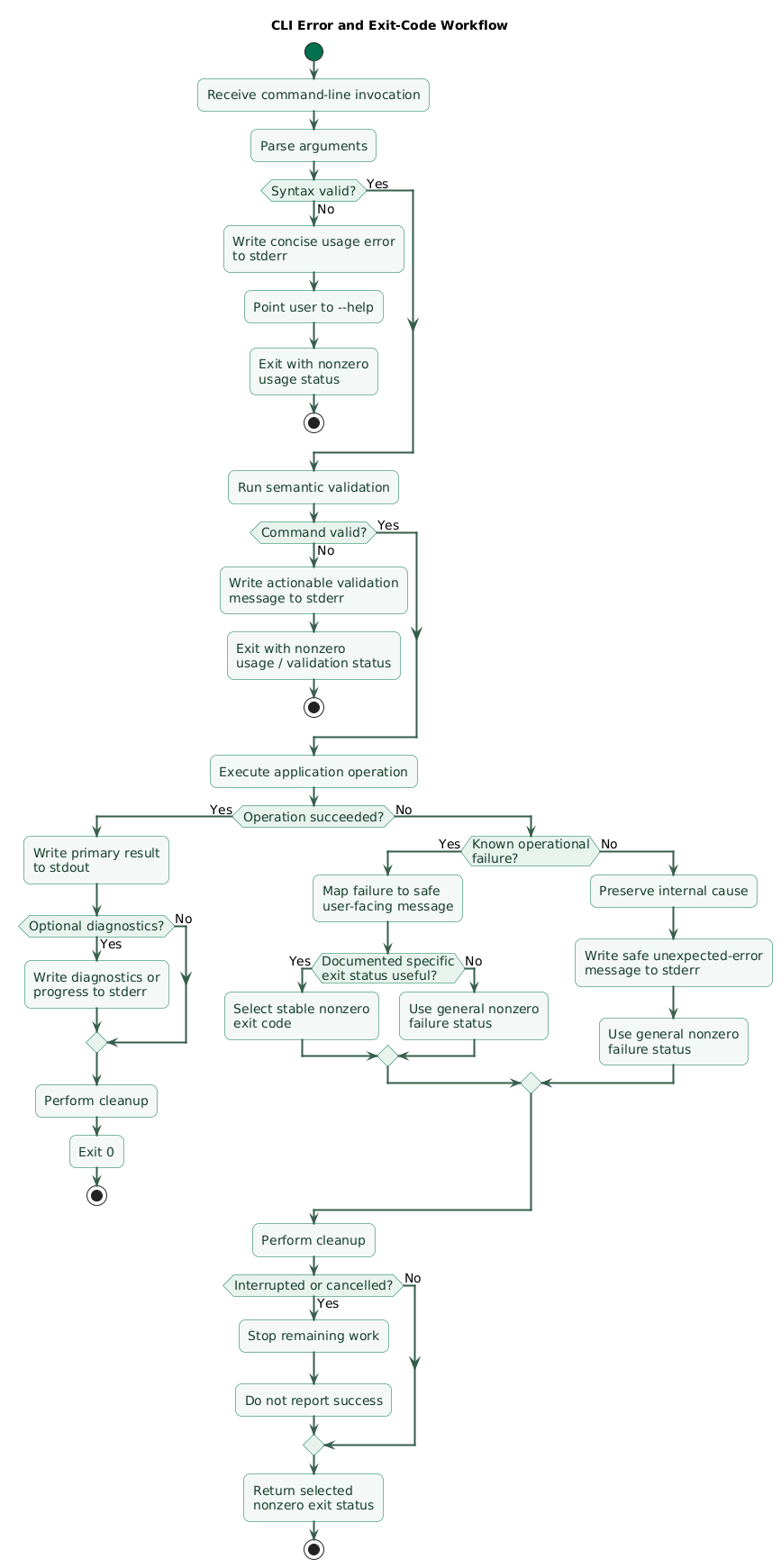
Parser tests
required argument present

required argument missing

short option

long option

unknown option

subcommand

-- separator
Validation tests
invalid timeout

missing file

mutually exclusive options

invalid combination
Process-level tests
Execute the actual command and assert:
stdout

stderr

exit code
Success example
exit:
0

stdout:
expected result

stderr:
empty or nonessential diagnostics
Usage failure example
exit:
nonzero

stdout:
empty

stderr:
clear usage error
Automation tests
Verify:
redirect stdout

pipe output

run with no TTY

use --json

use --quiet

use --force
Path tests
Include paths containing:
spaces
Unicode
relative components
long names
Failure tests
permission denied

network unavailable

file missing

malformed config

dependency timeout
Interrupt tests
For long-running tools, verify that cancellation:
stops work
cleans resources
does not report false success
Snapshot help text carefully
Help snapshots can catch accidental public-interface changes, but avoid making tests so brittle that harmless formatting improvements become difficult.
15. Copy/paste CLI design checklist
CLI design checklist

Command contract
- Treat CLI syntax as a public interface.
- Design example commands before implementing parser.
- Keep command names clear.
- Keep commands predictable.
- Avoid unnecessary abbreviations.
- Preserve compatibility after users automate against syntax.
- Deprecate before removing widely used options.

Command name
- Keep executable name short enough to type.
- Make purpose recognizable.
- Avoid surprising aliases.
- Document installation path where relevant.

Subcommands
- Use when operations are distinct.
- Use verbs or domain-oriented operations consistently.
- Avoid deeply nested command trees.
- Do not add a subcommand layer to a single-purpose utility without reason.
- Give each subcommand dedicated help.
- Keep shared options consistent.

Positional arguments
- Use for essential obvious values.
- Keep order intuitive.
- Avoid many optional positional arguments.
- Avoid positional booleans.
- Document whether multiple values are accepted.
- Validate count.

Options
- Use long descriptive names.
- Use short aliases for common options only.
- Keep naming consistent.
- Prefer --output over unrelated naming variations.
- Decide whether --option=value is supported.
- Decide whether repeated options are allowed.
- Document defaults.

Boolean flags
- Prefer presence-based flags.
- Use --verbose.
- Use --quiet.
- Use --force.
- Use --dry-run.
- Avoid --flag=true unless interface requires explicit tri-state or configuration behavior.
- Consider --no-feature form when disabling a default feature is useful.

Short options
- Reserve common letters deliberately.
- Avoid assigning every option a short form.
- Keep -h for help where convention fits.
- Keep -v semantics consistent.
- Document grouped short options only if parser supports them.

Argument parser
- Use standard or mature parsing library.
- Avoid manual argv scanning for nontrivial CLI.
- Let parser handle usage errors.
- Let parser generate help where practical.
- Convert parser output into a typed command model.
- Keep raw argv out of business logic.

Parsing
- Parse integers as integers.
- Parse enums into supported values.
- Parse paths through path abstraction.
- Reject missing option values.
- Reject unknown options unless compatibility design intentionally allows them.
- Handle -- end-of-options marker where appropriate.

Semantic validation
- Keep separate from syntax parsing.
- Validate numeric ranges.
- Validate file existence when required.
- Validate mutually exclusive options.
- Validate dependent options.
- Validate resource names.
- Validate operation-specific constraints.
- Return actionable messages.

Defaults
- Make defaults explicit.
- Document defaults in help.
- Keep defaults stable.
- Avoid surprising environment-dependent defaults.
- Test omitted options.
- Test explicit override.

Configuration
- Define precedence.
- Document precedence.
- Keep command-line options highest priority when that is the chosen model.
- Validate config file.
- Validate environment values.
- Expose effective configuration safely when useful.
- Redact secrets.

Environment variables
- Use namespaced variables.
- Document them.
- Validate values.
- Avoid hidden behavior from undocumented environment settings.
- Treat environment as configuration, not authorization.
- Do not print secret values.

Secrets
- Avoid passwords in command history where practical.
- Avoid secrets in argv where exposure matters.
- Use stdin or credential helper where appropriate.
- Redact logs.
- Redact verbose output.
- Avoid putting tokens into process titles.
- Avoid echoing secrets in validation errors.

stdout
- Use for primary successful result.
- Keep suitable for redirection.
- Keep machine mode clean.
- Avoid progress text in data stream.
- Flush when necessary.
- Handle broken pipe appropriately according to runtime conventions.

stderr
- Use for errors.
- Use for warnings.
- Use for diagnostics.
- Use for progress when stdout is reserved for data.
- Avoid writing successful structured data to stderr.
- Keep error messages concise.

Exit codes
- Return 0 on success.
- Return nonzero on failure.
- Never print failure and return 0 accidentally.
- Define small stable taxonomy if scripts need distinctions.
- Document nonzero codes.
- Avoid excessive code proliferation.
- Keep meaning stable.

Usage errors
- Detect missing required arguments.
- Detect unknown options.
- Detect invalid option values.
- Print short error.
- Point to --help.
- Return nonzero status.
- Avoid stack traces for ordinary usage mistakes.

Operational failures
- Distinguish from usage mistakes when useful.
- Report safe cause.
- Preserve internal diagnostics.
- Return nonzero status.
- Avoid pretending partial failure is success.

Help
- Support --help.
- Include usage.
- Include commands.
- Include options.
- Include defaults.
- Include examples.
- Explain destructive behavior.
- Keep help readable in terminal width.

Version
- Support --version when useful.
- Keep output simple.
- Include semantic tool version.
- Consider build metadata only when useful.
- Keep scripting contract stable.

Examples
- Show minimal successful command.
- Show common option.
- Show subcommand.
- Show machine-readable mode.
- Show destructive confirmation.
- Keep examples copyable.

Human output
- Prefer readable messages.
- Use tables where useful.
- Keep terminology consistent.
- Avoid unnecessary banners.
- Avoid printing decorative output in scripts.
- Keep success summary concise.

Machine output
- Provide --json or equivalent when automation matters.
- Keep schema stable.
- Use documented field names.
- Keep diagnostics out of stdout.
- Define null / missing behavior.
- Version breaking output changes.
- Test with parser.

Line-oriented output
- Consider one value per line for simple automation.
- Avoid decorative prefixes.
- Preserve escaping rules.
- Document whether lines can contain newlines.
- Use structured format for nested data.

Color
- Use color only when it improves readability.
- Detect TTY where practical.
- Disable color when redirected.
- Provide explicit override where useful.
- Never make color the only way to communicate meaning.

Progress
- Show for long operations.
- Avoid for fast operations.
- Write outside structured stdout.
- Disable or simplify in non-interactive mode.
- Avoid noisy CI logs.
- Show meaningful unit and completion state.

Quiet mode
- Suppress optional success chatter.
- Keep fatal errors visible.
- Keep requested stdout data visible.
- Document exact behavior.

Verbose mode
- Add diagnostic context.
- Do not expose secrets.
- Include useful paths and configuration sources safely.
- Avoid dumping complete sensitive requests.
- Keep default mode concise.

Dry run
- Show intended action.
- Avoid side effects.
- Clearly label dry-run behavior.
- Test that no writes occur.
- Include relevant targets.
- Do not promise perfect prediction if external state can change.

Destructive operations
- Ask for confirmation interactively.
- Support explicit non-interactive confirmation flag.
- Default dangerous prompt to no.
- Show target clearly.
- Show environment clearly.
- Consider dry-run.
- Do not silently proceed because stdin is unavailable.

Non-interactive mode
- Detect absence of TTY where useful.
- Never hang waiting for prompt unexpectedly.
- Require explicit flags for destructive work.
- Keep output deterministic.
- Disable animations.
- Make errors machine-detectable.

Shell quoting
- Let shell perform shell parsing.
- Work with runtime argv.
- Document quoting in examples.
- Test spaces.
- Test Unicode.
- Test quotes where shell conventions require escaping.
- Do not reparse command string unnecessarily.

End of options
- Support -- where parser convention permits.
- Test filenames beginning with hyphen.
- Document behavior for unusual positional values.

Paths
- Use path library.
- Support relative paths.
- Support absolute paths.
- Test spaces.
- Test Unicode.
- Avoid manual separators.
- Normalize only when semantics allow.
- Preserve user path in error messages safely.

stdin
- Support when composition benefits.
- Define whether omitted file means stdin.
- Avoid ambiguity between no input and empty input.
- Do not wait forever unexpectedly.
- Test piped input.
- Test closed stdin.

stdout redirection
- Test command > file.
- Keep result free from diagnostics.
- Handle write errors.
- Handle broken pipe gracefully where appropriate.

stderr redirection
- Ensure diagnostic stream can be captured independently.
- Avoid hiding required result only in stderr.
- Test command 2> errors.log where relevant.

Pipelines
- Design output for composition.
- Avoid terminal-only formatting in pipes.
- Handle downstream process closing pipe.
- Preserve meaningful exit status.
- Do not buffer indefinitely.

Configuration precedence
- Define built-in default.
- Define config-file level.
- Define environment level.
- Define CLI level.
- Test every override.
- Document result.

Config files
- Validate syntax.
- Validate semantic values.
- Report path.
- Report failing field.
- Avoid leaking secrets.
- Define missing-file behavior.
- Define default location.

Working directory
- Know whether relative paths depend on current directory.
- Document assumptions.
- Avoid silently changing working directory.
- Test invocation from different directories.

Filesystem errors
- Distinguish missing path.
- Distinguish permission denied.
- Distinguish already exists.
- Distinguish directory vs file mismatch.
- Return nonzero.
- Provide actionable path context.

Overwrite behavior
- Do not overwrite important files silently unless interface promises it.
- Consider --force.
- Consider --output.
- Use atomic replacement where practical.
- Test existing target.
- Test permissions.

Temporary files
- Use secure temporary-file APIs.
- Clean up.
- Use unique names.
- Avoid predictable insecure paths.
- Handle interruption.
- Avoid leaving partial result as final output.

Network
- Set timeout.
- Report destination safely.
- Distinguish authentication failure.
- Distinguish unavailable dependency.
- Support retry only where safe.
- Return nonzero on unresolved failure.

Retries
- Retry transient errors only.
- Bound attempts.
- Respect cancellation.
- Avoid retrying validation errors.
- Keep output understandable.
- Consider verbose diagnostics.

Signals
- Handle interrupts using runtime APIs.
- Propagate cancellation.
- Stop long-running work.
- Clean resources.
- Avoid false exit 0.
- Avoid complex unsafe signal-handler work where platform restricts it.

Ctrl+C
- Stop promptly.
- Avoid giant stack trace for normal interruption.
- Preserve safe cleanup.
- Define partial-output behavior.
- Test long-running commands.

Child processes
- Pass cancellation where appropriate.
- Capture exit status.
- Avoid shell invocation when direct process execution is safer.
- Quote arguments through process APIs rather than command-string concatenation.
- Clean child processes on cancellation.

Security
- Treat arguments as untrusted input.
- Validate paths.
- Avoid shell injection.
- Avoid eval.
- Avoid constructing shell command strings from raw user input.
- Use subprocess argument arrays.
- Protect secrets.
- Respect permissions.

Shell execution
- Prefer direct process execution API.
- Avoid "sh -c" unless shell semantics are required.
- Escape only with a trusted shell-specific method when unavoidable.
- Keep command and arguments separate.
- Test hostile input.

Logging
- Keep logs separate from primary output.
- Redact secrets.
- Include command name.
- Include operation ID where useful.
- Avoid logging full sensitive argv.
- Keep verbose diagnostics user-controlled.

Errors
- State what failed.
- State relevant safe resource.
- State what user can do.
- Avoid internal stack trace by default.
- Provide debug mode if useful.
- Preserve root cause internally.

Error wording
- Start consistently with error: where appropriate.
- Avoid blaming user.
- Avoid vague "something went wrong".
- Include expected value constraints.
- Point to help where useful.

Testing
- Test no arguments.
- Test help.
- Test version.
- Test valid positional argument.
- Test missing positional argument.
- Test valid option.
- Test invalid option.
- Test unknown option.
- Test short alias.
- Test subcommand.

Exit-code tests
- Assert 0 on success.
- Assert nonzero on parse error.
- Assert nonzero on validation error.
- Assert nonzero on operational error.
- Assert documented codes where taxonomy exists.
- Assert cancellation is not reported as success.

Stream tests
- Assert stdout.
- Assert stderr.
- Assert errors do not pollute data output.
- Assert JSON mode contains valid JSON.
- Assert quiet mode behavior.
- Assert verbose mode behavior.

Integration tests
- Execute actual binary where possible.
- Test filesystem interaction.
- Test environment overrides.
- Test config files.
- Test stdin.
- Test output redirection.
- Test non-interactive mode.

Automation tests
- Run without TTY.
- Capture exit code.
- Pipe stdout.
- Parse machine output.
- Verify no prompt.
- Verify deterministic output.

Compatibility tests
- Keep old option alias during deprecation.
- Test documented scripts.
- Test output schema.
- Test default behavior.
- Avoid accidental breaking help changes when syntax changed.

Packaging
- Make installation clear.
- Produce executable entry point.
- Keep dependencies reasonable.
- Verify Windows / macOS / Linux support where claimed.
- Test executable permissions.
- Test PATH usage.

Performance
- Startup time matters for frequently invoked tools.
- Avoid loading unnecessary heavy components before parsing --help.
- Avoid network calls for --help.
- Avoid database startup for --version.
- Measure long-running operations separately.

UX
- Make common path short.
- Make dangerous path deliberate.
- Make errors actionable.
- Make automation predictable.
- Keep defaults safe.
- Keep terminology consistent.
- Avoid surprising implicit behavior.

Code structure
- Keep parsing at outer boundary.
- Convert args to typed command model.
- Validate command model.
- Call application service.
- Map result to output.
- Map failure to stderr and exit status.
- Keep process termination logic near outermost layer.

Final review
- Is the command syntax easy to explain?
- Are required values positional only when obvious?
- Are optional values named?
- Are flags presence-based where appropriate?
- Are subcommands justified?
- Is a mature parser used?
- Is semantic validation separate from parsing?
- Is primary output written to stdout?
- Are diagnostics written to stderr?
- Does success return 0?
- Do failures return nonzero?
- Are exit codes stable and documented?
- Is --help useful?
- Are examples copyable?
- Is configuration precedence documented?
- Are secrets protected?
- Is machine-readable output available when automation needs it?
- Is structured stdout free of progress messages?
- Are destructive operations safe?
- Can automation bypass prompts explicitly?
- Are shell quoting and paths handled by proper libraries?
- Does Ctrl+C cancel safely?
- Are temporary resources cleaned?
- Are stdout, stderr, and exit codes covered by tests?
- Can both humans and scripts use the tool without surprises?
16. FAQ
What is a CLI argument?
A CLI argument is a value passed to a command when it starts. Positional
arguments are identified by order, while named options and flags are
identified by names such as --output or
--verbose.
What exit code means success?
Exit status 0 conventionally indicates success. A nonzero status indicates that the command did not complete successfully and allows shell scripts to detect failure.
Should error messages go to stdout or stderr?
Error messages and diagnostics normally belong on stderr. The primary successful result belongs on stdout so it can be redirected or piped independently.
When should I use subcommands?
Use them when a tool has several distinct operations with different
arguments or behavior, such as add, list,
show, and delete. Single-purpose utilities may
not need them.
Should CLI tools provide JSON output?
If scripts need to consume structured results, a JSON mode can provide a much more stable contract than parsing human-readable tables or prose.
How should a destructive CLI command work in CI?
Do not require an unavoidable interactive prompt. Require an explicit
non-interactive confirmation such as --force or
--yes, and fail safely when confirmation is missing.
Should I manually parse argv?
Usually not for anything beyond a trivial controlled command. A mature argument-parsing library handles option syntax, subcommands, missing values, help, type conversion, and usage errors more reliably.
Key terms (quick glossary)
- CLI
- Command-line interface: a text-oriented interface through which users or automation invoke a program using commands and arguments.
- Positional argument
- A command argument whose meaning is determined primarily by its position in the invocation.
- Option
-
A named command-line parameter such as
--output file.txtthat usually configures optional behavior. - Flag
-
An option commonly represented by its presence or absence, such as
--verbose. - Subcommand
-
A named operation within a larger CLI, such as
add,list, ordelete. - Argument parser
- A library or runtime component that converts command-line arguments into structured values and reports syntax-level usage errors.
- stdout
- Standard output, normally used for the primary successful data or result produced by a command.
- stderr
- Standard error, normally used for errors, warnings, diagnostics, and progress messages that should remain separate from primary output.
- Exit code
- The integer status returned by a process when it terminates, with zero conventionally indicating success and nonzero indicating failure.
- TTY
- A terminal-like interactive device. CLI tools often adjust color, progress, and prompts depending on whether a stream is connected to one.
- stdin
- Standard input, a process input stream commonly used for piped data or interactive input.
- Dry run
- A mode that reports what a command would change without performing the actual side effects.
- Non-interactive mode
- Operation in which a command must complete without prompting a human, commonly required for CI, scheduled jobs, and scripts.
- Configuration precedence
- The rule determining which value wins when configuration is supplied by several sources such as defaults, files, environment variables, and CLI options.
- Signal
- An operating-system mechanism used to notify a process of events such as interruption or termination.
- Broken pipe
- A condition where a command tries to write to a pipe after the receiving process has stopped reading.
Worth reading
Recommended guides from the category.
