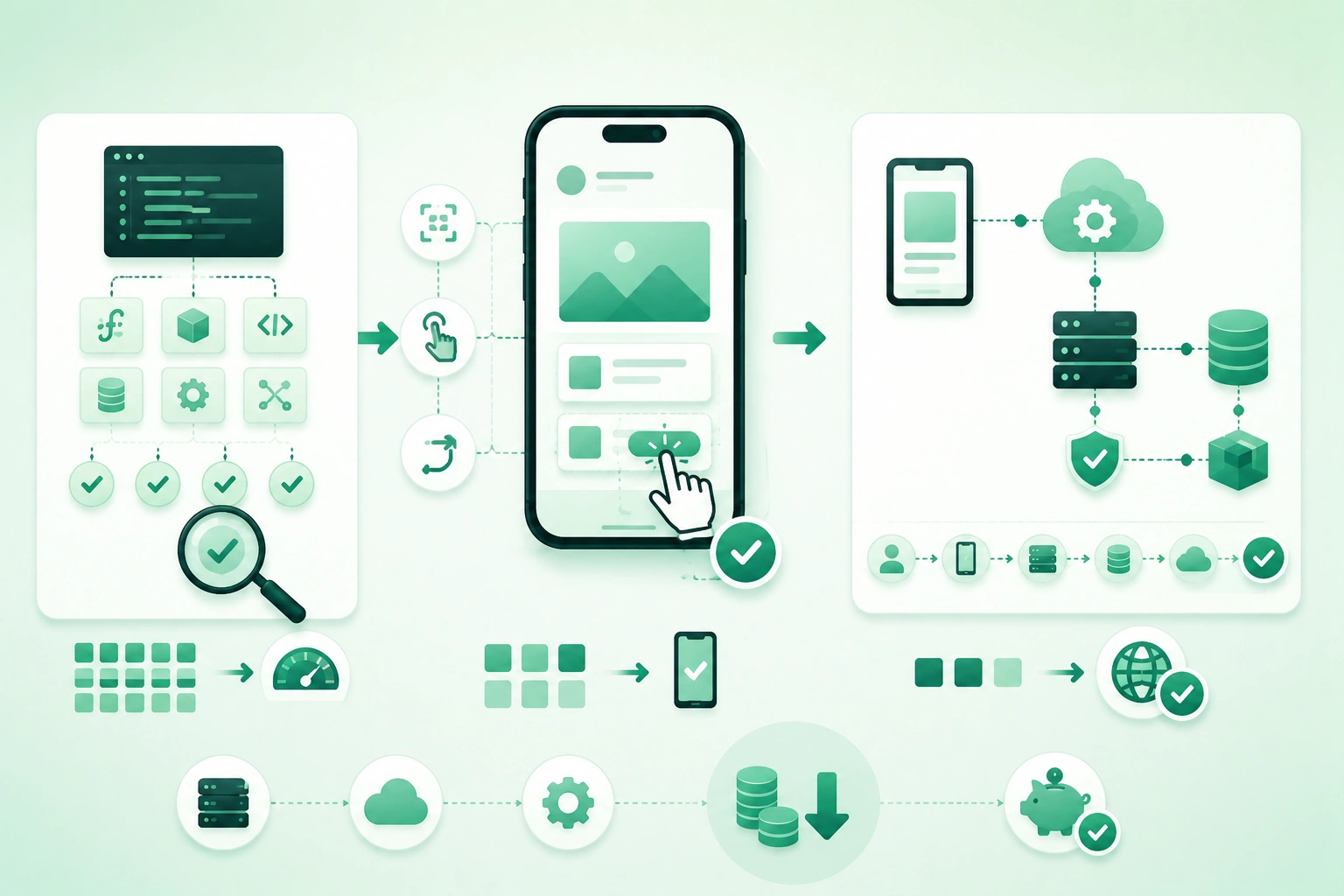
Small mobile teams rarely have:
50 physical devices

dedicated QA department

large cloud-device budget

hours for every CI run
That does not mean they need to choose between:
test everything

or

test nothing
A better strategy is to spend testing effort where failures are most expensive.
For most applications:
many fast logic tests
        +
focused integration tests
        +
smaller UI suite
        +
few critical E2E journeys
provides far better value than hundreds of fragile end-to-end scripts.
Cheap tests should catch cheap-to-detect bugs
If a pricing calculation can be tested in milliseconds without starting a device, do that. Save device automation for behavior that actually depends on navigation, rendering, operating-system integration, permissions, storage, sensors, notifications, or other boundaries.
1. Test risk, not every possible combination
Start by identifying what would hurt if it broke.
High-risk examples
login

payment

account creation

password recovery

offline synchronization

data deletion

subscription purchase

security settings
Lower-risk examples
minor animation timing

decorative icon

rare informational tooltip
Both deserve quality, but they do not necessarily deserve equal automated test investment.
Score risk simply
A useful mental model:
risk
=
failure impact
x
likelihood
x
difficulty of detection
A frequently changed checkout flow with expensive failures deserves more coverage than a static About screen.
Ask four questions for every feature
What can break?

How expensive is failure?

What is the cheapest test
that detects it?

Which remaining risk
needs a real device?
2. Build a practical low-cost test pyramid
Budget mobile testing pyramid (diagram)
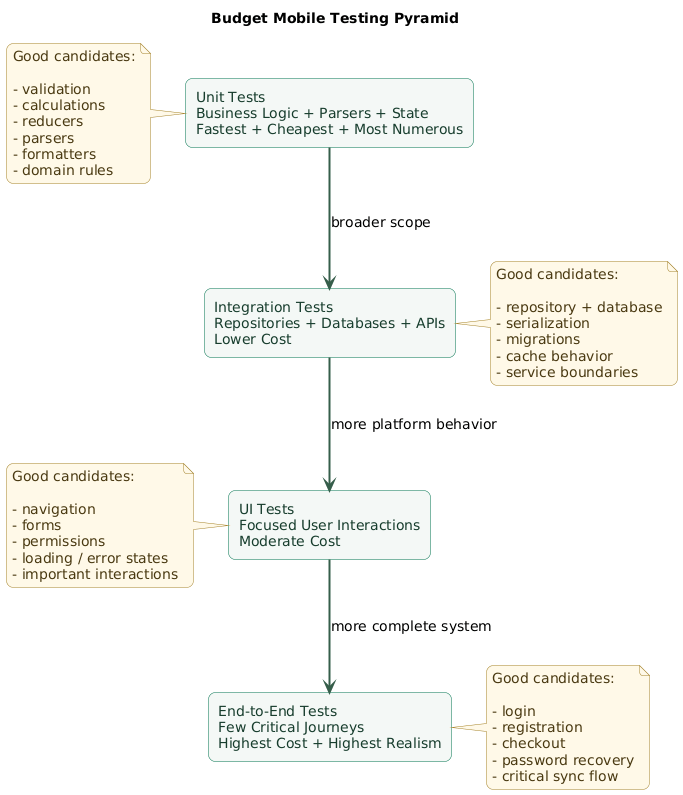
A useful distribution is:
          E2E
         /   \
        UI tests
       /       \
   Integration
  /             \
       Unit
Unit tests
Characteristics:
fast
isolated
cheap
deterministic
easy to run frequently
Integration tests
Verify:
database + repository

serializer + API model

cache + persistence

domain logic + storage
UI tests
Verify:
user interacts
      ↓
UI responds correctly
End-to-end tests
Verify a broader path:
mobile app
      ↓
network
      ↓
backend
      ↓
database / service
      ↓
response
      ↓
mobile UI
The pyramid is guidance, not a quota
Do not target:
exactly 70%
20%
10%
merely because a diagram says so.
The principle is:
use the cheapest reliable
test level that proves
the behavior you care about
3. Put most business logic in unit tests
Unit tests are ideal for deterministic logic.
Validation
email valid?

password strong enough?

quantity positive?
Calculations
subtotal
tax
discount
shipping
total
State transitions
Loading
  ↓
Success

Loading
  ↓
Error
Parsing
deep link
      ↓
typed route
Formatting
timestamp
      ↓
display string
Domain rules
Can user cancel order?

Can item be returned?

Does subscription allow feature?
Example
Given:
price = 100
discount = 20%

Expect:
final price = 80
This test should not need:
emulator
network
database
UI
real account
Design code so logic can be tested
Hard-to-test architecture often looks like:
button callback
  ↓
database
  ↓
network
  ↓
calculation
  ↓
navigation
  ↓
analytics
all inside one method.
Extract:
business rule
repository interface
navigation decision
analytics event
into boundaries that can be exercised independently.
4. Test important integration boundaries
Unit tests can prove each piece works alone while the pieces still fail together.
Repository integration
fake API response
      ↓
repository
      ↓
local database
      ↓
domain object
Database integration
Test:
- Insert.
- Update.
- Delete.
- Transactions.
- Migrations.
- Queries.
Serialization
A backend can return:
{
  "created_at": null
}
while the mobile parser expected:
created_at:
always present
Contract-oriented integration tests catch this class of bug.
Use realistic fixtures
Avoid testing only:
{
  "id": 1,
  "name": "Test"
}
when production objects can contain:
- Null values.
- Long strings.
- Unicode.
- Empty arrays.
- Optional fields.
- Large numeric values.
Test migrations especially carefully
Existing users upgrade from:
database version 8

to

database version 11
rather than installing an empty version 11 database.
5. Use fakes and deterministic test data
Reliable tests need control over their dependencies.
Fake
A lightweight working implementation.
FakeUserRepository
stores users in memory
Stub
Returns predefined data.
GET /products

returns

products-success.json
Mock
Often verifies expected interactions.
verify analytics.track(
  "checkout_completed"
)
Prefer behavior over excessive interaction assertions
A brittle test:
expects method A
then B
then C
then D
can break after harmless refactoring.
Prefer verifying meaningful output or state where possible.
Control the clock
Bad:
if current time
is after 18:00...
using the real wall clock in every test.
Better:
Clock.now()

production:
real clock

test:
2026-08-27 18:30
Control randomness
Inject:
random source

UUID generator

clock
when deterministic output matters.
6. Keep UI tests focused on real user behavior
Unit, UI, and E2E boundaries (diagram)
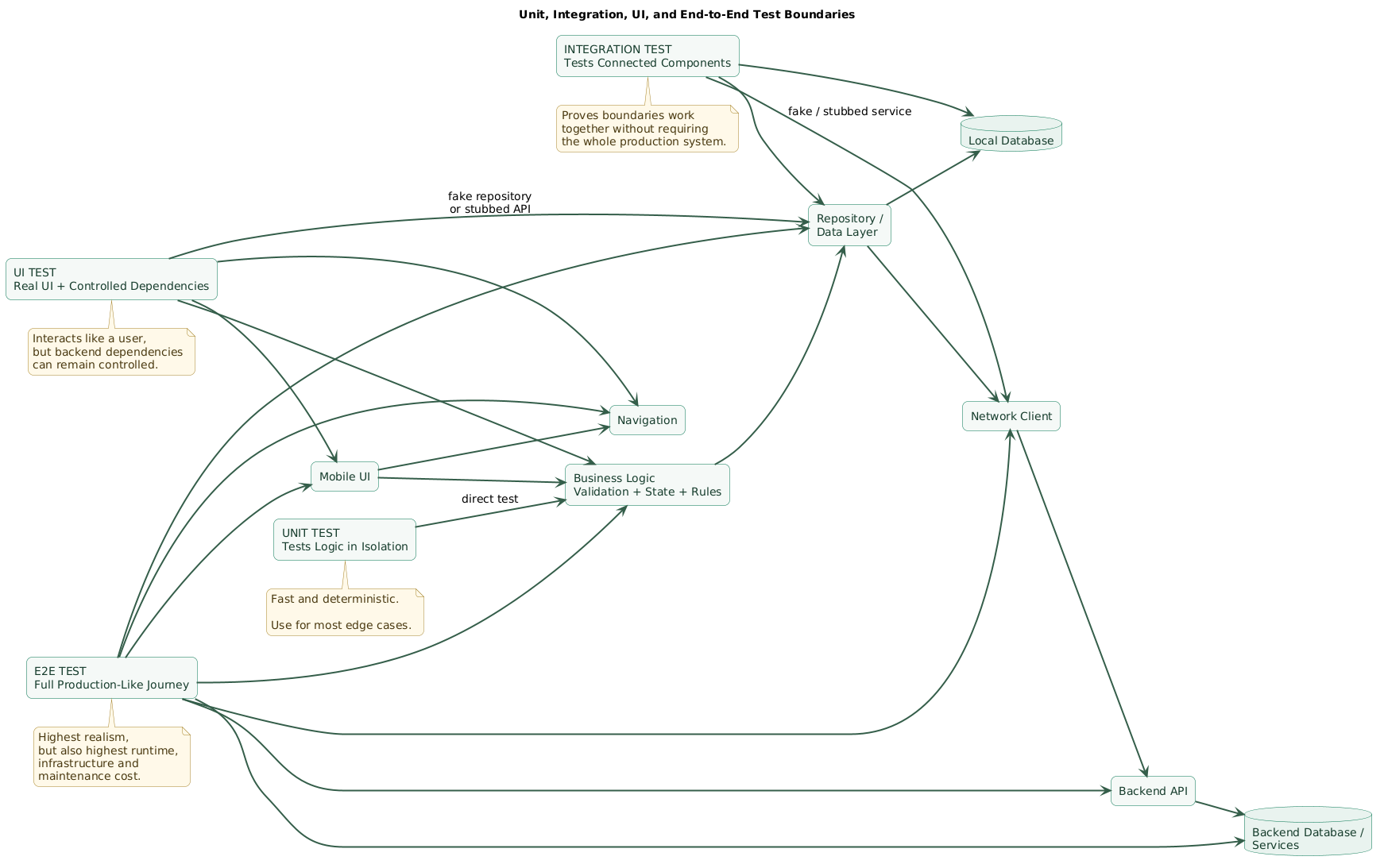
UI tests are useful when the question is genuinely:
Can the user perform
this interaction?
Good UI tests
tap Save
      ↓
validation error appears
open menu
↓
choose Settings
↓
Settings screen visibletoggle dark mode
↓
selected state changesDo not repeat every logic test through the UI
If discount calculation has:
40 edge casestest those in the unit suite.
The UI suite may need only:
one or two representative
discount scenarios
Use stable selectors
Fragile:
third button
inside second container
Better:
stable accessibility identifier

or

semantic test tag
Avoid depending on visual position
Layout can change because of:
- Screen size.
- Dynamic type.
- Localization.
- Redesign.
The logical control can remain the same.
Control backend data for most UI tests
A UI test can still be valuable when:
real UI
+
real navigation
+
real local state
+
fake network
are used together.
This is often faster and more deterministic than calling a shared staging backend.
7. Reserve end-to-end tests for critical journeys
End-to-end testing provides high realism but also high cost.
Good candidates
new user registration

login

password recovery

checkout

subscription purchase

critical sync workflow
E2E verifies system wiring
mobile app
      ↓
authentication
      ↓
API
      ↓
database
      ↓
business service
      ↓
response
      ↓
mobile state
Do not reproduce the full product matrix
Avoid:
every feature
x
every device
x
every OS
x
every locale
x
every account type
through full E2E.
Use smoke journeys
Example:
1. install app
2. login
3. open dashboard
4. create core object
5. verify object appears
6. logout
Keep staging state isolated
Shared test accounts create:
test A changes data

test B expects old data

test B fails
unexpectedly.
Create dedicated test data
Prefer:
test creates account
or
resets controlled fixture
      ↓
test runs
      ↓
cleanup
Do not make E2E the only quality gate
A thirty-minute suite that fails at the end of every pull request provides much slower feedback than a logic test failing in ten seconds.
8. Remove common causes of flaky tests
A flaky test is dangerous because teams eventually stop trusting it.
Arbitrary sleep
Bad:
tap Login

sleep 5 seconds

assert dashboard visible
Five seconds may be:
too long on fast device

too short on slow CI
Wait for observable state
Prefer:
tap Login

wait until:
dashboard exists

timeout:
reasonable limit
Shared test data
Avoid several tests editing:
qa@example.comsimultaneously.
Execution-order dependencies
Bad:
test 1 creates order

test 2 assumes order from test 1 exists
Every test should ideally prepare the state it requires.
Animations
UI animations can make synchronization harder.
Use framework-supported synchronization and test configuration rather than guessing animation duration with sleeps.
Uncontrolled network
fast response
slow response
timeout
temporary error
should be explicit test scenarios rather than random CI conditions.
Retries do not fix broken tests
A retry can occasionally protect against infrastructure noise, but:
retry 3 times
until green
should not replace root-cause investigation.
9. Use Android and iOS testing tools appropriately
Android local tests
Use local host-side tests for logic that does not require a real Android runtime.
Typical targets:
domain rules
view-model logic
reducers
formatters
parsers
Android instrumented tests
Run on a device or emulator when behavior requires:
Android framework
database integration
UI
permissions
device configuration
Jetpack Compose
Compose testing APIs can inspect semantic UI nodes, perform actions and assert state.
View-based Android UI
Espresso-style testing remains useful for interacting with traditional Android View interfaces.
Apple unit testing
Modern Xcode projects can use Swift Testing for new unit-test development, including parameterized and concurrency-aware tests.
XCTest remains important
XCTest continues to integrate with Xcode and supports areas including:
- Existing unit suites.
- Performance tests.
- UI automation with XCUIAutomation.
UI automation should use accessibility semantics
Well-designed accessibility identifiers and labels improve both:
accessibility

and

testability
10. Build a small but useful device matrix
Budget mobile testing CI and device strategy (diagram)
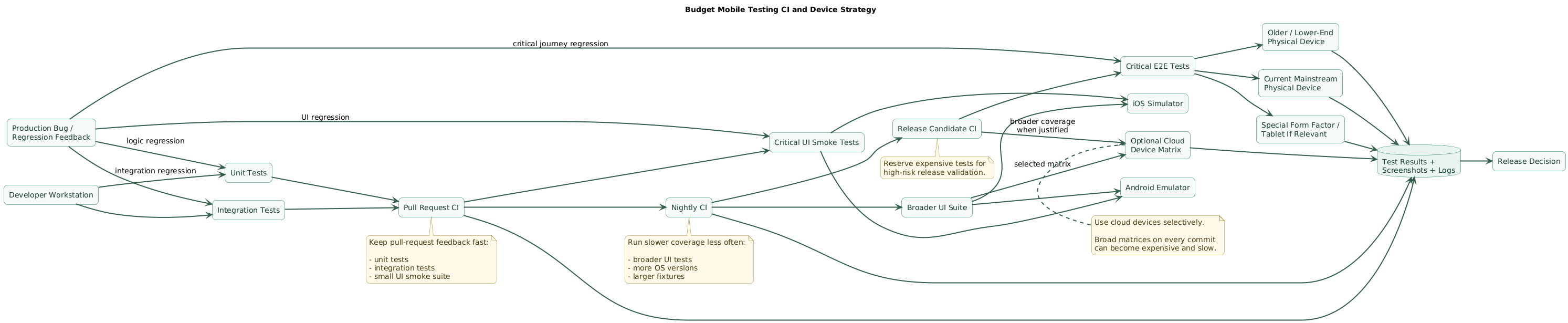
You do not need every device model.
Start with dimensions of risk
OS version

screen size

performance class

manufacturer differences

hardware features
Example Android matrix
small / older device

mainstream current device

large-screen or tablet
if product supports it
Example Apple matrix
older supported iPhone

current mainstream iPhone

large screen
or iPad
if relevant
Use virtual devices heavily
Emulators and simulators are excellent for:
- Automated UI testing.
- OS-version coverage.
- Screen-size coverage.
- Clean-state testing.
Keep a few physical devices
Physical hardware is valuable for:
- Camera.
- Bluetooth.
- NFC.
- Biometrics.
- Push notification behavior.
- Performance.
- Memory pressure.
- Real GPU behavior.
Use cloud device testing selectively
A cloud device lab can broaden:
device
OS
locale
orientation
coverage without buying every phone.
A budget strategy is to use broad matrices:
nightly

before release

after major platform changes
rather than on every small code change.
11. Split tests across pull request and release CI
Not every test needs to run at the same frequency.
Developer loop
seconds to a few minutesRun:
- Changed unit tests.
- Relevant integration tests.
- Focused UI test during feature work.
Pull request
unit suite
+
integration suite
+
critical UI smoke tests
Nightly
broader UI suite

multiple virtual devices

larger data fixtures
Release candidate
critical E2E
+
selected physical devices
+
upgrade tests
+
permission flows
+
production-like configuration
Fail fast
Run:
fastest
most deterministic
highest-signal
checks first.
There is little value waiting:
20 minutesfor UI tests when a unit test could reveal the same failure after:
20 secondsParallelize carefully
Tests can run in parallel only if they do not fight over:
same account
same database record
same emulator port
same shared environment
12. Test permissions, offline mode, links, and notifications
Mobile applications depend on operating-system state in ways ordinary web unit tests often do not.
Permissions
Test:
not requested

allowed

denied

changed later in Settings
for important capabilities such as:
- Camera.
- Location.
- Notifications.
- Bluetooth.
Offline mode
Test:
launch offline

lose network during request

edit offline

reconnect

retry synchronization
Deep links
Test:
cold start

warm start

logged out

logged in

invalid route

deleted resource
Push notifications
Verify:
payload received

tap routes correctly

authentication handled

stale destination handled
App upgrade
Install:
previous production versionwith realistic data, then upgrade to:
new candidate versionand verify:
- Database migration.
- Authentication persistence.
- Preferences.
- Cached data.
- Encrypted storage.
Process death and restart
Mobile operating systems can terminate applications.
Test whether important workflows recover from:
background
      ↓
process killed
      ↓
application reopened
13. Turn production bugs into regression tests
Every meaningful bug is evidence of a missing test or missing monitoring signal.
Example production bug
discount greater than subtotal
produces negative order total
Add smallest useful regression test
Given:
subtotal = 10
discount = 20

Expect:
total never below allowed minimum
This belongs in a:
unit testnot necessarily a full checkout E2E.
Another bug
Android notification permission denied

app crashes when opening settings
This may deserve:
instrumented UI regression testChoose the lowest effective level
Ask:
What is the cheapest stable test
that would have prevented
this exact bug?
Track flaky tests as defects
Do not accept:
that test fails sometimesas normal indefinitely.
A flaky suite increases:
- CI cost.
- Developer waiting.
- False alarms.
- Risk of real failures being ignored.
14. Copy/paste mobile testing checklist
Mobile app testing checklist

Strategy
- Identify critical user journeys.
- Identify expensive failure modes.
- Rank features by risk.
- Use cheapest test level that proves behavior.
- Avoid maximizing test count as a goal.
- Optimize for useful feedback.
- Keep maintenance cost visible.

Test pyramid
- Write many fast unit tests.
- Add focused integration tests.
- Add fewer UI tests.
- Keep E2E suite small.
- Adjust distribution to product risk.
- Do not copy fixed percentages blindly.

Unit tests
- Test validation.
- Test calculations.
- Test formatters.
- Test parsers.
- Test reducers.
- Test state machines.
- Test domain rules.
- Test error mapping.
- Test feature flags.
- Test boundary values.

Boundary values
- Empty input.
- Zero.
- Negative numbers.
- Maximum values.
- Very long strings.
- Unicode.
- Null / optional values.
- Empty arrays.
- Duplicate items.
- Invalid IDs.

Business logic
- Keep logic outside UI callbacks.
- Inject external dependencies.
- Inject clock where time matters.
- Inject random source where randomness matters.
- Make state transitions deterministic.
- Test error paths.
- Test success paths.

Parameterized tests
- Use multiple inputs for repeated logic rules.
- Cover boundary values efficiently.
- Keep cases readable.
- Give failures meaningful labels.
- Avoid duplicating test methods unnecessarily.

Integration tests
- Test repository + database.
- Test repository + fake API.
- Test serialization.
- Test caching.
- Test migrations.
- Test transactions.
- Test persistence.
- Test retry state.
- Test conflict handling.
- Test encrypted storage where relevant.

API models
- Test successful response.
- Test missing optional field.
- Test null field.
- Test unknown field.
- Test malformed response.
- Test empty collection.
- Test large collection.
- Test backward-compatible response.

Database
- Test insert.
- Test update.
- Test delete.
- Test query.
- Test transaction rollback.
- Test unique constraints.
- Test migrations.
- Test upgrade from real older schema.
- Test data corruption handling where relevant.

Migrations
- Keep old schema fixtures.
- Upgrade through supported versions.
- Verify data survives.
- Verify indexes.
- Verify default values.
- Verify authentication state.
- Test interrupted migration where architecture requires it.

Test doubles
- Use fake repositories.
- Use network stubs.
- Use controlled clocks.
- Use deterministic ID generators.
- Mock only interactions that matter.
- Prefer observable behavior over internal-call assertions.
- Keep doubles simple.

Fake backend
- Return success.
- Return validation error.
- Return authorization error.
- Return server error.
- Return timeout.
- Return empty response.
- Return slow response.
- Return malformed response.
- Support deterministic fixtures.

Fixtures
- Keep small readable fixtures.
- Include realistic null values.
- Include Unicode.
- Include long text.
- Include old API shapes where required.
- Version fixtures.
- Avoid one giant fixture for every test.

UI tests
- Test visible user behavior.
- Use stable accessibility identifiers.
- Use semantic test tags.
- Avoid screen-coordinate taps where possible.
- Avoid depending on item position.
- Keep test setup explicit.
- Keep flows short.
- Assert meaningful outcomes.

UI selectors
- Prefer semantic identifier.
- Prefer accessibility identifier.
- Avoid generated hierarchy paths.
- Avoid matching arbitrary text where localization changes.
- Keep identifiers stable across redesign.
- Do not expose sensitive values through test IDs.

UI coverage
- Navigation.
- Form validation.
- Important buttons.
- Loading state.
- Empty state.
- Error state.
- Retry action.
- Permission flow.
- Critical accessibility behavior.
- Core list interaction.

UI data
- Seed known data.
- Stub network where appropriate.
- Reset application state.
- Avoid shared mutable accounts.
- Use deterministic dates.
- Avoid depending on production data.

End-to-end
- Keep E2E journeys few.
- Cover login.
- Cover account creation if critical.
- Cover checkout if critical.
- Cover subscription flow if critical.
- Cover critical synchronization.
- Cover password recovery.
- Cover one complete core workflow.

E2E environment
- Use isolated accounts.
- Seed deterministic state.
- Clean up after tests.
- Avoid tests depending on one another.
- Monitor backend health separately.
- Distinguish app failure from environment failure.

E2E assertions
- Assert important business outcome.
- Avoid asserting every intermediate pixel.
- Verify backend side effect where relevant.
- Verify mobile state reflects server result.
- Keep test scenario understandable.

Flakiness
- Avoid arbitrary sleeps.
- Wait for observable conditions.
- Control network responses.
- Control clock.
- Control test data.
- Remove execution-order dependencies.
- Handle animations correctly.
- Avoid shared mutable state.

Waiting
- Wait for element existence.
- Wait for loading state to disappear.
- Wait for navigation destination.
- Use framework synchronization.
- Set reasonable timeout.
- Fail with useful diagnostics.
- Do not sleep for guessed duration.

Retries
- Do not hide flaky tests with unlimited retries.
- Record retry rate.
- Investigate repeated instability.
- Distinguish infrastructure retry from product retry.
- Quarantine only temporarily.
- Give flaky tests an owner.

Screenshots
- Capture screenshot on UI failure.
- Capture relevant hierarchy where supported.
- Keep artifacts for failed CI.
- Avoid storing sensitive production content.
- Use screenshots as debugging evidence, not primary assertions for everything.

Android local tests
- Keep deterministic logic local.
- Avoid device when Android framework is unnecessary.
- Run frequently.
- Keep fast.
- Include in pull-request gate.

Android instrumented tests
- Use for Android framework behavior.
- Use for database integration when device behavior matters.
- Use for permissions.
- Use for UI.
- Use for configuration changes.
- Keep suite focused.

Jetpack Compose
- Use semantics.
- Add stable test tags where required.
- Test state and interactions.
- Avoid implementation-detail selectors.
- Test scrolling.
- Test different screen sizes where relevant.

Android Views
- Use stable view identifiers.
- Use Espresso-style synchronization.
- Avoid Thread.sleep.
- Test lifecycle behavior where important.
- Test configuration changes.

Android configurations
- Phone.
- Small screen.
- Large screen.
- Tablet if supported.
- Portrait.
- Landscape if supported.
- Current OS.
- Oldest important OS.
- Different manufacturer physical device where risk justifies it.

Android permissions
- Not requested.
- Granted.
- Denied.
- Denied permanently where applicable.
- Changed through settings.
- Permission removed after inactivity where platform behavior applies.
- Feature remains usable where possible.

iOS unit testing
- Use Swift Testing where appropriate for new unit tests.
- Keep existing XCTest suites maintainable.
- Test async code deterministically.
- Use parameterized tests where useful.
- Keep unit tests independent.

XCTest
- Maintain existing unit coverage.
- Use for performance testing where appropriate.
- Use XCTest UI infrastructure for UI automation.
- Attach useful failure artifacts.
- Keep test targets organized.

iOS UI automation
- Use accessibility identifiers.
- Launch app with controlled arguments.
- Seed deterministic state.
- Wait for elements.
- Test cold launch.
- Test foreground transitions.
- Test permission-related flows where practical.

Apple device matrix
- Older supported iPhone.
- Current mainstream iPhone.
- Large display where layout risk exists.
- iPad where product supports it.
- Important supported OS versions.
- Physical device for hardware-sensitive features.

Emulators
- Use frequently in CI.
- Reset state.
- Use known OS image.
- Keep snapshots controlled.
- Avoid depending on local developer configuration.
- Parallelize when isolated.

Simulators
- Use frequently for iOS CI.
- Test multiple screen sizes.
- Test representative OS versions.
- Reset between scenarios where needed.
- Keep runtime versions pinned in CI.

Physical devices
- Test cameras.
- Test Bluetooth.
- Test NFC.
- Test biometrics.
- Test push notifications.
- Test performance.
- Test memory pressure.
- Test GPU-sensitive behavior.
- Test sensors.
- Test real network transitions.

Device budget
- Do not buy every device.
- Pick representative low-end hardware.
- Pick current mainstream hardware.
- Pick special form factor only when supported.
- Replace devices based on user population.
- Review production device analytics.

Cloud device testing
- Use for broader release coverage.
- Use for device-specific regressions.
- Use after major Android or iOS updates.
- Limit matrix to meaningful configurations.
- Monitor test duration and cost.
- Keep a budget.
- Avoid running huge matrix on every commit.

CI developer stage
- Run unit tests quickly.
- Run relevant integration tests.
- Fail fast.
- Keep feedback short.
- Run locally before push where practical.

Pull-request CI
- Run full unit suite.
- Run integration suite.
- Run critical UI smoke tests.
- Build release-like artifact where useful.
- Report failures clearly.
- Upload test artifacts.

Nightly CI
- Run broader UI suite.
- Run several virtual devices.
- Run migration tests.
- Run larger fixtures.
- Run longer reliability scenarios.
- Detect flaky tests.

Release CI
- Run critical E2E.
- Test upgrade path.
- Test selected physical devices.
- Test important OS versions.
- Test permissions.
- Test deep links.
- Test push notifications.
- Test production-like configuration.

Parallel tests
- Use isolated accounts.
- Use isolated databases.
- Avoid shared files.
- Avoid shared ports.
- Avoid shared mutable backend state.
- Generate unique test IDs.
- Ensure cleanup.

Authentication
- Test valid login.
- Test invalid password.
- Test expired session.
- Test refresh failure.
- Test logout.
- Test account switching.
- Test revoked account.
- Test offline launch with cached session.

Registration
- Test valid form.
- Test invalid email.
- Test weak password.
- Test duplicate account.
- Test network failure.
- Test verification flow.
- Test retry.

Password recovery
- Test valid token.
- Test expired token.
- Test already-used token.
- Test malformed link.
- Test password rules.
- Test successful return to login.

Payments
- Use provider sandbox.
- Test success.
- Test cancellation.
- Test declined payment.
- Test timeout.
- Test duplicate submission.
- Test interrupted return.
- Verify server-side final state.

Subscriptions
- Test purchase.
- Test restore.
- Test expired subscription.
- Test renewal.
- Test cancellation state.
- Test account switching.
- Treat store state as external dependency.

Offline behavior
- Launch offline.
- Read cached data.
- Write offline.
- Queue mutation.
- Reconnect.
- Retry.
- Resolve conflict.
- Handle long-offline state.
- Handle stale token.

Network
- Fast success.
- Slow success.
- Timeout.
- DNS / connectivity failure.
- Server error.
- Unauthorized.
- Rate limited.
- Partial response.
- Retry.
- Recovery after reconnect.

Deep links
- Cold start.
- Warm start.
- Logged out.
- Logged in.
- Valid route.
- Invalid route.
- Deleted resource.
- Unauthorized resource.
- Old link.
- Query parameters.

Push notifications
- Permission granted.
- Permission denied.
- Token registered.
- Token refreshed.
- Notification received.
- Notification tapped.
- Deep link correct.
- Logged-out handling.
- Deleted resource.
- Multiple devices.

App lifecycle
- Fresh launch.
- Background.
- Foreground.
- Process death.
- Reopen.
- Low-memory restart.
- Device rotation where supported.
- Configuration change.

Upgrade
- Install old release.
- Create realistic user data.
- Login.
- Populate database.
- Upgrade to candidate.
- Verify migration.
- Verify secure storage.
- Verify preferences.
- Verify critical workflows.

Localization
- Long translations.
- Right-to-left language if supported.
- Unicode.
- Different date format.
- Different number format.
- Different currency.
- Dynamic text lengths.
- Missing translation fallback.

Accessibility
- Accessibility labels.
- Focus order.
- Screen reader navigation.
- Dynamic text.
- Contrast where automated tooling helps.
- Touch target size.
- Important state announcements.

Performance
- Keep correctness separate from performance tests.
- Track startup.
- Track critical interactions.
- Track scrolling where relevant.
- Compare release builds.
- Detect large regressions.

Security-related tests
- Unauthorized API access rejected.
- Expired session handled.
- Account switching isolated.
- Deep-link authorization enforced.
- Sensitive cache cleared on logout where required.
- Debug functionality absent from release.
- Secrets not exposed in logs.

Regression tests
- Add test for meaningful production bug.
- Use lowest effective test level.
- Name test after behavior.
- Keep reproduction fixture.
- Remove obsolete workaround only when test proves safety.

Coverage
- Use code coverage as signal, not target.
- Inspect untested critical branches.
- Do not write meaningless assertions for percentage.
- Prioritize business-critical logic.
- Review uncovered error handling.

Test naming
- Describe condition.
- Describe action.
- Describe expected result.
- Make failure understandable.
- Avoid generic test1 / test2 names.

Test structure
- Arrange known state.
- Act once where practical.
- Assert meaningful outcome.
- Keep one behavioral purpose.
- Avoid enormous multi-purpose tests.

Maintenance
- Delete obsolete tests.
- Refactor duplicated setup.
- Keep fixtures readable.
- Keep helper APIs small.
- Fix flaky tests.
- Review suite runtime.
- Review expensive device matrices.

Budget control
- Run cheap tests often.
- Run expensive tests less often.
- Keep cloud-device usage targeted.
- Keep physical fleet small.
- Parallelize only where cost helps.
- Track CI duration.
- Track flaky reruns.
- Remove low-value tests.

Release smoke test
- App installs.
- App launches.
- Login works.
- Core screen loads.
- Core create/update action works.
- Core navigation works.
- Logout works.
- No immediate crash.

Manual testing
- Keep exploratory testing.
- Test unusual gestures.
- Test visual quality.
- Test unexpected navigation.
- Test real-world interruptions.
- Use automation to free time for exploration.
- Do not expect automation to discover every UX problem.

Bug reports
- Record app version.
- Record OS.
- Record device.
- Record reproduction steps.
- Record expected result.
- Record actual result.
- Attach logs or video where safe.
- Convert reproducible regression into automated test.

Final review
- What failures would hurt users most?
- Are important business rules covered by unit tests?
- Are storage and API boundaries tested?
- Are fixtures deterministic?
- Are UI tests using stable selectors?
- Are arbitrary sleeps removed?
- Is the E2E suite small?
- Are critical journeys covered?
- Can tests run independently?
- Are emulator and simulator tests part of CI?
- Do we have at least a few representative physical devices?
- Are cloud-device matrices used selectively?
- Are permissions tested?
- Is offline behavior tested?
- Are deep links tested?
- Are notifications tested?
- Is the app upgrade path tested?
- Are flaky tests treated as defects?
- Do production bugs create regression tests?
- Can pull-request tests finish quickly enough that developers trust and run them?
- Does the release suite protect the highest-risk workflows without becoming prohibitively expensive?
15. FAQ
What tests should a small mobile team write first?
Start with fast tests for important business logic and known regressions. Then add integration coverage around databases and service boundaries, focused UI tests for important interactions, and a few end-to-end tests for the highest-risk user journeys.
What is the difference between a unit test and a UI test?
A unit test exercises a small piece of logic in isolation and usually does not launch the application interface. A UI test launches or renders the interface and interacts with controls in a way closer to user behavior.
What is the difference between a UI test and an end-to-end test?
A UI test can use controlled or fake backend dependencies while still exercising real interface behavior. An end-to-end test generally covers a much broader production-like chain that may include the app, network, backend services, authentication, and persistence.
Do I need hundreds of physical devices?
No. Use emulators and simulators for frequent automated coverage, maintain a small representative physical-device set, and optionally use cloud device infrastructure when broader compatibility testing provides enough value.
Why do mobile UI tests become flaky?
Typical causes include fixed sleeps, variable network timing, unstable selectors, shared data, animations, device-performance differences, tests that depend on execution order, and stale state left behind by previous runs.
Should every feature have an end-to-end test?
Usually not. E2E tests are valuable but expensive. Cover most edge cases through unit and integration tests and reserve full-system automation for critical journeys whose wiring cannot be adequately proven at a lower level.
Should I still test manually?
Yes. Automated tests are excellent at detecting known classes of regression. Exploratory testing remains valuable for discovering unusual interactions, confusing UX, visual problems, and scenarios nobody thought to encode in advance.
Key terms (quick glossary)
- Unit test
- A fast test that verifies a relatively small piece of logic in isolation from expensive external dependencies.
- Integration test
- A test that verifies two or more components work correctly together, such as a repository and database.
- UI test
- An automated test that interacts with the application's interface and verifies visible or semantic behavior.
- End-to-end test
- A broad test that exercises a complete or near-complete user journey across multiple system boundaries.
- Test pyramid
- A testing strategy favoring many fast lower-level tests and progressively fewer expensive integration, UI, and end-to-end tests.
- Test double
- A controlled replacement for a real dependency during testing, including fakes, stubs, and mocks.
- Fake
- A simplified but functional implementation used in place of a production dependency.
- Stub
- A test dependency configured to return predetermined values or responses.
- Mock
- A test double often used to verify that specific interactions occurred.
- Fixture
- Known test data used to establish repeatable input or application state.
- Flaky test
- A test that can pass or fail without a meaningful change in the behavior it is supposed to verify.
- Instrumented test
- An Android test executed on a device or emulator where Android framework behavior is available.
- Swift Testing
- Apple's modern Swift-native framework for writing and organizing unit tests in Swift packages and Xcode projects.
- XCTest
- Apple's established testing framework supporting Xcode test workflows, including existing unit tests and performance testing.
- XCUIAutomation
- Apple UI automation APIs used with XCTest to interact with and verify an application's interface.
- Smoke test
- A small high-value test that confirms a critical system path works well enough to justify further testing or release.
- Regression test
- A test added or maintained to ensure previously correct behavior does not break again.
- Device matrix
- A selected collection of hardware models, operating-system versions, screen sizes, locales, or other configurations used for compatibility testing.
Worth reading
Recommended guides from the category.
