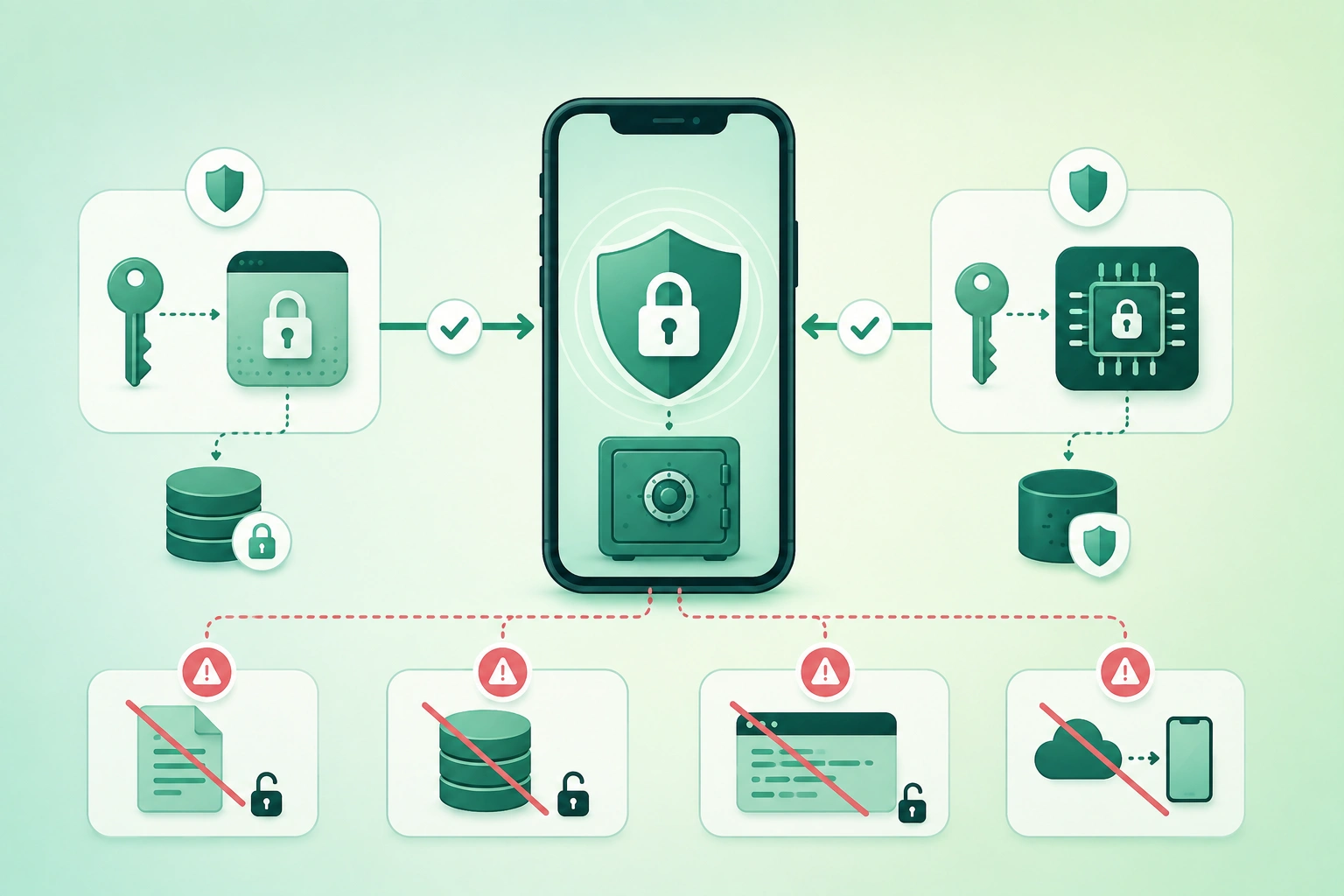
Mobile apps routinely handle values that should not be stored like normal preferences.
Examples include:
refresh token
private key
database encryption key
session credential
client certificate
user password
A common mistake is to put all of them into:
preferences
JSON file
SQLite row
application constant
simply because those mechanisms are convenient.
Secure mobile storage requires a different question:
What is this value?

What can it authorize?

How long must it exist?

Must it survive backup?

Must it survive device migration?

Should it require user presence?

What happens when it is stolen?
Keychain and Keystore are related ideas, not identical APIs
Apple's Keychain can directly hold small sensitive items such as passwords, tokens, certificates, and cryptographic keys. Android Keystore is primarily a facility for protecting cryptographic keys and restricting how those keys can be used. A common Android design stores the encryption key in Keystore and keeps the resulting ciphertext in normal app-private storage.
1. Start with the secret and threat model
Not every piece of application data requires the same protection.
Public or low-sensitivity state
theme = dark
sort_order = newest
onboarding_complete = true
These usually do not need a secure credential store.
Private user data
cached messages
health records
documents
location history
These may require encrypted database or file storage, but are often too large for a secret store such as Keychain.
Credentials
access token
refresh token
session secret
client certificate
These can authorize actions and deserve stronger protection.
Cryptographic keys
AES database key
private signing key
private authentication key
These are especially useful candidates for platform key-management facilities.
Server secrets do not belong in the app at all
If a secret must remain unknown to the person who owns the phone:
do not ship it
inside the application
Examples include:
- Privileged backend API keys.
- Database administrator passwords.
- Payment-provider secret keys.
- Private signing keys used by the backend.
Obfuscation can slow inspection, but it does not transform a distributed application secret into a server-side secret.
2. Separate ordinary app data from secrets
Secure mobile storage architecture (diagram)
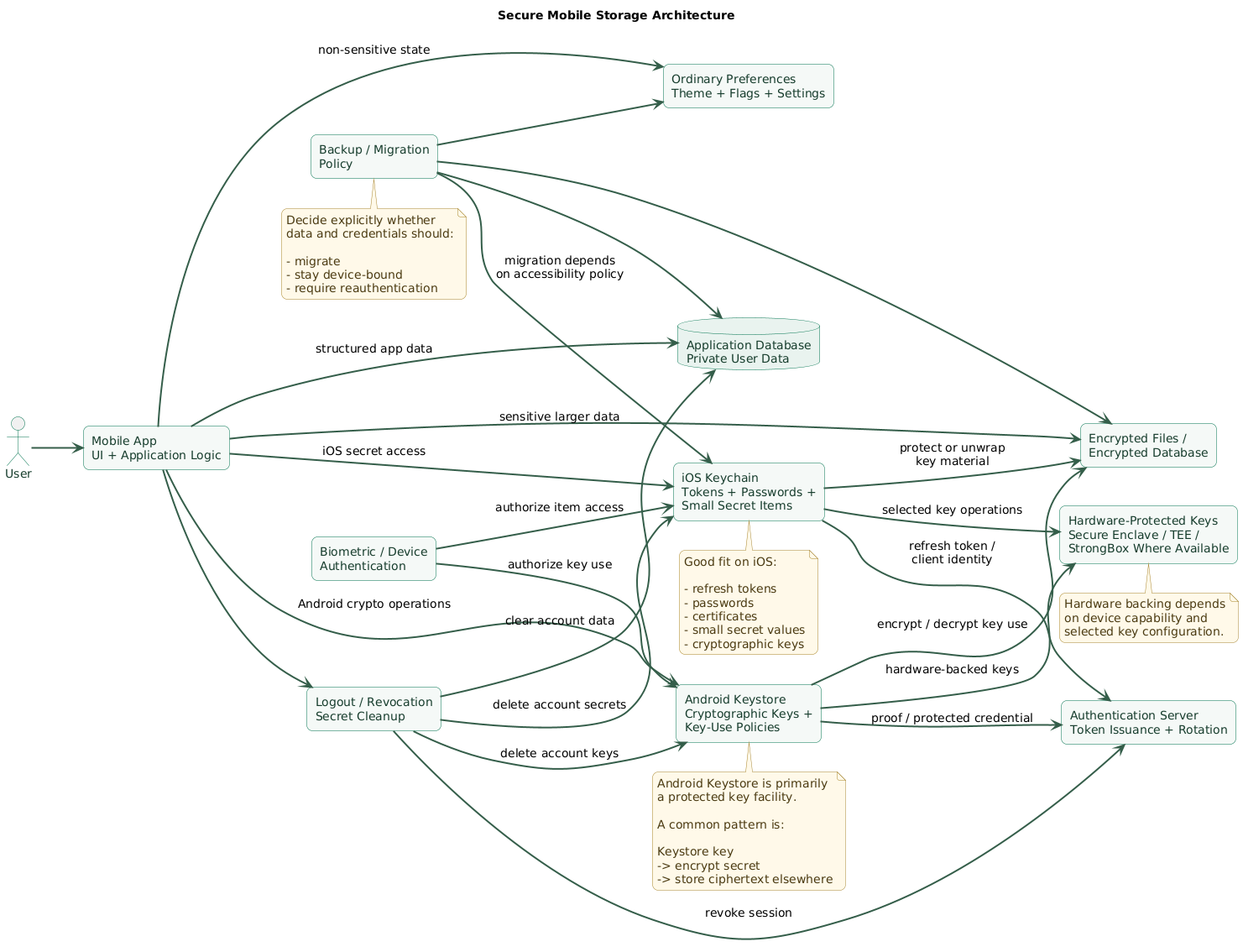
A useful design has several storage layers.
Ordinary preferences
Store values such as:
UI settings
feature hints
non-sensitive flags
Application database
Store structured data such as:
messages
notes
offline records
cached server data
Secure credential storage
Store or protect:
refresh tokens
password-like credentials
small secret blobs
cryptographic key references
Hardware-protected key layer
Where available and appropriate, cryptographic operations can use keys protected by platform security hardware.
Server-side state
Mobile storage should complement:
- Token expiration.
- Authorization.
- Credential revocation.
- Device-session management.
The phone should never become the only security boundary.
3. Understand what iOS Keychain provides
Apple's Keychain Services provides storage intended for small pieces of sensitive information.
Typical items include:
- Passwords.
- Authentication tokens.
- Certificates.
- Cryptographic keys.
- Identity material.
Keychain items have accessibility policies
You should choose when an item needs to be available.
For example:
only while device unlocked

or

after first unlock
for background operation
Use the most restrictive policy that still works
If a refresh token is only required while the user is actively using the application:
access while unlockedmay be appropriate.
A background networking feature may require a different accessibility choice.
Device-only policies affect migration
Some Keychain accessibility classes include:
ThisDeviceOnlysemantics.
These items are intentionally not migrated to another device through a backup restore.
Use device binding when that matches the credential
Good candidate:
credential representing
this physical device
Less obvious candidate:
user data that must recover
on a replacement phone
Secure Enclave is not simply “more Keychain”
Secure Enclave-backed cryptographic keys are useful when private-key operations should remain tied to protected hardware.
The application can request cryptographic operations without treating the private key like an ordinary exportable byte string.
User-presence controls can be added
Sensitive operations may be protected with:
device authentication
Touch ID
Face ID
depending on the access-control policy.
Policies tied to the current biometric enrollment should also have an explicit recovery path because enrollment changes can invalidate access.
4. Understand what Android Keystore provides
Android Keystore is commonly misunderstood as:
a secret preferences databaseThat is not its primary model.
It manages cryptographic key entries and associated key-use restrictions.
Typical Android pattern
Android Keystore
      ↓
AES key
      ↓
encrypt refresh token
      ↓
store ciphertext
in app-private storage
The raw key can remain non-exportable
Instead of:
read raw encryption key
into application code
the application asks the cryptographic provider to perform an authorized operation using the stored key.
Hardware-backed protection varies by device
Depending on hardware and configuration, key material can be protected by an isolated trusted environment or StrongBox-class security hardware.
Do not assume every device has StrongBox
If your application requests a specific hardware capability:
check availability
      ↓
define fallback
or
reject unsupported device
according to the product's risk model.
Keys can have usage restrictions
Android key policies can constrain:
- Encryption versus decryption.
- Signing.
- Algorithms.
- Validity period.
- User-authentication requirements.
Authentication-bound keys can become invalid
Depending on how the key is configured, changes to secure lock-screen or biometric enrollment state can invalidate the key.
Your application must therefore handle:
key no longer usableas a real lifecycle state.
Modern Android guidance deserves attention
Older tutorials often center their design around convenience wrappers such as:
EncryptedSharedPreferences
MasterKey
Current Android documentation marks the AndroidX Security Crypto versions of those APIs as deprecated.
For new security-sensitive designs, verify current platform guidance instead of copying an old tutorial unchanged.
5. Store access and refresh tokens deliberately
Mobile secret-storage decision tree (diagram)
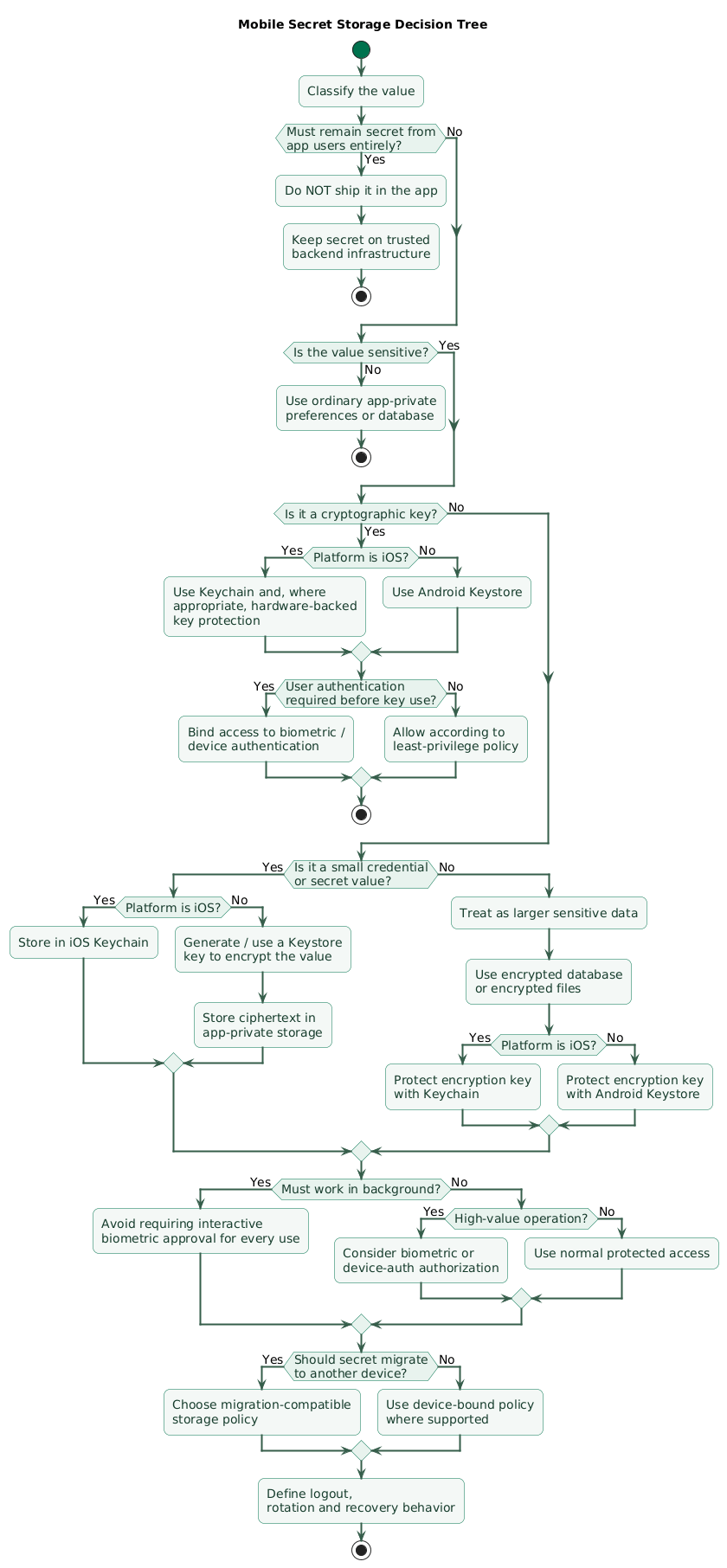
Access token
Usually:
shorter lifetime
used frequently
limited scope
Where practical, an access token can remain only in memory during an active application session.
If the product requires persistence, use storage appropriate to its threat model.
Refresh token
Usually:
longer lived
used less frequently
capable of obtaining
new access tokens
This makes it a higher-value credential.
A common architecture is:
securely stored refresh token
      ↓
authentication server
      ↓
short-lived access token
      ↓
API request
Avoid storing the user's password
Once an authentication protocol has exchanged credentials for suitable session tokens, the application usually should not retain the original account password merely for convenience.
Use server-side rotation where supported
Refresh-token lifecycle may look like:
refresh token R1
      ↓
used once
      ↓
server returns
R2
      ↓
store R2
      ↓
retire R1
Make rotation transactional
Consider:
server invalidates R1
      ↓
server sends R2
      ↓
app crashes before storing R2
Authentication protocols and backend policies should consider interrupted rotation and replay explicitly.
6. Use biometrics to authorize access, not as encryption
Face ID, Touch ID, or Android biometrics are often described as:
encrypting the tokenThat description is usually too simplistic.
A better model is:
secret / key exists
      ↓
platform access policy
requires authentication
      ↓
user authenticates
      ↓
operation becomes authorized
Decide whether authentication is required every time
Possible policies include:
every sensitive operation

or

for a limited authenticated window
The correct choice depends on:
- Transaction sensitivity.
- Frequency of use.
- User experience.
- Background requirements.
Do not biometric-lock background credentials accidentally
If a credential is required by:
background refresh
silent push handling
scheduled upload
but its key requires interactive biometric approval every time, background operation may become impossible.
Separate app unlock from server authentication
A local biometric screen can protect access to the app interface.
It does not replace:
backend access-token validation
authorization
revocation
session policy
7. Encrypt larger local datasets with key separation
Secure credential stores are not intended to become multi-gigabyte application databases.
Use envelope-style separation
platform-protected key
      ↓
encrypts / unwraps
data-encryption key
      ↓
encrypts
database or files
Or, for a simpler design:
Keystore-managed AES key
      ↓
encrypt small sensitive values
stored as ciphertext
Protect both confidentiality and integrity
Encryption design should detect unauthorized modification rather than only hide plaintext.
Use established authenticated encryption
Avoid inventing:
custom XOR
custom cipher
home-made key derivation
fixed IV scheme
Never store the encryption key beside the ciphertext
Bad:
database.enc
database-key.txt
in the same ordinary storage location.
Keys and data have separate lifecycles
Deleting a key may make encrypted data permanently unreadable.
That can be useful for:
cryptographic erasurebut only when the product intentionally accepts that recovery model.
Plan for key rotation
Large encrypted datasets may require:
old key
      ↓
decrypt
      ↓
new key
      ↓
reencrypt
or a wrapped data-key architecture that avoids rewriting every file for every wrapping-key change.
8. Design backup and device migration behavior
Backup is part of secure storage.
Ask:
Should this credential
appear on a new phone
after restore?
Some iOS Keychain policies migrate
Other policies with:
ThisDeviceOnlyintentionally do not migrate.
Device-bound authentication should often re-enroll
If the secret represents:
this specific trusted devicerestoring it onto another device may defeat that identity model.
Android app files can participate in backup
Ordinary internal application files and preferences can be included in platform backup depending on application configuration.
Do not assume:
app-private
=
never backed up
Encrypted file without its key is not a successful restore
Example:
backup contains ciphertext

new phone does not have
device-bound encryption key

result:
data cannot decrypt
That may be intentional, but the application should recognize and recover from the condition.
Choose one of three recovery models
1. migrate securely

2. restore encrypted data
   and recover key separately

3. intentionally do not migrate
   and require re-authentication
9. Handle logout, account switching, and revocation
Mobile token and key lifecycle (diagram)
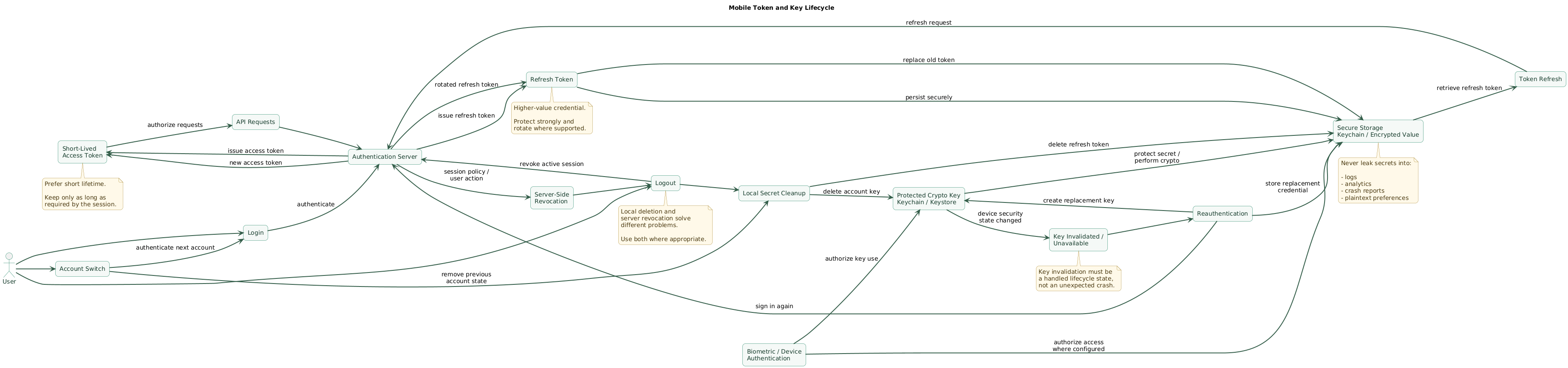
Logout should have explicit semantics
Possible sequence:
user taps Logout
      ↓
revoke server session
where supported
      ↓
remove refresh token
      ↓
remove access token
      ↓
clear account-specific keys
      ↓
clear protected local data
according to policy
      ↓
return to signed-out state
Local deletion alone may not revoke the session
If a refresh token was copied before logout:
deleting local copydoes not necessarily invalidate the stolen copy.
Server-side revocation remains important.
Account switching requires namespacing
Do not use:
key = "refresh_token"without understanding which account owns it.
Prefer a model such as:
account ID
+
credential type
+
environment
Never let account B inherit account A's local state
Review:
- Database rows.
- Cached files.
- Secure-storage items.
- Push tokens and account mappings.
- In-memory state.
Handle invalid keys gracefully
If a key becomes unusable because the security configuration changed:
detect
      ↓
clear unusable encrypted session state
      ↓
re-authenticate
      ↓
create replacement key
      ↓
continue
rather than entering an endless crash loop.
10. Avoid common secure-storage mistakes
Mistake 1: storing tokens in plaintext preferences
Convenient storage is not automatically credential-grade storage.
Mistake 2: putting a secret key in source code
const API_SECRET =
"super-secret-production-key"
Anything shipped to the device should be assumed recoverable by a sufficiently motivated analyst.
Mistake 3: Base64 is not encryption
secret
      ↓
Base64
      ↓
still the same secret
Mistake 4: encrypting data and hard-coding the key
encrypted token
+
hard-coded AES key
provides weak separation because the attacker receives both pieces.
Mistake 5: storing the key next to the ciphertext
preferences:
encrypted_token

preferences:
encryption_key
defeats the purpose of platform-protected key storage.
Mistake 6: logging secrets
Never casually log:
Authorization header
refresh token
password
session cookie
private key
database encryption key
Mistake 7: sending secrets to analytics
Analytics attributes and crash-report metadata can persist outside the application's primary security boundary.
Mistake 8: assuming app-private storage means hardware protection
Application sandboxing and hardware-backed key protection solve different problems.
Mistake 9: biometric prompt without cryptographic binding
Showing:
Face ID successfuland then reading an independently accessible plaintext token provides a weaker security model than actually binding sensitive key use or item access to the authentication policy.
Mistake 10: protecting everything with biometrics
Requiring user interaction for every token access may break:
background synchronization
push handling
scheduled operations
Protect according to the actual use case.
Mistake 11: ignoring backups
A perfectly encrypted file can become:
unrecoverable garbageif the backup restores the ciphertext but not its device-bound key.
Mistake 12: assuming secure storage replaces server security
Even strong local protection does not eliminate:
- Token expiration.
- Scope restrictions.
- Session revocation.
- Backend authorization.
11. Assume the client can eventually be inspected
Secure mobile storage increases the difficulty of extracting credentials.
It does not make an untrusted endpoint mathematically impossible to inspect.
Threats include
- Rooted or jailbroken devices.
- Runtime instrumentation.
- Debugger attachment.
- Malicious accessibility or overlay abuse.
- Memory inspection.
- Compromised third-party libraries.
Minimize credential value
Prefer:
short-lived
limited-scope
revocable credential
over:
permanent
global
non-revocable secret
Server authorization is mandatory
Never assume:
request came from our app

therefore

request is authorized
The backend should validate identity and authorization for each protected operation.
Consider device-bound credentials for stronger scenarios
A device can generate a private key locally and register the corresponding public key with the backend.
device
generates private key
      ↓
private key remains protected
      ↓
public key registered
with server
The server can then require proof involving that device-held private key for appropriate workflows.
12. Test the complete secret lifecycle
Fresh installation
Verify:
no old account accidentally loaded
no stale token used
secure storage initializes correctly
Successful login
Verify:
token stored
correct account binding
no secret in logs
Token refresh
Test:
- Success.
- Network timeout.
- Server rejection.
- Rotated refresh token.
App restart
Verify expected credentials remain available according to policy.
Device lock
Test whether items are accessible at the times your architecture expects.
Biometric changes
For authentication-bound keys, test the platform behavior when:
new biometric enrolled
screen lock removed
authentication policy changes
Backup and restore
Test an actual restore path rather than only reading API documentation.
Verify:
which data migrated
which secrets did not
whether encrypted data still decrypts
whether login is required again
Logout
Verify:
refresh token removed
server session revoked where expected
account cache cleared
in-memory state cleared
Account switching
Confirm user B cannot access:
user A's token
user A's database
user A's cached files
Key invalidation
Simulate a key that can no longer decrypt its data.
The application should recover intentionally rather than repeatedly crash.
13. Copy/paste secure-storage checklist
Secure mobile storage checklist

Threat model
- Inventory sensitive values.
- Identify passwords.
- Identify access tokens.
- Identify refresh tokens.
- Identify private keys.
- Identify database encryption keys.
- Identify user private data.
- Identify server-only secrets.
- Define attacker capabilities.
- Define acceptable recovery behavior.

Classification
- Classify public data.
- Classify ordinary private data.
- Classify credentials.
- Classify cryptographic keys.
- Classify high-impact secrets.
- Assign storage policy to each class.

Server secrets
- Never embed backend administrator credentials.
- Never embed payment-provider secret keys.
- Never embed database passwords.
- Never embed private server signing keys.
- Move privileged operations to backend infrastructure.
- Assume mobile binaries can be inspected.

Ordinary preferences
- Store theme.
- Store sort order.
- Store non-sensitive flags.
- Do not store passwords casually.
- Do not store long-lived credentials casually.
- Do not confuse private sandbox with secure key storage.

iOS Keychain
- Use Keychain for small secrets.
- Use Keychain for passwords where required.
- Use Keychain for tokens.
- Use Keychain for identities and keys where appropriate.
- Choose accessibility explicitly.
- Test locked-device behavior.
- Test background access.
- Test backup migration.
- Test device-only behavior.

Keychain accessibility
- Use restrictive accessibility where possible.
- Understand WhenUnlocked behavior.
- Understand AfterFirstUnlock behavior.
- Understand ThisDeviceOnly behavior.
- Avoid deprecated always-accessible policies.
- Document why background access is required.

Device migration
- Decide whether credential should move to a new device.
- Use device-only semantics for device identity where appropriate.
- Re-enroll device credentials after migration where appropriate.
- Do not assume migration behavior.
- Test real restore.

Secure Enclave
- Use for appropriate private-key operations.
- Keep private key hardware-bound where required.
- Do not expect every secret blob to belong in Secure Enclave.
- Define fallback for unsupported use cases.
- Handle key loss.
- Handle authentication policy changes.

iOS biometrics
- Decide whether authentication is required.
- Decide whether current biometric set matters.
- Handle enrollment changes.
- Handle Face ID / Touch ID unavailable.
- Provide device-credential fallback where product policy allows.
- Avoid endless authentication loops.

Android Keystore
- Use for cryptographic key material.
- Do not treat Keystore as a generic preference database.
- Generate keys through AndroidKeyStore where appropriate.
- Use key aliases deliberately.
- Restrict key purposes.
- Restrict algorithms.
- Restrict validity where required.
- Handle key invalidation.

Android hardware backing
- Check security level when it matters.
- Understand software-backed possibility.
- Understand trusted environment.
- Understand StrongBox.
- Do not assume StrongBox exists everywhere.
- Define product fallback.
- Test target device classes.

StrongBox
- Request only where security requirement justifies it.
- Detect unavailability.
- Avoid crashing when unavailable.
- Decide whether trusted environment is acceptable fallback.
- Document requirements.

Android authentication-bound keys
- Configure user-auth requirements deliberately.
- Decide authentication timeout.
- Decide biometric vs device credential policy.
- Handle UserNotAuthenticated.
- Handle permanently invalidated keys.
- Test enrollment changes.
- Test screen-lock removal.

AndroidX Security Crypto
- Check current platform documentation before using old tutorials.
- Be aware that EncryptedSharedPreferences is deprecated.
- Be aware that MasterKey convenience API is deprecated.
- Prefer a current supported design.
- Keep cryptographic key management separate from ordinary storage.

Application-private storage
- Use for ordinary private files.
- Use for ciphertext.
- Use for encrypted databases.
- Do not assume sandbox equals hardware-backed protection.
- Review backup behavior.
- Review debug extraction paths.

Encryption keys
- Never hard-code production encryption keys.
- Never store key beside ciphertext in plaintext.
- Generate keys securely.
- Protect keys through platform facilities.
- Rotate where required.
- Delete deliberately.
- Test lost-key behavior.

Authenticated encryption
- Protect confidentiality.
- Protect integrity.
- Use established algorithms.
- Avoid custom cryptography.
- Avoid fixed IV reuse.
- Use secure random values where required.
- Store nonce / IV according to algorithm requirements.
- Verify authentication tag before accepting plaintext.

Access tokens
- Prefer short lifetimes.
- Keep in memory when feasible.
- Persist only when product requires it.
- Limit scope.
- Remove on logout.
- Never log.
- Rotate / refresh according to protocol.

Refresh tokens
- Treat as high-value credentials.
- Use secure storage.
- Limit scope.
- Rotate where supported.
- Revoke server-side when appropriate.
- Remove on logout.
- Detect reuse where backend protocol supports it.
- Never send to analytics.

Passwords
- Avoid retaining after successful token exchange where possible.
- Never log.
- Never store plaintext in preferences.
- Never send to analytics.
- Avoid storing merely to implement automatic login.
- Prefer token-based session architecture.

API keys
- Distinguish public client identifier from secret.
- Do not pretend obfuscation makes a backend secret safe.
- Restrict any client-distributed API credential.
- Apply server-side quotas.
- Apply origin / application restrictions where provider supports them.
- Assume extracted client key can be copied.

Biometrics
- Use biometrics to authorize sensitive access.
- Do not call biometrics encryption by itself.
- Bind key use to authentication where appropriate.
- Preserve recovery path.
- Avoid biometric requirements that break background work.
- Test cancellation.
- Test lockout.

App lock
- Distinguish app-screen lock from authentication token security.
- Do not rely only on local UI gate.
- Protect underlying key or item where needed.
- Continue server-side authorization.
- Handle app snapshots.

Screenshots
- Review whether sensitive screens can appear in task switcher.
- Protect highly sensitive views where platform capabilities allow.
- Avoid displaying secrets unnecessarily.
- Mask passwords and recovery codes.
- Clear one-time secrets after use.

Clipboard
- Avoid copying credentials automatically.
- Avoid long clipboard retention where controllable.
- Warn user for sensitive recovery codes.
- Never use clipboard as secret storage.

Logs
- Never log Authorization header.
- Never log refresh token.
- Never log password.
- Never log private key.
- Never log database key.
- Redact sensitive request bodies.
- Review release logging.

Crash reporting
- Sanitize breadcrumbs.
- Sanitize custom metadata.
- Sanitize exceptions.
- Avoid attaching full request headers.
- Avoid attaching databases containing secrets.
- Review third-party crash SDK configuration.

Analytics
- Never send authentication tokens.
- Never send passwords.
- Never send private keys.
- Avoid sensitive personal fields.
- Review event parameters.
- Review user properties.
- Apply data minimization.

Debug builds
- Keep test credentials separate.
- Do not ship debug endpoints.
- Do not ship development certificates.
- Do not log production tokens.
- Disable insecure TLS overrides.
- Remove test backdoors.
- Verify release configuration.

Source control
- Do not commit production secrets.
- Scan repository.
- Rotate leaked secrets.
- Remove sensitive test accounts.
- Protect signing credentials.
- Keep environment-specific server secrets outside mobile source.

Memory
- Keep secrets in memory only as long as required.
- Avoid unnecessary copies.
- Do not build secret-heavy debug strings.
- Clear long-lived in-memory sessions on logout.
- Understand that application memory is not an absolute secure enclave.

Token lifecycle
- Issue token.
- Store appropriately.
- Use token.
- Refresh.
- Rotate.
- Revoke.
- Delete.
- Handle expiration.
- Handle compromised session.

Refresh rotation
- Preserve new token before discarding usable recovery state where protocol allows.
- Handle interrupted response.
- Handle duplicate retry.
- Handle token reuse.
- Define server grace behavior if required by architecture.
- Test crash during rotation.

Logout
- Revoke server session where supported.
- Delete refresh token.
- Delete access token.
- Clear in-memory credentials.
- Clear account-specific local data according to policy.
- Clear account-specific encryption keys where intended.
- Remove push-account mapping where required.
- Return to deterministic signed-out state.

Account switching
- Namespace credentials per account.
- Namespace encrypted data per account.
- Namespace local database state.
- Clear previous account memory.
- Prevent cross-account cache access.
- Test rapid account switching.

Server revocation
- Support logout revocation.
- Support stolen-device session revocation.
- Support password-change session policy.
- Support compromised refresh-token revocation.
- Support device removal.
- Apply authorization independently of local storage.

Backups
- Inventory what platform backs up.
- Decide what should migrate.
- Exclude device-bound ciphertext where appropriate.
- Exclude sensitive files where appropriate.
- Test backup rules.
- Test restore.
- Handle missing encryption key.
- Avoid silent data corruption.

iOS backup
- Understand Keychain accessibility migration behavior.
- Use ThisDeviceOnly where intentional.
- Reauthenticate when device-bound secret is missing.
- Test encrypted backup restore.
- Document recovery.

Android backup
- Review Auto Backup rules.
- Review SharedPreferences.
- Review internal files.
- Review databases.
- Exclude inappropriate encrypted artifacts.
- Test restore when Keystore key is absent.
- Use data extraction rules deliberately.

Encrypted database
- Separate data key from data.
- Protect key with platform mechanism.
- Authenticate ciphertext.
- Version encryption format.
- Plan migration.
- Plan key rotation.
- Handle lost key.
- Handle corrupted database.

Files
- Encrypt truly sensitive files where required.
- Store key separately.
- Restrict sharing.
- Avoid world-readable storage.
- Sanitize exported files.
- Remove temporary plaintext copies.
- Review external storage use.

Database key
- Generate securely.
- Never hard-code.
- Protect in Keychain / Keystore architecture.
- Define backup behavior.
- Define rotation.
- Define logout behavior.
- Define device migration.

Key rotation
- Assign key version.
- Create new key.
- Rewrap or reencrypt data.
- Verify migration.
- Retire old key.
- Keep rollback only when securely justified.
- Log version, not key material.

Key invalidation
- Catch platform errors.
- Distinguish auth required from permanent invalidation.
- Clear unusable session state.
- Reauthenticate user.
- Generate replacement key.
- Reencrypt recoverable data.
- Avoid crash loops.

Cryptographic erasure
- Understand that deleting a unique encryption key may make data unrecoverable.
- Use only when intentional.
- Ensure no backup copy of key remains if true erasure is required.
- Document recovery implications.

Background tasks
- Choose credentials that can be used while app is backgrounded.
- Avoid requiring interactive biometric auth for unattended sync.
- Use minimum required privilege.
- Refresh tokens carefully.
- Handle device-lock state.

Push notifications
- Do not place long-lived secrets in notification payloads.
- Do not assume notification content is private.
- Keep sensitive data fetch behind authenticated API.
- Review lock-screen exposure.

Rooted / jailbroken devices
- Treat as elevated risk.
- Do not rely on root detection as sole defense.
- Keep tokens short-lived.
- Limit privileges.
- Support revocation.
- Maintain server authorization.

Runtime instrumentation
- Assume client code can be inspected.
- Avoid permanent high-value secrets.
- Limit credential scope.
- Use server-side checks.
- Consider device-bound cryptographic proof for stronger scenarios.

Certificate pinning
- Do not confuse TLS pinning with local storage.
- Manage rotation carefully if used.
- Avoid breaking connectivity during certificate changes.
- Keep secure storage independent from transport assumptions.

Secure networking
- Use TLS.
- Validate certificates.
- Avoid disabling hostname verification.
- Avoid insecure development overrides in release.
- Never send credentials over plaintext transport.

Device-bound credentials
- Generate private key locally.
- Protect private key appropriately.
- Register public key server-side.
- Bind credential to account / device.
- Support revocation.
- Support device replacement.
- Handle key loss.

Least privilege
- Give tokens minimum scope.
- Separate read and administrative operations where useful.
- Limit token lifetime.
- Limit backend authorization.
- Do not let possession of one mobile token become global administrator access.

Session management
- Show active devices where useful.
- Allow user to revoke devices.
- Detect unusual token reuse where appropriate.
- Expire old sessions.
- Define password-change behavior.
- Define account-compromise response.

Testing
- Test fresh install.
- Test login.
- Test app restart.
- Test device lock.
- Test background operation.
- Test access-token expiration.
- Test refresh-token rotation.
- Test refresh failure.
- Test biometric cancellation.
- Test key invalidation.
- Test backup restore.
- Test logout.
- Test account switching.

Security review
- Inspect app package.
- Search binary strings.
- Search bundled configuration.
- Search logs.
- Search preferences.
- Search local database.
- Search cached files.
- Confirm privileged backend secrets are absent.

Recovery
- Define forgotten-device flow.
- Define lost-device flow.
- Define new-device enrollment.
- Define invalid-key recovery.
- Define corrupted encrypted-data recovery.
- Define support process.
- Avoid support agents requesting users to send raw tokens.

Documentation
- Document each secret.
- Document storage location.
- Document accessibility policy.
- Document backup behavior.
- Document migration behavior.
- Document rotation.
- Document deletion.
- Document server revocation.

Final review
- Is this value actually secret?
- What can an attacker do with it?
- Does it belong on the client at all?
- Is it a cryptographic key?
- Does it belong in Keychain?
- Does it belong in Android Keystore?
- Should Android store ciphertext outside Keystore?
- Does this credential need biometric authorization?
- Must it work in the background?
- Should it migrate to another device?
- Is backup behavior explicit?
- Is the token short-lived?
- Is refresh-token rotation supported?
- Can the server revoke it?
- Is the secret absent from logs?
- Is it absent from analytics?
- Is it absent from crash reports?
- Is it absent from source code?
- Is account switching isolated?
- Does logout remove local credentials?
- Does logout revoke server state where appropriate?
- Can the app recover if a key becomes invalid?
- Can encrypted data recover after device migration?
- Are privileged server secrets kept off the device?
- Does backend authorization remain effective even if local storage is compromised?
14. FAQ
What is the difference between Keychain and Keystore?
Apple Keychain can directly store small sensitive values such as passwords, tokens, certificates, and keys. Android Keystore primarily protects cryptographic keys and controls how those keys can be used. Android apps often use a Keystore-protected key to encrypt a token or database stored elsewhere.
Should refresh tokens be stored in Keychain or Keystore?
On iOS, a refresh token can be stored as a Keychain item using an accessibility policy appropriate to the application. On Android, a common design protects an encryption key with Android Keystore and stores the encrypted refresh token in app-private storage.
Should access tokens be stored permanently?
Not necessarily. If the application can keep a short-lived access token in memory and obtain a replacement from a securely protected refresh token, that reduces unnecessary persistent exposure.
Can I hard-code an API secret if I obfuscate the app?
Do not embed any credential that must remain secret from app users. Obfuscation may slow reverse engineering, but the distributed application still contains the information needed to use the credential.
Does biometric authentication make a token secure?
Biometrics can be part of an access-control policy for a Keychain item or cryptographic key. They do not automatically make arbitrary plaintext storage secure. The secret or key must still be stored through an appropriate mechanism.
What happens if a hardware-backed key becomes invalid?
The application should detect the condition and follow a documented recovery flow, typically clearing unusable session material, re-authenticating the user, creating a replacement key, and restoring only data that can be safely recovered.
Should secure data be backed up?
It depends on its role. User data may need migration, while a device-identity credential may intentionally remain tied to one physical device. Backup and migration behavior should be selected deliberately and tested on real restore flows.
Key terms (quick glossary)
- Keychain
- Apple's secure storage service for small sensitive items such as passwords, tokens, certificates, identities, and cryptographic keys.
- Android Keystore
- Android's protected cryptographic key facility for generating, storing, and using keys according to defined authorization policies.
- Secure Enclave
- Apple security hardware designed to protect sensitive cryptographic operations and selected device security functions.
- StrongBox
- An Android security-hardware profile that can provide stronger isolation for supported Keystore operations on devices that implement it.
- Hardware-backed key
- A cryptographic key whose sensitive key material and operations are protected by isolated security hardware rather than ordinary application memory.
- Access token
- A credential commonly used to authorize API requests for a limited period.
- Refresh token
- A longer-lived credential used to obtain replacement access tokens.
- Key accessibility
- A platform policy defining conditions under which stored secret material can be accessed, such as whether the device must be unlocked.
- Device-bound credential
- A credential designed to remain associated with one physical device rather than migrate freely between devices.
- Biometric authorization
- Using a successfully verified biometric identity to authorize access to an item or cryptographic operation.
- Authenticated encryption
- Encryption that protects both confidentiality and integrity so modified ciphertext can be detected.
- Key rotation
- Replacing an existing cryptographic key or credential with a new one according to a controlled migration process.
- Key invalidation
- A state in which a previously usable key can no longer perform the protected operation because a security condition or policy changed.
- Cryptographic erasure
- Making encrypted data unrecoverable by securely destroying the only key capable of decrypting it.
- Least privilege
- Limiting a credential to only the permissions and lifetime required for its intended operation.
- Secure storage
- Storage architecture designed to reduce unauthorized access to sensitive information using platform isolation, encryption, key management and controlled access policies.
Worth reading
Recommended guides from the category.
