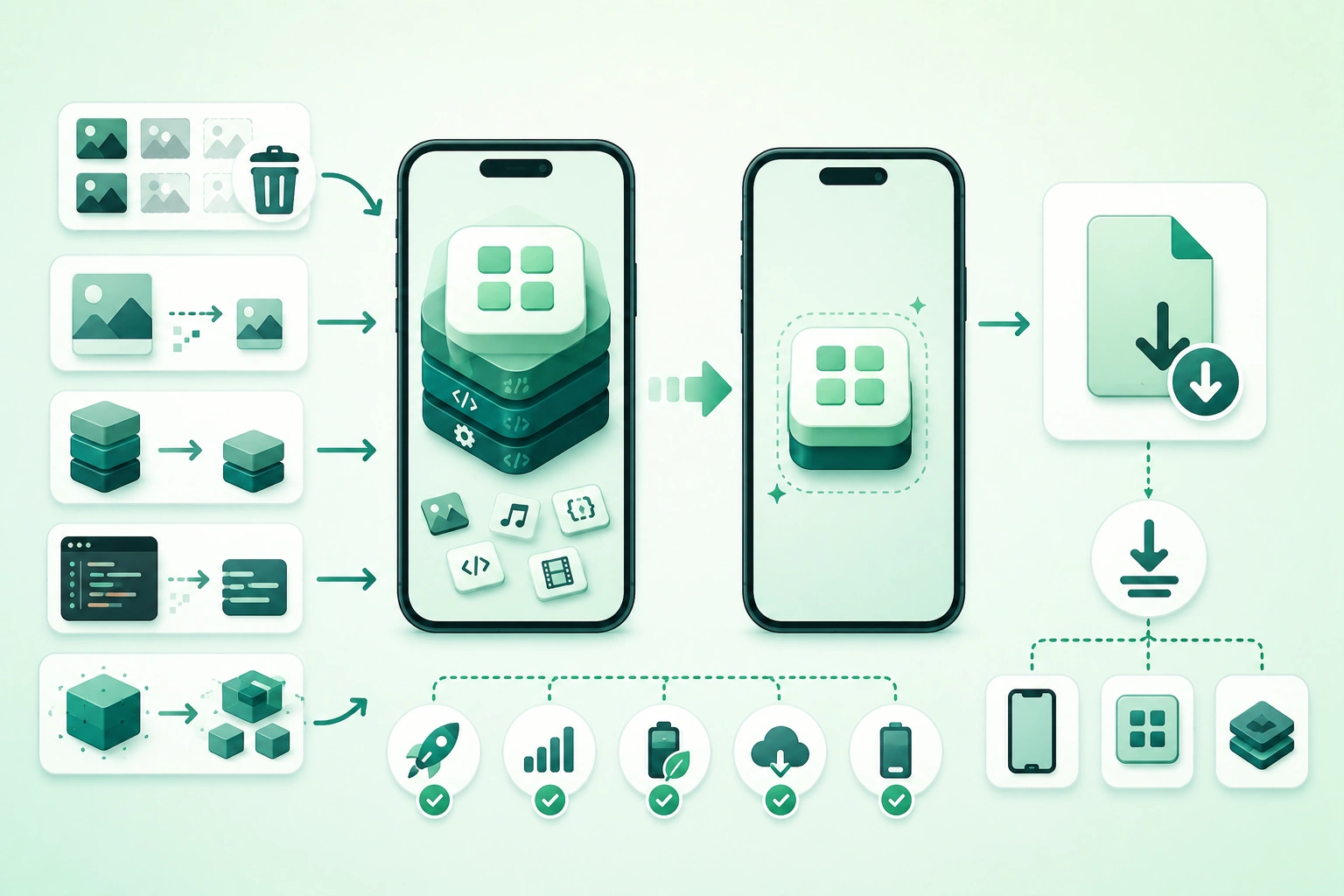
App-size optimization often starts with the wrong number.
A developer sees:
debug APK = 180 MB

or

archive = 320 MB
and assumes that is what every user downloads.
Modern mobile distribution is more complicated.
Depending on platform and store processing, the package you build can contain:
- Several device architectures.
- Multiple screen-density assets.
- Many localizations.
- Debug information.
- Resources that one particular device never needs.
App stores can transform that upload into smaller device-specific variants.
You therefore need to distinguish:
source project size

build artifact size

store upload size

user download size

installed app size

runtime cache / documents size
Optimize from measurements, not intuition
Before deleting code or recompressing every image, identify the largest components in a release build. A 30 MB native SDK deserves more attention than forty 5 KB icons.
1. Measure the size users actually receive
Mobile app size reduction pipeline (diagram)
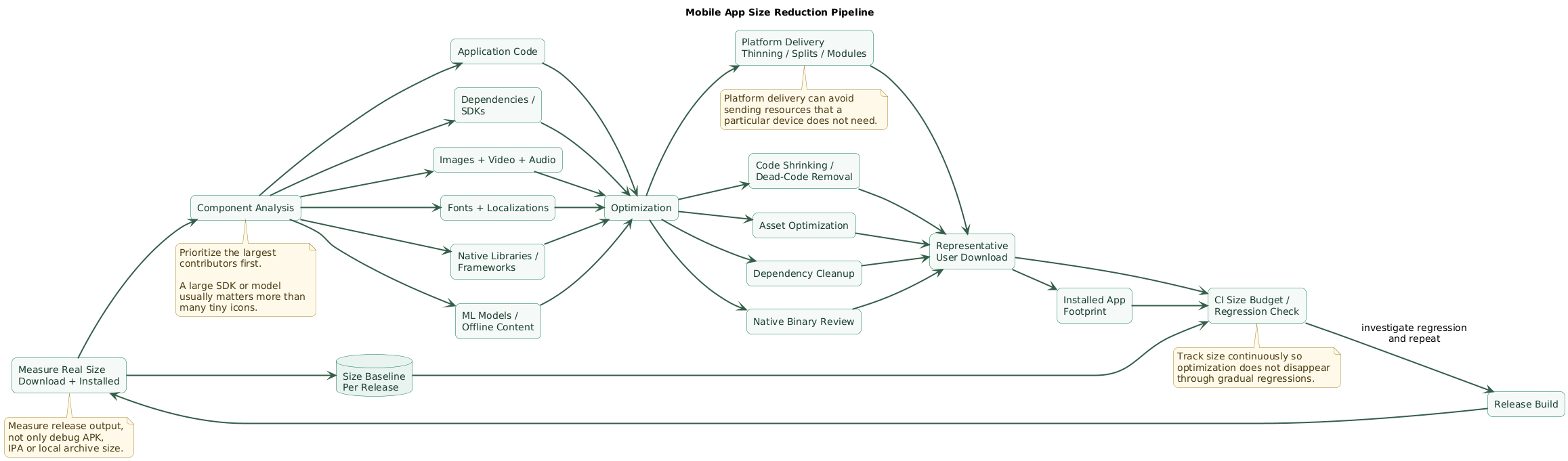
Start with a release build.
Debug builds often contain:
- Extra metadata.
- Development tooling.
- Less aggressive optimization.
- Debug resources.
Android
Inspect the APK or Android App Bundle using tooling that can break the artifact down by:
DEX code
resources
assets
native libraries
manifest
metadata
Android Studio's APK Analyzer can also compare builds, which is useful when a release suddenly becomes larger.
iOS
Do not treat:
.app
.xcarchive
uploaded .ipa
as an exact representation of the user's final App Store download.
Use App Store Connect size information for distributed builds, or generate an Xcode app thinning size report during development.
Track at least two user-facing numbers
compressed download size

installed size
They answer different questions.
Compression may make a file cheap to download while it still occupies substantial device storage after installation.
Do not mix bundle size with app data
A 70 MB application can later consume:
2 GB cached videoswithout the application bundle becoming larger.
Bundle optimization and runtime disk-usage management are related but separate tasks.
2. Break the app into size contributors
Create a simple inventory.
compiled application code
third-party SDKs
native libraries
images
audio
video
fonts
localizations
machine-learning models
offline content
development resources
Rank contributors by size
Example:
native ML runtime       32 MB
video tutorial          26 MB
third-party SDKs        18 MB
images                  14 MB
application code         8 MB
fonts                     5 MB
This tells you where optimization effort is likely to pay off.
Use a Pareto approach
The first goal is not:
optimize every filebut:
find the few categories
creating most of the footprint
Set a baseline
Android representative download:
62 MB

iPhone representative download:
71 MB
Then compare every optimization against that baseline.
3. Remove expensive dependencies and unused code
Dependencies are one of the easiest ways to add megabytes accidentally.
Audit every major SDK
Ask:
What feature needs this dependency?

How much does it add?

Is only 5% of the library used?

Is there a smaller alternative?

Does the platform already provide this feature?
Common large dependency categories
- Video processing.
- Computer vision.
- Machine learning.
- Map SDKs.
- Database engines.
- Analytics suites.
- Advertising SDKs.
Watch transitive dependencies
You may add:
library Aand unknowingly receive:
library B
library C
native runtime D
Prefer modular SDKs when possible
If a vendor offers:
analytics-core

analytics-crash

analytics-messaging

analytics-ads
avoid importing the entire suite when only one module is used.
Remove obsolete experiments
Production projects frequently retain:
- Old feature flags.
- Unused screens.
- Abandoned SDK integrations.
- Old migration code.
- Demo content.
Automated shrinking helps, but deleting dead architecture is still better than carrying it indefinitely.
4. Optimize images, video, audio, and fonts
Asset optimization often produces large wins without changing application behavior.
Images
Check whether a source image is:
4000 x 4000 pixelswhile the app displays it at:
300 x 300 pixelsShipping unnecessary resolution wastes storage and can also increase decoding and memory costs.
Use vectors for suitable artwork
Good candidates:
- Icons.
- Simple symbols.
- Logos.
- Flat interface illustrations.
Poor candidates:
- Photographs.
- Detailed textured artwork.
Use efficient raster formats
Test modern or platform-appropriate image formats for photographs and graphics rather than defaulting to large unoptimized PNG files.
Always compare:
file size
visual quality
decode support
runtime cost
Compress video aggressively enough
A bundled tutorial video can outweigh the rest of the application.
Ask whether it must:
ship at install time

or

download when needed
Optimize audio
UI sounds and spoken content may not require:
uncompressed PCM
maximum sample rate
maximum bitrate
Fonts
A font family can include:
Thin
Light
Regular
Medium
Semibold
Bold
Black
Italic variants
If the product uses only:
Regular
Semibold
Bold
do not automatically bundle every weight.
Font subsetting
Subsetting can reduce large fonts when the application's supported character set is genuinely constrained.
Be careful with:
- Localization.
- User-generated content.
- Names from multiple writing systems.
5. Use Android App Bundles and optimized delivery
Android app size optimization flow (diagram)
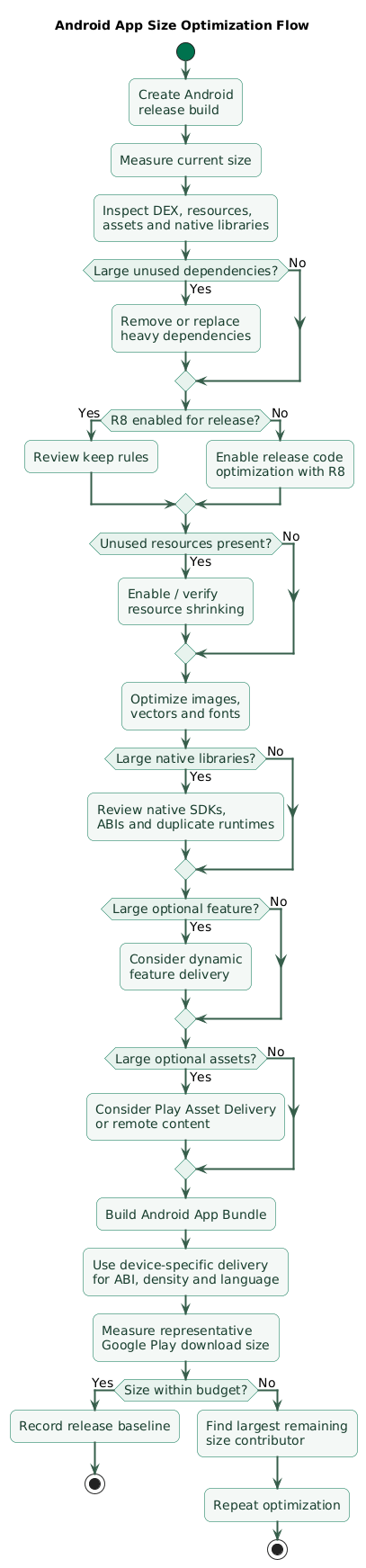
For Google Play distribution, the Android App Bundle is central to practical size optimization.
Instead of delivering one universal package containing every supported configuration, Google Play can generate optimized APKs for a particular device.
Device-specific delivery can avoid unnecessary resources
A particular device generally does not need:
every ABI

every screen density

every language resource
App Bundle delivery helps avoid sending all variants to every user.
Do not judge AAB optimization using one universal APK
A universal package can contain configurations that a real Play-delivered device would not receive.
Measure representative device downloads instead.
Language delivery
Applications with:
20
30
40
languages
can contain substantial localized strings and assets.
App Bundle delivery can reduce unnecessary language resources for devices, while applications implementing their own in-app language selection should verify that the required languages remain available.
Density-specific resources
Avoid manually packaging redundant copies when Android's resource and App Bundle systems can deliver the appropriate variant.
6. Enable Android code and resource optimization
Android release optimization can remove significant unused code.
R8 can reduce compiled code
Depending on project configuration, optimization can:
- Remove unreachable classes and methods.
- Optimize bytecode.
- Rename code where obfuscation applies.
Resource shrinking works with code optimization
After unused code paths disappear, resources referenced only by those code paths may also become removable.
unused feature code removed
      ↓
unused layout no longer referenced
      ↓
resource shrinker removes layout
Test release builds
Shrinkers cannot always infer runtime behavior involving:
- Reflection.
- Dynamically loaded classes.
- JNI.
- Resource names constructed at runtime.
Incorrect keep configuration can therefore produce:
small build
that crashes in production
Do not solve every shrinking issue with giant keep rules
This:
keep everything from every librarycan make the app work while giving away much of the size benefit.
Keep only what runtime behavior genuinely requires.
7. Investigate native libraries and ABIs
Native libraries often appear as:
lib/arm64-v8a/...
lib/armeabi-v7a/...
lib/x86_64/...
in Android packages.
On Apple platforms, third-party frameworks and libraries can similarly add substantial compiled code.
Common sources
- Computer-vision engines.
- Cryptography libraries.
- Media codecs.
- Database engines.
- Game engines.
- Cross-platform runtimes.
- Machine-learning inference frameworks.
Ask whether every architecture is needed in every delivered artifact
Distribution tooling can often avoid delivering irrelevant architecture slices to a particular device.
Inspect duplicated native libraries
Two dependencies may each include:
similar image-processing code

or

different copies of a common native runtime
Machine-learning models
A model may be:
5 MB
50 MB
500 MB
depending on architecture and precision.
Consider:
- Quantization where accuracy permits.
- A smaller architecture.
- Downloading specialized models only when needed.
- Server inference when latency and privacy requirements allow it.
8. Move optional Android features out of the base install
Some applications contain a large feature used by only a minority of users.
Example:
document scanner:
35 MB

used by:
8% of users
Shipping it to everyone may not be efficient.
Play Feature Delivery
Suitable features can be moved into feature modules with delivery strategies such as:
install-time
conditional
on-demand
depending on product requirements.
Play Asset Delivery
Large applications and games can use asset delivery for substantial resource packages rather than forcing all content into the base install.
Do not modularize tiny features unnecessarily
Dynamic delivery adds:
- Architecture complexity.
- Download states.
- Error handling.
- Testing requirements.
Use it when the size saving is meaningful.
Design offline behavior
If a feature is downloaded on demand:
user opens feature
without network
needs a defined experience.
9. Measure iOS variants and use app thinning
iOS app size optimization flow (diagram)
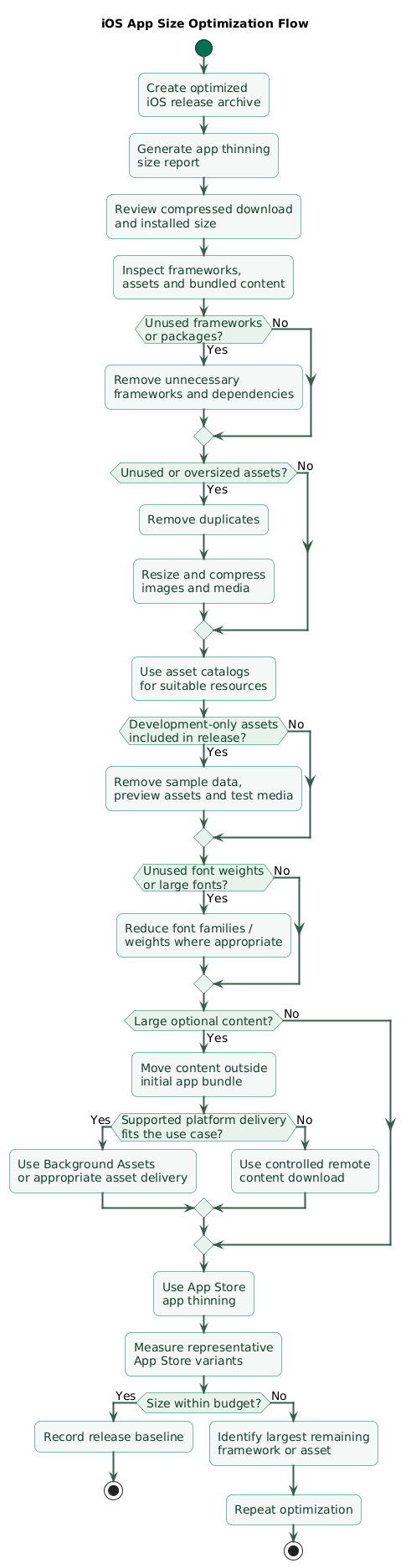
Apple's distribution pipeline also creates device-specific variants.
Use App Store Connect for production measurements
After processing, size information can differ by:
- Device.
- Operating-system version.
- Application variant.
Generate an app thinning size report during development
Xcode can export variants and produce:
App Thinning Size Report.txtcontaining estimates for:
compressed download size
uncompressed installed size
Use app thinning
App thinning ensures a particular device receives only code and resources required by its variant.
Use asset catalogs
Asset catalogs allow Xcode and App Store processing to optimize assets and select device-appropriate variants.
Keep development assets out of production
Preview and development resources may include:
sample images
large JSON fixtures
demo video
mock data
Xcode supports development assets that can remain available for development without increasing the shipped application.
Use release optimization
Verify production builds use the intended release configuration and that development-only code or resources are not accidentally bundled.
10. Optimize iOS assets and downloadable content
Apple specifically recommends reviewing asset formats and compression when reducing application size.
Images
Use an efficient format appropriate to the content.
Avoid unnecessarily high bit depth or image dimensions.
Audio and video
Compress according to the quality the product actually needs.
A short onboarding video does not necessarily need the same bitrate as premium media content.
Large optional content
Ask whether content must be present:
before first launchor can arrive:
during installation

after installation

when a feature is requested
Background Assets
Current Apple platforms provide Background Assets mechanisms for delivering additional content separately from the main application build.
Managed asset packs can be assigned delivery behavior such as:
essential
prefetch
on-demand
depending on the platform version and selected architecture.
Be careful with old On-Demand Resources guidance
On-Demand Resources were historically used to keep infrequently needed assets outside the initial application bundle.
For iOS 27-era development, Apple has deprecated On-Demand Resources and recommends migration toward Background Assets.
New applications should therefore check current deployment-target guidance before copying an older ODR implementation.
Remote content is another option
For content controlled by your own backend:
app installs
      ↓
user requests feature
      ↓
download content
      ↓
cache locally
may be appropriate.
This requires:
- Versioning.
- Integrity checks.
- Cache cleanup.
- Offline behavior.
- Download failure handling.
11. Watch cross-platform framework overhead
Flutter, React Native, .NET-based mobile frameworks, game engines and other cross-platform systems can include:
- Runtime engines.
- Native libraries.
- Bridges.
- Generated resources.
- Plugin binaries.
Measure framework baseline
Create:
empty release applicationand measure its size.
Then compare:
empty app

vs

production app
This separates unavoidable framework baseline from your own growth.
Audit plugins
One convenience plugin may import a substantial native SDK.
Ask:
Do we need the full plugin?

Can the feature use
a smaller native API?
Tree shaking helps but does not solve everything
Tree shaking may reduce unused application code, but it does not automatically guarantee removal of:
- Native libraries.
- Bundled media.
- Fonts.
- Opaque third-party assets.
Check duplicate assets
Cross-platform projects can accidentally include:
asset in shared bundle

plus

same asset in Android resources

plus

same asset in iOS resources
even when only one copy is needed per platform.
12. Enforce size budgets in CI
App-size optimization fails when it is a one-time cleanup.
After reducing:
95 MB
to
61 MB
the app can slowly grow back:
62
64
68
72
79
84 MB
if nobody watches the trend.
Store release measurements
version
Android size
iOS size
code size
assets
native libraries
Add a regression threshold
Example policy:
fail CI if base release
grows by more than 5 MB

unless explicitly approved
Use component budgets
base application:
60 MB

ML models:
20 MB

bundled video:
10 MB

fonts:
4 MB
A component budget makes the source of growth visible.
Review size in pull requests
Useful message:
PR adds:

+7.8 MB Android
+6.4 MB iOS

Largest new component:
camera-processing SDK
is much easier to act on than discovering the regression six months later.
Do not optimize size at any cost
A smaller application is not automatically a better application.
Avoid:
- Destroying image quality.
- Making offline features unusable.
- Adding complex dynamic delivery for tiny savings.
- Breaking reflection with excessive shrinking.
- Downloading essential content after every reinstall.
Optimize:
size
+
performance
+
reliability
+
maintainability
+
user experience
13. Copy/paste app-size optimization checklist
Mobile app size optimization checklist

Measurement
- Measure release builds.
- Do not optimize from debug artifact size.
- Record Android user-facing download size.
- Record Android installed size.
- Record iOS download size.
- Record iOS installed size.
- Keep per-version history.
- Compare before and after every optimization.

Size categories
- Measure application code.
- Measure dependencies.
- Measure native libraries.
- Measure images.
- Measure audio.
- Measure video.
- Measure fonts.
- Measure localization resources.
- Measure ML models.
- Measure bundled offline content.

Prioritization
- Rank components by bytes.
- Start with largest contributors.
- Estimate possible saving.
- Estimate engineering effort.
- Avoid spending days saving a few kilobytes while ignoring large SDKs.

Dependencies
- Audit direct dependencies.
- Audit transitive dependencies.
- Remove unused libraries.
- Remove abandoned experiments.
- Prefer modular SDK packages.
- Avoid importing entire suites for one feature.
- Compare library alternatives.
- Review dependency size during upgrades.

Code
- Remove obsolete features.
- Remove dead experimental code.
- Remove development-only utilities.
- Remove bundled test fixtures.
- Keep release configuration optimized.
- Test optimized builds.

Images
- Remove unused images.
- Reduce unnecessary dimensions.
- Avoid oversized source assets.
- Use vectors where suitable.
- Use efficient raster formats.
- Compress photographs.
- Compare quality after compression.
- Avoid duplicate images.

Video
- Remove unnecessary bundled video.
- Reduce resolution where acceptable.
- Reduce bitrate where acceptable.
- Use efficient codec supported by target platform.
- Consider streaming or downloadable content.
- Avoid shipping optional video to every user.

Audio
- Compress audio.
- Reduce bitrate where quality permits.
- Remove unused tracks.
- Trim silence.
- Avoid uncompressed audio without need.
- Consider downloading large optional audio.

Fonts
- Remove unused font families.
- Remove unused font weights.
- Remove unused italics.
- Consider system fonts.
- Subset carefully when character set is known.
- Verify localization after subsetting.
- Verify user-generated content.

Localization
- Remove unsupported languages.
- Avoid duplicate localized media.
- Use platform delivery optimization.
- Verify in-app language picker requirements.
- Test fallback languages.

Native libraries
- Inspect every .so or framework.
- Identify largest binaries.
- Remove unused native SDKs.
- Check architecture delivery.
- Check duplicate runtimes.
- Check media libraries.
- Check ML runtimes.
- Check database engines.

Machine learning
- Measure model files.
- Consider quantization.
- Consider smaller model.
- Consider downloadable model.
- Consider device-specific model.
- Consider server inference when appropriate.
- Test accuracy after optimization.

Android measurement
- Use APK Analyzer.
- Inspect Android App Bundle.
- Compare release versions.
- Inspect DEX.
- Inspect resources.
- Inspect assets.
- Inspect native libraries.
- Test representative Play-delivered configuration.

Android App Bundle
- Publish AAB where appropriate.
- Use device-optimized delivery.
- Avoid judging only universal APK size.
- Check ABI delivery.
- Check density delivery.
- Check language delivery.
- Verify custom language selection.

Android R8
- Enable release optimization.
- Enable resource optimization.
- Test release build.
- Review keep rules.
- Avoid broad keep-all rules.
- Test reflection.
- Test serialization.
- Test JNI.
- Test dynamically loaded classes.

Android resources
- Run lint for unused resources.
- Remove unused drawables.
- Remove unused layouts.
- Remove unused raw assets.
- Remove unused strings.
- Check assets directory manually.
- Avoid redundant density variants where unnecessary.
- Prefer scalable resources where appropriate.

Android native ABIs
- Identify supported ABIs.
- Avoid unnecessary universal packages for direct distribution.
- Use App Bundle delivery where available.
- Verify native library compatibility.
- Measure each ABI contribution.

Android feature delivery
- Identify rarely used large features.
- Consider dynamic feature module.
- Consider conditional delivery.
- Consider on-demand delivery.
- Keep essential path in base module.
- Test download failures.
- Test no-network behavior.
- Avoid modularizing tiny features.

Play Asset Delivery
- Consider for large games or asset-heavy apps.
- Separate asset packs logically.
- Choose delivery mode deliberately.
- Test storage behavior.
- Test download interruption.
- Test asset availability before use.

iOS measurement
- Use App Store Connect size information.
- Generate app thinning size report during development.
- Measure compressed size.
- Measure uncompressed installed size.
- Compare representative devices.
- Do not rely on raw uploaded IPA alone.

iOS app thinning
- Use App Store distribution thinning.
- Use TestFlight behavior appropriately.
- Generate thinned variants for local measurement.
- Verify device-specific resources.
- Check architecture slices.
- Check assets.

iOS asset catalogs
- Put suitable assets in asset catalogs.
- Remove unused assets.
- Remove duplicates.
- Verify device-specific variants.
- Optimize asset files.
- Avoid loose duplicate files where unnecessary.

iOS development assets
- Keep preview resources out of release bundle.
- Mark development-only assets correctly.
- Remove sample JSON.
- Remove demo video.
- Remove test images.
- Verify release target membership.

iOS frameworks
- Audit Swift packages.
- Audit CocoaPods where used.
- Audit binary frameworks.
- Remove unused frameworks.
- Identify duplicate dependencies.
- Measure framework contribution.
- Prefer modular imports.

iOS images
- Resize source artwork.
- Use efficient formats.
- Compress image assets.
- Avoid unnecessary bit depth.
- Test visual quality.
- Use asset catalogs.

iOS video
- Compress video.
- Reduce resolution when appropriate.
- Reduce bitrate.
- Consider Background Assets.
- Consider remote delivery.
- Avoid large optional media in base bundle.

iOS Background Assets
- Identify content not needed in main bundle.
- Decide essential assets.
- Decide prefetched assets.
- Decide on-demand assets.
- Version asset packs.
- Handle download failure.
- Handle storage cleanup.
- Check deployment-target support.

On-Demand Resources
- Recognize ODR as legacy for newer Apple platforms.
- Do not start new iOS 27-era architecture without checking current guidance.
- Plan migration toward Background Assets where applicable.
- Maintain compatibility only where deployment targets require it.

Cross-platform
- Measure empty framework baseline.
- Measure production delta.
- Audit plugins.
- Audit native SDKs.
- Audit bundled fonts.
- Audit shared images.
- Remove duplicated platform assets.
- Test release tree shaking.
- Do not assume tree shaking removes native binaries.

Flutter
- Measure release artifact, not debug artifact.
- Audit plugins.
- Audit fonts.
- Audit images.
- Audit native libraries.
- Check platform-specific delivery.
- Remove unused assets from pubspec configuration.

React Native
- Measure JS bundle.
- Measure native dependencies.
- Audit npm packages.
- Audit native modules.
- Remove unused assets.
- Verify release minification.
- Check Hermes or runtime implications according to project requirements.

Build configuration
- Use release configuration.
- Remove debug resources.
- Remove test fixtures.
- Remove development certificates from bundle.
- Remove sample databases.
- Remove unnecessary build outputs.
- Verify environment-specific files.

Store delivery
- Measure what store delivers.
- Measure multiple representative devices.
- Understand store thinning.
- Understand optional content delivery.
- Do not compare raw upload sizes across platforms blindly.

Downloadable content
- Move large optional assets out of initial install.
- Version downloaded content.
- Verify integrity.
- Cache responsibly.
- Handle offline mode.
- Handle interrupted downloads.
- Remove obsolete downloaded versions.

Runtime disk usage
- Keep bundle size separate from cache size.
- Monitor downloaded content.
- Limit cache growth.
- Delete replaceable temporary data.
- Avoid duplicate downloaded files.
- Define cleanup policy.

CI
- Generate size metrics on release builds.
- Store metrics per commit or release.
- Compare against baseline.
- Fail on excessive regression.
- Allow documented override.
- Report largest changed components.

Size budgets
- Set Android budget.
- Set iOS budget.
- Set asset budget.
- Set native library budget.
- Set model budget.
- Review budgets periodically.
- Adjust intentionally rather than silently.

Pull requests
- Report app-size delta.
- Identify new dependencies.
- Identify new native binaries.
- Identify large assets.
- Require explanation for major growth.
- Catch regressions before merge.

Regression review
- Compare current release with previous.
- Identify component growth.
- Check SDK updates.
- Check new localizations.
- Check new media.
- Check native library changes.
- Check duplicated assets.

User experience
- Do not damage important image quality.
- Do not delay essential first-run content unnecessarily.
- Do not require network for core offline workflows without reason.
- Show download progress for optional modules.
- Handle insufficient storage.
- Handle failed optional downloads.

Performance
- Measure startup after shrinking.
- Measure asset decoding.
- Measure decompression.
- Measure dynamic module loading.
- Measure downloaded-content access.
- Balance compression against CPU cost.

Security
- Verify shrinking does not remove required security code.
- Verify dynamic delivery integrity.
- Use trusted transport for remote assets.
- Verify downloaded content.
- Do not expose private configuration while removing packaging layers.

Testing
- Test clean installation.
- Test upgrade.
- Test multiple devices.
- Test multiple densities.
- Test multiple languages.
- Test every supported ABI.
- Test release build.
- Test offline optional-content behavior.
- Test low-storage device.

Final review
- Do I know the real user download size?
- Do I know the installed size?
- Which five files or libraries are largest?
- Are any dependencies unused?
- Are there duplicated SDKs?
- Are images larger than required?
- Are videos bundled unnecessarily?
- Are unused font weights included?
- Are unnecessary localizations included?
- Are native libraries dominating the package?
- Is Android distributed as an App Bundle where appropriate?
- Is Android release optimization enabled?
- Is resource shrinking enabled?
- Have shrinking keep rules been reviewed?
- Are optional Android features candidates for dynamic delivery?
- Is iOS measured using thinned variants?
- Are iOS assets using asset catalogs?
- Are development assets excluded from release?
- Should large Apple-platform content use Background Assets?
- Are old ODR assumptions being revisited for iOS 27-era apps?
- Does CI detect size regressions?
- Is every large addition justified by user value?
- Did optimization preserve performance and reliability?
14. FAQ
What usually makes a mobile app large?
The biggest contributors are commonly media assets, native SDKs, cross-platform runtimes, machine-learning models, fonts, localization resources and large third-party dependency trees. Measure before assuming that application source code is the main problem.
Why is my Android App Bundle larger than the user's download?
An App Bundle is an upload artifact containing code and resources needed for the range of supported device configurations. Google Play can generate optimized APKs for individual devices so one device does not necessarily download every ABI, density and language resource in the bundle.
Do R8 and resource shrinking really reduce app size?
They can produce meaningful reductions, particularly in applications with large dependency graphs and unused resources. Test optimized release builds carefully because reflection, JNI and dynamically referenced resources may require explicit configuration.
Why is my iOS archive much larger than the App Store download?
Development archives and uploaded artifacts are not direct measurements of the final device-specific App Store package. Use App Store Connect measurements or an Xcode app thinning size report for more useful download and installed-size estimates.
Should I remove every third-party library to reduce size?
No. Evaluate each dependency by user value, footprint and maintainability. Removing a high-quality library to save a small amount of space can create more complexity and bugs than the saving justifies.
Should optional assets be downloaded after installation?
Large resources used by only a subset of users can be good candidates for feature or asset delivery. Essential startup resources should remain readily available, and all delayed-download paths need offline, retry and storage-management behavior.
How can I stop app size from growing again?
Record release-size metrics in CI, compare every build to a baseline, set explicit budgets and report which dependency or resource caused a regression. Continuous measurement is more effective than occasional large cleanup projects.
Key terms (quick glossary)
- Download size
- The compressed amount of application data a user typically transfers during installation from an app store.
- Installed size
- The amount of device storage occupied by the installed application bundle after distribution processing and decompression.
- Android App Bundle
- An Android publishing format containing compiled application code and resources from which an app store can generate optimized installable APKs.
- APK
- An installable Android application package containing code, resources, native libraries and metadata required for a particular build or device configuration.
- R8
- Android build optimization tooling used to shrink and optimize compiled application code and support obfuscation.
- Resource shrinking
- Removing packaged Android resources that are determined not to be needed by the optimized application.
- ABI
- Application Binary Interface describing a native-code architecture and calling convention, such as an ARM architecture supported by Android.
- App thinning
- Apple's distribution process for delivering application variants containing only the code and resources needed by a particular device.
- Asset catalog
- Xcode's structured system for managing application images, colors, symbols and other resources while allowing build and distribution optimization.
- Dynamic feature
- An Android application module that can be delivered separately from the base application according to a selected installation policy.
- Play Asset Delivery
- Google Play infrastructure for delivering large asset packages separately according to supported delivery modes.
- Background Assets
- Apple platform technology for managing separately delivered application assets outside the main application bundle.
- On-Demand Resources
- An older Apple mechanism for delivering tagged resources after or around application installation, deprecated on newer iOS 27-class platforms in favor of Background Assets.
- Tree shaking
- A build optimization that attempts to eliminate code that is not reachable or required by the application.
- Size budget
- A predefined maximum application or component size used to detect and control regressions during development.
- Size regression
- An unexpected increase in application download or installed size between releases.
Worth reading
Recommended guides from the category.
