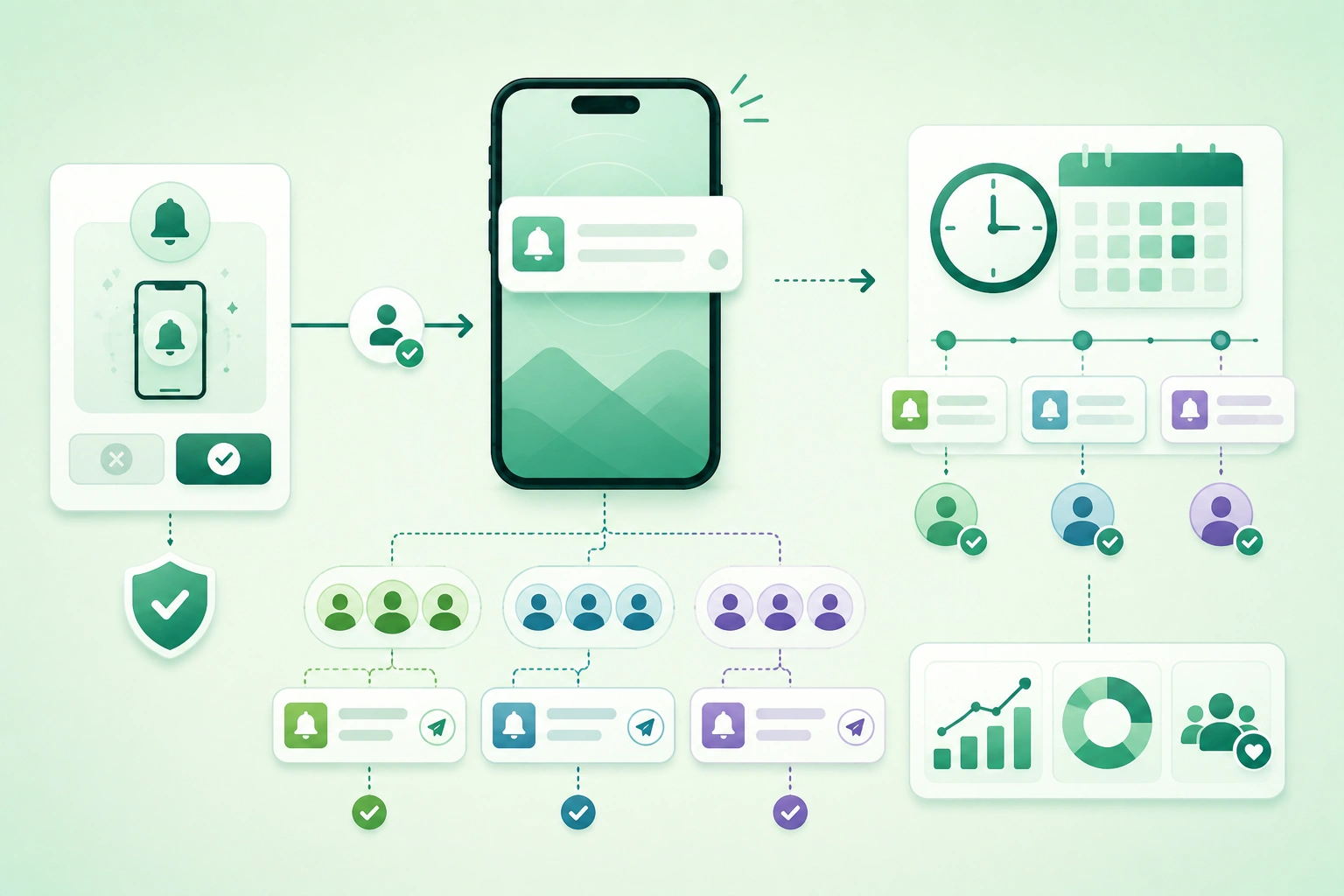
Push notifications are one of the few mobile features that can interrupt a person while the application is closed.
That makes them powerful.
It also makes poor notification design expensive.
A user who receives:
too many messages
irrelevant promotions
badly timed alerts
duplicate notifications
can disable notifications for the entire application.
A better goal is:
send the right notification

to the right installation

for the right user

at the right time

for a clear reason
Notification permission is not the same as notification strategy
Receiving operating-system permission is only the beginning. A useful notification system also needs product-level preferences, token lifecycle management, audience rules, timing, frequency caps, deep-link routing, expiration, privacy controls, analytics, and a way to suppress messages that are no longer relevant.
1. Treat notification permission as earned attention
The weakest permission flow is:
first launch
      ↓
system permission dialog
      ↓
"Allow notifications?"
At that moment the user may not yet know:
- What the app does.
- What notifications will contain.
- How often they will arrive.
- Why enabling them is useful.
Ask after a meaningful action
Good moments include:
user enables price alerts

user follows a sports team

user starts tracking an order

user enables medication reminder

user joins a conversation

user asks to be notified
when an item returns
Explain the value before the system prompt
A product screen can explain:
Get notified when your order ships
and when it is ready for delivery.
Then the user taps:
Enable delivery updatesand the application requests the operating-system permission.
Do not create fake pressure
A pre-permission screen should not claim:
You MUST enable notifications
to continue
if core application functionality does not actually require them.
Support "not now"
If the user is not ready:
continue using app
      ↓
ask again only
when a relevant feature
makes the value clear
Avoid prompting repeatedly on every launch.
2. Separate permission, preferences, and delivery
Push notification delivery architecture (diagram)
A production notification system typically has several distinct layers.
Operating-system permission
Can this application
display notifications?
Product preferences
Order updates:
ON

Marketing:
OFF

Weekly summary:
ON

Price alerts:
ON
Device registration
installation
      ↓
APNs / FCM token
      ↓
backend registry
Audience selection
Which users or installations
should receive this event?
Policy engine
quiet hours
frequency caps
suppression
expiration
priority
Delivery provider
Apple Push Notification service

or

Firebase Cloud Messaging
Application router
notification tapped
      ↓
deep link
      ↓
relevant screen
Analytics
eligible
sent
provider accepted
opened
task completed
disabled
These stages should not be collapsed into one:
sendPush(userId, text)function with hidden assumptions.
3. Ask for permission when the value is clear
Push notification opt-in decision flow (diagram)
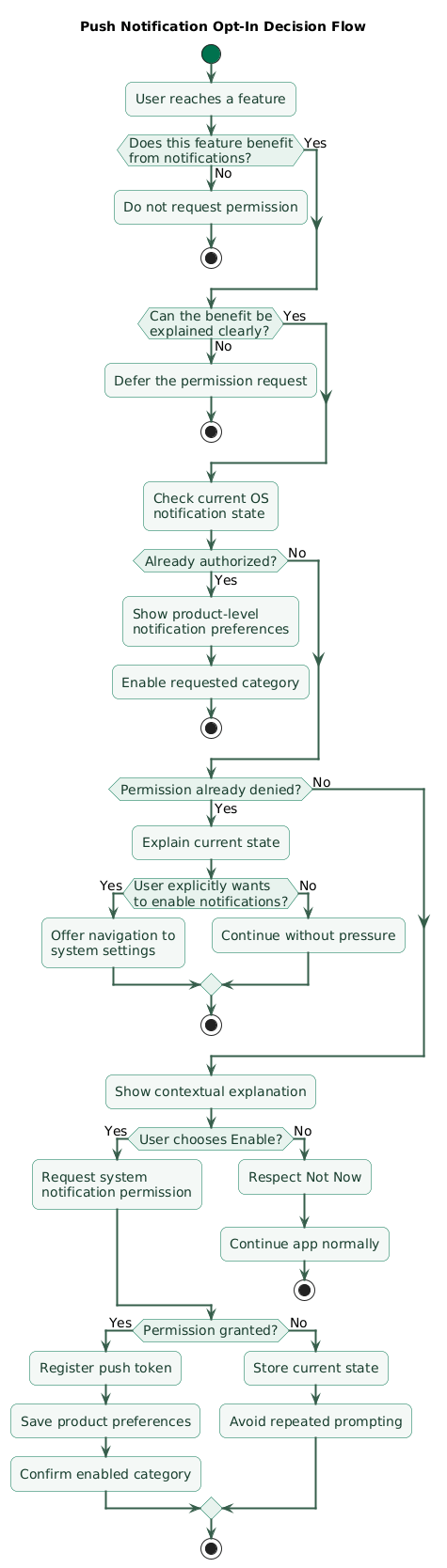
Start from user intent
The strongest prompt often follows:
user expresses desire
to know about future event
For example:
Notify me when price dropsmaps naturally to:
notification permissionDo not request permission solely because registration succeeded
The fact that:
account created successfullydoes not automatically make:
Allow notifications?a meaningful next step.
Ask for one benefit, not an abstract capability
Weak:
Enable push notificationsBetter:
Get shipping and delivery updatesDo not pre-prompt forever
If the user has already made a system-level choice, your application should react to the current state rather than repeatedly showing an internal imitation of the system permission dialog.
Separate opt-in from marketing consent
A user can reasonably want:
security alerts:
ON

order updates:
ON

promotions:
OFF
One global product toggle is often too coarse.
4. Handle iOS and Android permission states
Platform authorization should be represented as state, not as:
askedPermission = truePossible application-level model
UNKNOWN

AVAILABLE

AUTHORIZED

LIMITED_OR_QUIET

DENIED
Map platform-specific states into product behavior intentionally.
iOS
iOS applications should inspect current notification authorization and settings before assuming alerts, sounds, or badges are available.
Depending on product strategy, provisional notification authorization can also support a quieter introduction to notifications before the user makes a stronger delivery choice.
Android
Modern Android versions require runtime notification permission for ordinary application notifications on new installations.
Applications should request it in a meaningful context rather than merely because the app process started.
Android notification channels remain important
A useful channel structure might be:
Orders

Messages

Security

Reminders

Offers
rather than:
Generalfor every notification.
Channel semantics should be stable
Once users configure:
Offers:
silent

Orders:
sound enabled
avoid silently repurposing the Offers channel for urgent account-security alerts.
Permission can change outside the application
Users can change notification settings at any time.
Re-check state when it affects product behavior rather than assuming the result of a permission request remains permanent.
5. Treat push tokens as installation addresses
A push token is not:
user IDIt is closer to:
delivery address
for an app installation
One user can have several tokens
user 42
  |
  +-- iPhone
  |
  +-- iPad
  |
  +-- Android phone
One device installation can change token
Therefore the backend should support:
token registration
token update
token invalidation
token deletion
Useful installation record
installation_id
user_id
platform
push_token
app_version
locale
timezone
permission_state
last_seen_at
token_updated_at
Do not expose token values in ordinary logs
Treat them as sensitive identifiers and avoid unnecessary propagation through:
- Analytics.
- Crash reports.
- Support logs.
Remove invalid tokens
When the provider indicates a registration is no longer valid:
mark token invalid

or

delete registration
according to your lifecycle model.
Logout deserves a policy
Ask:
Should this installation
continue receiving
account-specific notifications
after logout?
Usually:
nounless the product has an explicit multi-account or device-level design.
6. Separate transactional and engagement notifications
Not every notification should pass through the same campaign policy.
Transactional
order shipped
payment failed
security alert
message received
appointment changed
These are directly tied to an event the user reasonably expects.
Reminder
appointment tomorrow
subscription renews soon
task due today
Engagement
new recommendations
weekly summary
new content
return to finish setup
Promotional
20% discount
limited-time campaign
special offer
These categories often need different:
- Preferences.
- Frequency caps.
- Quiet-hour rules.
- Urgency.
Security notifications should not share marketing logic
A frequency cap such as:
maximum 2 pushes per dayshould not suppress:
New login detected
from an unknown device
merely because two promotions were already sent.
7. Segment by relevance instead of blasting everyone
Push segmentation and timing flow (diagram)
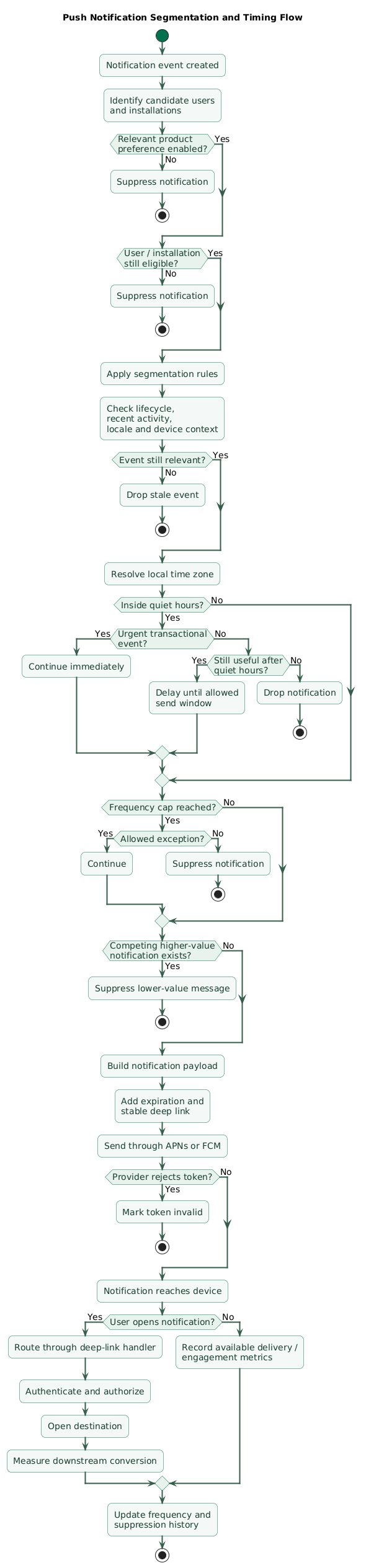
Broadcasting:
one message
to
every registered device
should be the exception.
Preference segmentation
user explicitly follows:
JavaScript
AI
security
Send relevant topics instead of generic updates.
Lifecycle segmentation
new user
active user
subscriber
trial user
inactive user
may each need different communication.
Behavior segmentation
Examples:
viewed product
but did not buy

created project
but did not invite team

saved item
that is now discounted
Event-driven relevance is stronger than broad demographics
This:
item you explicitly followed
is back in stock
is usually more relevant than:
users aged 25-34
might like this product
Use sensitive attributes cautiously
Avoid building unnecessary push targeting around sensitive personal characteristics.
Segment only where:
product need
+
privacy expectations
+
legal basis
+
data minimization
make the use appropriate.
Segment on server-side authoritative state where necessary
For example:
subscription active?should be based on current backend state rather than stale client analytics.
8. Respect local time, freshness, and quiet hours
A relevant message at the wrong time can still be a bad notification.
Store user or installation time zone
If you send:
weekly summary
at 09:00
decide whether that means:
09:00 UTC

or

09:00 local time
Use quiet hours
Example:
22:00 - 08:00

suppress non-urgent messages
Delay versus drop
If a campaign becomes eligible at:
23:45ask whether to:
send at 08:00

or

discard as stale
Freshness matters
A notification:
Your driver arrives in 5 minutesshould not appear:
40 minutes latermerely because a device was temporarily offline.
Give notifications expiration semantics
Conceptually:
created_at
expires_at
priority
Event-triggered timing usually beats arbitrary campaigns
This:
order status changed
      ↓
send relevant update
is naturally timed.
Engagement campaigns need more careful decisions about:
- Day of week.
- Local time.
- Recent activity.
- Previous messages.
9. Add frequency caps and suppression rules
Individual teams can create notification overload even when each campaign looks reasonable in isolation.
Example
marketing:
1 notification

recommendations:
1 notification

social:
2 notifications

onboarding:
1 notification

total:
5 notifications
from the user's perspective.
Use global caps
Example:
engagement messages:
maximum 2 per 24 hours
Add category caps
promotions:
max 3 per week

recommendations:
max 1 per day
Transactional messages may bypass engagement caps
But define this deliberately.
Suppression rules
Do not send:
Come back and finish checkoutif:
order already completedSuppress competing campaigns
If a high-value message is scheduled:
Your subscription expires tomorrowyou may suppress a lower-value:
See what's new this weekUse cooldowns after strong interaction
A user who just:
opened app
completed target action
may not need a re-engagement push five minutes later.
10. Route every notification to a useful destination
A notification saying:
Your order has shippedshould not open:
generic home screenif the user expects:
order trackingUse stable deep links
https://example.com/orders/9814or an equivalent typed application route.
Route through the same deep-link infrastructure
notification tap
      ↓
deep-link parser
      ↓
authentication
      ↓
authorization
      ↓
destination
Handle deleted resources
If the notification refers to:
message 817but the message was deleted:
show safe unavailable staterather than crash.
Handle authentication
notification tapped
      ↓
session expired
      ↓
login
      ↓
return to intended destination
Do not authorize from notification payload
This:
{
  "order_id": "9814",
  "role": "admin"
}
does not grant access.
The server must enforce current authorization when data is loaded.
11. Protect privacy and lock-screen content
Notifications can appear where other people can see them.
Avoid unnecessary sensitive content
Instead of:
Your HIV test result is positivea sensitive application may need a more discreet:
You have a new result availableConsider device state and user settings
Users control how notification previews appear.
Your application should still minimize unnecessary exposure in the payload.
Do not include secrets
Avoid push payloads containing:
password
refresh token
private API credential
full payment information
Payload data is not trusted state
Treat identifiers and parameters from the notification like other external input:
parse
validate
authenticate
authorize
Minimize segmentation data
Do not copy an entire analytics profile into the push delivery database merely because a campaign system could use it.
Store the minimum targeting information required for the actual product strategy.
12. Measure outcomes, not only opens
A notification campaign can have:
high open rateand still be harmful.
Measure the funnel
eligible users

permission available

notification selected

provider accepted

notification opened

destination loaded

target action completed
Track negative outcomes
notification disabled
category muted
campaign unsubscribed
app uninstalled
engagement decreases
Permission prompt metrics
Useful metrics include:
prompt shown
permission granted
permission denied
prompt deferred
Do not optimize only grant rate
A manipulative prompt may increase short-term grants while increasing:
later notification disablementMeasure downstream action
For:
Complete your profilethe valuable metric is not only:
notification openedbut:
profile completedExperiment carefully
Test:
- Timing.
- Frequency.
- Copy.
- Segmentation.
while keeping:
user value
+
opt-out rate
+
long-term engagement
in the evaluation.
13. Test the complete notification lifecycle
Fresh install
Verify:
no notification permission assumed
token lifecycle initializes correctly
preference defaults are correct
Permission accepted
Verify:
backend registration
correct channels / categories
test notification delivery
Permission denied
The application should remain usable and should not repeatedly harass the user.
Settings changed externally
Disable notifications through system settings, reopen the app, and verify product UI reflects reality.
Token refresh
Simulate:
old token
      ↓
new token
and verify the backend stops using obsolete registration data.
Logout
Confirm account-specific notifications no longer reach the signed-out installation unless that behavior is explicitly intended.
Account switching
Verify user B never receives:
user A's message
order
security alert
Multiple devices
Test:
same user
+
two phones

or

phone + tablet
and confirm fan-out behavior matches product requirements.
Quiet hours
Test:
before quiet hours
during quiet hours
after quiet hours
DST transition
timezone change
Stale event
Simulate a delayed notification that is no longer useful.
It should expire or be suppressed according to policy.
Deep link
Test:
app terminated
app backgrounded
app foregrounded
logged in
logged out
resource deleted
resource forbidden
14. Copy/paste push notification checklist
Push notification checklist

Strategy
- Define why push notifications exist.
- Define which user problems they solve.
- Avoid optimizing for maximum message volume.
- Treat notification attention as limited.
- Define notification categories.
- Define measurable outcomes.

Permission timing
- Do not request blindly at first launch.
- Ask after meaningful product context.
- Explain concrete benefit.
- Connect prompt to user intent.
- Support Not Now.
- Avoid repeated permission pressure.
- Track current operating-system state.

Pre-permission UX
- Explain what user receives.
- Explain why it is useful.
- Use truthful copy.
- Avoid fake urgency.
- Avoid deceptive buttons.
- Do not imitate system prompt misleadingly.
- Request system permission only after user intent.

iOS
- Request notification authorization deliberately.
- Inspect current notification settings.
- Handle authorized state.
- Handle denied state.
- Handle provisional / quieter states where used.
- Handle alert settings.
- Handle sound settings.
- Handle badge settings.
- Re-check settings when relevant.
- Test fresh install.
- Test changed settings.

Android
- Declare required notification permission.
- Request runtime notification permission on supported versions.
- Request in meaningful context.
- Handle Allow.
- Handle Deny.
- Handle dismissed prompt.
- Check whether notifications are enabled.
- Test new installation.
- Test application upgrade.
- Test restored installation.

Android channels
- Create meaningful channels.
- Separate orders.
- Separate messages.
- Separate reminders.
- Separate promotions.
- Keep channel semantics stable.
- Choose importance carefully.
- Avoid putting every notification in General.
- Respect user channel settings.

Product preferences
- Separate system permission from product preference.
- Add transactional preferences where appropriate.
- Add marketing preference.
- Add reminder preference.
- Add topic preferences.
- Allow category-level control.
- Sync preferences across devices where product requires it.

Transactional messages
- Identify security alerts.
- Identify order updates.
- Identify direct messages.
- Identify appointment changes.
- Do not suppress important transactional events through marketing caps.
- Keep content event-driven.

Promotional messages
- Require appropriate product preference.
- Use stronger frequency caps.
- Respect quiet hours.
- Avoid irrelevant broadcasts.
- Track opt-out impact.
- Expire stale campaigns.

Reminder messages
- Tie to user-configured reminders.
- Respect local time.
- Avoid duplicate reminders.
- Cancel when task completed.
- Cancel when event deleted.
- Update when event changes.

Push token registration
- Register token with backend.
- Associate token with installation.
- Associate installation with user where logged in.
- Store platform.
- Store app version where useful.
- Store locale where useful.
- Store timezone where useful.
- Store last-seen timestamp.
- Store token-updated timestamp.

Token lifecycle
- Handle new token.
- Handle changed token.
- Handle invalid token.
- Remove stale registration.
- Do not assume token is permanent.
- Do not use token as user ID.
- Handle reinstall.
- Handle logout.
- Handle account switching.

Installation identity
- Generate installation identifier where useful.
- Keep installation separate from account identity.
- Support anonymous installation where required.
- Bind after login.
- Unbind on logout according to policy.
- Avoid cross-account leakage.

Multiple devices
- Support multiple tokens per account.
- Decide whether event should fan out to every device.
- Decide whether opening on one device suppresses others.
- Avoid assuming one user equals one token.
- Test device removal.

Segmentation
- Start from notification relevance.
- Use explicit preferences.
- Use lifecycle stage.
- Use recent product behavior.
- Use event ownership.
- Use locale.
- Use time zone.
- Use device capability only when relevant.
- Avoid unnecessary sensitive profiling.

Behavior segments
- Define event window.
- Define current-state check.
- Avoid stale analytics.
- Re-check eligibility before send.
- Suppress after conversion.
- Suppress after account deletion.
- Suppress after unsubscribe.

Lifecycle segments
- Define new user.
- Define active user.
- Define inactive user.
- Define trial.
- Define subscriber.
- Avoid broad assumptions.
- Recompute state before campaign.

Sensitive attributes
- Minimize targeting data.
- Avoid sensitive categories without strong need.
- Apply privacy review.
- Apply legal review where required.
- Do not expose sensitive segment in notification copy.
- Avoid creating unnecessary profiling datasets.

Timing
- Store local time zone.
- Define local send time.
- Define quiet hours.
- Define send window.
- Define expiration.
- Define event freshness.
- Handle daylight saving changes.
- Handle travel and time-zone changes.

Quiet hours
- Suppress non-urgent notifications.
- Decide whether delayed messages remain useful.
- Drop stale notifications.
- Keep genuine urgent notifications separate.
- Let users configure quiet periods where useful.

Frequency caps
- Define global engagement cap.
- Define promotional cap.
- Define recommendation cap.
- Define campaign-specific cap.
- Define rolling window.
- Define exceptions.
- Count cross-team campaigns together.

Suppression
- Suppress after target action completed.
- Suppress after purchase.
- Suppress after unsubscribe.
- Suppress after account deletion.
- Suppress competing campaign.
- Suppress stale content.
- Suppress duplicate event.
- Suppress recently opened content.

Prioritization
- Rank transactional events.
- Rank reminders.
- Rank engagement campaigns.
- Rank promotions.
- Suppress lower-value message when needed.
- Avoid sending several messages at once.

Expiration
- Assign expires_at.
- Drop outdated alerts.
- Keep event TTL appropriate.
- Avoid delivering old real-time information.
- Re-check current backend state before send where possible.

Batching
- Combine related low-priority updates.
- Consider daily digest.
- Consider weekly summary.
- Avoid one notification per tiny event where unnecessary.
- Preserve important individual events.

Notification copy
- Be specific.
- Keep title concise.
- Explain useful event.
- Avoid clickbait.
- Avoid fake urgency.
- Avoid ALL CAPS.
- Avoid misleading badges.
- Avoid sensitive content.
- Match destination.

Personalization
- Use meaningful personalization.
- Do not insert sensitive data unnecessarily.
- Validate names.
- Handle missing personalization safely.
- Avoid malformed template variables.
- Test localization.

Localization
- Localize title.
- Localize body.
- Localize action buttons.
- Respect locale.
- Test text expansion.
- Test right-to-left layouts where supported.
- Avoid sending wrong language from stale profile.

Payload
- Keep payload small.
- Use stable event ID.
- Include route identifier.
- Include resource ID where required.
- Include expiration metadata where architecture uses it.
- Avoid passwords.
- Avoid refresh tokens.
- Avoid private API secrets.
- Avoid excessive personal data.

Deep links
- Use stable destination.
- Reuse deep-link router.
- Validate route.
- Handle cold start.
- Handle warm start.
- Handle authentication.
- Preserve destination after login.
- Handle deleted resource.
- Handle forbidden resource.
- Avoid generic home-screen fallback when specific destination exists.

Authorization
- Never authorize from push payload.
- Load protected data from backend.
- Validate current user.
- Validate resource ownership.
- Validate role.
- Handle revoked access safely.

Privacy
- Minimize lock-screen content.
- Avoid sensitive medical details.
- Avoid full financial data.
- Avoid password-reset secrets in visible body.
- Respect device preview settings.
- Keep delivery data minimal.

Security
- Authenticate push-sending backend.
- Protect APNs / FCM server credentials.
- Rotate provider credentials.
- Restrict sending permissions.
- Validate campaign input.
- Audit administrative sends.
- Rate-limit internal send APIs.
- Avoid exposing provider secrets in app binary.

APNs
- Maintain valid provider credentials.
- Use appropriate environment.
- Track invalid token responses.
- Use expiration deliberately.
- Use topic correctly.
- Test production configuration.
- Avoid assuming provider acceptance equals user display.

FCM
- Protect server credentials.
- Track registration lifecycle.
- Handle provider errors.
- Remove invalid registrations.
- Set message expiration appropriately.
- Use Android channel information correctly.
- Test production project configuration.

Delivery state
- Track eligible.
- Track queued.
- Track provider request.
- Track accepted or rejected.
- Track invalid registration.
- Distinguish provider acceptance from device display.
- Avoid overclaiming delivery certainty.

Analytics
- Track permission prompt shown.
- Track permission granted.
- Track permission denied.
- Track selected audience.
- Track campaign ID.
- Track notification open.
- Track deep-link success.
- Track downstream conversion.
- Track opt-out.
- Track category mute.

Metrics
- Permission grant rate.
- Notification selection rate.
- Provider acceptance rate where measurable.
- Open rate.
- Conversion rate.
- Opt-out rate.
- Category mute rate.
- Uninstall / disengagement signals where appropriately measured.
- Time to action.

Open rate
- Do not optimize in isolation.
- Compare downstream conversion.
- Compare opt-out.
- Compare long-term engagement.
- Beware clickbait copy.

Experiments
- Test timing.
- Test copy.
- Test segmentation.
- Test frequency.
- Keep control group.
- Limit concurrent experiments.
- Measure negative outcomes.
- Avoid manipulative dark patterns.

Re-engagement
- Define meaningful inactivity.
- Check whether user already returned.
- Use relevant unfinished action.
- Avoid repeated "We miss you" messages.
- Cap attempts.
- Stop after continued non-response.
- Respect marketing preference.

Notification preferences screen
- Show categories clearly.
- Explain what each category means.
- Reflect system-level disabled state.
- Link to system settings where appropriate.
- Avoid claiming app toggle can override OS denial.
- Keep defaults reasonable.

System settings
- Detect disabled notification capability.
- Explain status.
- Offer Settings navigation only when useful.
- Do not repeatedly nag.
- Continue core app functionality.

Logout
- Remove account binding where required.
- Stop account-specific notifications.
- Clear sensitive local notification state.
- Keep anonymous device campaigns only if intentionally permitted.
- Test logout while message queued.

Account switching
- Rebind installation.
- Clear previous account topics.
- Clear previous account segment membership.
- Avoid stale user ID.
- Test push immediately after switch.
- Prevent cross-account messages.

Account deletion
- Remove push registrations as required.
- Remove marketing preferences.
- Remove campaign eligibility.
- Stop queued account notifications.
- Respect retention policy.

Queued messages
- Re-check user state before send.
- Re-check permission / preference where available.
- Re-check conversion.
- Re-check account state.
- Re-check expiration.
- Avoid blindly sending yesterday's queue.

Race conditions
- User completes action while push queued.
- User logs out while push queued.
- User changes preference while push queued.
- User changes time zone while push queued.
- User deletes account while push queued.
- Resolve using current state close to send time.

Duplicates
- Give event stable ID.
- Deduplicate retries.
- Deduplicate event ingestion.
- Avoid sending same event through two campaigns.
- Use collapse / replacement semantics where appropriate.
- Test provider retries.

Ordering
- Do not assume provider delivery order.
- Avoid messages that require strict order without state validation.
- Load current server state after tap.
- Expire obsolete earlier messages.

Offline devices
- Decide TTL.
- Drop stale notifications.
- Avoid showing outdated real-time status.
- Load current state on open.
- Handle app data unavailable offline.

App version
- Avoid routing to unsupported feature.
- Include compatibility checks.
- Provide safe fallback.
- Consider minimum version.
- Do not break old notification links immediately.

Notification actions
- Keep actions clear.
- Authenticate sensitive actions.
- Validate state server-side.
- Avoid destructive action without confirmation where risk is high.
- Handle expired action.
- Test from locked device.

Badges
- Use badges intentionally.
- Keep counts meaningful.
- Clear / update accurately.
- Avoid using badges solely as pressure.
- Sync across devices where product semantics require it.

Testing
- Fresh install.
- Permission granted.
- Permission denied.
- Permission dismissed.
- Settings changed externally.
- Token changes.
- Invalid token.
- App terminated.
- App backgrounded.
- App foregrounded.
- User logged out.
- User logged in.
- Account switch.
- Multiple devices.

Timing tests
- Local morning.
- Local evening.
- Quiet hours.
- DST transition.
- Time-zone change.
- Delayed provider delivery.
- Expired event.

Segmentation tests
- Eligible user.
- Ineligible user.
- Wrong locale.
- Wrong preference.
- Converted user.
- Unsubscribed user.
- Deleted account.
- Trial expired.

Frequency tests
- First message.
- At cap.
- Above cap.
- Transactional exception.
- Competing campaigns.
- Cooldown after conversion.

Deep-link tests
- Valid resource.
- Deleted resource.
- Unauthorized resource.
- Session expired.
- App cold start.
- App warm start.
- Old application version.
- Malformed route.

Privacy tests
- Locked device.
- Hidden previews.
- Shared device.
- Screenshot review.
- Notification history.
- Sensitive account.

Monitoring
- Monitor provider errors.
- Monitor invalid token rate.
- Monitor opt-in rate.
- Monitor opt-out rate.
- Monitor message volume per user.
- Monitor duplicate sends.
- Monitor stale notifications.
- Monitor deep-link failures.

Operational safety
- Add preview before campaign send.
- Add recipient estimate.
- Add test-device send.
- Add approval for large campaigns.
- Add emergency cancel where possible.
- Protect production campaign access.
- Audit manual sends.

Campaign review
- Who receives it?
- Why are they eligible?
- What user value exists?
- Is the event still current?
- Is local timing appropriate?
- Is user below frequency cap?
- Is message permitted by preferences?
- Is content safe for lock screen?
- Does tap open the correct destination?
- What metric defines success?

Final review
- Does the user understand why notifications are useful?
- Is permission requested at a meaningful moment?
- Is OS permission separate from product preferences?
- Are iOS authorization states handled?
- Is Android runtime permission handled?
- Are notification channels meaningful?
- Are tokens modeled separately from users?
- Can one user have several devices?
- Are invalid tokens removed?
- Are transactional and marketing messages separated?
- Is targeting based on real relevance?
- Are quiet hours respected?
- Is local time handled?
- Are frequency caps global across campaigns?
- Are stale messages dropped?
- Are duplicate events deduplicated?
- Does every notification have a useful deep link?
- Does authentication preserve the destination?
- Does the backend enforce authorization?
- Is sensitive lock-screen content minimized?
- Are opt-outs measured?
- Is downstream value measured beyond open rate?
- Can users control notification categories?
- Does logout prevent cross-account notifications?
- Can the team stop a bad campaign quickly?
15. FAQ
When should I ask for notification permission?
Ask when the user can understand a concrete benefit. Good examples include enabling order tracking, price alerts, reminders, direct-message alerts, or another feature where the user explicitly wants to know when something changes.
Should I request notification permission on first launch?
Usually there is little reason to request it before the user understands the application. A contextual request later in the journey often provides a clearer explanation of what the permission enables.
What is push notification segmentation?
Segmentation selects recipients based on relevant state or behavior rather than broadcasting every message to every device. Examples include explicit interests, current lifecycle stage, event ownership, locale, time zone, and recent product actions.
How many notifications should an app send?
There is no universal number. Transactional messages should follow the underlying events, while engagement and promotional messages should be governed by product-specific global caps, category caps, quiet hours, relevance checks, and suppression rules.
Is an APNs or FCM token a user identifier?
No. It is a delivery address associated with an application installation or device context. A single user can have multiple tokens, and tokens can change or become invalid.
Should push notifications include sensitive information?
Minimize sensitive content because notifications may appear on a lock screen or in notification history. Use a discreet message and fetch protected details after the user opens the authenticated application where appropriate.
What is the best metric for a push campaign?
The metric should reflect the intended user outcome. Open rate can be useful, but task completion, purchase completion, reminder completion, retention, opt-out rate, and long-term engagement often provide a more meaningful picture.
Key terms (quick glossary)
- Push notification
- A notification delivered to an application installation through a platform push service, potentially while the app is not in the foreground.
- APNs
- Apple Push Notification service, the Apple platform infrastructure used to deliver remote notifications to application installations.
- FCM
- Firebase Cloud Messaging, Google's messaging infrastructure commonly used to deliver notifications and data messages to Android applications.
- Push token
- A platform-issued registration value used as a delivery address for a particular application installation or notification environment.
- Opt-in
- The user's decision to allow notifications or enable a particular category of notification.
- Pre-permission prompt
- An application-controlled explanation shown before invoking an operating-system permission request.
- Notification channel
- Android mechanism that groups notifications into user-configurable categories with characteristics such as importance and sound behavior.
- Segmentation
- Selecting a subset of users or installations for a notification based on relevant preferences, lifecycle state, behavior, locale, events, or other justified criteria.
- Frequency cap
- A rule limiting how many notifications of a particular class can be sent to a user or installation during a defined time window.
- Quiet hours
- A period during which non-urgent notifications are delayed or suppressed to avoid unnecessary interruption.
- Suppression rule
- A condition that prevents an otherwise eligible notification from being sent, such as the user already completing the target action.
- Transactional notification
- A notification directly associated with an expected account, security, communication, order, appointment, or similar product event.
- Engagement notification
- A notification intended to encourage a user to return to or continue using a product rather than reporting a required transactional event.
- Notification TTL
- The useful lifetime of a notification or delivery request before it should be considered stale and no longer delivered.
- Deep link
- A route that opens a notification directly to relevant application content instead of only launching the default home screen.
- Conversion
- The meaningful downstream action a notification is intended to support, such as completing a purchase, viewing an order update, responding to a message, or finishing a task.
Worth reading
Recommended guides from the category.
