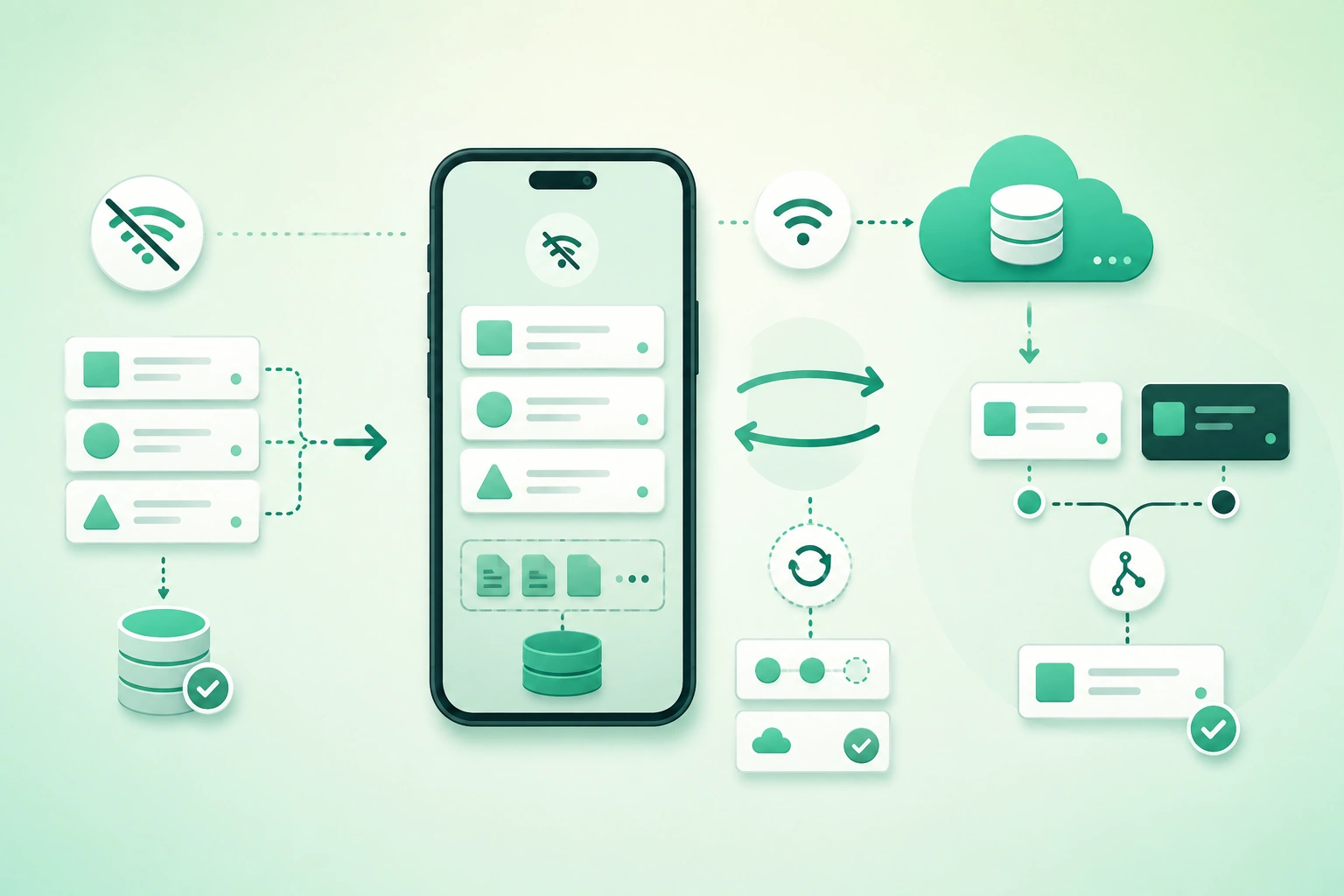
Many mobile applications claim to support offline use because they cache the last successful API response.
That is useful, but it is not the same as an offline-first architecture.
An offline-first application is designed so that:
user reads local data
      ↓
user changes local data
      ↓
UI updates immediately
      ↓
change is persisted locally
      ↓
sync happens separately
The network becomes a synchronization channel rather than a prerequisite for every screen interaction.
This makes the application more resilient on:
- Trains.
- Airplanes.
- Weak cellular networks.
- Basements.
- Congested Wi-Fi.
- Temporarily unavailable servers.
It also creates a harder distributed-systems problem:
What happens when the same data
changes in several places
before everyone reconnects?
Offline-first is primarily a state problem
Network detection alone does not solve offline synchronization. The important design questions are how local mutations are recorded, how remote changes are discovered, how duplicate delivery is handled, how versions are compared, and what happens when both sides changed the same logical record.
1. Treat local data as a real application state
A conventional online-first flow often looks like:
user taps Save
      ↓
POST /api/item
      ↓
wait
      ↓
server responds
      ↓
update UI
If the network disappears:
Save failsAn offline-first flow instead uses:
user taps Save
      ↓
update local database
      ↓
update UI
      ↓
record pending sync operation
      ↓
sync later
Local persistence becomes important
Local state may contain:
- Server-synchronized entities.
- Pending local changes.
- Sync metadata.
- Deletion markers.
- Last successful sync cursor.
The local database should survive restart
If the user edits a record and immediately closes the app:
pending changeshould normally remain durable.
Do not make “online” part of business logic everywhere
Bad architecture:
if online:
  allow edit
else:
  disable button
repeated across dozens of screens.
Better:
write through repository
      ↓
repository persists locally
      ↓
sync layer handles network later
2. Separate local persistence from synchronization
Offline-first mobile synchronization architecture (diagram)

A useful architecture separates several responsibilities.
UI
Reads observable local state.
Repository or data-access layer
Coordinates:
local reads
local writes
sync metadata
Local database
Stores application entities and synchronization state.
Outbox
Stores mutations that still need to reach the server.
Sync engine
Performs:
- Push.
- Pull.
- Retry.
- Conflict handling.
- Cursor updates.
Server
Maintains authoritative shared state according to the application's consistency model.
Keep synchronization metadata explicit
Example entity metadata:
id
version
updated_at
deleted
sync_status
Possible sync states:
synced
pending
syncing
conflict
failed
3. Write locally first and queue mutations
Suppose the user changes:
task title:
"Buy milk"

to:

"Buy milk and bread"
The app can immediately update the local task row.
In the same local transaction, it can record an outbox operation.
Example outbox record
{
  "operation_id": "op-9173",
  "entity_id": "task-42",
  "type": "UPDATE",
  "base_version": 7,
  "payload": {
    "title": "Buy milk and bread"
  }
}
Why use an outbox?
Without a durable pending-operation record:
local row updated
      ↓
app crashes
      ↓
server never learns about change
Prefer one local transaction
Ideally:
update local entity
+
insert outbox operation
either both succeed or both fail.
Client-generated identifiers help offline creation
Instead of waiting for:
server IDbefore creating a record, generate a stable identifier locally.
note-550e8400...The UI can reference the item immediately, and later sync operations use the same identity.
Avoid storing only the final state when intent matters
For some data, sending:
counter = 17is less safe than recording:
increment counter by 1because concurrent operations may have different merge semantics.
4. Design push and pull synchronization
Synchronization usually has two directions.
Push
local pending changes
      ↓
server
Pull
remote changes
      ↓
local database
Simple full refresh
Small datasets may use:
GET all records
      ↓
replace / merge local copy
This can be acceptable when:
- The dataset is small.
- Sync frequency is low.
- Battery and bandwidth costs are acceptable.
Incremental sync
Larger applications usually need:
give me changes
after cursor X
Server response:
{
  "changes": [...],
  "next_cursor": "c-81372"
}
Persist cursor only after applying changes safely
Bad:
receive cursor
      ↓
save cursor
      ↓
app crashes before records applied
The client may skip data on the next sync.
Prefer:
apply records
+
save cursor

atomically where practical
Push first or pull first?
There is no universal order.
A common sequence is:
push local changes
      ↓
pull server changes
      ↓
reconcile
      ↓
repeat if required
but applications with stronger server-side version requirements may pull before pushing.
Define the protocol explicitly rather than relying on accidental request timing.
5. Make retries safe with idempotency
Mobile networks fail at awkward moments.
Example:
client sends CREATE
      ↓
server creates record
      ↓
response lost
      ↓
client thinks request failed
The client retries.
Without protection:
two records createdUse stable operation IDs
operation_id:
op-9173
The server records that this operation was already applied.
Retry:
same operation_id
      ↓
server returns
previous result
Idempotent target-state writes are easier
This:
completed = truecan often be repeated safely.
This:
charge card 10 EURrequires stronger operation-level idempotency.
Do not treat every error as retryable
Retry:
temporary network failure
timeout
server temporarily unavailable
Do not retry forever:
validation failure
permission denied
unsupported schema
permanent conflict requiring user action
Use backoff
attempt 1
wait

attempt 2
wait longer

attempt 3
wait longer
Add appropriate jitter if many clients may retry simultaneously.
6. Detect conflicts before choosing a merge rule
A conflict occurs when two valid changes are based on incompatible views of the same data.
Example
server version 7:
title = "Buy milk"
Phone A goes offline.
Phone B changes:
title =
"Buy milk and bread"

server version = 8
Phone A changes its old version 7:
title =
"Buy oat milk"
When Phone A reconnects:
base_version = 7

server_version = 8
The server can detect that Phone A edited stale state.
Use version numbers
version:
7
8
9
are simple and avoid depending entirely on synchronized clocks.
Optimistic concurrency
The update can mean:
UPDATE task
SET ...
WHERE
id = task-42
AND
version = 7
If zero rows are updated:
conflict detectedTimestamps alone can be misleading
Client clocks may be:
- Incorrect.
- Manually changed.
- Out of synchronization.
Server-assigned versions or timestamps provide a more controlled ordering reference when ordering matters.
7. Choose conflict resolution by data semantics
Offline-first conflict-resolution decision tree (diagram)
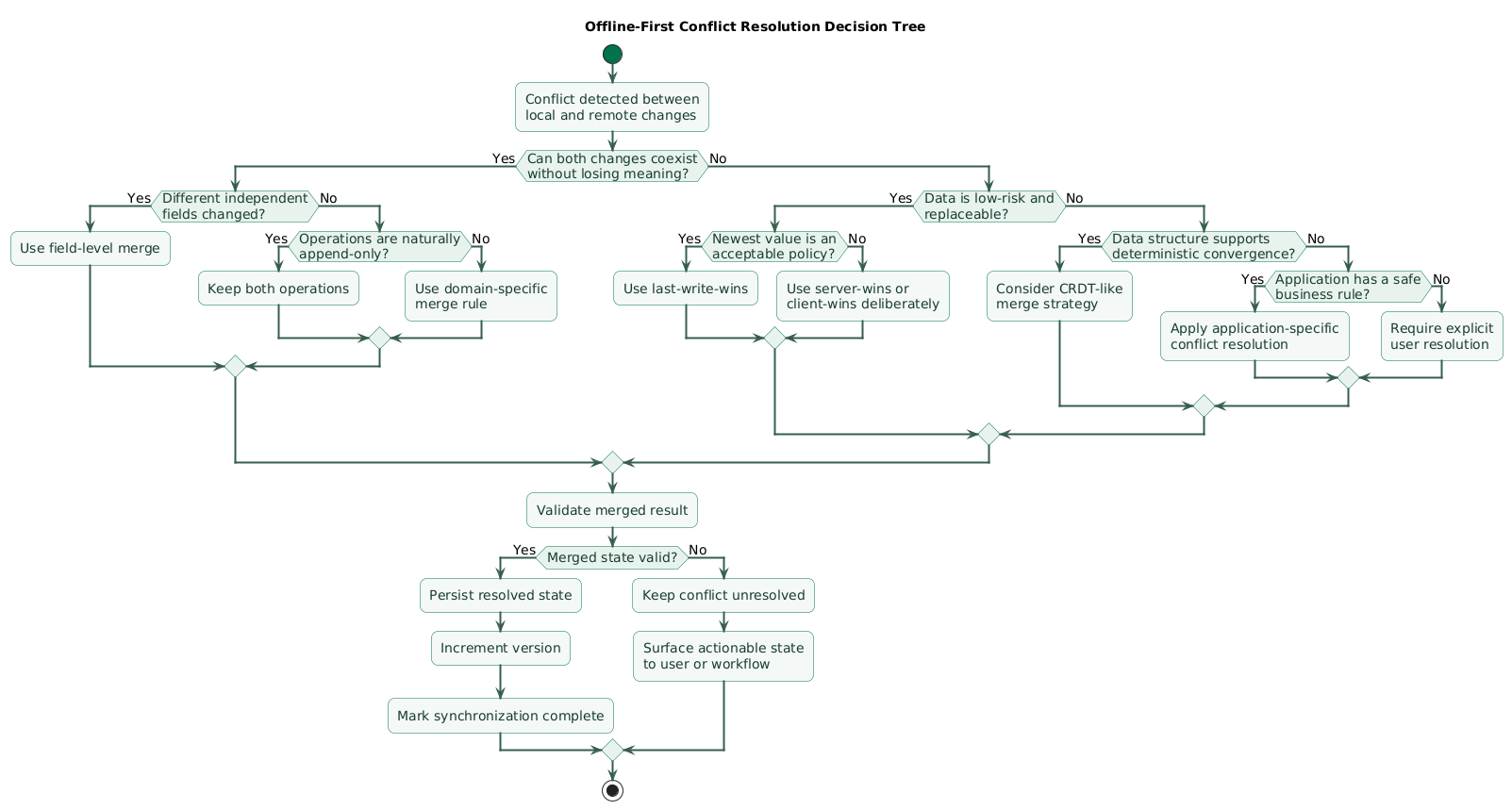
Conflict resolution should not be one global setting.
Last-write-wins
The newest accepted write replaces the older value.
Good fit:
theme preference
display name
non-critical note title
Risky fit:
money
inventory
reservation
approval workflow
Server-wins
On conflict:
server state remains
client change rejected
Useful when server state is authoritative.
Client-wins
Sometimes the client intentionally overrides the remote state.
This should be a deliberate domain decision rather than a default.
Field-level merge
Phone A changes:
titlePhone B changes:
due_dateThese changes may be safely merged:
title from A
+
due_date from B
Field-level conflicts still need rules
If both devices changed:
titlethe merge is no longer automatic.
Append-only operations
Some domains become easier when changes are represented as events:
add comment
add message
add transaction
add measurement
rather than repeatedly replacing one mutable object.
Application-specific merge
Example shopping list:
Phone A:
adds apples

Phone B:
adds bread
Both additions can coexist.
User-visible conflict resolution
For important text or configuration:
Your version:
...

Remote version:
...

Choose / merge
may be more honest than silently discarding one change.
CRDT-like strategies
Some collaborative data structures can be designed so concurrent operations merge deterministically.
They are valuable for the right problem but introduce conceptual and implementation complexity, so do not add them to a simple CRUD app without a concrete need.
8. Handle deletions with tombstones
Deletion creates a special synchronization problem.
Example
Phone A goes offline
with note-42

Phone B deletes note-42

Phone A reconnects
and still has note-42
If the server simply forgets that the record ever existed, Phone A may upload its old copy and recreate it.
Use a tombstone
{
  "id": "note-42",
  "deleted": true,
  "version": 12
}
The tombstone communicates:
this record existed
and was deleted
Tombstones need retention
If clients can remain offline for:
30 daysbut tombstones are removed after:
24 hoursstale clients may miss the deletion.
Alternative: full resync boundary
Some protocols define:
cursor too old
      ↓
incremental sync unavailable
      ↓
perform full resync
allowing old tombstones or change history to be compacted.
Deletion conflicts require policy
Example:
Phone A edits record offline

Phone B deletes record
Possible policies:
- Deletion wins.
- Edit recreates record.
- User decides.
- Restore as a new object.
Pick one based on product semantics.
9. Model synchronization as a state machine
Offline-first synchronization state machine (diagram)

Avoid reducing synchronization to:
synced = true / falseUseful states may include:
SYNCED

LOCAL_PENDING

SYNCING

RETRY_WAIT

CONFLICT

AUTH_REQUIRED

FAILED
UI can communicate meaningful state
Examples:
Saved on this device

Syncing...

Synced

Needs your attention

Could not sync
Local save is not remote durability
The app should not imply:
saved to servermerely because:
local transaction succeededDo not make temporary offline status look like an error
If offline operation is expected:
Waiting for connectionmay be better than:
ERROR!Reserve hard errors for actionable problems
Examples:
- Permission removed.
- Conflict requires user input.
- Unsupported data version.
- Repeated permanent validation failure.
10. Design background sync for mobile constraints
Mobile operating systems control background execution aggressively.
Therefore:
sync every 5 seconds foreveris not a reliable platform assumption.
Useful sync triggers
- App launch.
- App foreground.
- User-initiated refresh.
- After important local writes.
- OS-scheduled background opportunity.
- Push notification indicating remote changes.
Do not rely on only one trigger
Background execution may be delayed.
App foreground should therefore usually check whether synchronization is needed.
Batch operations
Instead of:
100 pending changes
=
100 separate network sessions
consider bounded batches:
20 operations / requestwhere the server protocol supports them.
Partial batch success
The response should identify:
operation 1: success
operation 2: conflict
operation 3: validation error
operation 4: success
rather than forcing the client to guess whether the whole request was applied.
Battery awareness
Frequent background networking consumes:
- Radio energy.
- CPU.
- Wake time.
Sync frequency should reflect product needs rather than a desire for perfect immediacy.
11. Handle authentication and partial failures
A user may create offline changes while authenticated.
Several hours later:
access token expiredwhen sync begins.
Do not discard pending work
Authentication failure should usually move operations into:
AUTH_REQUIREDrather than deleting them.
Refresh authentication where allowed
sync begins
   ↓
access token expired
   ↓
refresh succeeds
   ↓
continue sync
User no longer has permission
Different problem:
local edit exists
but
server says access revoked
The app must decide whether to:
- Keep a private local copy.
- Export the user's work.
- Discard according to policy.
- Show an explicit error.
Schema changes
Pending operations can survive app upgrades.
Therefore:
old outbox payload
+
new app version
must remain understandable or migratable.
Version the sync protocol
schema_version
operation_version
API version
can make migrations explicit.
12. Test multi-device and unreliable-network scenarios
Testing only:
Wi-Fi ON

one phone

one user
misses the difficult cases.
Start offline
launch app
without network
Verify local data remains usable.
Go offline during write
tap Save
network disappears
Verify local change remains durable.
Lose response after server commit
Simulate:
server applies operation
response never reaches client
Retry must not duplicate the effect.
Edit from two devices
Device A offline
Device B online

both edit same record
Verify the documented conflict strategy.
Delete versus edit
Device A edits
Device B deletes
Confirm which operation wins.
Remain offline for a long time
Test:
client cursor older
than server change retention
and verify the full-resync path.
App termination
Kill the app while:
- Outbox operation is pending.
- Batch upload is in progress.
- Remote changes are being applied.
Restart and verify state remains consistent.
Authentication expiration
Queue changes, expire the session, then reconnect.
Clock skew
Change device time and confirm conflict logic does not rely on an unrealistic assumption of perfect client clocks.
13. Copy/paste offline-first checklist
Offline-first mobile app checklist

Architecture
- Define what works offline.
- Define what requires server confirmation.
- Choose local source of UI state.
- Separate local persistence from synchronization.
- Keep synchronization logic out of UI components.
- Define server authority.
- Define client authority.
- Document consistency expectations.

Local database
- Store data required for offline screens.
- Persist user changes immediately.
- Persist sync metadata.
- Persist pending operations.
- Handle app restart.
- Handle process termination.
- Define local retention.
- Protect sensitive data.

Repository
- Read from local database.
- Write to local database.
- Hide network state from most UI code.
- Expose synchronization state separately.
- Keep business rules testable.

Identifiers
- Generate stable client IDs where appropriate.
- Avoid waiting for server IDs before local creation.
- Ensure IDs are globally unique enough for the domain.
- Keep identity stable across retries.
- Map legacy server IDs carefully if needed.

Local writes
- Write entity locally.
- Write pending operation.
- Prefer one local transaction.
- Update UI immediately.
- Mark entity pending.
- Avoid losing change on app close.

Outbox
- Give every operation unique ID.
- Store operation type.
- Store entity ID.
- Store base version.
- Store payload.
- Store creation time.
- Store retry state.
- Store permanent failure reason.
- Remove only after confirmed handling.

Operation types
- Define CREATE.
- Define UPDATE.
- Define DELETE.
- Consider domain-specific operations.
- Prefer semantic operations when merging matters.
- Avoid unnecessary generic overwrite operations.

Sync engine
- Push pending mutations.
- Pull remote changes.
- Update sync cursor.
- Detect conflicts.
- Apply resolution.
- Retry transient failures.
- Surface permanent failures.
- Persist progress.

Push sync
- Process pending operations.
- Preserve operation ID across retries.
- Send base version where needed.
- Handle partial success.
- Update local server version.
- Mark operation complete only after confirmation.
- Avoid deleting failed operations accidentally.

Pull sync
- Request changes after cursor.
- Apply remote changes transactionally where practical.
- Save cursor only after successful apply.
- Process tombstones.
- Update versions.
- Avoid overwriting newer local pending changes blindly.

Full sync
- Support initial synchronization.
- Support cursor expiration.
- Support local database recovery.
- Define pagination.
- Define deletion handling.
- Avoid loading unbounded datasets at once.

Incremental sync
- Define cursor.
- Define cursor ordering.
- Define retention.
- Define expiration.
- Return deterministic changes.
- Include deletions.
- Document whether cursor is user-specific.

Idempotency
- Give mutations stable operation IDs.
- Deduplicate retries server-side.
- Return prior result for repeated operation where practical.
- Make target-state writes idempotent.
- Protect non-idempotent business actions explicitly.
- Test lost-response scenario.

Retries
- Retry network failures.
- Retry temporary server failures.
- Use bounded exponential backoff.
- Add jitter where appropriate.
- Do not retry validation failures forever.
- Do not retry permission failures forever.
- Track retry count.

Connectivity
- Do not rely only on connectivity API.
- Treat failed request as authoritative network evidence.
- Sync when app foregrounds.
- Sync after useful local writes.
- Sync during allowed background opportunities.
- Avoid continuous polling without need.

Conflict detection
- Track entity version.
- Include base version in update.
- Detect stale writes.
- Do not rely only on device timestamp.
- Store server version.
- Test concurrent modifications.

Versions
- Increment server version on meaningful change.
- Return current version.
- Store version locally.
- Use version in optimistic concurrency.
- Define behavior after conflict.
- Handle version reset only through migration.

Timestamps
- Store local creation time where useful.
- Store server update time.
- Do not assume client clocks are accurate.
- Normalize timezone representation.
- Keep timestamps separate from versions when possible.
- Use server ordering for critical conflict logic.

Last-write-wins
- Use only for appropriate data.
- Define which clock determines last write.
- Understand overwritten changes are lost.
- Avoid for money.
- Avoid for inventory.
- Avoid for security-sensitive workflow.
- Document user impact.

Server-wins
- Use where server state is authoritative.
- Return current server value on conflict.
- Update local state.
- Preserve rejected local edit if user may need it.
- Explain conflict to user where appropriate.

Client-wins
- Use deliberately.
- Check permission.
- Check version semantics.
- Avoid silently overriding important server workflows.
- Audit where risk requires it.

Field-level merge
- Track changed fields where useful.
- Merge non-overlapping changes.
- Detect same-field conflict.
- Preserve field semantics.
- Avoid blindly merging dependent fields.
- Test validation after merge.

Domain-specific merge
- Define merge rules with product requirements.
- Model counters as operations when useful.
- Model lists as additions/removals where useful.
- Model messages as append-only.
- Model workflow transitions explicitly.
- Test concurrent cases.

CRDT-like data
- Use only when collaboration requirements justify it.
- Define operation identity.
- Define deterministic merge.
- Handle deletions.
- Handle metadata growth.
- Test convergence.
- Avoid complexity for simple CRUD without need.

Manual conflicts
- Show local version.
- Show remote version.
- Explain what changed.
- Let user choose where appropriate.
- Allow merge where practical.
- Persist unresolved conflict.
- Avoid silently discarding user work.

Deletions
- Represent deletion explicitly.
- Use tombstone or change event.
- Include deletion version.
- Sync deletion to offline clients.
- Define tombstone retention.
- Prevent stale resurrection.
- Define restore behavior.

Delete vs edit
- Choose deletion-wins or edit-wins.
- Consider restore-as-new.
- Consider manual resolution.
- Document product semantics.
- Test both operation orders.

Tombstones
- Store entity ID.
- Store deletion version.
- Store deletion timestamp.
- Retain long enough for incremental clients.
- Compact according to policy.
- Trigger full resync for overly old clients if needed.

Sync state
- Define SYNCED.
- Define LOCAL_PENDING.
- Define SYNCING.
- Define RETRY_WAIT.
- Define CONFLICT.
- Define AUTH_REQUIRED.
- Define FAILED.
- Persist important states.

UI
- Show local changes immediately.
- Distinguish local save from server sync.
- Show pending state where useful.
- Show synchronization progress carefully.
- Show conflicts.
- Show permanent failures.
- Avoid blocking routine offline work.
- Do not treat ordinary offline state as catastrophic error.

Optimistic UI
- Update local UI immediately.
- Keep rollback strategy where server can reject.
- Explain rejected operation.
- Preserve user input.
- Avoid irreversible UI assumptions before confirmation.

Background sync
- Do not assume continuous execution.
- Use platform scheduling appropriately.
- Sync on foreground.
- Sync after writes when possible.
- Batch work.
- Limit network usage.
- Limit battery impact.
- Make jobs restartable.

Batching
- Define maximum operations per batch.
- Define maximum payload bytes.
- Return per-operation status.
- Handle partial success.
- Resume after interruption.
- Avoid resending completed operations.
- Preserve ordering where domain requires it.

Ordering
- Do not assume network response order equals logical order.
- Define per-entity ordering if required.
- Use versions.
- Use sequence numbers for operation streams where useful.
- Reject stale state transitions.
- Test reordered delivery.

Authentication
- Handle access-token expiration.
- Refresh where appropriate.
- Keep pending changes.
- Enter AUTH_REQUIRED state.
- Resume after authentication.
- Do not discard work automatically.

Authorization
- Handle revoked access.
- Do not retry forever.
- Protect server data.
- Decide what happens to local unsynced work.
- Consider export where appropriate.
- Show actionable message.

Schema
- Version local database.
- Version API payload.
- Version outbox operation format.
- Migrate pending operations.
- Test app upgrade with unsynced data.
- Keep old server clients supported for defined period.

Migrations
- Migrate entity data.
- Migrate outbox data.
- Migrate tombstones.
- Migrate cursor.
- Handle rollback carefully.
- Test interrupted migration.

Partial failure
- Handle some operations succeeding.
- Handle some conflicting.
- Handle some permanently failing.
- Mark each result independently.
- Do not replay completed operations.
- Keep failed operation visible.

Crash recovery
- Kill app during push.
- Kill app during pull.
- Kill app during merge.
- Kill app before cursor commit.
- Restart safely.
- Avoid duplicated effects.
- Avoid skipped changes.

Multi-device
- Test two phones.
- Test phone + tablet.
- Edit same record.
- Edit different fields.
- Delete on one device.
- Edit on another.
- Reconnect in different order.
- Confirm deterministic outcome.

Multi-user
- Test shared records.
- Test permission changes.
- Test concurrent edits.
- Test user removal.
- Test role changes.
- Ensure sync respects authorization.

Clock skew
- Set device clock wrong.
- Set clock forward.
- Set clock backward.
- Test last-write-wins behavior.
- Prefer server versions for important ordering.
- Do not trust wall clock blindly.

Network testing
- Start offline.
- Go offline during request.
- Restore connection.
- Use slow network.
- Drop packets.
- Add latency.
- Return duplicate responses where test harness permits.
- Simulate timeout after server commit.

Server failure
- Return 500.
- Return temporary unavailable.
- Return timeout.
- Restart server.
- Restart database.
- Verify retry policy.
- Avoid losing local changes.

Validation failure
- Return field error.
- Mark operation permanent failure.
- Show user.
- Preserve editable local data.
- Allow correction and retry.

Conflict testing
- Force stale base version.
- Test LWW.
- Test server-wins.
- Test field merge.
- Test delete-vs-edit.
- Test manual resolution.
- Test repeat after conflict.

Observability
- Log sync start.
- Log sync completion.
- Count pending operations.
- Count retry operations.
- Count conflicts.
- Count permanent failures.
- Measure sync latency.
- Measure oldest pending operation age.

Privacy
- Encrypt sensitive local data where appropriate.
- Minimize offline retention.
- Protect auth tokens.
- Remove data on logout according to product policy.
- Avoid logs containing private content.
- Handle shared devices carefully.

Logout
- Decide whether pending changes must sync first.
- Decide whether unsynced data can remain.
- Clear account credentials.
- Clear local account data where required.
- Avoid syncing old user's data under new account.
- Test account switching.

Account switching
- Partition local data by account.
- Partition outbox by account.
- Partition sync cursor by account.
- Prevent cross-account leakage.
- Verify logout cleanup.

Performance
- Index local queries.
- Keep sync transactions bounded.
- Batch remote changes.
- Paginate large sync.
- Avoid rebuilding whole database on every launch.
- Measure database growth.
- Compact old metadata.

Battery
- Avoid constant polling.
- Batch network work.
- Respect background constraints.
- Avoid waking radio for tiny non-urgent changes.
- Measure real-world power impact.
- Balance freshness against battery.

Storage
- Track local database size.
- Track tombstone size.
- Track outbox size.
- Track cached attachments.
- Define cleanup.
- Handle low-storage conditions.
- Avoid deleting pending user changes.

Attachments
- Store upload state separately.
- Resume large uploads where appropriate.
- Use stable attachment IDs.
- Handle partial uploads.
- Avoid blocking metadata sync unnecessarily.
- Define deletion semantics.

Large files
- Avoid putting entire file in ordinary JSON sync payload.
- Use dedicated upload mechanism.
- Record local pending attachment.
- Synchronize metadata and binary lifecycle.
- Handle failed upload separately.

Security
- Authenticate every sync request.
- Authorize every entity.
- Validate client payload.
- Do not trust client version blindly.
- Rate-limit abusive sync.
- Protect idempotency records.
- Avoid exposing other users' conflict data.

Server API
- Support stable client identifiers.
- Support idempotency.
- Support version checks.
- Return conflicts explicitly.
- Return current server state when useful.
- Support incremental pull.
- Include deletions.
- Support bounded batches.

Error model
- Define transient network error.
- Define auth error.
- Define permission error.
- Define validation error.
- Define conflict.
- Define unsupported version.
- Define server failure.
- Map each to client action.

Recovery
- Provide manual retry.
- Provide full resync.
- Provide local database rebuild where safe.
- Preserve unsynced user data before destructive recovery.
- Diagnose stuck outbox.
- Diagnose cursor corruption.

Full resync
- Trigger when cursor invalid.
- Fetch authoritative server state.
- Preserve pending local operations.
- Reapply or reconcile pending operations.
- Rebuild local indexes.
- Update cursor.
- Test large datasets.

Analytics
- Do not count local action as server success automatically.
- Track local save.
- Track sync success.
- Track sync failure.
- Track conflict.
- Track offline duration.
- Avoid privacy-invasive telemetry.

Product decisions
- Define expected offline duration.
- Define maximum staleness.
- Define whether collaborative edits are common.
- Define which conflicts can be silent.
- Define which conflicts need user action.
- Define how deleted data behaves.
- Define support for multiple devices.

Simple app
- Start with local database.
- Add outbox.
- Add stable operation IDs.
- Add version field.
- Add push.
- Add incremental pull.
- Add deletion tombstones.
- Add one clear conflict rule.
- Add observability before more complexity.

Avoid premature complexity
- Do not add CRDTs without collaboration need.
- Do not build custom distributed database for simple preferences.
- Do not use one conflict rule for every entity.
- Do not infer correctness from network availability.
- Keep protocol understandable.

Final review
- Can users read required data offline?
- Can users create and edit data offline?
- Are local changes durable across restart?
- Is every pending mutation recorded?
- Can writes retry safely?
- Are operation IDs stable?
- Can the server detect stale writes?
- Is conflict strategy defined per data type?
- Are deletions synchronized explicitly?
- Can old offline clients learn about deletions?
- Is the sync cursor committed safely?
- Can the app recover from a lost server response?
- Can synchronization resume after process death?
- Can expired authentication pause without losing work?
- Can multiple devices edit safely?
- Is clock skew considered?
- Are schema migrations tested with pending operations?
- Does the UI distinguish local save from remote sync?
- Can users resolve important conflicts?
- Is full resync possible without destroying unsynced work?
14. FAQ
What does offline-first mean?
An offline-first app performs core reads and writes against local persistence first. The network is used to synchronize that state with a backend rather than being required for every normal user interaction.
What is the outbox pattern?
The outbox is a durable list of local mutations waiting to reach the server. It lets the application save user work immediately and retry synchronization later without losing the intent of the local change.
Should I use last-write-wins?
Only where losing one concurrent write is acceptable. It can work for simple replaceable preferences or low-risk fields, but financial, inventory, reservation, approval and collaborative data often require stronger conflict semantics.
Why do offline apps need version numbers?
Version numbers let the server detect whether a client updated the same version it originally read. If the server has moved from version 7 to version 8 while the client was offline, an attempted update based on version 7 can be recognized as a conflict.
What is a tombstone?
A tombstone is a retained deletion record. It tells offline clients that an object was deleted so that an old local copy is not accidentally treated as a new or still-active record after reconnection.
How should background synchronization work?
Use several opportunities: after useful local writes, when the app enters the foreground, during user refresh, and through platform-supported background execution. Do not assume the mobile operating system will allow arbitrary continuous background work.
What happens if authentication expires while changes are pending?
Preserve the pending changes, refresh authentication when possible, or move synchronization into an authentication-required state. Do not delete unsynced user work simply because the current access token expired.
Key terms (quick glossary)
- Offline-first
- An application architecture in which local state supports normal user interaction and remote synchronization is handled as a separate process.
- Local source of truth
- The local data store from which the user interface reads the current application state, including pending offline changes.
- Outbox
- A durable local queue or table containing mutations that still need to be synchronized to a remote system.
- Sync engine
- The component that pushes local changes, pulls remote changes, manages retries, updates cursors and coordinates conflict handling.
- Idempotency
- The property that allows the same logical operation to be processed more than once without producing duplicate unintended effects.
- Optimistic concurrency
- A technique that permits edits without locking but verifies during write that the underlying version has not changed unexpectedly.
- Version number
- A monotonically changing value associated with a record or state that can be used to detect stale updates.
- Conflict
- A condition in which concurrent changes cannot be applied together automatically under the current consistency rules.
- Last-write-wins
- A conflict strategy in which one write considered newer replaces another conflicting value.
- Field-level merge
- Combining changes to different fields of the same record when those modifications do not conflict semantically.
- Tombstone
- Metadata representing a deleted record so that deletion can propagate to clients that were offline.
- Sync cursor
- A server-issued or protocol-defined position identifying how far a client has consumed a remote change stream.
- Incremental sync
- Synchronizing only changes that occurred after a known cursor or version rather than downloading the complete dataset.
- Full resync
- Rebuilding synchronized local state from an authoritative remote source, typically when incremental history is unavailable or local state needs recovery.
- Retry backoff
- Increasing the delay between repeated attempts after temporary failures to avoid excessive traffic and repeated immediate failure.
- CRDT
- A conflict-free replicated data type designed so independently updated replicas can merge according to deterministic convergence rules.
- Stale data
- Local data that remains usable but may no longer reflect the newest state available on the server.
Worth reading
Recommended guides from the category.
