
A normal mobile application link often opens:
home screenregardless of what the user intended to see.
A deep link can instead open:
https://example.com/products/42

      ↓

Product 42
inside the app
The same idea works for:
- Articles.
- Messages.
- Orders.
- User profiles.
- Search results.
- Invitations.
- Password-reset flows.
The challenge is making the link:
secure
predictable
verified
backward compatible
useful without the app
on both major mobile platforms.
Prefer a real HTTPS URL as the public contract
A good Universal Link or App Link is still a useful web URL. If the app is installed and the domain relationship is verified, the operating system can route the link into the app. If the app is unavailable, the same URL can continue to useful website content instead of becoming a dead link.
1. Understand what a deep link actually does
Deep linking is a general routing concept.
For example:
URL:
https://shop.example.com/products/42

route:
product

parameter:
42
The app translates that URL into:
navigate to ProductScreen
with product ID 42
Traditional custom URL schemes
Mobile apps can use schemes such as:
myshop://products/42These remain useful for some app-to-app or internal flows.
But a custom scheme is not automatically tied to ownership of:
example.comVerified HTTPS links solve a different problem
Universal Links and App Links establish:
website
      ↕
application
through platform-supported verification.
Apple terminology
Universal LinksAndroid terminology
App LinksBoth are implementations of verified web-to-app linking, but their configuration formats differ.
2. Design stable HTTPS URLs before app routing
Do not begin deep linking with:
Which screen class
should we launch?
Begin with:
What is the stable public URL
for this resource?
Good link
https://example.com/orders/9814Fragile link
https://example.com/open-screen?class=OrderActivity&index=4Public links should represent:
product conceptsrather than internal implementation details.
Define a URL contract
/products/{productId}

/orders/{orderId}

/profile/{username}

/invite/{inviteToken}
Keep routes stable across app redesigns
Today:
/products/42
→ ProductScreen
Next year:
/products/42
→ ProductDetailFlow
The public URL does not need to change.
Use opaque IDs where exposing internal sequence numbers is undesirable
Avoid leaking sensitive information through predictable URL design.
Query parameters are useful but should remain controlled
https://example.com/search?q=laptopis reasonable.
Do not create a generic router like:
?screen=anything
&action=anything
&payload=anything
that bypasses normal navigation and security boundaries.
3. Separate domain verification from app routing
Universal Links and App Links architecture (diagram)

Deep linking has two independent layers.
Layer 1: operating-system association
Does this app have permission
to claim links from this domain?
Layer 2: application routing
What should the app do
with this specific URL?
Association can succeed while routing fails.
For example:
link opens app

but app always shows home screen
That means:
platform verification:
probably working

internal router:
probably incomplete
The opposite can also happen.
Your router may perfectly parse:
/products/42but the OS still opens the browser because the domain association is invalid.
4. Configure the iOS Associated Domain
iOS Universal Links setup flow (diagram)
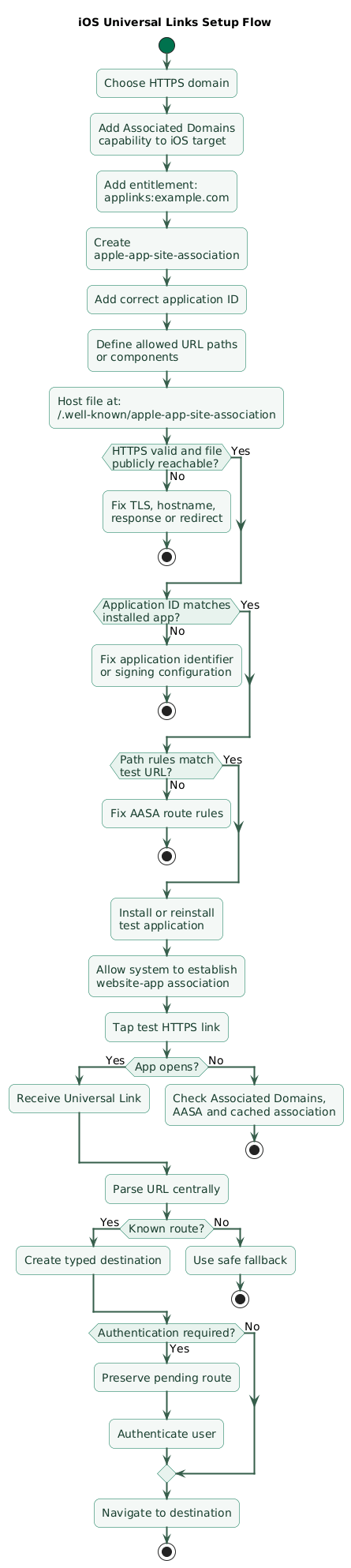
Universal Links require an association in both directions.
app says:
I support example.com

website says:
this app may handle my links
Add Associated Domains capability
In the iOS target, configure:
Signing & Capabilities
      ↓
Associated Domains
Then add:
applinks:example.comSubdomains are separate routing identities
If you use:
example.com
www.example.com
links.example.com
configure the domains intentionally rather than assuming one entry covers every deployment.
Do not put paths in the entitlement
Use:
applinks:example.comnot:
applinks:example.com/products/*Path matching belongs in the website association configuration.
Use separate domains for separate environments where practical
links.example.com
staging-links.example.com
can reduce the risk of test applications claiming production links.
5. Create apple-app-site-association
The website needs:
apple-app-site-associationcommonly hosted at:
https://example.com/.well-known/apple-app-site-associationThere is no .json extension
Use:
apple-app-site-associationnot:
apple-app-site-association.jsonMinimal conceptual example
{
  "applinks": {
    "details": [
      {
        "appID": "ABCDE12345.com.example.app",
        "components": [
          {
            "/": "/products/*"
          },
          {
            "/": "/orders/*"
          }
        ]
      }
    ]
  }
}
Application identifier matters
The value combines the relevant Apple application identifier prefix with the app's bundle identifier.
A typo means:
domain association fails
even though JSON looks valid
Limit paths where appropriate
You may want:
/products/*
/orders/*
/invite/*
while ordinary informational pages remain browser-only.
Serve the file through HTTPS correctly
Check:
- Valid HTTPS.
- Correct hostname.
- Correct content.
- No authentication requirement.
- No unexpected redirect.
Remember that association information can be cached
When changing Universal Link configuration, do not assume every installed device immediately receives the new relationship.
Test installation and association behavior deliberately.
6. Route Universal Links inside the iOS app
After iOS recognizes a Universal Link, the application still needs to interpret it.
Normalize the URL
Example input:
https://example.com/products/42?campaign=summerRouter output:
route:
product

productId:
42

campaign:
summer
Use one central router
Avoid:
AppDelegate parses links one way

Scene code parses links another way

notification handler
uses third implementation
Prefer:
incoming URL
      ↓
DeepLinkParser
      ↓
DeepLinkRoute
      ↓
navigation coordinator
Example route model
enum DeepLinkRoute {
  product(id)
  order(id)
  profile(username)
  invitation(token)
}
Cold start and warm start differ
Test:
app terminated
+
link tapped
and:
app already running
+
link tapped
Both should reach the same destination.
Navigation may need to wait
On cold start:
link arrives
      ↓
app initializes
      ↓
session loads
      ↓
navigation becomes ready
      ↓
route link
Do not lose the pending deep link during startup.
7. Add Android App Link intent filters
Android App Links verification flow (diagram)
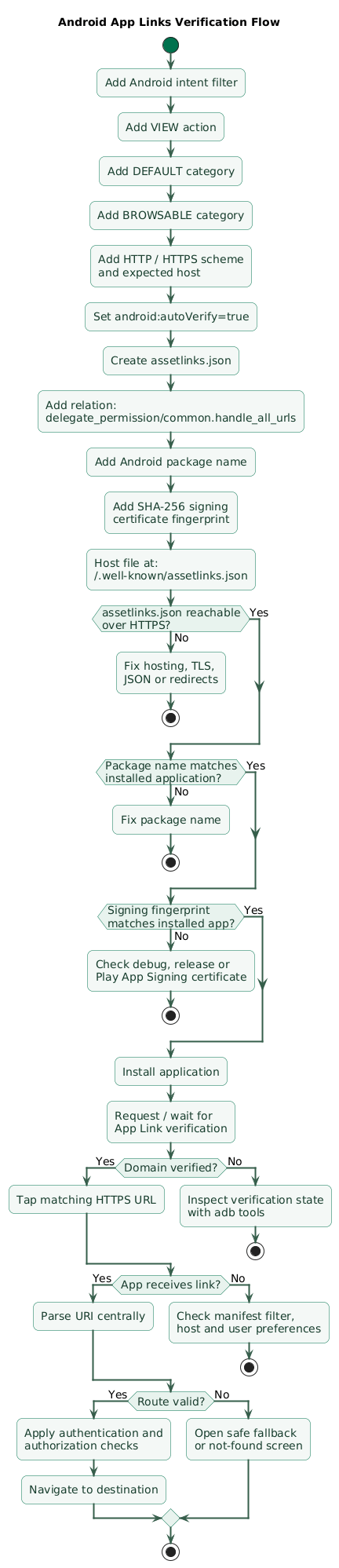
Android App Links begin with an intent filter.
Conceptual manifest example
<activity
    android:name=".MainActivity"
    android:exported="true">

    <intent-filter android:autoVerify="true">

        <action
            android:name="android.intent.action.VIEW" />

        <category
            android:name="android.intent.category.DEFAULT" />

        <category
            android:name="android.intent.category.BROWSABLE" />

        <data android:scheme="http" />
        <data android:scheme="https" />

        <data android:host="example.com" />

    </intent-filter>

</activity>
autoVerify matters
android:autoVerify="true"tells Android that the app intends to establish a verified association with the declared web domain.
VIEW, BROWSABLE, and DEFAULT
These identify the Activity as capable of receiving matching web-link intents.
Keep filters understandable
Multiple data elements in one filter can combine into URL patterns you did not initially intend.
If two URL families are conceptually independent, separate intent filters can make configuration easier to reason about.
Use a broad static host scope carefully
On modern Android versions, server-side Dynamic App Links can refine link behavior.
However, server rules cannot expand beyond the static scope permitted by the app manifest.
8. Publish assetlinks.json
Android validates the website relationship using:
https://example.com/.well-known/assetlinks.jsonConceptual example
[
  {
    "relation": [
      "delegate_permission/common.handle_all_urls"
    ],
    "target": {
      "namespace": "android_app",
      "package_name": "com.example.app",
      "sha256_cert_fingerprints": [
        "AA:BB:CC:..."
      ]
    }
  }
]
Package name must match the installed app
com.example.appis not the same as:
com.example.app.debugThe signing certificate fingerprint is critical
Android verifies:
package name
+
SHA-256 signing certificate fingerprint
against the installed application.
Play App Signing changes which certificate matters
If Google Play signs the distributed application, the certificate on users' devices may differ from a local upload or development signing certificate.
Use the fingerprint corresponding to the actual distributed application identity.
Multiple fingerprints can be intentional
For controlled situations:
production signing certificate
+
another recognized certificate
can be represented when required by the deployment model.
Android 15+ Dynamic App Links
Newer Android versions can use optional server-side:
dynamic_app_link_componentsin the Digital Asset Links relationship to refine matching by:
- Path.
- Query parameters.
- Fragment patterns.
This can let link-routing scope evolve without shipping a new app version, provided the rules remain inside the scope allowed by the manifest.
9. Route Android App Links safely
Verification gets the URL into the app.
Navigation remains your responsibility.
Input
https://example.com/orders/9814Parse
host:
example.com

path:
orders/9814
Map
OrderRoute(
  id = "9814"
)
Navigate
OrderDetailsScreenPrefer typed routes
Avoid passing raw URLs deeply through the UI.
Prefer:
Uri
      ↓
parser
      ↓
validated route object
      ↓
navigation
Unknown paths should fail safely
/old-feature/99should not crash the app.
Possible fallback:
open web page
or
show safe not-found screen
Do not assume one Activity forever
A navigation framework can route within a single Activity or coordinate several destinations.
The public URL should remain independent of internal Activity structure.
10. Design web fallback and authentication
A verified HTTPS link gives you a natural fallback.
App installed
https://example.com/products/42
      ↓
app
      ↓
Product 42
App not installed
https://example.com/products/42
      ↓
browser
      ↓
Product 42 web page
Do not force every browser visit into installation
The web page should remain useful where possible.
Authentication-aware routing
Suppose:
https://example.com/orders/9814requires a logged-in user.
Correct flow:
link opened
      ↓
route parsed
      ↓
authentication required?
      ↓
login
      ↓
authorization check
      ↓
continue to order 9814
Preserve the intended destination during authentication.
Do not leak protected data before authentication
The URL itself should not contain:
private order contents
password
access token
long-lived credential
Invitation links need expiration
/invite/{opaque-token}should normally be backed by:
- Expiration.
- Server validation.
- One-time or limited-use policy where appropriate.
11. Treat deep links as untrusted input
Domain verification proves:
this app is associated
with this website
It does not prove:
every URL parameter
contains safe trusted data
Validate IDs
/products/-999999999999999999should not produce unsafe parser behavior.
Validate enumerations
Bad:
?action=execute_arbitrary_functionBetter:
allow-list known actionsDo not perform destructive actions on open
Avoid:
/delete-accountcausing immediate deletion merely because a URL was activated.
Use:
open confirmation screen
      ↓
authenticate if required
      ↓
user confirms
      ↓
server authorizes
      ↓
perform action
Authorization belongs on the backend
A user changing:
/orders/9814

to

/orders/9815
must not gain access to another user's resource.
Beware open redirects
Dangerous pattern:
/redirect?url=https://anything.examplecan enable phishing or unexpected navigation if the destination is not constrained.
Be careful with JavaScript or WebView bridges
Do not let arbitrary deep-link data become:
JavaScript code
native method name
filesystem path
without strict validation.
12. Test verification and routing end to end
Deep links can appear correct in unit tests while real OS verification is broken.
Test the web URL first
Open:
https://example.com/products/42in an ordinary browser.
Verify:
- HTTPS works.
- Page exists.
- Redirect behavior is intentional.
Test iOS association file
https://example.com/.well-known/apple-app-site-associationVerify the response contains the expected app identifier and URL rules.
Install a fresh iOS build
Association behavior can differ from an already-installed app whose domain metadata is cached.
Test iOS states
app terminated
app backgrounded
app foregrounded
user logged out
user logged in
Test Android assetlinks.json
https://example.com/.well-known/assetlinks.jsonVerify:
- Correct package.
- Correct fingerprint.
- Valid JSON.
Check Android verification state
Useful development commands include:
adb shell pm verify-app-links --re-verify PACKAGE_NAMEand:
adb shell pm get-app-links PACKAGE_NAMESuccessful hosts should appear in the expected verified state.
Launch a URL through ADB
adb shell am start \
  -a android.intent.action.VIEW \
  -c android.intent.category.BROWSABLE \
  -d "https://example.com/products/42"
Test the production signing identity
A debug build succeeding does not prove the Play-distributed production build has the correct asset association.
Test every important subdomain
example.com
www.example.com
links.example.com
should each have intentional behavior.
13. Troubleshoot links that keep opening the browser
Problem: iOS link opens Safari
Check:
Associated Domains entitlement
AASA hostname
AASA app identifier
AASA path rules
HTTPS
redirects
fresh installation
Problem: Universal Link opens website while already browsing the same site
Browser context can affect whether navigation remains in the browser, particularly when the user is already browsing the same domain.
If the product needs an explicit web-to-app transition, design that journey and domain structure deliberately rather than assuming every same-domain tap will switch applications.
Problem: Android opens browser instead of app
Check:
autoVerify
VIEW action
DEFAULT category
BROWSABLE category
host
scheme
assetlinks.json
package name
certificate fingerprint
verification state
Problem: debug build works, production fails
Compare signing certificates.
debug certificate
!=
production app-signing certificate
Problem: one Android host breaks older-device verification
Multiple hosts deserve careful testing across the Android versions you support.
Do not add:
unused.example.comto a verified filter without also providing the required association.
Problem: app opens, wrong screen appears
Platform verification is probably not the primary problem.
Inspect:
URL parsing
route mapping
startup timing
navigation state
authentication redirect
Problem: link works only when app is already running
The cold-start path is probably losing the route before navigation initialization completes.
Problem: link works only once
Check whether the router incorrectly treats:
handledDeepLink = trueas a lifetime state instead of tracking each incoming URL.
Problem: redirect breaks verification
Association files should be hosted exactly where the platform expects them. Do not depend on a marketing redirect chain to reach the association file.
14. Copy/paste deep-linking checklist
Deep linking checklist

Architecture
- Define why deep links are needed.
- Prefer HTTPS public URLs.
- Separate domain verification from app routing.
- Keep routing independent from internal screen class names.
- Define web fallback.
- Define authentication behavior.
- Define unknown-route behavior.
- Define supported app versions.

URL design
- Use stable URL paths.
- Model product concepts.
- Avoid exposing internal screen names.
- Avoid exposing implementation indexes.
- Use opaque IDs where appropriate.
- Keep routes backward compatible.
- Document query parameters.
- Validate every parameter.
- Avoid generic arbitrary-action parameters.

Example routes
- Define /products/{id}.
- Define /orders/{id}.
- Define /profile/{username}.
- Define /invite/{token}.
- Define fallback behavior.
- Define route ownership.

Web fallback
- Ensure HTTPS page exists.
- Keep page useful without app.
- Avoid installation-only dead ends.
- Support desktop where relevant.
- Handle unsupported app route.
- Handle old shared links.
- Avoid unnecessary redirect chains.

Custom URL schemes
- Use only where appropriate.
- Do not treat custom scheme as domain verification.
- Avoid privileged operations from scheme alone.
- Validate incoming values.
- Prefer Universal Links / App Links for public web URLs.

iOS
- Add Associated Domains capability.
- Add applinks domain.
- Verify production entitlement.
- Verify correct target.
- Separate staging domain where practical.
- Test multiple subdomains.
- Do not include paths in entitlement.

AASA
- Create apple-app-site-association.
- Do not add .json extension.
- Host at expected HTTPS location.
- Use valid TLS certificate.
- Avoid redirects.
- Make file publicly reachable.
- Use correct application identifier.
- Define applinks details.
- Define components / paths.
- Exclude paths intentionally when required.
- Validate JSON.
- Test production domain.

iOS app identifier
- Verify application identifier prefix.
- Verify bundle identifier.
- Verify production signing setup.
- Avoid copying another app's identifier.
- Document associated app IDs.

iOS path matching
- Match intended paths.
- Avoid claiming entire site without need.
- Test trailing slash.
- Test nested paths.
- Test query parameters.
- Test fragments where relevant.
- Test excluded routes.

iOS routing
- Parse URL centrally.
- Convert URL to typed route.
- Validate host.
- Validate path.
- Validate parameters.
- Preserve pending route during cold start.
- Handle warm-start route.
- Handle foreground route.
- Handle authentication.
- Handle unknown route.

iOS navigation
- Wait for navigation coordinator if necessary.
- Do not lose link during startup.
- Preserve post-login destination.
- Avoid duplicate navigation.
- Handle already-open destination.
- Handle stale resources.

iOS testing
- Test app terminated.
- Test app backgrounded.
- Test app foregrounded.
- Test logged-out user.
- Test logged-in user.
- Test fresh install.
- Test reinstall after AASA change.
- Test real device.
- Test production domain.
- Test same-domain browser behavior.

Android
- Add VIEW intent action.
- Add DEFAULT category.
- Add BROWSABLE category.
- Add http scheme.
- Add https scheme.
- Add expected host.
- Add android:autoVerify=true.
- Use exported activity where required.
- Test manifest merging.
- Keep intent filters understandable.

Android hosts
- Verify every declared host.
- Verify every relevant subdomain.
- Avoid accidental host combinations.
- Separate filters when URL families differ.
- Test wildcard behavior deliberately.
- Do not declare unused domains.

assetlinks.json
- Create valid JSON.
- Host at /.well-known/assetlinks.json.
- Serve through HTTPS.
- Use correct relation.
- Use android_app namespace.
- Use exact package name.
- Use SHA-256 signing fingerprint.
- Verify production signing certificate.
- Avoid redirects.
- Test file publicly.

Play App Signing
- Check whether Play App Signing is enabled.
- Use Play app-signing certificate fingerprint for distributed app.
- Do not assume local upload certificate is the installed certificate.
- Record signing identities.
- Plan certificate changes.
- Test production release.

Android verification
- Install app.
- Allow verification to complete.
- Re-run verification when testing.
- Check pm get-app-links.
- Confirm host reports verified.
- Investigate all non-verified states.
- Test real HTTPS link.
- Test multiple Android versions.

ADB testing
- Reset link state when required.
- Trigger verify-app-links.
- Query get-app-links.
- Launch ACTION_VIEW with test URL.
- Verify destination Activity.
- Capture logs.
- Test production package.

Android 15+
- Consider Dynamic App Links where useful.
- Keep broad static scope only when appropriate.
- Keep dynamic rules inside manifest scope.
- Version server-side rules.
- Test devices without dynamic-rule support.
- Keep older Android path behavior compatible.
- Test query and path matching.

Internal router
- Parse host.
- Parse path.
- Parse query.
- Parse fragment only when intentionally used.
- Normalize URL.
- Create typed route.
- Reject malformed input.
- Reject unsupported host.
- Reject unsupported action.
- Route through normal navigation.

Authentication
- Determine whether route requires login.
- Preserve original route.
- Authenticate.
- Return to requested destination.
- Re-check authorization after authentication.
- Handle expired invitation.
- Handle deleted resource.
- Handle revoked account.

Authorization
- Enforce server-side ownership.
- Never trust route ID as authorization.
- Prevent IDOR-style access.
- Validate roles.
- Validate resource access.
- Avoid privileged actions on link open.

Security
- Treat URL as untrusted input.
- Validate numeric IDs.
- Validate UUIDs.
- Validate token format.
- Validate enumerations.
- Limit lengths.
- Decode URL safely.
- Avoid arbitrary command execution.
- Avoid arbitrary filesystem paths.
- Avoid arbitrary WebView JavaScript.
- Avoid open redirects.

Sensitive actions
- Never delete content automatically from a deep link.
- Never transfer money automatically from a deep link.
- Never change email automatically from a deep link.
- Require confirmation.
- Require authentication.
- Re-check authorization.
- Protect CSRF-like workflows where applicable.

Invitation links
- Use opaque token.
- Set expiration.
- Limit use where appropriate.
- Validate server-side.
- Avoid leaking private data in URL.
- Handle already-used invitation.
- Handle revoked invitation.

Password reset
- Use high-entropy token.
- Set expiration.
- Validate server-side.
- Make token limited-purpose.
- Avoid logging full token.
- Avoid analytics capture.
- Clear token from app state when finished.

Analytics
- Track route type.
- Track link source when appropriate.
- Avoid logging secret query parameters.
- Avoid storing reset tokens.
- Avoid storing invitation secrets.
- Sanitize analytics URLs.
- Record routing failure category.

Marketing parameters
- Allow known UTM-style metadata.
- Keep campaign data separate from navigation authorization.
- Do not let marketing parameters control privileged behavior.
- Strip unnecessary parameters before internal routing.

Redirects
- Minimize redirects.
- Avoid redirecting association files.
- Test www to apex behavior.
- Test HTTP to HTTPS behavior.
- Ensure final canonical URL remains supported.
- Do not build redirect loops.

Subdomains
- Document each associated subdomain.
- Host association file where required.
- Configure iOS entitlement.
- Configure Android host.
- Verify certificates.
- Avoid wildcard assumptions.
- Test each host independently.

Staging
- Use staging app identifier.
- Use staging Android package name.
- Use staging signing fingerprint.
- Use staging AASA.
- Use staging assetlinks.json.
- Avoid staging app claiming production URLs unless intentional.
- Keep analytics separate.

Multiple apps
- Decide which app owns which paths.
- Avoid overlapping routing ambiguity.
- Keep association files explicit.
- Test installed combinations.
- Document app priority assumptions.
- Avoid two activities claiming identical Android links without reason.

Multiple Android variants
- Handle debug package separately.
- Handle staging package separately.
- Include fingerprints intentionally.
- Avoid publishing debug association to production unless required.
- Test Play-distributed package.

Backward compatibility
- Keep old URLs working.
- Redirect deprecated paths safely.
- Map legacy routes.
- Maintain server fallback.
- Avoid removing shared campaign links immediately.
- Monitor route usage before retirement.

Cold start
- Capture incoming URL.
- Initialize session.
- Initialize navigation.
- Route when ready.
- Avoid losing URL.
- Avoid routing twice.
- Test slow initialization.

Warm start
- Receive new link.
- Avoid resetting entire navigation unnecessarily.
- Route relative to current state.
- Handle duplicate tap.
- Handle same destination.
- Preserve unsaved work according to product policy.

Unknown link
- Do not crash.
- Show safe fallback.
- Open web page where appropriate.
- Log route mismatch.
- Avoid infinite app-to-browser loop.

WebView
- Decide whether links remain in WebView.
- Decide whether verified domain should open native route.
- Validate navigation.
- Prevent arbitrary scheme execution.
- Avoid exposing unsafe JavaScript bridges.

Notifications
- Reuse same deep-link router where practical.
- Avoid separate routing grammar.
- Validate notification URL.
- Preserve security checks.
- Test cold and warm start.

QR codes
- Use HTTPS link where practical.
- Reuse existing routing contract.
- Validate scanned data.
- Avoid custom arbitrary actions.
- Provide web fallback.

Email links
- Use stable HTTPS URL.
- Avoid exposing private content in query string.
- Test mail clients.
- Test app installed.
- Test app not installed.
- Test expired links.

Testing matrix
- iPhone app installed.
- iPhone app not installed.
- Android app installed.
- Android app not installed.
- App terminated.
- App backgrounded.
- App foregrounded.
- Logged in.
- Logged out.
- Valid route.
- Unknown route.
- Deleted resource.
- Expired token.
- Invalid parameter.
- Staging environment.
- Production environment.

Monitoring
- Track link opens.
- Track app-routing success.
- Track browser fallback.
- Track invalid routes.
- Track authentication interruptions.
- Track destination load failure.
- Track verification incidents after releases.

Release process
- Verify AASA before release.
- Verify assetlinks.json before release.
- Verify production iOS entitlement.
- Verify Android production fingerprint.
- Verify package name.
- Test store-signed Android build.
- Test App Store / TestFlight iOS build where appropriate.
- Test representative links.

Troubleshooting iOS
- Check Associated Domains.
- Check app identifier.
- Check AASA filename.
- Check HTTPS.
- Check redirect.
- Check hostname.
- Check component rules.
- Reinstall app.
- Test real device.
- Check browser context.

Troubleshooting Android
- Check autoVerify.
- Check VIEW.
- Check DEFAULT.
- Check BROWSABLE.
- Check schemes.
- Check host.
- Check assetlinks.json.
- Check package name.
- Check fingerprint.
- Check domain verification state.
- Check user link preferences.

Final review
- Is the public link a valid HTTPS URL?
- Does it provide a useful browser fallback?
- Is the URL contract stable?
- Is the iOS Associated Domain configured?
- Is AASA correctly hosted?
- Is the iOS app identifier correct?
- Are iOS paths correct?
- Does iOS handle cold and warm starts?
- Is Android autoVerify enabled?
- Is assetlinks.json correctly hosted?
- Is the package name correct?
- Is the production signing fingerprint correct?
- Does Android report the domain as verified?
- Are Android 15 dynamic rules compatible with older versions?
- Are all parameters validated?
- Does authentication preserve the destination?
- Does the backend enforce authorization?
- Can malformed links fail safely?
- Do sensitive actions require confirmation?
- Are secret tokens excluded from analytics and logs?
- Have app-installed and app-not-installed flows both been tested?
- Can old shared links remain useful after future app redesigns?
15. FAQ
What is a deep link?
A deep link is a URL or URI that routes a user to a specific location or action inside an application instead of only opening the application's default home screen.
What is the difference between Universal Links and App Links?
Universal Links are Apple's verified HTTPS linking mechanism. App Links are Android's equivalent verified web-link mechanism. Both require an association between the website and application, but their configuration formats and platform APIs differ.
Where does apple-app-site-association go?
A standard deployment serves the file over HTTPS from the domain's
well-known location using the filename
apple-app-site-association without a .json
extension. The app needs a matching Associated Domains configuration.
Where does Android assetlinks.json go?
It is served from the domain's HTTPS
/.well-known/assetlinks.json location and identifies the
Android package and signing certificate authorized to handle the links.
Why does my Android App Link work in debug but fail from Google Play?
The production app can be signed with a different certificate from your
local debug or upload build. Verify that assetlinks.json
contains the SHA-256 fingerprint of the certificate that actually signs
the installed production application.
Why does the app open but show the wrong screen?
If the operating system already launches the app, domain verification may be working correctly. Inspect URL parsing, route mapping, initialization, authentication redirects, and navigation state inside the app.
Should a deep link perform a sensitive action immediately?
Usually not. Treat deep-link parameters as untrusted input, authenticate the user when required, enforce authorization on the server, and require explicit confirmation before destructive or high-impact operations.
Key terms (quick glossary)
- Deep link
- A URL or URI that maps to a specific destination or action inside a mobile application.
- Universal Link
- Apple's verified HTTPS linking mechanism that associates website URLs with an application.
- App Link
- Android's verified HTTP or HTTPS linking mechanism that associates website URLs with an installed Android application.
- Associated Domains
- Apple application capability and entitlement used for services including Universal Links.
- apple-app-site-association
- The website-hosted association file that identifies Apple applications authorized to handle specified Universal Link URLs for a domain.
- AASA
- Common abbreviation for the apple-app-site-association file.
- Digital Asset Links
- Android's mechanism for declaring verified relationships between web origins and applications.
- assetlinks.json
- The website-hosted Digital Asset Links statement file used for Android App Link verification.
- autoVerify
- Android manifest intent-filter setting indicating that the operating system should attempt to verify the declared web domains.
- Intent filter
- Android manifest declaration describing which external intents and URL patterns an Activity can handle.
- Signing certificate fingerprint
- A cryptographic fingerprint identifying the certificate used to sign an Android application for Digital Asset Links verification.
- Dynamic App Links
- Android 15-and-later functionality that can refine supported App Link matching rules through server-side Digital Asset Links configuration.
- Deep-link router
- Application component that parses incoming URLs, validates parameters, maps them to typed destinations, and triggers navigation.
- Cold start
- Launching the application from a state where its process or navigation hierarchy is not already running.
- Warm start
- Handling a new link while the application process or user interface is already active.
- Web fallback
- The website experience shown when a verified app link is not opened in the native application.
- Custom URL scheme
-
An application-defined URI scheme such as
myapp://that can route into an app but does not by itself provide the same website-domain verification as Universal Links or App Links.
Worth reading
Recommended guides from the category.
