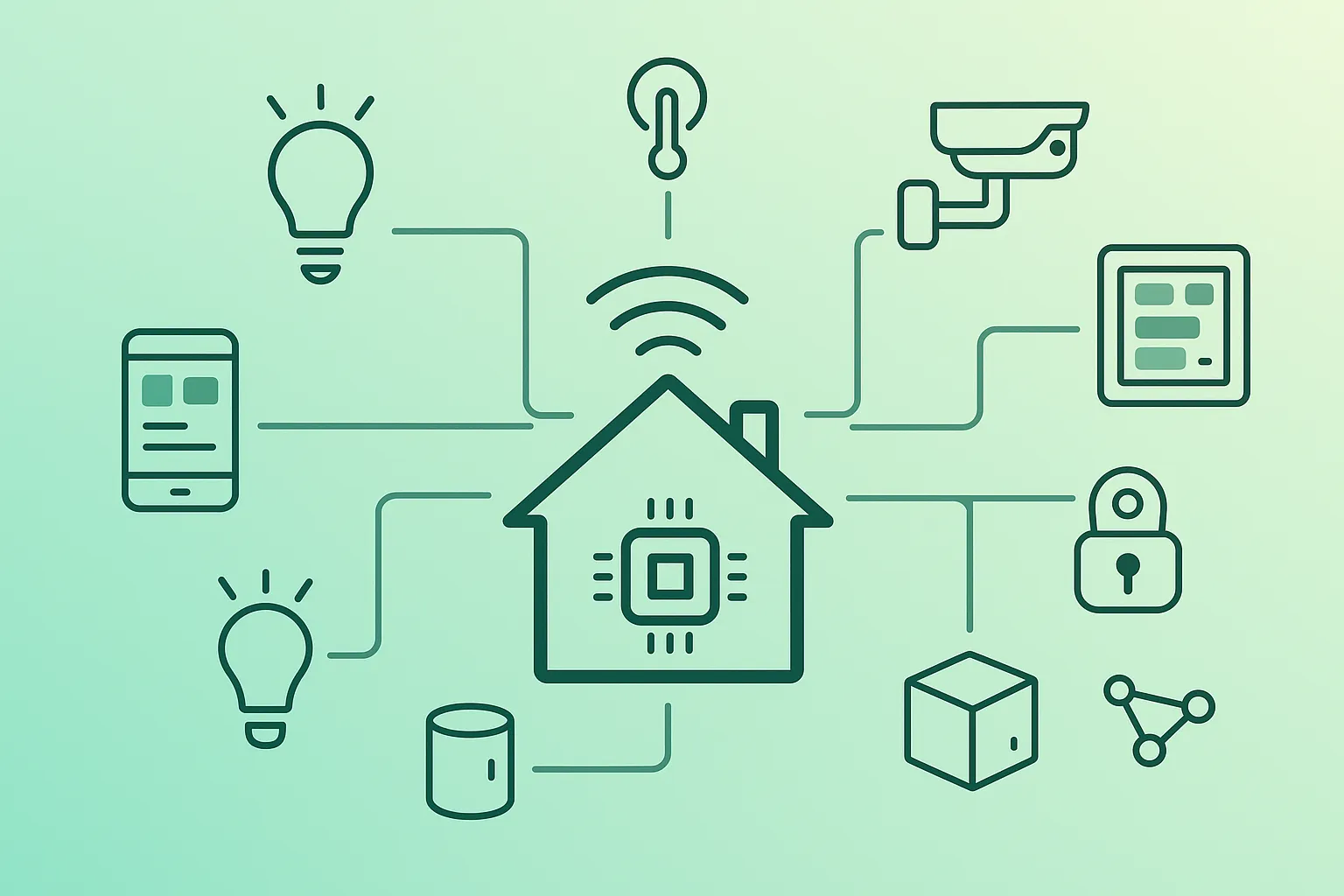
A smart home is not “a home with more apps”. It is a small distributed system in your house: sensors produce events, controllers make decisions, and devices perform actions. The result should feel boring—in a good way: lights that come on reliably, fewer repetitive tasks, and a home that stays usable even when the internet is unstable.
This guide prioritizes low-regret choices for beginners: pick the right protocol by device type, stabilize your network early, avoid over-automation, and keep security/privacy as a baseline—not an afterthought.
Beginner strategy that prevents 80% of pain
- Start with plugs/lights/sensors (not locks/alarm/HVAC).
- Prefer a mesh protocol for sensors (Zigbee/Z-Wave/Thread) over Wi-Fi sensors.
- Fix Wi-Fi coverage and router limits before you buy many devices.
- Build 1–3 automations and keep them stable for a week before expanding.
1. What a Smart Home Is (And What IoT Means)
IoT (Internet of Things) means devices with sensors and connectivity that can send data and receive commands. At home that usually breaks into four roles:
- Sensors: motion, contact (door/window), temperature, humidity, light level, leak detection.
- Actuators: lights, plugs, blinds, relays, thermostats, valves.
- Controller / hub: the “brain” that pairs devices, normalizes signals, and runs automations.
- Automations: rules reacting to events, states (home/away), and schedules (sunset).
Safety note (important)
For mains-powered wiring (switches, relays in electrical boxes), follow local electrical codes and use a qualified electrician if you are not experienced. Beginners can get 90% of the benefits with plugs, bulbs, and sensors without touching wiring.
2. Protocols Explained: Wi-Fi, Zigbee, Z-Wave, Thread, Matter
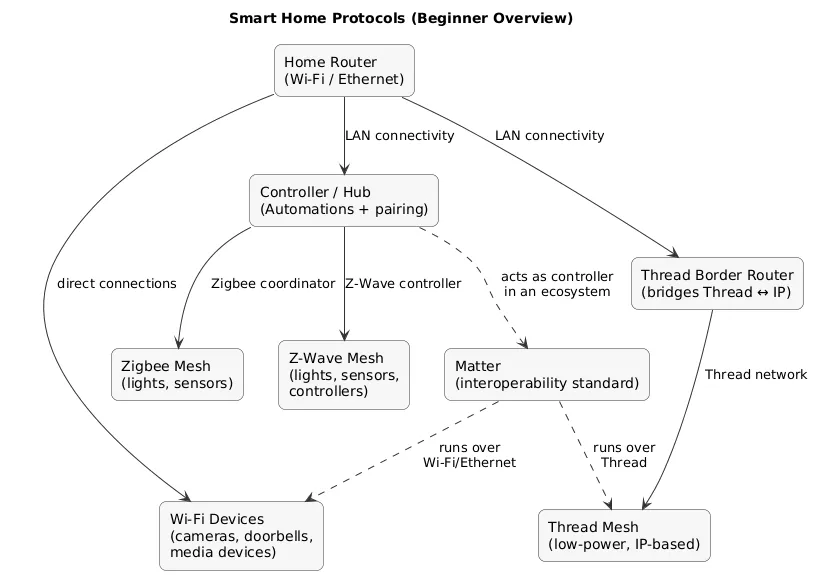
Smart home reliability is mostly a function of the radio protocol and your network design. Protocols differ in range, power usage, topology (mesh vs direct), and what infrastructure you need.
Quick comparison (beginner focus)
| Protocol | Best for | Tradeoffs / gotchas |
|---|---|---|
| Wi-Fi | Cameras, doorbells, media devices, anything bandwidth-heavy | Many devices can overload weak routers; coverage issues cause “random” disconnects |
| Zigbee | Sensors, lights, plugs (low power, mesh) | Needs a coordinator/hub; mesh quality depends on powered “router devices” |
| Z-Wave | Sensors and control devices with good range; often stable meshes | Needs a controller; devices can cost more; ecosystem choices narrower than Zigbee |
| Thread | Modern low-power mesh; great for Matter devices | Needs a Thread Border Router; still requires a controller ecosystem |
| Matter | Interoperability standard (works across ecosystems) | Not a radio; runs over Thread or Wi-Fi/Ethernet; compatibility improves but isn’t “magic” |
Common misconception
Matter improves cross-ecosystem compatibility, but you still need the right controller and (for Thread) a border router. Also, device categories and features may vary by ecosystem even when Matter works.
Protocols overview (diagram)
2.1 Protocol selection cheat sheet (quick decisions)
If you want quick, practical decisions without overthinking:
- Battery sensors: pick Zigbee/Z-Wave/Thread (mesh + low power).
- Lights and plugs: Zigbee/Z-Wave/Thread often scale better than Wi-Fi.
- Cameras/doorbells: usually Wi-Fi (bandwidth), but treat them as the highest privacy-risk category.
- New build / future-proofing: consider Matter-capable devices where it doesn’t force compromises.
- Small apartment, few devices: Wi-Fi can be fine, but watch router limits and coverage.
A “low-regret” mixed setup
Many stable homes end up with: Wi-Fi for cameras + a mesh protocol (Zigbee/Z-Wave/Thread) for sensors and lights, all unified under one controller.
3. Choosing an Ecosystem: Apple, Google, Amazon, Home Assistant
Your ecosystem determines voice control, app experience, and where automations run (cloud vs local). Beginners do best when they choose one primary “control plane” rather than juggling multiple apps.
- Apple Home: strong day-to-day UX for iOS households; privacy posture is often a priority.
- Google Home: broad device support and strong assistant workflows.
- Amazon Alexa: huge ecosystem; routines are flexible and widely supported.
- Home Assistant: local-first power-user option; excellent integrations; higher setup effort.
Decision rule
If you want maximum flexibility and local control, pick a local-first controller. If you want the fastest “it just works” path, pick the ecosystem you already use daily.
4. Do You Need a Hub? Controllers, Bridges, and Border Routers
You typically need a hub/controller when you use:
- Zigbee: requires a coordinator (hub or USB dongle attached to a controller).
- Z-Wave: requires a controller (hub or USB dongle).
- Thread: requires a Thread Border Router to connect the Thread mesh to your home network.
A bridge connects a brand’s devices into your chosen ecosystem (common in lighting). A controller is where automations ideally run locally, so lights still work when your internet hiccups.
Avoid the “hub pile”
Every additional bridge/hub is another point of failure. Prefer devices that pair directly with your primary controller when possible. If you need a bridge, keep it for a clear reason (coverage, unique devices, or a must-have feature).
5. Best First Devices: Lights, Plugs, Sensors (Low regret)
Your first devices should teach you pairing, placement, and automation design without creating high-stakes failure modes. These categories are both practical and beginner-friendly:
- Smart plugs: cheap, flexible (lamps, fans), and easy to test.
- Smart lights: immediate improvement; great for “scene” automations.
- Motion + contact sensors: unlock useful automations (hallways, closets, entry doors).
- Leak sensor: high-value safety automation (alert early, avoid damage).
Beginner automation starter kit
Motion sensor + hallway light: turn on with motion after sunset, turn off after 3–5 minutes of no motion. Add a “sleep mode” guardrail so it doesn’t wake you at night.
6. Your Network Matters: Wi-Fi Coverage and IoT Segmentation
Most “smart home reliability” problems are network problems: weak coverage, overloaded routers, and poor mesh placement. Start with a simple baseline and upgrade only when required.
Reliability baseline (practical)
- Coverage: stable 2.4GHz where IoT devices live (especially far corners and thick walls).
- Router capacity: many consumer/ISP routers struggle with lots of IoT clients.
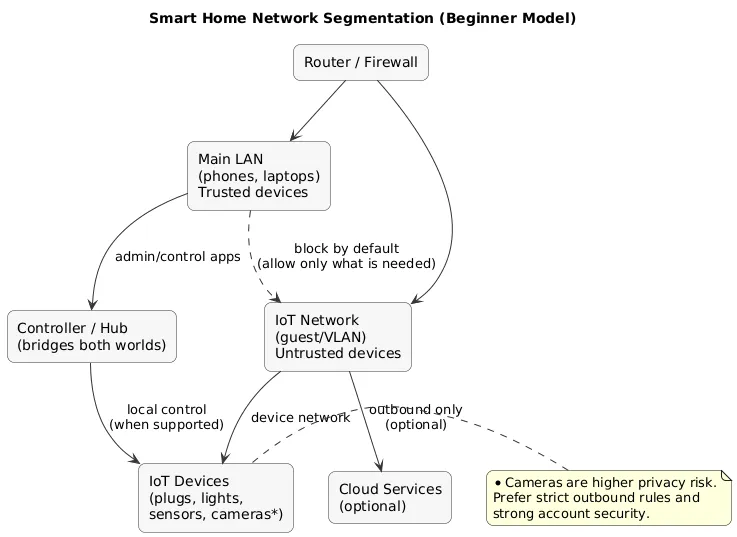
- Segmentation: place IoT on guest network or VLAN when possible.
- Mesh health: Zigbee/Z-Wave/Thread meshes need powered routing devices placed strategically.
- Stability: prefer fewer SSIDs and avoid frequent Wi-Fi configuration changes.
Mesh reliability trick
For Zigbee/Z-Wave/Thread: add a few powered devices (plugs/repeaters) first, then add battery sensors. Battery sensors tend to behave better when the mesh already has strong routing paths.
Network segmentation overview (diagram)
Beginner-friendly segmentation options
- Guest Wi-Fi: easiest option; keeps IoT separate from laptops/phones (depends on router behavior).
- IoT VLAN: more control; you can restrict IoT access while allowing the controller/app to talk to devices.
- “Do nothing” baseline: acceptable for very small setups, but prioritize strong router passwords and updates.
7. Security & Privacy Baseline for Smart Homes
Treat IoT devices like small computers: they run firmware, talk to networks, and may connect to cloud services. A good baseline is simple and repeatable.
Security baseline checklist
- Router first: change default admin password; keep firmware updated; disable remote admin unless you truly need it.
- Unique passwords: especially for hubs/controllers and cloud accounts.
- MFA: enable on Apple/Google/Amazon accounts used for smart home control.
- Update firmware: hub + devices; schedule a monthly check.
- Avoid port forwarding: do not expose cameras/bridges directly to the internet.
- Least privilege: only grant permissions you need (location, microphone, contacts).
Highest privacy risk devices
Cameras, doorbells, and voice assistants are the most sensitive devices. Choose reputable vendors, review cloud settings, and avoid unnecessary sharing or always-on recording if you don’t need it.
8. Automations That Don’t Annoy You (Reliability Principles)
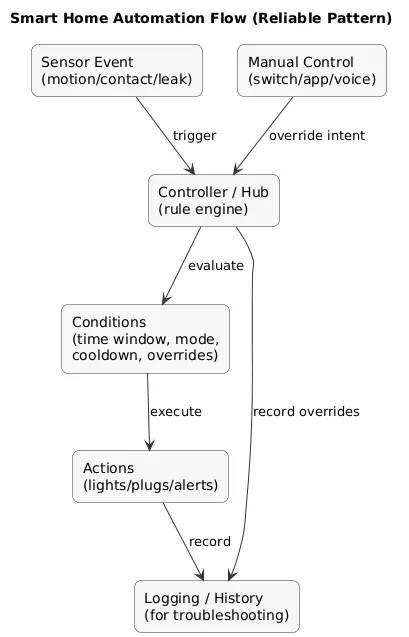
Good automations feel invisible. Bad automations feel like your home is fighting you. Build reliability into the rule design:
- Prefer sensors over schedules: motion + light level beats “7:00 PM every day”.
- Add guardrails: time windows, cooldowns, and explicit manual overrides.
- Use modes: home/away, sleep, movie mode; make automation behavior predictable.
- Fail safe: if a sensor fails, the home should remain usable (manual switches still matter).
- Local where possible: local automations reduce latency and survive internet problems.
Automation pattern (reliable)
IF motion detected AND after sunset AND mode != "Sleep"
THEN turn on hallway light
AND turn it off after 3 minutes of no motion
Automation flow (diagram)
Pro tip that keeps peace in the household
Add a manual override. If someone turns a light off manually, pause motion re-triggers for 10–30 minutes. This prevents the classic “the light keeps turning itself back on” problem.
9. Practical Automation Ideas (Room by Room)
- Entryway: motion lights after dark; turn off after delay; longer delay when guests are present.
- Kitchen: under-cabinet light on motion; “cooking mode” scene; auto-off after inactivity.
- Bedroom: sleep mode dims lights and silences non-urgent notifications.
- Living room: movie mode sets lighting and disables motion triggers temporarily.
- Safety: leak sensor triggers alert; optional: shut down a non-critical plug if safe to do so.
10. Troubleshooting: The Most Common Reliability Problems
When something is flaky, fix in the most likely order. This prevents random guessing.
- Power and batteries: low battery causes missed events and slow responses.
- Placement: move hub/coordinator centrally; avoid putting it next to a router or metal enclosure.
- Wi-Fi coverage: confirm stable 2.4GHz signal where devices live.
- Router limits: too many clients can destabilize consumer routers.
- Mesh health: add a powered router device (plug/repeater) near problematic sensors.
- Cloud dependency: if a rule breaks when the internet is slow, migrate to local automation when possible.
Troubleshooting discipline
Change one thing at a time and observe for 24–48 hours. Multiple changes at once make cause-and-effect unclear.
11. Scaling Your Smart Home Without a Mess
Scaling is mostly about organization: naming, grouping, documentation, and minimizing “special cases”. The goal is that anyone in the household can understand what a device does.
- Naming convention: room_device_type_number (e.g., kitchen_motion_1).
- Groups: “Downstairs lights”, “Bedroom lamps”, “All sensors”.
- Document hubs/bridges: note what protocol each one handles and where it is placed.
- Standardize: fewer vendors usually means fewer apps and fewer edge cases.
- Backups: export controller configuration when possible and store it safely.
12. Setup Checklist
- Network: confirm strong 2.4GHz coverage; consider guest/VLAN for IoT if possible.
- Controller: pick your primary hub/controller and keep it updated.
- Protocols: choose mesh for sensors; avoid putting everything on Wi-Fi by default.
- Security: strong router/hub passwords + MFA; avoid port forwarding.
- Automations: start small; add guardrails; keep manual overrides.
- Stability: verify core automations for a week before adding critical devices.
- Documentation: keep a simple device list (name, room, protocol, notes).
Fast win
Build one automation that saves daily effort (entryway motion lights or a bedtime scene). Expand only after it stays reliable for a week.
13. FAQ: Smart Home & IoT
Should I buy Matter devices only?
Matter is a good signal for future interoperability, but you can mix devices. Prioritize reliability, vendor support, and the protocol that fits the device type. Matter is a compatibility layer, not a guarantee of identical features everywhere.
What is the best protocol for sensors?
Zigbee, Z-Wave, and Thread are common choices for battery sensors because they are low-power mesh networks. A healthy mesh (good placement of powered routing devices) matters more than the logo on the box.
Do smart homes work when the internet is down?
It depends on your controller and automations. Local controllers and local rules can keep working offline. Cloud-only setups often degrade significantly without internet.
Why do my Wi-Fi smart devices disconnect?
Common causes are weak 2.4GHz coverage, router device limits, interference, or unstable ISP routers. Improving Wi-Fi and moving sensors/lights to a mesh protocol often improves stability.
How do I avoid a “smart home mess”?
Standardize on fewer brands, document devices, use naming conventions, and prefer local control where possible. Simple, predictable automations beat complicated “smart” behavior.
Key IoT terms (quick glossary)
- Matter
- An interoperability standard designed to improve compatibility across ecosystems and brands.
- Thread
- A low-power, IP-based mesh networking protocol commonly used alongside Matter.
- Thread Border Router
- A device that connects a Thread network to your home IP network.
- Zigbee coordinator
- The “root” of a Zigbee network that pairs devices and manages the mesh.
- Zigbee / Z-Wave router device
- A powered device (plug/bulb/repeater) that relays messages and strengthens the mesh.
- Controller / Hub
- The central device or software that pairs devices, runs automations, and coordinates your smart home.
- Local automation
- An automation that runs on your controller without relying on a cloud service for every trigger/action.
- Segmentation
- Placing IoT devices on a separate network (guest/VLAN) to reduce risk and improve control.
- mDNS / multicast discovery
- Local network discovery mechanisms used by many smart home ecosystems; may affect cross-VLAN device discovery.
Worth reading
Recommended guides from the category.
