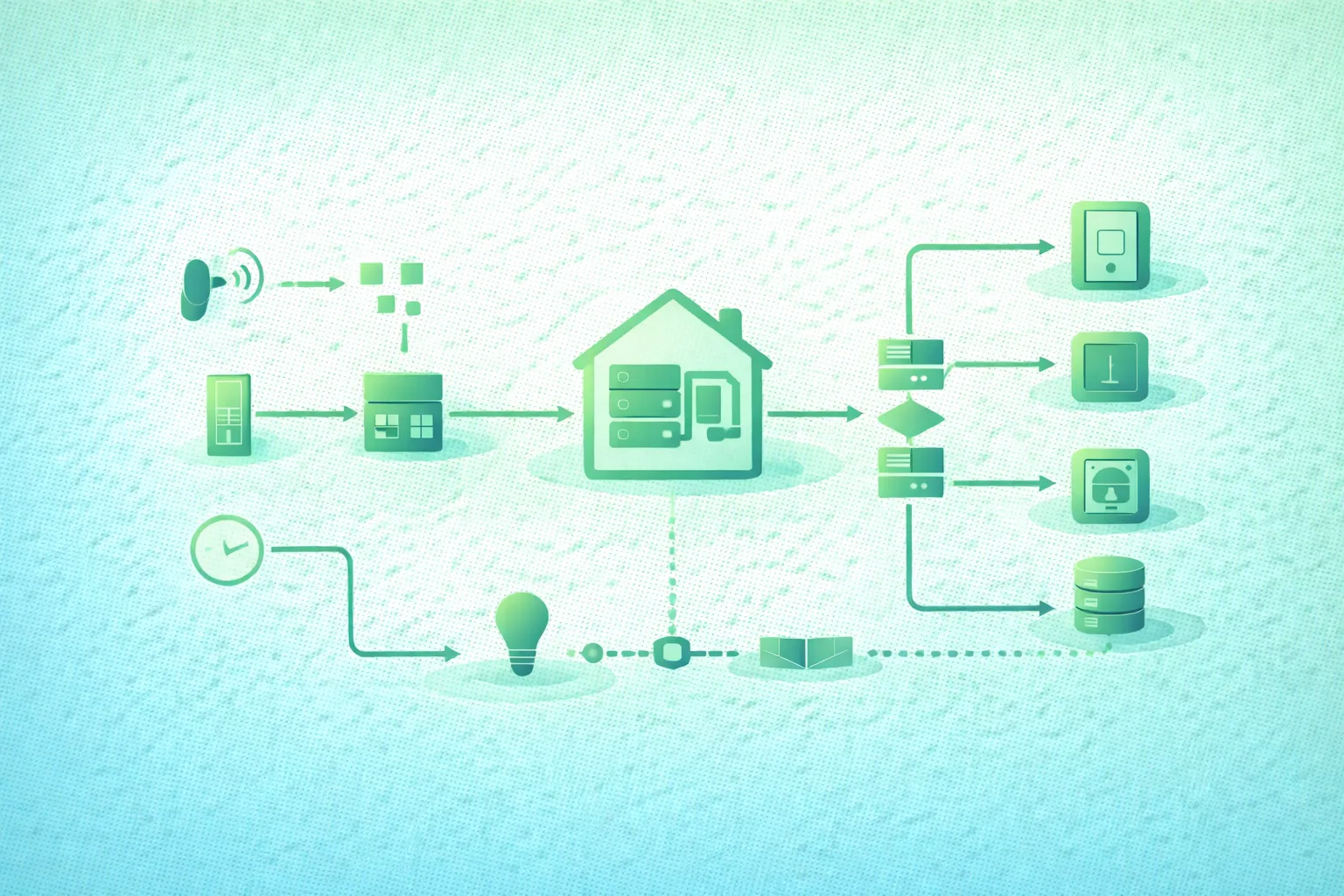
A smart-home automation that works ninety-nine times is still unreliable if the hundredth failure leaves a door unlocked, a heater running, or a leak valve open.
Many automations are initially written as:
WHEN motion detected
THEN turn light on
Real systems need more context:
trigger
  ↓
is sensor state fresh?
  ↓
are conditions satisfied?
  ↓
issue command
  ↓
did device respond?
  ↓
did reported state change?
  ↓
retry or fallback?
  ↓
record outcome
Sensors can report late. Battery devices can disappear. Wi-Fi can fail. Cloud APIs can be unavailable. A hub can restart halfway through a timer. An actuator can accept a command without physically reaching the expected state.
Reliability begins by accepting those failures as normal design inputs.
Design the failure path with the success path
For every important automation, document what should happen when the sensor is unavailable, the command times out, the controller restarts, Internet access disappears, and the reported device state disagrees with the requested state.
1. Treat automation as a reliability problem
Reliable smart-home automation architecture (diagram)

Think of a home automation as a small distributed system.
It contains:
- Inputs.
- Networks.
- State.
- Processing.
- Outputs.
- Failures.
Inputs
motion
temperature
door contact
leak detector
time
sun position
presence
manual button
Controller
Evaluates the automation.
Actuator
light
lock
valve
thermostat
blind
plug
siren
External dependencies
Wi-Fi
DNS
Internet
cloud API
push notification service
The fewer external dependencies a critical local automation requires, the fewer unrelated failures can disable it.
Classify automations by consequence
Low consequence:
change decorative LED colorMedium consequence:
turn heating down when nobody is homeHigher consequence:
close water valve after confirmed leakMore consequential automations deserve more confirmation, monitoring, testing, and conservative fallback behavior.
2. Design triggers that represent real events
A trigger starts evaluation.
It should not necessarily mean the action must execute.
State-change trigger
door:
closed → open
This is different from:
door is openTime trigger
07:00 every weekdayThreshold trigger
humidity rises above 70%Event trigger
button double-clickedAvailability trigger
device becomes unavailableThese represent different semantics.
Avoid noisy thresholds
Bad:
temperature > 25.0
turn fan on

temperature < 25.0
turn fan off
With sensor noise:
24.9
25.1
24.9
25.1
the system may rapidly switch.
Use hysteresis
fan ON:
temperature >= 25.5

fan OFF:
temperature <= 24.5
This creates a stable dead band.
Use minimum duration
humidity > 70%
for 5 minutes
→ ventilation ON
This can reject momentary spikes.
Debounce contact sensors
A noisy or mechanically bouncing input may produce:
OPEN
CLOSED
OPEN
CLOSED
OPEN
over a short period.
Where appropriate, accept the state only after it remains stable for a defined interval.
3. Separate triggers from conditions
A trigger answers:
Why should we evaluate now?Conditions answer:
Is the action appropriate now?Example
TRIGGER:
motion detected

CONDITIONS:
sun is below horizon
AND
house mode != Away
AND
light is currently off

ACTION:
turn hallway light on
This makes the intent easier to inspect and debug.
Check data freshness
Consider:
room temperature:
17 C

last updated:
9 hours ago
The value may be syntactically valid but operationally useless.
For critical decisions, include:
sensor available
AND
last update recent enough
Handle unknown state explicitly
Do not silently treat:
unknownas:
falseunless that is intentionally the safe behavior.
Example heating rule
if temperature unavailable:
do not assume house is warm

instead:
use fallback mode
or
notify user
or
use another sensor
4. Confirm important actions instead of assuming success
Trigger, command, confirmation, and recovery flow (diagram)
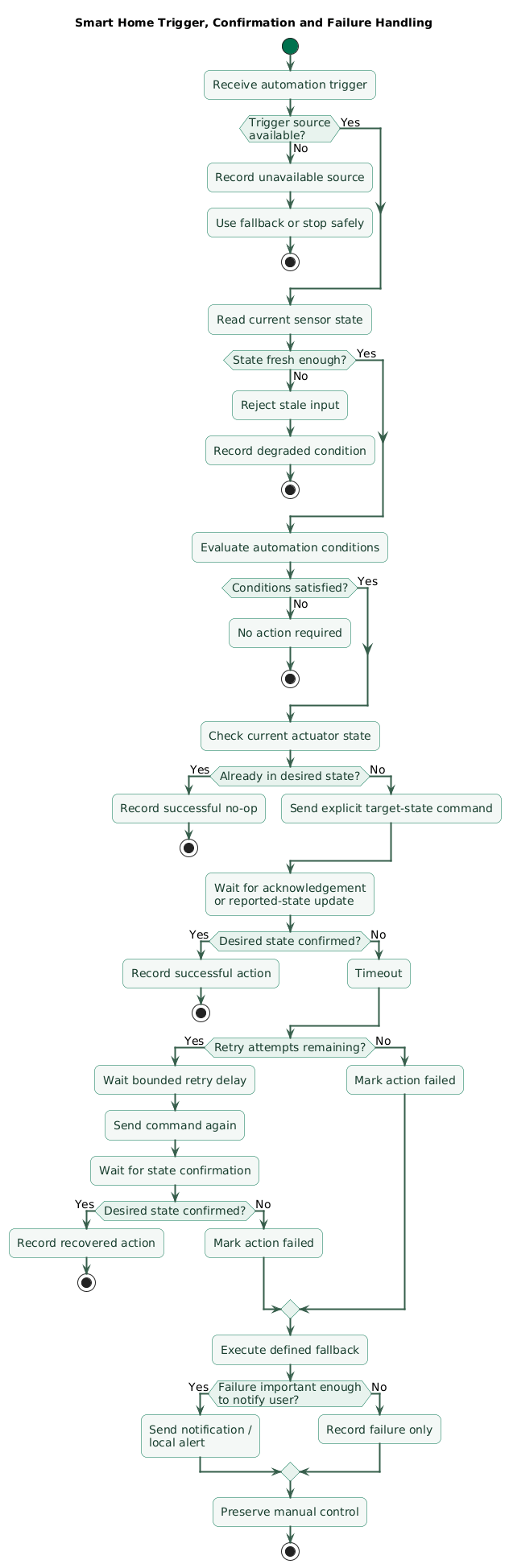
Sending a command and reaching the desired physical state are not always the same event.
Weak model
send:
lock front door

automation complete
Better model
send:
lock front door
    ↓
wait for state
    ↓
front door lock = locked
    ↓
success
Command acknowledgement is useful but limited
Depending on the device, an acknowledgement might mean:
message receivedrather than:
physical mechanism completed successfullyPrefer reported state for important actions
For example:
requested:
valve CLOSED

reported:
valve CLOSED
is stronger evidence than merely knowing the controller sent a command.
Independent sensors can provide even stronger confirmation
For some systems:
garage door command:
CLOSE

motor state:
stopped

door contact:
CLOSED
gives better confidence in physical outcome.
5. Use bounded retries, timeouts, and idempotent actions
Devices occasionally miss commands.
Retrying can improve reliability, but unlimited retries create new failures.
Bounded retry
send command
   ↓
wait 5 seconds
   ↓
not confirmed
   ↓
retry once
   ↓
wait
   ↓
still failed
   ↓
fallback + alert
Do not retry forever
An offline device should not create:
command
command
command
command
command
...
indefinitely.
Use timeouts
Every wait should answer:
How long are we willing
to wait?
Otherwise an automation may remain stuck forever.
Prefer idempotent actions
This:
set light = ONis safer to retry than:
toggle lightbecause duplicate toggle commands may return the device to the original state.
Same rule for locks and valves
Prefer:
set valve CLOSEDinstead of:
toggle valvewhere the protocol allows explicit target-state commands.
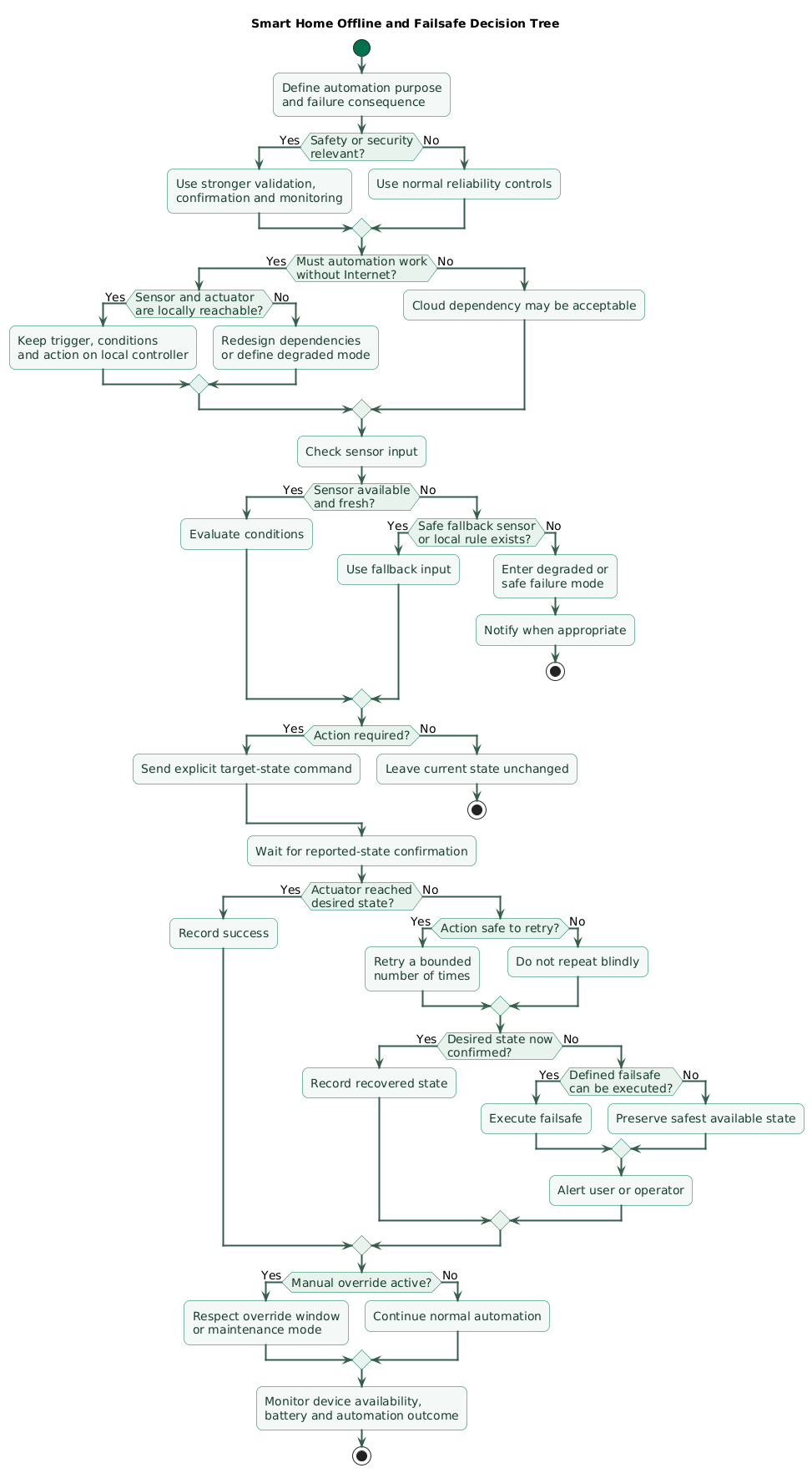
6. Decide what must continue without Internet access
A cloud dashboard being unavailable should not necessarily disable local automation.
Local-first path
sensor
  ↓
local hub
  ↓
local actuator
can continue even when:
Internet = DOWNCloud-enhanced path
local hub
   ↓
cloud
   ↓
remote dashboard
notifications
analytics
These functions may degrade temporarily without stopping core local behavior.
Classify automations
Must work offline:
- Basic lighting controls.
- Heating protection.
- Local leak response.
- Physical wall controls.
Useful but optional offline:
- Energy optimization.
- Complex presence inference.
- Voice assistant integrations.
Cloud-dependent by nature:
- Remote mobile access away from home.
- External weather API enrichment.
- Cloud-only voice services.
Test by disconnecting WAN
Do not assume the system is local because the hub is physically inside the house.
Test:
disconnect Internet
keep LAN powered
run automation
and observe which dependencies remain.
7. Choose safe failure behavior per device
There is no universal safe state.
Lighting
An automation failure might leave a light:
ONbecause wasting some electricity is preferable to leaving a staircase dark.
Heater
A heater may need:
hardware thermostat
+
maximum runtime
+
independent thermal protection
rather than relying entirely on a network automation.
Water valve
The preferred failure state depends on plumbing design and consequence.
Door lock
Fail-open versus fail-closed behavior involves both safety and security.
Physical emergency exit requirements must not be replaced by simplistic software logic.
Define three states
NORMAL
expected operation

DEGRADED
some dependency unavailable

SAFE FAILURE
system cannot continue normally
Example leak automation
leak detected
   ↓
close water valve
   ↓
confirm valve closed

if confirmed:
notify leak + valve closed

if not confirmed:
sound local alarm
notify failure
keep retry bounded
request manual intervention
The automation should not report success simply because the close command was transmitted.
8. Preserve manual override
Automation should usually assist the occupants rather than trap them.
Physical controls still matter
Keep practical manual paths for:
lights
heating
locks
blinds
critical appliances
Automation should notice manual intent
Imagine:
automation turns light ON

user turns light OFF

motion automation immediately
turns it back ON
The user may feel they are fighting the house.
Use override windows
manual action detected
      ↓
pause automatic control
for 30 minutes
where appropriate.
Use explicit modes
Home
Away
Night
Guest
Vacation
Maintenance
can be easier to reason about than dozens of independent boolean conditions.
Maintenance mode
Useful during:
- Sensor replacement.
- Plumbing work.
- Network maintenance.
- Firmware upgrades.
It can suppress selected automations without deleting them.
9. Reconcile desired and reported state
Reliable automation should distinguish:
DESIRED:
what controller wants

REPORTED:
what device says it is doing
Example
desired thermostat:
20 C

reported thermostat:
18 C
That difference may simply mean the room is still heating.
But:
desired valve:
CLOSED

reported valve:
OPEN
for 60 seconds
may require intervention.
Hub restart
After restart:
load persisted desired state
      ↓
query current devices
      ↓
compare
      ↓
reconcile intentionally
Do not blindly replay every old command
A command issued before a restart may be stale.
Include:
issued_at
expires_at
command_id
for command workflows that can be delayed.
Use state age
state:
ON

last update:
45 minutes ago

device:
unavailable
should not be displayed as confidently as:
state:
ON

last update:
2 seconds ago

device:
online
10. Prevent automation loops and flapping
Two innocent automations can interact badly.
Example loop
Automation A:
window opens
→ heater OFF

Automation B:
heater OFF
→ ventilation ON

Automation C:
ventilation ON
→ window actuator CLOSE

Automation D:
window closes
→ heater ON
The full system needs to be evaluated, not only each rule in isolation.
Guard against already-satisfied state
if light != ON:
  set light ON
avoids unnecessary events.
Add cooldowns carefully
after automation executes:
ignore identical trigger
for 30 seconds
can suppress repeated events, but long cooldowns may also hide legitimate state changes.
Use hysteresis for environmental control
Temperature, humidity, brightness, and battery voltage often need separate activation and deactivation thresholds.
Track cause where useful
light changed because:
automation
manual switch
scene
remote user
can help prevent an automation from reacting to its own output.
11. Monitor sensors, hubs, batteries, and automations
Reliability problems are easier to fix when failures are visible.
Device availability
online
offline
unknown
last seen
Battery sensors
Track:
- Battery level.
- Last update.
- Missed check-ins.
- Rapidly falling battery.
Automation metrics
runs
successes
timeouts
retries
failures
average execution time
Hub health
Monitor:
- CPU.
- Memory.
- Disk space.
- Database health.
- Network connectivity.
- Backup status.
Watchdog automation
A simple health check can detect:
sensor expected every 5 minutes

last seen:
35 minutes ago

→ mark unavailable
→ notify operator
Alert on the automation system itself
If:
automation controller offlinea cloud-connected notification path may still be useful where an independent mechanism exists.
12. Test real failure scenarios
Offline and failsafe decision tree (diagram)
Internet outage
disconnect WAN

verify:
lights
heating
local buttons
leak response
Wi-Fi outage
Turn off the access point and observe which devices retain local functionality.
Hub restart
Restart during:
active timer
device command
scene execution
heating schedule
and verify recovery.
Sensor unavailable
Remove the battery or disconnect it.
Verify the automation does not interpret missing data as a valid normal value.
Actuator unavailable
Disable a switch or lock and verify:
timeout
bounded retry
failure state
notification
Duplicate trigger
Generate:
trigger
trigger
trigger
rapidly and verify the automation remains safe.
Clock change
Test scheduled automations across:
- Restart.
- Time synchronization.
- Daylight-saving transition where relevant.
Power outage
After power returns, verify:
hub startup
device reconnection
state reconciliation
safe default states
no stale command replay
Cloud outage
Verify local automations do not wait forever for optional external APIs.
13. Copy/paste smart-home reliability checklist
Smart-home automation reliability checklist

Architecture
- Identify local sensors.
- Identify local actuators.
- Identify local hub.
- Identify Wi-Fi dependencies.
- Identify cloud dependencies.
- Identify external APIs.
- Identify notification providers.
- Draw the automation path.
- Identify every single point of failure.

Risk
- Classify low-consequence automations.
- Classify comfort automations.
- Classify security-related automations.
- Classify safety-related automations.
- Increase validation for higher-consequence actions.
- Do not rely solely on convenience logic for life-safety protection.

Triggers
- Define exact trigger semantics.
- Distinguish state from state change.
- Distinguish threshold from event.
- Define timer triggers.
- Define manual triggers.
- Define availability triggers.
- Avoid unnecessarily broad triggers.
- Document why each trigger exists.

Sensor state
- Check availability.
- Check state freshness.
- Check timestamp.
- Handle unknown explicitly.
- Handle unavailable explicitly.
- Handle stale explicitly.
- Validate plausible range.
- Detect stuck sensors where useful.

Debounce
- Identify noisy binary sensors.
- Define stable duration.
- Avoid reacting to contact bounce.
- Test repeated open/close events.
- Keep debounce short enough for real events.

Hysteresis
- Use separate ON threshold.
- Use separate OFF threshold.
- Apply to temperature.
- Apply to humidity.
- Apply to brightness.
- Apply to battery level where appropriate.
- Avoid rapid state flapping.

Duration
- Require threshold duration where appropriate.
- Avoid reacting to short spikes.
- Reset timer when condition clears.
- Test restart behavior during duration timer.
- Decide whether timer state must persist.

Conditions
- Separate trigger from condition.
- Check occupancy.
- Check home mode.
- Check time window.
- Check target device availability.
- Check current target state.
- Check manual override.
- Check sensor freshness.
- Keep conditions understandable.

Actions
- Prefer explicit set-state commands.
- Prefer ON over toggle.
- Prefer OFF over toggle.
- Prefer LOCK over toggle.
- Prefer CLOSE over toggle.
- Make actions idempotent where possible.
- Avoid duplicate physical side effects.

Confirmation
- Decide which actions require confirmation.
- Wait for reported state.
- Use physical contact sensor where appropriate.
- Define expected confirmation time.
- Detect mismatched state.
- Log failed confirmation.
- Notify for important failures.

Timeouts
- Add timeout to waits.
- Add timeout to device confirmation.
- Add timeout to external API calls.
- Add timeout to user-response waits.
- Define behavior after timeout.
- Avoid waiting forever.

Retries
- Retry only when useful.
- Bound retry count.
- Add delay between retries.
- Avoid retry storms.
- Stop retrying permanently unavailable devices.
- Log retry count.
- Escalate after repeated failure.

Idempotency
- Use set-state commands.
- Give important commands IDs where supported.
- Avoid duplicate irreversible actions.
- Check whether desired state is already satisfied.
- Make restart/replay safe where possible.

Offline operation
- Disconnect Internet during testing.
- Identify automations that continue locally.
- Identify automations that fail.
- Remove unnecessary cloud dependency.
- Keep critical local control on local infrastructure where practical.
- Document cloud-only features.

Local hub
- Back up configuration.
- Monitor storage.
- Monitor database health.
- Monitor CPU.
- Monitor memory.
- Monitor restart count.
- Protect credentials.
- Keep software updated.
- Test restore.

Cloud integrations
- Treat optional cloud data as optional.
- Add timeout.
- Cache useful previous values when appropriate.
- Define stale-data limit.
- Avoid blocking core local automation.
- Monitor authentication expiration.
- Handle API rate limits.

Weather API
- Do not make safety-critical control depend only on remote weather.
- Cache data where useful.
- Check data age.
- Define fallback.
- Handle API failure.
- Handle invalid values.

Presence
- Avoid one unreliable signal controlling everything.
- Combine signals where useful.
- Use grace periods.
- Handle phone battery loss.
- Handle location-service failure.
- Preserve manual home mode.
- Avoid locking occupants out because presence detection failed.

Occupancy
- Distinguish motion from presence.
- Define timeout.
- Avoid turning lights off while occupants remain still where that matters.
- Combine door and motion events where useful.
- Allow manual override.

Lighting
- Preserve physical switch control.
- Define behavior after power restoration.
- Avoid unnecessary cloud dependency.
- Add occupancy timeout.
- Prevent repeated toggles.
- Consider safe illumination for stairs and entrances.

Heating
- Keep hardware safety controls.
- Define minimum temperature fallback.
- Define maximum temperature.
- Handle missing sensor.
- Handle stale sensor.
- Handle hub failure.
- Avoid rapid thermostat changes.
- Preserve manual thermostat control.

Cooling
- Define minimum compressor cycle times where equipment requires them.
- Avoid rapid ON/OFF automation.
- Handle unavailable temperature sensor.
- Preserve equipment safety controls.
- Confirm control mode.

Water leak
- Require reliable leak signal.
- Close valve where design requires it.
- Confirm valve state.
- Sound local alert where useful.
- Notify user.
- Handle valve unavailable.
- Provide manual valve access.
- Test sensor battery failure.

Locks
- Prefer explicit LOCK and UNLOCK.
- Confirm reported state.
- Consider door contact separately.
- Avoid automatic unlock from weak signals.
- Expire delayed unlock commands.
- Preserve physical access method.
- Review fail-open/fail-closed requirements carefully.

Garage doors
- Distinguish command from physical position.
- Use contact/position sensor.
- Reject stale commands.
- Confirm final state.
- Avoid repeated blind toggles.
- Preserve manual controls.
- Consider obstruction and equipment safety mechanisms.

Blinds
- Define behavior after power failure.
- Avoid repeated commands.
- Confirm position where available.
- Protect against conflicting schedules.
- Preserve manual control.

Appliances
- Avoid automating unsafe restart after power recovery.
- Confirm device state.
- Define maximum runtime.
- Use hardware protection where needed.
- Avoid relying on smart plug alone for critical safety.

Manual override
- Detect manual changes where possible.
- Define override duration.
- Provide explicit manual mode.
- Provide maintenance mode.
- Avoid immediately undoing user action.
- Display active override.

Modes
- Define Home.
- Define Away.
- Define Night.
- Define Guest.
- Define Vacation.
- Define Maintenance.
- Avoid contradictory modes.
- Persist modes through restart where appropriate.

Desired state
- Store desired state deliberately.
- Timestamp changes.
- Version configuration where useful.
- Distinguish desired from reported.
- Do not assume command means success.

Reported state
- Track last update.
- Track availability.
- Track confidence/freshness where useful.
- Reconcile after restart.
- Do not overwrite current state with stale events.

Stale commands
- Give commands timestamps.
- Define expiration.
- Reject expired unlock commands.
- Reject expired valve commands.
- Avoid blindly replaying queued actions.
- Make delayed execution explicit.

Restarts
- Test hub restart.
- Test device restart.
- Test router restart.
- Test power restoration.
- Reconcile state after startup.
- Avoid unexpected command replay.
- Restore timers intentionally.
- Verify automation mode.

Power failure
- Define actuator power-up state.
- Define hub startup order.
- Define network startup delay.
- Handle unavailable devices during boot.
- Add startup grace period where appropriate.
- Verify safe recovery.

Network failure
- Test LAN failure.
- Test Wi-Fi AP failure.
- Test DNS failure.
- Test WAN failure.
- Test partial device isolation.
- Monitor reconnect behavior.

Cloud failure
- Test service unavailable.
- Test authentication failure.
- Test expired token.
- Test slow API.
- Use timeout.
- Preserve local functionality.

Loops
- Review automations together.
- Identify actions that trigger other automations.
- Check target state before setting.
- Use cooldown carefully.
- Avoid toggle loops.
- Track automation cause where useful.
- Test interacting scenes.

Flapping
- Add hysteresis.
- Add minimum state duration.
- Add cooldown where justified.
- Detect noisy sensors.
- Avoid rapid relay switching.
- Monitor excessive automation runs.

Watchdogs
- Track last seen.
- Track expected reporting interval.
- Alert on missing devices.
- Alert on hub failure.
- Alert on gateway failure.
- Alert on repeated automation errors.
- Avoid alert storms.

Battery devices
- Monitor battery percentage where meaningful.
- Monitor voltage where available.
- Monitor last seen.
- Account for sleeping behavior.
- Replace batteries before critical failure.
- Alert on long silence.
- Keep spare batteries.

Observability
- Log trigger.
- Log conditions.
- Log selected action.
- Log command result.
- Log confirmation.
- Log timeout.
- Log retry.
- Log fallback.
- Keep logs understandable.

Notifications
- Do not assume notification delivery equals problem resolution.
- Use local alarm for urgent local hazards where appropriate.
- Add notification retry carefully.
- Avoid duplicate spam.
- Include useful context.
- Include failing device.
- Include current state.
- Include requested state.

Safe defaults
- Define safe state for each actuator.
- Do not use one global rule.
- Consider safety.
- Consider security.
- Consider accessibility.
- Consider physical equipment.
- Document rationale.

Fail-open
- Use only where the hazard analysis supports it.
- Understand security implications.
- Test power failure.
- Test controller failure.
- Document behavior.

Fail-closed
- Use only where the hazard analysis supports it.
- Understand safety implications.
- Preserve emergency egress where required.
- Test power failure.
- Document behavior.

Fallback
- Define fallback sensor.
- Define fallback schedule.
- Define fallback local control.
- Define manual intervention.
- Define alarm behavior.
- Define degraded mode.
- Keep fallback simpler than primary path where possible.

Testing
- Test successful trigger.
- Test failed condition.
- Test stale sensor.
- Test unavailable sensor.
- Test duplicate trigger.
- Test actuator unavailable.
- Test command timeout.
- Test retry.
- Test hub restart.
- Test network outage.
- Test cloud outage.
- Test power outage.
- Test manual override.

Recovery
- Verify devices reconnect.
- Verify automations re-enable correctly.
- Verify desired state.
- Verify reported state.
- Verify timers.
- Verify queued commands.
- Verify stale commands expire.
- Verify alerts clear correctly.

Backups
- Back up hub configuration.
- Back up automation definitions.
- Back up device mappings.
- Back up credentials securely.
- Test restore.
- Document replacement procedure.

Device replacement
- Remove old identity.
- Add replacement device.
- Update automation references.
- Test calibration.
- Test availability.
- Test reported state.
- Re-run failure tests.

Security
- Use unique credentials.
- Protect local admin access.
- Keep firmware updated.
- Keep hub updated.
- Segment networks where appropriate.
- Avoid exposing management interfaces directly to the Internet.
- Use encrypted transport where supported.
- Protect backups.

Maintenance
- Review unavailable entities.
- Review low batteries.
- Review failed automations.
- Review stale sensors.
- Review excessive retries.
- Review unused integrations.
- Review backup success.
- Review update status.

Documentation
- Document automation purpose.
- Document triggers.
- Document conditions.
- Document actions.
- Document timeout.
- Document retry.
- Document fallback.
- Document manual override.
- Document offline behavior.

Final review
- What exactly triggers this automation?
- Can that trigger duplicate?
- Can that sensor become stale?
- What happens if state is unknown?
- Are conditions explicit?
- Is the action idempotent?
- Is important state confirmed?
- Is there a timeout?
- Are retries bounded?
- What happens if the actuator is offline?
- What happens if Wi-Fi fails?
- What happens if Internet fails?
- What happens if the hub restarts?
- What happens after a power outage?
- Is manual control preserved?
- Can two automations form a loop?
- Is there a safe fallback?
- Can the system distinguish desired and reported state?
- Are failures visible?
- Has the failure path actually been tested?
14. FAQ
How can I make smart-home automations more reliable?
Separate triggers from conditions, check sensor availability and freshness, use hysteresis or debounce where inputs are noisy, prefer explicit target-state commands, confirm important state changes, add bounded retries and timeouts, preserve manual override, and test actual failure scenarios.
Should smart-home automations work without Internet?
Important local functions should generally avoid unnecessary Internet dependencies. Local lighting, heating, leak response, and physical controls can often continue through a local hub while remote dashboards and cloud integrations temporarily degrade.
What is a failsafe in home automation?
A failsafe defines the behavior when normal operation cannot continue. Depending on the device, that could mean keeping a light on, stopping a heater, sounding a local alarm, requiring manual intervention, or preserving the last safe configuration.
Should automations retry failed commands?
Often yes, but retries should be bounded. Retry only when the action is safe to repeat, wait between attempts, confirm the resulting state, and switch to a fallback or notification path after the allowed attempts fail.
Why are toggle commands risky?
A duplicated or retried toggle can reverse the intended action. Explicit commands such as ON, OFF, LOCK, and CLOSE are generally easier to retry safely because repeating them does not normally change the desired result.
How do I prevent automation loops?
Check whether the target already has the desired state, use hysteresis and cooldowns where appropriate, understand which automations react to each other's actions, and distinguish manual changes from automation-generated state transitions when useful.
What should happen after a smart-home hub restarts?
The system should restore necessary configuration, query current device state, distinguish stale commands from still-valid intent, reconcile desired and reported state, restart appropriate timers, and avoid blindly replaying old actions.
Key terms (quick glossary)
- Trigger
- An event, state change, threshold, schedule, or other condition that causes an automation to begin evaluation.
- Condition
- A rule checked after a trigger to determine whether the automation's action should execute.
- Debounce
- Ignoring very rapid repeated state changes until an input remains stable for a defined period.
- Hysteresis
- Using different thresholds for entering and leaving a state to prevent rapid switching near one boundary.
- Timeout
- A maximum amount of time an automation waits for an event, response, or state change before following another path.
- Retry
- Repeating a failed operation according to a controlled policy.
- Idempotent action
- An action that can be repeated without changing the intended final outcome after the first successful execution.
- Failsafe
- A predefined behavior intended to leave the system in an acceptable or safer state when normal operation fails.
- Fail-open
- A design in which a failure results in an open, unlocked, enabled, or otherwise permissive state depending on the system.
- Fail-closed
- A design in which a failure results in a closed, locked, disabled, or otherwise restrictive state depending on the system.
- Manual override
- A mechanism that lets a person temporarily or permanently take control away from automatic logic.
- Desired state
- The state an automation controller wants a device to reach.
- Reported state
- The state the physical device reports that it currently has.
- State reconciliation
- Comparing desired and reported state and deciding how to resolve any difference after delays, restarts, or connectivity failures.
- Watchdog
- A monitoring mechanism that detects when a device, process, or automation has stopped reporting or behaving as expected.
- Offline mode
- A mode in which local functionality continues despite loss of Internet or another external service.
- Degraded mode
- A reduced-function state used when part of the normal system is unavailable but safe operation can still continue.
Worth reading
Recommended guides from the category.
