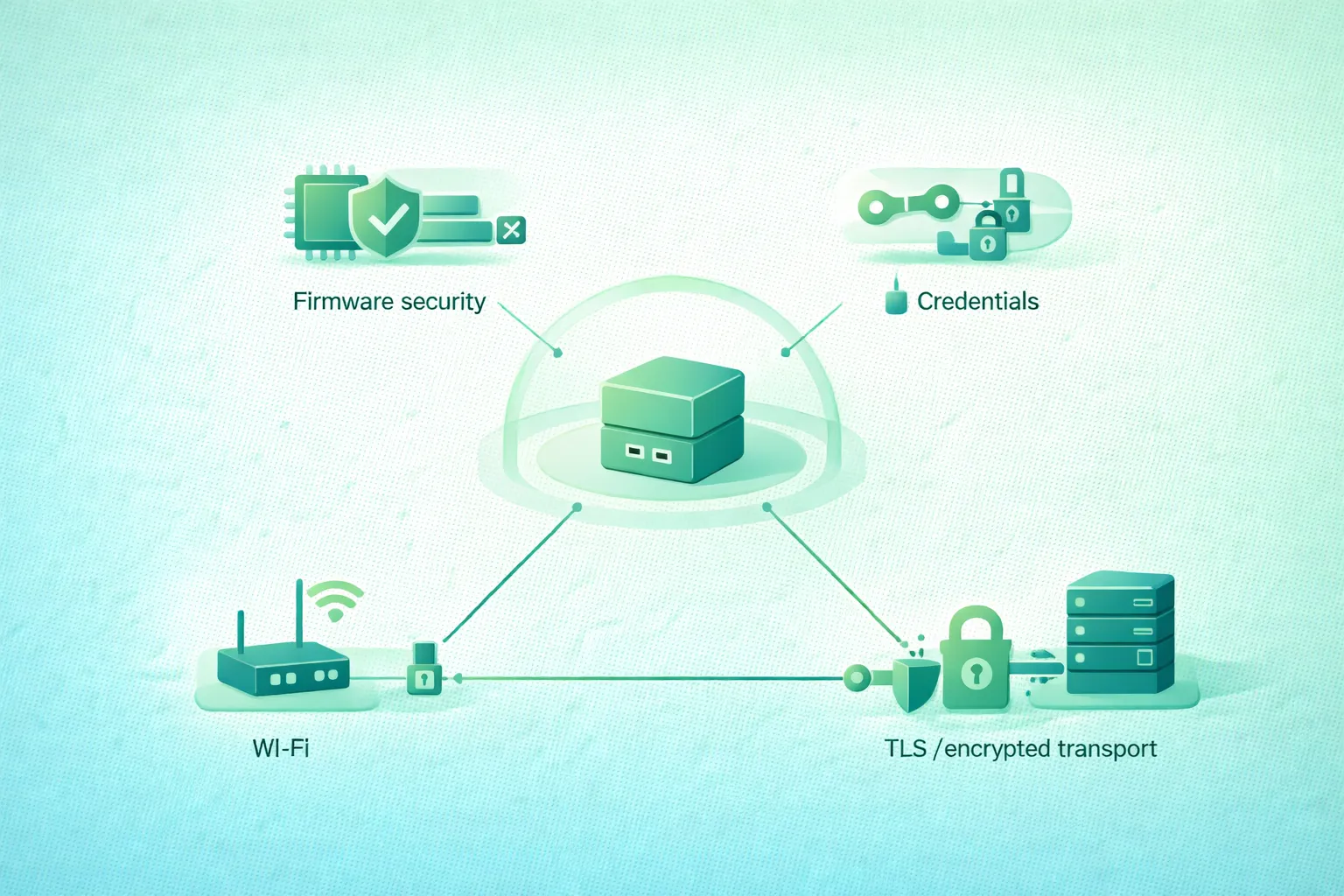
An IoT device can remain deployed much longer than the web application that controls it.
A sensor installed today may still be operating years later with the same processor, bootloader, credentials, flash storage, radio, and physical interfaces.
That changes the security problem.
You cannot rely only on:
strong cloud password
+
TLS connection
if the device itself accepts unsigned firmware, every unit shares the same secret, debug access remains open, or credentials cannot be rotated after compromise.
Practical IoT security needs several connected controls:
trusted firmware
      ↓
trusted device identity
      ↓
protected credentials
      ↓
authenticated encrypted communication
      ↓
least-privilege backend access
      ↓
monitoring
      ↓
update + rotation + revocation
Design for compromise recovery
The important question is not only whether a device can be protected today. Ask whether you can patch a vulnerability, replace a leaked credential, revoke one compromised device, recover from a failed update, and retire the device safely years later.
1. Secure the whole device lifecycle
Security begins before the device first connects to production.
Manufacturing
The device may receive:
- A unique serial number.
- A cryptographic identity.
- A trust anchor.
- Boot verification material.
- Initial firmware.
Provisioning
The device must establish its relationship with:
owner
network
backend
device registry
Normal operation
The device exchanges data while maintaining:
- Confidentiality where needed.
- Integrity.
- Authentication.
- Authorization.
- Availability.
Maintenance
Vulnerabilities appear after deployment.
The device therefore needs:
software update
credential renewal
configuration changes
security monitoring
Compromise response
Operators need a way to:
- Block a device identity.
- Replace credentials.
- Deploy patched firmware.
- Investigate abnormal behavior.
Retirement
When a device leaves service:
revoke identity
remove backend permissions
wipe credentials where possible
remove ownership
clear sensitive user data
2. Identify the important trust boundaries
IoT device security trust boundaries (diagram)
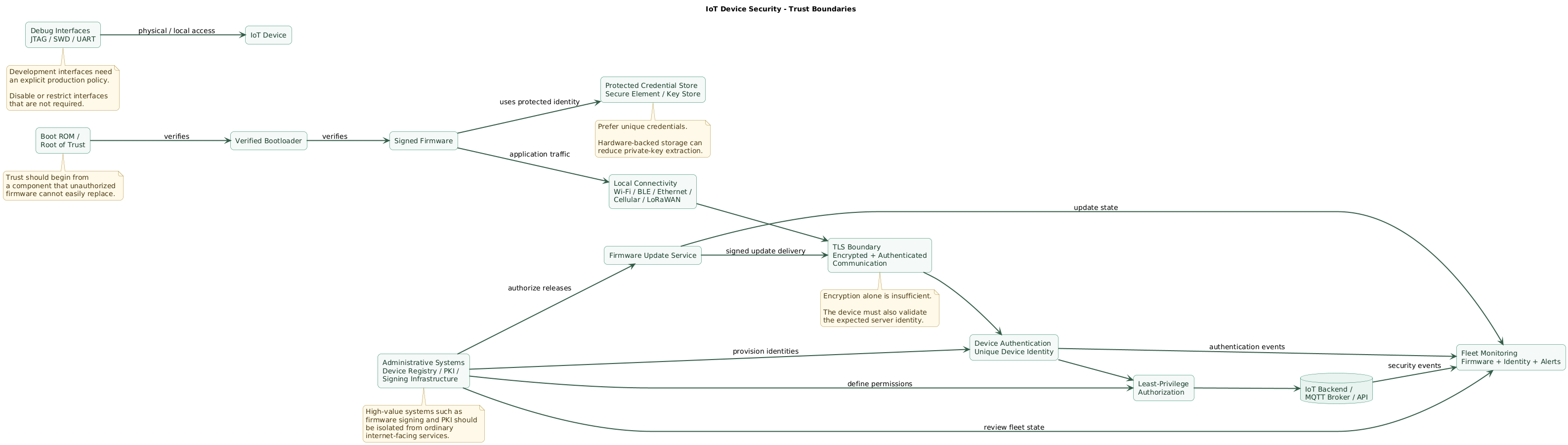
Threat modeling becomes easier when the system is separated into trust boundaries.
Inside the device
boot ROM
bootloader
firmware
credential storage
application data
debug interfaces
Device-to-network boundary
Wi-Fi
BLE
Ethernet
cellular
LoRaWAN
USB
serial
Network-to-backend boundary
TLS endpoint
MQTT broker
HTTPS API
device gateway
load balancer
Administrative boundary
fleet console
update signing
device registry
certificate authority
manufacturing system
A strong TLS connection does not protect a private key that can be read from an exposed debug port.
A secure boot chain does not protect the backend if every device has administrator permissions.
Security controls need to match each boundary.
3. Authenticate firmware updates before installing them
Secure IoT firmware update flow (diagram)
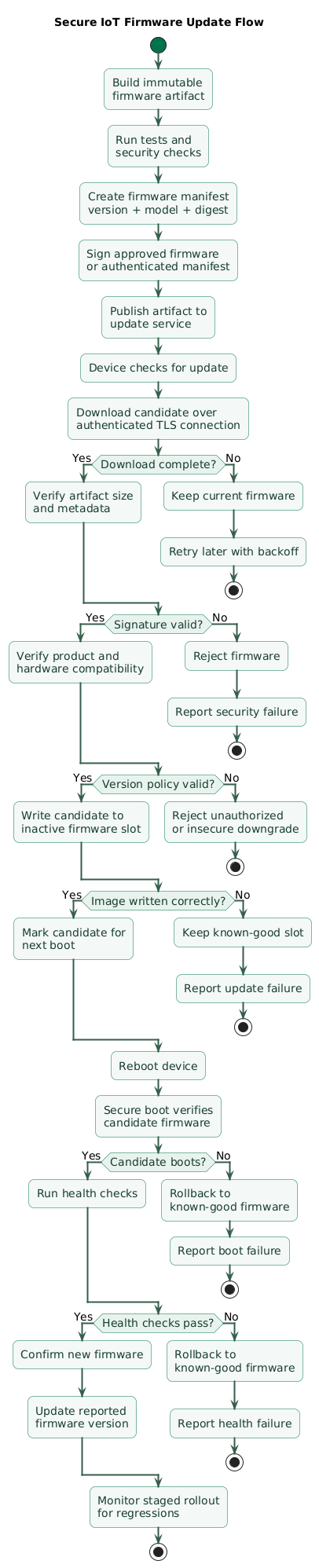
Remote firmware updates are one of the most important IoT security capabilities.
Without a safe update path, a vulnerability discovered after deployment may remain exploitable for the rest of the product's lifetime.
Separate build from authorization
Conceptually:
source code
    ↓
CI build
    ↓
firmware artifact
    ↓
security checks
    ↓
authorized signing
    ↓
update repository
The ability to build firmware should not automatically imply unrestricted ability to authorize production firmware.
Sign firmware
The device should authenticate updates before installing them.
A simplified model:
manufacturer signing key
          ↓
firmware signature

device
  ↓
embedded trusted public key
  ↓
verify signature
  ↓
install only when valid
This prevents an attacker who only controls the download server from automatically gaining the ability to install arbitrary firmware.
A hash alone is not enough for authenticity
A checksum such as SHA-256 can detect whether bytes changed:
expected hash
vs
downloaded firmware hash
but if an attacker can replace both:
firmware.bin
firmware.sha256
the device still needs an authenticated method to determine that the update came from an authorized publisher.
Digital signatures or authenticated manifests provide that additional trust.
Verify before installation
Check:
- Signature.
- Product or hardware model.
- Firmware version.
- Image size.
- Expected metadata.
- Rollback policy.
Do not trust transport security alone
Downloading firmware over TLS is important, but firmware signing provides a separate security boundary.
If the update server or CDN is compromised, the device should still reject firmware that was not properly authorized.
4. Extend trust with secure boot and rollback protection
Firmware signing protects the update process.
Secure boot extends verification to the software actually executed after power-on.
Chain of trust
immutable root of trust
        ↓ verifies
bootloader
        ↓ verifies
firmware
        ↓
application runtime
The exact implementation depends on the microcontroller, SoC and boot architecture.
Anti-rollback protection
Imagine:
firmware 4.1
vulnerability fixed

attacker installs:
firmware 2.8
known vulnerability returns
A device may therefore need a policy that prevents installation of firmware older than an allowed security version.
Allow controlled recovery
Anti-rollback design needs care.
A strict irreversible version counter can make recovery difficult if a new firmware release contains a serious reliability defect.
Separate:
application release version

from

minimum allowed security version
where the platform design supports it.
A/B firmware layouts
A robust update mechanism may use two firmware slots:
Slot A
current known-good firmware

Slot B
new candidate firmware
The update can proceed:
download to inactive slot
        ↓
verify
        ↓
boot candidate
        ↓
health check
        ↓
mark confirmed
If the candidate cannot boot successfully:
rollback to previous slotThis reduces the chance that power failure or a broken update permanently bricks the device.
5. Give devices unique credentials
One of the most damaging IoT shortcuts is a fleet-wide credential.
Bad model
device-1 ─┐
device-2 ─┼─ same password
device-3 ─┤
device-N ─┘
If one device is reverse-engineered, the attacker may gain credentials for the entire fleet.
Better model
device-1
  ↓
identity-1
credential-1

device-2
  ↓
identity-2
credential-2
Unique identity improves authorization
The backend can express:
device-17 may publish:
devices/device-17/telemetry/#

device-17 may not publish:
devices/device-18/telemetry/#
It also improves incident response
If device 17 is stolen:
revoke device-17instead of:
replace the credential
on every device
Provision credentials securely
Manufacturing and onboarding systems become part of the security boundary.
Protect:
- Credential-generation systems.
- Certificate authorities.
- Provisioning databases.
- Manufacturing stations.
- Device-to-identity mapping.
6. Protect private keys and secrets on the device
Unique credentials help only if extraction is sufficiently difficult for the threat model.
Plain firmware constants
Avoid designs such as:
const char *DEVICE_PASSWORD =
  "production-fleet-secret";
Firmware can often be extracted, copied, decompiled or inspected.
Protected storage
Depending on hardware, credentials may be stored in:
- Protected flash regions.
- Trusted execution environments.
- Secure elements.
- Hardware security modules integrated into the SoC.
- Platform key stores.
Prefer non-exportable private keys where practical
An ideal hardware-backed workflow can look like:
private key generated
inside secure element
        ↓
public key exported
        ↓
certificate issued
        ↓
TLS signatures performed
inside secure element

private key never leaves
This does not make physical compromise impossible, but it can significantly raise the cost of credential extraction.
Do not confuse encryption with protection
Encrypting a private key with another key that is stored immediately next to it can provide limited value.
Ask:
Where is the decrypting key?

Can firmware read it?

Can debug access read it?

Can an attacker copy both?
7. Use TLS correctly, not just technically
TLS provides a protected communication channel for protocols such as:
HTTPS
MQTT over TLS
WebSockets over TLS
custom TCP applications
TLS is designed to protect communication against eavesdropping, modification and message forgery when deployed correctly.
Prefer modern protocol support
TLS 1.3 is the current TLS protocol generation and should be preferred where the device, server and libraries support it appropriately.
TLS 1.2 may remain necessary for interoperability with some systems, but it should use a carefully maintained modern configuration.
Certificate validation is critical
Bad development shortcut:
verify_certificate = falseEncryption without verifying the peer's identity can allow the device to create an encrypted connection to an attacker.
The device should validate
- Certificate chain or configured trust model.
- Expected server identity.
- Certificate validity where applicable.
- Relevant certificate constraints.
Trust anchors need lifecycle management
An embedded device may remain deployed longer than the certificate ecosystem originally provisioned into it.
Consider:
What happens when a CA changes?

What happens when a root expires?

Can trust anchors be updated securely?

Can the device survive certificate rotation?
Time creates a bootstrap problem
Certificate validation may depend on knowing the current time.
But a device without a battery-backed clock may boot believing the date is years in the past.
Design secure time acquisition carefully rather than simply disabling certificate validity checks.
8. Consider certificates and mutual TLS for device identity
Normal HTTPS commonly authenticates the server to the client.
Mutual TLS can authenticate both sides:
device
  ↓ verifies server certificate
server

server
  ↓ verifies device certificate
device
This can fit managed IoT fleets particularly well when every device has a unique cryptographic identity.
Benefits
- Per-device identity.
- No fleet-wide shared password.
- Precise revocation.
- Strong integration with hardware-backed private keys.
- Backend authorization based on identity.
Operational costs
You now need:
- Certificate issuance.
- Renewal.
- Expiration monitoring.
- Revocation or disablement.
- Trust-chain management.
- Manufacturing or onboarding integration.
Certificates are powerful, but the lifecycle must be automated.
9. Design credential rotation and revocation
IoT credential and TLS lifecycle (diagram)
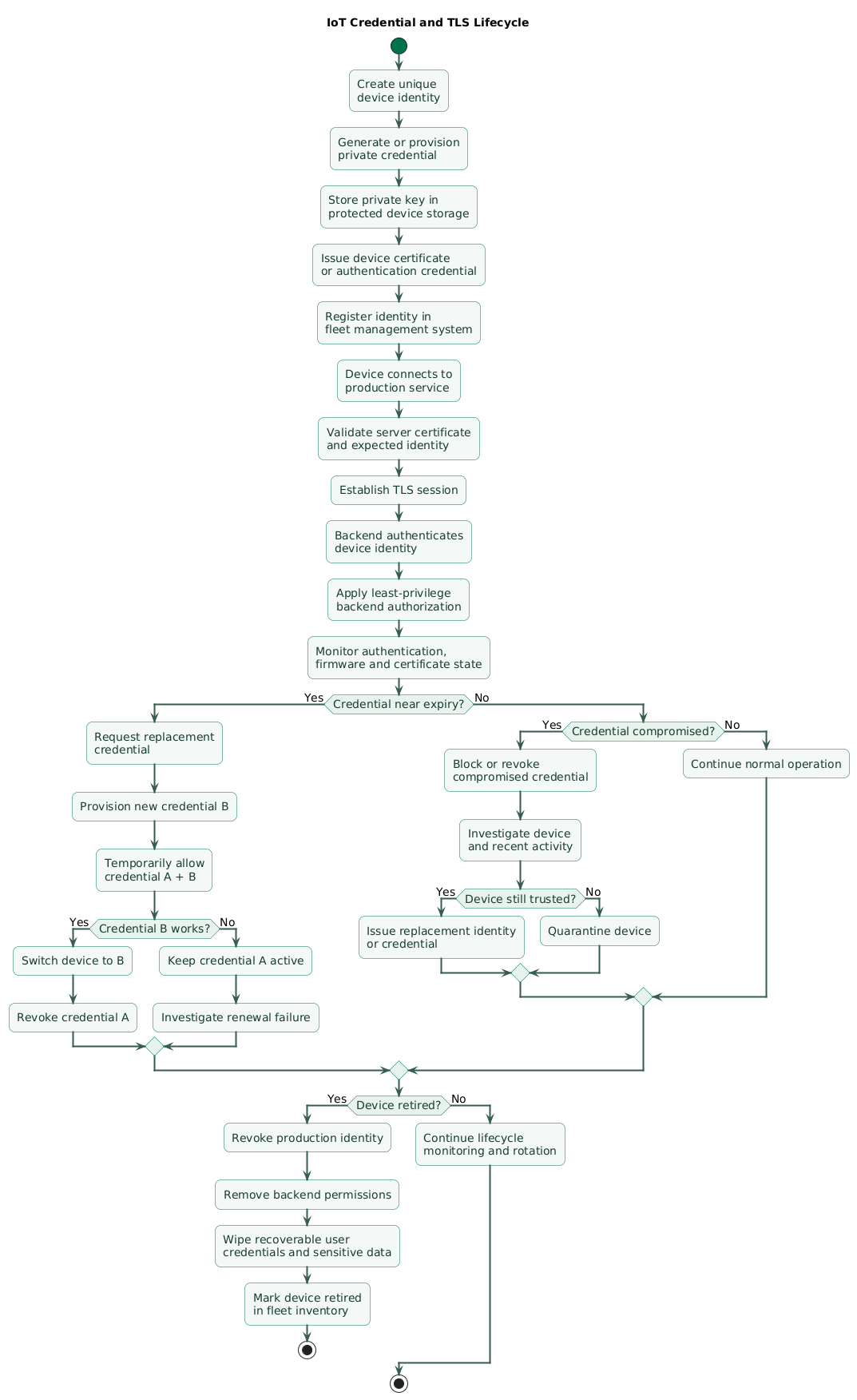
Credentials should be considered replaceable operational state.
Do not design a product where:
credential provisioned in factory
        ↓
must remain valid forever
Normal rotation
current credential A
        ↓
obtain credential B
        ↓
verify B works
        ↓
switch device to B
        ↓
revoke A
Use overlap where practical
When both credentials can temporarily remain valid:
A = valid
B = valid
        ↓
device proves B works
        ↓
A = revoked
B = valid
This reduces the risk of losing remote management because of a failed credential update.
Compromise response is different
If a private key is known to be stolen:
identify device
      ↓
block or revoke credential
      ↓
investigate activity
      ↓
issue replacement only if
device can still be trusted
Credential replacement alone is not sufficient if an attacker still controls the device firmware.
Monitor expiration before failure
Do not discover certificate expiration because thousands of devices stop connecting at midnight.
Track:
certificate expiration
renewal success
credential version
last successful authentication
10. Reduce local and remote attack surface
Every enabled interface is another path into the device.
Review physical interfaces
Examples:
- JTAG.
- SWD.
- UART.
- USB.
- Recovery pins.
- Test pads.
Development access may be necessary during manufacturing and debugging but should have an intentional production policy.
Review network services
Avoid shipping unnecessary:
Telnet
FTP
debug HTTP server
development SSH credentials
unauthenticated maintenance API
Disable unused functionality
If a device does not need:
Bluetooth after provisioningconsider whether it should remain permanently discoverable.
Protect management separately
Administrative operations such as:
- Factory reset.
- Credential replacement.
- Firmware installation.
- Diagnostic data retrieval.
should require stronger authorization than ordinary telemetry.
Secure defaults matter
Avoid requiring customers to discover that they must manually disable an insecure default before deploying the device.
Production defaults should minimize exposure.
11. Enforce least privilege in the backend
A correctly authenticated device should not automatically become an administrator.
Separate authentication from authorization
Authentication:
This is device-17.

Authorization:
device-17 may submit telemetry
only for device-17.
MQTT example
device-17 may publish:
devices/device-17/telemetry/#

device-17 may subscribe:
devices/device-17/command/#
HTTPS example
Avoid relying only on a device-supplied identifier:
POST /telemetry

{
  "device_id": "device-99"
}
The backend should bind authorization to the authenticated device identity instead of blindly trusting the payload.
Limit backend credentials too
The API handling device telemetry should not need unrestricted:
- Cloud administrator access.
- Database administrator rights.
- Firmware-signing keys.
- Certificate-authority keys.
Separate update signing from online services
Firmware-signing credentials are exceptionally sensitive.
Keep them away from ordinary internet-facing application servers where practical.
A compromised telemetry server should not automatically allow an attacker to sign trusted firmware.
12. Monitor security state across the fleet
Security becomes much easier when operators can answer:
Which devices are online?

Which firmware version
does each device run?

Which certificates expire soon?

Which devices repeatedly fail authentication?

Which devices have not checked in?

Which devices are using revoked software?
Track firmware versions
A fleet dashboard should identify:
- Current approved firmware.
- Devices awaiting update.
- Failed updates.
- Unsupported versions.
Track security-relevant identity information
device ID
credential ID
certificate serial
firmware version
hardware revision
last seen
last authentication
ownership state
Monitor authentication failures
Sudden failures may indicate:
- Expired certificates.
- Broken rotation.
- Incorrect provisioning.
- Credential abuse.
Detect impossible identity behavior
If the same device identity appears from incompatible locations or sessions simultaneously, investigate possible credential cloning.
Protect logs from sensitive data
Never log:
- Private keys.
- Passwords.
- Refresh tokens.
- Provisioning secrets.
Security monitoring should increase visibility without creating a new secret repository inside your logs.
13. Prepare for compromise and device retirement
Lost or stolen device
Response may include:
mark device compromised
        ↓
revoke identity
        ↓
block backend access
        ↓
review recent activity
        ↓
notify owner where required
Firmware vulnerability
vulnerability confirmed
        ↓
build fixed firmware
        ↓
security testing
        ↓
sign release
        ↓
staged rollout
        ↓
monitor failures
        ↓
increase minimum
security version if appropriate
Compromised signing key
This is a severe incident because the trust system itself may be affected.
Update architecture should therefore consider:
- Signing-key rotation.
- Multiple trusted signing keys during transition.
- Revocation of compromised authorities.
- Recovery trust anchors.
Factory reset
Define what a reset actually removes:
user Wi-Fi credentials?
device ownership?
cloud tokens?
device identity?
logs?
local sensor history?
Some manufacturer identity may intentionally survive reset while user-specific credentials should not.
Decommissioning
A retired device should not remain an active production identity.
remove ownership
      ↓
revoke cloud credential
      ↓
wipe customer secrets
      ↓
remove retained backend state
      ↓
record retirement
14. Copy/paste IoT security checklist
IoT security checklist

Threat model
- Identify device assets.
- Identify sensitive data.
- Identify physical attackers.
- Identify remote attackers.
- Identify network attackers.
- Identify compromised backend scenarios.
- Identify compromised update infrastructure scenarios.
- Identify stolen-device scenarios.
- Identify credential extraction risk.
- Identify expected device lifetime.
- Identify recovery requirements.

Device identity
- Give every device a unique logical identity.
- Keep device IDs stable where required.
- Bind backend authorization to authenticated identity.
- Avoid fleet-wide shared identities.
- Record device-to-owner mapping.
- Record hardware revision.
- Record manufacturing batch where useful.
- Track lifecycle state.
- Support identity revocation.

Manufacturing
- Secure manufacturing stations.
- Protect provisioning credentials.
- Protect certificate-authority access.
- Protect firmware-signing operations.
- Separate test credentials from production credentials.
- Remove development secrets before shipping.
- Validate provisioned identity.
- Audit provisioning failures.
- Prevent duplicate device identities.

Firmware build
- Build firmware reproducibly where practical.
- Record source revision.
- Record compiler and build environment.
- Create immutable release artifact.
- Generate release metadata.
- Scan dependencies.
- Run static analysis where useful.
- Run security tests.
- Store approved artifacts securely.
- Keep release history.

Firmware signing
- Sign production firmware.
- Protect signing private keys.
- Separate firmware build from release authorization.
- Restrict who can initiate signing.
- Audit signing operations.
- Support signing-key rotation.
- Maintain recovery procedure for compromised signing keys.
- Avoid storing high-value signing keys on ordinary web servers.

Firmware manifest
- Include product identifier.
- Include hardware compatibility.
- Include firmware version.
- Include security version where applicable.
- Include image size.
- Include cryptographic digest.
- Authenticate the manifest.
- Reject incompatible images.
- Reject malformed metadata.

OTA download
- Use authenticated transport.
- Validate server identity.
- Handle interrupted downloads.
- Avoid uncontrolled retry loops.
- Verify available storage.
- Verify expected image size.
- Rate-limit update attempts where useful.
- Report update download status.

Update verification
- Authenticate update before installation.
- Verify digital signature.
- Verify trusted signing authority.
- Verify product model.
- Verify hardware compatibility.
- Verify version policy.
- Verify image integrity.
- Reject unauthorized firmware.
- Log validation failure without leaking secrets.

Secure boot
- Establish root of trust.
- Verify bootloader where hardware permits.
- Verify firmware before execution.
- Protect boot verification keys.
- Fail safely on invalid firmware.
- Test corrupted firmware.
- Test unsigned firmware.
- Test altered firmware.
- Document recovery behavior.

Rollback protection
- Define minimum allowed security version.
- Prevent downgrade to known-vulnerable firmware.
- Keep normal release version separate from security floor where architecture permits.
- Test legitimate rollback scenarios.
- Avoid irreversible policy changes without recovery planning.
- Record rollback events.

A/B firmware
- Keep known-good slot.
- Download candidate to inactive slot.
- Verify candidate.
- Boot candidate.
- Require health confirmation.
- Roll back automatically when boot fails.
- Protect both slots from unauthorized modification.
- Test power loss during update.
- Test flash-write failure.
- Test full storage conditions.

Recovery firmware
- Keep recovery environment minimal.
- Authenticate recovery images.
- Restrict recovery commands.
- Avoid permanent unauthenticated recovery access.
- Protect recovery interface.
- Test recovery before shipping.
- Document field recovery procedure.

Credentials
- Use unique per-device credentials.
- Avoid universal passwords.
- Avoid universal private keys.
- Avoid hard-coded fleet secrets.
- Use strong randomly generated credentials.
- Track credential ownership.
- Track credential version.
- Support replacement.
- Support revocation.

Private keys
- Generate private keys securely.
- Prefer generation on-device or inside protected hardware where practical.
- Avoid unnecessary private-key export.
- Protect flash containing keys.
- Use secure element or hardware-backed store when justified.
- Restrict firmware access to key material.
- Do not log private keys.
- Do not include private keys in crash reports.
- Do not expose keys through diagnostic commands.

Secure element
- Evaluate threat model before adding hardware.
- Use non-exportable keys where supported.
- Protect communication with the secure element where required.
- Lock manufacturing configuration.
- Test key-generation procedure.
- Test certificate enrollment.
- Document replacement limitations.
- Plan for hardware failure.

Credential provisioning
- Authenticate provisioning system.
- Encrypt sensitive provisioning data.
- Verify target device identity.
- Prevent accidental credential duplication.
- Record provisioning result.
- Remove temporary provisioning credentials.
- Protect manufacturing logs.
- Audit failed provisioning.

Passwords
- Avoid default shared passwords.
- Use unique generated passwords if passwords are required.
- Require change of user-facing defaults where appropriate.
- Rate-limit authentication attempts.
- Avoid exposing passwords in logs.
- Provide secure reset procedure.
- Avoid passwords that cannot be rotated.

TLS
- Use TLS for untrusted network communication.
- Prefer TLS 1.3 where supported appropriately.
- Maintain secure TLS 1.2 interoperability only where needed.
- Keep TLS libraries updated.
- Disable obsolete protocol versions.
- Avoid obsolete cryptographic configurations.
- Test interoperability before fleet rollout.
- Monitor TLS failures.

Server certificate validation
- Validate certificate chain.
- Validate expected server identity.
- Validate certificate validity as appropriate.
- Maintain trusted root certificates.
- Do not disable verification in production.
- Do not accept every certificate.
- Test expired certificate.
- Test wrong hostname.
- Test untrusted issuer.
- Test certificate rotation.

Trust anchors
- Provision trusted roots securely.
- Protect trust-store updates.
- Support CA migration.
- Consider long device lifetime.
- Monitor root and intermediate expiration.
- Test new certificate chain before rollout.
- Avoid depending forever on one unchangeable external root unless lifecycle is understood.

Device time
- Determine whether TLS validation depends on accurate time.
- Use trusted or authenticated time where practical.
- Handle first boot without a valid clock.
- Protect time-setting interfaces.
- Detect unreasonable clock changes.
- Avoid disabling certificate validation to solve time problems.
- Test long offline periods.

Mutual TLS
- Consider mTLS for per-device identity.
- Give each device its own certificate.
- Protect the private key.
- Validate client certificates on server.
- Bind authorization to certificate identity.
- Monitor certificate expiration.
- Automate certificate renewal.
- Support revocation or device disablement.
- Test stolen-device response.

Certificate lifecycle
- Record certificate serial number.
- Record issuance date.
- Record expiration date.
- Alert before expiration.
- Renew before expiry.
- Verify replacement works.
- Revoke previous credential where appropriate.
- Handle devices offline during renewal.
- Provide recovery procedure.

Credential rotation
- Design rotation before production launch.
- Generate replacement credential.
- Deliver replacement securely.
- Allow temporary overlap where practical.
- Verify new credential.
- Switch device.
- Revoke old credential.
- Monitor authentication failures.
- Record rotation completion.

Credential compromise
- Identify affected device.
- Revoke compromised credential.
- Block suspicious sessions.
- Inspect recent activity.
- Determine whether device firmware remains trusted.
- Issue replacement only when appropriate.
- Notify required stakeholders.
- Preserve incident evidence.

Authorization
- Authenticate every production device.
- Apply least privilege.
- Restrict device to its own resources.
- Restrict publish topics.
- Restrict subscribe topics.
- Restrict API routes.
- Restrict administrative functions.
- Avoid relying on device-supplied IDs alone.
- Enforce identity server-side.

Backend
- Separate device API from administration.
- Use least-privilege database accounts.
- Restrict cloud permissions.
- Protect signing infrastructure separately.
- Protect certificate authority separately.
- Rate-limit abusive clients.
- Validate payloads.
- Reject malformed telemetry.
- Monitor unusual behavior.

MQTT
- Use authenticated MQTT clients.
- Use TLS where traffic crosses untrusted networks.
- Validate broker certificate.
- Apply topic ACLs.
- Prevent devices publishing as other devices.
- Prevent broad wildcard subscriptions by ordinary devices.
- Avoid retained secrets.
- Rotate broker credentials.
- Monitor authentication failures.

HTTPS
- Validate TLS.
- Authenticate devices.
- Bind API authorization to device identity.
- Validate request schema.
- Limit request size.
- Rate-limit where appropriate.
- Avoid exposing unnecessary endpoints.
- Use idempotency for important commands where needed.

BLE
- Use appropriate pairing method.
- Protect sensitive characteristics.
- Require authorization for administrative operations.
- Disable unnecessary discoverability.
- Protect provisioning flows.
- Avoid fixed universal pairing PINs.
- Test re-pairing.
- Test factory reset.
- Secure application-layer commands.

Wi-Fi
- Protect Wi-Fi credentials.
- Support network credential changes.
- Secure onboarding.
- Avoid universal device Wi-Fi secrets when unnecessary.
- Use TLS above Wi-Fi.
- Do not treat Wi-Fi membership as sufficient authentication.
- Test router replacement.
- Test network loss.

Debug interfaces
- Inventory JTAG.
- Inventory SWD.
- Inventory UART.
- Inventory USB.
- Inventory test pads.
- Decide production policy.
- Disable or lock unnecessary debug access.
- Protect authenticated service access.
- Do not leave development shell credentials enabled.
- Test production hardware.

Network interfaces
- Disable unused services.
- Disable unused ports.
- Remove Telnet.
- Remove unnecessary FTP.
- Remove development HTTP interfaces.
- Restrict SSH.
- Authenticate management services.
- Minimize listening sockets.
- Document required services.

Local management
- Authenticate sensitive configuration changes.
- Separate user controls from administrator controls.
- Protect credential-export functions.
- Protect firmware-update commands.
- Protect factory-reset behavior appropriately.
- Avoid exposing sensitive diagnostics.
- Log security-relevant administrative changes.

Secure defaults
- Ship with unnecessary services disabled.
- Avoid default shared passwords.
- Require secure onboarding.
- Minimize externally reachable interfaces.
- Avoid permanent debug mode.
- Default to encrypted communication.
- Default to least privilege.
- Make insecure modes explicit when unavoidable.

Data protection
- Identify sensitive local data.
- Encrypt sensitive data where justified.
- Protect encryption keys.
- Minimize stored personal information.
- Define retention.
- Clear temporary secrets.
- Protect logs.
- Wipe user data during decommissioning.
- Avoid unnecessary cloud collection.

Firmware secrets
- Do not embed production fleet passwords.
- Do not embed reusable private keys.
- Assume firmware can eventually be inspected.
- Use public verification keys where appropriate.
- Keep sensitive private material outside general firmware when possible.
- Rotate secrets accidentally shipped in firmware.

Logging
- Log firmware version.
- Log important update state.
- Log authentication failures.
- Log security-state changes.
- Avoid passwords.
- Avoid private keys.
- Avoid access tokens.
- Avoid excessive personal data.
- Protect remote log transport.
- Define retention.

Fleet inventory
- Track device ID.
- Track owner.
- Track model.
- Track hardware revision.
- Track firmware version.
- Track security version.
- Track credential ID.
- Track certificate expiration.
- Track last seen.
- Track lifecycle state.
- Track update status.

Fleet monitoring
- Monitor devices on old firmware.
- Monitor failed updates.
- Monitor repeated reboots.
- Monitor authentication failures.
- Monitor certificate expiration.
- Monitor unusual traffic.
- Monitor cloned identity symptoms.
- Monitor long-offline devices.
- Monitor update adoption rate.

Vulnerability management
- Maintain software inventory.
- Track third-party libraries.
- Track OS components.
- Track cryptographic libraries.
- Monitor vulnerability disclosures.
- Assess exploitability.
- Prioritize security fixes.
- Publish updates.
- Monitor installation.
- Communicate support status.

Update rollout
- Test internally.
- Test hardware revisions.
- Use staging devices.
- Start with small production cohort.
- Monitor boot success.
- Monitor crash rate.
- Monitor network connectivity.
- Expand rollout gradually.
- Pause automatically or manually when failure rate is excessive.

Update failure
- Keep previous working image where possible.
- Detect boot loops.
- Limit repeated failed boots.
- Fall back safely.
- Report failure.
- Preserve diagnostic reason.
- Avoid endless download loops.
- Provide field-recovery procedure.

Signing-key security
- Keep signing key outside ordinary CI runners where practical.
- Use controlled signing service.
- Require release authorization.
- Audit signatures.
- Rotate signing keys.
- Support multiple trusted keys during transition.
- Maintain emergency compromise plan.
- Protect recovery key.

Physical security
- Consider device location.
- Assume hostile access for publicly reachable devices.
- Protect sensitive test pads where justified.
- Detect enclosure opening if use case requires it.
- Avoid relying solely on obscurity.
- Protect external storage.
- Consider flash readout attacks.
- Match controls to product value and threat model.

Network segmentation
- Separate IoT devices from sensitive user networks where appropriate.
- Restrict inbound connectivity.
- Limit device-to-device communication when unnecessary.
- Restrict management network.
- Use firewall rules.
- Monitor outbound destinations.
- Do not depend on segmentation instead of device authentication.

Privacy
- Collect only required data.
- Document telemetry.
- Minimize persistent identifiers where possible.
- Protect location data.
- Protect audio and video.
- Define retention.
- Support deletion where required.
- Avoid leaking sensitive data in diagnostics.

Incident response
- Identify device owner.
- Identify credential.
- Identify firmware.
- Revoke affected identity.
- Block suspicious traffic.
- Preserve logs.
- Investigate backend activity.
- Determine whether update is required.
- Rotate related credentials.
- Document incident.

Stolen device
- Mark device lost.
- Revoke production identity.
- Remove owner binding.
- Review recent sessions.
- Prevent re-enrollment without authorization.
- Consider physical credential extraction risk.
- Notify owner where appropriate.

Compromised firmware
- Stop vulnerable rollout.
- Produce fixed firmware.
- Sign approved release.
- Deploy staged update.
- Monitor recovery.
- Raise minimum security version where appropriate.
- Investigate whether credentials need rotation.

Factory reset
- Define retained manufacturer identity.
- Remove user network credentials.
- Remove owner binding.
- Remove user tokens.
- Clear sensitive configuration.
- Clear personal data.
- Protect reset procedure from remote abuse.
- Test reset fully.

Ownership transfer
- Remove previous owner.
- Clear previous user data.
- Issue new application credentials if appropriate.
- Re-enroll device.
- Preserve manufacturer identity only where required.
- Verify old owner can no longer control device.

Decommissioning
- Revoke backend identity.
- Revoke certificates.
- Remove API permissions.
- Wipe user credentials.
- Wipe local personal data.
- Remove device from fleet inventory or mark retired.
- Clear retained cloud state.
- Prevent future production authentication.
- Record retirement date.

Support lifetime
- Define security-support period.
- Define update-support period.
- Communicate end-of-support.
- Plan cryptographic migration.
- Plan certificate ecosystem changes.
- Avoid devices silently remaining production-connected after support ends.
- Provide retirement guidance.

Testing
- Test unsigned firmware.
- Test corrupted firmware.
- Test old firmware.
- Test interrupted update.
- Test power loss.
- Test full flash.
- Test invalid certificate.
- Test expired certificate.
- Test wrong server identity.
- Test revoked device.
- Test duplicate identity.
- Test locked debug interface.
- Test credential rotation.
- Test factory reset.
- Test compromised-device response.

Final review
- Does every device have a unique identity?
- Are fleet-wide shared credentials avoided?
- Are private keys protected?
- Can credentials rotate?
- Can one device be revoked?
- Are firmware updates authenticated?
- Can unauthorized firmware execute?
- Is downgrade to vulnerable firmware controlled?
- Can a failed update recover safely?
- Is TLS used for untrusted networks?
- Does the device validate the server certificate?
- Can trust anchors be updated?
- Can certificates renew before expiry?
- Are unnecessary interfaces disabled?
- Does backend authorization enforce least privilege?
- Can security state be monitored across the fleet?
- Can vulnerable firmware be identified quickly?
- Can compromised devices be blocked?
- Can retired devices be removed from production trust?
- Has the complete security lifecycle been tested?
15. FAQ
How should IoT firmware updates be secured?
Accept updates only through an authorized update mechanism and authenticate the firmware before installation. A common design uses digitally signed firmware or an authenticated update manifest, version checks, safe installation into an inactive firmware slot, boot validation, and automatic recovery if the candidate fails.
Is HTTPS enough to secure firmware downloads?
HTTPS protects the transport when TLS is configured correctly, but update signing creates an additional security boundary. If the download server is compromised, a device that verifies an independent firmware signature can still reject an unauthorized image.
Should every IoT device have unique credentials?
Yes, unique device identities are strongly preferable for most managed fleets. They allow precise authorization, monitoring, rotation, and revocation and reduce the impact of one extracted credential.
What is secure boot?
Secure boot creates a chain of trust from an initial trusted component to later software stages. Each stage verifies the next before execution, helping prevent unauthorized bootloaders or firmware from becoming the trusted runtime.
Does TLS encrypt IoT traffic?
Yes, TLS provides an encrypted and integrity-protected communication channel when implemented correctly. Security also depends on authenticating the peer correctly rather than disabling certificate verification.
What is mutual TLS?
Mutual TLS authenticates both endpoints. The device verifies the server, while the server also verifies a client certificate presented by the device. It is useful for fleets with unique device certificates and controlled certificate lifecycle management.
What should happen when an IoT device is retired?
Revoke its backend identity, remove user ownership, wipe recoverable customer credentials and sensitive data where supported, remove production permissions, clear obsolete cloud state, and ensure the retired device can no longer authenticate to production services.
Key terms (quick glossary)
- Secure boot
- A boot process in which trusted software verifies the authenticity or integrity of the next software stage before allowing it to execute.
- Firmware signing
- Applying a cryptographic digital signature to firmware so a device can determine whether an update was authorized by a trusted signer.
- Root of trust
- A component or cryptographic value trusted as the starting point for later security decisions, such as verifying a bootloader or update signing key.
- Rollback protection
- A control preventing a device from installing software older than an allowed security version when that downgrade would reintroduce known vulnerabilities.
- A/B firmware update
- An update architecture using two firmware slots so a new candidate can be installed separately while a known-good image remains available for recovery.
- Device identity
- A logical or cryptographic identity that allows a backend or another system to distinguish one IoT device from another.
- Secure element
- Hardware designed to perform sensitive cryptographic operations and protect keys from ordinary software access or extraction.
- Trust anchor
- A cryptographic key or certificate that an endpoint explicitly trusts when verifying another certificate, firmware signer, or identity.
- TLS
- Transport Layer Security, the protocol used to establish encrypted, integrity-protected and authenticated communication channels between networked applications.
- Mutual TLS
- TLS configuration in which both server and client authenticate with cryptographic credentials, commonly certificates.
- Certificate validation
- The process of determining whether a certificate is trusted and appropriate for the identity and connection being established.
- Credential rotation
- The controlled replacement of a password, key, certificate, token, or other authentication credential with a new one.
- Revocation
- The act of preventing a previously valid device identity or credential from continuing to authenticate or access resources.
- Least privilege
- The principle of granting a device, application or user only the permissions required to perform its intended function.
- Attack surface
- The collection of interfaces, services, software components, credentials and physical access paths an attacker could potentially target.
- JTAG
- A hardware debugging and testing interface commonly available on embedded systems and therefore important to consider in production device-security policies.
- OTA update
- Over-the-air update, meaning software or firmware delivered remotely to a deployed device through a network connection.
Worth reading
Recommended guides from the category.
