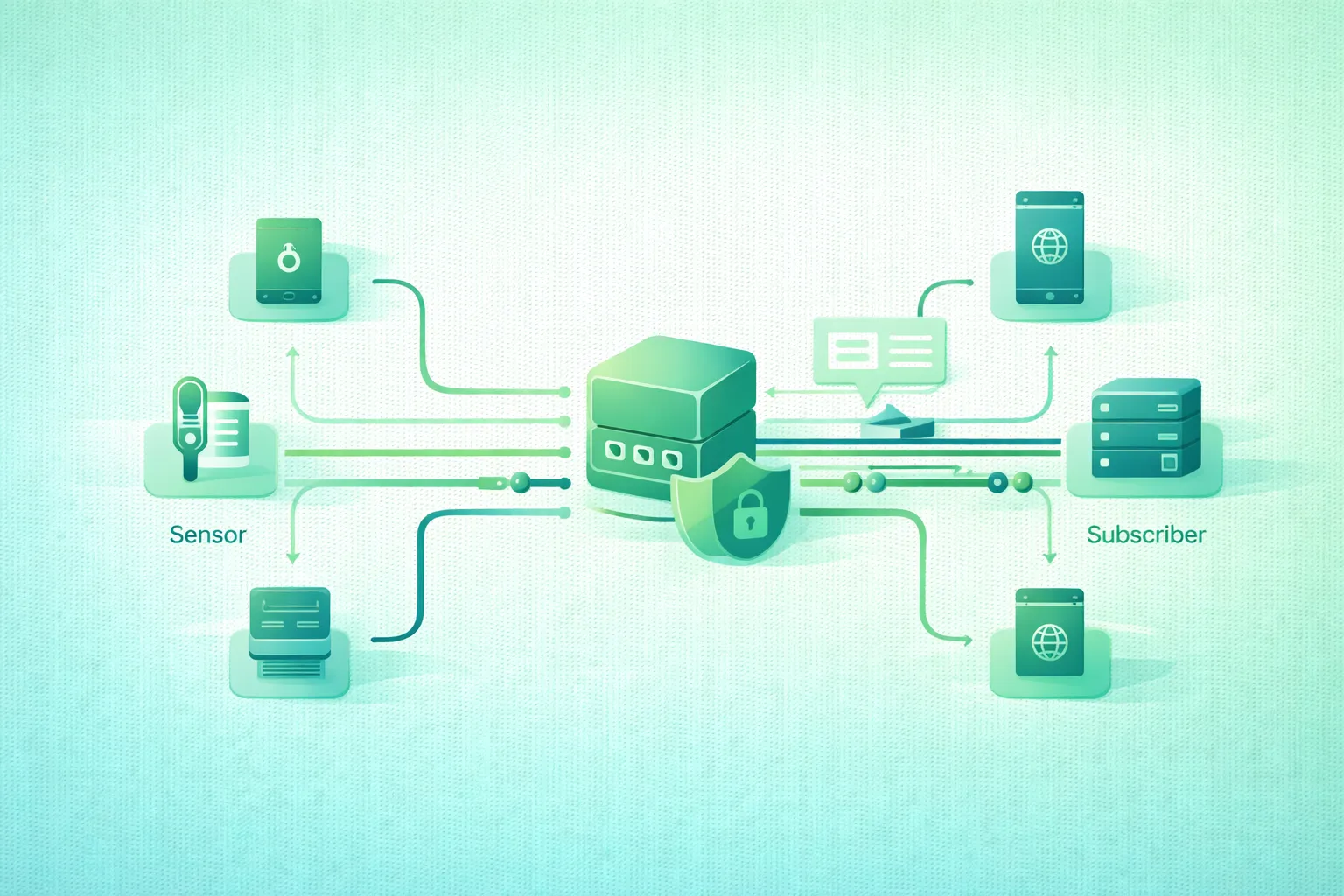
MQTT is popular in Internet of Things systems because it provides a small and flexible messaging model without requiring every device to know about every other device.
A temperature sensor does not need the IP address of the dashboard. A dashboard does not need a direct connection to every sensor. A backend service does not need devices to call a different endpoint whenever the architecture changes.
Instead, MQTT places a broker between producers and consumers:
sensor
  ↓ publish
broker
  ↓ deliver
dashboard

sensor
  ↓ publish
broker
  ↓ deliver
database collector

backend
  ↓ publish
broker
  ↓ deliver
device
The important concepts are therefore not HTTP-style routes and request handlers. They are:
clients
topics
subscriptions
QoS
retained state
sessions
broker permissions
MQTT decouples producers from consumers
A publisher sends to a topic without needing to know which clients are currently subscribed. Subscribers express what information they want through topic filters, while the broker performs matching and delivery.
1. Understand MQTT's publish/subscribe model
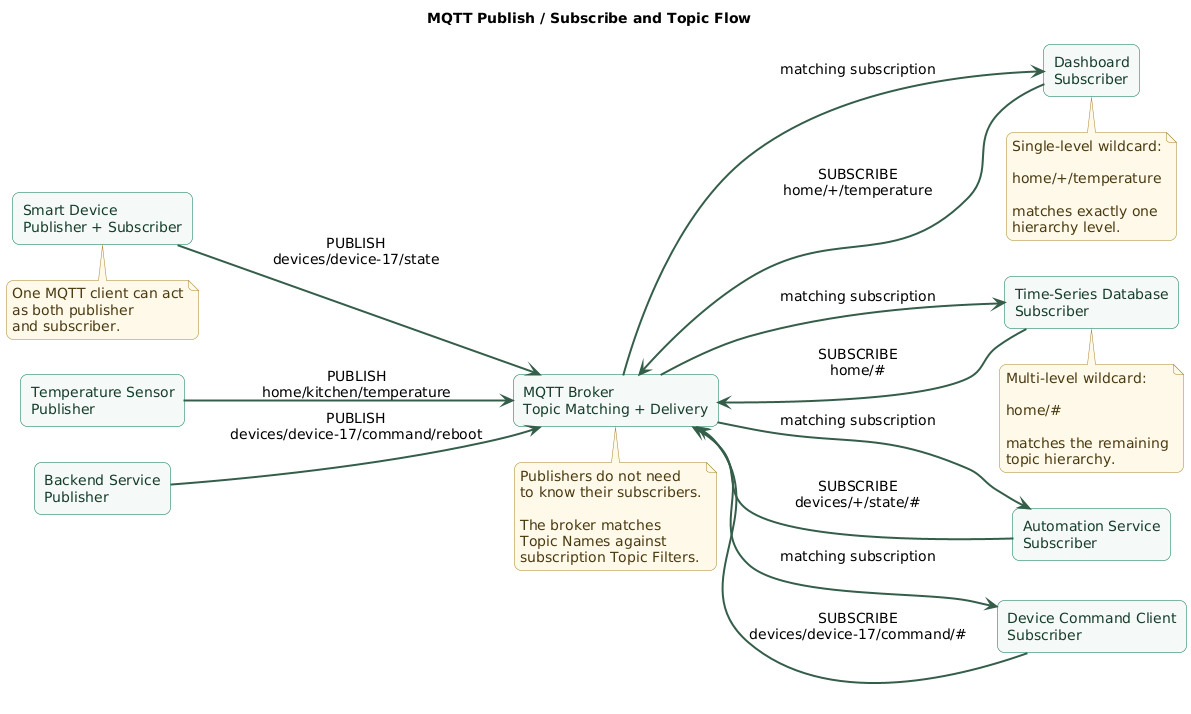
MQTT publish, broker, topic, and subscriber flow (diagram)
The broker
The broker is the central message-routing component.
MQTT clients connect to it and then publish or subscribe.
device A ──┐
device B ──┼── MQTT broker ── dashboard
device C ──┘              └── storage service
The broker is responsible for matching publications to subscriptions and implementing the protocol's delivery behavior.
Publisher
A publisher sends an application message to a Topic Name.
Topic:
home/kitchen/temperature

Payload:
{"value":22.7,"unit":"C"}
A client can publish some messages and subscribe to others. “Publisher” and “subscriber” describe roles for particular messages rather than necessarily separate types of device.
Subscriber
A subscriber registers a Topic Filter.
home/kitchen/temperatureWhen a matching message arrives, the broker forwards it according to the subscription and QoS rules.
Publishers do not target subscribers directly
This is the main architectural distinction.
Instead of:
sensor → dashboard IP
sensor → database IP
sensor → automation IP
you get:
sensor
  ↓
home/kitchen/temperature
  ↓
broker
  ├── dashboard
  ├── database
  └── automation
New consumers can subscribe later without changing the sensor.
2. Design MQTT topics as a hierarchy
Topic Names are UTF-8 strings structured into levels with the
/ separator.
A useful hierarchy might look like:
building/office-1/sensor-17/temperatureIts levels are:
building
office-1
sensor-17
temperature
Design for stable meaning
A topic should describe what the message represents, not temporary implementation details.
For example:
factory/line-1/device-17/telemetry/temperature

factory/line-1/device-17/state/online

factory/line-1/device-17/command/reboot
The structure separates:
- Location.
- Device identity.
- Message class.
- Measurement or command.
Separate telemetry, state, and commands
For example:
devices/device-17/telemetry/temperature
devices/device-17/telemetry/humidity

devices/device-17/state/availability
devices/device-17/state/firmware

devices/device-17/command/reboot
devices/device-17/command/set-mode
This makes authorization much easier later.
Avoid encoding too much into one topic
Bad:
temperature-22.7-device17-office1Better:
office/office-1/device/device-17/temperature

payload:
{"value":22.7}
Topics route information. Payloads normally carry the changing data.
Be consistent with case
Topic names are case-sensitive.
devices/device-17/state

is different from

Devices/device-17/state
Choose a naming convention and enforce it.
Do not publish using wildcards
Wildcards belong in subscription Topic Filters, not in Topic Names used by PUBLISH messages.
3. Use topic wildcards carefully
MQTT provides two standard wildcard characters for subscription filters.
Single-level wildcard: +
The + wildcard matches exactly one topic level.
home/+/temperaturecan match:
home/kitchen/temperature
home/bedroom/temperature
home/garage/temperature
but not:
home/temperature

home/kitchen/sensor-1/temperature
Multi-level wildcard: #
The # wildcard matches multiple levels and must appear as the
final part of the filter when used after a separator.
home/kitchen/#can match:
home/kitchen

home/kitchen/temperature

home/kitchen/humidity

home/kitchen/device/17/status
Broad subscriptions can expose too much data
A subscription such as:
#can represent an extremely broad view of broker traffic.
Do not authorize every authenticated client to subscribe broadly merely because wildcard filters are convenient.
Topics beginning with $ require attention
MQTT topic matching gives special treatment to Topic Names beginning with
$: a Topic Filter that begins with # or
+ does not automatically match those names.
Some brokers expose operational data beneath broker-specific
$SYS topics, but the exact contents are implementation
dependent.
Shared subscriptions
MQTT supports a shared-subscription pattern that allows one matching publication to be delivered to one member of a subscriber group.
Conceptually:
publisher
   ↓
jobs/image-processing
   ↓
broker
   ↓
shared group
 ┌────┼────┐
worker1 worker2 worker3
This can help distribute work across consumers, but confirm broker and client support before building an architecture around optional capabilities.
4. Choose between QoS 0, 1, and 2
MQTT QoS delivery semantics (diagram)
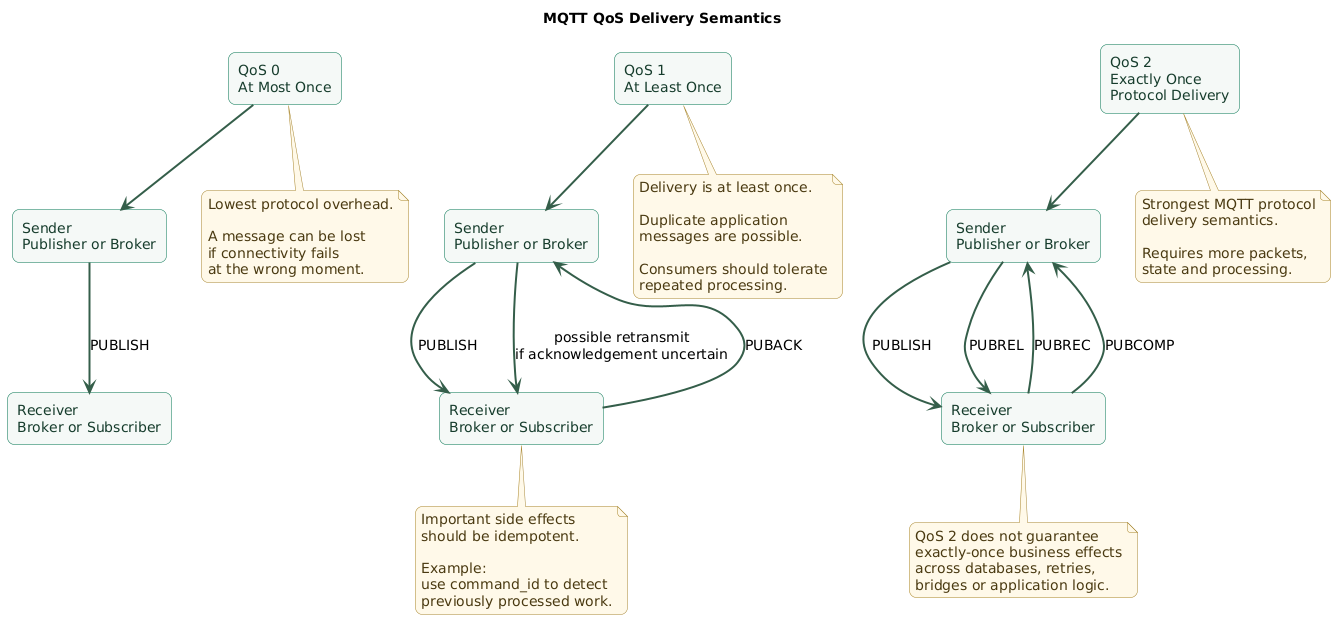
Quality of Service controls the MQTT protocol's delivery guarantees between a sender and receiver.
| QoS | Protocol semantics | Typical tradeoff |
|---|---|---|
| 0 | At most once | Lowest protocol overhead, no QoS acknowledgement flow |
| 1 | At least once | Reliable acknowledgement with possible duplicate delivery |
| 2 | Exactly once | Strongest protocol delivery guarantee with additional handshake cost |
QoS 0: at most once
publisher
   ↓ PUBLISH
broker
There is no QoS-level acknowledgement handshake for the publication.
If the connection fails at the wrong moment, the message can be lost.
Good candidates include:
- High-frequency temperature telemetry.
- Repeated sensor measurements.
- Data where the next update arrives soon.
QoS 1: at least once
sender
   ↓ PUBLISH
receiver
   ↓ PUBACK
sender
If the sender cannot determine that delivery was acknowledged, it may retransmit according to protocol behavior.
That means consumers must tolerate duplicate application messages.
Make side effects idempotent
Imagine this command:
payments/device-17/charge

{"amount":100}
Processing the same logical action twice could be disastrous.
Important commands should therefore have an application-level identifier:
{
  "command_id": "cmd-8f93a1",
  "action": "open-valve",
  "duration_seconds": 10
}
The consumer can remember already processed command IDs.
QoS 2: exactly once protocol delivery
QoS 2 uses a four-step exchange:
PUBLISH
  ↓
PUBREC
  ↓
PUBREL
  ↓
PUBCOMP
This reduces duplicate protocol delivery between the participating MQTT sender and receiver but costs more packets and state.
QoS 2 should not be interpreted as a universal guarantee that a business action can never happen twice.
Applications may still contain:
- Retries outside MQTT.
- Bridges.
- Database retries.
- Consumer crashes after performing a side effect.
- Application-level duplication.
Idempotency remains valuable.
Higher QoS is not automatically better
More protocol reliability requires:
- More network traffic.
- More acknowledgement state.
- More broker resources.
- More client resources.
Choose QoS based on the cost of losing or duplicating that class of message.
5. Use retained messages for current state
Normally, a subscriber receives publications that occur while the subscription is active according to its session and delivery behavior.
But sometimes a new subscriber immediately needs the current value.
Example: device state
topic:
devices/device-17/state/mode

retained payload:
{"mode":"automatic"}
A dashboard that subscribes later can receive the retained state without waiting for device 17 to change modes again.
Retained state is broker-side state
Conceptually:
device publishes
retain = true
        ↓
broker stores retained value
for that Topic Name
        ↓
future subscriber connects
        ↓
broker sends matching
retained publication
Good retained-message uses
- Current online/offline status.
- Latest device operating mode.
- Current configuration version.
- Last known sensor value when that semantics is appropriate.
- Current firmware version.
Retained messages are not an event database
Suppose a temperature sensor publishes:
20.1
20.4
20.7
21.0
a retained topic represents the current retained value, not the complete historical sequence.
Use a time-series database or another persistence system when history matters.
Clear retained state deliberately
A retained publication with a zero-byte payload can remove the retained message for that Topic Name.
This should be part of lifecycle management when devices are deleted or topic meanings change.
Old retained data can become dangerous
Imagine:
devices/pump-4/state
{"running":true}
but the device has been offline for two weeks.
A dashboard that shows only:
running = truemay incorrectly imply that the information is current.
Include timestamps:
{
  "running": true,
  "observed_at": "2026-08-24T14:17:23Z"
}
MQTT 5 also provides Message Expiry Interval behavior that can help bound how long a publication remains useful in applicable workflows.
6. Understand sessions and offline delivery
MQTT separates the network connection from the concept of session state.
Depending on MQTT version, client settings, broker configuration, QoS, and session expiry behavior, the broker can preserve state across a client disconnect.
Why persistent session state matters
Imagine a gateway subscribes to:
devices/+/command/#and briefly loses connectivity.
Appropriate session settings can preserve subscription and applicable in-flight or queued delivery state instead of treating every reconnect as a completely new client.
Client IDs matter
MQTT sessions are associated with client identities.
Every long-lived device should therefore have a predictable unique client identifier.
device-000017

gateway-site-berlin-02

collector-production-eu-01
Avoid accidental Client ID collisions
If two physical devices incorrectly identify themselves as the same MQTT client, connections and session behavior can interfere with each other.
Do not keep offline messages forever
Consider whether an old queued command still makes sense when a device reconnects hours later.
08:00
command:
open valve for maintenance test

17:00
device reconnects

Should that command
still execute?
Use application timestamps, command expiration, and MQTT 5 message expiry where appropriate.
7. Use Last Will messages for device presence
MQTT's Will Message mechanism lets a client provide a message to the broker during connection setup that can be published if the connection ends unexpectedly under applicable protocol conditions.
Presence pattern
When connecting:
Will topic:
devices/device-17/state/availability

Will payload:
{"online":false}

Will retain:
true
After connecting successfully, the device publishes:
topic:
devices/device-17/state/availability

payload:
{"online":true}

retain:
true
If the connection later disappears unexpectedly, the broker can publish the configured offline Will.
Why retained Will state is useful
A dashboard subscribing five minutes later can immediately see:
device-17:
offline
rather than waiting for another status event.
Presence is still a distributed-systems problem
Device status can be affected by:
- Network partitions.
- Broker failover.
- Keep Alive timing.
- Delayed reconnects.
- Gateway behavior.
Treat presence as operational state, not unquestionable physical truth.
8. Secure the broker, not only the network
MQTT security and retained-state boundaries (diagram)
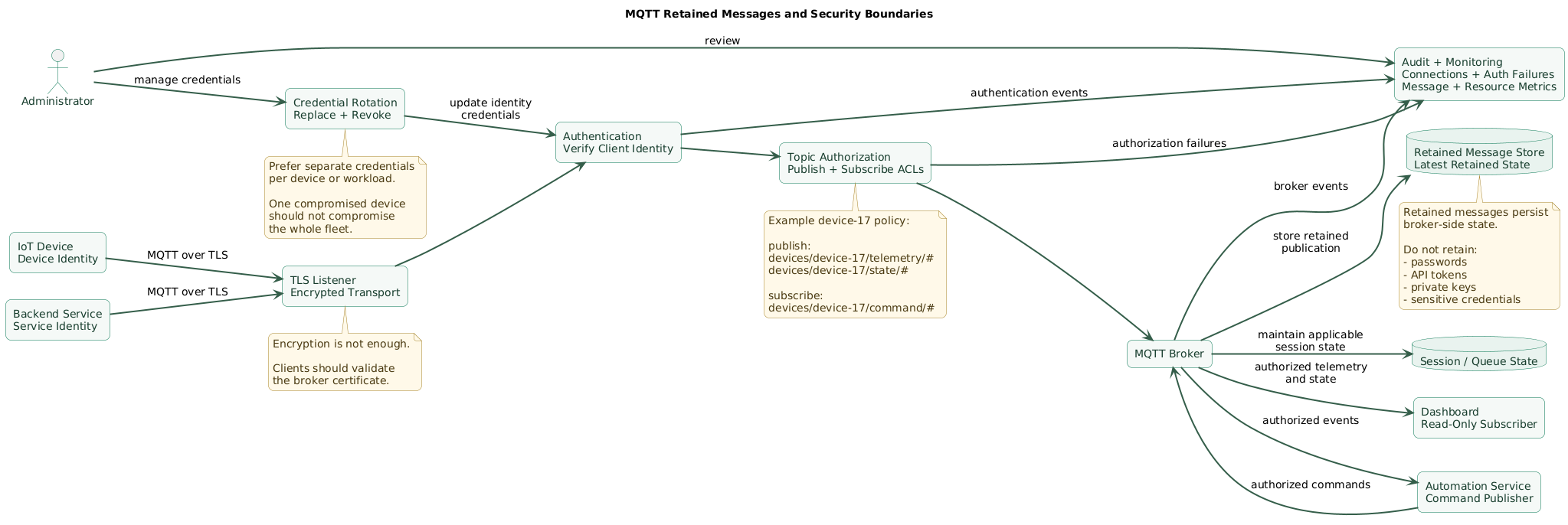
MQTT defines the messaging protocol. A secure deployment still needs to choose appropriate transport and access-control mechanisms.
Use TLS across untrusted networks
Without transport encryption, credentials and application data may be exposed to observers on the network depending on the authentication and transport design.
Production internet-connected deployments should normally use:
device
  ↓ TLS
MQTT broker
TCP port 8883 is registered for secure MQTT usage, while
1883 is traditionally associated with MQTT without TLS.
Port choice alone does not create security; the listener must actually be
configured correctly.
Validate the broker certificate
A device that encrypts traffic but accepts any server certificate remains vulnerable to connecting to an impostor.
Clients should validate the broker identity against a trusted certificate chain or an intentionally managed trust model.
Authenticate clients
Options can include:
- Username and password.
- Per-device credentials.
- Client TLS certificates.
- Token-based or external authentication mechanisms.
- MQTT 5 enhanced authentication where supported.
Avoid one password for the entire fleet
Bad:
10,000 devices
     ↓
same username
same password
One leaked device credential then affects the entire fleet.
Prefer:
device-17
  ↓
credential scoped to device-17

device-18
  ↓
different credential
Individual credentials improve revocation, auditing, and incident containment.
Authentication is not authorization
Authentication answers:
Who is this client?Authorization answers:
What may this client publish?
What may this client subscribe to?
Both are required.
Avoid anonymous public brokers
An internet-accessible broker that accepts unauthenticated publications and subscriptions can expose:
- Telemetry.
- Device identifiers.
- Location data.
- Commands.
- Retained state.
Worse, unauthorized clients may be able to send commands to devices.
9. Apply least-privilege topic authorization
Topic design and authorization should be planned together.
Device permissions
Device 17 may need to publish:
devices/device-17/telemetry/#
devices/device-17/state/#
and subscribe to:
devices/device-17/command/#It should not necessarily be allowed to publish:
devices/device-18/state/#Dashboard permissions
A monitoring dashboard might be allowed to subscribe to:
devices/+/telemetry/#
devices/+/state/#
while having no permission to publish commands.
Control service permissions
A backend automation service may publish:
devices/+/command/#but that broad permission should belong only to a trusted identity.
Protect retained topics especially carefully
Retained messages remain stored by the broker until replaced, expired under applicable behavior, or cleared.
Do not place sensitive credentials in retained payloads.
# Never design state like this

devices/device-17/config

{
  "wifi_password": "...",
  "api_token": "..."
}
Restrict broad wildcard subscriptions
Administrative tools may legitimately need:
devices/#ordinary devices usually do not.
Protect broker administration separately
Broker administration may control:
- Authentication.
- Authorization.
- Listeners.
- Certificates.
- Persistence.
- Bridges.
- Plugins.
Administrative access therefore deserves stronger controls than ordinary MQTT client access.
10. Keep payloads and topic semantics predictable
MQTT routes bytes. Your application still needs a payload contract.
JSON example
{
  "device_id": "device-17",
  "observed_at": "2026-08-24T15:20:17Z",
  "value": 22.7,
  "unit": "C"
}
Do not rely only on the topic for identity
Duplicating an important identifier in the payload can make stored events easier to validate later.
Version message schemas
IoT devices may remain deployed for years.
A backend upgrade cannot assume every device changes firmware simultaneously.
Possible approaches include:
{
  "schema_version": 2,
  ...
}
or versioned topic branches such as:
v2/devices/device-17/telemetryChoose one strategy and document compatibility expectations.
Include timestamps for measurements
Broker receipt time and sensor observation time are not always the same.
Offline devices may upload delayed measurements after reconnecting.
Keep commands explicit
Prefer:
{
  "command_id": "cmd-3921",
  "action": "set_temperature",
  "value": 19,
  "expires_at": "2026-08-24T17:00:00Z"
}
over ambiguous payloads such as:
19Validate payloads
A correctly authenticated MQTT client can still send malformed data because of:
- Firmware bugs.
- Version mismatch.
- Corrupted application state.
- Compromise.
Consumers should validate type, ranges, identifiers, and schema before acting.
11. Monitor the broker and client fleet
MQTT can make application messaging simple while hiding failures behind asynchronous delivery.
Monitor broker availability
Track:
- Listener availability.
- Connection counts.
- Authentication failures.
- Publish rate.
- Subscription rate.
- Queued messages.
- Dropped or rejected messages.
- Resource consumption.
Monitor unusual connection churn
Devices repeatedly connecting and disconnecting can indicate:
- Weak cellular or Wi-Fi connectivity.
- Certificate failures.
- Incorrect Keep Alive configuration.
- Firmware bugs.
- Broker overload.
Monitor authentication failures
A sudden increase may indicate:
- Expired credentials.
- Failed rotation.
- Incorrect device provisioning.
- Credential attacks.
Monitor retained-state growth
Systems that create unique retained topics indefinitely can accumulate stale broker state.
Define lifecycle procedures when devices are removed.
Observe end-to-end outcomes
Broker health does not prove application correctness.
Monitor outcomes such as:
telemetry reaches database
commands receive application acknowledgement
device state remains fresh
alerts process events
offline devices are detected
Back up broker state when it matters
If your design depends on:
- Retained messages.
- Persistent sessions.
- Broker configuration.
- Authentication databases.
understand the broker's persistence and disaster-recovery model.
12. A practical MQTT deployment workflow
Step 1: define message classes
telemetry
state
commands
events
Step 2: design the topic hierarchy
devices/{device_id}/telemetry/{metric}

devices/{device_id}/state/{name}

devices/{device_id}/command/{action}
Step 3: define payload schemas
Specify:
- Required fields.
- Units.
- Timestamps.
- Schema versions.
- Command identifiers.
Step 4: select QoS by message type
Example:
temperature telemetry:
QoS 0

device state:
QoS 1

important command:
QoS 1 + command ID + application acknowledgement
QoS 2 can be selected when its stronger MQTT delivery semantics justify the extra protocol cost.
Step 5: decide what should be retained
retain:
current device availability

retain:
current operating mode

do not retain:
every temperature sample

do not retain:
sensitive credential
Step 6: configure Last Will
Use it where unexpected disconnection should update operational state.
Step 7: create identities
Prefer:
one device
    ↓
one device identity
rather than a fleet-wide shared credential.
Step 8: configure TLS
Protect broker traffic when crossing untrusted networks and verify the server certificate correctly.
Step 9: create topic ACLs
device-17:
publish devices/device-17/telemetry/#
publish devices/device-17/state/#
subscribe devices/device-17/command/#
Step 10: test failure scenarios
Test:
- Broker restart.
- Device network loss.
- Duplicate QoS 1 messages.
- Expired credentials.
- Unauthorized subscription.
- Stale retained state.
- Device reconnect.
Step 11: monitor
Track:
connections
disconnects
authentication failures
message rate
queued messages
broker resources
device freshness
application outcomes
13. Copy/paste MQTT checklist
MQTT deployment checklist

Architecture
- Identify the MQTT broker.
- Identify every publisher type.
- Identify every subscriber type.
- Identify device-to-cloud flows.
- Identify cloud-to-device flows.
- Identify local gateway flows.
- Identify which messages are telemetry.
- Identify which messages represent current state.
- Identify commands.
- Identify business events.
- Document broker ownership.

Topic design
- Use consistent slash-separated hierarchy.
- Keep topic names predictable.
- Use lowercase consistently where practical.
- Keep device identity in a stable topic level.
- Separate telemetry from state.
- Separate state from commands.
- Separate commands from acknowledgements where needed.
- Avoid embedding changing measurement values in topic names.
- Document topic structure.
- Review topic design before deploying a large fleet.

Example structure
- devices/{device_id}/telemetry/{metric}
- devices/{device_id}/state/{state_name}
- devices/{device_id}/command/{command_name}
- devices/{device_id}/event/{event_type}

Topic naming
- Remember topic names are case-sensitive.
- Avoid accidental empty topic levels.
- Keep identifiers stable.
- Avoid changing topic hierarchy casually after devices are deployed.
- Use UTF-8 carefully and consistently.
- Avoid characters that create unnecessary tooling problems.
- Do not use wildcard characters in published Topic Names.

Single-level wildcard
- Use + to match one topic level.
- Make + occupy an entire topic level.
- Test filters before deployment.
- Avoid granting broad wildcard subscriptions without a reason.

Multi-level wildcard
- Use # for multiple remaining levels.
- Keep # as the final wildcard portion of the filter.
- Understand how broad the resulting subscription is.
- Restrict # permissions.
- Avoid giving ordinary devices unrestricted # access.

Dollar-prefixed topics
- Understand wildcard filters beginning with # or + do not automatically match Topic Names beginning with $.
- Check broker documentation for operational $SYS topics.
- Do not assume $SYS contents are portable across brokers.
- Restrict operational broker topics appropriately.

Publishers
- Publish to explicit Topic Names.
- Choose QoS intentionally.
- Decide whether RETAIN is appropriate.
- Validate payload before publish.
- Include useful timestamps.
- Include schema version when evolution is expected.
- Handle reconnects.
- Avoid excessive publish frequency.
- Use backoff during broker outages.

Subscribers
- Use the narrowest useful Topic Filter.
- Choose maximum subscription QoS intentionally.
- Validate incoming payloads.
- Handle duplicates.
- Handle malformed payloads.
- Handle stale data.
- Handle reconnects.
- Handle session behavior explicitly.
- Avoid assuming message history exists unless implemented separately.

QoS 0
- Use when occasional message loss is acceptable.
- Prefer for frequent replaceable telemetry where appropriate.
- Understand there is no QoS acknowledgement flow.
- Do not use QoS 0 for a critical one-shot action unless the application provides another recovery mechanism.

QoS 1
- Use when messages should arrive at least once.
- Expect possible duplicates.
- Make important consumers idempotent.
- Include message or command identifiers where useful.
- Avoid performing irreversible side effects blindly.
- Monitor retransmission or duplicate symptoms.

QoS 2
- Use when exactly-once MQTT protocol delivery is genuinely required.
- Understand the additional handshake.
- Account for additional broker state.
- Account for additional client state.
- Measure throughput impact.
- Do not assume QoS 2 guarantees exactly-once business side effects across the whole application.

QoS selection
- Classify message importance.
- Consider cost of loss.
- Consider cost of duplicate delivery.
- Consider network quality.
- Consider device power.
- Consider bandwidth.
- Consider broker capacity.
- Avoid setting every message to QoS 2 by default.

Idempotency
- Give important commands unique IDs.
- Store processed IDs where required.
- Make repeated processing safe.
- Use database uniqueness where appropriate.
- Design payment or actuator commands carefully.
- Separate message delivery from business transaction completion.

Application acknowledgements
- Consider explicit command-result topics.
- Include command_id.
- Include success or failure state.
- Include completion timestamp.
- Include useful error code.
- Do not assume PUBACK means a physical device completed the requested action.

Retained messages
- Use retained messages for current state.
- Use retained availability where appropriate.
- Use retained configuration version where useful.
- Avoid retaining event streams.
- Avoid retaining secrets.
- Include observation timestamp.
- Define stale-state behavior.
- Clear retained messages when topics are retired.
- Monitor retained-topic growth.

Retained cleanup
- Identify deleted devices.
- Clear obsolete retained topics.
- Remove old configuration topics.
- Verify dashboards no longer consume stale device state.
- Document device decommissioning procedure.

Message expiry
- Use MQTT 5 Message Expiry Interval where supported and useful.
- Expire time-sensitive commands.
- Expire stale publications when appropriate.
- Still validate timestamps at application level.
- Do not assume every client or broker deployment uses MQTT 5.

Sessions
- Choose session behavior intentionally.
- Use unique Client IDs.
- Avoid accidental Client ID collisions.
- Define Session Expiry Interval for MQTT 5 clients where appropriate.
- Decide whether subscriptions should survive reconnects.
- Decide whether queued QoS messages should remain useful.
- Avoid indefinite offline accumulation without a reason.
- Test reconnect behavior.

Offline messages
- Decide which messages can wait for disconnected clients.
- Expire stale commands.
- Bound queue growth.
- Monitor offline queues.
- Avoid delivering obsolete physical-control commands hours later.
- Validate command timestamp before execution.

Last Will
- Configure a Will for important device-presence state.
- Choose Will topic.
- Choose Will payload.
- Choose Will QoS.
- Choose whether Will should be retained.
- Test abrupt device disconnection.
- Test normal graceful disconnect.
- Include timestamps where useful.
- Treat presence as operational state rather than perfect physical truth.

Keep Alive
- Choose Keep Alive based on connection requirements.
- Avoid values that create excessive heartbeat traffic.
- Avoid values so long that failed devices remain apparently connected for too long.
- Test mobile and unstable networks.
- Monitor connection churn.

Shared subscriptions
- Use shared subscriptions when distributing work across consumers.
- Verify broker support.
- Verify client support.
- Design workers to tolerate re-delivery.
- Keep jobs idempotent.
- Monitor consumer capacity.
- Do not assume shared subscriptions create a durable job queue with all desired queue semantics.

Payload design
- Define payload schema.
- Define content type.
- Define encoding.
- Include schema version where needed.
- Include device identifier where useful.
- Include observation timestamp.
- Include unit for measurements.
- Validate numeric ranges.
- Validate enum values.
- Reject malformed payloads.
- Keep sensitive information out of telemetry.

JSON
- Keep keys stable.
- Avoid unnecessarily verbose structures on constrained links.
- Use explicit units.
- Use UTC timestamps where practical.
- Version schemas.
- Validate before storing.
- Consider binary formats when bandwidth and device constraints justify them.

Commands
- Give important commands unique IDs.
- Include expiration.
- Include target identity.
- Validate authorization.
- Validate payload.
- Return application-level acknowledgement.
- Make duplicate processing safe.
- Log command outcome without leaking secrets.
- Consider physical safety before remote actuation.

Broker exposure
- Avoid anonymously writable internet-facing brokers.
- Restrict listener interfaces where appropriate.
- Use firewall rules.
- Use VPN or private networking where appropriate.
- Use TLS across untrusted networks.
- Disable unused listeners.
- Monitor connection sources.
- Rate-limit or otherwise protect exposed services where supported.

TLS
- Enable TLS for untrusted networks.
- Use valid broker certificates.
- Validate certificates on clients.
- Verify hostname.
- Protect private keys.
- Rotate certificates before expiration.
- Monitor certificate expiry.
- Test devices with replacement certificates.
- Maintain trust-store update strategy for long-lived devices.

Authentication
- Authenticate clients.
- Prefer per-device or per-workload identities.
- Avoid one shared fleet password.
- Use strong generated credentials.
- Consider client certificates when appropriate.
- Consider token or external authentication when supported.
- Protect provisioning credentials.
- Rotate credentials.
- Revoke compromised identities.

Authorization
- Apply publish permissions.
- Apply subscribe permissions.
- Use least privilege.
- Bind permissions to client identity.
- Prevent devices publishing as other devices.
- Prevent devices subscribing to unrelated command topics.
- Restrict broad wildcards.
- Restrict administrative topics.
- Test unauthorized operations.
- Fail closed where practical.

Example device ACL
- Allow publish devices/device-17/telemetry/#
- Allow publish devices/device-17/state/#
- Allow subscribe devices/device-17/command/#
- Deny unrelated device topics.
- Deny broker administration.

Backend ACL
- Give telemetry collectors read access only where possible.
- Give control services command-publish permission only where required.
- Separate monitoring identities.
- Separate administrative identities.
- Avoid giving every backend full broker permissions.

Credentials
- Store credentials securely.
- Do not hard-code production passwords in public firmware repositories.
- Avoid logging passwords.
- Avoid logging access tokens.
- Avoid sending credentials in retained messages.
- Rotate compromised credentials immediately.
- Track credential ownership.
- Decommission credentials with devices.

Provisioning
- Create unique device identity.
- Provision trust anchor.
- Provision authentication credential.
- Record device ownership.
- Record permitted topic prefix.
- Test broker connection.
- Test authorization.
- Avoid shipping universal administrator credentials.

Credential rotation
- Define rotation procedure.
- Support overlapping credentials where practical.
- Update device safely.
- Verify new credential.
- Revoke previous credential.
- Monitor authentication failures.
- Maintain recovery procedure for offline devices.

Retained-message security
- Treat retained payloads as stored broker data.
- Do not retain secrets.
- Restrict subscribers.
- Restrict retained publishers.
- Clear obsolete retained data.
- Include timestamps.
- Use expiry where appropriate.
- Include retained state in broker recovery planning when required.

Broker administration
- Restrict administrative interfaces.
- Require strong administrator authentication.
- Separate administrator credentials from device credentials.
- Limit management-network exposure.
- Audit configuration changes.
- Back up broker configuration.
- Protect plugin configuration.
- Protect authentication databases.

Broker persistence
- Understand what broker state is persisted.
- Understand retained-message persistence.
- Understand session persistence.
- Understand queued-message persistence.
- Understand restart behavior.
- Back up state when recovery requirements demand it.
- Test broker restore.
- Define RPO and RTO for MQTT infrastructure.

Monitoring
- Monitor broker availability.
- Monitor connected clients.
- Monitor connection rate.
- Monitor disconnect rate.
- Monitor authentication failures.
- Monitor authorization failures where available.
- Monitor publish rate.
- Monitor delivery rate.
- Monitor queued messages.
- Monitor broker CPU.
- Monitor memory.
- Monitor disk usage.
- Monitor persistence health.
- Monitor certificate expiry.

Device monitoring
- Track last-seen timestamp.
- Track retained availability state.
- Track firmware version.
- Track reconnect frequency.
- Track authentication failures.
- Track message freshness.
- Detect silent devices.
- Distinguish network outage from application failure where possible.

Logging
- Centralize important broker logs.
- Record authentication events.
- Record authorization failures.
- Record abnormal disconnects where useful.
- Avoid logging sensitive payloads unnecessarily.
- Avoid logging credentials.
- Define retention.
- Correlate device IDs with operational events.

Rate control
- Define expected publish rate.
- Detect runaway devices.
- Protect broker from accidental message floods.
- Apply quotas or limits where supported.
- Back off after connection failure.
- Avoid synchronized reconnect storms.
- Add reconnect jitter to large fleets.

Reconnect behavior
- Use exponential or bounded backoff.
- Add jitter.
- Avoid reconnecting thousands of devices simultaneously.
- Re-establish subscriptions as required by session settings.
- Validate broker failover behavior.
- Test network interruption.

High availability
- Understand broker clustering or failover model.
- Understand retained-state replication.
- Understand session-state replication.
- Understand client reconnect behavior.
- Use stable broker DNS or endpoint.
- Test broker-node failure.
- Test complete broker outage.
- Document recovery.

Bridges
- Treat broker bridges as trust boundaries.
- Authenticate both sides.
- Encrypt untrusted links.
- Restrict bridged topics.
- Avoid accidental loops.
- Understand retained-message propagation.
- Understand QoS behavior across bridges.
- Monitor bridge health.

Network security
- Restrict broker ports.
- Use private networks where practical.
- Separate IoT networks from administrative networks.
- Firewall management interfaces.
- Monitor unusual source addresses.
- Use VPN when appropriate.
- Do not rely only on network isolation instead of MQTT authorization.

Internet-facing deployments
- Require authentication.
- Require authorization.
- Prefer TLS.
- Protect administrative endpoints.
- Limit exposed ports.
- Patch broker software.
- Monitor brute-force behavior.
- Monitor connection spikes.
- Review broker security advisories.
- Test external exposure.

Firmware
- Protect broker credentials in device storage.
- Avoid universal secrets.
- Verify firmware updates.
- Support credential rotation.
- Validate server certificates.
- Avoid disabling TLS verification for convenience.
- Protect debug interfaces.
- Remove test credentials before production.

Decommissioning
- Revoke device credentials.
- Remove device authorization.
- Clear obsolete retained topics.
- Remove inventory entry.
- Archive required historical data separately.
- Confirm device can no longer connect.
- Recover or destroy sensitive hardware where appropriate.

Testing
- Test normal publishing.
- Test normal subscription.
- Test + wildcard.
- Test # wildcard.
- Test QoS 0 loss tolerance.
- Test QoS 1 duplicates.
- Test QoS 2 where used.
- Test retained delivery.
- Test retained deletion.
- Test Last Will.
- Test unexpected network loss.
- Test reconnect.
- Test persistent session behavior.
- Test expired commands.
- Test unauthorized publish.
- Test unauthorized subscribe.
- Test invalid credentials.
- Test expired certificates.
- Test malformed payloads.

Failure scenarios
- Broker unavailable.
- Device offline.
- Network partition.
- Duplicate message.
- Delayed message.
- Stale retained state.
- Credential revoked.
- Broker certificate replaced.
- Backend consumer unavailable.
- Queue growth.
- Database unavailable.
- Broker disk full.
- Device reconnect storm.

Final review
- Is the topic hierarchy documented?
- Are topic names consistent?
- Are wildcard subscriptions intentionally scoped?
- Is QoS selected by message importance?
- Can consumers handle duplicates?
- Are commands idempotent?
- Are retained messages used only for suitable state?
- Can obsolete retained state be cleared?
- Are sessions configured intentionally?
- Is Last Will tested?
- Is TLS enabled where required?
- Do clients validate the broker certificate?
- Does every device have an appropriate identity?
- Are publish and subscribe permissions least-privilege?
- Can one compromised device access another device's topics?
- Are credentials rotatable?
- Is broker activity monitored?
- Is important broker state recoverable?
- Have reconnect and broker-failure scenarios been tested?
14. FAQ
What is MQTT used for?
MQTT is commonly used for lightweight asynchronous messaging between IoT devices, gateways, backend services, automation systems, and dashboards. Typical message classes include telemetry, current device state, alerts, and commands.
What is an MQTT topic?
A Topic Name identifies the logical channel to which an MQTT client
publishes a message. Topic levels are separated with /, for
example devices/device-17/telemetry/temperature.
What is the difference between + and #?
+ matches exactly one topic level in a subscription filter.
# matches multiple remaining levels and is used at the end of
the filter according to MQTT topic-filter rules.
Which MQTT QoS should I use?
Use QoS 0 when occasional loss is acceptable, QoS 1 when at-least-once delivery is required and your application can tolerate duplicates, and QoS 2 when exactly-once MQTT protocol delivery justifies the additional handshake and state.
What is an MQTT retained message?
It is a publication the broker stores as retained state for a Topic Name. Future matching subscribers can receive that retained value immediately, making it useful for current state such as device mode or availability.
Are retained messages a database?
No. They are primarily useful for the latest retained state. Use a database, time-series platform, or another event store when complete historical data matters.
Is MQTT secure by default?
MQTT provides messaging semantics while the deployment must configure suitable transport security, authentication and authorization. Production systems should protect untrusted network connections with TLS, authenticate clients, restrict topics by identity, and avoid anonymous broad access.
Key terms (quick glossary)
- MQTT
- A lightweight publish and subscribe messaging protocol commonly used for IoT devices, gateways, telemetry, automation, and backend integration.
- Broker
- The MQTT server component that accepts client connections, receives publications, matches Topic Names against subscriptions, and delivers messages to matching subscribers.
- Publisher
- An MQTT client acting as the sender of an application message to a Topic Name.
- Subscriber
- An MQTT client with one or more subscriptions that receives application messages matching its Topic Filters.
- Topic Name
- The UTF-8 name identifying the information channel used by a PUBLISH packet, commonly structured into slash-separated levels.
- Topic Filter
- A subscription expression identifying the Topic Names a client wants to receive and optionally containing MQTT wildcard characters.
- +
- The MQTT single-level wildcard used in Topic Filters to match exactly one topic level.
- #
- The MQTT multi-level wildcard used in Topic Filters to match the remaining hierarchy beneath a topic level.
- QoS 0
- MQTT's at-most-once delivery level, providing the lowest protocol overhead without the acknowledgement sequence used by QoS 1 or QoS 2.
- QoS 1
- MQTT's at-least-once delivery level, using acknowledgement and allowing duplicate delivery when retransmission occurs.
- QoS 2
- MQTT's exactly-once protocol delivery level, using a multi-step handshake between the participating sender and receiver.
- Retained message
- An MQTT publication stored by the broker as retained state for a Topic Name and delivered to future matching subscribers according to retained message rules.
- Session
- MQTT state associated with a client that can include subscriptions and applicable in-flight or queued message state depending on protocol and session configuration.
- Last Will
- A message supplied by an MQTT client when connecting that the broker can publish if the client connection ends unexpectedly under the applicable protocol conditions.
- Keep Alive
- An MQTT connection mechanism used to help the client and server detect whether the network connection remains operational.
- Shared subscription
- An MQTT subscription form that allows matching messages to be distributed among clients participating in the same shared subscription group.
- Authentication
- Verification of the identity of an MQTT client or server.
- Authorization
- The decision about which MQTT operations an authenticated identity may perform, including which topics it may publish to or subscribe to.
- TLS
- Transport Layer Security, commonly used to provide encrypted, authenticated network communication between MQTT clients and brokers.
Worth reading
Recommended guides from the category.
