The first IoT prototype has one job:
prove that the idea can workA production device has a much harder job:
work repeatedly
for many users
across many hardware units
over many years
while software, networks,
batteries, suppliers and
cloud services keep changing
A prototype can survive because its developer knows every cable, password, serial log, reset sequence and hardware quirk.
A production fleet cannot depend on that knowledge.
Moving from prototype to production therefore means transforming:
a working deviceinto:
a manufactured
provisioned
observable
updatable
replaceable
supportable
retirable product
Production readiness is a lifecycle property
A device is not production-ready simply because the PCB works and the cloud dashboard receives data. Production readiness also means you know how to manufacture another thousand units, identify one broken unit, rotate its credentials, update its firmware, replace it in the field and eventually remove it from production trust.
1. Recognize when a prototype is not a product
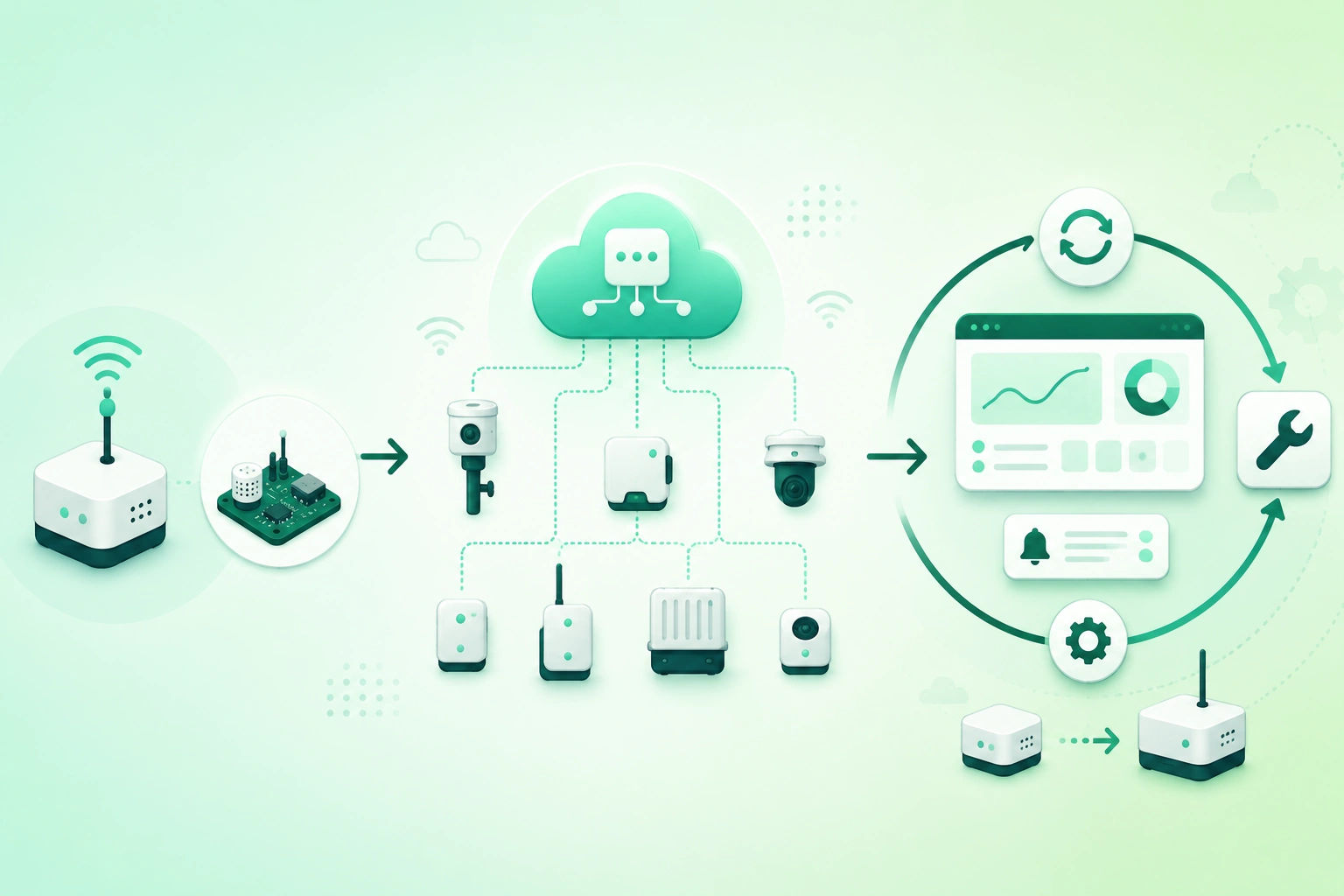
IoT prototype-to-production lifecycle roadmap (diagram)

A successful prototype may contain shortcuts that are completely reasonable during experimentation.
Typical prototype shortcuts
development board
jumper wires
manual firmware flashing
shared test credentials
debug logging enabled
fixed test Wi-Fi network
single backend instance
manual database edits
no update recovery
no production enclosure
None of these automatically make the prototype bad.
The problem begins when they accidentally become production architecture.
Ask what the prototype actually proved
It may have demonstrated:
- The sensor works.
- The radio has adequate range.
- The protocol is feasible.
- The cloud can ingest telemetry.
- The customer finds the concept useful.
It probably did not prove:
- Manufacturing yield.
- Five-year component availability.
- Fleet-wide credential management.
- Mass firmware update behavior.
- Field replacement workflows.
- Long-term battery performance.
Create an explicit production gap list
prototype capability
       ↓
production requirement
       ↓
gap
       ↓
engineering work
This prevents the team from assuming that “90% done” means only 10% of the engineering remains.
2. Freeze production requirements before scaling
Hardware becomes expensive to change after tooling, certification, inventory and manufacturing fixtures depend on it.
Define product constraints before locking the design.
Environmental requirements
temperature range
humidity
dust
water exposure
vibration
UV exposure
indoor / outdoor
installation orientation
Power requirements
battery type
battery lifetime
replaceable or sealed
mains voltage
backup power
peak current
Connectivity requirements
Wi-Fi
BLE
LoRaWAN
Ethernet
cellular
offline operation
required range
Support requirements
expected service life
security support duration
firmware-update capability
replacement procedure
spare-part availability
Scale requirements
Plan at least several fleet sizes:
pilot:
100 devices

initial production:
5,000 devices

successful product:
50,000 devices

upper planning case:
250,000 devices
The exact numbers will differ, but designing only for the first batch can hide architectural limits.
3. Redesign hardware for manufacturing and testing
Breadboards and development modules optimize engineering speed.
Production hardware must optimize repeatability, cost, assembly, diagnostics and field reliability.
Design for manufacturing
Review:
- Component count.
- Assembly process.
- PCB stack-up.
- Connector choice.
- Mechanical tolerances.
- Antenna placement.
- Programming access.
Design for test
A production line needs a repeatable way to verify every device.
power test
   ↓
program firmware
   ↓
read unique identity
   ↓
sensor test
   ↓
radio test
   ↓
I/O test
   ↓
final result recorded
Add test points deliberately
Test pads can provide access to:
- Power rails.
- Programming interface.
- Serial diagnostics.
- Important analog signals.
Production access should still have a defined security policy after manufacturing.
Plan for component substitutions
The exact sensor, regulator, flash chip or radio module used in the prototype may become:
expensive
unavailable
end-of-life
allocation limited
Record acceptable alternatives and understand which substitutions require firmware, RF, power or certification retesting.
Track the BOM as product data
Maintain:
manufacturer
part number
approved alternative
supplier
lead time
lifecycle status
criticality
4. Build secure factory provisioning
Production devices need identities before they become manageable fleet members.
Give every device a unique serial identity
product:
environment-sensor

serial:
ES-2026-001847
The identity should map to manufacturing and fleet records.
Use unique production credentials
Avoid:
all devices
=
one MQTT password
Prefer:
device-001
credential-001

device-002
credential-002
Per-device identity enables precise revocation and troubleshooting.
Record manufacturing metadata
Useful records include:
serial number
hardware revision
PCB revision
firmware installed
manufacturing date
batch
test result
credential ID
Provisioning should be transactional
Avoid situations where:
credential created
but
device programming failed
leaving unusable credentials or duplicate identities.
A production station should record whether each step succeeded and make failed units clearly distinguishable from completed units.
Separate factory and production environments
Manufacturing systems should receive only the permissions required to provision devices.
They should not automatically have broad access to:
- Customer data.
- Cloud administration.
- Production analytics.
- Firmware-signing roots.
5. Use pilot builds to expose production problems
Do not move directly from:
10 engineering prototypesto:
20,000 production unitswithout an intermediate build.
Pilot production tests the process
A pilot run exposes problems such as:
- Poor fixture contact.
- Unexpected assembly tolerance.
- Slow programming.
- Provisioning failures.
- RF variation.
- Calibration errors.
- Packaging mistakes.
Measure yield
units started:
500

units passing first test:
470

first-pass yield:
94%
Failed units need categorized reasons, not just:
FAILTrack failure categories
sensor failure
radio failure
programming failure
power failure
assembly defect
calibration failure
This reveals whether the dominant problem is design, process, component or test-fixture related.
Run real field pilots too
Factory success does not guarantee:
good Wi-Fi
good battery life
good antenna performance
easy installation
reliable cloud onboarding
Deploy pilot units in representative customer environments.
6. Scale the backend for fleets, not demos
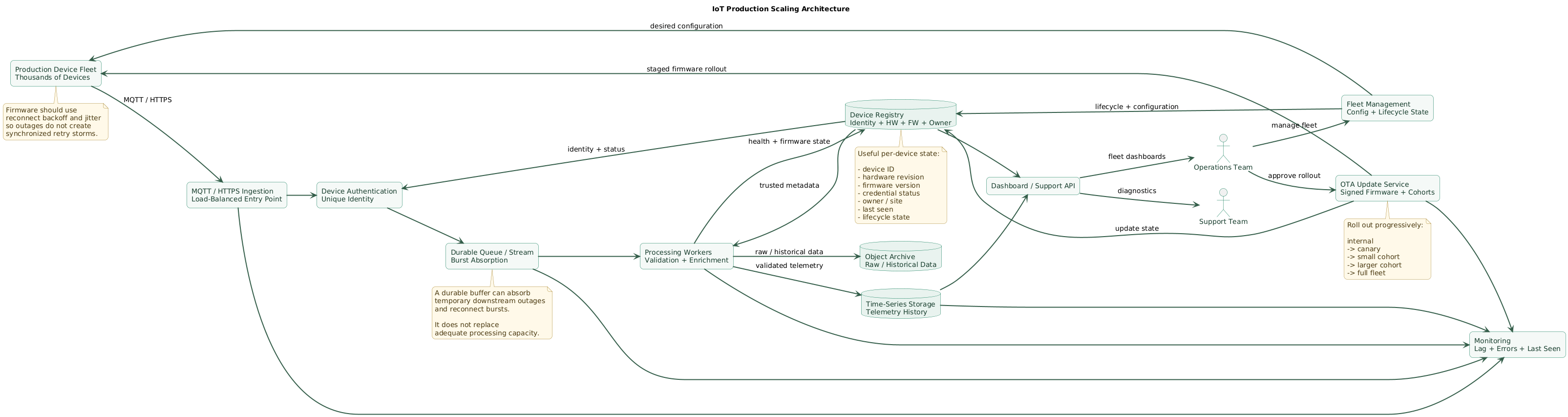
IoT production scaling architecture (diagram)
Ten devices hide problems that ten thousand devices expose.
Calculate average ingest
Example:
50,000 devices

1 message every 5 minutes

50,000 / 300
≈
167 messages / second
Then model bursts
After an outage:
20,000 devices reconnect
within 2 minutes
produces a very different workload from the average.
Reconnect storms
Possible sequence:
regional ISP outage
      ↓
many devices disconnected
      ↓
network returns
      ↓
every device reconnects
      ↓
authentication spike
      ↓
telemetry backlog
      ↓
database spike
Device firmware should use backoff and jitter where appropriate, while the backend should have capacity and buffering for predictable recovery bursts.
Separate ingestion from processing
devices
   ↓
ingestion
   ↓
durable queue
   ↓
workers
   ↓
storage
This can prevent a temporary database slowdown from immediately becoming a fleet-wide connectivity failure.
Maintain a device registry
The backend should know:
device ID
hardware revision
firmware version
owner
site
credential state
last seen
configuration version
lifecycle state
This becomes the control plane for operating the fleet.
7. Make firmware updates a production capability
Bugs and vulnerabilities will appear after devices ship.
A production device therefore needs an update path that is:
- Authenticated.
- Recoverable.
- Observable.
- Staged.
Do not update the entire fleet first
internal devices
      ↓
1% canary
      ↓
5%
      ↓
25%
      ↓
100%
Exact cohort sizes depend on fleet size and risk.
Monitor more than download success
A device may:
download successfully
verify successfully
install successfully
boot successfully

but then:

battery drain increases
sensor stops responding
network reconnects repeatedly
Release monitoring should therefore include operational health after installation.
Keep rollback or recovery
A/B firmware layouts can provide:
Slot A:
known-good

Slot B:
candidate
allowing recovery if the candidate fails boot validation.
Track update state per device
eligible
scheduled
downloading
installed
confirmed
failed
rolled back
Firmware compatibility matters
Never assume one image works on every hardware revision.
HW rev A
→ firmware family A

HW rev B
→ firmware family B
where hardware differences require separate support.
8. Build fleet observability and remote diagnostics
Production support becomes expensive when the only diagnostic step is:
ask customer to unplug it
and plug it back in
Track basic health
last seen
firmware version
uptime
reset reason
battery
signal quality
free storage
sensor status
Track connectivity quality
Useful indicators may include:
- Reconnect count.
- Authentication failures.
- Message retry count.
- Network signal quality.
- Gateway association.
Track reset reasons
Distinguish:
normal reboot
watchdog
brownout
firmware update
crash
manual reset
where hardware and firmware expose that information.
Logs need limits
Embedded devices cannot retain unlimited diagnostics.
Use:
- Bounded ring buffers.
- Event counters.
- Error summaries.
- Remote retrieval only when needed.
Protect privacy and credentials
Never use diagnostics to upload:
private keys
Wi-Fi passwords
access tokens
sensitive user data
without clear need
9. Control hardware and firmware compatibility
Products evolve.
A fleet may eventually contain:
hardware rev A
hardware rev B
hardware rev C

firmware 2.x
firmware 3.x
firmware 4.x
Do not hide hardware revision
The backend and firmware-update service should know exactly which hardware each device contains.
Use explicit compatibility rules
firmware 4.7
supports:
HW-B
HW-C

does not support:
HW-A
Keep protocol compatibility longer than hardware compatibility
When possible, older devices should continue sending a supported telemetry schema even when new hardware adds fields.
Version messages
{
  "schema_version": 3,
  "device_id": "sensor-1847",
  ...
}
Support mixed fleets
Production rollouts are gradual.
Backend services should expect several firmware generations to coexist during updates.
10. Plan field maintenance and replacement
Maintenance cost can dominate hardware cost.
Battery replacement
For battery-powered products, define:
battery chemistry
replacement interval
low-battery warning
replacement procedure
battery orientation
post-replacement test
Gateway replacement
A failed gateway should not require rebuilding a site manually from memory.
Prefer:
replacement gateway
      ↓
authenticate
      ↓
download site config
      ↓
restore device mappings
      ↓
resume service
Device replacement
A replacement workflow should address:
- Old device revocation.
- New device provisioning.
- Ownership transfer.
- Configuration migration.
- Historical-data continuity.
Spare parts
Decide how many:
devices
gateways
batteries
power supplies
antennas
need to remain available for field service.
Installation documentation matters
Production documentation should cover:
- Placement.
- Power.
- Antenna orientation.
- Pairing.
- Network requirements.
- Reset procedure.
- Replacement.
11. Define support and security lifetimes
IoT devices can remain physically functional long after their original software stack becomes difficult to maintain.
Define the support window
product sale begins
      ↓
active support
      ↓
last sale
      ↓
security maintenance
      ↓
end of support
Avoid leaving the duration undefined.
Track third-party dependencies
Firmware may depend on:
- RTOS.
- TCP/IP stack.
- TLS library.
- Radio stack.
- Bootloader.
- Cloud SDK.
These components may need security updates years after initial release.
Plan certificate lifetime
If a device certificate expires in:
3 yearsbut the product is expected to operate for:
8 yearscertificate renewal is a production requirement, not an optional future feature.
Plan infrastructure migrations
During a long product lifetime you may need to change:
API hostname
MQTT broker
certificate authority
cloud provider
device-management service
telemetry schema
Avoid hard-coding assumptions that cannot be changed securely.
12. Design ownership transfer and decommissioning
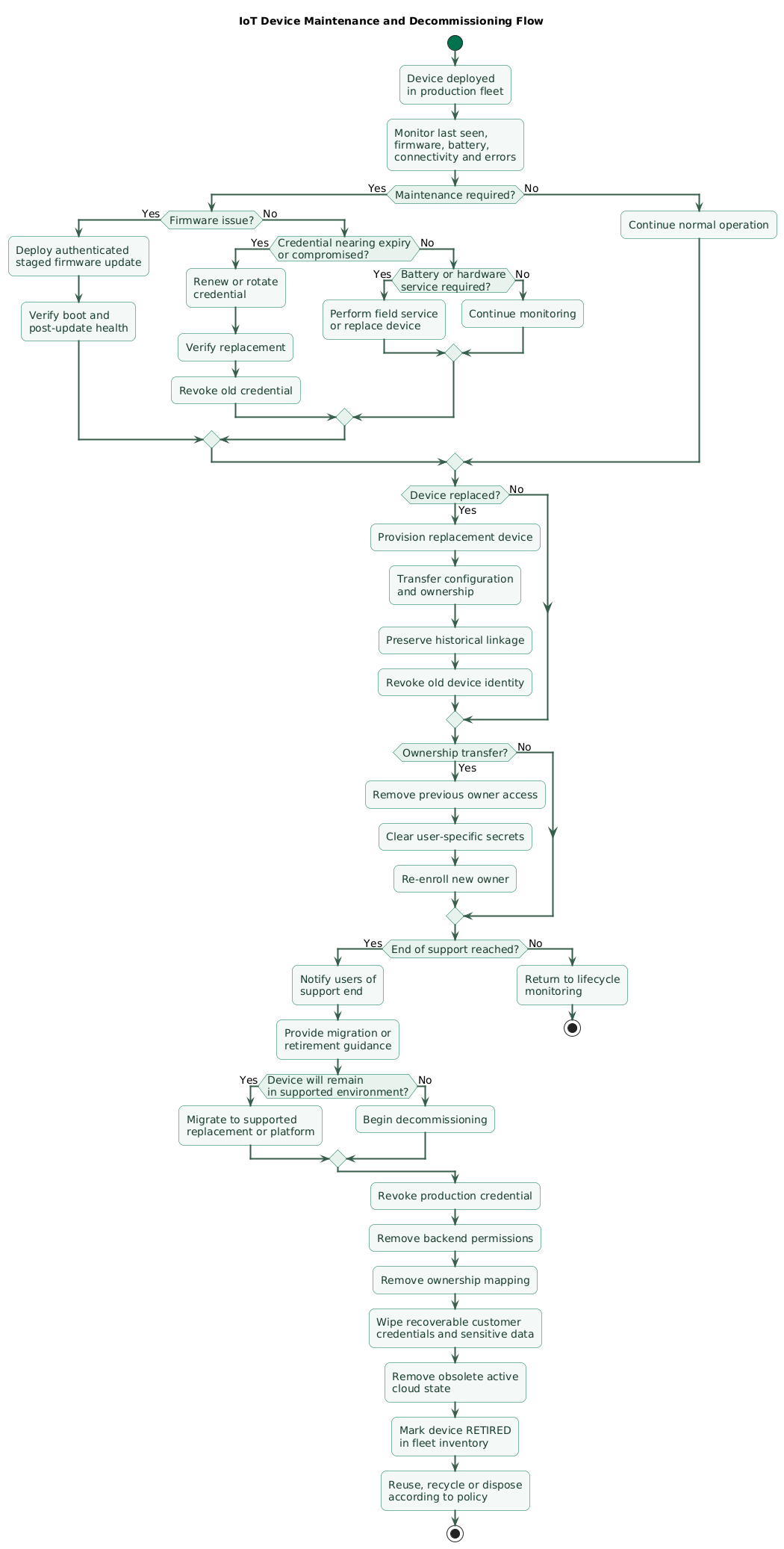
IoT maintenance and decommissioning flow (diagram)
Device lifecycle does not end when a product leaves the factory.
Ownership transfer
A product may be:
sold
given away
moved to another site
assigned to another customer
The previous owner should lose access.
Factory reset
Define what reset removes:
Wi-Fi credentials
user accounts
cloud ownership
tokens
local history
configuration
Manufacturer identity may intentionally remain where required for secure re-enrollment.
End of support
Communicate:
- Final supported firmware.
- Support end date.
- Cloud-service implications.
- Migration path.
- Safe retirement instructions.
Decommissioning
device removed from service
      ↓
revoke production credential
      ↓
remove ownership
      ↓
wipe user secrets
      ↓
remove active permissions
      ↓
mark retired
      ↓
reuse / recycle / dispose
Do not leave retired identities active
A device sitting in electronic waste should not retain a credential that still authenticates to production systems.
13. Copy/paste production-readiness checklist
IoT prototype-to-production checklist

Product requirements
- Define product purpose.
- Define installation environment.
- Define operating temperature.
- Define humidity requirements.
- Define indoor or outdoor use.
- Define expected lifetime.
- Define support lifetime.
- Define security-support lifetime.
- Define maximum fleet size.
- Define connectivity requirements.
- Define offline behavior.
- Define power source.
- Define battery target where applicable.

Prototype review
- List development-board dependencies.
- List manual steps.
- List hard-coded values.
- List shared test credentials.
- List development-only services.
- List missing recovery paths.
- List untested assumptions.
- Create production gap list.
- Assign owner for each gap.

Hardware
- Create production PCB.
- Review schematic.
- Review layout.
- Review power integrity.
- Review antenna placement.
- Review RF layout.
- Review ESD protection.
- Review environmental protection.
- Review connectors.
- Review mechanical tolerances.
- Review enclosure.

Design for manufacturing
- Minimize unnecessary parts.
- Standardize components where practical.
- Review assembly process.
- Review panelization.
- Review soldering constraints.
- Review component orientation.
- Define manufacturing documentation.
- Define acceptable substitutions.
- Review component lifecycle.

Bill of materials
- Track manufacturer part number.
- Track supplier.
- Track approved alternatives.
- Track lead time.
- Track lifecycle status.
- Track minimum order quantity.
- Track critical parts.
- Monitor end-of-life notices.
- Avoid single-source risk where practical.

Design for test
- Add programming pads.
- Add power test points.
- Add important signal test points.
- Design production fixture.
- Automate test where possible.
- Define test limits.
- Record failure reason.
- Record test results.
- Measure test duration.

Production fixture
- Verify reliable contact.
- Protect against incorrect placement.
- Detect unit identity.
- Program firmware.
- Run functional test.
- Run radio test.
- Run sensor test.
- Record pass/fail.
- Version fixture software.
- Maintain calibration where required.

Firmware programming
- Use approved release image.
- Verify image hash.
- Record firmware version.
- Prevent accidental development firmware.
- Lock production settings where appropriate.
- Verify device boots.
- Record programming result.

Device identity
- Assign unique serial number.
- Assign unique logical identity.
- Avoid duplicated IDs.
- Bind identity to manufacturing record.
- Print machine-readable identifier where useful.
- Track device identity in fleet registry.

Credentials
- Use unique device credentials.
- Avoid fleet-wide shared secrets.
- Generate credentials securely.
- Provision securely.
- Protect manufacturing access.
- Record credential identifier.
- Avoid storing private keys in logs.
- Support rotation.
- Support revocation.

Provisioning
- Authenticate production station.
- Verify target device.
- Provision identity.
- Provision trust anchors.
- Provision credential.
- Register backend record.
- Confirm registration.
- Handle partial failure.
- Prevent duplicate provisioning.
- Audit results.

Manufacturing database
- Store serial number.
- Store hardware revision.
- Store PCB revision.
- Store batch.
- Store manufacturing date.
- Store firmware version.
- Store test result.
- Store credential ID.
- Restrict access.
- Back up appropriately.

Hardware revisions
- Define revision naming.
- Record every device revision.
- Document changes.
- Link BOM to revision.
- Link firmware compatibility.
- Avoid silent hardware substitutions.
- Test every meaningful revision.

Pilot build
- Build production-like units.
- Use production PCB.
- Use production enclosure.
- Use production fixture.
- Use real provisioning.
- Measure first-pass yield.
- Categorize failures.
- Fix process issues.
- Repeat when necessary.

Field pilot
- Deploy representative sites.
- Test onboarding.
- Test coverage.
- Test battery life.
- Test environmental conditions.
- Test offline behavior.
- Test firmware updates.
- Test support workflow.
- Gather installer feedback.
- Gather customer feedback.

Yield
- Track first-pass yield.
- Track final yield.
- Track failure category.
- Track supplier lot.
- Track repair rate.
- Investigate trends.
- Define acceptable limits.

Quality control
- Define incoming inspection.
- Define assembly inspection.
- Define functional test.
- Define radio test.
- Define calibration.
- Define final inspection.
- Define packaging inspection.
- Keep traceability.

Backend capacity
- Estimate device count.
- Estimate messages per second.
- Estimate peak messages.
- Estimate payload size.
- Estimate storage growth.
- Estimate API load.
- Estimate dashboard load.
- Estimate update traffic.
- Test capacity.

Reconnect storms
- Model regional outage.
- Model router outage.
- Model cloud restart.
- Use client backoff.
- Use jitter.
- Avoid synchronized reconnect.
- Protect authentication services.
- Protect databases.
- Monitor recovery rate.

Ingestion
- Authenticate devices.
- Apply authorization.
- Validate payloads.
- Use durable buffering where needed.
- Monitor ingress rate.
- Monitor rejected messages.
- Monitor queue lag.
- Scale consumers independently.

Device registry
- Track device ID.
- Track hardware revision.
- Track firmware version.
- Track configuration version.
- Track credential state.
- Track owner.
- Track site.
- Track last seen.
- Track lifecycle state.

Fleet management
- Search devices.
- Filter by firmware.
- Filter by hardware revision.
- Filter by site.
- Filter by owner.
- View connectivity.
- View battery state.
- View update state.
- Revoke device.
- Mark replacement.
- Mark retired.

Telemetry
- Version schema.
- Include device identity.
- Include event timestamp.
- Include useful diagnostic fields.
- Validate input.
- Define retention.
- Avoid unnecessary sensitive data.
- Monitor data quality.

Firmware updates
- Sign firmware.
- Authenticate update metadata.
- Validate hardware compatibility.
- Validate version policy.
- Use safe installation.
- Support recovery.
- Track update state.
- Log failures.
- Test power interruption.

Staged rollout
- Test internal devices.
- Use canary cohort.
- Monitor health.
- Expand gradually.
- Pause on regression.
- Compare old and new firmware.
- Define rollback criteria.
- Avoid all-at-once rollout.

Update health
- Track download success.
- Track install success.
- Track boot success.
- Track confirmation.
- Track crash rate.
- Track battery impact.
- Track reconnect rate.
- Track sensor errors.
- Track rollback rate.

Rollback
- Keep known-good image where practical.
- Detect failed boot.
- Detect repeated reset.
- Roll back safely.
- Record reason.
- Report failure.
- Avoid rollback to known-vulnerable versions without policy.

Observability
- Track last seen.
- Track uptime.
- Track reset reason.
- Track battery.
- Track signal quality.
- Track storage.
- Track sensor state.
- Track firmware.
- Track error counters.

Remote diagnostics
- Provide safe diagnostic commands.
- Restrict permissions.
- Limit output size.
- Protect secrets.
- Avoid arbitrary remote shell unless strongly justified.
- Record diagnostic access.
- Allow support to identify common failure modes.

Logs
- Use bounded local logs.
- Use ring buffer.
- Record error codes.
- Record reset reason.
- Record update failures.
- Do not log credentials.
- Do not log unnecessary personal data.
- Define retention.

Configuration
- Version configuration.
- Validate before applying.
- Define defaults.
- Support rollback where useful.
- Track desired state.
- Track reported state.
- Avoid unbounded configuration complexity.

Compatibility
- Map firmware to hardware revision.
- Map schema to firmware.
- Support mixed fleet versions.
- Test old devices with new backend.
- Test new devices with current backend.
- Avoid breaking changes without migration.
- Document compatibility matrix.

Security
- Use secure boot where appropriate.
- Sign updates.
- Protect device credentials.
- Use TLS where appropriate.
- Validate peers.
- Apply least privilege.
- Rotate credentials.
- Revoke compromised devices.
- Monitor failures.
- Maintain vulnerability-response process.

Batteries
- Define approved battery.
- Define replacement interval.
- Define low-battery warning.
- Define field replacement procedure.
- Test cold conditions.
- Test old batteries.
- Keep compatible spares.
- Document polarity.

Gateways
- Track gateway identity.
- Track software version.
- Track site mapping.
- Track last seen.
- Monitor storage.
- Monitor backhaul.
- Support replacement.
- Restore configuration.
- Keep spare units.

Device replacement
- Identify failed unit.
- Revoke old credential.
- Assign replacement.
- Transfer ownership.
- Transfer configuration.
- Preserve historical data linkage.
- Verify new device.
- Record replacement.

Spare parts
- Forecast failure rate.
- Keep spare devices.
- Keep spare gateways.
- Keep approved batteries.
- Keep power supplies.
- Track spare inventory.
- Review obsolescence.
- Plan replenishment.

Support
- Create troubleshooting guide.
- Define escalation path.
- Provide serial lookup.
- Provide device-health view.
- Provide replacement process.
- Track support incidents.
- Feed recurring failures into engineering.

Security support
- Define support period.
- Track third-party components.
- Monitor vulnerability disclosures.
- Assess affected versions.
- Build security fixes.
- Stage updates.
- Communicate important changes.
- Track adoption.

Certificates
- Track issue date.
- Track expiry.
- Alert before expiry.
- Support renewal.
- Support CA migration.
- Test offline renewal scenarios.
- Revoke compromised credentials.
- Avoid certificates that expire before product lifetime without renewal plan.

Third-party dependencies
- Inventory libraries.
- Inventory RTOS.
- Inventory radio stacks.
- Inventory TLS library.
- Inventory bootloader.
- Inventory cloud SDK.
- Track versions.
- Track security updates.
- Plan replacements.

Cloud dependencies
- Inventory hosted services.
- Inventory domains.
- Inventory APIs.
- Inventory queues.
- Inventory databases.
- Inventory object storage.
- Define backups.
- Define disaster recovery.
- Plan provider changes.

Infrastructure migration
- Avoid immutable hard-coded endpoints.
- Support endpoint changes securely.
- Support certificate-chain changes.
- Support DNS migration.
- Support broker migration.
- Test failover.
- Preserve backward compatibility.

Backups
- Back up fleet metadata.
- Back up customer configuration.
- Back up device registry.
- Back up manufacturing records where required.
- Back up cloud configuration.
- Test restore.
- Define recovery time.

Incident response
- Identify affected devices.
- Identify firmware versions.
- Identify hardware revisions.
- Identify credentials.
- Revoke when required.
- Deploy fix.
- Monitor recovery.
- Preserve evidence.
- Communicate with affected users.

Ownership transfer
- Remove previous owner.
- Clear user-specific credentials.
- Preserve manufacturer identity where appropriate.
- Re-enroll new owner.
- Verify previous owner loses access.
- Reset privacy-sensitive state.
- Record transfer.

Factory reset
- Define what is removed.
- Remove Wi-Fi credentials.
- Remove user tokens.
- Remove owner binding.
- Clear sensitive local data.
- Preserve only required manufacturer identity.
- Test complete reset.
- Document behavior.

End of support
- Define support-end date.
- Communicate in advance.
- Publish final supported firmware.
- Explain cloud-service impact.
- Provide migration path.
- Provide retirement guidance.
- Avoid silent abandonment.

Decommissioning
- Mark device retired.
- Revoke production identity.
- Revoke certificates.
- Remove backend permissions.
- Remove owner mapping.
- Wipe user secrets.
- Wipe sensitive local data where possible.
- Remove active cloud state.
- Record retirement.

Disposal
- Remove batteries appropriately.
- Protect residual customer data.
- Recycle electronics where possible.
- Prevent discarded devices from retaining valid production credentials.
- Follow applicable local disposal requirements.

Lifecycle state
- Manufactured.
- Provisioned.
- Inventory.
- Assigned.
- Active.
- Maintenance.
- Compromised.
- Replaced.
- Retired.
- Decommissioned.

Documentation
- Keep architecture diagram.
- Keep hardware revision history.
- Keep BOM history.
- Keep firmware release notes.
- Keep compatibility matrix.
- Keep manufacturing procedure.
- Keep provisioning procedure.
- Keep support runbook.
- Keep retirement procedure.

Final review
- Can another factory build the product repeatably?
- Can every device be uniquely identified?
- Can every device be authenticated independently?
- Can failed provisioning be detected?
- Is manufacturing traceable?
- Is hardware revision recorded?
- Can the backend handle reconnect storms?
- Can firmware be updated safely?
- Can a bad update be stopped?
- Can a failed update recover?
- Can support see device health remotely?
- Can one compromised device be revoked?
- Can credentials rotate?
- Can hardware revisions coexist?
- Can gateways and devices be replaced?
- Are spare parts planned?
- Is the security-support period defined?
- Can certificates renew during the product lifetime?
- Can ownership transfer safely?
- Can a retired device be removed from production trust?
- Is end-of-life part of the product design rather than an afterthought?
14. FAQ
What changes when an IoT prototype moves to production?
Production introduces manufacturing repeatability, component lifecycle management, secure provisioning, hardware traceability, fleet-scale backend capacity, firmware-update recovery, monitoring, support, replacement and retirement requirements that a small prototype can often ignore.
Do production IoT devices need unique credentials?
Unique per-device credentials are strongly preferable. They reduce the blast radius of one compromised device and enable precise authorization, monitoring, credential rotation, revocation and replacement.
Why is a pilot manufacturing run important?
A pilot run tests the production process rather than only the electrical design. It exposes fixture problems, programming failures, assembly variation, provisioning mistakes, yield issues and other problems that may not appear in hand-built engineering prototypes.
How should IoT firmware updates be rolled out?
Use staged cohorts. Begin with internal or canary devices, monitor update success and operational health, expand gradually, pause if regressions appear, and retain a recovery or rollback path where the hardware design supports it.
What should fleet management track?
At minimum, track device identity, hardware revision, firmware version, credential state, ownership, site, last seen, configuration version, update state and lifecycle status. Battery and connectivity data are also valuable for many products.
How long should IoT products receive updates?
The support window depends on the product and market, but it should be defined deliberately before launch. Device certificates, cryptographic dependencies, firmware libraries and cloud services should all be planned around the expected supported lifetime.
What happens when an IoT device is retired?
Revoke its production identity, remove backend permissions and ownership, wipe customer credentials and sensitive data where possible, record the device as retired, and ensure it can no longer authenticate to production systems.
Key terms (quick glossary)
- Prototype
- An early implementation used to validate technical feasibility, product behavior or user value before production engineering is complete.
- Design for Manufacturing
- Engineering a product so it can be assembled repeatably, economically and at the required quality level using the intended manufacturing process.
- Design for Test
- Designing hardware and production processes so manufactured units can be tested efficiently and failures can be identified reliably.
- BOM
- Bill of Materials, the controlled list of components and assemblies required to manufacture a product.
- Provisioning
- The process of assigning a device its production identity, credentials, configuration and relationship with backend systems.
- First-pass yield
- The proportion of manufactured units that pass the required production tests on their first attempt without repair or rework.
- Device registry
- A backend inventory containing device identity, hardware, software, ownership, configuration, connectivity and lifecycle information.
- Fleet management
- Operational tools and processes used to inventory, configure, monitor, update, diagnose, revoke and retire groups of deployed devices.
- OTA update
- An over-the-air firmware or software update delivered remotely to a deployed device.
- Canary deployment
- Releasing a new firmware or configuration to a small subset of devices before expanding deployment to the wider fleet.
- Rollback
- Returning from a defective software release to a previously working version according to an authorized recovery policy.
- Reconnect storm
- A burst of connection and authentication traffic created when many devices reconnect at approximately the same time after an outage.
- Hardware revision
- A controlled version of the physical product design identifying meaningful changes to the PCB, components or mechanical implementation.
- Compatibility matrix
- Documentation describing which firmware, hardware, protocols and backend versions are intended to work together.
- Support lifetime
- The defined period during which a product receives maintenance, compatibility, operational or security support.
- Ownership transfer
- The controlled process of removing a device from one customer or account and securely assigning it to another.
- Decommissioning
- Removing a device from active service, revoking production access, clearing required data and credentials, and recording that it is no longer trusted as an active fleet member.
Worth reading
Recommended guides from the category.
