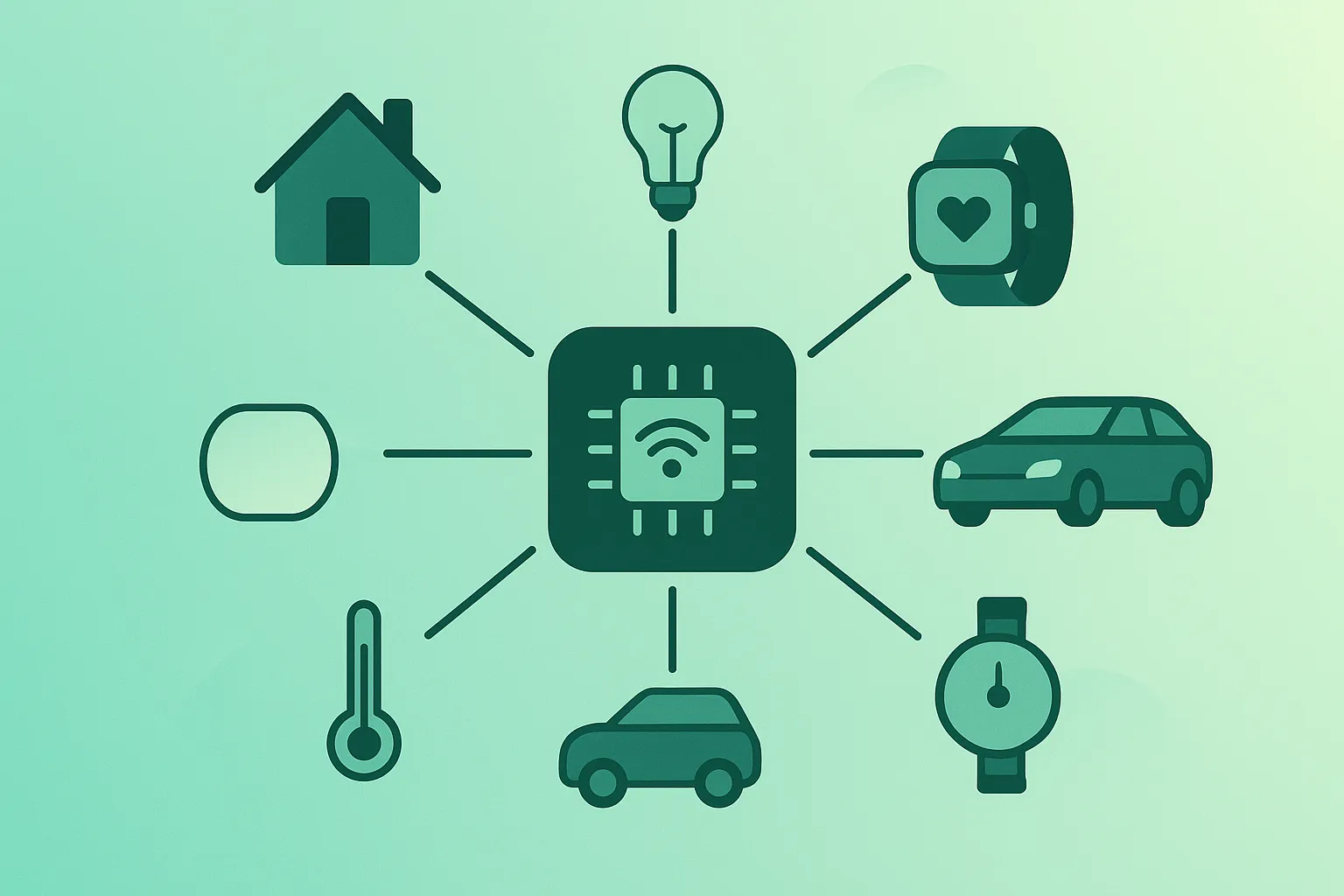
The Internet of Things (IoT) sounds futuristic, but it’s already routine: watches, thermostats, cars, cameras, TVs, industrial sensors, delivery trackers, and smart meters all qualify. The only “magic” is that everyday objects get sensors + connectivity + software, so they can share data and (sometimes) act automatically.
This guide explains IoT in plain English and adds the practical layer people usually miss: how IoT works end-to-end, which networks and protocols exist, what can go wrong, and what habits make connected devices safer and more reliable.
What you should be able to answer after this guide
- What “IoT” means (and what it does not mean).
- How an IoT system works: device → network → cloud/local → app/automation.
- Which protocol is typical for which use case (Wi-Fi vs Zigbee vs Thread vs cellular/LoRaWAN).
- How to reduce common risks (privacy, security, vendor lock-in).
- How to start building IoT projects without unnecessary complexity.
1. What Is the Internet of Things (IoT)?
IoT is a category of systems where physical objects (“things”) contain electronics that let them: sense something, communicate that information, and optionally act on it. The “internet” part usually means IP networking somewhere in the chain, but not every device needs direct internet access.
A simple definition that stays accurate: IoT connects sensors and devices to software so data can create actions. Sometimes actions are manual (you tap a button in an app). Sometimes they’re automatic (a rule triggers).
Important nuance
“Smart” does not automatically mean “useful”. The best IoT products reduce effort, improve safety, or provide measurable insight. If a device needs the internet but doesn’t deliver real value, it adds risk and maintenance.
2. IoT in one minute (quick mental model)
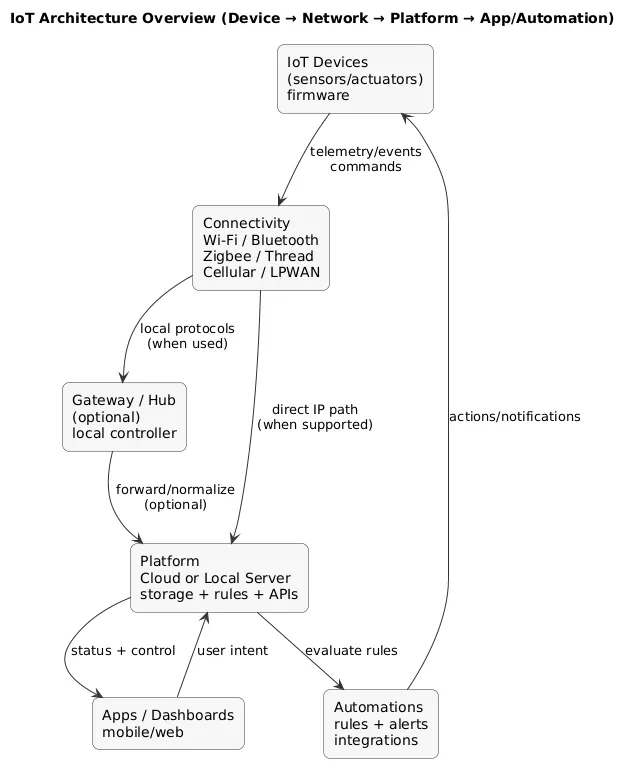
Most IoT setups can be described as five moving parts:
- Device: a sensor/actuator with firmware.
- Connectivity: Wi-Fi/Bluetooth/Zigbee/Thread/cellular/LPWAN, etc.
- Platform: cloud service or local server/hub that stores data and runs logic.
- Interface: mobile app, dashboard, voice assistant, or API integration.
- Automation: rules and workflows that trigger actions and notifications.
IoT architecture overview (diagram)
3. Everyday IoT Examples You Already Use
IoT exists on a spectrum. Some devices are “light IoT” (simple status updates), and others are full monitoring-and-control systems.
- Smart speakers & assistants: control, voice interaction, and integrations.
- Wearables: health/fitness measurements, notifications, and location features.
- Thermostats: schedules, occupancy logic, energy optimization.
- Security cameras & doorbells: video, motion events, alerts (also higher privacy risk).
- Lighting and plugs: scenes, schedules, motion-based controls.
- Connected cars: telemetry, remote features, maintenance insights.
- Business IoT: asset trackers, cold-chain monitors, equipment health sensors.
Practical “IoT value” example
A leak sensor is a classic high-value IoT device: it turns a rare but expensive event (water damage) into an early warning system. The payoff is not convenience—it’s risk reduction.
4. How IoT Systems Work: Devices, Networks, Cloud & Apps
Although products differ, the flow is consistent: a device generates data → data moves over a network → software stores/visualizes it → rules decide what to do. When something breaks, it almost always breaks at one of these boundaries.
Cloud-first vs local-first (why it matters)
- Cloud-first: easy onboarding and remote access, but more vendor dependency and internet sensitivity.
- Local-first: lower latency and better offline behavior, but requires more setup and discipline.
Reliability rule of thumb
If you want lights, sensors, and basic automations to keep working during internet issues, prefer local automation where possible (a hub/controller running rules locally).
5. Key Building Blocks: Sensors, Connectivity, Data & Automation
IoT is easier to understand when you separate the “physical layer” (sensors and actuators) from the “information layer” (messages and data).
- Sensors: temperature, humidity, motion, vibration, air quality, GPS, open/close state.
- Actuators: relays, valves, motors, smart plugs, locks (high-stakes category).
- Device firmware: sampling, calibration, reconnect logic, update mechanism (firmware lifecycle matters).
- Messaging: lightweight telemetry/events over protocols like MQTT/HTTP/CoAP (implementation varies by vendor).
- Platform logic: dashboards, alerts, automation rules, integrations.
The IoT data lifecycle (diagram)
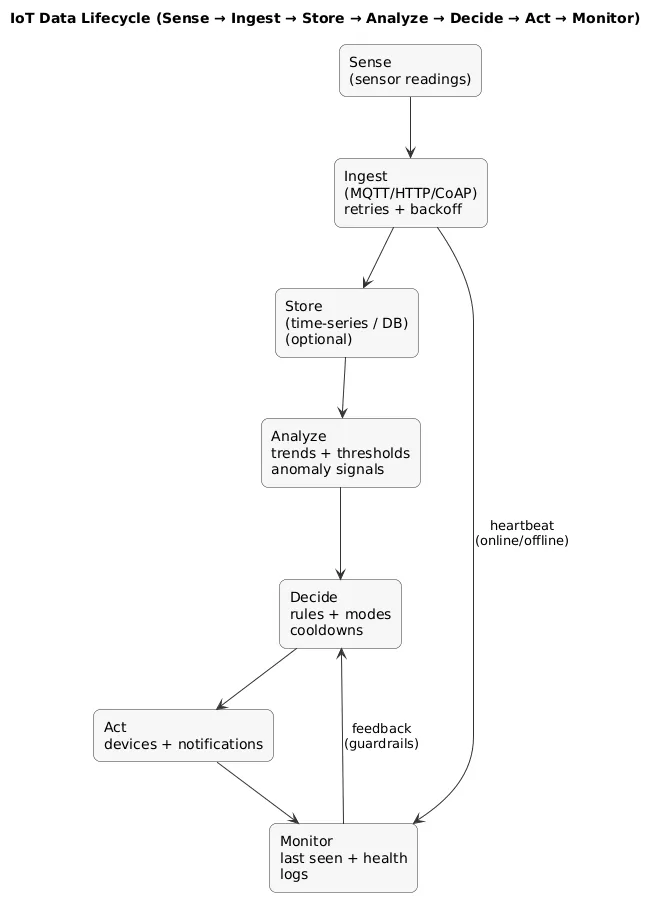
Many IoT “wins” come from patterns over time: trend charts, anomaly detection, threshold alerts with cooldowns, and “last seen” monitoring that shows when devices silently fail.
6. IoT Connectivity & Protocols (Wi-Fi, Bluetooth, Zigbee, Thread, Cellular, LoRaWAN)
Connectivity is a tradeoff between range, power usage, cost, and complexity. A simple mental model: Wi-Fi for bandwidth, mesh protocols for sensors, and cellular/LPWAN for remote deployments.
| Connectivity | Typical use | Tradeoffs |
|---|---|---|
| Wi-Fi | Cameras, doorbells, appliances, high-bandwidth devices | Can overload weak routers; power usage higher than mesh sensors |
| Bluetooth | Onboarding, local control, short-range accessories | Short range; often not ideal as a “whole-home” backbone |
| Zigbee / Z-Wave | Sensors and lighting (mesh networks) | Needs hub/controller; mesh quality depends on device placement |
| Thread | Modern low-power mesh, often used with Matter | Needs a Thread Border Router; still depends on ecosystem/controller |
| Cellular (4G/5G/NB-IoT/LTE-M) | Fleet tracking, remote sites, enterprise deployments | Subscription cost; power considerations |
| LPWAN (e.g., LoRaWAN) | Long-range, low-bitrate sensors (agriculture, cities) | Low bandwidth; usually event/telemetry only |
About “Matter”
Matter is an interoperability standard for smart homes. It is not a radio protocol by itself; it typically runs over Thread or Wi-Fi/Ethernet. It reduces compatibility risk, but it is not a guarantee that every feature is identical across ecosystems.
7. Smart Homes, Cities & Industry (IIoT)
IoT appears at different scales, but the core pattern stays the same: sense → communicate → decide → act.
- Smart homes: comfort, safety, energy efficiency; common constraints are Wi-Fi and consumer hubs.
- Smart buildings: occupancy, HVAC optimization, access control, air quality monitoring.
- Smart cities: lighting, traffic, public infrastructure monitoring, waste management.
- Industrial IoT (IIoT): predictive maintenance, uptime, safety, compliance; stronger emphasis on reliability and governance.
- Agriculture: irrigation optimization via soil and weather telemetry; long-range sensor networks.
8. Benefits of IoT (When Used Well)
- Convenience: remote control and automation for repetitive tasks.
- Efficiency: energy and resource savings from better measurement and control.
- Safety: early alerts (leaks, smoke, intrusion signals) and faster response.
- Insight: trends over time (usage patterns, equipment health, anomaly detection).
- Operational discipline: inventory tracking, compliance logging, maintenance scheduling.
The strongest IoT deployments are intentionally boring: measurable outcomes, clear ownership, and a maintenance routine (updates, device inventory, and decommissioning).
9. Risks, Privacy & Security Considerations
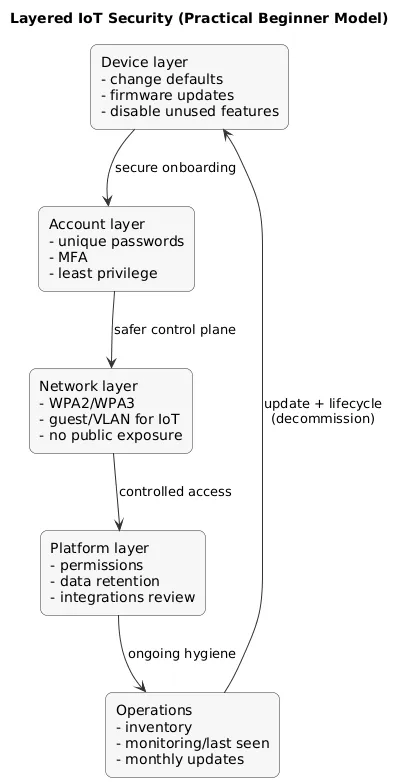
IoT risks usually fall into a few categories: insecure defaults, weak update practices, excessive data collection, and network exposure.
- Security vulnerabilities: outdated firmware, default passwords, exposed remote access.
- Privacy concerns: cameras/microphones, cloud recordings, analytics, behavioral data.
- Vendor lock-in: devices tied to one ecosystem or cloud service.
- Product abandonment: a discontinued cloud can degrade or disable devices.
- Complexity cost: more devices = more maintenance and more failure points.
Layered security model (diagram)
High-risk device categories
Cameras, doorbells, baby monitors, and door locks carry higher privacy and safety impact. Choose reputable vendors, keep firmware updated, and avoid exposing these devices directly to the public internet.
10. How to Choose & Set Up IoT Devices Safely
You do not need perfect security to be safer than most households. You need consistent habits. Use this as a practical buying and setup checklist.
Before you buy
- Value test: What problem does this solve? Would you still want it if the app disappeared?
- Vendor test: Is there a clear update policy and a readable privacy policy?
- Local control: Is there an offline/local mode or hub-based control?
- Standards: Does it support open standards or broad ecosystem compatibility?
During setup
- Change defaults: passwords, admin access, device names.
- MFA: enable it on the account that controls the home ecosystem.
- Update immediately: router/hub firmware + device firmware.
- Network hygiene: WPA2/WPA3, strong Wi-Fi password, disable unnecessary remote admin.
- Segmentation: guest network or VLAN for IoT when possible.
Simple inventory habit (helps a lot later)
Keep a list: device name, room/location, controlling app, connectivity type (Wi-Fi/Zigbee/Thread), and the reset procedure. It makes troubleshooting and migrations dramatically easier.
11. IoT for Developers: Where to Start
For developers, IoT is software engineering with additional constraints: unreliable networks, power limitations, and hardware behavior. A beginner-friendly learning path is to build end-to-end projects in layers.
- Read one sensor reliably (stable values, timestamps, basic error handling).
- Publish data (consistent topics/fields, reconnect with backoff).
- Visualize (dashboard + last seen/health tile).
- Add one automation/alert (threshold + cooldown + test procedure).
- Harden reliability (reboot tests, outage recovery, monitoring).
What makes an IoT project “portfolio-ready”
- A diagram of the architecture.
- Readable payload schema and naming.
- Monitoring: last seen, uptime, error counters.
- Documentation: wiring notes, setup, troubleshooting.
12. Future Trends: Edge, 5G & AI in IoT
- Edge computing: more decisions close to devices (lower latency, less bandwidth).
- On-device AI: small models for classification/anomaly detection near the sensor.
- Interoperability: continued push for cross-vendor compatibility in smart homes.
- Specialized networks: NB-IoT/LTE-M/LPWAN adoption for wide-area sensors.
- Privacy expectations: stronger user demand for transparency and local control.
13. Frequently Asked Questions About IoT
Is IoT only useful for big companies and factories?
No. Consumer IoT is everywhere: energy monitoring, safety sensors, smart thermostats, and convenience automations. Industrial IoT extends the same patterns to reliability and compliance at scale.
Will IoT increase my internet bill?
Most IoT devices use little data (telemetry and small messages). Cameras are the main exception because video can be bandwidth-heavy, especially with cloud uploads and high resolution.
What happens if the vendor shuts down?
Cloud-dependent devices can lose features or stop working. When possible, prefer devices that support local control, widely used ecosystems, or standards that reduce migration pain.
Should I put IoT on a separate network?
If you can, yes. Guest networks or VLANs reduce blast radius if a device is compromised. It’s not mandatory for small setups, but it’s a high-value safety improvement for camera-heavy or device-heavy homes.
14. Final Thoughts & Next Steps
IoT is most useful when it is intentional: measurable value, minimal complexity, and a maintenance routine. Start small, pick devices that solve a real problem, and treat connected devices like small computers: secure them, update them, and keep track of what you own.
If you want to go further, explore other resources in the Internet of Things guides on All Days Tech.
Key IoT terms (quick glossary)
- Internet of Things (IoT)
- A network of physical devices with sensors, software, and connectivity that collect and exchange data.
- Sensor
- A component that measures a physical signal (temperature, motion, light, etc.) and produces data.
- Actuator
- A component that performs an action in the physical world (relay, motor, valve, lock).
- Gateway / Hub
- A device that connects local protocols (Zigbee/Thread/Bluetooth) to IP networks and often runs automations.
- Telemetry vs events
- Telemetry is periodic measurement (every N seconds). Events are changes (motion detected, door opened).
- MQTT
- A lightweight publish/subscribe messaging pattern commonly used for IoT telemetry and events.
- Edge computing
- Processing data close to the device (on-device or on a local gateway) instead of sending everything to the cloud.
- Thread / Zigbee / Z-Wave
- Low-power mesh networks commonly used for sensors and smart home devices.
- Matter
- An interoperability standard for smart home devices that often runs over Thread or Wi-Fi/Ethernet.
- Firmware
- The software running on the device hardware; firmware updates patch bugs and security issues.
Worth reading
Recommended guides from the category.
