The most visible difference between Wi-Fi, Bluetooth Low Energy, and LoRaWAN is range.
It is not the most important difference.
A useful IoT connectivity decision must also account for:
payload size
message frequency
battery capacity
latency
uplink vs downlink traffic
device count
local infrastructure
smartphone interaction
cloud connectivity
installation environment
security
provisioning
future maintenance
A battery-powered soil sensor sending 20 bytes every hour has almost nothing in common with a security camera streaming video, even though both are called IoT devices.
The correct radio therefore follows from the workload.
Do not choose connectivity from maximum range alone
Longer range usually comes with a trade-off somewhere else: lower data rate, longer airtime, more limited downlink behavior, additional gateway infrastructure, or different power characteristics. Start by defining what the device must communicate and how often.
1. Start with the workload, not the radio
Before comparing protocols, describe one device in operational terms.
Example A: indoor environmental sensor
payload:
temperature + humidity

frequency:
every 5 minutes

power:
coin cell or small battery

location:
inside a building

user interaction:
smartphone commissioning useful

range:
one room or building area
BLE immediately becomes interesting.
Example B: powered industrial controller
payload:
telemetry + configuration + logs

frequency:
continuous

power:
mains

location:
factory with Wi-Fi coverage

latency:
low

cloud:
direct IP connectivity useful
Wi-Fi may be much simpler.
Example C: agricultural sensor
payload:
soil moisture + temperature

frequency:
every 30 minutes

power:
battery

location:
large outdoor area

coverage:
no local Wi-Fi near each sensor

data rate:
very low
LoRaWAN becomes a strong candidate.
Write the communication budget
For each device, record:
bytes per message
messages per hour
expected downlinks
maximum latency
battery target
required lifetime
coverage area
device count
This usually eliminates inappropriate technologies quickly.
2. Wi-Fi vs BLE vs LoRaWAN at a glance
IoT connectivity architecture comparison (diagram)
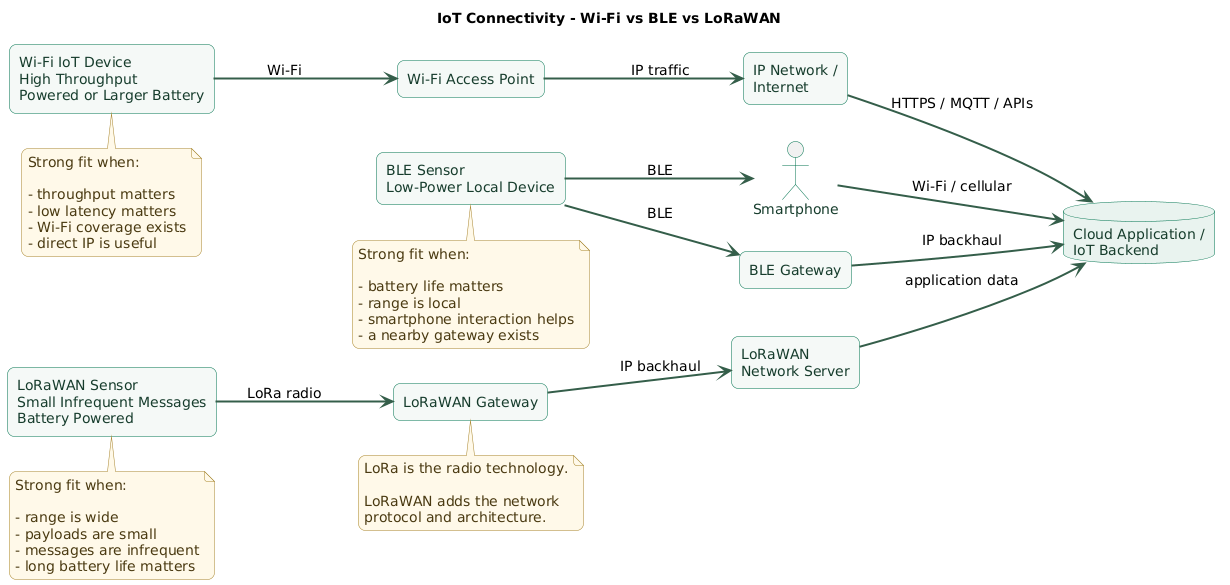
| Characteristic | Wi-Fi | Bluetooth LE | LoRaWAN |
|---|---|---|---|
| Typical design goal | High-throughput local IP connectivity | Low-power local device connectivity | Low-power wide-area telemetry |
| Throughput | High | Low to moderate | Low |
| Energy profile | Usually higher | Designed for low-energy operation | Designed for low-duty-cycle battery devices |
| Range profile | Local network | Short to extended local range | Wide area |
| Infrastructure | Wi-Fi access point | Phone, gateway, central device, or mesh infrastructure | LoRaWAN gateway plus network server |
| Direct Internet/IP | Natural fit | Usually through phone or gateway | Usually through gateway and network/application infrastructure |
| Smartphone support | Yes | Excellent | Usually not direct |
| Large firmware transfer | Good fit | Possible but slower | Usually poor fit |
| Small remote telemetry | Possible | Possible with local gateway | Strong fit |
These are architectural tendencies, not universal physical limits.
Actual performance depends heavily on hardware, PHY, antenna design, transmit power, interference, regulatory constraints, building materials, firmware, network configuration and environment.
3. When Wi-Fi is the practical choice
Wi-Fi is often dismissed as “too power hungry for IoT.”
That statement is too broad.
Wi-Fi is an excellent choice when the device has adequate power and needs the capabilities that Wi-Fi provides.
Use Wi-Fi when bandwidth matters
Examples:
- Security cameras.
- Video doorbells.
- Audio devices.
- Large firmware downloads.
- Gateways.
- Industrial equipment producing substantial data.
These workloads do not match LoRaWAN's low-data-rate design.
Direct IP connectivity is valuable
A Wi-Fi device can join an ordinary IP network:
device
  ↓
Wi-Fi access point
  ↓
LAN
  ↓
router
  ↓
Internet / backend
This makes standard protocols practical:
- HTTPS.
- MQTT over TCP/TLS.
- WebSockets.
- DNS.
- NTP.
Existing infrastructure reduces deployment cost
In a home, office, factory, or warehouse that already has suitable Wi-Fi, the network may already exist.
That can be operationally easier than installing a separate wireless gateway system.
Wi-Fi can support power-saving behavior
Modern Wi-Fi generations include mechanisms designed to reduce unnecessary active radio time, and individual products can sleep aggressively between transmissions.
Battery operation is therefore possible.
But battery life depends heavily on:
- Association behavior.
- Wake frequency.
- DHCP and network setup.
- TLS connection establishment.
- Payload size.
- Signal quality.
- Firmware power management.
Wi-Fi disadvantages
Wi-Fi becomes less attractive when:
- The device must run for years on a very small battery.
- There is no access point nearby.
- Coverage must extend across fields or remote infrastructure.
- The payload is only a few bytes per hour.
- Provisioning local network credentials at fleet scale is difficult.
Wi-Fi security
Use current Wi-Fi security mechanisms supported by the deployment environment, protect network credentials, and still secure the application protocol.
Joining a protected Wi-Fi network does not eliminate the need for:
TLS
device authentication
API authorization
credential rotation
secure firmware updates
4. When Bluetooth Low Energy fits better
Bluetooth Low Energy is designed around energy-efficient local wireless communication.
It is especially useful when a device communicates with:
- A smartphone.
- A tablet.
- A nearby gateway.
- Another embedded device.
Excellent smartphone compatibility
This is one of BLE's largest practical advantages.
A product can use a phone for:
discovery
pairing
commissioning
configuration
diagnostics
firmware update
local control
BLE does not inherently mean cloud connectivity
A common topology is:
BLE sensor
    ↓
phone or gateway
    ↓
Wi-Fi / Ethernet / cellular
    ↓
cloud
This gateway dependency must be included in the architecture.
BLE physical layer choices
Bluetooth LE supports several PHY options.
LE 1M
The standard baseline PHY, with a protocol data rate of 1 Mbit/s.
LE 2M
An optional higher-rate PHY with a 2 Mbit/s physical-layer data rate.
It can reduce airtime for supported devices, although application throughput is lower than the raw PHY rate because of protocol overhead.
LE Coded
An optional PHY that adds forward error correction.
It trades data rate for improved link robustness and increased effective range.
This makes the statement:
BLE is always very short rangemisleading.
BLE advertising
Devices can transmit small pieces of information through advertising without establishing a normal connected data session for every use case.
This works well for:
- Beacons.
- Presence information.
- Discovery.
- Compact sensor broadcasts.
BLE connections
Connected BLE communication allows structured bidirectional interaction through services and characteristics.
This works well for:
- Wearables.
- Medical peripherals.
- Smart locks.
- Configuration interfaces.
- Local control panels.
Bluetooth Mesh is a different architecture
Do not assume ordinary BLE communication automatically provides a mesh network.
Bluetooth Mesh adds:
- Mesh provisioning.
- Network and application keys.
- Relay behavior.
- Managed many-to-many communication.
It can be appropriate for building automation and dense device networks, but it has a different complexity profile from a simple BLE sensor and gateway connection.
5. When LoRaWAN becomes attractive
LoRaWAN targets low-power wide-area networks.
It is well suited to devices that send relatively small amounts of data across distances where deploying Wi-Fi access points near every sensor would be impractical.
Typical architecture
end device
    ↓ LoRa radio
gateway
    ↓ IP backhaul
network server
    ↓
application
Multiple gateways may receive the same uplink. The network infrastructure coordinates processing rather than devices forming Wi-Fi-style associations with one specific gateway.
LoRa and LoRaWAN are not the same thing
LoRa refers to the radio modulation technology.
LoRaWAN defines the network protocol and architecture used to connect end devices through gateways and network infrastructure.
Strong use cases
- Environmental monitoring.
- Agriculture.
- Utility metering.
- Tank-level sensors.
- Remote asset monitoring.
- Smart-city sensors.
- Industrial telemetry with small payloads.
Do not use LoRaWAN as low-speed Wi-Fi
It is not designed for:
- Video.
- Audio streaming.
- Frequent large payloads.
- Large interactive file transfers.
- Chatty request-response protocols.
Regional parameters matter
LoRaWAN channel plans, frequencies, data rates, transmit power constraints and other radio parameters depend on the regulatory region.
A device configuration designed for one region should not simply be copied globally.
Always use the channel plan appropriate to the country or region where the product will operate.
Class A
Class A is the fundamental LoRaWAN end-device behavior and is optimized around low-power operation.
After an uplink, the device opens receive opportunities for downlink.
device transmits
      ↓
RX1
      ↓
RX2
      ↓
sleep
This means a server cannot necessarily send an arbitrary immediate downlink whenever it wants.
Class B
Class B adds scheduled receive opportunities synchronized through network timing.
This improves downlink availability compared with Class A while consuming additional energy.
Class C
Class C devices keep receive capability available almost continuously except while transmitting.
This improves downlink latency but significantly changes the power profile, making it more suitable for devices with generous power availability.
6. Range is not one fixed number
Range, power, and throughput trade-off (diagram)
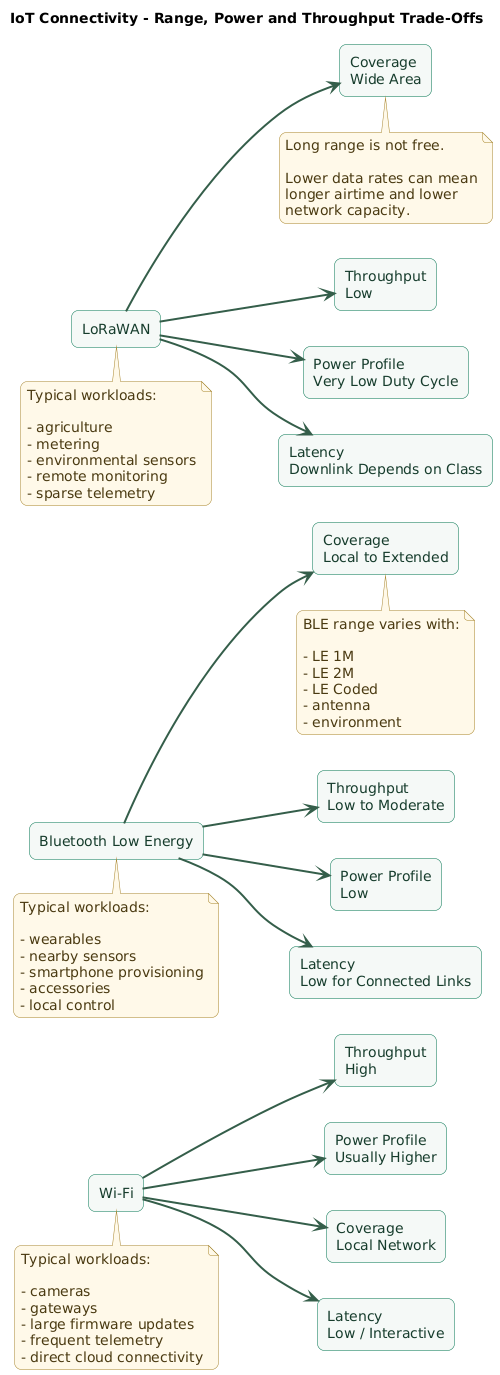
Marketing often reduces wireless technologies to:
Wi-Fi:
X meters

BLE:
Y meters

LoRaWAN:
Z kilometers
Real radio design does not work that cleanly.
Range depends on the link budget
Important factors include:
- Transmit power.
- Receiver sensitivity.
- Antenna gain.
- PHY configuration.
- Frequency.
- Interference.
- Obstacles.
- Device orientation.
- Regulatory limits.
Walls matter
Indoor RF propagation can be heavily affected by:
- Reinforced concrete.
- Metal shelving.
- Machinery.
- Elevator shafts.
- Water.
- People.
Outdoor line of sight is different
Long-range systems can perform dramatically better with:
elevated gateway
clear antenna placement
open terrain
than with:
gateway in basement
sensor inside metal cabinet
dense urban obstruction
Do a site survey or pilot
Do not derive a production coverage plan from one range number on a module datasheet.
Test:
- Actual enclosure.
- Actual antenna.
- Actual mounting position.
- Representative interference.
- Worst expected environment.
7. Battery life depends on the whole communication pattern
Radio technology matters, but average current is determined by the whole device lifecycle.
Think in phases:
sleep
  ↓
sensor measurement
  ↓
CPU processing
  ↓
radio wake
  ↓
transmit
  ↓
receive / acknowledgement
  ↓
radio off
  ↓
sleep
Duty cycle matters enormously
A device transmitting:
20 bytes every hourhas a completely different energy profile from one transmitting:
2 KB every secondFailed connections cost power
Weak RF conditions can cause:
- Retries.
- Longer airtime.
- Reassociation.
- Repeated scans.
- Long receive windows.
A theoretically efficient radio can perform poorly if the link is unreliable.
Wi-Fi startup overhead can matter
A deeply sleeping Wi-Fi sensor may need to:
wake
join network
obtain network state
establish secure connection
transmit
close
sleep
Optimized implementations can reduce this cost, but it must be measured on the real hardware.
BLE can remain very efficient for local interaction
Advertising intervals, connection intervals, PHY choice, transmit power and packet frequency strongly influence power use.
LoRaWAN airtime matters
Long-range configurations can increase time on air.
That affects:
- Battery energy.
- Network capacity.
- Regional regulatory constraints.
Adaptive data rate and careful payload design can therefore matter greatly in appropriate LoRaWAN deployments.
Measure energy per useful transaction
Instead of comparing only:
radio active currentmeasure:
energy required to deliver
one useful sensor update
successfully
That captures wake-up, retries, acknowledgements and connection overhead.
8. Uplink, downlink, and latency change the decision
IoT traffic is not always symmetric.
Telemetry-heavy sensor
device → cloud
device → cloud
device → cloud

rare cloud → device
LoRaWAN Class A can fit this pattern well.
Interactive controller
app → device
device → app
app → device
device → app
Wi-Fi or connected BLE may provide a more natural interaction model.
Immediate command requirements matter
Suppose a device must receive:
unlock door nowversus:
update reporting interval
the next time the sensor checks in
Those are different downlink requirements.
LoRaWAN Class A changes server-initiated timing
The server normally waits for receive opportunities associated with device uplinks.
If low-latency downlink is central to the product, include that requirement before choosing Class A purely for battery life.
BLE depends on local connectivity
A smartphone-controlled lock can respond quickly while the phone is nearby.
Remote Internet control requires another path:
cloud
  ↓
gateway
  ↓
BLE
  ↓
lock
Wi-Fi naturally supports bidirectional IP sessions
This makes it convenient for devices requiring frequent server communication, persistent connections, MQTT, or interactive APIs.
9. Compare the security and provisioning model
Connectivity is not only about radio packets.
Ask:
How does the device obtain identity?
How is it commissioned?
How are credentials stored?
How are credentials rotated?
How is traffic encrypted?
How is a lost device revoked?
Wi-Fi provisioning
The device needs access to the local network.
Possible provisioning methods include:
- Mobile application.
- Temporary access point.
- BLE-assisted onboarding.
- Enterprise device provisioning.
Fleet-wide use of one shared Wi-Fi password may create an operational problem when the credential must be changed.
BLE pairing and application security
BLE provides security mechanisms including authenticated pairing and encrypted links, but the selected pairing mode matters.
A product should consider:
- Protection against unauthorized pairing.
- User confirmation.
- Device identity.
- Credential storage.
- Re-pairing and reset procedures.
Do not assume “Bluetooth is encrypted” means the entire product security model is solved.
LoRaWAN device identity and keys
LoRaWAN deployments use cryptographic device credentials and activation procedures.
Protect device-specific root keys and avoid manufacturing processes that make one leaked credential compromise an entire fleet.
Gateway trust boundary
A gateway is infrastructure.
It still requires:
- Secure management.
- Software updates.
- Protected backhaul.
- Monitoring.
- Physical security where appropriate.
Application security remains necessary
Whatever radio you choose, secure:
firmware updates
device identity
backend APIs
authorization
secret storage
logging
credential rotation
10. Consider fleet scale and infrastructure
Ten devices and ten thousand devices create different operational problems.
Wi-Fi fleet questions
- Can the access points support the device density?
- Who owns the network?
- How are credentials distributed?
- What happens when SSIDs or credentials change?
- How much airtime do devices consume?
BLE fleet questions
- How many devices can each gateway handle?
- Will devices advertise or maintain connections?
- How often must gateways scan?
- Does the environment already have 2.4 GHz interference?
- How are devices provisioned and identified?
LoRaWAN fleet questions
- How many devices share gateway coverage?
- How frequently does each device transmit?
- Which data rates are expected?
- How much airtime will the fleet consume?
- How much downlink traffic is required?
- Is gateway placement sufficient?
Gateway economics matter
A LoRaWAN sensor may be inexpensive per device, but a private deployment also needs adequate gateway coverage.
BLE sensors may require local gateways when smartphones are not reliably present.
Wi-Fi may reuse existing infrastructure but may require access-point upgrades when device density becomes large.
Managed network vs private infrastructure
For LoRaWAN, determine whether you will use:
public / managed network

or

private gateways
+
private or managed network server
The operational responsibility differs significantly.
11. Hybrid designs are often the best answer
Real IoT systems frequently combine radios because different parts of the system have different constraints.
BLE + Wi-Fi
battery sensors
    ↓ BLE
local gateway
    ↓ Wi-Fi
cloud
Sensors remain simple and energy efficient while the powered gateway handles Internet connectivity.
BLE for provisioning + Wi-Fi for normal operation
phone
  ↓ BLE
new device

phone sends:
Wi-Fi configuration

device
  ↓ Wi-Fi
cloud
This avoids requiring the user to interact with a temporary device access point.
LoRaWAN + cellular or Ethernet gateway backhaul
remote sensors
   ↓ LoRaWAN
gateway
   ↓ cellular / Ethernet
network server
   ↓
application
The end devices get wide-area low-power radio while the gateway handles Internet backhaul.
BLE + LoRaWAN
Some field gateways can collect nearby BLE data and forward summarized information using a wide-area connection.
Hybrid designs introduce more components but can match each link to the correct communication requirement.
12. A practical connectivity decision framework
Wi-Fi vs BLE vs LoRaWAN decision tree (diagram)
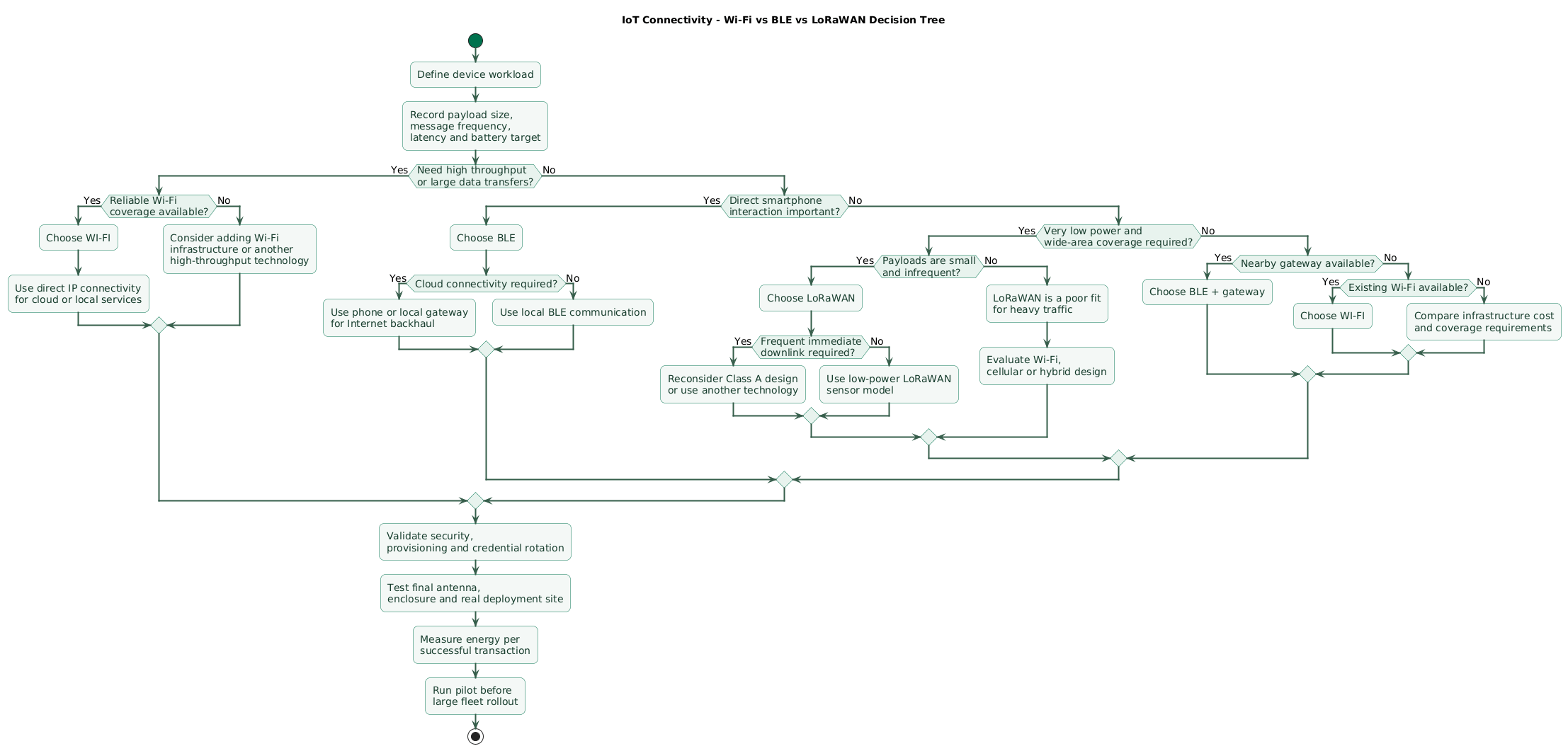
Question 1: do you need high throughput?
If yes:
video
audio
large files
frequent large telemetry
fast firmware transfer
Wi-Fi is usually the first technology to evaluate.
Question 2: is the device very power constrained?
If a tiny battery must last months or years, BLE or LoRaWAN may provide a better starting point.
Question 3: how far apart are the communicating endpoints?
If the device communicates with:
nearby phone
or
nearby gateway
BLE is attractive.
If sensors are distributed over a broad area with no nearby IP network, LoRaWAN becomes attractive.
Question 4: does the product need direct smartphone interaction?
If yes, BLE deserves serious consideration even when it is not the primary cloud transport.
Question 5: is an access point already available?
Existing reliable Wi-Fi can dramatically simplify deployment.
Question 6: how much downlink is required?
Frequent low-latency server-to-device control generally fits Wi-Fi or connected BLE more naturally than a deeply sleeping LoRaWAN Class A sensor.
Question 7: can you install gateways?
BLE and LoRaWAN cloud architectures usually depend on gateways or other intermediary devices.
Include:
- Hardware cost.
- Installation.
- Power.
- Backhaul.
- Monitoring.
- Replacement.
Question 8: what happens when the network changes?
Consider the future:
Wi-Fi password changed
gateway replaced
device moved
certificate expired
LoRaWAN keys rotated
phone app removed
site loses Internet
Operability over the device's lifetime matters as much as the first successful connection.
13. Copy/paste IoT connectivity checklist
IoT connectivity selection checklist

Application
- Define the device's primary job.
- Define where the device will be installed.
- Define whether the device is mobile.
- Define whether the device is indoors or outdoors.
- Define expected lifetime.
- Define expected device count.
- Define whether users interact directly with the device.
- Define whether a smartphone is available.
- Define whether a local gateway is acceptable.

Traffic
- Calculate typical payload size.
- Calculate maximum payload size.
- Define message frequency.
- Define peak message frequency.
- Define uplink volume.
- Define downlink volume.
- Define whether traffic is bursty.
- Define whether messages can be delayed.
- Define whether messages can be lost.
- Define whether duplicates are acceptable.
- Define whether large firmware transfers are required.

Latency
- Define maximum acceptable uplink latency.
- Define maximum acceptable downlink latency.
- Identify real-time control requirements.
- Identify emergency command requirements.
- Identify data that can wait until the next scheduled communication.
- Test latency under weak signal conditions.

Power
- Define power source.
- Define battery capacity.
- Define target battery life.
- Measure sleep current.
- Measure sensor current.
- Measure CPU processing current.
- Measure radio wake current.
- Measure transmit energy.
- Measure receive energy.
- Measure retry energy.
- Measure reconnect energy.
- Calculate average energy over a realistic day.
- Include battery self-discharge.
- Include temperature effects.
- Include battery aging.

Range
- Define minimum required range.
- Measure in the real environment.
- Test through representative walls.
- Test inside the final enclosure.
- Test final antenna.
- Test final PCB layout.
- Test device orientation.
- Test gateway antenna placement.
- Test worst expected installation location.
- Do not rely only on datasheet maximum range.

RF environment
- Measure interference where practical.
- Consider 2.4 GHz congestion for Wi-Fi and BLE.
- Consider building materials.
- Consider metal enclosures.
- Consider industrial machinery.
- Consider moving obstacles.
- Consider outdoor line of sight.
- Consider regulatory frequency restrictions.
- Run a site pilot.

Wi-Fi fit
- Prefer Wi-Fi when high throughput matters.
- Prefer Wi-Fi when devices already have reliable access-point coverage.
- Prefer Wi-Fi when direct IP connectivity simplifies the application.
- Prefer Wi-Fi for cameras.
- Prefer Wi-Fi for audio.
- Prefer Wi-Fi for large firmware downloads.
- Prefer Wi-Fi for powered gateways.
- Consider Wi-Fi for mains-powered industrial equipment.
- Measure battery life before using Wi-Fi for deeply constrained sensors.

Wi-Fi infrastructure
- Identify access points.
- Verify coverage.
- Verify device density.
- Verify DHCP capacity.
- Verify DNS.
- Verify Internet routing.
- Verify VLAN design.
- Verify firewall rules.
- Monitor AP health.
- Plan credential changes.
- Plan SSID changes.

Wi-Fi provisioning
- Decide how credentials reach the device.
- Consider BLE-assisted commissioning.
- Consider temporary AP commissioning.
- Consider enterprise provisioning.
- Avoid printing permanent fleet-wide secrets publicly.
- Support network reconfiguration.
- Support factory reset.
- Test onboarding after router replacement.

Wi-Fi security
- Use appropriate current Wi-Fi security.
- Protect network credentials.
- Use TLS for application traffic.
- Authenticate devices to the backend.
- Rotate application credentials.
- Verify server certificates.
- Secure firmware updates.
- Do not trust LAN membership as application authorization.

Wi-Fi power
- Measure association energy.
- Measure DHCP/network initialization.
- Measure DNS.
- Measure TLS handshake energy.
- Measure data transfer.
- Measure disconnect and sleep.
- Test weak signal.
- Test AP unavailable behavior.
- Avoid aggressive reconnect loops.
- Use appropriate power-saving features supported by hardware and network.

BLE fit
- Prefer BLE for smartphone interaction.
- Prefer BLE for local low-power sensors.
- Prefer BLE for wearables.
- Prefer BLE for accessories.
- Prefer BLE for local configuration.
- Prefer BLE for nearby gateway communication.
- Consider BLE advertising for compact broadcast state.
- Consider connected BLE for bidirectional control.

BLE PHY
- Confirm LE 1M support.
- Consider LE 2M for supported higher-rate links.
- Consider LE Coded when additional effective range is valuable.
- Understand LE Coded trades throughput for link robustness.
- Verify central and peripheral support the desired PHY.
- Test PHY behavior on actual hardware.

BLE advertising
- Choose advertising interval.
- Minimize payload where practical.
- Consider discovery latency.
- Consider battery impact.
- Avoid excessive advertisement frequency.
- Test phone discovery.
- Test crowded RF environments.
- Validate privacy requirements for identifiers.

BLE connections
- Define connection interval.
- Define supervision timeout.
- Define MTU behavior.
- Define notification frequency.
- Define characteristic permissions.
- Test disconnect and reconnect.
- Test multiple central devices if required.
- Measure power under realistic connection parameters.

BLE smartphone use
- Test Android devices.
- Test iOS devices.
- Test permissions.
- Test background behavior.
- Test Bluetooth disabled.
- Test location-related platform behavior where relevant.
- Test app termination.
- Test phone replacement.
- Avoid depending on undocumented operating-system behavior.

Bluetooth Mesh
- Do not assume ordinary BLE equals mesh.
- Evaluate mesh only when many-to-many networking solves a real problem.
- Understand provisioning.
- Understand network keys.
- Understand application keys.
- Understand relay behavior.
- Understand friendship and low-power behavior where used.
- Plan key rotation.
- Monitor mesh health.
- Test large network behavior.

LoRaWAN fit
- Prefer LoRaWAN for small, infrequent messages.
- Prefer LoRaWAN for wide-area sensor deployments.
- Prefer LoRaWAN for battery-powered remote telemetry.
- Consider LoRaWAN for metering.
- Consider LoRaWAN for agriculture.
- Consider LoRaWAN for environmental monitoring.
- Avoid LoRaWAN for video.
- Avoid LoRaWAN for audio streaming.
- Avoid LoRaWAN for frequent large file transfers.

LoRa vs LoRaWAN
- Understand LoRa is the radio modulation technology.
- Understand LoRaWAN is the network protocol and architecture.
- Do not use the names interchangeably when designing the system.
- Document protocol version.
- Document regional parameters version.
- Document network provider or network server.

LoRaWAN regions
- Select the correct regional channel plan.
- Verify legal frequency use.
- Verify transmit power limits.
- Verify duty-cycle or dwell-time requirements where applicable.
- Verify supported data rates.
- Configure gateways correctly.
- Configure end devices correctly.
- Do not copy EU settings to another region automatically.
- Review certification requirements for target markets.

LoRaWAN gateways
- Determine required gateway count.
- Perform coverage survey.
- Place antennas appropriately.
- Provide stable power.
- Provide IP backhaul.
- Secure management access.
- Monitor gateway availability.
- Monitor packet forwarding.
- Plan spare hardware.
- Protect outdoor equipment from weather and lightning as appropriate.

LoRaWAN network server
- Choose managed or self-hosted service.
- Configure tenants and applications.
- Protect administrative access.
- Monitor join failures.
- Monitor uplinks.
- Monitor downlinks.
- Monitor gateway connectivity.
- Monitor frame-counter problems.
- Back up configuration where required.
- Document disaster recovery.

LoRaWAN Class A
- Use for lowest-power default operation.
- Understand downlink follows uplink receive opportunities.
- Design application around delayed downlink where necessary.
- Avoid expecting arbitrary instant server-to-device messages.
- Tune reporting frequency carefully.
- Test receive windows.

LoRaWAN Class B
- Use when scheduled additional receive opportunities provide real value.
- Account for synchronization.
- Account for additional energy use.
- Verify device support.
- Verify network support.
- Test timing behavior.

LoRaWAN Class C
- Use when low downlink latency is important.
- Account for much higher receive energy.
- Prefer devices with adequate power.
- Test continuous receive behavior.
- Verify network configuration.

LoRaWAN payloads
- Keep payloads compact.
- Avoid verbose JSON on constrained links where unnecessary.
- Use efficient binary encoding when appropriate.
- Version payload formats.
- Include timestamps where needed.
- Include measurement units in the schema.
- Validate values on the backend.
- Design backward compatibility.

LoRaWAN airtime
- Calculate airtime.
- Minimize unnecessary transmissions.
- Minimize retries.
- Use appropriate data rates.
- Understand spreading-factor impact.
- Understand fleet-scale channel usage.
- Account for regional restrictions.
- Avoid chatty application protocols.

Downlink
- Estimate downlinks per device.
- Estimate fleet-wide downlink demand.
- Identify urgent commands.
- Identify non-urgent configuration.
- Avoid unnecessary acknowledgements.
- Avoid designing high-downlink applications around a low-power uplink-centric network.
- Test worst-case command latency.

Firmware updates
- Estimate firmware image size.
- Estimate transfer time.
- Estimate energy cost.
- Prefer Wi-Fi for frequent large updates.
- Evaluate BLE DFU where local update is acceptable.
- Treat LoRaWAN firmware distribution as a specialized design problem rather than assuming normal file transfer.
- Maintain a secure recovery path.

Reliability
- Define acceptable packet loss.
- Define retry behavior.
- Define buffering.
- Define offline behavior.
- Define local fallback.
- Define gateway failure behavior.
- Define AP failure behavior.
- Define cloud outage behavior.
- Test real outages.

Security
- Give devices unique identities.
- Avoid fleet-wide shared credentials where practical.
- Protect keys in manufacturing.
- Protect credentials at rest.
- Encrypt traffic appropriately.
- Authenticate backend endpoints.
- Authorize device operations.
- Rotate credentials.
- Revoke lost devices.
- Secure firmware updates.
- Monitor authentication failures.

Provisioning
- Define factory provisioning.
- Define field activation.
- Define ownership transfer.
- Define replacement device process.
- Define lost-device response.
- Define factory reset.
- Define credential recovery.
- Automate fleet provisioning where scale requires it.

Fleet management
- Track device serial number.
- Track radio identifier.
- Track firmware version.
- Track connectivity technology.
- Track credential status.
- Track last seen.
- Track battery status.
- Track gateway association or coverage information where useful.
- Track configuration version.
- Support remote diagnostics.

Scaling
- Calculate device density.
- Calculate messages per hour.
- Calculate total airtime.
- Calculate gateway load.
- Calculate AP load.
- Calculate BLE gateway scanning load.
- Calculate backend ingestion.
- Model peak reconnect events.
- Model firmware update campaigns.
- Test a representative fleet size.

Cost
- Calculate device radio cost.
- Calculate certification cost.
- Calculate antenna cost.
- Calculate gateway cost.
- Calculate access-point upgrades.
- Calculate cloud/network-server fees.
- Calculate backhaul cost.
- Calculate installation labor.
- Calculate battery replacement labor.
- Calculate field maintenance.
- Compare total lifecycle cost rather than radio-module price.

Hybrid architecture
- Consider BLE + Wi-Fi.
- Consider BLE + Ethernet gateway.
- Consider BLE + cellular gateway.
- Consider LoRaWAN + cellular backhaul.
- Consider LoRaWAN + Ethernet backhaul.
- Consider BLE provisioning for Wi-Fi devices.
- Use each technology for the link where it provides the best trade-off.
- Avoid hybrid complexity without a concrete benefit.

BLE + Wi-Fi gateway
- Keep sensors low power.
- Power the gateway continuously.
- Aggregate sensor data.
- Buffer during Internet outage.
- Secure BLE side.
- Secure Wi-Fi/cloud side.
- Monitor gateway health.
- Support gateway replacement.

LoRaWAN gateway backhaul
- Choose Ethernet where available.
- Choose cellular where remote.
- Monitor backhaul.
- Buffer or recover appropriately during outages.
- Protect gateway credentials.
- Maintain secure remote management.

Site pilot
- Build production-like prototypes.
- Use final enclosure.
- Use final antenna.
- Deploy at representative locations.
- Measure RSSI and other useful link indicators.
- Measure delivery success.
- Measure latency.
- Measure retries.
- Measure battery consumption.
- Run for long enough to see environmental variation.

Decision: Wi-Fi
- Choose when throughput is high.
- Choose when power is available.
- Choose when access points already provide adequate coverage.
- Choose when direct IP simplifies the system.
- Choose when firmware updates are large.
- Choose when low-latency bidirectional traffic is important.

Decision: BLE
- Choose when smartphone interaction matters.
- Choose when range is local.
- Choose for low-power peripherals.
- Choose for nearby gateways.
- Choose for wearables.
- Choose when local commissioning is important.
- Consider LE Coded when extra effective range helps.

Decision: LoRaWAN
- Choose when range is wide.
- Choose when payloads are small.
- Choose when messages are infrequent.
- Choose when battery lifetime is critical.
- Choose when installing Wi-Fi near every sensor is impractical.
- Choose for geographically distributed sensors.
- Confirm downlink requirements remain compatible.

Avoid Wi-Fi when
- Tiny batteries must last for years and communication is minimal.
- No Wi-Fi infrastructure exists.
- Coverage would require many access points solely for sparse sensors.
- High throughput is unnecessary and power cost dominates.

Avoid BLE when
- Direct long-distance cloud connectivity is required without gateways.
- Large continuous data transfers dominate.
- Reliable local gateway or phone presence cannot be guaranteed.
- The required topology exceeds what the selected BLE architecture supports.

Avoid LoRaWAN when
- Video is required.
- Audio streaming is required.
- Large frequent payloads are required.
- Immediate frequent downlinks are central to the product.
- Interactive high-throughput sessions are required.

Final review
- What is the payload size?
- How often does the device transmit?
- How often does the server transmit to the device?
- What is the maximum acceptable latency?
- How much battery is available?
- How long must the battery last?
- What range is actually required?
- What obstacles exist?
- Is Wi-Fi infrastructure already available?
- Is a smartphone part of the user experience?
- Can gateways be installed?
- Does direct IP connectivity matter?
- Are firmware images large?
- Are messages small and infrequent?
- Which regional radio rules apply?
- How will devices be provisioned?
- How will credentials be rotated?
- How will a compromised device be revoked?
- How will connectivity be monitored?
- What happens when the gateway or access point fails?
- Has the design been tested in the real deployment environment?
- Would a hybrid architecture reduce total system cost or risk?
14. FAQ
Should I use Wi-Fi, BLE, or LoRaWAN for an IoT sensor?
Use Wi-Fi when substantial throughput, low-latency IP connectivity, or large data transfers matter and adequate power and coverage are available. BLE is often better for local battery-powered devices and smartphone or gateway interaction. LoRaWAN is often better for small, infrequent telemetry from devices spread over much larger areas.
Which one has the longest range?
LoRaWAN is designed for wide-area connectivity and generally targets a much larger coverage footprint than conventional Wi-Fi or ordinary BLE links. Exact distance should not be treated as a fixed protocol number because antenna design, PHY settings, obstructions, interference, transmit power and gateway placement can dramatically change real performance.
Which technology gives the best battery life?
There is no universal answer. BLE and LoRaWAN are commonly used for highly constrained battery devices, but actual battery life depends on message frequency, payload size, radio configuration, retries, receive behavior, signal quality, sleep current, sensors and firmware. Measure the complete device workload.
Can LoRaWAN replace Wi-Fi?
Usually not for applications requiring substantial bandwidth. LoRaWAN is designed around relatively small IoT messages over wide areas and low-power operation, while Wi-Fi is designed for much higher data rates and normal local IP networking.
Is BLE only short range?
BLE is primarily a local connectivity technology, but effective range varies significantly. Bluetooth LE includes the optional LE Coded PHY, which uses forward error correction to improve effective range at the cost of lower data rate.
Is Bluetooth Mesh the same as BLE?
No. Bluetooth Mesh is a separate mesh-networking architecture built on Bluetooth Low Energy technology. A normal BLE peripheral connected to a smartphone or gateway is not automatically part of a Bluetooth Mesh network.
Can I combine Wi-Fi and BLE in one device?
Yes. A common design uses BLE for smartphone discovery and provisioning, then Wi-Fi for normal cloud connectivity. Gateways can also collect BLE sensor data and forward it over Wi-Fi, Ethernet, or cellular networks.
Key terms (quick glossary)
- Wi-Fi
- A family of wireless local-area networking technologies commonly used to provide high-throughput IP connectivity through an access point.
- Bluetooth Low Energy
- The low-energy portion of Bluetooth technology designed for efficient local wireless communication between embedded devices, phones, peripherals and gateways.
- BLE
- Common abbreviation for Bluetooth Low Energy.
- LE 1M
- The mandatory baseline Bluetooth LE PHY using a protocol physical-layer data rate of 1 Mbit/s.
- LE 2M
- An optional Bluetooth LE PHY providing a 2 Mbit/s physical-layer data rate for devices that support it.
- LE Coded
- An optional Bluetooth LE PHY using forward error correction to improve effective communication range and robustness while reducing data rate.
- Bluetooth Mesh
- A many-to-many network architecture built using Bluetooth LE technology and designed for managed device networks such as building automation.
- LoRa
- A long-range radio modulation technology used by systems including LoRaWAN.
- LoRaWAN
- A low-power wide-area networking protocol and architecture that connects end devices through radio gateways and network-server infrastructure.
- LPWAN
- Low-Power Wide-Area Network, a category of networking designed for power-constrained devices communicating relatively small amounts of data across wide areas.
- Gateway
- Infrastructure that connects one type of device network to another network, such as BLE sensors to an IP backend or LoRaWAN radio traffic to network-server infrastructure.
- PHY
- Physical-layer configuration describing how radio symbols are transmitted and received, including parameters affecting data rate, robustness and range.
- Uplink
- Communication from an IoT end device toward a gateway, network, or backend.
- Downlink
- Communication from the network or application toward an IoT end device.
- LoRaWAN Class A
- The mandatory low-power LoRaWAN device class in which receive opportunities follow uplink transmissions.
- LoRaWAN Class B
- A LoRaWAN operating class providing additional scheduled receive opportunities through network synchronization.
- LoRaWAN Class C
- A LoRaWAN class providing nearly continuous receive availability except while transmitting, improving downlink responsiveness at greater energy cost.
- Link budget
- The accounting of transmitter power, antenna gains, path losses and receiver sensitivity used to estimate whether a radio link can operate reliably.
- Duty cycle
- The proportion of time a radio or device spends transmitting or otherwise operating in a particular active state.
- Backhaul
- The connection carrying traffic from a gateway or local network toward wider network infrastructure, commonly using Ethernet, Wi-Fi, fiber, or cellular connectivity.
Worth reading
Recommended guides from the category.
