“Zero downtime” sounds like a property of a deployment command.
In practice, it is a property of the entire application architecture.
Starting a new container before stopping the old one is necessary, but it is not sufficient. The new instance must be ready before traffic reaches it. The old instance must stop receiving new requests before it exits. Existing requests need time to finish. Database changes must work with both application versions during the transition, and the previous release must remain deployable if rollback becomes necessary.
Two of the most practical deployment models for small web applications are blue-green and rolling.
Zero downtime means overlapping healthy capacity
At some point during the release, the old application must still be able to serve users while the replacement becomes healthy. A single instance that must stop before its replacement can start cannot provide a true zero-downtime rollout without temporarily adding capacity.
1. What zero downtime actually requires
A safe zero-downtime deployment generally requires six capabilities.
1. More than one serving opportunity
Either:
- Two complete environments coexist.
- Several replicas are replaced gradually.
- A temporary replacement instance is started before the old one stops.
2. Traffic control
A load balancer, reverse proxy, orchestrator, or platform router needs to decide which healthy instance receives each new request.
3. Readiness checks
“Process exists” is weaker than:
application started
configuration loaded
required local initialization finished
server socket listening
instance ready to accept requests
4. Graceful termination
Removing an instance should not abruptly terminate requests that are still being processed.
5. Cross-version compatibility
During a rollout, an old instance and a new instance may both communicate with:
- The same database.
- The same cache.
- The same queues.
- The same API clients.
6. Deployment observability
The deployment process must know whether the new version is actually healthy.
A successful container start does not prove the release is safe.
2. How blue-green deployment works
Blue-green deployment traffic switch (diagram)
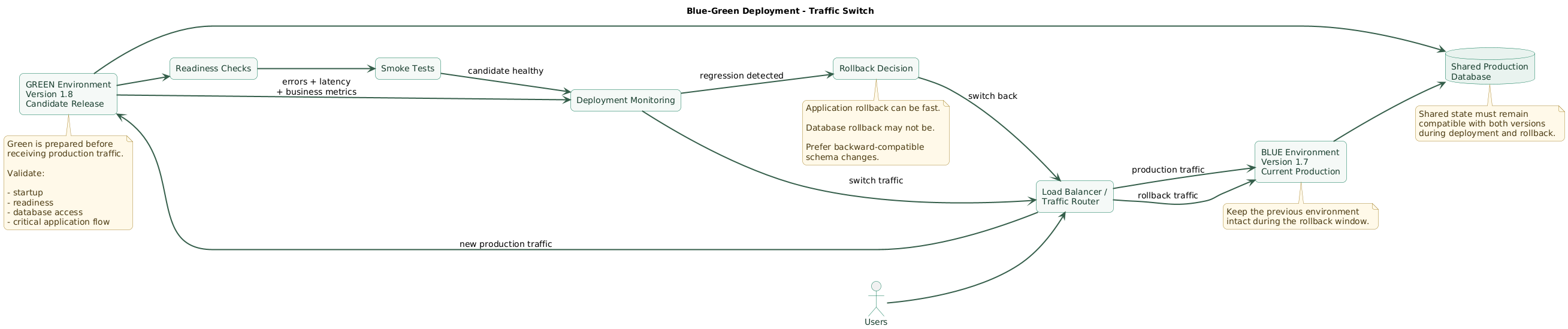
Blue-green deployment maintains two application environments.
Suppose blue currently serves production:
users
  ↓
load balancer
  ↓
BLUE
version 1.7
A new release is deployed independently to green:
BLUE
version 1.7
serving production

GREEN
version 1.8
starting + validation
Green can receive:
- Startup checks.
- Readiness checks.
- Internal smoke tests.
- Database connectivity checks.
- Selected synthetic transactions.
Once green is considered healthy, the traffic target changes:
before:
users → BLUE

after:
users → GREEN
The old environment remains available temporarily
Blue can remain intact for a rollback window instead of being destroyed immediately.
If production monitoring detects a major regression:
GREEN error rate rises
        ↓
stop deployment
        ↓
route traffic back to BLUE
Why blue-green is attractive
The old application environment is not modified while the new release is prepared.
This provides strong separation between:
currently proven environment

and

candidate production environment
Application rollback can therefore be conceptually simple.
The main cost is capacity
For a period, both environments exist.
If production normally needs:
4 application instancesa full blue-green deployment may temporarily require:
4 blue instances
+
4 green instances
Small applications may find that perfectly affordable. Resource-heavy workloads may not.
Blue-green does not automatically duplicate state
Both environments often still share:
- The production database.
- Object storage.
- Queues.
- External APIs.
Application rollback can therefore be fast while database rollback remains difficult.
3. How rolling deployment works
Rolling deployment batch flow (diagram)
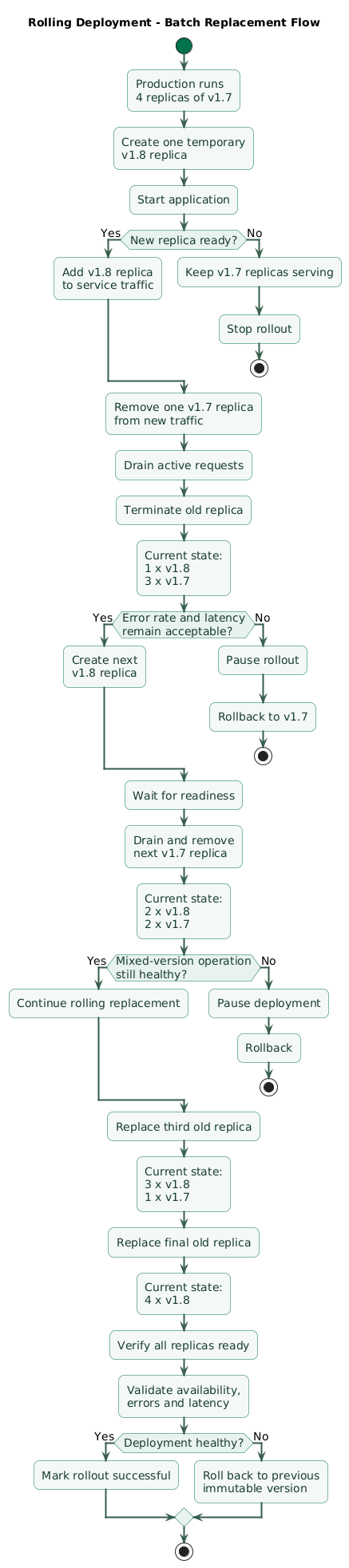
Rolling deployment replaces application instances gradually.
Start with:
instance A → v1.7
instance B → v1.7
instance C → v1.7
instance D → v1.7
During the rollout:
instance A → v1.8
instance B → v1.7
instance C → v1.7
instance D → v1.7
Later:
instance A → v1.8
instance B → v1.8
instance C → v1.8
instance D → v1.7
Finally:
instance A → v1.8
instance B → v1.8
instance C → v1.8
instance D → v1.8
Mixed versions are part of the design
The important implication is that version 1.7 and version 1.8 may both serve production traffic during the rollout.
Your application must tolerate that overlap.
Kubernetes RollingUpdate
Kubernetes Deployments use RollingUpdate by default and
expose two important controls:
maxUnavailable— how many desired replicas may be unavailable.maxSurge— how many temporary additional replicas may exist.
For a small application:
apiVersion: apps/v1
kind: Deployment
metadata:
  name: web
spec:
  replicas: 4

  strategy:
    type: RollingUpdate
    rollingUpdate:
      maxUnavailable: 0
      maxSurge: 1

  template:
    spec:
      containers:
        - name: web
          image: registry.example.com/web:8f21c36

          readinessProbe:
            httpGet:
              path: /ready
              port: 8080
            periodSeconds: 5
            failureThreshold: 3

      terminationGracePeriodSeconds: 30
This style allows a replacement Pod to be created before reducing the available old population.
Kubernetes currently defaults both maxUnavailable and
maxSurge to 25% when they are not explicitly configured, so
small teams should understand the resulting behavior rather than relying
blindly on defaults. :contentReference[oaicite:0]{index=0}
Rolling deployment uses less duplicate capacity
Unlike full blue-green, the platform usually needs only limited temporary surge capacity.
That can make rolling deployment the natural choice when:
- The app already has several replicas.
- Instances are interchangeable.
- Old and new versions can coexist safely.
4. Blue-green vs rolling: practical tradeoffs
| Consideration | Blue-green | Rolling |
|---|---|---|
| Deployment model | Prepare a parallel environment, then switch traffic | Gradually replace the existing replica population |
| Temporary capacity | Often close to a second full environment | Usually limited surge capacity |
| Version overlap | Mainly around validation and traffic transition | Expected throughout the rollout |
| Application rollback | Often fast traffic reversal | Requires rolling replicas back to previous version |
| Environment isolation | Strong | Lower; rollout happens inside the active replica set |
| Infrastructure cost | Usually higher during deployment | Usually lower |
| Mixed-version compatibility | Still important | Essential |
| Small multi-replica service | Good when rollback isolation matters | Often simplest default |
Managed platforms implement these tradeoffs differently. For example, AWS Elastic Beanstalk documents rolling deployments as batch replacement and blue-green as a separate-environment model, with different capacity and rollback characteristics. :contentReference[oaicite:1]{index=1}
5. Readiness, draining, and graceful shutdown
Most “zero-downtime deployment” bugs happen at the boundary between starting and stopping instances.
Do not route traffic immediately after process start
A new application may need to:
- Load configuration.
- Initialize connection pools.
- Load certificates.
- Warm important local data.
- Start its HTTP listener.
It should not receive production requests before it is actually ready.
Readiness is different from liveness
Readiness answers:
Should this instance receive traffic?Liveness answers something closer to:
Should the runtime consider
this process unhealthy enough
to restart it?
Kubernetes removes an unready Pod from normal Service traffic while leaving the container running, which is why readiness is particularly important during rolling replacement. :contentReference[oaicite:2]{index=2}
Keep readiness checks representative but cheap
A readiness endpoint should prove that the process can serve requests without becoming a distributed health test for every dependency.
Be cautious about declaring an instance unready because one optional external service is briefly unavailable; this can remove otherwise usable capacity during an upstream incident.
Stop new traffic before terminating
A safe removal sequence looks like:
mark instance terminating
        ↓
remove from normal new traffic
        ↓
allow in-flight requests to finish
        ↓
close workers / connections
        ↓
exit process
Current Kubernetes endpoint semantics expose terminating endpoints and mark terminating Pod endpoints unready for normal traffic during shutdown. :contentReference[oaicite:3]{index=3}
Handle SIGTERM
A Node.js application might use:
const server = app.listen(PORT);

process.on("SIGTERM", () => {
  server.close((error) => {
    if (error) {
      process.exit(1);
    }

    process.exit(0);
  });
});
Real applications may additionally need to:
- Stop accepting queue jobs.
- Finish active jobs.
- Close database pools.
- Flush telemetry.
- Close WebSocket connections deliberately.
Set a realistic termination grace period
If normal requests can take 20 seconds but the runtime kills the process after 5 seconds, the deployment will still interrupt work.
Choose the grace period based on actual request and worker behavior rather than an arbitrary number.
6. Make database changes backward-compatible
Database migrations are frequently the hardest part of zero-downtime deployment.
Consider version 1:
users.full_nameVersion 2 wants:
users.first_name
users.last_name
Unsafe migration
DROP COLUMN full_name;
ADD first_name;
ADD last_name;
If an old application instance is still running, it may immediately fail because the column it expects disappeared.
Use expand-migrate-contract
A safer sequence is:
Release A
--------
1. Add first_name.
2. Add last_name.
3. Keep full_name.
4. Update application to tolerate both schemas.

Data migration
--------------
5. Backfill new columns.
6. Verify data.

Release B
---------
7. Read new columns.
8. Stop depending on full_name.

Later cleanup
-------------
9. Remove full_name only after
   no deployed version needs it.
The database must support the rollback version
This rule is useful:
database after migration
must remain compatible with:

- new application version
- previous application version

for the intended rollback window
Separate schema expansion from application activation
Do not bundle every database operation into one destructive release step.
A practical sequence is:
expand schema
    ↓
deploy compatible application
    ↓
migrate / backfill data
    ↓
verify
    ↓
later contract old schema
Be careful with long-running migrations
Large table rewrites or locking operations can create downtime even if the application rollout itself is perfect.
Test migration behavior using production-like volume and understand the database engine's locking and online schema-change behavior before production.
7. Sessions, workers, caches, and long-lived connections
User sessions
If session state lives only in one application process:
user → instance A
session stored only in RAM

deployment removes instance A
        ↓
session disappears
Prefer stateless session tokens or shared session storage when seamless instance replacement matters.
Shared caches
New and old versions may interpret cached objects differently.
Options include:
- Backward-compatible cache formats.
- Versioned cache keys.
- Safe cache invalidation during release.
Background workers
Workers require their own draining model.
A safe worker termination often means:
stop taking new job
        ↓
finish current job
        ↓
acknowledge / commit result
        ↓
close connections
        ↓
exit
Terminating halfway through a non-idempotent job can create duplicate or partially applied work.
Message compatibility
During a rolling deployment:
worker v1
worker v2
may consume messages from the same queue.
Avoid changing message formats in a way that only the new version understands until old consumers are gone.
WebSockets and streaming requests
Long-lived connections may continue for minutes or hours.
Decide whether the deployment should:
- Allow existing connections to drain.
- Close them with a controlled reconnect path.
- Use a maximum connection lifetime.
“Wait forever” is usually not a practical termination strategy.
Static assets
A user can load HTML from the old version and request JavaScript after the switch.
Content-hashed asset names help:
app.a281f9.js
app.73ce12.js
Keep previous immutable assets available long enough that pages loaded immediately before deployment continue working.
8. Design rollback before deployment
Rollback is not:
figure out how to deploy
the previous version
after production breaks
It should already be part of the release design.
Deploy immutable artifacts
Prefer:
registry.example.com/app:8f21c36or an exact digest:
registry.example.com/app@sha256:<digest>Rollback should use an artifact that previously passed your deployment pipeline.
Do not rebuild the previous commit during the outage
A rebuild can produce different dependencies or base-image content.
Promote and retain tested artifacts so the rollback target is known.
Blue-green rollback
If blue remains intact:
traffic → GREEN v1.8

regression detected

traffic → BLUE v1.7
This is one of blue-green's strongest operational advantages.
Rolling rollback
A rolling platform needs to replace the new replicas with the previous version again.
In Kubernetes:
kubectl rollout history deployment/web

kubectl rollout undo deployment/web
The Deployment controller manages revisions and supports rollback of the deployment state. The rollback is still subject to the same runtime and database compatibility constraints as any other rollout. :contentReference[oaicite:4]{index=4}
Application rollback is not database rollback
This distinction is critical.
application:
easy to switch back

database:
may already contain new schema
and new-format data
Prefer database changes that make application rollback possible without attempting emergency destructive schema reversal.
9. Monitor the deployment itself
A deployment is an experiment against production.
Compare the new release against the previous baseline.
Availability
Is the public service reachable?Error rate
Did 5xx responses increase?Latency
Did p95 or p99 latency regress?Resource usage
CPU
memory
connection pools
queue depth
Business-level signals
successful login
successful checkout
jobs completed
emails dispatched
payments confirmed
Annotate deployments
Add deployment events to dashboards:
14:31 release 8f21c36 starts
14:33 first new instances ready
14:37 100% new version
14:39 error-rate alert
Correlation becomes much easier.
Define rollback thresholds before release
Example:
rollback if:

- readiness repeatedly fails
- error ratio exceeds 5% for 5 minutes
- p95 latency doubles
- critical checkout smoke test fails
- unexpected database errors appear
The actual thresholds must match your service, but deciding them before the rollout reduces debate during an incident.
10. Which strategy should a small team choose?
Zero-downtime deployment decision tree (diagram)
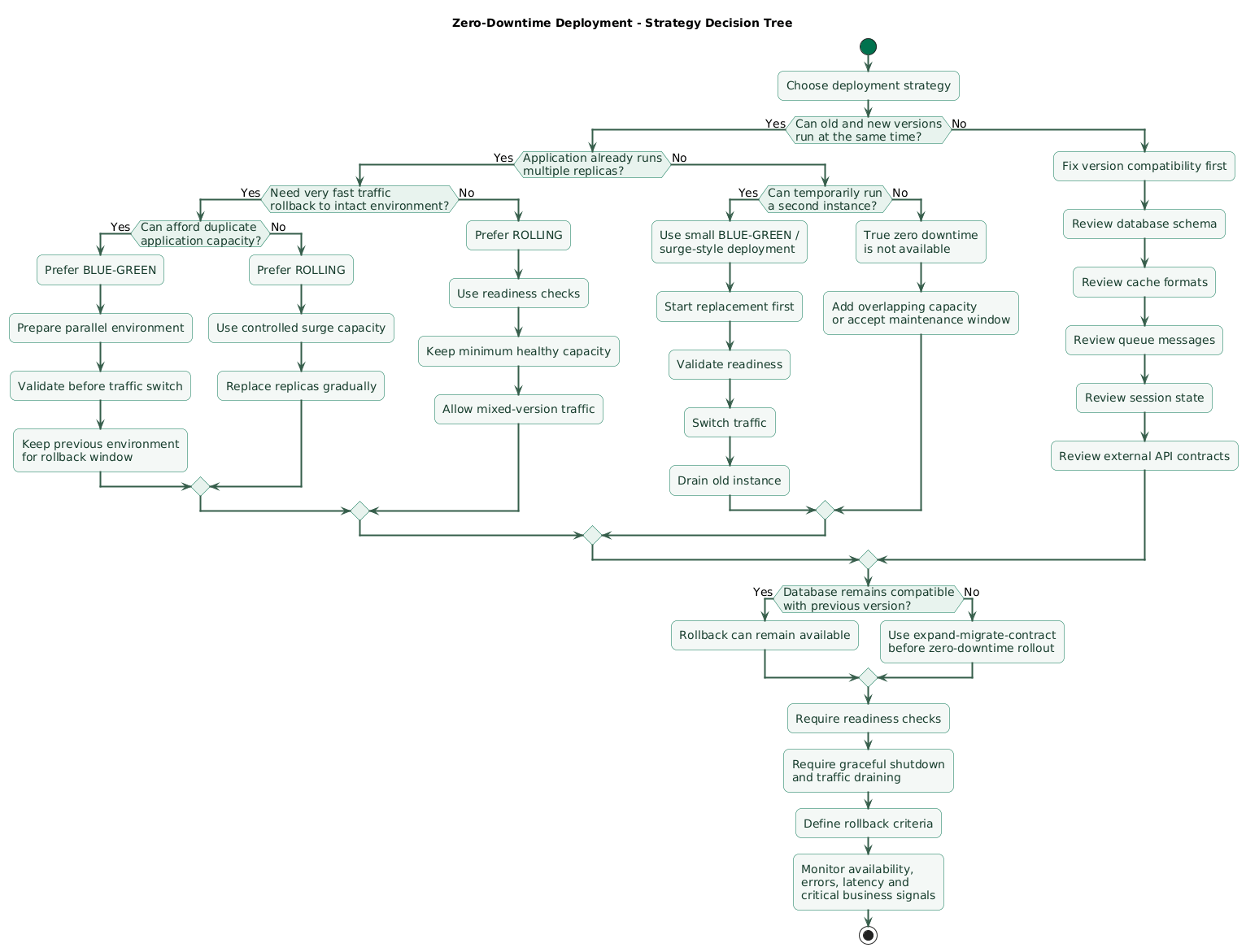
Choose rolling when
- You already run several replicas.
- Your platform supports safe rolling replacement.
- Old and new versions can serve simultaneously.
- You want modest temporary capacity overhead.
- Deployments are frequent and incremental.
Choose blue-green when
- You can afford parallel environments.
- You want strong isolation before the switch.
- You value very fast application traffic rollback.
- Environment-level changes need validation together.
- A clear production cutover point simplifies operations.
Single-instance applications
If one process currently serves all traffic, neither strategy works magically without temporary additional capacity.
A practical first improvement may simply be:
normally:
1 instance

during deployment:
old instance + temporary new instance

after validation:
route to new
drain old
remove old
That is effectively a very small blue-green or surge-based deployment.
Do not choose based only on tooling fashion
The best deployment strategy is the simplest one your team can understand, test, monitor, and roll back reliably.
A complicated orchestration system does not compensate for incompatible schema changes or broken graceful shutdown.
11. A practical zero-downtime release workflow
Step 1: build once
commit
  ↓
CI build
  ↓
immutable image
  ↓
tests
  ↓
registry
Step 2: run pre-deployment checks
- Tests pass.
- Image scan acceptable.
- Configuration exists.
- Migration reviewed.
- Previous artifact available.
Step 3: apply compatible schema expansion
Perform additive changes before application code begins depending on them.
Step 4: start the new application version
For blue-green:
start GREENFor rolling:
start first new batchStep 5: wait for readiness
Do not advance merely because the process started.
Step 6: run smoke checks
Test at least:
- Health endpoint.
- Main application endpoint.
- Database path.
- One critical business flow where safe.
Step 7: expose traffic
Switch blue-green routing or allow the rolling controller to continue.
Step 8: monitor
Watch:
availability
traffic
errors
latency
resources
database errors
critical business metrics
Step 9: drain old instances
Stop new work before terminating existing processes.
Step 10: preserve rollback window
Do not immediately destroy every previous artifact or remove backward-compatible database structures.
Step 11: contract later
Once the new application has operated safely and rollback to the old schema consumer is no longer required:
remove obsolete columns
remove compatibility code
remove old cache format
remove old message format
12. Copy/paste deployment checklist
Zero-downtime deployment checklist

Architecture
- Identify how production traffic is routed.
- Identify how many application instances normally run.
- Confirm replacement capacity can overlap old capacity.
- Identify whether blue-green is supported.
- Identify whether rolling replacement is supported.
- Document the deployment strategy.
- Avoid depending on manual SSH deployment steps.

Artifacts
- Build once in CI.
- Produce an immutable artifact.
- Tag with release or commit identifier.
- Record the image digest where appropriate.
- Push the tested artifact to a registry.
- Retain the previous known-good artifact.
- Do not rebuild the previous release during rollback.

Pre-deployment
- Run automated tests.
- Run integration tests.
- Run image or package security checks.
- Validate configuration.
- Validate required secrets exist.
- Review database migrations.
- Review infrastructure changes.
- Confirm rollback target.
- Confirm monitoring is healthy.
- Check whether another incident is already active.

Capacity
- Know normal replica count.
- Know required minimum healthy replicas.
- Reserve surge capacity for rolling updates.
- Reserve parallel capacity for blue-green.
- Check CPU and memory headroom.
- Check database connection capacity.
- Check load-balancer target limits.
- Avoid deploying when the remaining capacity cannot handle traffic.

Blue-green
- Keep current blue environment serving.
- Create or update green separately.
- Deploy the new immutable artifact to green.
- Apply identical required configuration.
- Verify secrets and dependencies.
- Wait for readiness.
- Run smoke tests against green.
- Validate database connectivity.
- Validate critical application flows.
- Switch traffic only after green is healthy.
- Monitor after traffic switch.
- Keep blue available during the rollback window.
- Route traffic back to blue if rollback criteria are met.
- Remove blue only after confidence is sufficient.

Rolling
- Define replica count.
- Define maxUnavailable.
- Define maxSurge.
- Ensure enough capacity remains during replacement.
- Start new replicas before removing too much old capacity.
- Require readiness before continuing.
- Expect old and new versions to coexist.
- Keep APIs compatible across versions.
- Keep database schema compatible across versions.
- Monitor each rollout phase.
- Pause rollout when health degrades.
- Keep previous revision available for rollback.

Kubernetes
- Use RollingUpdate when rolling behavior is intended.
- Understand maxUnavailable.
- Understand maxSurge.
- Configure readinessProbe.
- Configure startupProbe when startup is unusually slow.
- Use livenessProbe only for conditions where restart helps.
- Set realistic terminationGracePeriodSeconds.
- Inspect rollout status.
- Keep Deployment revision history appropriate for rollback.
- Check terminating Pods during problem deployments.
- Monitor temporary surge resource consumption.

Readiness
- Provide a readiness endpoint or equivalent signal.
- Do not mark ready before initialization completes.
- Verify required local resources are ready.
- Keep readiness checks lightweight.
- Avoid unnecessary dependencies in readiness.
- Test readiness failure behavior.
- Ensure unready instances stop receiving normal traffic.
- Verify rollout does not progress before replacements are ready.

Graceful shutdown
- Handle SIGTERM.
- Stop accepting new requests.
- Stop consuming new background jobs.
- Allow active requests to finish.
- Allow active jobs to finish when practical.
- Close database connections.
- Close queue connections.
- Flush important telemetry.
- Set a bounded shutdown timeout.
- Test forced termination behavior.
- Verify the platform allows enough grace time.

Traffic draining
- Remove terminating instances from new traffic.
- Understand load-balancer deregistration behavior.
- Account for connection draining.
- Account for HTTP keep-alive.
- Account for WebSockets.
- Account for streaming responses.
- Define a maximum practical drain duration.
- Test active requests during deployment.

Database
- Avoid destructive schema changes in the first deployment step.
- Add new columns before depending on them.
- Keep old columns while old code still needs them.
- Make new code tolerate old and new data during transition.
- Backfill data separately where practical.
- Verify backfill results.
- Stop old code from depending on obsolete schema.
- Remove obsolete schema in a later release.
- Avoid migration locks that create hidden downtime.
- Test migrations with realistic data volume.
- Ensure the database remains compatible with the rollback version.
- Treat database rollback separately from application rollback.

Expand-migrate-contract
- Expand schema.
- Deploy compatible application code.
- Migrate existing data.
- Verify migration.
- Switch application reads and writes.
- Observe production.
- End rollback window.
- Contract obsolete schema later.

Sessions
- Avoid storing essential sessions only in one process.
- Use shared session storage where appropriate.
- Or use stateless signed tokens where appropriate.
- Test requests switching between replicas.
- Ensure session format works across versions.
- Do not invalidate all users accidentally during deployment.

Caches
- Keep cache formats backward-compatible.
- Version cache keys when formats change.
- Avoid requiring synchronized cache invalidation across every instance.
- Test mixed-version cache access.
- Treat caches as disposable where possible.

Queues and workers
- Stop workers from taking new jobs before shutdown.
- Finish or safely abandon active jobs.
- Make jobs idempotent where practical.
- Keep message formats compatible with old and new workers.
- Version message formats when necessary.
- Avoid releasing producers that old consumers cannot understand.
- Monitor retry and dead-letter queues during deployment.

Long-lived connections
- Identify WebSockets.
- Identify server-sent events.
- Identify streaming responses.
- Define connection-draining behavior.
- Test client reconnection.
- Avoid infinite deployment waits for permanent connections.
- Preserve application-level recovery when connections are interrupted.

Static assets
- Use content-hashed asset names.
- Keep previous assets available during transition.
- Avoid replacing one global filename with incompatible content.
- Configure cache headers deliberately.
- Test a page loaded immediately before deployment.

Configuration
- Keep configuration compatible with both versions during overlap.
- Avoid removing an environment variable before old replicas disappear.
- Add new configuration before code requires it.
- Remove old configuration later.
- Version important configuration changes.
- Validate configuration at startup.

Secrets
- Inject secrets at runtime.
- Do not bake environment-specific secrets into deployment artifacts.
- Keep shared credentials compatible during transition.
- Rotate credentials separately from application rollout when practical.
- Avoid revoking old credentials before all old instances are gone.

Smoke tests
- Test readiness endpoint.
- Test public health endpoint.
- Test database connectivity.
- Test authentication.
- Test one important read path.
- Test one important write path where safe.
- Test critical dependency access.
- Keep smoke tests fast and repeatable.

Monitoring
- Monitor deployment start time.
- Annotate dashboards with release version.
- Monitor availability.
- Monitor request volume.
- Monitor error rate.
- Monitor latency.
- Monitor CPU.
- Monitor memory.
- Monitor connection pools.
- Monitor queue depth.
- Monitor database errors.
- Monitor critical business operations.
- Compare new behavior with the pre-deployment baseline.

Rollback criteria
- Define criteria before deployment.
- Roll back on repeated readiness failure.
- Roll back on severe sustained error increase.
- Roll back on severe latency regression.
- Roll back on critical workflow failure.
- Roll back on incompatible database behavior.
- Do not continue merely because part of the rollout already succeeded.
- Record who can authorize rollback.

Blue-green rollback
- Keep the previous environment intact.
- Verify it remains healthy.
- Keep required configuration available.
- Keep database compatible with it.
- Switch traffic back.
- Confirm recovery.
- Investigate the failed environment separately.

Rolling rollback
- Retain previous artifact or revision.
- Know the rollback command.
- Ensure old code still works with current database state.
- Roll replicas back gradually.
- Monitor rollback health.
- Confirm all new replicas have been removed when intended.
- Validate user-facing recovery.

Release monitoring window
- Do not declare success immediately after rollout completion.
- Observe the service for an appropriate period.
- Watch delayed background failures.
- Watch memory growth.
- Watch queue backlog.
- Watch scheduled work.
- Watch database errors.
- Watch customer-impact metrics.

Single-instance services
- Do not claim zero downtime if the only instance must stop first.
- Add temporary replacement capacity.
- Start the replacement before stopping the old instance.
- Put both behind a controllable traffic layer.
- Validate the replacement.
- Route traffic to it.
- Drain the old instance.
- Remove temporary excess capacity afterward.

Failure testing
- Test failed readiness during deployment.
- Test a crashing new version.
- Test rollback.
- Test termination during active requests.
- Test deployment during moderate traffic.
- Test database compatibility.
- Test connection draining.
- Test a failed migration safely outside production.
- Document observed behavior.

Operational simplicity
- Prefer a strategy the team understands.
- Avoid unnecessary orchestration complexity.
- Automate repeated deployment steps.
- Keep commands and configuration in source control.
- Make deployment status visible.
- Make rollback easy to execute.
- Keep runbooks current.

Post-deployment
- Verify all intended replicas run the new version.
- Verify no unexpected old replicas remain.
- Verify error and latency metrics.
- Verify background workers.
- Verify queues.
- Verify scheduled jobs.
- Verify database health.
- Record the deployed artifact.
- Record deployment result.
- Remove temporary capacity when safe.
- Schedule later schema cleanup separately.

Final review
- Can old and new versions coexist?
- Can the database support both versions?
- Does a new instance become ready before receiving traffic?
- Does an old instance stop receiving new traffic before exit?
- Can active requests finish?
- Can workers finish jobs safely?
- Is there enough capacity during deployment?
- Can you identify the exact deployed artifact?
- Can you roll back without rebuilding?
- Will rollback still work after database changes?
- Are deployment health signals visible?
- Are rollback criteria defined before release?
- Has the complete deployment and rollback path been tested?
13. FAQ
What is the main difference between blue-green and rolling deployments?
Blue-green prepares a separate new environment and switches traffic after validation. Rolling deployment gradually replaces instances inside the active service, so old and new versions typically serve simultaneously during part of the release.
Which strategy provides easier rollback?
Blue-green often provides the simplest application rollback because the load balancer can route traffic back to the previous environment. Rolling deployment can also roll back, but the platform must replace the new replicas with the old revision. Database compatibility can prevent safe rollback in either model.
Can I perform a zero-downtime deployment with one server?
Not if that one process must stop before its replacement can serve. Temporarily run another application instance or environment so healthy old and new capacity overlap during the switch.
Why are readiness checks important?
They prevent the traffic layer from sending requests to a new application instance before it has completed startup and is actually capable of serving traffic. They can also remove temporarily unready instances from normal traffic without necessarily killing the process.
Why can database migrations break zero-downtime deployment?
Old and new application versions can access the same database during the transition. Removing or changing schema that the old version still expects can break active instances and can make rollback impossible. Use backward-compatible staged migrations.
Is rolling deployment always cheaper than blue-green?
It generally requires less temporary duplicate application capacity, but actual cost depends on the platform, replica count, surge settings, and supporting services. Operational complexity and rollback requirements also matter.
Key terms (quick glossary)
- Zero-downtime deployment
- A deployment process that replaces application code or instances without intentionally making the user-facing service unavailable.
- Blue-green deployment
- A release strategy using two parallel application environments, with production traffic switched from the current environment to the new one after validation.
- Rolling deployment
- A release strategy that gradually replaces old application instances with new instances while keeping enough capacity available to serve users.
- Readiness check
- A signal indicating whether an application instance should currently receive normal service traffic.
- Liveness check
- A health signal commonly used to determine whether a process or container is unhealthy enough that restarting it may be appropriate.
- Connection draining
- The process of stopping new traffic from reaching an instance while giving existing connections or requests time to finish.
- Graceful shutdown
- Controlled application termination that stops new work, finishes appropriate in-flight work, closes resources, and exits before the runtime's shutdown deadline.
- maxUnavailable
- A Kubernetes rolling-update setting controlling the maximum number of desired Pods that may be unavailable during a Deployment rollout.
- maxSurge
- A Kubernetes rolling-update setting controlling the number of temporary Pods that may exist above the desired replica count during rollout.
- Expand-migrate-contract
- A staged database-change pattern that first adds compatible schema, migrates usage and data, and removes obsolete schema only after old application versions no longer require it.
- Immutable artifact
- A built release artifact, such as a container image digest, whose contents do not change after it has passed the deployment pipeline.
- Rollback
- Returning production to a previously known-good application release after a deployment is found to be unsafe.
- Traffic switch
- A routing change that redirects production requests from one application environment or target set to another.
- Surge capacity
- Temporary capacity added during a deployment so new instances can start before old instances are removed.
Worth reading
Recommended guides from the category.
