Secrets management often starts with a file called
.env.
That works surprisingly well for a developer running one application on one laptop. The difficulty appears when the application reaches production and the same database password, API key, signing secret, or cloud credential must be safely distributed across CI/CD, servers, containers, developers, staging, production, and recovery procedures.
At that point the problem is no longer:
Where should I type the password?It becomes:
Who is allowed to obtain it?
Where is the authoritative copy?
How does the application receive it?
Can access be audited?
How do we replace it?
How do we revoke it?
What happens if it leaks?
Secret storage is only one part of secrets management
A password encrypted in a database is not fully managed if nobody knows who can retrieve it, how applications authenticate to the store, when it should rotate, how old versions are revoked, or how an incident response should proceed after exposure.
1. First decide what is actually a secret
A secret is information that grants authority, proves identity, decrypts protected data, or otherwise creates meaningful access if disclosed.
Typical secrets
- Database passwords.
- API keys.
- OAuth client secrets.
- Private signing keys.
- TLS private keys.
- Webhook verification secrets.
- Cloud service credentials.
- Encryption keys.
- Session-signing secrets.
Typical non-secret configuration
- Public application URL.
- Database hostname.
- HTTP port.
- Log level.
- Feature flag names.
- Region name.
- Public client identifier.
Keeping secrets and ordinary configuration conceptually separate makes access control easier.
Not every identifier is a secret
A public API client ID may identify an application without authenticating it.
Compare:
PAYMENT_CLIENT_ID
public identifier

PAYMENT_CLIENT_SECRET
credential
Treating every configuration value as highly sensitive creates operational friction without improving security.
2. Think in terms of a complete secret lifecycle
Small-stack secrets management architecture (diagram)
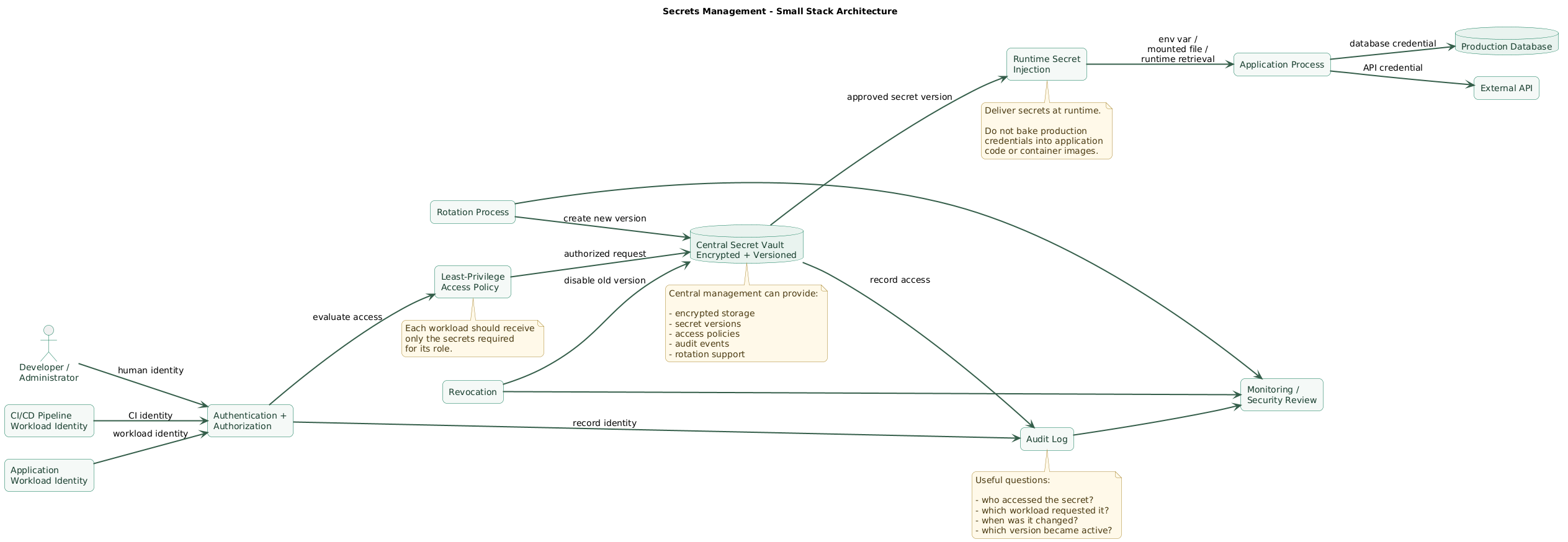
A useful secret lifecycle contains several separate operations:
create
  ↓
store
  ↓
authorize access
  ↓
deliver
  ↓
use
  ↓
audit
  ↓
rotate
  ↓
revoke
  ↓
delete when obsolete
Create
Credentials should have enough randomness for the authentication mechanism they protect.
Avoid passwords invented by humans when the system can generate strong random credentials automatically.
Store
There should be a clear authoritative location rather than copies spread across:
developer laptops
chat messages
CI variables
server files
password managers
deployment scripts
old documentation
Authorize
Decide which human or workload identity can retrieve each secret.
Deliver
The application needs the credential at runtime without placing it in source control or the application artifact.
Audit
For important secrets, you should be able to determine which identity accessed or changed them.
Rotate
Replace credentials before or after compromise without redesigning the application.
Revoke
Old or compromised credentials must stop working.
3. Where environment variables fit
Environment variables are a delivery mechanism, not a secret vault.
An application can read:
DATABASE_URL
PAYMENT_API_KEY
SESSION_SECRET
without knowing whether those values originated from:
- A deployment platform.
- A secret manager.
- A container orchestrator.
- A protected service configuration.
- A local development file.
Application example
const databaseUrl = process.env.DATABASE_URL;

if (!databaseUrl) {
  throw new Error("DATABASE_URL is required");
}
The application knows the variable name, not the production credential value.
Local development
A local file may be convenient:
.envwith:
DATABASE_URL=postgres://localhost/example
PAYMENT_API_KEY=development-only-value
But the real file containing sensitive values should be excluded from source control.
# .gitignore
.env
.env.*
!.env.example
Commit a template containing variable names instead:
# .env.example
DATABASE_URL=
PAYMENT_API_KEY=
SESSION_SECRET=
Production environment variables
Environment variables are reasonable for many small deployments when:
- The platform stores their values securely.
- Access to deployment configuration is controlled.
- Secrets are injected only at runtime.
- They are not embedded in container images.
- They are not printed into logs.
- Rotation can be performed reliably.
Limitations
Environment variables do not inherently provide:
- Centralized secret inventory.
- Fine-grained secret policies.
- Version history.
- Automated rotation.
- Dynamic credentials.
- Revocation workflows.
- Detailed access auditing.
Their contents can also be exposed accidentally through debugging tools, environment dumps, support bundles, overly verbose startup logs, or administrative interfaces.
Never log the complete process environment
# Dangerous
console.log(process.env);
Log the presence of required configuration rather than its value.
console.log({
  databaseConfigured: Boolean(process.env.DATABASE_URL),
  paymentConfigured: Boolean(process.env.PAYMENT_API_KEY)
});
4. When a vault or managed secret store becomes useful
Environment variables vs vault decision tree (diagram)
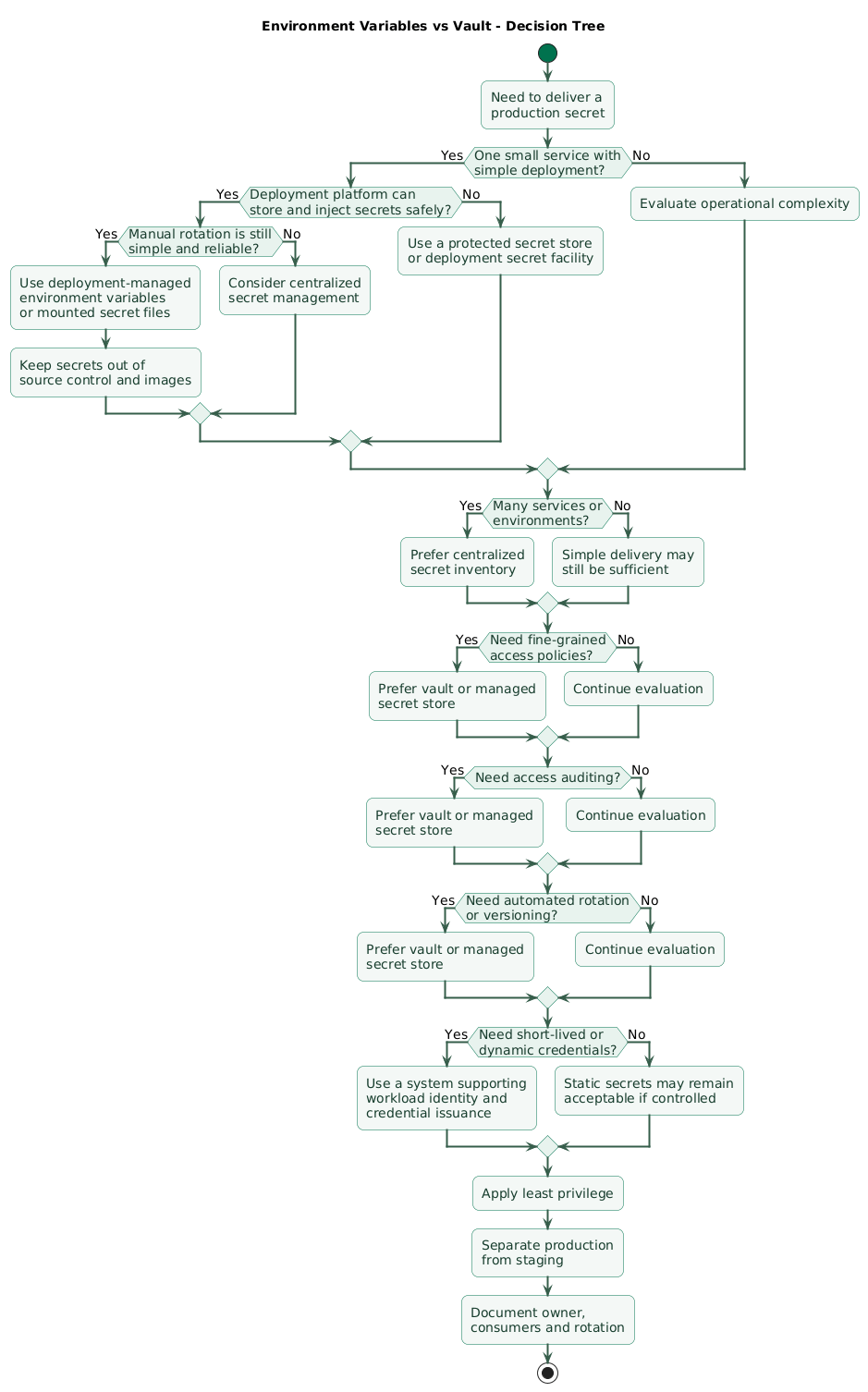
A small application does not need complex infrastructure merely to say it uses a vault.
A centralized secret store becomes especially useful when operational complexity begins growing.
Several services need different credentials
frontend
API
worker
backup service
analytics job
Each should receive only the credentials required for its role.
Several environments exist
development
staging
production
Production credentials should not be casually copied into staging.
Several people administer secrets
A centralized system can make permissions and change history more manageable than a collection of manually shared values.
Auditing matters
Sensitive systems may need records of:
- Who read a secret.
- Who changed it.
- Which workload requested credentials.
- When a secret version became active.
Rotation is becoming painful
If replacing one database password requires editing six systems manually, centralized management can reduce coordination risk.
Short-lived credentials are possible
Some secret-management systems can issue temporary credentials rather than distributing one password that remains valid for months.
Conceptually:
application authenticates
        ↓
secret system verifies identity
        ↓
temporary database credential
        ↓
credential expires automatically
This reduces the useful lifetime of a leaked credential.
A vault does not remove the bootstrap problem
The application still needs a way to prove:
I am the production checkout service
and I am allowed to obtain
the production payment credential.
Prefer workload or platform identity over distributing another long-lived password merely to access the secret manager.
5. Authenticate workloads and apply least privilege
The safest secret is not only protected from outsiders. It is also inaccessible to internal services that do not need it.
Bad model
all production applications
    ↓
shared admin credential
    ↓
every database and API
Better model
checkout-api
    ↓
checkout database account
payment API credential

email-worker
    ↓
email provider credential

backup-service
    ↓
backup storage credential
read-only database access
Use one identity per workload where practical
Separate application identities make it easier to:
- Grant only necessary permissions.
- Audit usage.
- Revoke one compromised service.
- Rotate credentials independently.
Separate human and machine access
A developer manually reading a production database password and an application automatically obtaining database access are different operations.
Give them separate identities and policies.
Avoid shared production administrator credentials
If every service connects as:
database_admincompromise of any one service creates excessive access.
Applications should normally receive the minimum database permissions they actually need.
6. Deliver secrets at runtime without leaking them
Secrets should normally arrive after the application artifact has already been built.
source code
   ↓
CI build
   ↓
immutable application image
   ↓
deployment
   ↓
runtime secret injection
Do not bake secrets into container images
# Never do this
ENV DATABASE_PASSWORD=real-production-password
Do not COPY secret files into the image
# Avoid
COPY .env.production /app/.env
Container registries, image caches, and exported image layers can outlive the original deployment.
Environment injection
The deployment platform can fetch or store the secret and expose it to the application as:
DATABASE_PASSWORD
PAYMENT_API_KEY
Mounted secret files
Some systems can expose secrets as temporary files:
/run/secrets/database_passwordThis can be useful for applications or libraries that support file-based credential loading.
Direct retrieval
An application may authenticate to a secret service and retrieve values directly.
This enables advanced capabilities such as dynamic credentials but adds responsibility for:
- Authentication.
- Retries.
- Caching.
- Lease renewal.
- Secret refresh.
- Secret-service outages.
Do not turn the secret manager into a per-request dependency
Avoid:
every HTTP request
    ↓
fetch database password
    ↓
process request
Applications should generally obtain or refresh credentials according to lifecycle needs rather than retrieving static secrets for every user request.
7. Design a rotation strategy before you need it
Rotation means replacing a credential while preserving legitimate access and eventually invalidating the previous credential.
Reasons to rotate
- Suspected compromise.
- Confirmed exposure.
- Employee or contractor departure.
- Provider policy.
- Regulatory requirement.
- Periodic security policy.
- Migration to a stronger authentication method.
Inventory before automating
For every important credential, record:
secret name
owner
system that issues it
systems that consume it
permissions
storage location
rotation procedure
revocation procedure
last rotation
expected lifetime
Rotation frequency is not universal
A credential with:
administrator access
public internet exposure
many consumers
poor auditing
may deserve different controls from a narrowly scoped credential with short lifetime and strong monitoring.
Automate reliable rotation before increasing frequency
A manual policy saying:
rotate every 30 daysis not very useful if the process is so risky that the team avoids doing it.
First make rotation repeatable, observable, and reversible.
8. Rotate credentials without downtime
Zero-downtime secret rotation flow (diagram)
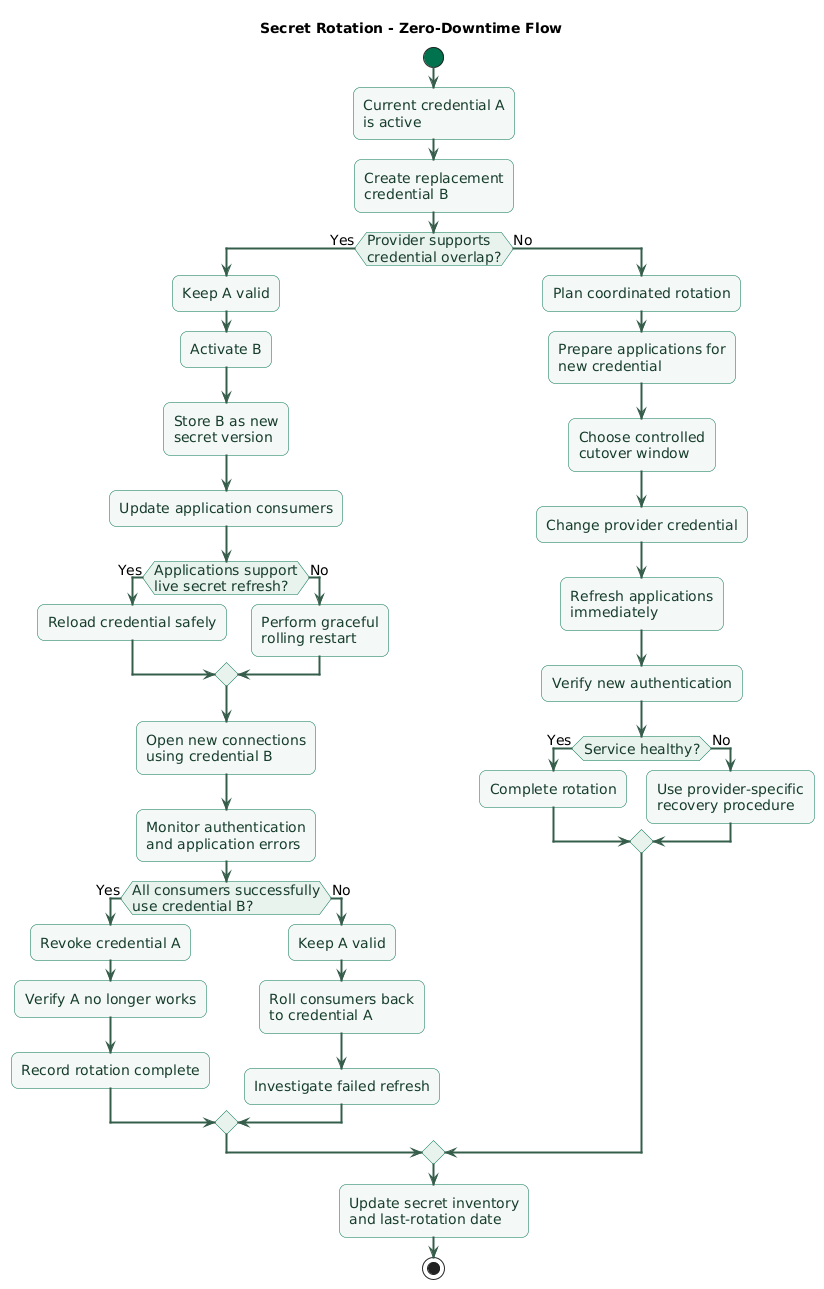
The easiest rotation strategy is overlap.
Assume an external service currently accepts:
API_KEY_AStep 1: create a replacement
API_KEY_A = valid
API_KEY_B = valid
Step 2: update the secret store
PAYMENT_API_KEY → API_KEY_BStep 3: refresh applications
Depending on the application:
- Reload the secret.
- Restart the process gracefully.
- Perform a rolling deployment.
- Renew the credential through a sidecar or agent.
Step 4: verify usage
Confirm:
- Requests succeed.
- New connections authenticate.
- Error rates remain normal.
- All replicas have refreshed.
Step 5: revoke the previous credential
API_KEY_A = revoked
API_KEY_B = valid
Why overlap matters
If you revoke A before every application has received B:
revoke old credential
        ↓
some replica still uses old value
        ↓
authentication failures
        ↓
production incident
Database password rotation
Databases require extra care because applications often maintain long-lived connection pools.
A safe pattern may involve:
create new database credential
        ↓
grant required permissions
        ↓
update secret store
        ↓
refresh application replicas
        ↓
force new database connections gradually
        ↓
verify authentication
        ↓
disable old database credential
Use separate database users when necessary
When a database cannot keep two passwords active for one user, rotation may use:
app_user_a
app_user_b
and alternate between them.
Support refresh where the operational value justifies it
Some applications read secrets only during startup.
That is perfectly acceptable when a graceful rolling restart is simple and reliable.
Live secret refresh becomes more useful when:
- Credentials are short-lived.
- Restarts are expensive.
- The secret system issues leases.
- Rotation happens frequently.
9. Respond correctly when a secret leaks
A leaked secret should be treated as compromised.
Removing it from the visible location is not enough.
Example: secret committed to Git
commit contains API key
        ↓
commit pushed
        ↓
secret discovered
        ↓
file edited
        ↓
new commit removes key
The secret can still exist in:
- Git history.
- Forks.
- Clones.
- CI caches.
- Logs.
- External indexing systems.
Response sequence
1. Revoke or replace credential.
2. Deploy replacement.
3. Verify legitimate systems recover.
4. Investigate possible misuse.
5. Remove exposed copies where practical.
6. Identify how leakage happened.
7. Add prevention controls.
Revoke first when exposure is serious
Cleaning Git history does not protect an API key that an attacker already copied.
Review access logs
Depending on the service, inspect:
- Authentication events.
- API calls.
- Cloud audit logs.
- Database connections.
- Secret-store access history.
Reduce the blast radius
A narrowly scoped secret might permit:
read objects in one bucketinstead of:
administrator access
to the entire cloud account
Least privilege changes secret leakage from an unlimited incident into a bounded one.
Deleting a leaked secret is not revocation
Once a credential has been exposed outside its intended trust boundary, assume somebody could have copied it. Replace or revoke the credential at the system that validates it.
10. Protect secrets in CI/CD and containers
Do not put production secrets in source code
const apiKey = "real-production-key";Repository access, code review, logs, package archives, and backups can all spread that value.
Do not print CI variables
# Dangerous
echo "$PRODUCTION_DATABASE_PASSWORD"
Masking features are useful but should not be your only defense.
Avoid shell tracing around secret commands
Debug modes can print expanded command arguments.
Understand what the CI runner records before enabling verbose shell tracing during credential operations.
Prefer short-lived CI identity
When the infrastructure supports it, prefer:
CI job identity
    ↓
temporary cloud authorization
over:
permanent cloud administrator key
stored in CI for years
Build-time secrets
Private package registries may require credentials during image builds.
Use ephemeral build-secret mechanisms rather than:
ARG PRIVATE_TOKEN
ENV PRIVATE_TOKEN=...
and confirm the final image does not contain credential files or package manager configuration with embedded tokens.
Scan images and repositories
Secret scanning can catch patterns such as:
- Private keys.
- Cloud credentials.
- Known token formats.
- Accidentally committed environment files.
Detection is an additional control, not permission to commit secrets temporarily.
Backups contain secrets too
If a vault database or configuration backup contains encrypted secret values or encryption keys, protect the backup according to the same threat model as the original system.
11. A practical migration path for small teams
You do not have to move from local .env files directly to a
complex dynamic-credential platform.
Stage 1: clean up source control
application code
+
.env.example
+
no real credentials
Rotate anything that was previously committed.
Stage 2: use deployment-managed secrets
Store production values in your deployment platform or hosting provider and inject them at runtime.
Establish:
- Separate production and staging values.
- Limited administrative access.
- Documented ownership.
- Manual rotation procedures.
Stage 3: inventory credentials
Create a table such as:
Secret:
payment-api-key

Owner:
payments

Used by:
checkout-api

Environment:
production

Scope:
payment API only

Rotation:
dual-key replacement

Last rotated:
2026-07-12
Stage 4: centralize when complexity requires it
Introduce a vault or managed secret store when it solves concrete problems such as:
- Too many manual copies.
- Poor auditing.
- Weak service separation.
- Difficult rotation.
- Need for dynamic credentials.
Stage 5: automate rotation
Automate one secret class at a time.
For example:
database application accounts
        ↓
third-party API keys
        ↓
internal service credentials
        ↓
short-lived credentials where supported
Stage 6: test compromise response
Pick a non-production credential and simulate:
credential reported leaked
        ↓
identify owner
        ↓
create replacement
        ↓
deploy replacement
        ↓
revoke old credential
        ↓
verify applications
        ↓
review audit evidence
If that process takes hours because nobody knows where the credential is used, the secret inventory needs improvement.
12. Copy/paste secrets-management checklist
Secrets-management checklist

Inventory
- List production secrets.
- List staging secrets separately.
- Identify the owner of every secret.
- Identify the system that issues each credential.
- Identify every service that consumes it.
- Record permissions granted by the credential.
- Record storage location.
- Record rotation method.
- Record revocation method.
- Record last rotation date.
- Record expected lifetime.
- Remove secrets that are no longer used.

Classification
- Distinguish secrets from ordinary configuration.
- Treat passwords as secrets.
- Treat API keys as secrets.
- Treat private keys as secrets.
- Treat OAuth client secrets as secrets.
- Treat session-signing keys as secrets.
- Treat encryption keys as secrets.
- Do not over-classify public identifiers as secrets.

Source control
- Never commit production credentials.
- Never commit private keys.
- Ignore local .env files.
- Commit .env.example without real values.
- Scan repository history when leakage is suspected.
- Rotate credentials that were committed.
- Remember removing a secret from the latest commit does not revoke it.

Environment variables
- Use environment variables as a delivery mechanism, not as the secret authority.
- Inject production values through the deployment platform.
- Restrict access to deployment configuration.
- Do not print the full environment.
- Avoid debugging dumps that include environment variables.
- Do not place secret values in startup logs.
- Verify crash reports do not capture them unexpectedly.
- Rotate environment-provided secrets when ownership changes.
- Restart or refresh applications safely after updates.

Local development
- Use separate development credentials.
- Keep .env out of source control.
- Avoid using production credentials locally.
- Limit development credential permissions.
- Use local emulators when practical.
- Document required variable names.
- Revoke credentials from lost or decommissioned developer machines.

Central secret store
- Use one authoritative secret location where practical.
- Encrypt stored secret material.
- Restrict administrative access.
- Enable access auditing where available.
- Version secrets.
- Document recovery procedures.
- Protect the encryption or unsealing mechanism.
- Monitor availability.
- Back up required configuration safely.
- Avoid making one secret store an unmanaged single point of failure.

Vault adoption
- Adopt a vault when it solves concrete operational problems.
- Consider it when many services share secret infrastructure.
- Consider it when several environments exist.
- Consider it when auditing matters.
- Consider it when rotation is frequent.
- Consider it for dynamic or short-lived credentials.
- Do not add complexity only for terminology or fashion.
- Ensure the team understands operation and recovery.

Authentication
- Give each workload its own identity where practical.
- Separate human identities from workload identities.
- Prefer platform identity over static bootstrap credentials where supported.
- Avoid sharing one secret-store token across many applications.
- Restrict token lifetime.
- Restrict token scope.
- Revoke identities for decommissioned services.

Authorization
- Apply least privilege.
- Give applications only required secrets.
- Give applications only required database permissions.
- Avoid shared administrator credentials.
- Separate production from staging.
- Separate application roles.
- Review permissions periodically.
- Remove stale policies.
- Test that unauthorized workloads cannot retrieve secrets.

Runtime delivery
- Deliver secrets after build time.
- Keep secrets out of application artifacts.
- Keep secrets out of container images.
- Keep secrets out of static frontend bundles.
- Use environment injection where appropriate.
- Use mounted secret files where appropriate.
- Use direct secret retrieval only when operationally justified.
- Avoid fetching static secrets on every user request.
- Handle temporary secret-service failures safely.

Containers
- Never use Dockerfile ENV for real production secrets.
- Do not COPY .env files into images.
- Do not COPY cloud credentials.
- Do not COPY private package credentials.
- Inspect final image contents.
- Use build-secret mechanisms for build-only credentials.
- Confirm build credentials are absent from final layers.
- Inject runtime secrets through the deployment environment.

CI/CD
- Store CI secrets in protected secret facilities.
- Limit which jobs can access production credentials.
- Avoid exposing production secrets to pull requests from untrusted contexts.
- Do not echo secrets.
- Be careful with shell tracing.
- Mask sensitive output where supported.
- Prefer short-lived workload identity.
- Rotate long-lived CI credentials.
- Remove credentials from old CI systems.
- Audit CI secret permissions.

Logging
- Never log passwords.
- Never log API keys.
- Never log access tokens.
- Never log refresh tokens.
- Never log session cookies.
- Never log Authorization headers.
- Never log private keys.
- Avoid logging full environment objects.
- Redact secret-like fields.
- Review exception context.
- Review request-body logging.
- Treat centralized logs as a possible secret exposure path.

Monitoring
- Monitor authentication failures.
- Monitor unusual secret access where possible.
- Monitor failed rotations.
- Monitor secret-manager availability.
- Monitor credential expiration.
- Alert before certificates or credentials expire when applicable.
- Monitor applications after rotation.
- Detect sudden authorization failures.

Rotation policy
- Define which credentials rotate periodically.
- Define rotation frequency based on risk.
- Define emergency rotation procedure.
- Define credential owner.
- Define consumer list.
- Define validation steps.
- Define rollback point.
- Automate repeatable rotation where practical.
- Test rotation before a real compromise.

Zero-downtime rotation
- Determine whether two credentials can be valid simultaneously.
- Create the replacement first.
- Keep the previous credential valid temporarily.
- Publish the new secret version.
- Refresh applications.
- Verify every replica.
- Verify new connections authenticate.
- Monitor errors.
- Revoke the old credential only after validation.
- Keep a rollback path before revocation.
- Document completion.

Database credential rotation
- Identify database user.
- Record required privileges.
- Avoid using database administrator credentials for applications.
- Determine whether the database supports password overlap.
- Use alternate application users when necessary.
- Create the new credential.
- Grant required privileges.
- Update the secret store.
- Refresh application replicas.
- Refresh connection pools.
- Confirm new connections succeed.
- Revoke old credentials.
- Verify old credentials no longer work.

API-key rotation
- Check whether the provider supports multiple active keys.
- Generate a replacement key.
- Assign minimum permissions.
- Store the new key centrally.
- Update consumers.
- Verify requests using the new key.
- Revoke the previous key.
- Review provider audit logs.
- Record rotation date.

Short-lived credentials
- Prefer short-lived credentials when infrastructure supports them reliably.
- Keep leases appropriate to workload duration.
- Renew before expiration where required.
- Handle renewal failures.
- Revoke leases when workloads terminate where supported.
- Avoid caching short-lived credentials indefinitely.
- Monitor expiration failures.

Secret refresh
- Decide whether secrets require process restart.
- Support graceful rolling restart when startup-only loading is sufficient.
- Support live reload when frequent rotation justifies it.
- Reload atomically.
- Validate the new credential before discarding the previous one.
- Ensure failed reload does not overwrite a working credential.
- Monitor refresh success.

Leak response
- Treat exposed secrets as compromised.
- Revoke or rotate immediately when risk warrants it.
- Do not rely only on deleting the public copy.
- Identify affected systems.
- Identify credential permissions.
- Inspect relevant access logs.
- Replace the credential.
- Deploy consumers with the replacement.
- Verify recovery.
- Revoke the old credential.
- Remove exposed copies where practical.
- Investigate the cause.
- Add preventive controls.

Git leaks
- Revoke the credential first.
- Rotate dependent systems.
- Remove the secret from current files.
- Rewrite history when appropriate.
- Consider forks and clones.
- Check CI logs and artifacts.
- Check package or image artifacts.
- Add secret scanning.
- Update developer guidance.

Employee and contractor changes
- Avoid shared personal production secrets.
- Remove human access promptly.
- Revoke personal tokens.
- Rotate shared credentials the departing person knew.
- Review secret-manager access.
- Review CI access.
- Review cloud credentials.
- Record completed revocations.

Backups
- Protect secret-store backups.
- Encrypt backups.
- Restrict restore permissions.
- Protect encryption keys separately.
- Test restoration.
- Avoid leaving plaintext exports.
- Apply retention.
- Securely remove obsolete backups when policy permits.

Disaster recovery
- Document how the secret store is restored.
- Document emergency administrator access.
- Protect emergency credentials.
- Test recovery periodically.
- Avoid one-person-only recovery knowledge.
- Ensure applications can recover after secret infrastructure restoration.

Ownership
- Assign a secret owner.
- Assign a service owner.
- Keep contact details current.
- Document who can approve emergency rotation.
- Remove orphaned credentials.
- Review ownership after organizational changes.

Access review
- Review human access periodically.
- Review workload access periodically.
- Remove unused credentials.
- Remove unused policies.
- Remove decommissioned service identities.
- Reduce excessive permissions.
- Confirm production and staging remain separated.

Expiration
- Track credentials with fixed expiration.
- Alert before expiry.
- Avoid discovering expiration through production failure.
- Rotate certificates early enough for validation.
- Confirm applications use the replacement.
- Remove obsolete versions after the rollback window.

Architecture
- Keep secrets out of frontend code.
- Keep secrets out of downloadable JavaScript.
- Avoid sharing one credential among unrelated services.
- Use workload identity where available.
- Keep secret boundaries aligned with service boundaries.
- Design applications so credentials can be replaced.

Final review
- Are real secrets absent from source control?
- Are secrets absent from container images?
- Is there one authoritative location for each important credential?
- Does every secret have an owner?
- Can you identify all consumers?
- Does every workload receive only what it needs?
- Can important access be audited?
- Can credentials be rotated without guessing where they are used?
- Can leaked credentials be revoked quickly?
- Can applications survive credential rotation?
- Are old secret versions actually revoked?
- Has emergency rotation been tested?
13. FAQ
Are environment variables safe for production secrets?
They can be a practical delivery mechanism when values are injected securely by the deployment platform and runtime access is controlled. Environment variables are not themselves a complete secret-management solution because storage, authorization, auditing, rotation, and revocation must still be solved elsewhere.
Should secrets be stored in a .env file?
A local .env file is convenient for development when it is
excluded from source control and contains development-only credentials.
Production values should normally be supplied by the production
deployment system or a centralized secret store.
When does a small team need a vault?
Consider centralizing secrets when several services or environments need credentials, access must be audited, permissions need finer control, rotation is difficult, or you want short-lived or dynamically issued credentials.
How often should secrets rotate?
There is no universal interval. Base frequency on credential sensitivity, privileges, exposure, provider capabilities, organizational policy, and how safely rotation can be automated. Suspected compromise requires immediate replacement regardless of the normal schedule.
How do I rotate a secret without downtime?
When possible, create a replacement while the previous credential remains valid. Update applications, verify that all consumers successfully use the new credential, and revoke the previous version only after validation.
What should I do if an API key is committed to Git?
Treat the key as compromised. Revoke or replace it, update legitimate consumers, investigate possible use, remove exposed copies where practical, and improve controls such as repository secret scanning. Deleting the key from the latest commit is not sufficient.
Key terms (quick glossary)
- Secret
- Sensitive data that grants access, proves identity, signs information, or decrypts protected resources, such as a password, API key, private key, or access token.
- Environment variable
- A runtime key-value value exposed to a process, commonly used to deliver configuration and sometimes secrets to applications.
- Secret vault
- A centralized system designed to protect, authorize, audit, version, distribute, rotate, or generate sensitive credentials.
- Secret manager
- A generic term for a service or platform component that stores and distributes secrets under controlled access policies.
- Workload identity
- An identity assigned to an application, VM, container, CI job, or other workload so it can authenticate without sharing a general-purpose human credential.
- Least privilege
- The principle of granting an identity only the permissions required for its legitimate function.
- Rotation
- The controlled replacement of one credential with another and eventual invalidation of the previous credential.
- Revocation
- The act of making a credential or authorization no longer valid.
- Dynamic credential
- A credential generated for a particular identity or workload, often with a limited lifetime, rather than a long-lived shared static password.
- Lease
- A limited validity period associated with a temporary credential or secret that may require renewal before it expires.
- Secret version
- A particular revision of a stored secret, allowing a new value to be introduced while previous values remain identifiable for controlled transition or rollback.
- Secret injection
- Delivery of a secret to an application at runtime through an environment variable, mounted file, local agent, secret-store API, or similar mechanism.
- Credential overlap
- A rotation period during which old and new credentials are both valid so consumers can move to the replacement without service interruption.
- Blast radius
- The maximum systems, data, or permissions potentially affected if a credential or identity is compromised.
Worth reading
Recommended guides from the category.
