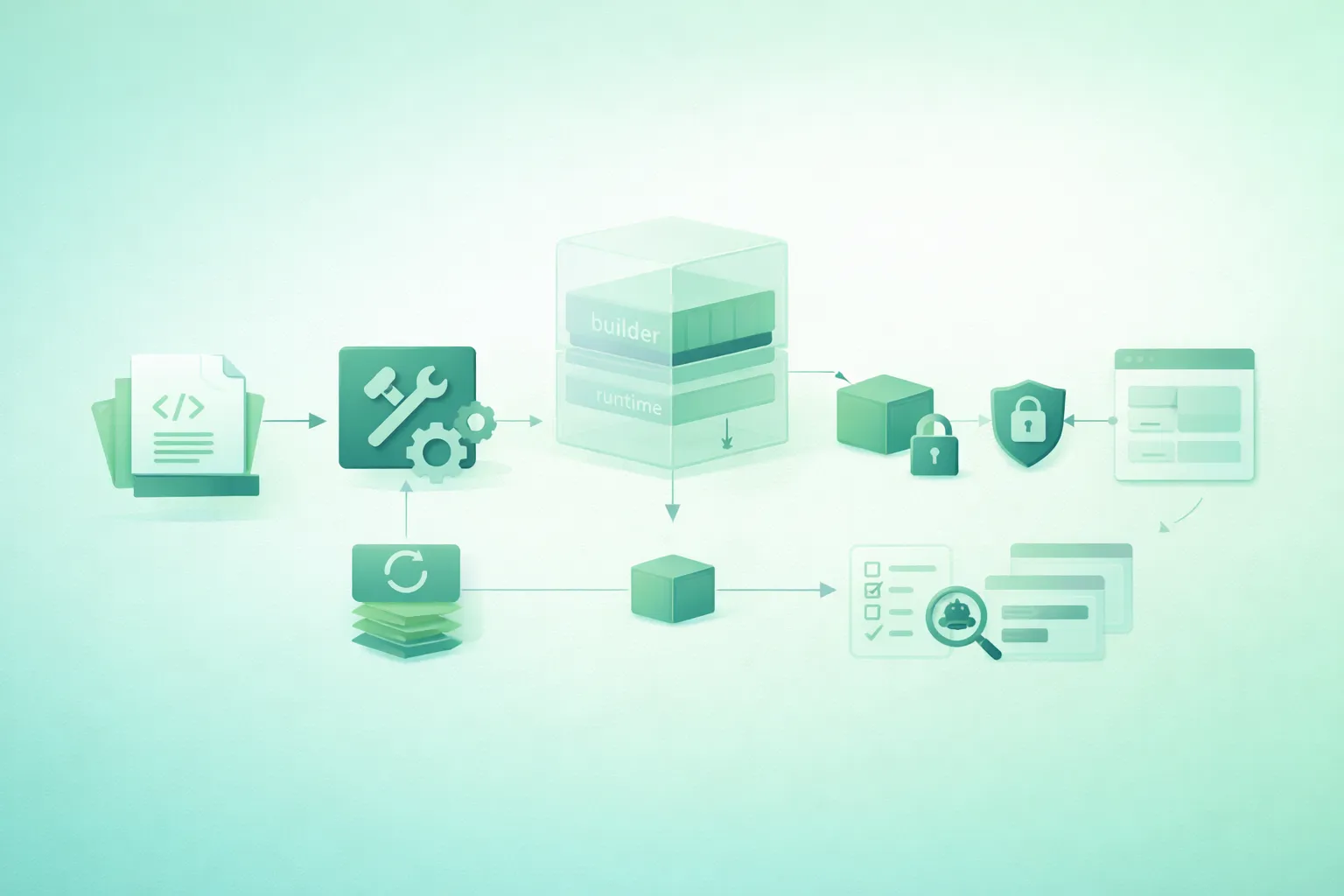
A Dockerfile that successfully starts your application is not necessarily ready for production.
Development images often contain compilers, package-manager caches, source files, test dependencies, debugging utilities, writable directories, root privileges, and configuration that exists only because it was convenient during development.
A production image should be more deliberate. It should contain only what the application needs to run, be reproducible enough to rebuild and investigate, receive configuration at runtime, handle container lifecycle signals correctly, and minimize the privileges available to the application process.
Think of the image as a deployable artifact
The Dockerfile is not merely a script for installing software. It defines the filesystem, dependencies, default process, user, metadata, and part of the security boundary that every production instance will inherit.
1. What production-ready actually means
For a small web application, a strong production container generally aims for:
- A trusted and supported base image.
- A reproducible dependency installation.
- A small runtime filesystem.
- No compiler or unnecessary build tools in production.
- No source-control metadata or local secrets in the build context.
- No credentials embedded in image layers.
- An explicit non-root runtime user.
- A predictable working directory.
- A direct application startup process.
- Graceful handling of termination signals.
- A lightweight health signal where appropriate.
- Logs written to stdout and stderr.
- Regular image rebuilds and security scanning.
Notice what is not on that list: “smallest image possible at any cost.”
Smaller is often beneficial, but maintainability, compatibility, patchability, observability, and reproducibility also matter.
2. Start from a deliberate base image
Every Dockerfile begins with a trust decision.
FROM node:24-bookworm-slimFor common language runtimes, prefer an official or otherwise trusted, actively maintained base rather than an unknown convenience image.
Avoid an unqualified latest tag
# Too vague for controlled production builds
FROM node:latest
A broad moving tag can change the runtime or operating-system generation underneath your application.
At minimum, pin a deliberate runtime and distribution family:
FROM node:24-bookworm-slimUse a digest when exact image identity matters
FROM node:24-bookworm-slim@sha256:<approved-digest>A digest identifies immutable image content and makes the upstream base reproducible.
The tradeoff is that a pinned digest does not silently move to a patched upstream image. Your dependency-update process must deliberately refresh it.
Do not automatically choose Alpine
Alpine-based images can be excellent, but “smallest compressed size” is not the only criterion.
Check:
- Native dependency compatibility.
- Required libc behavior.
- Availability of runtime libraries.
- How your framework's ecosystem tests that base.
- Operational debugging requirements.
A slim Debian-family image may be a simpler choice for many small applications.
3. Separate build and runtime stages
Production multi-stage Docker build (diagram)

Multi-stage builds are one of the most valuable Dockerfile patterns.
One stage can contain:
- Compilers.
- Development dependencies.
- TypeScript.
- Bundlers.
- Test tooling.
- Source files.
The final stage receives only the artifacts required to run the application.
Basic pattern
# syntax=docker/dockerfile:1

FROM node:24-bookworm-slim AS build

WORKDIR /app

COPY package.json package-lock.json ./

RUN npm ci

COPY . .

RUN npm test
RUN npm run build

FROM node:24-bookworm-slim AS runtime

WORKDIR /app

COPY --from=build /app/dist ./dist

CMD ["node", "dist/server.js"]
The final stage does not inherit previous layers. Only files explicitly copied from the build stage enter it.
Do not copy the entire build stage
This defeats much of the benefit:
# Avoid copying everything blindly
COPY --from=build /app /app
Prefer explicit runtime artifacts.
Tests can be a build gate
A useful pattern is:
dependencies
    ↓
tests
    ↓
application build
    ↓
runtime image
Failed tests then prevent creation of the production target in the same build path.
4. Design layers for predictable caching
Docker can reuse previous build layers when the instruction and relevant inputs have not changed.
Layer order therefore has a large impact on rebuild time.
Cache-unfriendly pattern
COPY . .

RUN npm ci
Editing one source file invalidates the earlier COPY, so the
dependency installation must run again.
Better pattern
COPY package.json package-lock.json ./

RUN npm ci

COPY . .
Application code can now change while the dependency layer remains cached as long as the package manifests remain unchanged.
Use deterministic install commands
When your package ecosystem provides a lockfile-aware clean installation command, use it in CI and image builds.
For npm projects:
RUN npm ciThe same principle applies to other ecosystems: preserve lock files and use installation modes intended for reproducible builds.
Use BuildKit cache mounts where useful
RUN --mount=type=cache,target=/root/.npm \
    npm ci
A cache mount lets the package manager reuse downloaded artifacts without baking that download cache into the final runtime image.
5. Keep the build context small with .dockerignore
The build context is the collection of files available to the Docker build.
Sending unnecessary files slows builds and creates opportunities for accidental copies.
Example .dockerignore
.git
.gitignore

node_modules
dist
coverage

.env
.env.*
!.env.example

*.log
npm-debug.log*

Dockerfile*
docker-compose*.yml

README.md
docs/

.vscode/
.idea/

.DS_Store
Adapt this list to the project. A file should not be ignored if the build genuinely requires it.
Especially exclude local secrets
.env
.env.production
*.pem
*.key
credentials/
secrets/
A secret excluded from a later COPY is still safer when it
never enters the build context in the first place.
6. Run the application as a non-root user
Production container security boundaries (diagram)
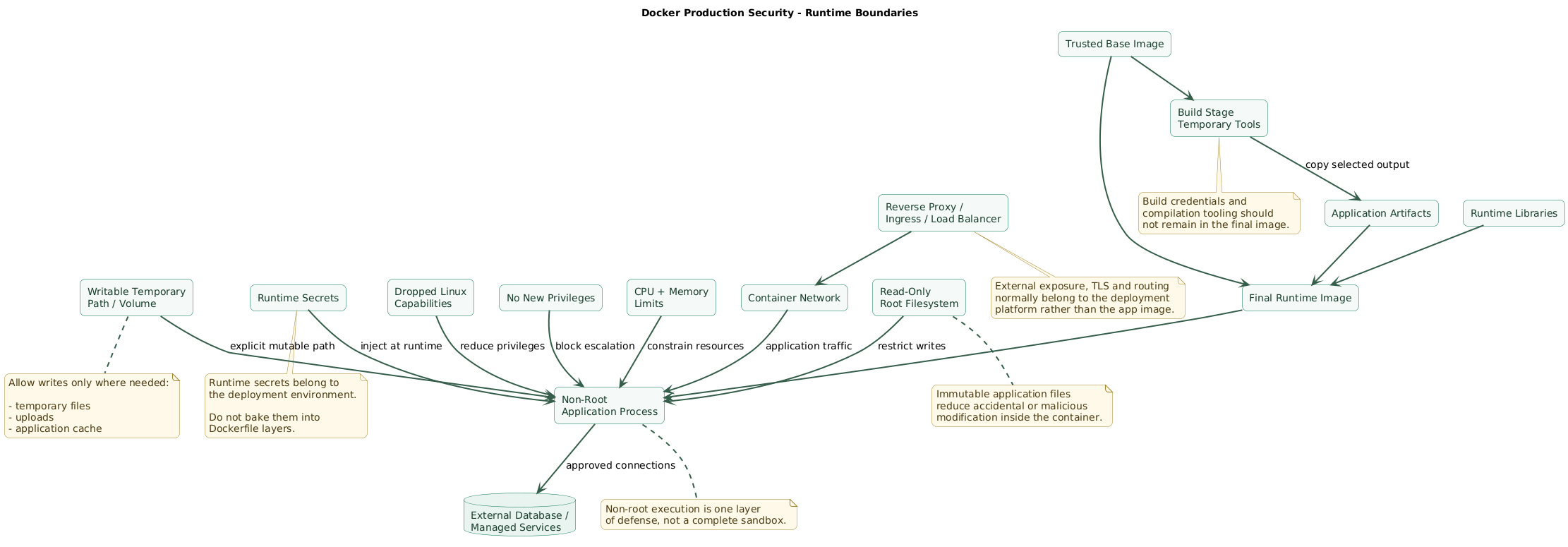
A web server normally does not need UID 0.
Use an unprivileged account provided by the base image or create one explicitly.
Using the Node image's existing user
WORKDIR /app

COPY --chown=node:node . .

USER node

CMD ["node", "dist/server.js"]
Ownership matters
Switching users is not sufficient if application files or required writable directories have incorrect permissions.
COPY --chown=node:node \
    --from=build \
    /app/dist \
    ./dist
Do not make everything world-writable
# Avoid permission fixes like this
RUN chmod -R 777 /app
Instead, decide exactly which path needs to be writable.
RUN mkdir -p /app/tmp \
    && chown node:node /app/tmp
A production service may eventually run with a read-only root filesystem, making this distinction even more important.
7. Keep secrets out of image layers
Do not bake secrets with ENV
# Never commit this
ENV DATABASE_PASSWORD=super-secret
Do not use ARG for sensitive build credentials
# Avoid
ARG NPM_TOKEN
RUN npm config set //registry.npmjs.org/:_authToken=$NPM_TOKEN
Build arguments and Dockerfile environment variables are inappropriate places for sensitive build credentials because secret values can persist in image metadata, build history, provenance, or layers depending on how they are used.
Use a BuildKit secret mount
# syntax=docker/dockerfile:1

RUN --mount=type=secret,id=npmrc,target=/root/.npmrc \
    npm ci
Then provide the file during the build:
docker buildx build \
  --secret id=npmrc,src="$HOME/.npmrc" \
  -t my-app:build .
The secret is made available to that build instruction without being intentionally copied into the resulting filesystem layer.
Runtime secrets are a different problem
Database passwords, API keys, signing secrets, and similar production values should normally be supplied by the deployment environment when the container starts.
image:
contains application

deployment:
provides DATABASE_URL
provides API_TOKEN
provides SESSION_SECRET
Build one image and configure it per environment rather than building a separate secret-bearing image for development, staging, and production.
8. Start the process correctly and handle shutdown
Containers have a lifecycle. During deployments, the runtime sends a termination signal and gives the application an opportunity to shut down.
Prefer exec form
CMD ["node", "dist/server.js"]This starts the intended executable directly rather than implicitly wrapping it in a shell.
Avoid unnecessary shell wrappers
# Less desirable for the primary server process
CMD node dist/server.js
An extra shell layer can complicate signal delivery and process behavior.
Do not run a development server in production
# Development-oriented
CMD ["npm", "run", "dev"]
Development servers may enable watchers, hot reload, verbose diagnostics, or behavior that is inappropriate for production.
Run the production server your framework recommends.
Implement graceful shutdown
A Node.js server might include:
const server = app.listen(PORT);

function shutdown(signal) {
  console.log(`Received ${signal}`);

  server.close((error) => {
    if (error) {
      console.error(error);
      process.exit(1);
    }

    process.exit(0);
  });
}

process.on("SIGTERM", () => shutdown("SIGTERM"));
process.on("SIGINT", () => shutdown("SIGINT"));
A real service may also need to stop accepting jobs, close database connections, drain queues, and enforce a shutdown timeout.
Write logs to stdout and stderr
Avoid requiring the container to maintain rotating application log files.
console.log("server started");
console.error("database connection failed");
Let the container platform capture, route, retain, and aggregate the streams.
9. Add a useful health check
A health check should answer a narrow operational question:
Is this application instance able to serve?
Create a cheap endpoint
GET /health

200 OK
{
  "status": "ok"
}
Avoid turning a frequent liveness check into an expensive database, external API, or dependency stress test.
Dockerfile HEALTHCHECK example
HEALTHCHECK \
  --interval=30s \
  --timeout=3s \
  --start-period=10s \
  --retries=3 \
  CMD ["node", "-e", "fetch('http://127.0.0.1:3000/health').then(r=>{if(!r.ok)process.exit(1)}).catch(()=>process.exit(1))"]
Using the existing runtime avoids installing curl only for a
health check.
Liveness and readiness are not always identical
On orchestrated platforms, you may have separate concepts:
- Liveness: should this process be considered unhealthy enough to restart?
- Readiness: should this instance currently receive traffic?
Follow the deployment platform's native health model rather than
assuming a Dockerfile HEALTHCHECK solves every environment.
10. A complete small-web-app Dockerfile
The following example assumes a Node.js application that compiles into
dist/.
# syntax=docker/dockerfile:1

ARG NODE_VERSION=24

# --------------------------------------------------
# Dependencies
# --------------------------------------------------

FROM node:${NODE_VERSION}-bookworm-slim AS deps

WORKDIR /app

COPY package.json package-lock.json ./

RUN --mount=type=cache,target=/root/.npm \
    npm ci


# --------------------------------------------------
# Build + tests
# --------------------------------------------------

FROM deps AS build

WORKDIR /app

COPY . .

RUN npm test

RUN npm run build

RUN npm prune --omit=dev


# --------------------------------------------------
# Production runtime
# --------------------------------------------------

FROM node:${NODE_VERSION}-bookworm-slim AS runtime

ENV NODE_ENV=production

WORKDIR /app

COPY --from=build \
    --chown=node:node \
    /app/package.json \
    /app/package-lock.json \
    ./

COPY --from=build \
    --chown=node:node \
    /app/node_modules \
    ./node_modules

COPY --from=build \
    --chown=node:node \
    /app/dist \
    ./dist

USER node

EXPOSE 3000

HEALTHCHECK \
  --interval=30s \
  --timeout=3s \
  --start-period=10s \
  --retries=3 \
  CMD ["node", "-e", "fetch('http://127.0.0.1:3000/health').then(r=>{if(!r.ok)process.exit(1)}).catch(()=>process.exit(1))"]

CMD ["node", "dist/server.js"]
What this Dockerfile deliberately does
- Uses separate build and runtime stages.
- Installs from the lockfile.
- Copies dependency manifests before source files.
- Uses a BuildKit cache for package downloads.
- Runs tests before producing the final target.
- Removes development dependencies before copying runtime dependencies.
- Copies only required artifacts.
- Sets file ownership during copying.
- Runs the service as the existing unprivileged user.
- Uses exec-form
CMD. - Includes a lightweight health probe.
It is still only an example
A Next.js standalone build, Python Gunicorn application, Go binary, Java service, PHP application, or static frontend will need a different final stage.
Preserve the principles rather than copying the exact commands blindly.
11. Harden the runtime outside the Dockerfile
A Dockerfile controls the image. It does not control the entire container runtime.
Several important production controls belong in Compose, Kubernetes, a PaaS configuration, systemd wrapper, container runtime, or cloud service.
Read-only root filesystem
docker run \
  --read-only \
  --tmpfs /tmp \
  my-app:1.0.0
This prevents the application from modifying most of its container filesystem.
Test the application first: frameworks may need temporary directories, caches, uploads, or generated files.
Drop unnecessary Linux capabilities
docker run \
  --cap-drop=ALL \
  my-app:1.0.0
Add back a capability only if the application demonstrably needs it.
Prevent privilege escalation where supported
docker run \
  --security-opt=no-new-privileges:true \
  my-app:1.0.0
Set memory and CPU boundaries
docker run \
  --memory=512m \
  --cpus=1 \
  my-app:1.0.0
The appropriate values depend on measured application behavior.
Do not expose an unnecessary host port
EXPOSE 3000 documents that the application listens on port
3000. It does not itself publish the port on the host.
Let the deployment layer decide which network interfaces and external routes should expose the service.
Terminate TLS at an appropriate boundary
Small application containers are often placed behind:
- A reverse proxy.
- An ingress controller.
- A cloud load balancer.
- A managed platform router.
Avoid bundling unrelated infrastructure into the application container merely to make one image do everything.
Non-root is not a complete sandbox
Running as an unprivileged user is an important defense, but production isolation also depends on runtime capabilities, mounts, networks, secrets, kernel controls, resource limits, host security, and the container platform.
12. Build, scan, tag, and deploy immutably
Production Docker image review flow (diagram)

Production readiness is a pipeline property, not only a Dockerfile property.
Build in CI
docker buildx build \
  --target runtime \
  -t registry.example.com/my-app:${GIT_SHA} \
  .
Run a smoke test
docker run \
  --rm \
  -d \
  --name app-smoke-test \
  -p 127.0.0.1:3000:3000 \
  registry.example.com/my-app:${GIT_SHA}
Then verify:
GET http://127.0.0.1:3000/healthScan the final image
Scan the image actually intended for deployment rather than only the source repository.
Review findings based on:
- Severity.
- Exploitability.
- Whether the affected package exists in the runtime path.
- Whether a patched version is available.
- Your deployment environment and exposure.
Generate or retain software inventory
An SBOM can help record which operating-system and application components are present in an image.
That becomes valuable when a new vulnerability is announced and you need to identify affected artifacts quickly.
Use immutable deployment identifiers
Tags such as:
my-app:latest
my-app:production
are mutable references.
A commit-derived tag is better for traceability:
my-app:8f21c36A registry digest provides exact content identity:
registry.example.com/my-app@sha256:<digest>Deploying the exact artifact that passed tests reduces ambiguity about what is actually running.
Do not rebuild the same release independently per environment
Prefer:
commit
   ↓
build once
   ↓
test image
   ↓
push image
   ↓
deploy same image to staging
   ↓
promote same image to production
Environment-specific configuration and secrets should be supplied at runtime.
Rebuild even when application code has not changed
Your application source can remain unchanged while:
- The base operating system receives security fixes.
- The language runtime receives fixes.
- System packages become vulnerable.
- Certificate bundles or other runtime components need updates.
Establish a regular rebuild and dependency-update process rather than assuming an old image remains safe because the app commit has not changed.
13. Copy/paste production Dockerfile checklist
Production-ready Dockerfile checklist

Base image
- Use a trusted base image.
- Use an actively maintained runtime version.
- Avoid an unqualified latest tag.
- Pin the runtime and operating-system family deliberately.
- Consider digest pinning when exact reproducibility is required.
- Have a process that updates pinned base images.
- Do not choose an image only because it is the smallest.
- Verify compatibility with native dependencies.

Build stages
- Separate build tools from the runtime image.
- Use multi-stage builds.
- Name build stages.
- Keep compilers out of the final image when they are not required.
- Keep test tools out of the final image.
- Copy only required runtime artifacts.
- Build the production target in CI.

Dependencies
- Commit dependency lockfiles.
- Use deterministic install commands.
- Install dependencies before copying frequently changing source files.
- Keep development dependencies out of the final runtime where possible.
- Pin important application dependency versions.
- Review dependency updates regularly.
- Avoid downloading unversioned binaries during builds.

Build cache
- Order layers from relatively stable to frequently changing inputs.
- Copy dependency manifests before application source.
- Use BuildKit cache mounts for package-manager caches where useful.
- Use CI cache intentionally.
- Do not sacrifice correctness merely to preserve a stale cache.
- Understand which source changes invalidate each layer.

Build context
- Create a .dockerignore.
- Exclude .git.
- Exclude local dependency directories.
- Exclude build output that is regenerated inside the image.
- Exclude logs.
- Exclude editor metadata.
- Exclude local temporary files.
- Exclude local secret files.
- Keep only files required by the build.

Secrets
- Never hard-code credentials in the Dockerfile.
- Do not copy .env files into production images.
- Do not use ARG as a secret-storage mechanism.
- Do not use Dockerfile ENV for build credentials.
- Use BuildKit secret mounts for build-time credentials.
- Use SSH mounts for private Git access where appropriate.
- Inject runtime secrets from the deployment platform.
- Rotate secrets independently of rebuilding the image.

Filesystem
- Set WORKDIR explicitly.
- Copy only required files.
- Set deliberate ownership.
- Avoid chmod 777.
- Define the small number of paths that must be writable.
- Prefer immutable application files.
- Test the image with a read-only root filesystem where practical.
- Use tmpfs or dedicated volumes for necessary temporary state.

Runtime user
- Do not run the web app as root unless required.
- Use an existing unprivileged base-image user where appropriate.
- Otherwise create a dedicated application user.
- Set USER explicitly.
- Verify application files are readable by that user.
- Verify required writable directories are writable by that user.
- Avoid privileged ports unless the deployment architecture requires them.

Application process
- Use the production application server.
- Avoid development mode.
- Prefer exec-form CMD or ENTRYPOINT.
- Avoid unnecessary shell wrappers around the main process.
- Ensure lifecycle signals reach the application.
- Handle SIGTERM.
- Implement graceful shutdown.
- Stop accepting new requests during shutdown when appropriate.
- Close database or queue connections cleanly.
- Set a bounded shutdown strategy.

Networking
- Document the application port with EXPOSE when useful.
- Remember EXPOSE does not publish a host port.
- Bind the application to the interface expected by the container environment.
- Publish only necessary ports at runtime.
- Use a reverse proxy or platform ingress where appropriate.
- Keep database and internal services off unnecessary public networks.

Configuration
- Set safe non-secret runtime defaults with ENV where useful.
- Keep environment-specific configuration outside the image.
- Validate required environment variables at startup.
- Fail clearly when required configuration is missing.
- Avoid separate secret-bearing images for each environment.

Health checks
- Provide a lightweight health endpoint.
- Decide whether Dockerfile HEALTHCHECK is useful for your platform.
- Keep health checks inexpensive.
- Avoid requiring unnecessary packages only for the check.
- Define reasonable intervals.
- Define a short timeout.
- Give slow-starting applications an appropriate startup period.
- Do not make liveness depend unnecessarily on every external dependency.
- Distinguish readiness from liveness where the platform supports both.

Logging
- Write normal logs to stdout.
- Write errors to stderr.
- Avoid local log rotation inside the application container.
- Do not persist important logs only inside the ephemeral filesystem.
- Include enough context for centralized log analysis.
- Avoid logging secrets and access tokens.

Image size
- Use multi-stage builds.
- Remove unnecessary runtime packages.
- Do not retain package-manager caches in runtime layers.
- Do not include source or tests unless needed.
- Do not optimize size at the cost of maintainability without evidence.
- Measure image size and layer composition.

Security
- Run as non-root.
- Minimize installed packages.
- Keep runtime dependencies patched.
- Scan the final image.
- Audit suspicious files in the image.
- Do not include SSH keys or cloud credentials.
- Consider a read-only root filesystem.
- Drop Linux capabilities at runtime where possible.
- Enable no-new-privileges where supported.
- Avoid privileged containers.
- Avoid mounting the Docker socket into the application container.

Resources
- Define memory limits in the deployment platform.
- Define CPU limits or requests where appropriate.
- Test application behavior under memory pressure.
- Define restart behavior outside the image.
- Avoid unlimited worker or thread growth.
- Size connection pools according to runtime limits.

Image identity
- Tag images with an immutable release or commit identifier.
- Record the source commit in build metadata where useful.
- Push the tested artifact to the registry.
- Promote the same image across environments.
- Avoid rebuilding separately for production.
- Deploy by immutable digest where practical.
- Record which digest is deployed.

CI/CD
- Build the Dockerfile in CI.
- Fail on compilation errors.
- Run automated tests.
- Run Dockerfile or build checks.
- Build the final production stage.
- Start the resulting image.
- Run a smoke test.
- Verify the health endpoint.
- Scan for vulnerabilities.
- Scan for accidentally included secrets.
- Generate or retain an SBOM where useful.
- Push only after required checks pass.

Updates
- Rebuild images regularly.
- Update base-image digests deliberately.
- Update application dependencies.
- Re-scan after rebuild.
- Remove superseded vulnerable images according to retention policy.
- Keep rollback images available according to deployment policy.

Runtime deployment
- Inject secrets at runtime.
- Configure TLS at the correct boundary.
- Limit network exposure.
- Apply resource constraints.
- Drop unnecessary capabilities.
- Use a read-only filesystem where possible.
- Mount only required volumes.
- Keep persistent data outside the container filesystem.
- Configure monitoring and alerting.
- Configure log collection.

Final review
- Can the image be rebuilt from source and lockfiles?
- Does the final image contain only runtime requirements?
- Are build credentials absent from the image?
- Does the application run without root?
- Does it start without a shell wrapper?
- Does it shut down cleanly on SIGTERM?
- Can the platform determine whether the instance is healthy?
- Can the root filesystem be read-only or mostly read-only?
- Has the exact production image been tested?
- Has the final image been scanned?
- Can you identify the source commit for a running image?
- Can you identify the exact image digest deployed?
- Can the base image be updated without redesigning the Dockerfile?
14. FAQ
Should a production Docker container run as root?
Usually not. A web application should generally run as a dedicated unprivileged user. Ensure the application can read its code and write only to directories that genuinely require mutation.
Why should I use a multi-stage build?
Multi-stage builds separate compilation, testing, and development tooling from the final runtime. Only selected artifacts are copied into the final stage, reducing image contents and attack surface.
Is Alpine always the best production base image?
No. Alpine is compact, but compatibility, native libraries, debugging, runtime support, and maintenance should also influence the decision. A slim image based on another distribution can be the simpler production choice.
Should I put API tokens in Docker ARG?
No. Build-time secrets should use BuildKit secret or SSH mounts rather
than Dockerfile ARG or ENV. Runtime credentials
should be supplied by the deployment environment.
Should every Dockerfile have a HEALTHCHECK?
Not necessarily. Use it when your deployment environment makes use of Docker image health information. Other platforms may define liveness and readiness separately. In either case, keep checks lightweight and aligned with the actual service state you need to observe.
Does EXPOSE make a port public?
No. EXPOSE documents the intended container port. Port
publication and external network exposure are controlled when the
container is run or by the orchestration platform.
Is a good Dockerfile enough to secure a production container?
No. Runtime security also depends on secret management, mounts, networks, TLS, Linux capabilities, resource limits, image provenance, host security, logging, monitoring, and the container orchestration environment.
Key terms (quick glossary)
- Dockerfile
- A declarative build file containing instructions used to construct a container image.
- Base image
-
The image referenced by a
FROMinstruction and used as the starting filesystem and runtime environment for a build stage. - Multi-stage build
- A Dockerfile containing multiple build stages so artifacts can be created in one environment and selectively copied into a smaller runtime stage.
- Build context
- The files and directories made available to the Docker builder for a build.
- .dockerignore
- A file defining paths that should be excluded from the Docker build context.
- BuildKit
- Docker's modern build backend supporting features including cache mounts, secret mounts, SSH mounts, and advanced multi-stage build behavior.
- Build secret
- Sensitive information temporarily exposed to a build instruction without intentionally storing it in the resulting image filesystem.
- Image digest
- A content-addressed immutable identifier such as a SHA-256 digest that refers to exact image content.
- Non-root container
- A container whose primary application process runs with an unprivileged user identity rather than UID 0.
- Exec-form command
-
JSON-array Dockerfile syntax such as
CMD ["node", "server.js"]that directly executes the specified program. - Health check
- A periodic test used to determine whether a running service or container is functioning according to a defined health condition.
- SBOM
- Software Bill of Materials, an inventory of software components included in an artifact such as a container image.
- Read-only root filesystem
- A runtime restriction preventing the container process from modifying most of its root filesystem.
- Linux capability
- A granular unit of privileged Linux kernel functionality that can be granted to or removed from a process independently of full root privileges.
Worth reading
Recommended guides from the category.
