
Kubernetes can solve real operational problems for a small project.
It can also transform:
one application
one database
one server
into:
cluster
nodes
Pods
Deployments
Services
Gateway or Ingress
DNS
storage classes
persistent volumes
RBAC
service accounts
resource requests
probes
autoscaling
monitoring
cluster upgrades
backup procedures
None of those concepts are inherently bad. The question is whether they solve problems your project actually has.
Kubernetes is most valuable when it replaces recurring operational complexity with a consistent platform. It is less valuable when the platform itself becomes the largest source of complexity.
Do not adopt Kubernetes for containerization alone
Running a container does not require a cluster orchestrator. A small application can run containers with a managed container platform, Docker Compose, or another lightweight deployment system. Kubernetes becomes interesting when you need its orchestration model, not simply because your application has a Dockerfile.
1. Ask which problem Kubernetes would solve
Start with operational pain, not technology preference.
Useful reasons
Kubernetes may solve problems such as:
- Several stateless services need a common deployment model.
- Applications need multiple interchangeable replicas.
- Rolling deployments are becoming difficult to manage manually.
- Service discovery between components is increasingly complicated.
- Workloads need scheduling across several machines.
- Different services need explicit resource reservations.
- Replica counts need to respond to workload metrics.
- Several teams need a shared application platform.
Weak reasons
"Everyone uses Kubernetes."

"We want Kubernetes experience."

"We have containers."

"It will make everything highly available."

"We might need massive scale someday."
Learning Kubernetes is a valid educational goal, but that is different from concluding that production needs Kubernetes.
Write down the current pain
For example:
Current problem:

We operate eight services
across four servers.

Deployments are inconsistent.

Service addresses are manually configured.

One failed server requires
manual workload placement.

We want a standard deployment,
health and discovery model.
That is a much stronger Kubernetes case than:
Current problem:

One website runs reliably
on one VM.

Deployment takes two commands.
2. Understand the minimum Kubernetes model
Small-project Kubernetes architecture (diagram)
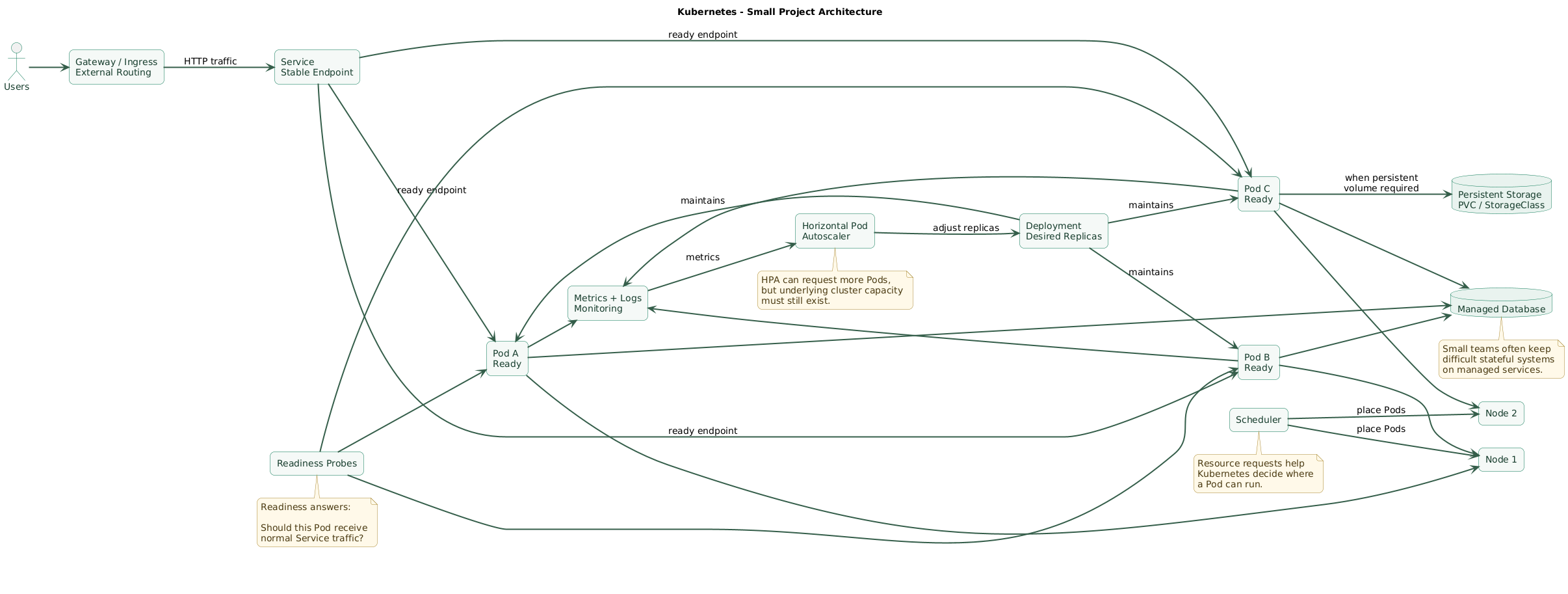
Kubernetes introduces several abstractions between your application and the machine running it.
Container
Your application still runs as a containerized process.
Pod
Kubernetes schedules containers inside Pods.
A Pod is ephemeral. You should not design a normal stateless service around the assumption that one particular Pod will remain alive forever.
Deployment
A Deployment describes the desired state of a stateless application.
desired replicas:
3

container image:
registry.example.com/api:8f21c36
Kubernetes controllers work to keep the desired replica population running.
Service
Pods are created and destroyed, so applications should not depend directly on individual Pod IP addresses.
A Service provides a stable logical network endpoint in front of a changing group of Pods.
Gateway or Ingress
Public HTTP traffic needs routing into cluster Services.
Existing installations commonly use Ingress. For new architecture, Gateway API is the direction Kubernetes recommends, although it requires an implementation and its API resources are installed separately from the core Kubernetes API.
Node
Nodes provide compute capacity where Pods run.
Kubernetes schedules workloads, but somebody still needs to provide, maintain, scale, secure, and monitor the underlying compute.
Control plane
The control plane stores and reconciles cluster state.
With a managed Kubernetes service, much of the direct control-plane operation can be delegated to a cloud provider. That does not remove workload and cluster-level operational responsibility.
3. When Kubernetes starts helping
You have several interchangeable application replicas
Suppose an API needs:
api-1
api-2
api-3
api-4
Kubernetes gives those replicas one declarative workload definition.
Instead of individually managing four servers or processes:
replicas: 4becomes part of the desired state.
You deploy frequently
Deployments provide rolling replacement behavior:
old replicas
    ↓
start new replicas
    ↓
wait for readiness
    ↓
gradually replace old replicas
    ↓
new version converges
This becomes valuable when several services deploy many times each week.
You need consistent service discovery
Instead of configuring:
10.0.3.41
10.0.3.57
10.0.4.12
workloads can communicate through stable Service names.
http://payments
http://users
http://notifications
You operate multiple machines
Kubernetes can schedule workloads across available nodes based on declared requirements.
This becomes more useful as manually deciding:
which service should run
on which server?
becomes a recurring operational problem.
You need one deployment contract
Different services can share conventions for:
- Deployment.
- Health checks.
- Resource requests.
- Configuration.
- Secrets.
- Networking.
- Monitoring labels.
Standardization can be more valuable than autoscaling itself.
4. Deployments, readiness, and self-healing
Kubernetes is often described as self-healing.
That phrase needs a precise interpretation.
Replacement of failed Pods
If a Deployment wants three replicas and one Pod disappears:
desired = 3
running = 2

controller
    ↓
create replacement

running = 3
This removes a category of manual restart work.
It cannot repair arbitrary application defects
If every replacement Pod crashes because:
bad configuration
invalid migration
missing secret
broken dependency
software defect
Kubernetes may repeatedly recreate the failing workload.
Orchestration is not application correctness.
Readiness controls traffic
A readiness probe asks:
Should this Pod
receive Service traffic?
Example:
readinessProbe:
  httpGet:
    path: /ready
    port: 8080
  periodSeconds: 5
  failureThreshold: 3
A Pod that fails readiness remains running but is removed from normal Service traffic until it becomes ready again.
Liveness has a different job
A liveness probe asks whether restarting the container may recover it.
Poor liveness checks can make incidents worse by restarting slow but recoverable applications during dependency failures.
Startup probes protect slow initialization
A startup probe can give slow applications time to initialize before normal liveness behavior begins.
Rolling updates require real readiness
A useful Deployment configuration might include:
strategy:
  type: RollingUpdate
  rollingUpdate:
    maxUnavailable: 0
    maxSurge: 1
The exact values depend on capacity and availability requirements.
The important principle is:
new replica becomes genuinely ready
before old serving capacity disappears
5. Resource requests, limits, and autoscaling
Requests help the scheduler place workloads
Example:
resources:
  requests:
    cpu: 250m
    memory: 256Mi
Requests describe the compute resources the scheduler should account for when deciding whether a Pod fits on a node.
Limits constrain consumption
resources:
  limits:
    cpu: "1"
    memory: 512Mi
CPU and memory limits do not behave identically. CPU limits are generally enforced through throttling, while exceeding available memory constraints can lead to an out-of-memory termination.
Bad resource values create their own incidents
Requests that are too high can leave Pods pending:
cluster has spare real CPU

but declared requests
do not fit

Pod remains Pending
Requests that are too low can lead to excessive packing and contention.
Horizontal Pod Autoscaler
HPA can adjust the replica count of a workload using metrics.
traffic increases
      ↓
metric increases
      ↓
HPA raises desired replicas
      ↓
Deployment creates Pods
This is useful when application replicas are interchangeable and workload demand changes enough that static replica counts are inefficient.
Autoscaling does not create infrastructure capacity
Suppose:
HPA wants 12 Pods

cluster nodes only have
space for 7
the remaining Pods cannot simply appear.
Node autoscaling or sufficient spare capacity must solve the next layer.
Autoscaling can amplify downstream pressure
More application replicas can create more:
- Database connections.
- Queue consumers.
- API requests.
- Cache traffic.
Scaling one layer does not guarantee the rest of the system can absorb the additional concurrency.
6. Networking becomes both easier and more complex
Internal discovery becomes easier
Services provide stable endpoints for changing Pod groups.
This is a real advantage for multi-service systems.
Cluster networking becomes another platform
You now depend on:
Pod networking
Service networking
cluster DNS
network plugin
external routing
load balancer integration
Gateway or Ingress implementation
Gateway and Ingress
Existing small clusters frequently expose HTTP applications through an Ingress controller.
The Ingress API remains stable, but its API is frozen. Kubernetes recommends Gateway API for newer functionality and future development.
That means new projects should understand the selected Gateway implementation rather than assuming Kubernetes alone provides the external proxy.
NetworkPolicy requires implementation support
NetworkPolicy objects define network access policy, but enforcement depends on the cluster networking implementation.
Creating policy objects without confirming that your networking stack enforces them can create a false sense of isolation.
DNS becomes important infrastructure
Internal services commonly depend on cluster DNS.
A DNS problem can therefore look like:
database unavailable
API unavailable
queue unavailable
even though those systems themselves are healthy.
7. Stateful workloads are not magically solved
Running stateless applications in Kubernetes is generally easier than operating critical databases correctly inside Kubernetes.
StatefulSet provides useful identities
StatefulSets can provide:
- Stable Pod identities.
- Ordered lifecycle behavior.
- PersistentVolume relationships.
- Rolling update behavior suitable for some stateful applications.
StatefulSet is not database high availability
It does not automatically decide:
- Which database replica should be primary.
- How replication should work.
- How corruption should be handled.
- How backups should be verified.
- How point-in-time recovery should work.
Database-native clustering, operators, managed databases, or other specialized systems still solve those problems.
PersistentVolumes move the responsibility
Instead of:
/var/lib/postgresql
on one server disk
you now need to understand:
PersistentVolumeClaim
StorageClass
CSI driver
volume attachment
snapshot support
backup
restore
zone constraints
Managed databases are often simpler for small teams
A practical architecture can be:
Kubernetes:
stateless web + workers

managed database:
PostgreSQL

object storage:
uploads

managed queue:
background tasks
This keeps replaceable application compute in Kubernetes while delegating difficult stateful infrastructure.
8. Where Kubernetes adds operational risk
Kubernetes operational responsibility stack (diagram)
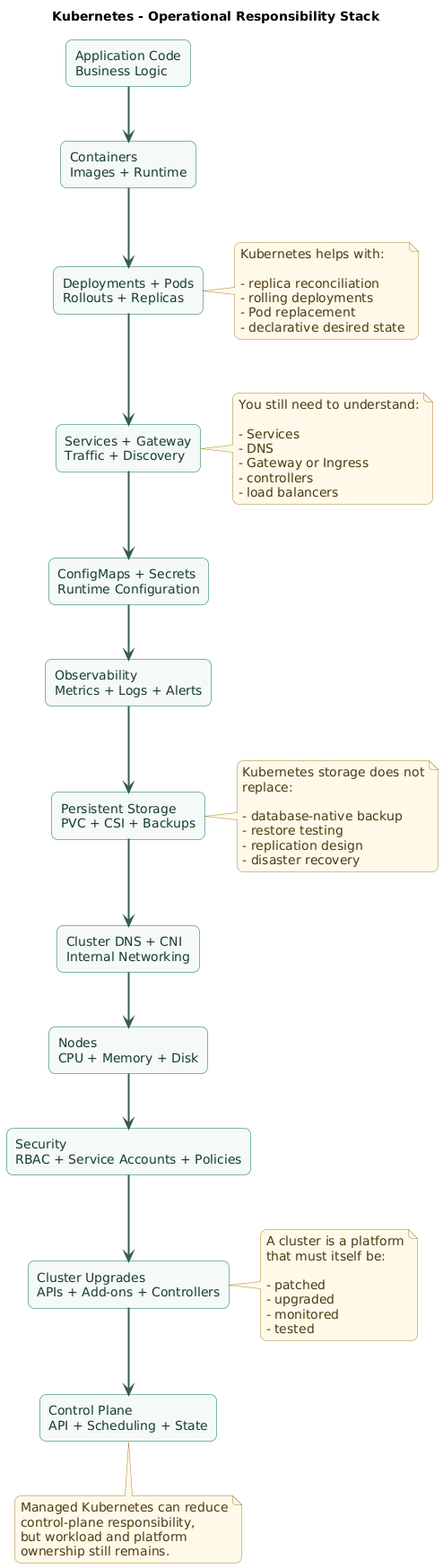
Kubernetes removes some manual operations while introducing a platform that must itself remain healthy.
Cluster upgrades
Kubernetes evolves continuously.
You need a process for:
- Control-plane upgrades where applicable.
- Worker-node upgrades.
- Deprecated APIs.
- Networking components.
- Storage drivers.
- Gateway or ingress controllers.
- Metrics components.
- Monitoring agents.
More failure domains
Without Kubernetes:
application
reverse proxy
database
server
With Kubernetes, troubleshooting may involve:
application
Pod
Deployment
ReplicaSet
Service
EndpointSlice
Gateway
Gateway controller
DNS
network plugin
node
scheduler
storage driver
control plane
Debugging requires new skills
Engineers need to interpret:
kubectl get pods
kubectl describe pod
kubectl logs
kubectl get events
kubectl rollout status
kubectl top
kubectl get endpointslices
plus the underlying Linux, networking, storage, and application behavior.
Configuration volume grows
One application may require:
Deployment
Service
Gateway route
ConfigMap
Secret
ServiceAccount
HPA
PDB
Helm, Kustomize, GitOps, or templating can organize this configuration, but each tool also adds concepts.
Security surface grows
You now need to manage:
- RBAC.
- Service accounts.
- Cluster credentials.
- Image supply chain.
- Secrets.
- Network policy.
- Pod security configuration.
- Node security.
Observability becomes essential
A cluster without usable monitoring and logs is difficult to operate.
At minimum, understand:
- Application availability.
- Pod restarts.
- Pending Pods.
- Node capacity.
- CPU and memory use.
- Deployment failures.
- Cluster component health.
Platform expertise has opportunity cost
For a three-person product team, every day spent maintaining the orchestration platform is a day not spent on:
- Product functionality.
- Security.
- Testing.
- Customer support.
- Application reliability.
Kubernetes should repay that cost by removing enough other operational work.
9. Managed Kubernetes vs self-managed clusters
Self-managed cluster
You may own:
control plane
etcd
certificates
node provisioning
cluster networking
cluster upgrades
high availability
backup of cluster state
recovery
This is difficult to justify for many small product teams unless Kubernetes operation itself is a requirement or organizational capability.
Managed Kubernetes
A managed service can remove much of the direct control-plane operation.
You still generally own significant responsibilities around:
- Workload configuration.
- Node or compute capacity.
- Resource sizing.
- Applications.
- Network configuration.
- Storage choices.
- Access policy.
- Secrets.
- Monitoring.
- Backup and recovery.
Managed does not mean maintenance-free
It changes the responsibility boundary.
That can still be an excellent trade for a small team because control-plane reliability is one of the least differentiated things a product team can spend time building.
Prefer boring managed components where practical
A small-team platform might deliberately use:
managed Kubernetes
managed database
managed object storage
managed DNS
managed container registry
instead of implementing every infrastructure component inside the cluster.
10. Consider simpler alternatives first
systemd on a VM
Good fit when:
- There are one or two services.
- Traffic is predictable.
- One or two machines are enough.
- The team already understands Linux well.
Architecture:
Internet
   ↓
Nginx / Caddy
   ↓
systemd application
   ↓
managed database
Docker Compose
Useful for several containers on one machine:
reverse proxy
application
worker
cache
It offers a much smaller operational surface than Kubernetes, although it does not provide the same multi-node orchestration model.
Managed container service
Many platforms can run container images with:
- Automatic deployment.
- TLS.
- Health checks.
- Horizontal scaling.
- Managed routing.
without exposing a full Kubernetes cluster to the application team.
Platform-as-a-service
If your operational requirement is:
git push
or
deploy container

then:
run application reliably
a PaaS may solve the real problem with much less platform ownership.
Kubernetes is not the default maturity level
There is no universal progression:
beginner:
one VM

professional:
Kubernetes
A professionally operated simple architecture can be safer than a poorly operated cluster.
11. A practical small-project decision framework
Kubernetes small-project decision tree (diagram)
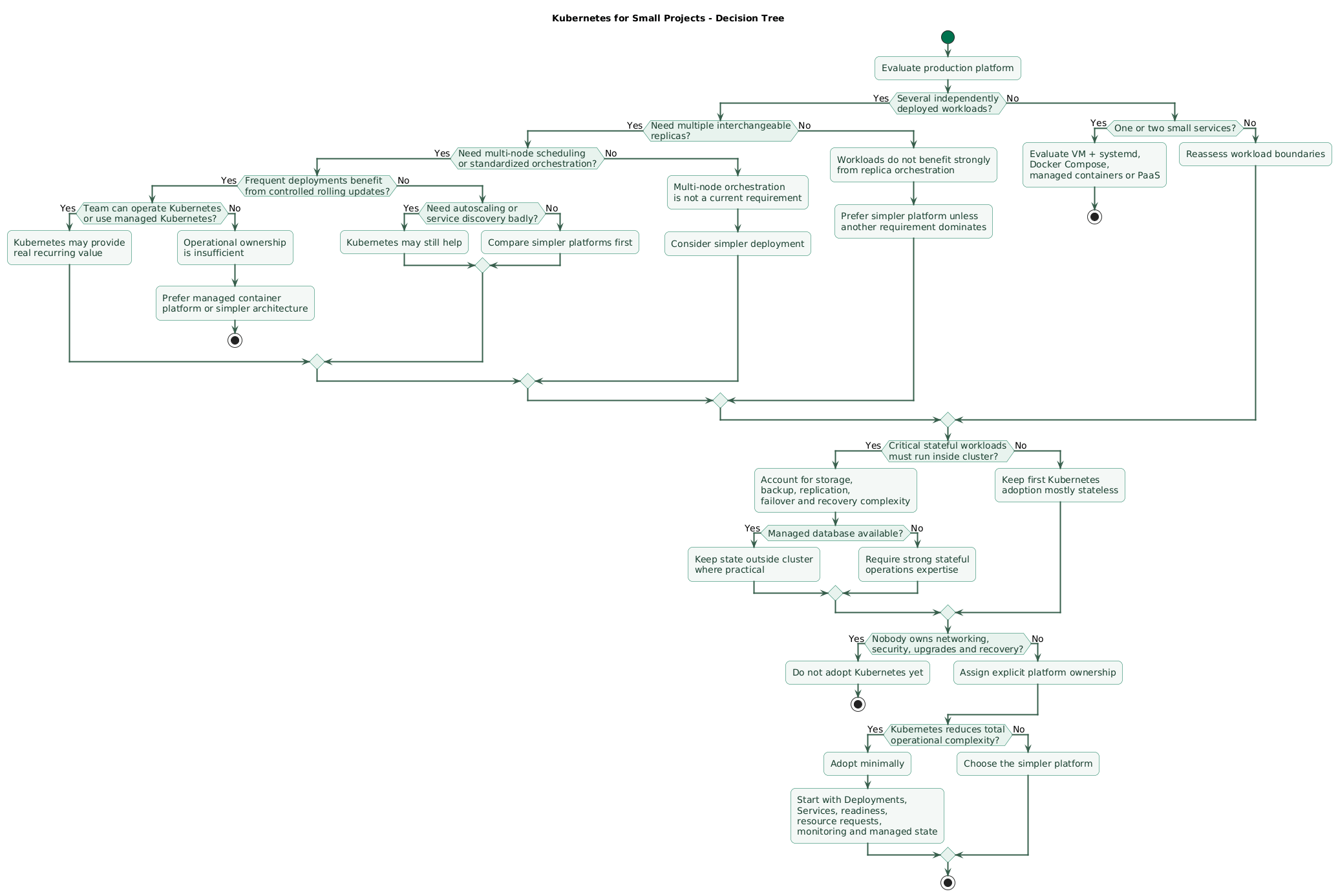
Question 1: how many workloads?
If you have:
1 web application
1 worker
1 managed database
Kubernetes may be unnecessary unless another requirement strongly favors it.
If you have:
12 independently deployed services
multiple workers
scheduled jobs
several environments
the common orchestration model becomes more valuable.
Question 2: do you need multiple nodes?
If everything comfortably runs on one host and that architecture satisfies availability requirements, multi-node scheduling may not solve an existing problem.
Question 3: do you need replicas?
Kubernetes is strongest when replicas are interchangeable:
api replica 1
api replica 2
api replica 3
and any healthy replica can serve traffic.
Question 4: are deployments painful?
If releases already provide:
- Health checks.
- Zero-downtime replacement.
- Rollback.
- Versioned artifacts.
Kubernetes may not add enough additional value.
Question 5: do you actually need autoscaling?
Stable applications sometimes work better with:
3 replicas
all the time
than an elaborate autoscaling system.
Question 6: who owns the platform?
Someone must understand what happens when:
Pod stays Pending
node becomes NotReady
DNS fails
volume will not attach
Gateway stops routing
Deployment stalls
certificate expires
cluster upgrade breaks an add-on
If the answer is:
nobodyKubernetes creates organizational risk.
Question 7: can you use managed Kubernetes?
If Kubernetes provides strong application-level value but your team should not operate the control plane, a managed service can significantly improve the tradeoff.
Question 8: can a simpler platform satisfy the same requirements?
Compare the full requirement set:
deployment
availability
scaling
networking
security
observability
backup
recovery
team time
cost
Choose the simplest platform that meets those requirements reliably.
12. If you choose Kubernetes, adopt it minimally
Do not install the entire cloud-native ecosystem on day one.
Start with stateless workloads
Keep the first migration simple:
web application
worker
scheduled jobs
Leave databases on an established managed platform unless moving them has a concrete benefit.
Use Deployments for interchangeable services
Define:
- Replica count.
- Immutable image.
- Readiness probe.
- Resource requests.
- Graceful shutdown.
Add limits deliberately
Avoid copying arbitrary values from examples.
Observe real application behavior and size resources from measurements.
Use namespaces for useful boundaries
A small cluster does not need dozens of namespaces.
A simple split might be:
production
staging
platform-monitoring
Keep manifests in source control
k8s/
  base/
    deployment.yaml
    service.yaml

  production/
    ...

  staging/
    ...
Treat cluster configuration as reviewed code rather than an accumulation
of manual kubectl edit changes.
Use explicit resource requests
Without useful requests, the scheduler has weaker information about how much capacity workloads require.
Add HPA only when there is a real scaling signal
First understand:
- What metric indicates demand?
- How fast does the application start?
- What is the minimum safe replica count?
- Can dependencies handle additional concurrency?
Use PDBs with realistic expectations
A PodDisruptionBudget can limit how much of a workload is voluntarily disrupted at once.
It does not protect against every node failure, and Deployment rolling updates are controlled by Deployment rollout settings rather than by the PDB itself.
Monitor before scaling adoption
At minimum, be able to see:
availability
request errors
latency
Pod readiness
Pod restarts
Deployment status
Pending Pods
CPU
memory
node availability
storage health
Test node failure
Do not assume multiple nodes automatically provide availability.
Verify what happens when one node disappears.
Test cluster upgrades
Staging should exercise:
- Application manifests.
- Networking.
- Gateway or ingress.
- Storage.
- Monitoring.
- Autoscaling.
Keep a rollback path outside Kubernetes configuration
Retain the previous immutable application image.
A rollback should not require rebuilding an old commit during an outage.
13. Copy/paste Kubernetes decision checklist
Kubernetes for small projects checklist

Current architecture
- List all application services.
- List all workers.
- List scheduled jobs.
- List databases.
- List caches.
- List queues.
- List persistent data.
- List current servers.
- List current deployment steps.
- List current availability requirements.
- List current scaling requirements.
- List current operational pain.

Problem definition
- Write down the problem Kubernetes should solve.
- Avoid choosing Kubernetes only because containers are used.
- Avoid choosing Kubernetes only because it is popular.
- Avoid choosing Kubernetes only for resume experience when evaluating production architecture.
- Separate learning goals from production requirements.
- Estimate how often the identified operational problem occurs.
- Estimate time currently spent solving it.
- Compare that cost with cluster ownership.

Workloads
- Count independently deployed workloads.
- Identify stateless workloads.
- Identify stateful workloads.
- Identify workloads that can run several replicas.
- Identify workloads that require stable identity.
- Identify workloads requiring persistent storage.
- Identify workloads requiring scheduled execution.
- Identify long-running jobs.
- Identify GPU or unusual scheduling requirements where relevant.

Replicas
- Determine whether applications support multiple replicas.
- Remove process-local session dependencies where necessary.
- Use shared session storage where appropriate.
- Ensure uploaded files are not stored only on one ephemeral Pod.
- Ensure replicas can use shared external state safely.
- Verify applications tolerate Pod replacement.
- Verify graceful shutdown.
- Verify load-balanced operation.

Deployments
- Determine current deployment frequency.
- Determine whether rolling replacement solves a recurring problem.
- Use immutable images.
- Define Deployment strategy.
- Understand maxSurge.
- Understand maxUnavailable.
- Configure readiness.
- Monitor rollout status.
- Keep previous revision available.
- Test rollback.
- Keep database changes backward-compatible.

Readiness
- Define what ready means.
- Keep readiness checks inexpensive.
- Do not mark ready before application initialization completes.
- Verify unready Pods stop receiving normal Service traffic.
- Avoid declaring the whole application unready because an optional dependency is unavailable.
- Test readiness during deployment.
- Test readiness during dependency incidents.

Liveness
- Use liveness only when restart can actually recover the condition.
- Avoid liveness checks that cause restart storms.
- Keep liveness independent from unnecessary remote dependencies.
- Test liveness failure behavior.
- Monitor container restart count.

Startup probes
- Use startupProbe when applications need long initialization.
- Give startup enough time.
- Avoid hiding permanently broken startup indefinitely.
- Confirm liveness begins after successful startup where intended.

Services
- Use Services for stable Pod discovery.
- Avoid depending on individual Pod IP addresses.
- Define clear service ownership.
- Understand ClusterIP.
- Understand LoadBalancer where used.
- Understand external routing.
- Test service discovery failures.
- Monitor DNS.

External routing
- Decide whether Gateway API or an existing Ingress implementation fits the environment.
- Understand that an implementation or controller is required.
- Keep routing configuration in source control.
- Configure TLS.
- Monitor certificates.
- Monitor controller health.
- Test routing after upgrades.
- Avoid exposing administrative Services accidentally.

Gateway API
- Review support in the selected platform.
- Choose a maintained implementation.
- Install required API resources where necessary.
- Understand GatewayClass.
- Understand Gateway.
- Understand HTTPRoute.
- Keep infrastructure ownership clear.
- Test provider-specific behavior.

Ingress
- Understand existing Ingress deployments can remain valid.
- Remember the Ingress API is frozen.
- Understand the selected ingress controller.
- Monitor controller upgrades.
- Avoid assuming every Ingress annotation is portable.

Resources
- Define CPU requests.
- Define memory requests.
- Measure real workload usage.
- Avoid arbitrary copy/pasted requests.
- Understand scheduler placement uses requests.
- Define limits deliberately.
- Understand CPU throttling.
- Understand memory OOM behavior.
- Monitor throttling.
- Monitor OOM kills.
- Revisit resource values after traffic changes.

Capacity
- Calculate total workload requests.
- Reserve capacity for system components.
- Reserve deployment surge capacity.
- Reserve capacity for node failure where required.
- Monitor node allocatable resources.
- Monitor Pending Pods.
- Understand cluster autoscaler behavior if used.
- Avoid assuming HPA creates node capacity.

Horizontal Pod Autoscaler
- Identify a meaningful scaling signal.
- Confirm metrics are available.
- Define minimum replicas.
- Define maximum replicas.
- Understand scaling stabilization.
- Test scale-up.
- Test scale-down.
- Monitor replica changes.
- Verify application startup speed.
- Verify database connection capacity.
- Verify downstream API limits.
- Avoid autoscaling simply because the feature exists.

PodDisruptionBudget
- Decide how many replicas may be voluntarily disrupted.
- Configure PDB only for workloads where it represents a useful availability rule.
- Understand PDB does not prevent involuntary failure.
- Understand Deployment rollout strategy is separate.
- Test node drain.
- Avoid impossible PDB settings that block necessary maintenance.
- Monitor disrupted workloads during maintenance.

State
- Identify all stateful components.
- Understand PersistentVolumeClaims.
- Understand StorageClasses.
- Understand the CSI driver.
- Understand volume topology.
- Understand zone constraints.
- Understand snapshot support.
- Test volume attachment.
- Test recovery after node loss.
- Back up persistent data separately.

StatefulSets
- Use StatefulSet when stable identity or ordered stateful behavior is required.
- Do not treat StatefulSet as database high availability.
- Understand the application's native clustering model.
- Understand replication.
- Understand failover.
- Test Pod replacement.
- Test storage reconnection.
- Test upgrades.
- Test rollback limitations.

Databases
- Consider keeping databases outside Kubernetes for small teams.
- Prefer a managed database when it reduces operational risk.
- Use database-native backup.
- Define RPO.
- Define RTO.
- Test restoration.
- Do not rely only on PersistentVolume snapshots.
- Monitor replication.
- Monitor storage capacity.
- Document disaster recovery.

Configuration
- Keep manifests in source control.
- Use declarative configuration.
- Avoid unmanaged kubectl edits.
- Separate environment-specific values.
- Review changes through pull requests.
- Record deployed revision.
- Validate manifests before production.

Secrets
- Do not commit production secrets.
- Use controlled secret injection.
- Understand base Kubernetes Secret is an API object requiring proper cluster protection.
- Restrict RBAC access.
- Prefer workload identity where supported.
- Consider external secret-management systems when justified.
- Rotate credentials.
- Avoid logging secret values.
- Review service account permissions.

RBAC
- Use least privilege.
- Avoid cluster-admin for applications.
- Separate human access from workload identities.
- Use dedicated ServiceAccounts.
- Review RoleBindings.
- Review ClusterRoleBindings.
- Remove stale users and identities.
- Audit administrative access.

Namespaces
- Use namespaces where they create a useful boundary.
- Avoid one namespace per tiny component without a reason.
- Separate production and staging when sharing a cluster only if the risk model supports that.
- Apply ResourceQuota where useful.
- Apply LimitRange where useful.
- Keep ownership clear.

Networking
- Understand the cluster network implementation.
- Understand Pod networking.
- Understand Service routing.
- Understand DNS.
- Understand external load balancing.
- Understand NetworkPolicy implementation.
- Test cross-service connectivity.
- Test DNS failure.
- Monitor networking components.

NetworkPolicy
- Confirm the network plugin enforces NetworkPolicy.
- Define default-deny only with a tested rollout plan.
- Permit required DNS traffic.
- Permit required service dependencies.
- Test policies in staging.
- Avoid assuming policy objects are effective without implementation support.

Observability
- Monitor user-visible availability.
- Monitor error rate.
- Monitor latency.
- Monitor Pod readiness.
- Monitor Pod restarts.
- Monitor deployment health.
- Monitor Pending Pods.
- Monitor node health.
- Monitor CPU.
- Monitor memory.
- Monitor storage.
- Monitor cluster DNS.
- Monitor Gateway or ingress.
- Centralize logs.
- Keep runbooks.

Cluster monitoring
- Monitor control-plane health where exposed and appropriate.
- Monitor node availability.
- Monitor kubelet health.
- Monitor scheduler symptoms.
- Monitor API availability.
- Monitor certificate expiration where relevant.
- Monitor cluster add-ons.
- Alert on persistent Pending workloads.
- Alert on repeated restart loops.

Logging
- Collect application logs.
- Collect important cluster events.
- Collect relevant node logs.
- Use structured application logging.
- Include deployment version.
- Include service name.
- Avoid secrets.
- Define retention.
- Make logs searchable during incidents.

Security
- Patch nodes.
- Upgrade Kubernetes regularly.
- Restrict API access.
- Protect kubeconfig files.
- Use least privilege.
- Restrict container privileges.
- Avoid unnecessary hostPath mounts.
- Avoid privileged containers unless required.
- Scan container images.
- Pin trusted images.
- Review supply-chain controls.
- Configure network isolation where appropriate.
- Audit sensitive access.

Pod security
- Run as non-root where practical.
- Drop unnecessary Linux capabilities.
- Use read-only root filesystems where compatible.
- Prevent privilege escalation where practical.
- Restrict host namespaces.
- Restrict host mounts.
- Test application compatibility with security controls.

Nodes
- Decide who provisions nodes.
- Decide who patches nodes.
- Decide who replaces failed nodes.
- Monitor node capacity.
- Monitor disk pressure.
- Monitor memory pressure.
- Monitor PID pressure.
- Test node loss.
- Automate node replacement where possible.

Managed Kubernetes
- Understand what the provider manages.
- Understand what the team still manages.
- Review control-plane availability.
- Review supported Kubernetes versions.
- Review upgrade policy.
- Review node-management options.
- Review networking integration.
- Review storage integration.
- Review load-balancer costs.
- Review monitoring integration.
- Review backup responsibility.

Self-managed Kubernetes
- Justify why the control plane must be owned.
- Design control-plane availability.
- Protect etcd.
- Back up etcd.
- Test etcd restore.
- Manage certificates.
- Manage control-plane upgrades.
- Manage networking.
- Manage node bootstrap.
- Document disaster recovery.
- Ensure more than one engineer understands recovery.

Upgrades
- Track supported Kubernetes versions.
- Read release notes.
- Check deprecated APIs.
- Upgrade staging first.
- Test workloads.
- Test Gateway or ingress.
- Test storage.
- Test monitoring.
- Test autoscaling.
- Test security policies.
- Upgrade production with rollback planning.
- Record results.

Cost
- Calculate cluster baseline cost.
- Calculate node cost.
- Calculate load-balancer cost.
- Calculate storage cost.
- Calculate network egress.
- Calculate managed control-plane cost where applicable.
- Calculate monitoring cost.
- Include engineering time.
- Compare with simpler hosting alternatives.

Operational complexity
- Count platform components.
- Identify owner for every component.
- Keep add-ons minimal.
- Avoid installing operators without a clear reason.
- Avoid installing service mesh without a clear requirement.
- Avoid adding GitOps only because it is fashionable.
- Avoid adding multiple observability stacks.
- Prefer one understandable platform path.

Service mesh
- Do not add a service mesh by default.
- Identify the exact networking or policy problem first.
- Consider application and Gateway-level alternatives.
- Measure resource overhead.
- Understand debugging complexity.
- Adopt only when the benefits justify another distributed systems layer.

GitOps
- Consider GitOps when many cluster changes need controlled reconciliation.
- Keep source control authoritative.
- Protect production branches.
- Review changes.
- Understand reconciliation behavior.
- Avoid introducing GitOps before basic Kubernetes operations are understood.

Backups
- Back up application state.
- Back up databases.
- Back up required persistent volumes.
- Back up important configuration.
- Protect secret recovery.
- Understand cluster-state recovery needs.
- Keep off-site copies.
- Verify backups.
- Run restore drills.
- Define RPO.
- Define RTO.

Disaster recovery
- Define cluster-loss scenario.
- Define node-loss scenario.
- Define region or zone-loss scenario where relevant.
- Document cluster recreation.
- Document workload redeployment.
- Document database recovery.
- Document DNS changes.
- Test recovery.
- Avoid assuming Kubernetes objects alone contain all business data.

Simpler alternatives
- Evaluate systemd on a VM.
- Evaluate Docker Compose.
- Evaluate managed container services.
- Evaluate platform-as-a-service.
- Evaluate serverless where workload behavior fits.
- Compare availability.
- Compare deployment features.
- Compare scaling.
- Compare security.
- Compare recovery.
- Compare cost.
- Compare engineering time.

Use Kubernetes when
- Several workloads benefit from one deployment platform.
- Multiple interchangeable replicas are common.
- Multi-node scheduling solves a real problem.
- Rolling deployment is repeatedly valuable.
- Service discovery is a recurring operational need.
- Resource scheduling matters.
- Autoscaling has a useful signal.
- Standardization reduces operational work.
- The team can operate or buy the platform responsibly.

Avoid or postpone Kubernetes when
- One small application is the entire workload.
- One server satisfies requirements.
- Deployments are already simple and reliable.
- Traffic is stable.
- Autoscaling is unnecessary.
- There is little operational expertise.
- Nobody owns the cluster.
- Managed alternatives solve the same problem more simply.
- The cluster would become more complicated than the application.

Adoption
- Start with managed Kubernetes when practical.
- Start with stateless workloads.
- Keep databases managed externally where appropriate.
- Start with a small number of namespaces.
- Use Deployments and Services first.
- Add readiness probes.
- Add resource requests.
- Add limits deliberately.
- Add Gateway or ingress routing.
- Add monitoring.
- Add autoscaling only when needed.
- Add PDBs when disruption requirements are understood.
- Add advanced operators only when they solve real problems.

Testing
- Test failed Pods.
- Test failed readiness.
- Test failed deployments.
- Test rollback.
- Test node failure.
- Test node drain.
- Test insufficient capacity.
- Test storage recovery.
- Test DNS failure where practical.
- Test application behavior when dependencies fail.
- Test cluster upgrades.
- Test disaster recovery.

Ownership
- Name the cluster owner.
- Name backup owner.
- Name security owner.
- Name networking owner.
- Name storage owner.
- Keep on-call expectations clear.
- Keep operational documentation current.
- Ensure knowledge is shared across more than one person.

Final decision review
- Which recurring problem does Kubernetes solve?
- Can that problem be solved more simply?
- Do workloads benefit from multiple replicas?
- Is multi-node scheduling required?
- Does deployment standardization provide real value?
- Is autoscaling genuinely required?
- Can applications tolerate Pod replacement?
- Are stateful systems designed correctly?
- Who owns cluster operation?
- Can the team debug networking and storage failures?
- Can the team keep the cluster upgraded?
- Are monitoring and backup ready?
- Is managed Kubernetes available?
- Is the additional platform cost justified?
- Will Kubernetes reduce total operational complexity rather than merely move it?
14. FAQ
Is Kubernetes useful for a small project?
Yes, when the project has problems Kubernetes solves well: several workloads, interchangeable replicas, rolling deployments, service discovery, multi-node scheduling, standardized runtime configuration, or useful autoscaling. A single low-traffic application may be safer and cheaper to operate on a simpler platform.
Is Kubernetes required for high availability?
No. High availability can also be implemented with managed application platforms, multiple virtual machines, managed container services, load balancers, replicated databases, and other architectures. Kubernetes provides useful orchestration primitives but does not guarantee application availability by itself.
Does Kubernetes automatically restart failed applications?
Kubernetes controllers can create replacement Pods when a workload has fewer replicas than desired, and container restart policies can restart processes under applicable conditions. This does not repair an application that repeatedly fails because of bad configuration, incompatible data, or a broken dependency.
Does Kubernetes automatically scale applications?
Not unless autoscaling is configured. Horizontal Pod Autoscaler can adjust replica counts from metrics, but the workload must support horizontal scaling, metrics must be available, and the cluster needs enough underlying capacity.
Should a small team run its own Kubernetes control plane?
Usually only when there is a concrete requirement to own that layer or the organization already has the necessary platform expertise. Managed Kubernetes commonly provides a better tradeoff for small product teams, although many workload and cluster responsibilities remain.
Should I run PostgreSQL inside Kubernetes?
It can be done, but Kubernetes does not eliminate database replication, backup, failover, upgrade, storage, and recovery responsibilities. For small teams, a managed PostgreSQL service is often operationally simpler while Kubernetes runs stateless applications and workers.
What is the simplest alternative to Kubernetes?
It depends on requirements. A systemd service on a VM, Docker Compose, a managed container platform, or a platform-as-a-service may provide all the deployment and availability features a small application needs with much less platform overhead.
Key terms (quick glossary)
- Kubernetes
- A platform for declaratively deploying, scheduling, networking, scaling, and managing containerized workloads across a cluster.
- Pod
- The smallest deployable Kubernetes compute object, containing one or more containers that share parts of their runtime environment.
- Deployment
- A Kubernetes workload controller commonly used for stateless applications whose replicas are interchangeable and can be replaced.
- ReplicaSet
- A controller that maintains a desired population of matching Pods and is commonly managed indirectly through a Deployment.
- Service
- A stable network abstraction in front of a changing set of Pods, allowing clients to communicate with a workload without tracking individual Pod addresses.
- Gateway API
- A family of Kubernetes extension APIs for role-oriented and protocol-aware service networking and external traffic routing.
- Ingress
- A stable Kubernetes API for HTTP and HTTPS routing to Services. Its API is frozen, and new Kubernetes networking development is centered on Gateway API.
- Readiness probe
- A check indicating whether a Pod should currently receive normal traffic through Kubernetes Services.
- Liveness probe
- A check used to identify a container state where restarting the container may be appropriate.
- Startup probe
- A probe designed for application startup, allowing slow initialization before normal liveness behavior begins.
- Resource request
- A declared amount of compute resource used by Kubernetes scheduling and resource accounting to determine where workloads can run.
- Resource limit
- A declared maximum resource boundary applied to a container or, depending on supported configuration, a Pod.
- Horizontal Pod Autoscaler
- A Kubernetes controller that adjusts workload replica count according to configured metrics.
- PodDisruptionBudget
- A policy object used to limit how much of a workload can be voluntarily disrupted at once under applicable eviction operations.
- StatefulSet
- A workload controller intended for applications that require stable Pod identity, ordered behavior, or persistent storage relationships.
- PersistentVolumeClaim
- A Kubernetes request for persistent storage that can be matched with storage provided through the cluster's storage system.
- Control plane
- The Kubernetes components responsible for storing cluster state and reconciling workloads toward their declared desired state.
- Node
- A machine providing compute capacity where Kubernetes schedules Pods.
- NetworkPolicy
- A Kubernetes API for defining allowed network traffic between selected workloads, subject to enforcement by the cluster networking implementation.
Worth reading
Recommended guides from the category.
