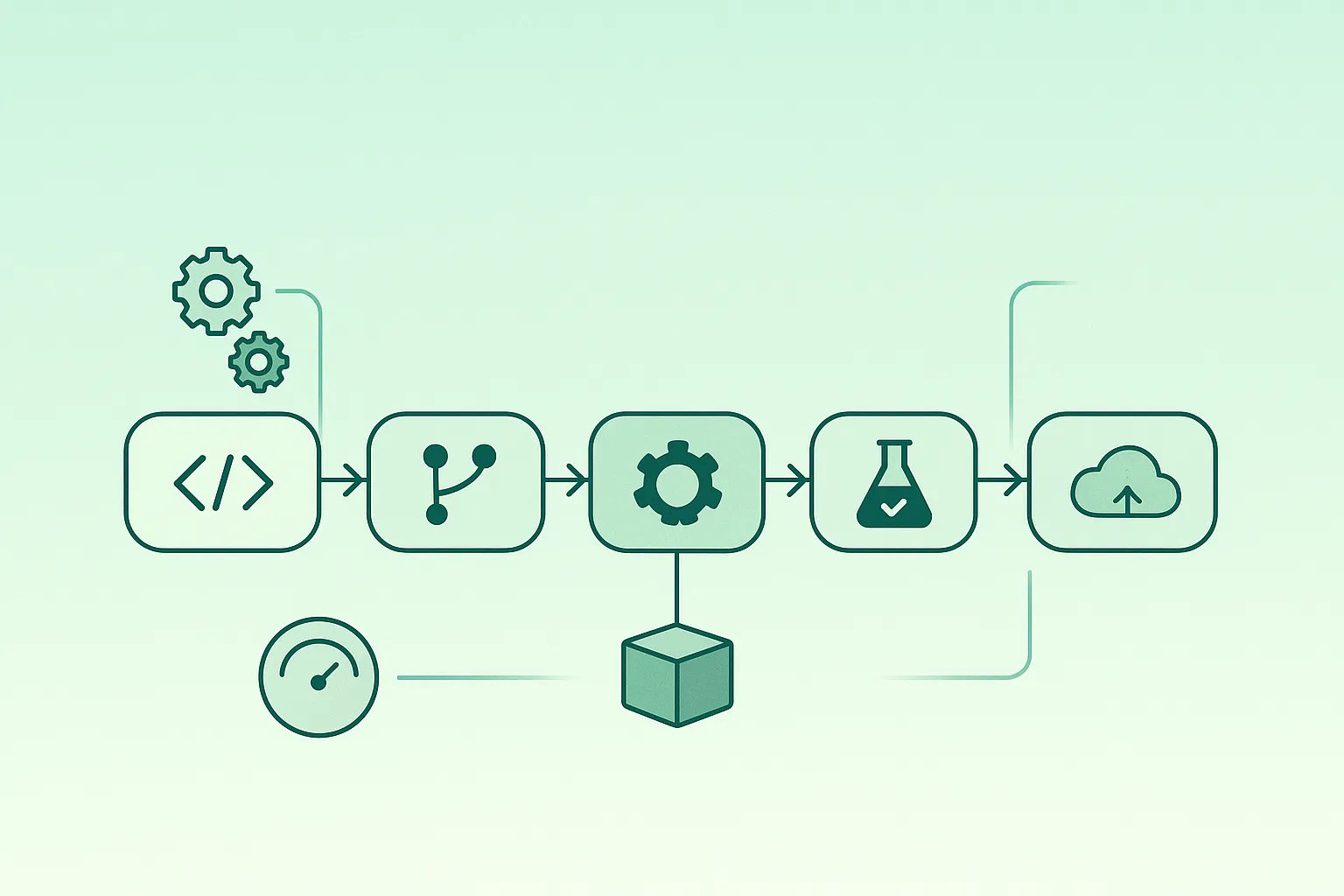
A CI/CD pipeline is the automated delivery system that turns code changes into tested, scanned, and deployable releases. Its job is to remove “tribal knowledge” from shipping: every change follows the same quality checks, the same build rules, and the same deployment path.
When teams say “our pipeline is broken”, the root cause is rarely the tool. It’s usually unclear stage design, slow feedback, unreliable tests, secret sprawl, or missing verification and rollback. This guide focuses on the repeatable patterns behind effective CI/CD—independent of GitHub Actions, GitLab CI, Jenkins, or any other platform.
Simple mental model
A good pipeline answers three questions automatically: Does it work? (tests), Is it safe? (security + policy), Can we release it reliably? (deploy + verify + rollback).
1. What a CI/CD Pipeline Is (In Plain English)
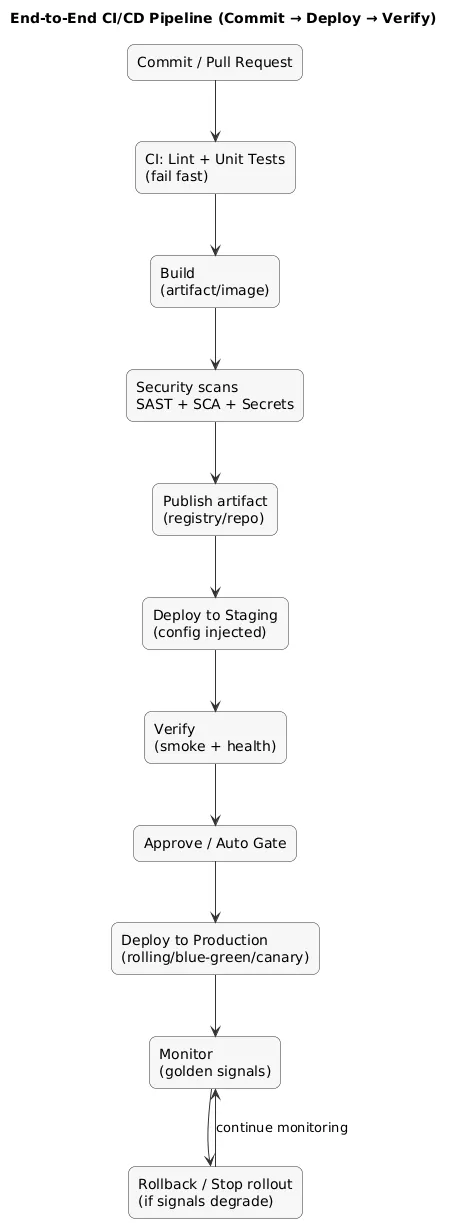
Think of the pipeline as a conveyor belt. Every commit triggers a predictable sequence: validate the change, build a release artifact, run security checks, deploy to a safe environment, verify health, then (optionally) promote to production. The value is consistency: less manual work, fewer “special cases”, faster feedback, and smaller release risk.
End-to-end pipeline map (diagram)
2. CI vs CD: Continuous Delivery vs Continuous Deployment
“CI” and “CD” often get mixed up, so use this practical definition:
- CI (Continuous Integration): every change is validated automatically (build + tests + basic checks).
- Continuous delivery: every change is releasable; production deploy typically requires an explicit approval step.
- Continuous deployment: production deploy happens automatically when the pipeline passes (common for low-risk services once mature).
Practical choice
Many teams start with continuous delivery (manual production approval) and shift select services to continuous deployment only after tests are trustworthy, monitoring is strong, and rollback is fast.
3. Pipeline Anatomy: Stages from Commit to Production
A high-signal pipeline is designed for both speed and confidence. The best pattern is to run the fastest checks first (“fail fast”) and only spend minutes on expensive steps once cheap steps pass.
Typical stage layout (recommended baseline)
- Pre-checks: formatting, linting, type checks, static analysis.
- Tests: unit → integration; keep E2E small and targeted.
- Build: versioned artifact or container image (immutable).
- Security: dependency scan (SCA), code scan (SAST), container scan, IaC scan.
- Deploy non-prod: staging deployment + smoke tests.
- Promote: promote the same artifact to production.
- Post-deploy: health checks, dashboards, rollback triggers.
Commit/PR → Lint/Unit → Build → Scan → Deploy Staging → Verify → Approve/Auto → Deploy Prod → Monitor/RollbackWhat “good” looks like
PR checks are fast and stable. Builds are repeatable. Production deploys are boring. When production deploys aren’t boring, the pipeline needs better verification and rollback.
4. Triggers, Branching, and Change Flow
Keep triggers simple and explainable. Most teams benefit from three trigger types:
- Pull request pipeline: fast checks (lint + unit tests + quick build).
- Main branch pipeline: build + scan + deploy to staging automatically.
- Release/tag pipeline: promote a known artifact to production with approval gates.
Avoid “main-only reality”
If critical checks run only after merge, you move failures later (and more expensively). Run core checks on PRs.
5. Testing Strategy in Pipelines (Unit, Integration, E2E)
Pipeline testing is risk management. You want maximum confidence per minute of pipeline time. A practical layering strategy:
- Unit tests: fast, stable, great ROI; cover business logic.
- Integration tests: DB/queue/cache boundaries; validate important wiring.
- E2E tests: few critical user journeys; keep the set small to avoid flakiness.
Flaky tests are a delivery tax
If tests fail randomly, teams stop trusting CI and start bypassing it. Track flaky test rate and treat it like a reliability defect.
6. Artifacts & Promotion: Build Once / Deploy Many
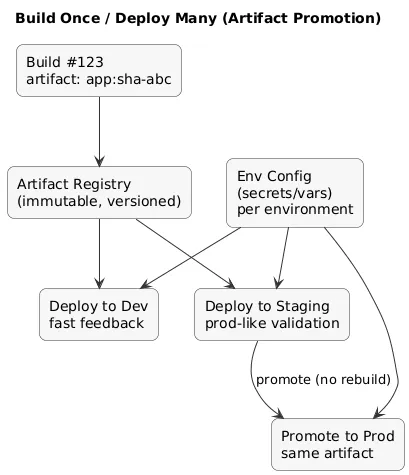
One of the most important CI/CD upgrades is adopting the promotion model: build the artifact once and promote the exact same artifact across environments. This improves traceability and eliminates an entire class of “staging passed, production failed” surprises caused by different builds.
Environment promotion flow (diagram)
Artifact best practices
- Immutable artifacts: never overwrite tags; publish new versions.
- Traceability: embed commit SHA/build number in the artifact metadata.
- Artifact registry: store artifacts centrally; avoid “local builds” on servers.
- Config separation: environment-specific configuration is injected at deploy time, not baked into the build.
7. DevSecOps: Security Scans (SAST, SCA, Containers, IaC)
Security in CI/CD should be automated and predictable. The goal is not to block every PR with noise, but to stop high-risk issues early and make risk acceptance explicit.
- SAST: scan code for risky patterns and insecure APIs.
- SCA: scan dependencies for known vulnerabilities.
- Container scanning: scan base images and OS packages.
- IaC scanning: detect risky cloud/Kubernetes/Terraform settings.
- Secrets scanning: stop accidental token/key commits.
Policy rule of thumb
Fail the pipeline on critical issues, warn on lower severity, and require explicit exceptions for risk acceptance (auditable).
8. Environments & Promotion: dev → staging → prod
Environments exist to reduce blast radius and validate production behavior safely. A useful, beginner-friendly structure:
- dev: fastest feedback; permissive; frequent deploys.
- staging: production-like; smoke tests; release rehearsal.
- prod: controlled rollout; strong monitoring; rollback readiness.
Golden rule
Make staging “production-like” where it matters (dependencies, config shape, routing), but keep costs reasonable.
9. Secrets Management & Least Privilege
Pipelines often end up with broad access because it’s easy. That is also how credentials leak or get abused. Minimum standards that scale:
- Use a secret store: CI secret manager or a dedicated vault.
- Scope by environment: staging credentials cannot deploy production.
- Least privilege: pipeline identities can do only what they must (deploy, read registry, nothing else).
- Short-lived credentials: prefer tokens that expire over long-lived static keys.
- Rotation: define a rotation routine and enforce it.
Never
Do not commit secrets, do not echo secrets in logs, and do not reuse production credentials in non-production pipelines.
10. Deployment Strategies: Rolling, Blue/Green, Canary
Your deployment strategy is part of reliability engineering. Choose it based on risk and rollback needs:
Rollout strategies (diagram)
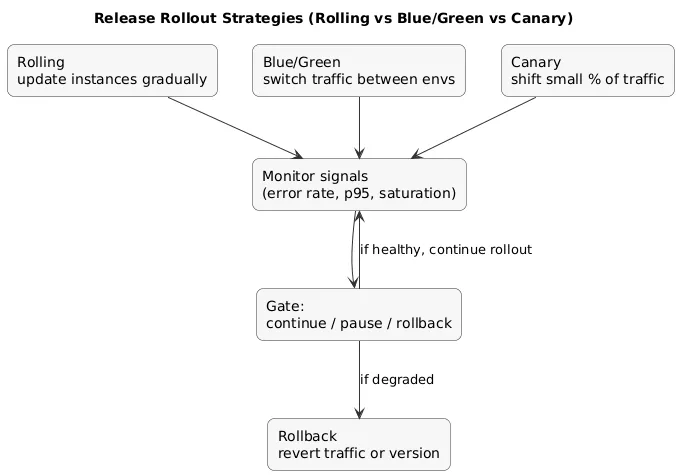
- Rolling: simplest default; update instances gradually; rollback is another rollout.
- Blue/green: two environments; switch traffic; fast rollback by switching back.
- Canary: release to a small percentage first; expand if healthy; stop/rollback if signals degrade.
- Feature flags: decouple deploy from release; reduce pressure to “time” deployments perfectly.
Practical rollback trigger
Automate rollback/stop conditions using signals like error rate, p95 latency, and saturation thresholds for N minutes.
11. Approvals, Auditability, and Change Control
Not every team needs heavy change management, but most production systems benefit from a lightweight audit trail: who deployed what, when, and why. This is useful for incident analysis and accountability.
- Approval gates: manual production approval (common baseline).
- Change record: link deployment to issue/ticket or release notes.
- Audit logs: the pipeline should record approvals and the artifact version deployed.
12. Post-Deploy Verification: Health, Monitoring, Rollback
A deployment is not “done” when the deploy step completes. It is done when the new version is stable under real traffic. Post-deploy verification is where mature pipelines differ from “scripted deploys”.
Post-deploy checks (high ROI)
- Smoke tests: critical endpoints and top user flows.
- Health checks: readiness/liveness and dependency reachability.
- Golden signals dashboards: latency, traffic, errors, saturation.
- Rollback path: scripted and practiced (not theoretical).
Example go/no-go signals
- Error rate > 1% for 5 minutes
- p95 latency +30% vs baseline
- Critical dependency failing readiness checks
13. Metrics That Matter (DORA + Pipeline Health)
Metrics help you improve delivery without debates. Start with the outcome metrics, then add pipeline health signals:
- DORA: deployment frequency, lead time for changes, change failure rate, time to restore.
- Pipeline duration: time from commit to deploy (and where time is spent).
- Queue time: waiting time before jobs start (capacity/runner issues).
- Flaky test rate: failures that disappear on retry (trust killer).
- Rollback frequency: how often releases need reversal (risk indicator).
Fast win
If the pipeline is slow, split tests into fast vs slow suites, run jobs in parallel, cache dependencies, and fix flaky tests first.
14. Common CI/CD Mistakes (And How to Avoid Them)
- Different builds per environment: staging ≠ prod. Fix: build once, promote.
- Secret sprawl: credentials everywhere. Fix: secret store + least privilege + rotation.
- Overreliance on E2E: slow + flaky. Fix: more unit/integration coverage; smaller E2E.
- No rollback practice: rollback fails under pressure. Fix: scripted rollback + rehearsal.
- Ignoring pipeline health: CI becomes “background chore”. Fix: track duration, queue time, flaky rate.
15. CI/CD Pipeline Checklist
Use this as a practical quality bar (small team / solo dev friendly):
- PR checks: lint + unit tests + quick build on every PR.
- Artifacts: versioned, immutable, stored centrally.
- Promotion: build once / deploy many; promote same artifact.
- Security: secrets + dependency scans at minimum; clear fail rules for critical issues.
- Secrets: injected at runtime; environment-scoped; least privilege.
- Staging verification: smoke tests and health checks on deploy.
- Production rollout: rolling/blue-green/canary chosen intentionally.
- Post-deploy: dashboards and go/no-go signals defined.
- Rollback: one-step rollback (or scripted) and practiced.
- Metrics: DORA + pipeline health tracked and reviewed.
16. FAQ: CI/CD
Do I need Kubernetes to have CI/CD?
No. CI/CD is platform-agnostic: you can deploy to VMs, PaaS, serverless, or containers. The patterns (stages, artifacts, promotion, verification) still apply.
Should pipelines deploy on every commit?
Often yes for dev/staging. For production, many teams deploy from release tags or approvals until reliability and rollback are mature.
How do I make pipelines faster without reducing confidence?
Parallelize jobs, cache dependencies, split fast vs slow tests, avoid rebuilding unchanged artifacts, and fix flaky tests. Confidence comes from stable checks, not from slow checks.
What’s the safest “first security step” in CI/CD?
Secrets scanning + dependency scanning (SCA). Then add SAST, container scanning, and IaC scanning with clear policies.
Key DevOps terms (quick glossary)
- CI
- Continuous integration: building and testing changes automatically to detect issues early.
- Continuous Delivery
- Keeping software deployable; production release often includes an explicit approval gate.
- Continuous Deployment
- Automatically deploying to production when the pipeline passes.
- Artifact
- The deployable output (package, binary, or container image). Best practice: immutable, versioned, centrally stored.
- Promotion
- Moving the same artifact through environments (dev → staging → prod) rather than rebuilding per environment.
- DevSecOps
- Security checks integrated into the pipeline (SAST/SCA/container/IaC/secrets scanning) with policy gates.
- DORA Metrics
- Delivery performance metrics: deployment frequency, lead time, change failure rate, time to restore service.
Worth reading
Recommended guides from the category.
