
A backup job that prints “success” every night can still leave you without a usable recovery path.
The wrong directories may be included. The database copy may be inconsistent. The remote repository may have stopped receiving new snapshots weeks ago. Encryption credentials may be unavailable during an emergency, or nobody may know the exact sequence required to reconstruct the server.
Reliable backups therefore require four separate capabilities:
create recovery data
        ↓
store it outside the production failure domain
        ↓
verify that it remains usable
        ↓
prove restoration through drills
The restore is the real product
Backup software produces archives, snapshots, or repository objects. The business requirement is different: recover the required service and data within an acceptable amount of time and with an acceptable amount of data loss.
1. Start with recovery, not the backup command
Before choosing a tool, write down what failure you expect to recover from.
Accidental file deletion
one application file deleted
        ↓
restore only that file
Database corruption
database damaged
        ↓
restore previous consistent database state
Server loss
VM / physical host lost
        ↓
provision replacement
        ↓
restore configuration
        ↓
restore application data
        ↓
restore database
        ↓
start service
Account compromise or ransomware
production host compromised
        ↓
attacker may delete local data
and reachable backups
        ↓
recover from protected copy
outside production control
Define the recovery unit
Ask whether you need to recover:
- One file.
- One database.
- One application.
- One server.
- An entire environment.
Different recovery units may need different backup mechanisms.
2. Decide exactly what must be backed up
Start with an inventory.
Application data
Examples:
/srv/app/uploads
/srv/app/data
/var/lib/my-application
Include data that cannot be recreated from source control or external systems.
Database data
Treat database recovery separately from ordinary files.
Examples include:
- PostgreSQL.
- MariaDB or MySQL.
- SQLite.
- Redis when persistence matters.
Server configuration
Useful configuration may include:
/etc/nginx
/etc/caddy
/etc/systemd/system
/etc/ssh
/etc/backup
application deployment configuration
Infrastructure-as-code reduces how much configuration must be recovered manually, but production-specific configuration still needs an identified recovery source.
Secrets
Secrets require special handling.
Decide whether recovery depends on:
- Environment files.
- Private keys.
- Database credentials.
- Encryption keys.
- Secret-manager configuration.
Do not casually copy secrets into an unencrypted general-purpose archive.
Application code
Source code normally belongs in source control rather than being treated as the only backup of a production server.
Production recovery should ideally redeploy a known application artifact:
container image
package artifact
release bundle
rather than relying on whatever happens to remain in a working directory.
What usually does not need backup?
Common examples:
- Temporary files.
- Package caches.
- Rebuildable container layers.
- Downloaded dependencies.
- Application caches.
- Generated files that are inexpensive to recreate.
Excluding rebuildable data reduces backup duration and storage.
3. Build an off-host and off-site backup architecture
Linux backup architecture and data flow (diagram)

Keeping a backup on the same disk as production protects against very few serious failures.
production disk
    ├── application data
    └── backup.tar.gz
If that disk fails, both copies disappear.
Minimum useful separation
production server
        ↓
encrypted backup repository
        ↓
different storage system
Better separation
production server
        ↓
primary backup repository
        ↓
off-site / independent copy
The secondary copy should not depend on the same physical host, filesystem, or administrative failure domain as production.
Think beyond “three copies” as a slogan
What matters is that one event cannot easily destroy every recovery point.
Consider:
- Hardware failure.
- Cloud account compromise.
- Operator error.
- Ransomware.
- Backup repository corruption.
- Provider outage.
Use encrypted repositories
Backups often contain the most complete copy of your production data.
Encryption should protect the repository if the underlying storage is exposed.
Tools such as restic are useful for small Linux environments because they support encrypted snapshot-oriented repositories and can store backups on local, remote, or object-storage destinations.
Do not lose the backup decryption secret
An encrypted repository without its recovery credential is effectively unrecoverable.
Store the recovery credential through a separate, documented emergency process.
4. Back up databases consistently
One of the most dangerous shortcuts is copying a live database directory as though it were an ordinary folder.
Why raw copies can fail
While the copy runs, the database may be modifying:
- Data files.
- Indexes.
- Transaction logs.
- Metadata.
Files copied at different moments can represent incompatible points in time.
Use database-supported mechanisms
Depending on the database, use:
- Logical dumps.
- Supported physical backups.
- Replication-based backup tools.
- Coordinated filesystem snapshots.
PostgreSQL logical backup example
pg_dump \
  --format=custom \
  --file=/var/lib/backup-staging/app.dump \
  app_database
The backup tool can then archive the generated dump.
Database roles and metadata
Database contents may not be the only required state.
Depending on the system, recovery may also require:
- Roles or users.
- Permissions.
- Extensions.
- Server configuration.
- Encryption configuration.
Test the exact restoration command
Do not assume that because:
pg_dump succeededthen:
pg_restore will succeed
into a clean replacement system
Version compatibility, required extensions, ownership, and permissions can all affect restoration.
5. Automate backups with systemd timers
Cron is still usable, but systemd timers fit naturally on modern systemd-based Linux servers and provide service status, logging, timer inspection, and persistent scheduling behavior.
Example backup script
#!/usr/bin/env bash

set -Eeuo pipefail

STAGING="/var/lib/backup-staging"

cleanup() {
  rm -rf "$STAGING"
}

trap cleanup EXIT

install -d -m 0700 "$STAGING"

pg_dump \
  --format=custom \
  --file="$STAGING/app.dump" \
  app_database

restic backup \
  /etc/nginx \
  /etc/systemd/system \
  /srv/app/uploads \
  "$STAGING/app.dump"

restic forget \
  --keep-daily 7 \
  --keep-weekly 4 \
  --keep-monthly 12 \
  --prune
Adjust directories, database commands, retention, repository details, and exclusions to your environment.
Protect the script
sudo chown root:root /usr/local/sbin/server-backup
sudo chmod 750 /usr/local/sbin/server-backup
Keep repository credentials separate
For example:
/etc/backup/restic-passwordwith restricted permissions:
sudo chown root:root /etc/backup/restic-password
sudo chmod 600 /etc/backup/restic-password
systemd service
# /etc/systemd/system/server-backup.service

[Unit]
Description=Production server backup
Wants=network-online.target
After=network-online.target

[Service]
Type=oneshot

Environment=RESTIC_REPOSITORY=s3:https://backup.example.com/server01
Environment=RESTIC_PASSWORD_FILE=/etc/backup/restic-password

ExecStart=/usr/local/sbin/server-backup

Nice=10
IOSchedulingClass=best-effort
IOSchedulingPriority=7
systemd timer
# /etc/systemd/system/server-backup.timer

[Unit]
Description=Run production server backup daily

[Timer]
OnCalendar=*-*-* 02:30:00
Persistent=true
RandomizedDelaySec=10m

[Install]
WantedBy=timers.target
Enable the timer
sudo systemctl daemon-reload

sudo systemctl enable --now \
  server-backup.timer
Inspect scheduling
systemctl list-timers \
  server-backup.timer
Run the job manually before trusting the timer
sudo systemctl start \
  server-backup.service

sudo systemctl status \
  server-backup.service
Inspect logs
journalctl \
  -u server-backup.service \
  --since "today"
Schedule according to RPO
A nightly timer may be appropriate for configuration but insufficient for a busy transactional database.
Different data can have different schedules:
configuration:
daily

database:
hourly

critical transaction log:
continuous / much more frequent
6. Keep several useful recovery points
One current backup is not enough.
Some failures are discovered late:
Monday:
file silently corrupted

Tuesday:
backup succeeds

Wednesday:
backup succeeds

Thursday:
corruption discovered
If only Wednesday's backup exists, the backup faithfully preserves corrupted data.
Use multiple recovery points
A simple retention policy might keep:
7 daily snapshots
4 weekly snapshots
12 monthly snapshots
The correct policy depends on:
- Data change rate.
- Detection delay.
- Compliance requirements.
- Available storage.
- Business recovery needs.
Retention is different from backup frequency
You might create:
24 backups per daybut retain:
hourly for 48 hours
daily for 30 days
monthly for one year
Frequent short-term recovery points and sparse long-term recovery points serve different purposes.
Monitor pruning
Retention operations can fail too.
If pruning never runs, storage may grow until the repository or object storage budget is exhausted.
7. Verify more than exit status
Backup verification pipeline (diagram)
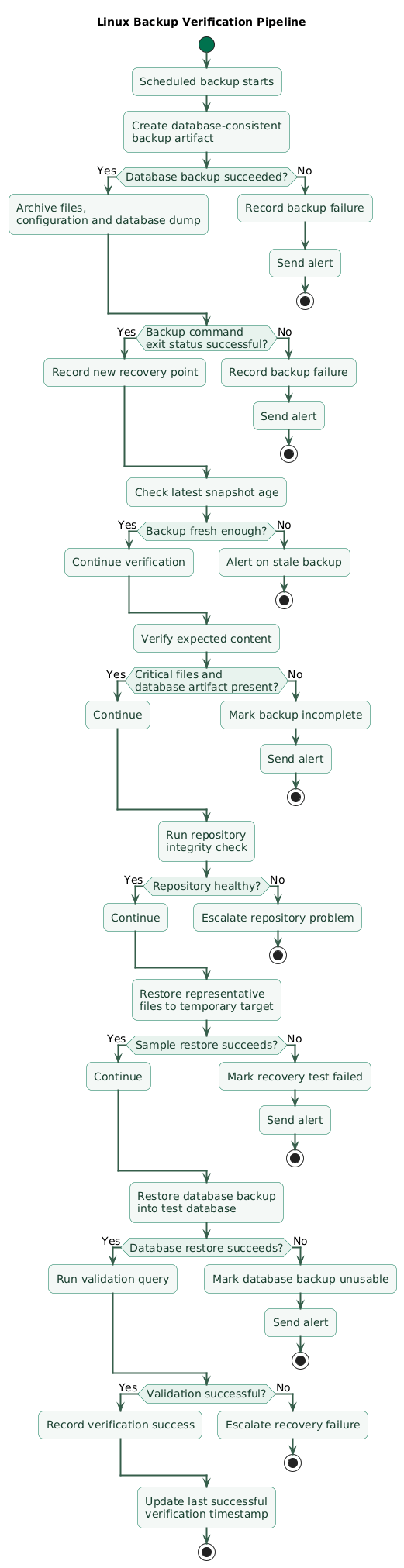
Backup verification should have several layers.
Layer 1: command success
The backup command should exit unsuccessfully when an important operation fails.
Shell scripts should not hide errors:
set -Eeuo pipefailLayer 2: snapshot existence and age
Confirm that a recent recovery point actually exists.
Your monitoring system should know:
latest successful backup:
2026-08-24 02:37 UTC

expected maximum age:
26 hours
If the timer silently stops running, backup-age monitoring catches the problem.
Layer 3: expected content
Confirm that critical paths are present.
For example:
/etc/nginx/nginx.conf
/srv/app/uploads
database dump
A successful snapshot that accidentally excluded the database dump is not sufficient.
Layer 4: repository integrity
Repository-aware tools normally provide consistency verification.
For restic:
restic checkPeriodically reading repository data provides stronger verification than metadata-only checks.
Depending on repository size and operational constraints, you may run complete or sampled data checks on a separate schedule.
Layer 5: restore representative data
For example:
restore latest snapshot
into temporary directory
        ↓
verify configuration file
        ↓
verify sample upload
        ↓
restore database dump
into test database
        ↓
run validation query
Layer 6: complete service restore
This is the strongest test.
Rebuild a clean environment from the documented recovery process and verify the application itself.
A backup that has never been restored is unproven
Repository integrity checks are useful, but they cannot prove that you remembered every required file, database role, encryption key, DNS dependency, environment setting, or recovery command. Restore drills test the whole recovery system.
8. Monitor backup age, failures, and storage
Backups are scheduled jobs, and scheduled jobs have a dangerous failure mode:
nothing happensNobody notices because there is no user request associated with the job.
Monitor last successful completion
Record a metric such as:
backup_last_success_timestamp_secondsThen alert on excessive age.
Monitor job duration
A backup that normally takes:
12 minutesbut suddenly takes:
3 hoursmay indicate:
- Storage problems.
- Unexpected data growth.
- Network degradation.
- Repository maintenance issues.
Monitor backup size or ingestion volume
Sudden changes can reveal:
- Missing directories.
- Runaway log growth.
- Unexpected uploads.
- New large datasets.
Monitor repository capacity
Do not discover that backup storage is full only when the next job fails.
Alert on freshness, not just job failure
An alert such as:
backup command faileddoes not detect:
timer disabled accidentallybut:
latest successful backup
older than expected
detects both.
Monitor verification too
Track:
- Last successful repository check.
- Last successful sample restore.
- Last successful full restore drill.
9. Protect backups from compromise and ransomware
Backups can become a primary target during destructive attacks.
Avoid one credential with unlimited control
Bad model:
production server credential
        ↓
read backups
write backups
delete every backup
change retention
delete storage account
If production is compromised, the attacker inherits the ability to destroy recovery data.
Separate backup-writing and administrative permissions
Where your storage design permits it, let the automated backup process write required data without giving it unrestricted authority over every historical recovery point.
Use immutability or deletion protection where appropriate
Object locking, protected snapshots, versioning, or delayed deletion can create recovery points that survive a compromised production credential.
The exact control depends on the storage provider and backup tool.
Encrypt backup data
Treat backup storage as sensitive production data.
Protect backup credentials
Restrict permissions on:
- Repository passwords.
- Object-storage credentials.
- SSH backup keys.
- Encryption keys.
Keep emergency recovery access separate
During a severe compromise, the normal production credential store may not be trustworthy.
Document how authorized responders obtain backup recovery credentials through an independent channel.
Do not test restores onto production accidentally
Restore drills should use isolated targets so test data cannot overwrite live application data.
10. Measure RPO and RTO
Recovery Point Objective
RPO answers:
How much recent data
can we afford to lose?
If the RPO is:
1 hourthen a nightly backup cannot satisfy that objective.
Recovery Time Objective
RTO answers:
How quickly should the
service be restored?
If the RTO is:
2 hoursbut restoring a 2 TB repository over the network requires eight hours, architecture and expectations are misaligned.
RPO drives backup frequency
RPO = 24 hours
→ daily backup may be sufficient

RPO = 1 hour
→ hourly or better required

RPO = minutes
→ continuous database-oriented
  protection may be required
RTO drives recovery design
A short RTO may require:
- Faster storage.
- Prebuilt infrastructure automation.
- Database replication.
- Warm standby systems.
- Documented DNS and networking steps.
Measure actual values during drills
Do not rely on:
we think recovery
would take about an hour
Record timestamps:
10:00 incident simulation begins
10:08 replacement host ready
10:14 backup access obtained
10:31 application files restored
10:52 database restored
11:04 service starts
11:11 validation succeeds

actual recovery time:
71 minutes
11. Run real restore drills
Linux restore drill workflow (diagram)

A restore drill should simulate recovery without touching production.
Step 1: choose the scenario
For example:
production server completely lostor:
database accidentally deletedStep 2: record the start time
This allows actual RTO to be measured.
Step 3: provision a clean target
Avoid restoring onto a server that already contains configuration copied from production.
A clean environment tests whether the backup and documentation are truly sufficient.
Step 4: obtain recovery credentials
Follow the same emergency access procedure you expect to use during a real incident.
Step 5: restore configuration and application data
For restic, conceptually:
restic restore latest \
  --target /restore
Review restored paths before moving data into final locations.
Step 6: restore the database
For a PostgreSQL custom-format backup:
createdb restored_app

pg_restore \
  --dbname=restored_app \
  /restore/var/lib/backup-staging/app.dump
Exact options depend on ownership, roles, extensions, and database design.
Step 7: start the application
Validate:
- Configuration.
- Filesystem permissions.
- Secrets.
- Database connection.
- Reverse proxy configuration.
- Required systemd units.
Step 8: test user-visible behavior
Do not stop at:
systemctl status app
= active
Test:
- Homepage.
- Authentication.
- Important read operations.
- Important write operations.
- Uploaded files.
- Background jobs.
- Critical external integrations.
Step 9: determine the recovered point
Compare:
latest recovered transaction
vs
drill start time
This gives evidence about actual RPO.
Step 10: record actual RTO
Stop the clock when the agreed critical service validation succeeds.
Step 11: document every surprise
Examples:
missing TLS certificate
database role not backed up
wrong filesystem owner
backup password unavailable
restore download too slow
DNS procedure undocumented
one environment variable missing
These discoveries are the purpose of the drill.
Step 12: improve the recovery system
Convert each discovery into:
- Backup scope change.
- Automation.
- Documentation update.
- Access-control improvement.
- Monitoring change.
Schedule drills
A practical small-team starting point for important services is a periodic drill such as quarterly, plus additional tests after major changes to:
- Database engines.
- Backup tooling.
- Cloud accounts.
- Storage providers.
- Server architecture.
12. Copy/paste Linux backup checklist
Linux server backup checklist

Recovery requirements
- Identify critical services.
- Identify service owner.
- Define failure scenarios.
- Define recovery unit.
- Define RPO.
- Define RTO.
- Document business impact of data loss.
- Document business impact of prolonged outage.
- Review objectives with stakeholders.

Backup inventory
- List application data directories.
- List uploaded files.
- List persistent volumes.
- List databases.
- List database roles and permissions.
- List reverse proxy configuration.
- List systemd units.
- List application configuration.
- List required certificates.
- List secret recovery requirements.
- List infrastructure configuration.
- Identify data that can be recreated.
- Exclude unnecessary caches and temporary files.

Application artifacts
- Keep source code in version control.
- Keep release artifacts outside the production host.
- Retain known-good container images or packages.
- Record deployed release versions.
- Avoid treating the production filesystem as the only copy of application code.

Database backups
- Identify every production database.
- Use database-supported backup mechanisms.
- Avoid blindly copying active database directories.
- Test logical dump commands.
- Test physical backup procedures where used.
- Include required roles.
- Include required extensions.
- Include ownership information where needed.
- Verify database version compatibility.
- Test restoration into a clean database.
- Monitor database backup duration.
- Monitor database dump size.
- Protect temporary dump files.
- Remove staging files after successful archive.

SQLite
- Understand application write behavior.
- Use SQLite-supported backup mechanisms or safe snapshots.
- Avoid copying during unsafe concurrent modification.
- Test restored database integrity.
- Include related application files where required.

Files
- Include persistent application data.
- Include user uploads.
- Include important configuration.
- Preserve permissions where required.
- Preserve ownership where required.
- Preserve symbolic links correctly.
- Exclude temporary data.
- Exclude rebuildable caches.
- Exclude mounted backup repository from recursive backup.
- Review exclusions after application changes.

Backup repository
- Use a repository separate from the production disk.
- Prefer off-host storage.
- Maintain an off-site or independent recovery copy.
- Encrypt backup data.
- Protect repository credentials.
- Protect encryption credentials.
- Document repository location.
- Document repository recovery procedure.
- Monitor repository availability.
- Monitor repository storage capacity.

Failure domains
- Do not keep the only backup on the source server.
- Do not keep all copies on one physical disk.
- Do not keep every recovery copy under one easily compromised credential.
- Consider account compromise.
- Consider provider outage.
- Consider ransomware.
- Consider operator error.
- Consider repository corruption.
- Design at least one copy to survive important failure scenarios.

Backup tool
- Choose a maintained backup tool.
- Understand encryption behavior.
- Understand retention behavior.
- Understand pruning behavior.
- Understand repository locking.
- Understand restore commands.
- Test repository initialization.
- Document tool version.
- Test upgrades before relying on new versions in production.

restic-style repository
- Configure repository location.
- Configure password file safely.
- Restrict password-file permissions.
- Run initial backup manually.
- List snapshots.
- Test restore.
- Configure retention.
- Configure repository checks.
- Protect backend credentials.
- Avoid exposing secrets in command history where practical.

Backup script
- Use a dedicated script.
- Use set -Eeuo pipefail.
- Fail on database dump errors.
- Fail on backup errors.
- Clean temporary files with trap.
- Use secure staging directories.
- Log meaningful start and completion events.
- Avoid logging passwords.
- Return non-zero status on failure.
- Keep script in source control.
- Protect deployed script permissions.

systemd service
- Use Type=oneshot.
- Wait for network availability when remote storage requires it.
- Define repository configuration.
- Keep sensitive values outside public unit files where appropriate.
- Use explicit ExecStart.
- Set reasonable scheduling priority.
- Inspect service exit status.
- Inspect journal logs.
- Test manual execution.

systemd timer
- Define OnCalendar.
- Enable Persistent=true when missed executions should run later.
- Consider RandomizedDelaySec.
- Enable the timer.
- Verify next execution time.
- Verify last execution time.
- Test after reboot.
- Monitor timer disappearance or disablement indirectly through backup freshness.

Schedule
- Derive frequency from RPO.
- Do not use daily backups when RPO requires hourly recovery points.
- Use different schedules for different data classes.
- Consider backup duration.
- Avoid unnecessary overlap between jobs.
- Avoid excessive production I/O during traffic peaks.
- Document expected completion window.

Retention
- Keep multiple recovery points.
- Define daily retention.
- Define weekly retention.
- Define monthly retention.
- Define long-term retention when required.
- Account for delayed discovery of corruption.
- Account for compliance requirements.
- Estimate storage usage.
- Test pruning.
- Monitor pruning failures.
- Avoid retaining everything forever without a reason.

Freshness monitoring
- Record last successful backup timestamp.
- Define maximum acceptable backup age.
- Alert when latest backup is too old.
- Do not rely only on command-failure alerts.
- Detect disabled timers.
- Detect server-side scheduling failures.
- Detect repository-delivery failures.

Backup metrics
- Track last successful completion.
- Track duration.
- Track bytes processed where practical.
- Track snapshot count.
- Track repository size.
- Track failures.
- Track verification age.
- Track restore-drill age.
- Detect unusual size changes.
- Detect unusually long jobs.

Verification
- Check process exit status.
- Verify a recent snapshot exists.
- Verify expected paths exist.
- Verify database backup artifact exists.
- Verify repository consistency.
- Schedule full or sampled data reads where practical.
- Test representative file restoration.
- Test database restoration.
- Run full recovery drills.
- Record verification results.
- Alert when verification becomes stale.

Repository checks
- Schedule repository integrity checks separately from daily backup when appropriate.
- Avoid overloading production or remote storage.
- Record last successful check.
- Investigate integrity errors immediately.
- Do not prune aggressively while repository problems remain unexplained.
- Keep another independent copy when recovery importance justifies it.

Security
- Encrypt backups.
- Restrict backup credentials.
- Restrict repository administration.
- Separate human and automated access where practical.
- Use least privilege.
- Avoid production credentials with unrestricted backup deletion rights where possible.
- Use deletion protection or immutability where appropriate.
- Protect object-storage accounts.
- Protect SSH keys.
- Protect repository password.
- Rotate backup credentials.
- Review access periodically.

Ransomware resilience
- Assume production credentials can be compromised.
- Keep recovery copies outside the primary production failure domain.
- Limit deletion rights.
- Use storage versioning where appropriate.
- Use immutable recovery points where appropriate.
- Keep offline or separately controlled copies where required.
- Test recovery without trusting the compromised server.
- Document clean-room recovery.

Encryption
- Know where encryption occurs.
- Protect decryption credentials separately.
- Keep an emergency recovery copy of required decryption information.
- Test decryption during drills.
- Do not store the only decryption key solely on the protected production server.
- Review key ownership after staff changes.

Off-site copy
- Use a different location or provider where justified.
- Verify replication actually completes.
- Verify independent access.
- Monitor copy freshness.
- Test restoration from the off-site copy.
- Consider network bandwidth during full recovery.
- Estimate download duration.
- Document provider-specific recovery steps.

Local staging
- Use restricted permissions.
- Keep staging capacity monitored.
- Remove old dump files.
- Avoid leaving plaintext database dumps indefinitely.
- Ensure backup job failure does not fill the production disk with staging files.
- Clean staging through trap or equivalent cleanup.

RPO
- Define maximum acceptable data loss.
- Convert RPO into backup or replication frequency.
- Validate actual recovered point during drills.
- Compare achieved RPO with target.
- Improve schedule or architecture when target is missed.
- Use more frequent database protection when required.

RTO
- Define maximum acceptable restoration time.
- Measure provisioning time.
- Measure credential recovery time.
- Measure backup download time.
- Measure database restore time.
- Measure application startup time.
- Measure validation time.
- Compare actual RTO with target.
- Improve automation when recovery is too slow.

Restore documentation
- Document server provisioning.
- Document operating system requirements.
- Document package dependencies.
- Document backup tool installation.
- Document repository access.
- Document decryption procedure.
- Document file restoration.
- Document database restoration.
- Document permissions.
- Document secrets retrieval.
- Document service startup.
- Document reverse proxy configuration.
- Document DNS changes.
- Document validation steps.
- Keep the runbook accessible during production outages.

Partial restore drill
- Select one recent snapshot.
- Restore one configuration file.
- Restore one application file.
- Verify permissions.
- Restore one representative user upload.
- Record duration.
- Delete the temporary restore after validation.
- Investigate unexpected differences.

Database restore drill
- Provision clean database target.
- Restore database roles where required.
- Restore backup.
- Run integrity checks.
- Run application queries.
- Verify row counts or known records.
- Verify extensions.
- Verify permissions.
- Measure restore duration.
- Document issues.

Full restore drill
- Select disaster scenario.
- Record start time.
- Provision clean replacement environment.
- Obtain backup credentials through documented procedure.
- Install backup tooling.
- Restore configuration.
- Restore application files.
- Restore database.
- Restore permissions.
- Restore required secrets.
- Start system services.
- Start reverse proxy.
- Validate DNS or temporary test routing.
- Run critical user workflows.
- Record recovered data point.
- Record completion time.
- Calculate actual RPO.
- Calculate actual RTO.
- Record every unexpected manual step.
- Update recovery documentation.

Clean-room recovery
- Do not depend on files remaining on the failed server.
- Do not depend on shell history from the old server.
- Do not depend on undocumented administrator knowledge.
- Use independent credential recovery.
- Use trusted installation media or images.
- Restore from known recovery repositories.
- Rotate compromised credentials before reconnecting recovered systems when required.

Restore validation
- Confirm application starts.
- Confirm database connects.
- Confirm authentication works.
- Confirm critical reads work.
- Confirm critical writes work.
- Confirm uploads exist.
- Confirm scheduled jobs work.
- Confirm external integrations work.
- Confirm monitoring works.
- Confirm logging works.
- Confirm backups resume after recovery.

Restore drills
- Schedule drills.
- Assign an owner.
- Use isolated targets.
- Avoid modifying production.
- Test partial restores regularly.
- Test database restores regularly.
- Test complete recovery periodically.
- Repeat after major backup architecture changes.
- Repeat after major database upgrades.
- Repeat after storage-provider changes.
- Record results.

Post-drill review
- Compare actual RPO with objective.
- Compare actual RTO with objective.
- Identify missing files.
- Identify missing credentials.
- Identify missing permissions.
- Identify undocumented commands.
- Identify slow download steps.
- Identify database restore problems.
- Improve automation.
- Update backup scope.
- Update runbook.
- Assign follow-up owners.

Operations
- Review backup failures promptly.
- Do not allow repeated failures to become normal.
- Investigate sudden backup size changes.
- Investigate sudden duration changes.
- Monitor network transfer errors.
- Monitor repository locks.
- Keep backup software patched.
- Test configuration changes.

Ownership
- Assign backup owner.
- Assign restore owner.
- Define escalation contact.
- Ensure more than one person understands recovery.
- Keep emergency credentials accessible to authorized responders.
- Review access after team changes.
- Document support contacts for storage providers.

Final review
- Do you know exactly what is backed up?
- Is the database backed up consistently?
- Is there a recent recovery point?
- Is at least one copy outside the production server?
- Is at least one important recovery copy protected from production compromise?
- Are backups encrypted?
- Can decryption credentials be recovered independently?
- Are backup failures monitored?
- Is stale backup age monitored?
- Is repository integrity checked?
- Are representative files restored periodically?
- Has the database been restored successfully?
- Has the complete service been restored into a clean environment?
- Is actual RPO known?
- Is actual RTO known?
- Can someone other than the original administrator perform the recovery?
13. FAQ
How often should I back up a Linux server?
Derive the schedule from the RPO of each dataset. If losing one hour of database changes would be unacceptable, once-per-day database backups are insufficient. Configuration and low-change data may use a slower schedule.
Is a successful backup command enough?
No. Also verify backup freshness, expected content, repository integrity, representative restoration, and eventually complete service recovery.
Can I copy a running database directory?
Do not assume an ordinary filesystem copy of active database files is consistent. Use the database engine's supported logical dump, physical backup, replication, or coordinated snapshot mechanism.
What is the difference between RPO and RTO?
RPO describes how much recent data loss is acceptable. RTO describes how long recovery may take before the service should be operating again.
How often should restore drills run?
Base the cadence on service criticality and how frequently the environment changes. A small team can start with quarterly full drills for important services and run additional tests after major database, storage, backup, or infrastructure changes.
Does an off-site backup protect against ransomware?
Not automatically. If a compromised production credential can delete the off-site repository, an attacker may still destroy it. Add permission separation, versioning, immutability, delayed deletion, or independently controlled copies where the risk justifies those controls.
Key terms (quick glossary)
- Backup
- A recoverable copy or snapshot of data maintained separately from the active production state.
- Restore
- The process of retrieving backup data and returning files, databases, or services to a usable state.
- Restore drill
- A controlled recovery exercise that tests whether backup data, credentials, documentation, infrastructure, and operational procedures can reconstruct the required service.
- RPO
- Recovery Point Objective, the maximum acceptable amount of data loss expressed as time between the recovered state and the failure.
- RTO
- Recovery Time Objective, the target amount of time allowed to restore a service after disruption.
- Retention policy
- Rules determining which historical backup snapshots are retained and for how long.
- Off-host backup
- Backup data stored outside the server that created it so failure of the original host does not destroy both production and recovery data.
- Off-site backup
- A recovery copy maintained in another physical or administrative location to reduce correlated failure risk.
- Repository integrity check
- Validation of backup repository metadata and, depending on the check, stored data to detect corruption or inconsistency.
- Backup freshness
- The age of the latest successful recovery point relative to the current time and expected backup schedule.
- Logical database backup
- A database-generated export of logical objects and data, commonly restored through database-specific import or restore tools.
- Physical database backup
- A database-supported copy of physical database files and transaction information created using procedures designed to preserve consistency.
- Immutable backup
- A recovery point protected from modification or deletion for a defined period, reducing the risk of destructive compromise.
- Recovery runbook
- Documented steps for provisioning, retrieving backups, restoring data, starting services, validating recovery, and escalating problems during a disaster.
Worth reading
Recommended guides from the category.
