When a website sends an HTTP response, it sends more than HTML, CSS, images, or JSON. It can also send instructions that tell the browser how the page should be handled.
Security headers use that channel to establish browser-enforced rules. They can restrict where scripts come from, force future connections to use HTTPS, reduce accidental information leakage, stop a page from being framed by another site, and limit how authentication cookies are sent.
The simple mental model
Your application decides what the user may do. Security headers tell the browser what the page itself may load, expose, send, embed, or remember.
1. What security headers actually do
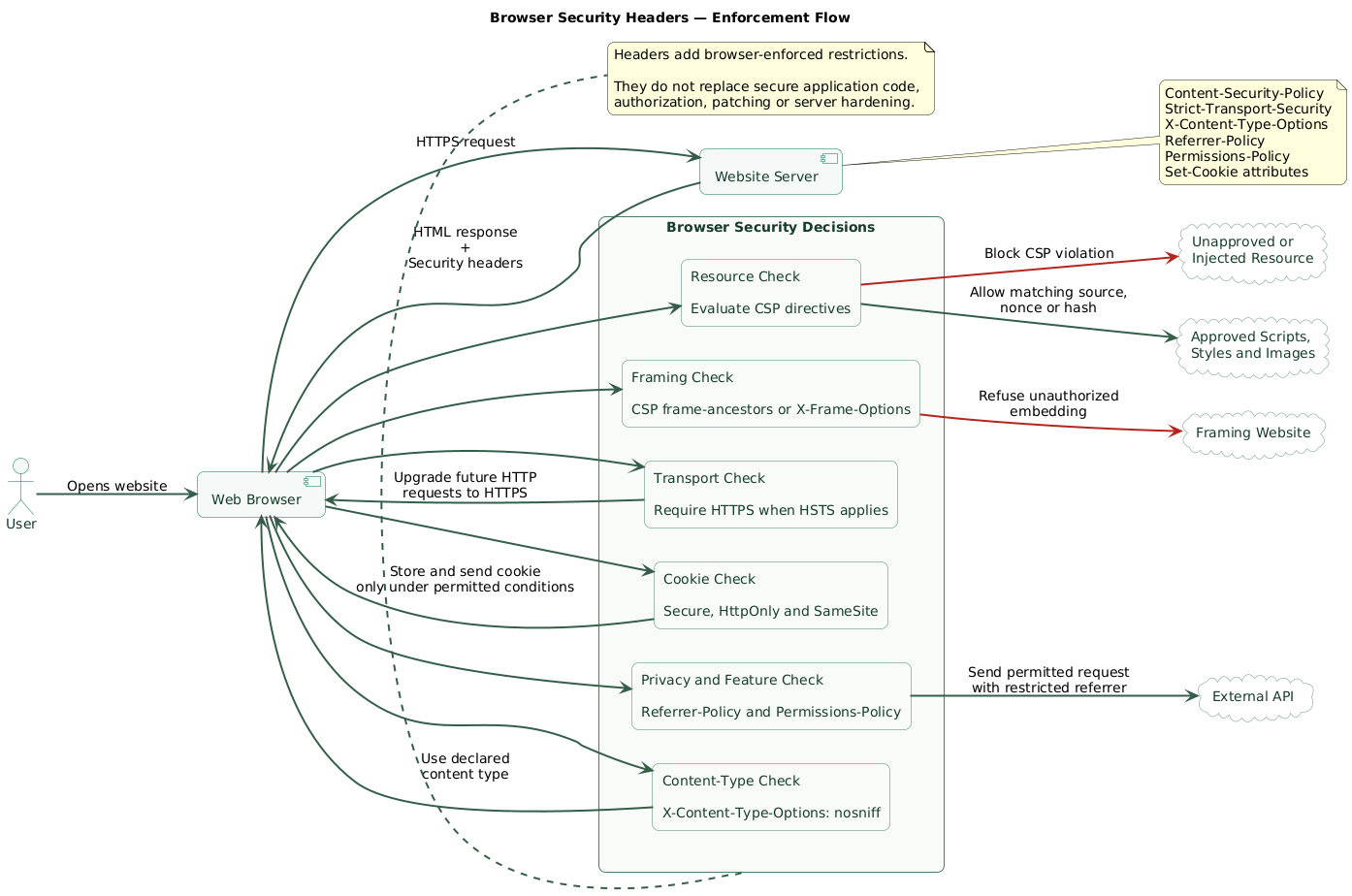
A security header is usually a normal HTTP response header with a value that a supporting browser understands. The browser reads the rule and applies it to the current response, future requests, or both.
Browser enforcement flow (diagram)
| Control | Plain-English purpose | Main risk reduced |
|---|---|---|
| Content-Security-Policy | Defines which code and resources the browser may use | XSS impact, malicious injection, unsafe framing |
| Strict-Transport-Security | Tells the browser to use HTTPS for future connections | HTTP downgrade and insecure first requests |
| Secure cookie attribute | Sends the cookie only with HTTPS requests | Cookie exposure over unencrypted connections |
| HttpOnly cookie attribute | Blocks ordinary JavaScript access to the cookie | Direct session-cookie theft through injected JavaScript |
| SameSite cookie attribute | Controls cross-site cookie sending | Some CSRF and cross-site leakage scenarios |
| X-Content-Type-Options | Stops browsers from guessing a different content type | MIME-type confusion |
| Referrer-Policy | Controls how much referring URL information is shared | Accidental URL and path leakage |
| Permissions-Policy | Limits access to selected browser capabilities | Unnecessary camera, microphone, location, or sensor access |
Headers are defense in depth
A strong header set does not repair broken authorization, SQL injection, unsafe file uploads, outdated dependencies, weak passwords, exposed secrets, or insecure server configuration.
2. Content Security Policy in plain English
Content Security Policy, normally shortened to CSP, gives the browser an allowlist and a set of restrictions for the page. It can control scripts, styles, images, fonts, frames, network connections, forms, plugins, and other resource types.
Without CSP, a browser generally executes a script that appears in the page, even when an attacker inserted it through an application vulnerability. With a well-designed CSP, the browser can reject a script that does not match the approved sources, nonce, or hash.
A restrictive starting example
Content-Security-Policy:
  default-src 'self';
  script-src 'self';
  style-src 'self';
  img-src 'self' data:;
  font-src 'self';
  connect-src 'self';
  object-src 'none';
  base-uri 'self';
  form-action 'self';
  frame-ancestors 'none';
This example is intentionally restrictive. It will break a site that relies on external analytics, hosted fonts, payment frames, newsletter forms, inline scripts, inline styles, or third-party APIs until the required behavior is handled explicitly.
Important CSP directives
| Directive | What it controls | Typical value |
|---|---|---|
| default-src | Fallback rule for many resource types | 'self' |
| script-src | JavaScript sources and allowed inline-script mechanisms | 'self' 'nonce-...' |
| style-src | Stylesheets and inline-style mechanisms | 'self' |
| img-src | Image sources | 'self' data: https: |
| connect-src | Fetch, XHR, WebSocket, EventSource, and similar connections | 'self' https://api.example.com |
| frame-src | Frames the page is allowed to load | 'self' https://payments.example |
| frame-ancestors | Sites allowed to place your page inside a frame | 'none' or 'self' |
| object-src | Legacy plugin content such as object and embed resources | 'none' |
| base-uri | Allowed targets for the document's base URL | 'self' |
| form-action | Destinations to which forms may submit | 'self' |
Why nonces and hashes matter
A nonce is an unpredictable value generated for one response. The server
places it in both the CSP header and an approved inline
<script> element. The browser runs that script only
when the values match.
Content-Security-Policy:
  script-src 'self' 'nonce-RANDOM_VALUE_FOR_THIS_RESPONSE';
<script nonce="RANDOM_VALUE_FOR_THIS_RESPONSE">
initializeApplication();
</script>Generate a new cryptographically unpredictable nonce for every response. Do not hardcode one value in a template, configuration file, CDN rule, or web-server setting.
A hash is useful for a small, static inline script whose exact contents do not change. The CSP contains a hash of that script. A change to the script requires a new hash.
Avoid unsafe shortcuts
Adding 'unsafe-inline' or broad wildcards may make a policy
easier to deploy, but it can remove much of the protection you expected
from CSP. Treat these values as temporary migration compromises, not
automatic defaults.
3. How to deploy CSP without breaking the website
CSP often fails as a project because someone copies a strict policy into production, important scripts stop working, and the entire header is removed. A staged rollout is safer.
CSP rollout process (diagram)
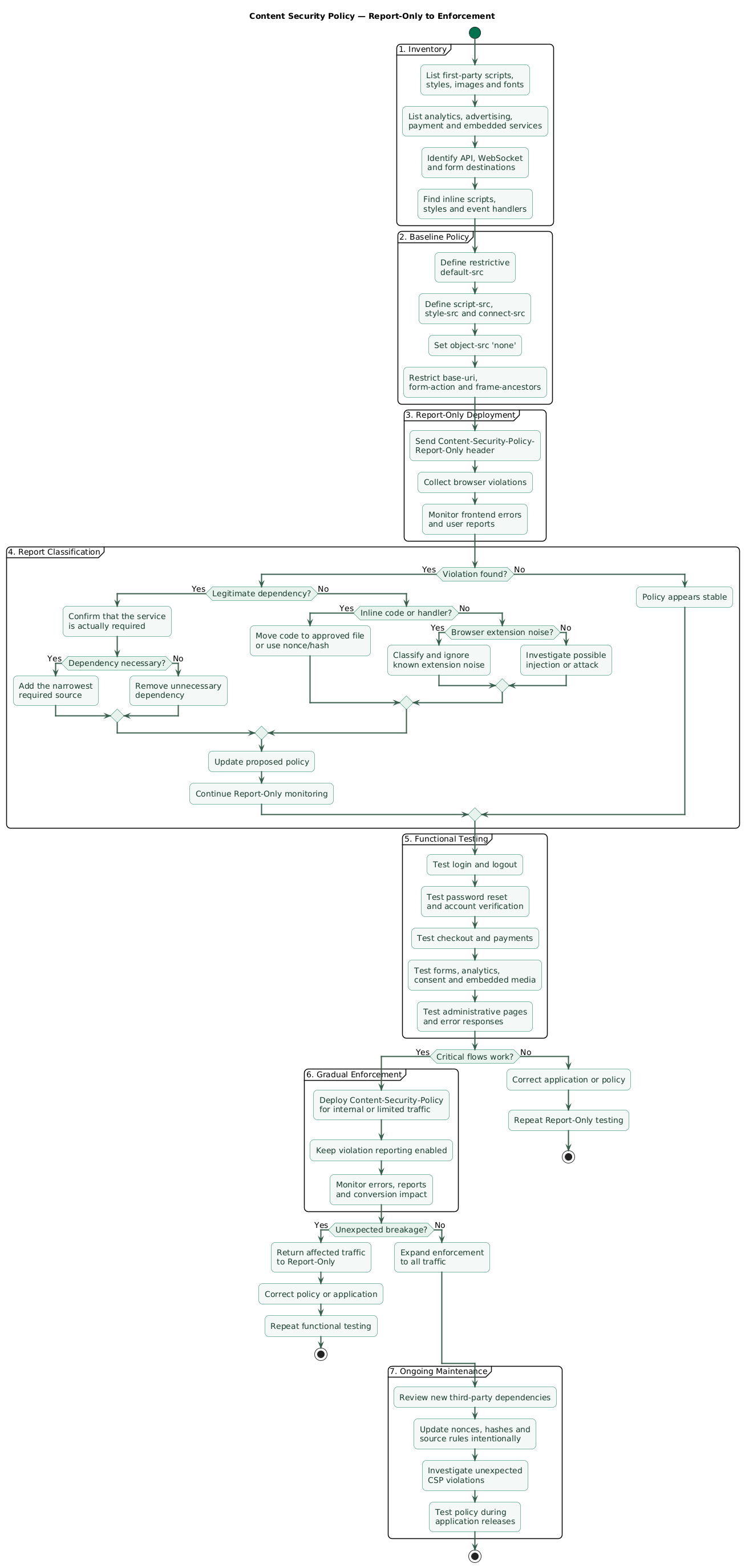
Step 1: inventory real dependencies
Use browser developer tools, server configuration, source code, and network logs to identify:
- First-party and third-party scripts.
- Stylesheets, fonts, and images.
- Analytics and advertising services.
- APIs used by fetch, XHR, or WebSocket connections.
- Payment, video, map, authentication, and newsletter frames.
- Form destinations.
- Inline scripts, inline styles, and HTML event handlers.
- Workers, manifests, media, and downloadable resources.
Step 2: start with Report-Only
Content-Security-Policy-Report-Only:
  default-src 'self';
  script-src 'self';
  style-src 'self';
  img-src 'self' data:;
  connect-src 'self';
  object-src 'none';
  base-uri 'self';
  form-action 'self';
  frame-ancestors 'none';
Report-Only mode records violations without enforcing the policy. It lets you see what would have been blocked while users continue using the website.
Step 3: classify reports
- Required behavior: a legitimate dependency that needs an explicit rule.
- Unnecessary dependency: remove it instead of adding another domain.
- Browser extension noise: not necessarily caused by the website.
- Attack or injection signal: an unexpected script, domain, frame, or connection.
- Configuration mistake: a missing source, nonce, hash, or directive fallback.
Step 4: remove inline behavior
Replace inline event handlers such as
onclick="window.print()" with event listeners in an approved
JavaScript file. Move reusable inline CSS into a stylesheet. This makes a
restrictive policy easier to maintain.
<button type="button" id="print-guide">
  Print this guide
</button>

<script src="/assets/js/print-guide.js" defer></script>
document
.getElementById("print-guide")
?.addEventListener("click", () => window.print());Step 5: enforce gradually
Test authentication, checkout, forms, password reset, consent tools,
analytics, embedded media, downloads, administrative pages, and error
handling. Move the stable rules into
Content-Security-Policy and continue monitoring.
Keep the allowlist narrow
Allow the exact services and resource types the application needs. Adding an entire scheme or a broad domain wildcard can authorize much more content than the original integration requires.
4. HSTS: telling browsers to stay on HTTPS
HTTP Strict Transport Security, or HSTS, tells a browser that a host should only be reached through HTTPS. After receiving a valid HSTS header over HTTPS, the browser automatically upgrades future HTTP attempts for that host.
Strict-Transport-Security: max-age=31536000The value above asks the browser to remember the HTTPS-only rule for one year. The timer is refreshed whenever the browser receives the header again.
What HSTS protects
- Future attempts to open the site with an
http://URL. - Bookmarks or manually entered links that still use HTTP.
- Some downgrade attempts on hostile or untrusted networks.
- Users clicking through certain certificate warnings for an HSTS host.
What HSTS does not do
- It does not create or renew a TLS certificate.
- It does not repair mixed content.
- It does not secure an HTTP-only subdomain automatically.
- It does not replace an HTTP-to-HTTPS redirect.
- It does not protect a first visit unless the domain is preloaded.
Add directives carefully
Strict-Transport-Security:
  max-age=31536000; includeSubDomains
includeSubDomains extends the rule to subdomains. Do not add
it until every relevant subdomain works correctly over HTTPS, including
old services, temporary hosts, development endpoints, and third-party
delegated systems.
Strict-Transport-Security:
  max-age=63072000; includeSubDomains; preload
The preload token is associated with browser HSTS preload
programs, but adding the token alone does not submit a domain. Preloading
is a major operational commitment. Confirm that the main domain and all
included subdomains can remain HTTPS-only before requesting inclusion.
HSTS must arrive over HTTPS
Browsers ignore an HSTS header delivered over an insecure HTTP connection because a network attacker could add or modify that header. Configure the header on HTTPS responses.
Safer HSTS rollout
- Make HTTPS work reliably across the website.
- Automate certificate renewal and monitor expiration.
- Redirect HTTP traffic to HTTPS.
- Fix mixed-content requests.
- Begin with a short
max-age. - Increase the duration after successful testing.
- Add
includeSubDomainsonly after auditing subdomains. - Consider preload only after understanding removal delays and risks.
5. Secure, HttpOnly, and SameSite cookie flags
Authentication systems often use a cookie to carry a session identifier. Anyone who obtains a valid session cookie may be able to act as that user, so the browser should receive explicit instructions about how the cookie may be handled.
Secure session-cookie flow (diagram)
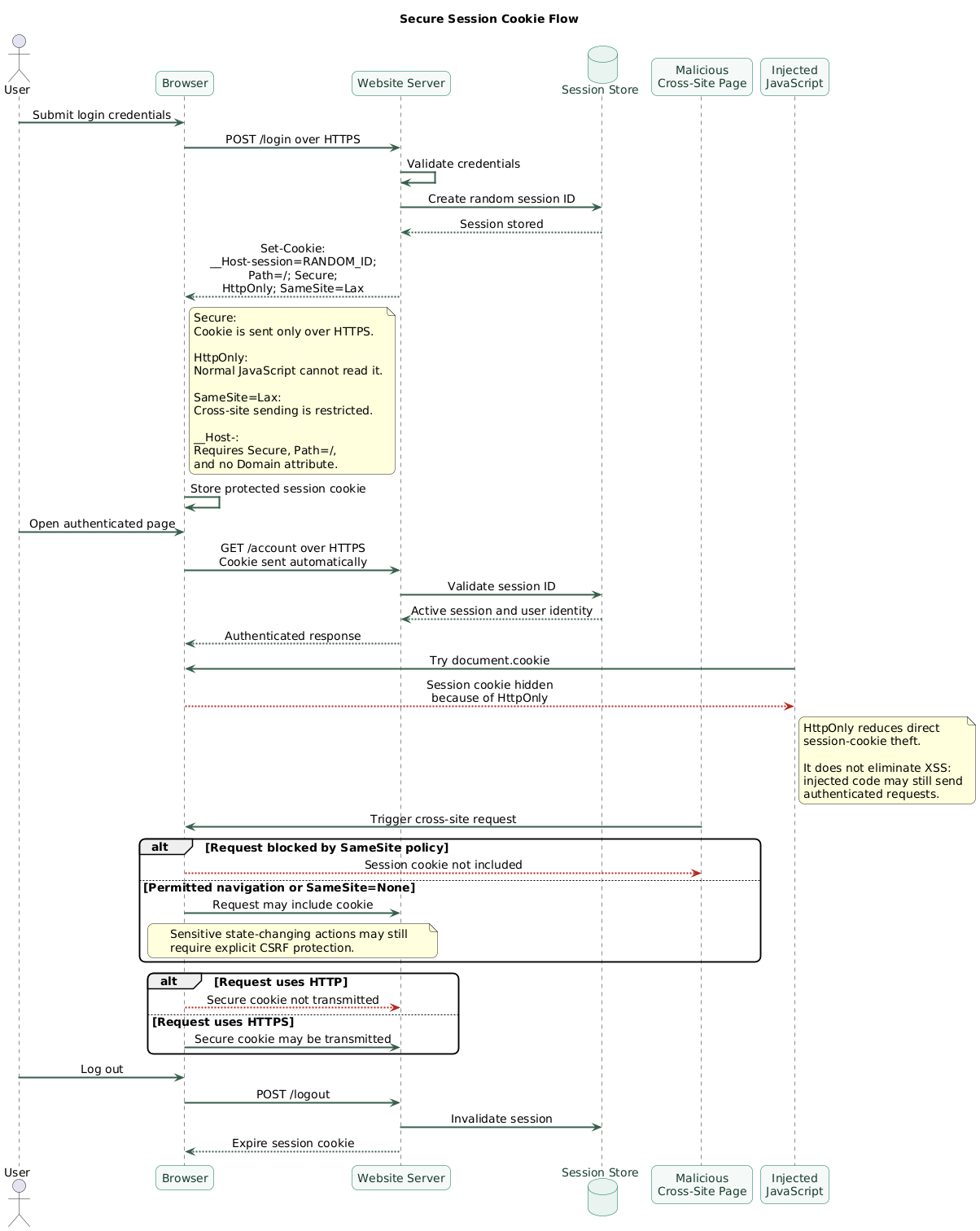
Set-Cookie:
  __Host-session=RANDOM_SESSION_ID;
  Path=/;
  Secure;
  HttpOnly;
  SameSite=Lax
Secure
Secure tells the browser to send the cookie only with HTTPS
requests. It protects the cookie from being transmitted over ordinary
unencrypted HTTP.
Secure does not encrypt the cookie inside the browser, stop server-side leaks, prevent JavaScript access, or make sensitive cookie contents safe to expose elsewhere.
HttpOnly
HttpOnly prevents normal page JavaScript from reading or
changing the cookie through interfaces such as
document.cookie. This makes direct theft of a session cookie
harder when an attacker manages to execute JavaScript in the page.
HttpOnly does not neutralize XSS. Malicious JavaScript may still perform actions as the user, read page content, submit forms, or send requests while the browser automatically includes the cookie.
SameSite
SameSite controls when a cookie accompanies cross-site
requests.
| Value | General behavior | Typical use |
|---|---|---|
| Strict | Most restrictive cross-site sending behavior | Highly sensitive flows that do not require inbound cross-site use |
| Lax | Allows selected top-level navigation behavior | Common default for ordinary web sessions |
| None | Allows cross-site sending | Legitimate cross-site embeds or integrations |
A cookie using SameSite=None must also use
Secure in modern browser implementations.
SameSite is not complete CSRF protection
Use explicit anti-CSRF controls for sensitive state-changing actions when the application's architecture requires them. SameSite is a valuable additional layer, not a universal replacement.
Cookie prefixes
Supporting browsers enforce additional rules for cookie names using recognized prefixes.
-
__Secure-: requires the cookie to be set withSecurefrom an HTTPS origin. -
__Host-: requiresSecure, requiresPath=/, and does not allow aDomainattribute.
__Host- is useful for a host-bound session cookie because a
subdomain cannot define a broader domain cookie with the same compliant
prefix.
Keep cookie scope and lifetime narrow
- Avoid a
Domainattribute unless subdomains need the cookie. - Use the narrowest practical
Path. - Use short session lifetimes appropriate to the application risk.
- Rotate the session identifier after login and privilege changes.
- Invalidate server-side sessions during logout and security events.
- Do not store passwords, API keys, or unnecessary personal data in cookies.
6. Supporting headers worth understanding
X-Content-Type-Options
X-Content-Type-Options: nosniff
This tells the browser not to reinterpret certain resources as a
different MIME type. The server must still send correct
Content-Type headers.
Referrer-Policy
Referrer-Policy: strict-origin-when-cross-originReferrer Policy controls how much of the current page URL may be sent when navigating or loading another resource. Avoid placing secrets, access tokens, or sensitive personal information in URLs regardless of this header.
Permissions-Policy
Permissions-Policy:
  camera=(),
  microphone=(),
  geolocation=()
This example disables camera, microphone, and geolocation access for the document and embedded content. Enable a capability only when the application genuinely needs it.
Framing protection
Content-Security-Policy: frame-ancestors 'none'
frame-ancestors controls which sites may embed your page in a
frame. It is the modern CSP-based control for reducing clickjacking risk.
X-Frame-Options: DENY
X-Frame-Options remains useful as a legacy fallback. Use
SAMEORIGIN instead of DENY when the application
intentionally frames its own pages.
Cross-origin isolation headers
Cross-Origin-Opener-Policy: same-origin
Cross-Origin-Resource-Policy: same-origin
These headers can strengthen isolation between origins, but they can also break payment windows, federated login popups, embedded assets, document previews, and other legitimate cross-origin workflows. Add them only after testing the application's integrations.
Sensitive-page caching
Cache-Control: no-store
Use restrictive cache rules for responses containing highly sensitive,
user-specific information when browser or intermediary storage would be
inappropriate. Do not apply no-store globally without
considering performance and application behavior.
Do not collect headers for a score
Every header should correspond to a real browser behavior and an understood application requirement. A shorter, tested policy is better than a long configuration copied without understanding its impact.
7. Practical configuration examples
Configure security headers at the layer that reliably controls the final HTTPS response: the application, reverse proxy, web server, CDN, or hosting platform.
Example baseline for a simple static site
Content-Security-Policy:
  default-src 'self';
  script-src 'self';
  style-src 'self';
  img-src 'self' data:;
  font-src 'self';
  connect-src 'self';
  object-src 'none';
  base-uri 'self';
  form-action 'self';
  frame-ancestors 'none';

Strict-Transport-Security:
  max-age=31536000; includeSubDomains

X-Content-Type-Options:
  nosniff

Referrer-Policy:
  strict-origin-when-cross-origin

Permissions-Policy:
  camera=(), microphone=(), geolocation=()

X-Frame-Options:
  DENY
This is an example, not a universal drop-in configuration. Remove
includeSubDomains when subdomains are not ready for HSTS.
Extend CSP only for dependencies the website actually uses.
Nginx example
server {
    listen 443 ssl;
    server_name example.com;

    add_header Strict-Transport-Security
        "max-age=31536000; includeSubDomains" always;

    add_header X-Content-Type-Options
        "nosniff" always;

    add_header Referrer-Policy
        "strict-origin-when-cross-origin" always;

    add_header Permissions-Policy
        "camera=(), microphone=(), geolocation=()" always;

    add_header X-Frame-Options
        "DENY" always;

    add_header Content-Security-Policy
        "default-src 'self'; script-src 'self'; style-src 'self'; img-src 'self' data:; font-src 'self'; connect-src 'self'; object-src 'none'; base-uri 'self'; form-action 'self'; frame-ancestors 'none';"
        always;
}
Review how inherited add_header directives behave across
server and location blocks. Test error responses as well as successful
pages.
Application cookie example
response.cookie("__Host-session", sessionId, {
  secure: true,
  httpOnly: true,
  sameSite: "lax",
  path: "/",
  maxAge: 30 * 60 * 1000,
});
Framework syntax varies. Confirm the actual
Set-Cookie response in browser developer tools rather than
assuming the framework applied every option.
Dynamic CSP nonce example
import crypto from "node:crypto";

function createCspNonce() {
  return crypto.randomBytes(18).toString("base64");
}

app.use((request, response, next) => {
  const nonce = createCspNonce();

  response.locals.cspNonce = nonce;

  response.setHeader(
    "Content-Security-Policy",
    [
      "default-src 'self'",
      `script-src 'self' 'nonce-${nonce}'`,
      "style-src 'self'",
      "img-src 'self' data:",
      "connect-src 'self'",
      "object-src 'none'",
      "base-uri 'self'",
      "form-action 'self'",
      "frame-ancestors 'none'",
    ].join("; "),
  );

  next();
});
The rendering layer must place the same response-specific nonce on each approved inline script. Escape template values correctly and do not allow user input to enter a nonce-authorized script block.
Check the final response
A CDN, proxy, framework, plugin, or hosting platform may replace, duplicate, merge, or remove headers. Test what the browser actually receives from production.
8. Test and release headers safely
Inspect response headers
curl -I https://example.com/Also test redirects, error pages, authentication routes, administrative pages, static assets, and API responses.
Use browser developer tools
- Inspect the Network panel for response headers.
- Check the Console for CSP violations and mixed content.
- Inspect cookies for Secure, HttpOnly, SameSite, Path, and Domain.
- Test from a fresh browser profile without cached HSTS state.
- Test private windows and multiple supported browsers.
Test critical user journeys
- Account registration and login.
- Multifactor authentication.
- Password reset and email verification.
- Checkout and payment redirects.
- OAuth and single sign-on popups.
- Embedded maps, videos, documents, and support widgets.
- Consent manager and analytics behavior.
- Newsletter and contact forms.
- Administrative dashboards.
- Logout and session expiration.
Monitor after enforcement
Continue reviewing CSP reports, frontend errors, authentication failures, conversion changes, support reports, and third-party integration health. A browser extension or malformed report can create noise, so reports need classification rather than blind alerting.
Practical release sequence
Deploy CSP in Report-Only, fix real violations, enforce it for internal users or a small traffic segment, verify critical journeys, expand the rollout, and keep reporting enabled for later regressions.
9. Common security-header mistakes
- Copying a policy from another website: CSP must reflect your own resource and integration graph.
- Using broad wildcards: a wide allowlist can authorize compromised or user-controlled content.
- Keeping unsafe-inline permanently: it weakens script-injection protection.
- Hardcoding a nonce: a reusable nonce is no longer a meaningful one-response authorization value.
- Enabling long HSTS immediately: a configuration or certificate problem can lock users out.
- Adding includeSubDomains without an inventory: an old HTTP-only subdomain may become inaccessible.
- Preloading too early: browser-list removal is not an immediate rollback mechanism.
- Setting SameSite=None without Secure: modern browsers may reject the cookie.
- Assuming HttpOnly fixes XSS: injected code may still perform authenticated actions.
- Trusting browser defaults: explicitly configure security-relevant cookie attributes.
- Sending duplicate conflicting headers: application, proxy, and CDN configuration must agree.
- Testing only the homepage: errors, redirects, APIs, login pages, and embedded workflows may behave differently.
10. Copy/paste implementation checklist
Security headers and cookie flags (checklist)

Preparation
- Confirm that HTTPS works across the website.
- Automate and monitor certificate renewal.
- Inventory scripts, styles, images, fonts, APIs, frames, forms, and workers.
- Identify inline scripts, inline styles, and HTML event handlers.
- Identify authentication and other sensitive cookies.
- Record which layer controls final response headers.

Content Security Policy
- Begin with Content-Security-Policy-Report-Only on an existing site.
- Define default-src as a restrictive fallback.
- Define script-src explicitly.
- Prefer external scripts, per-response nonces, or static hashes.
- Remove unnecessary inline scripts and event handlers.
- Define style-src, img-src, font-src, and connect-src.
- Set object-src 'none' unless legacy plugin content is required.
- Set base-uri 'self' or 'none'.
- Restrict form-action to approved destinations.
- Set frame-ancestors 'none' or an explicit allowlist.
- Review violations and remove unnecessary third-party dependencies.
- Test critical user flows before enforcement.
- Continue monitoring after enforcement.

HSTS
- Send HSTS only over HTTPS.
- Keep the HTTP-to-HTTPS redirect.
- Begin with a short max-age.
- Increase max-age after successful testing.
- Add includeSubDomains only after auditing every relevant subdomain.
- Confirm that certificates and renewal work for included hosts.
- Understand the operational commitment before requesting preload.
- Do not rely on HSTS to fix mixed content or certificate problems.

Session cookies
- Set Secure on authentication and sensitive cookies.
- Set HttpOnly when JavaScript does not need cookie access.
- Set SameSite explicitly.
- Use Lax or Strict when application flows allow it.
- Pair SameSite=None with Secure.
- Consider a __Host- prefix for host-bound session cookies.
- Avoid Domain unless subdomains genuinely need the cookie.
- Use Path=/ when required by the __Host- prefix.
- Keep session lifetime appropriate to the risk.
- Rotate session identifiers after authentication and privilege changes.
- Invalidate sessions server-side during logout and security events.
- Do not store passwords or unnecessary sensitive data in cookies.

Supporting headers
- Set X-Content-Type-Options: nosniff.
- Choose and set an explicit Referrer-Policy.
- Disable unused browser capabilities with Permissions-Policy.
- Use CSP frame-ancestors for framing control.
- Consider X-Frame-Options as a legacy fallback.
- Test COOP and CORP before deployment.
- Use restrictive Cache-Control on highly sensitive responses where needed.
- Remove obsolete headers that provide no useful modern protection.

Testing
- Inspect production headers with curl and browser developer tools.
- Test success responses, redirects, errors, and authentication routes.
- Inspect the actual Set-Cookie response.
- Check the browser console for CSP and mixed-content errors.
- Test login, logout, password reset, checkout, OAuth, and embedded content.
- Test multiple supported browsers.
- Test CDN, reverse-proxy, and cache behavior.
- Check whether headers appear on error responses.
- Monitor CSP reports and frontend errors after release.
- Document ownership and rollback procedures.
11. FAQ
Do security headers fix vulnerabilities in a website?
No. They provide defense in depth. CSP can reduce the impact of some injected content, but you still need output encoding, input handling, secure authorization, CSRF controls, dependency updates, secret protection, and server hardening.
Should I deploy CSP in Report-Only mode first?
For an existing website, that is usually the safer approach. Report-Only lets you discover what the proposed policy would block. Review the reports, update the application and policy, test important workflows, and then enforce the stable version.
Can HSTS break a website?
Yes. A long duration can keep the browser on HTTPS even after you remove
the header. includeSubDomains can affect forgotten or
third-party subdomains, while preload creates an even stronger
commitment. Establish reliable HTTPS before increasing the policy.
What do Secure, HttpOnly, and SameSite do?
Secure limits cookie transmission to HTTPS. HttpOnly prevents ordinary JavaScript access. SameSite controls whether the cookie accompanies cross-site requests. They solve different problems and are commonly used together for session cookies.
Does HttpOnly make a session safe from XSS?
It makes direct cookie reading more difficult, but injected JavaScript may still issue authenticated requests and interact with the page as the user. Prevent and remediate XSS rather than relying on HttpOnly alone.
Can I add CSP using a meta tag?
A limited CSP can be delivered through a
meta http-equiv element, but it has important restrictions
and is processed only after the browser reaches that element. Prefer a
real HTTP response header. HSTS and cookie attributes cannot be
implemented through CSP meta markup.
Key terms (quick glossary)
- HTTP security header
- A response header that instructs a supporting browser to apply a security or privacy-related rule.
- Content Security Policy
- A browser-enforced policy controlling allowed resources, code sources, framing, forms, connections, and related page behavior.
- CSP nonce
- A cryptographically unpredictable, response-specific value used to authorize selected inline scripts or styles.
- CSP hash
- A cryptographic digest that authorizes inline content matching the exact hashed bytes.
- Report-Only
- A CSP deployment mode that records violations without enforcing the proposed restrictions.
- HSTS
- HTTP Strict Transport Security, which tells browsers to use HTTPS for future requests to a host.
- Secure
- A cookie attribute restricting transmission of the cookie to HTTPS requests.
- HttpOnly
- A cookie attribute preventing ordinary page JavaScript from accessing the cookie.
- SameSite
- A cookie attribute controlling whether the browser sends the cookie with cross-site requests.
- Clickjacking
- Tricking a user into interacting with a framed page or interface that is hidden or visually disguised.
- MIME sniffing
- Browser behavior that attempts to infer a resource type instead of relying only on the declared content type.
- Defense in depth
- Using multiple independent protective layers so one failure does not automatically produce a complete compromise.
Worth reading
Recommended guides from the category.
