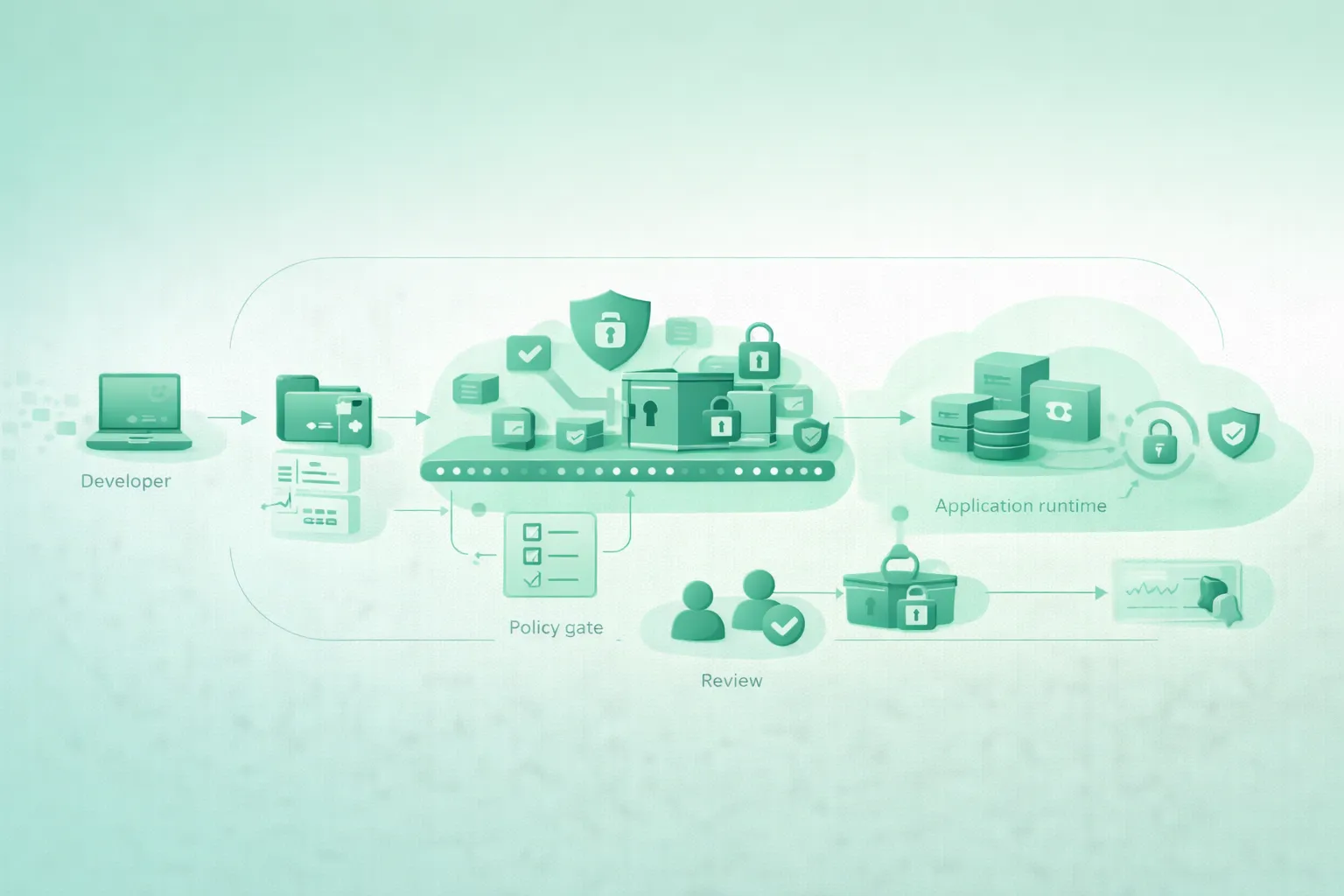
Small projects often begin with a single developer, one repository, a hosting platform, and a few third-party APIs. That simplicity is useful, but it also makes shortcuts tempting: an API key pasted into source code, a production password copied into a chat, or a cloud credential stored as a permanent CI variable.
You do not need an enterprise security platform to improve this. A practical setup keeps secrets out of Git and client-side code, gives each environment separate credentials, injects secrets only where they are needed, restricts their permissions, prevents accidental commits, and makes revocation fast.
The fast security rule
A secret should be stored in one approved place, delivered only to the workload that needs it, and replaceable without rewriting the application.
1. What counts as a secret?
A secret is any value that grants access, proves identity, decrypts data, signs requests, or provides privileged capabilities. The name of the variable does not matter. Its power does.
Common project secrets
- Third-party API keys and access tokens.
- Database usernames, passwords, and connection strings.
- Cloud access keys and service-account credentials.
- OAuth client secrets and refresh tokens.
- Webhook signing secrets.
- Session-signing and JSON Web Token signing keys.
- Private SSH keys and TLS private keys.
- Encryption keys and key-encryption keys.
- Package registry, container registry, and deployment tokens.
- Internal service credentials and administrative passwords.
Not every value called an API key is confidential. Some providers issue publishable browser or mobile keys that identify an application but are expected to be visible. Those keys still require restrictions such as allowed origins, application identifiers, rate limits, or limited API access.
Frontend code is public
Any value shipped to a browser, desktop client, or mobile application can be extracted. Obfuscation, minification, and Base64 encoding do not turn a server secret into a safe client credential.
Classify secrets by impact
| Level | Example | Potential impact | Minimum protection |
|---|---|---|---|
| Low | Restricted development-only API key | Limited test usage or small financial cost | Separate development key, usage limits, no Git storage |
| Medium | Production email or payment integration token | Abuse, customer impact, unexpected charges | Managed storage, narrow scopes, monitoring, rotation |
| High | Cloud administrator credential or signing key | Infrastructure takeover or forged authentication | Short-lived identity, strong access control, audit logs |
| Critical | Root account credential or master encryption key | Catastrophic compromise and difficult recovery | Eliminate routine use, isolate, monitor, test recovery |
2. The minimal security model for small projects
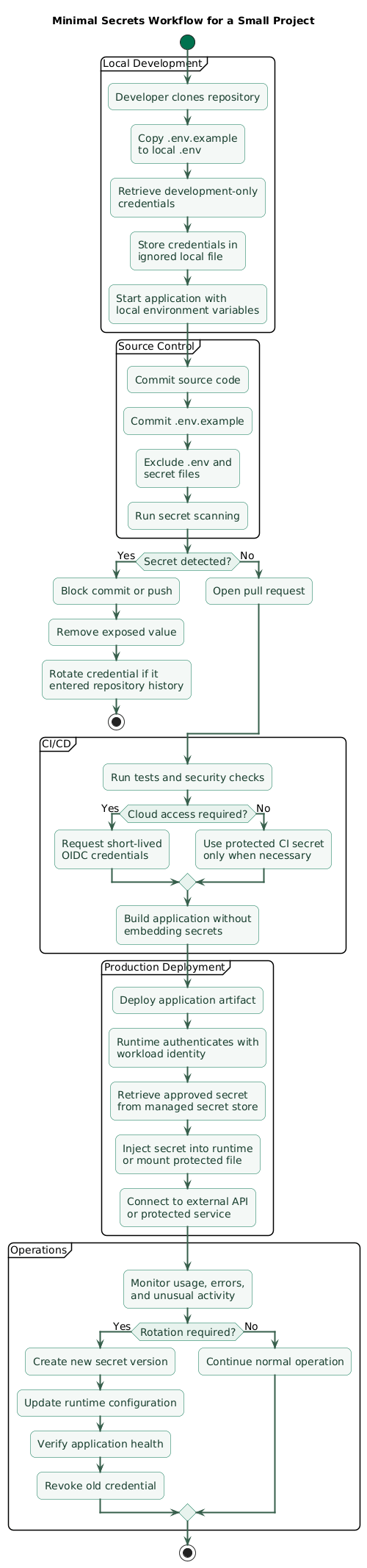
The goal is not to add as many security tools as possible. The goal is to reduce the number of places where secrets can exist and make the safe workflow easier than the unsafe one.
Minimal secrets workflow (diagram)
The five-part model
- Local development: use a local ignored configuration file or a developer-oriented secret tool.
- Source control: commit variable names and examples, never real secret values.
- CI/CD: use protected secret storage and prefer short-lived workload identity when supported.
- Production runtime: retrieve or inject secrets from the deployment platform or a dedicated secret manager.
- Operations: restrict, monitor, rotate, and revoke credentials through a documented process.
A reasonable small-project setup
One ignored .env file for local development, one
.env.example template in Git, protected repository or
environment secrets for CI, and the hosting provider's encrypted
production-secret settings may be enough for an early project.
3. Keep local development simple and safe
Local secret handling must be convenient enough that developers do not work around it. For many small projects, a local environment file is an acceptable starting point when it remains outside source control and is never treated as a production secret store.
Ignore local secret files
# Local environment files
.env
.env.*
!.env.example

# Local secrets
secrets/
*.key
*.pem
*.p12
*.pfx

# Tool output that may contain credentials
*.tfstate
*.tfstate.*
*.plan
debug.log
npm-debug.log*
yarn-debug.log*
yarn-error.log*
Check whether the file was already tracked before assuming that
.gitignore protects it. Ignore rules do not remove files
already stored in repository history.
Commit a safe template
# .env.example

APP_ENV=development
APP_PORT=3000

DATABASE_URL=
EMAIL_API_KEY=
PAYMENT_API_KEY=
WEBHOOK_SIGNING_SECRET=

# Describe where each value comes from.
# Never place real credentials in this file.
The example file documents required configuration without sharing the values. Include setup instructions in the README so a new contributor knows which provider dashboard or approved tool supplies each secret.
Fail safely when required configuration is missing
const requiredSecrets = [
  "DATABASE_URL",
  "EMAIL_API_KEY",
  "WEBHOOK_SIGNING_SECRET",
];

const missingSecrets = requiredSecrets.filter(
  (name) => !process.env[name] || process.env[name].trim() === "",
);

if (missingSecrets.length > 0) {
  throw new Error(
    `Missing required configuration: ${missingSecrets.join(", ")}`,
  );
}
Validate the presence and shape of configuration during application startup. Do not print the values in the error message.
Do not share a production .env file
Sending a complete production environment file through email, chat, or an issue tracker creates additional uncontrolled copies. Share access to the approved secret system instead of sharing the secret itself.
4. Use deployment-platform or managed secrets in production
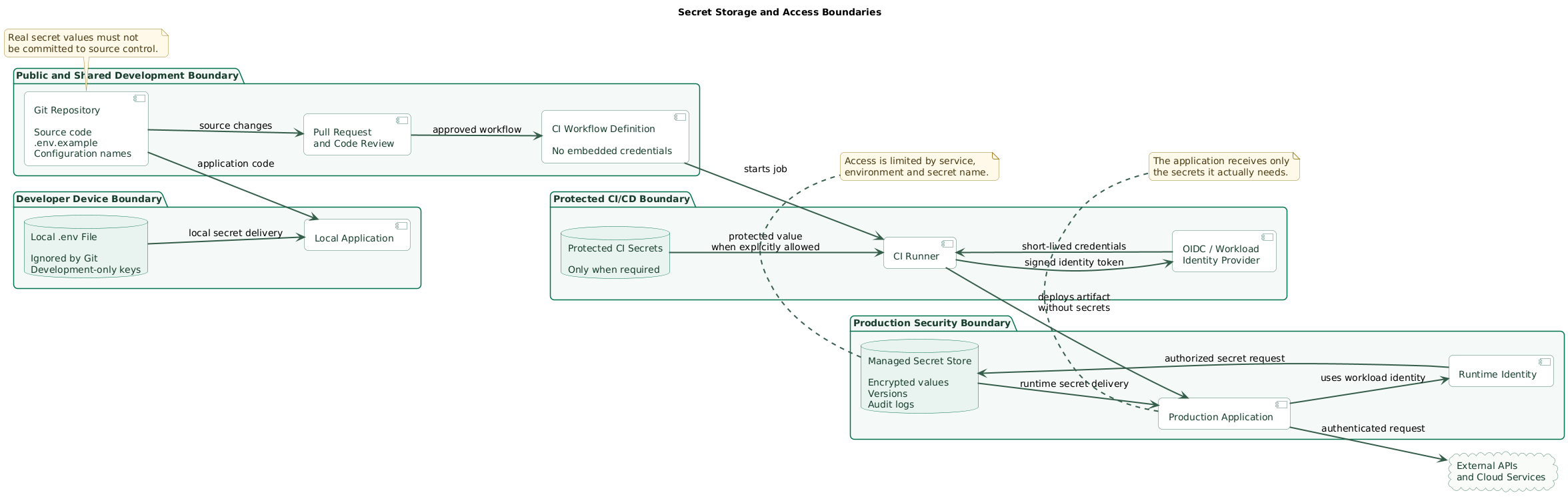
Production secrets should not depend on a developer's laptop or a manually copied file. Use the encrypted secret or configuration feature offered by the hosting platform, container platform, cloud provider, or a dedicated secret manager.
A managed secret system normally provides access control, encrypted storage, secret versions, auditing, and integration with runtime identities. It also makes rotation possible without committing a new value to the repository.
Secret storage boundaries (diagram)
Choose the simplest appropriate storage layer
| Project stage | Practical option | Important controls |
|---|---|---|
| Local prototype | Ignored local environment file | Development-only keys, restricted permissions, no Git history |
| Hosted small app | Hosting platform's encrypted secret settings | Separate environments, limited project access, audit changes |
| Cloud application | Cloud secret manager and workload identity | Least privilege, versions, logs, rotation, runtime-only access |
| Multiple services | Centralized secret manager with service identities | Per-service access, ownership, monitoring, revocation procedures |
Prefer runtime delivery
Deliver the secret when the application starts or when it needs the credential. Avoid placing real secret values inside application source, compiled bundles, deployment manifests, container images, or build artifacts.
Environment variables can be practical, but they are not automatically safe. Their exposure depends on the operating system, hosting platform, debugging tools, process permissions, crash handling, and who can inspect deployment configuration. File mounts or direct secret-manager access may provide better isolation in some environments.
Use references where possible
Store a secret name, identifier, or version reference in configuration. Let the runtime identity retrieve the value instead of copying the secret through multiple deployment systems.
5. Protect secrets in CI/CD
CI/CD systems execute code, install dependencies, create artifacts, and often have deployment access. A workflow that can read a secret may also be able to print it, upload it, or send it to an external service.
Use protected CI secret storage
- Store credentials in the CI platform's secret settings.
- Use environment-specific secrets for staging and production.
- Require approval before production jobs receive production secrets.
- Limit who can edit workflows and deployment environments.
- Do not expose production secrets to untrusted pull-request code.
- Do not place secrets in command-line arguments when avoidable.
- Review third-party actions before giving them secret access.
Prefer short-lived identity over permanent cloud keys
When the cloud provider and CI platform support OpenID Connect or another workload-identity mechanism, use it to exchange the workflow identity for temporary credentials. This removes the need to store a permanent cloud access key in the repository settings.
name: deploy

on:
  workflow_dispatch:

permissions:
  contents: read
  id-token: write

jobs:
  deploy-production:
    environment: production
    runs-on: ubuntu-latest

    steps:
      # Pin real actions to reviewed full commit SHAs.
      - uses: actions/checkout@<full-commit-sha>

      - name: Authenticate with short-lived identity
        uses: cloud-provider/login-action@<full-commit-sha>
        with:
          workload_identity: ${{ vars.WORKLOAD_IDENTITY }}

      - name: Deploy
        run: ./scripts/deploy.sh
The authentication action and configuration depend on the selected provider. Restrict the provider trust policy to the expected repository, branch, workflow, and protected environment.
Mask additional sensitive values
CI platforms may mask registered secrets, but transformed or dynamically generated values may still appear in logs. Avoid printing configuration objects, request headers, command traces, or complete provider responses.
# Unsafe debugging
echo "Authorization: Bearer $API_TOKEN"

# Safer debugging
echo "API authentication configured: yes"
echo "Token length: ${#API_TOKEN}"
A secret can leave CI without appearing plainly
Malicious or compromised workflow code can encode a secret, place it in an artifact, include it in a cache key, or send it over the network. Secret masking is useful, but it is not a replacement for restricting workflow permissions and reviewing code.
6. Restrict every key and reduce its blast radius
Assume that a credential may eventually be copied, logged, or exposed. Restrictions determine whether that mistake causes a minor interruption or a major incident.
Apply restrictions supported by the provider
- Permissions: allow only the API operations the application requires.
- Environment: use different credentials for local, staging, and production systems.
- Resource scope: limit access to the required project, account, bucket, database, or queue.
- Network scope: restrict source IP addresses, private networks, or service identities where practical.
- Client restrictions: for publishable keys, configure allowed origins, application identifiers, or signing certificates.
- Time: use temporary credentials and short expiration periods when the workflow supports them.
- Usage limits: configure quotas, spending limits, rate limits, and alerts.
Use one credential per workload
Do not share one powerful API key between local development, multiple services, CI, staging, and production. Separate credentials improve attribution and let you revoke one workload without interrupting everything.
Better than one shared key
Create separate keys named for their purpose, such as
email-api-local, email-api-staging, and
email-api-production. Give each key only the permissions
and limits required by that environment.
7. Block the common leak paths
Secrets are often exposed through normal development activity rather than a direct attack. Preventing a few common mistakes provides a large security improvement.
Source control and collaboration
- Enable repository secret scanning and push protection when available.
- Run a secret scanner in pre-commit hooks or CI.
- Do not paste secrets into issues, pull requests, or code reviews.
- Review generated configuration and sample files before committing.
- Treat private repositories as shared systems, not secret stores.
Application logs and error reports
- Redact authorization headers, cookies, tokens, and passwords.
- Do not serialize complete request or configuration objects.
- Review error-reporting and telemetry payloads.
- Limit access to logs and configure retention intentionally.
- Do not expose stack traces or environment dumps to users.
function redactHeaders(headers) {
  const safeHeaders = { ...headers };

  for (const name of [
    "authorization",
    "cookie",
    "set-cookie",
    "x-api-key",
  ]) {
    if (safeHeaders[name]) {
      safeHeaders[name] = "[REDACTED]";
    }
  }

  return safeHeaders;
}
Frontend and mobile applications
Keep privileged calls behind a backend you control. The backend can authenticate the user, enforce authorization, validate input, apply rate limits, and use the protected server credential.
When a provider requires a publishable client key, confirm that the key cannot perform privileged operations and apply every available restriction. Do not store a confidential key beside it.
Container images and build systems
Do not pass secrets through Dockerfile ARG or
ENV instructions. Those values can persist in image layers,
image metadata, caches, or build records. Use temporary build-secret
mounts when a build must authenticate to a private dependency source.
# syntax=docker/dockerfile:1

FROM node:24-alpine AS build
WORKDIR /app

COPY package*.json ./

RUN --mount=type=secret,id=npm_token \
    NPM_TOKEN="$(cat /run/secrets/npm_token)" \
    npm ci

COPY . .
RUN npm run build
Pass the secret through the build system's secret mechanism rather than copying the token into the Docker build context.
Deleting a secret in a later layer is not enough
If a credential was copied into an earlier container layer, deleting the file later may not remove it from the image history. Revoke the credential and rebuild the image without the secret.
8. Rotate secrets without causing downtime
Rotation limits how long a leaked credential remains useful, but careless rotation can create an outage. Design the application so it can move from one credential to another without an emergency redeployment.
Safe overlapping rotation
- Create a new credential or secret version.
- Apply the same restrictions as the existing credential.
- Update the approved secret store with the new value.
- Restart or refresh the workloads that consume it.
- Verify successful authentication and service health.
- Disable the old credential.
- Monitor for unexpected use of the old credential.
- Revoke or destroy it after the validation period.
Some providers support multiple active keys, versioned secrets, or automatic rotation. Use those capabilities when they match the application's recovery requirements.
Maintain a small secret inventory
| Field | Example | Why it matters |
|---|---|---|
| Name | payment-api-production | Identifies the credential clearly |
| Owner | Backend team | Defines who handles rotation and incidents |
| Consumer | Production API service | Shows where the credential is used |
| Permissions | Read payments, create refunds | Makes excessive access visible |
| Last rotated | 2026-07-10 | Supports policy and operational review |
| Revocation path | Provider dashboard and incident runbook | Reduces response time during a leak |
Test rotation before an incident
Rotate one non-critical credential through the complete procedure. Confirm that the team can update the secret, refresh the application, verify service health, and revoke the old value.
9. What to do when a secret leaks
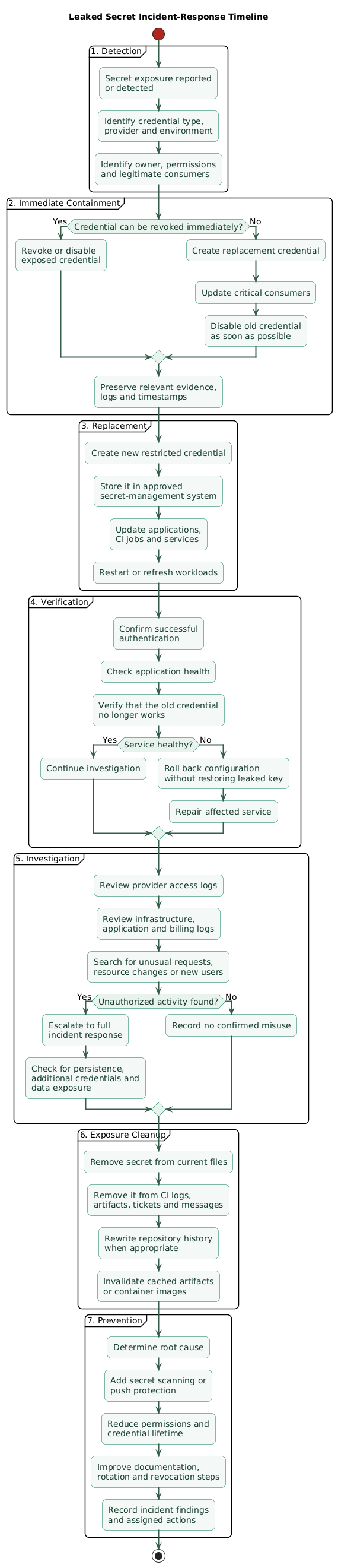
Treat an exposed credential as compromised. Do not wait for evidence that someone used it. A public commit, CI log, screenshot, support ticket, or shared message may have been copied before you removed it.
Leaked-secret response timeline (diagram)
Response order
- Identify: determine the credential, provider, environment, owner, permissions, and affected systems.
- Contain: revoke, disable, or rotate the credential as quickly as possible.
- Replace: update legitimate applications and deployment systems with a new restricted credential.
- Verify: confirm service health and successful authentication after replacement.
- Investigate: review provider logs, unusual requests, resource changes, new users, unexpected charges, and access locations.
- Reduce exposure: remove the value from logs, tickets, artifacts, and repository history where appropriate.
- Prevent recurrence: add scanning, restrictions, documentation, or workflow controls that would have blocked the leak.
Removing the commit is not containment
A credential remains valid until the provider revokes, disables, or replaces it. Rewrite repository history only after the exposed credential has been invalidated.
Escalate high-impact credentials
A leaked administrator credential, signing key, database superuser password, encryption key, or production service-account key may require a broader incident response. Review whether the attacker could create new credentials, alter logs, access customer data, modify infrastructure, or maintain persistence after the original key is revoked.
10. Copy/paste security checklist
API keys and secrets for small projects (checklist)

Inventory
- List API keys, passwords, tokens, private keys, and signing secrets.
- Record the owner and application that uses each credential.
- Separate local, staging, and production credentials.
- Identify credentials with administrator or account-wide access.

Source control
- Add local secret files to .gitignore.
- Commit a .env.example file containing names but no real values.
- Confirm that secrets are not already present in Git history.
- Enable secret scanning and push protection where available.
- Add automated secret scanning to CI or pre-commit checks.

Local development
- Use development-only credentials with limited permissions.
- Protect local files using operating-system permissions.
- Do not send complete .env files through email or chat.
- Validate required configuration without logging values.
- Revoke credentials from lost or decommissioned devices.

Production
- Use the hosting platform's secret feature or a managed secret store.
- Keep production secrets out of source code and deployment artifacts.
- Give runtime identities access only to required secrets.
- Separate secret administration from ordinary application access.
- Enable access logs and secret versioning where supported.

CI/CD
- Store CI secrets in protected environment or repository settings.
- Do not expose production secrets to untrusted pull requests.
- Prefer OIDC or another short-lived workload identity.
- Restrict cloud trust policies to the correct repository and workflow.
- Review third-party actions before giving them secret access.
- Avoid printing headers, configuration objects, and command traces.
- Pin third-party CI actions to reviewed full commit SHAs.

API restrictions
- Apply the minimum required permissions.
- Restrict projects, resources, origins, applications, IPs, or networks.
- Configure quotas, rate limits, spending limits, and alerts.
- Use one credential per service and environment.
- Avoid shared administrator credentials.

Containers and builds
- Do not use Dockerfile ARG or ENV for build secrets.
- Use temporary build-secret or SSH mounts.
- Keep secret files outside the build context.
- Do not copy credentials into container images.
- Revoke any credential that entered an image layer or build artifact.

Logging
- Redact authorization headers, cookies, tokens, and passwords.
- Do not log complete requests, environment variables, or configuration.
- Review telemetry, crash reports, and error-tracking payloads.
- Restrict access to logs and configure retention.
- Alert on suspicious authentication failures or unusual usage.

Rotation
- Create a new credential before disabling the current one.
- Update the approved secret store.
- Refresh applications and verify service health.
- Disable the old credential and monitor for remaining use.
- Revoke the old credential after validation.
- Document the date, owner, and result.

Leak response
- Revoke or rotate the credential immediately.
- Replace it in every legitimate application and workflow.
- Review provider, infrastructure, and billing logs.
- Check whether the credential could create additional access.
- Remove the value from tickets, logs, artifacts, and Git history.
- Add a preventive control and document the incident.
11. FAQ
Is storing API keys in a .env file secure?
A local .env file can be a practical development option when
it is excluded from source control, protected by operating-system
permissions, never copied into artifacts, and limited to development
credentials. Use managed or platform-protected secrets for shared and
production environments.
Are environment variables always safe for secrets?
No. They are convenient, but they may be visible through process inspection, debugging tools, crash reports, deployment interfaces, or overly broad platform permissions. Evaluate the runtime and consider secret-mounted files or direct secret-manager access where appropriate.
What should I do if an API key is committed to Git?
Revoke or rotate the key immediately. Replace it in legitimate systems, verify the application, and review the provider's logs and billing. After containment, remove the value from current files and rewrite history if required. Deleting the latest line does not invalidate the exposed key.
Should frontend applications contain API keys?
Frontend code must be treated as public. Never place a confidential server credential in browser or mobile code. When a provider issues a publishable client key, restrict it using the provider's available controls and keep privileged operations behind a trusted backend.
How often should API keys be rotated?
Rotate immediately after suspected exposure, when access changes, or when required by policy. Scheduled rotation should reflect the credential's privileges and the ability to replace it safely. Overlapping credentials or versioned secrets can prevent downtime.
Is Base64 encoding enough to protect a secret?
No. Base64 is an encoding format, not encryption. Anyone who obtains the encoded value can normally decode it immediately. Use an approved secret store and proper access control instead.
Key terms (quick glossary)
- Secret
- A sensitive value that grants access, proves identity, signs data, decrypts information, or enables privileged operations.
- API key
- A value used by an application to identify itself or authenticate to an API. Its confidentiality and privileges depend on the provider.
- Secret manager
- A managed system for storing, controlling, versioning, auditing, and delivering sensitive values.
- Least privilege
- Granting a user, service, or credential only the permissions required to perform its intended function.
- OIDC
- OpenID Connect, commonly used by CI/CD workflows to exchange a trusted workload identity for temporary cloud credentials.
- Secret scanning
- Automated detection of credentials or secret-like values in source code, commits, files, and related development systems.
- Push protection
- A control that detects supported secrets before or during a source-code push and blocks or warns about the exposure.
- Rotation
- Replacing an existing secret with a new value and retiring the previous credential after consumers have been updated.
- Revocation
- Invalidating a credential so it can no longer be used.
- Blast radius
- The maximum damage or number of systems that could be affected if a credential is compromised.
Worth reading
Recommended guides from the category.
