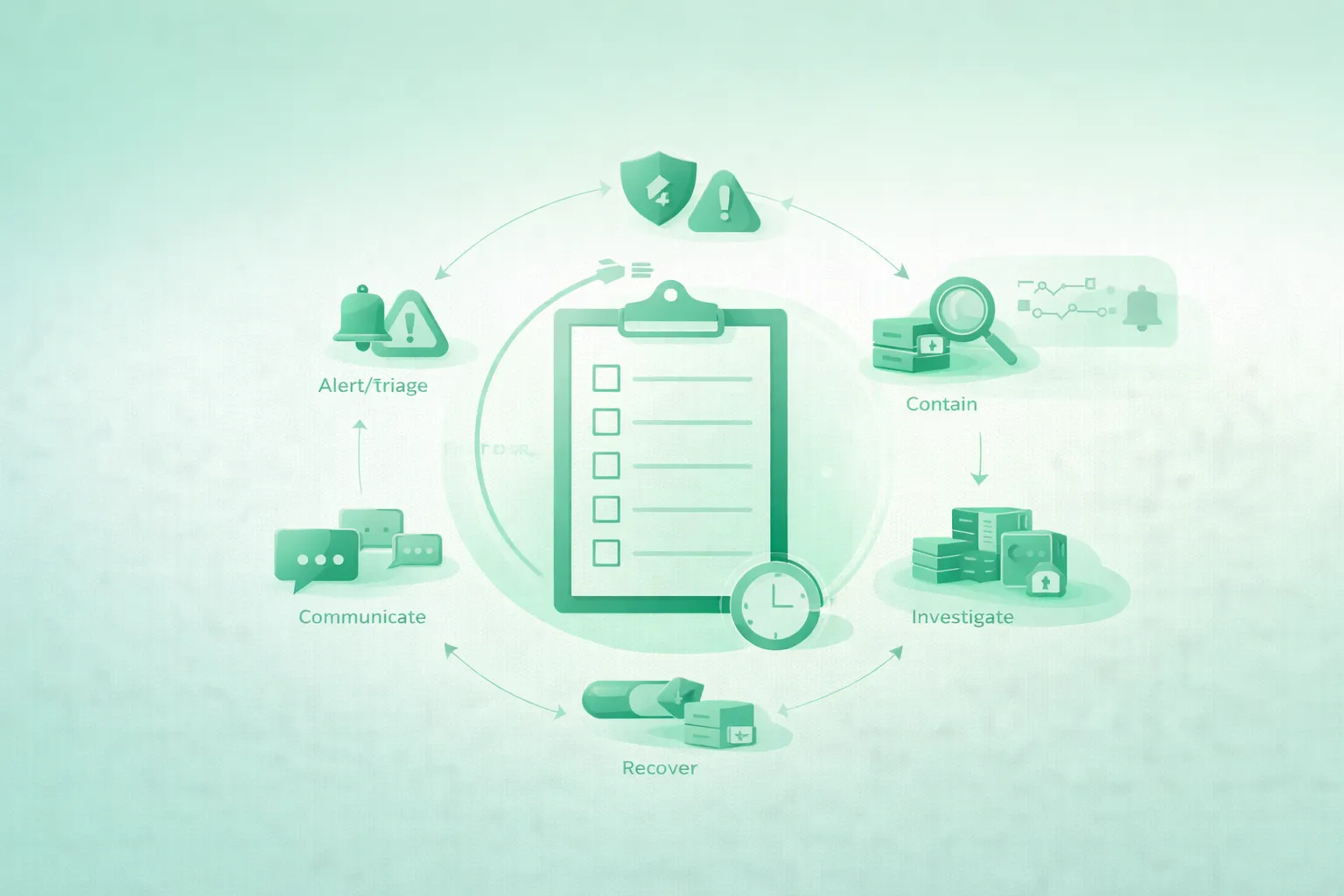
A security incident rarely begins with a clear message saying, “Your website has been compromised.” It may begin with a customer reporting a redirect, an administrator account you do not recognize, an antivirus warning, a traffic spike, unexpected cloud charges, modified files, missing content, or a password-reset email nobody requested.
During the first hour, the objective is not to complete a perfect forensic investigation. The objective is to establish control: assign one person to coordinate the response, record what is happening, preserve useful evidence, stop active harm, protect important accounts, and prepare a recovery that does not reintroduce the attacker.
Immediate danger takes priority
If the website is distributing malware, stealing passwords or payment details, redirecting visitors to harmful content, exposing sensitive information, or enabling fraud, contain that harm immediately. Evidence matters, but it should not become a reason to leave users exposed.
1. Recognize when you may have an incident
Treat a credible warning as a potential incident until you can explain it. You do not need complete proof before starting a structured response.
Common warning signs
- Unexpected website defacement or modified pages.
- Visitors redirected to gambling, scam, or malware websites.
- Browser, search-engine, or antivirus security warnings.
- Unknown administrator, hosting, cloud, or database accounts.
- Unexplained password resets or multifactor-authentication prompts.
- New plugins, themes, extensions, scheduled tasks, or startup scripts.
- Modified application files that were not part of a deployment.
- Large traffic spikes, email activity, API usage, or cloud charges.
- Suspicious login locations or repeated authentication failures.
- Unexpected database exports, backups, archives, or outbound traffic.
- Disabled security tools, altered logs, or missing audit records.
- Customer reports of fraudulent messages or account activity.
Start with three questions
| Question | What you are trying to learn | Example evidence |
|---|---|---|
| Is harm happening now? | Whether immediate containment is required | Malicious redirects, credential theft, malware downloads |
| Which systems may be affected? | The initial incident boundary | Website, hosting panel, cloud account, database, DNS, email |
| Which identities may be compromised? | What access must be revoked or protected | Admin users, API keys, deployment tokens, recovery email |
Do not wait for certainty
You can downgrade the incident later. It is safer to begin a small, documented response than to ignore an early warning while an attacker continues operating.
2. Minutes 0–5: declare the incident and take control
Confusion creates duplicate work and destructive changes. The first step is to give the incident an owner and create a shared timeline.
First-hour response timeline (diagram)

Assign simple roles
- Incident lead: makes decisions, tracks priorities, and prevents conflicting actions.
- Technical responder: investigates, preserves evidence, and performs approved containment.
- Communications owner: handles hosting providers, customers, partners, and public updates.
- Recorder: maintains the event and action timeline.
One person may perform several roles in a small project. The important point is that responsibilities are explicit.
Open an incident record
Incident title:
Website or service:
Date and time detected:
Reported by:
Incident lead:
Technical responder:
Communication owner:

Initial symptoms:
-

Potentially affected systems:
- Website/application
- Hosting or cloud account
- Database
- Domain registrar and DNS
- Email and password recovery
- CI/CD and source control
- Third-party APIs

Actions and observations:
[time] [person] [observation or action] [result]

Known user impact:
-

Current containment status:
-

Next decision:
-
Use a communication channel that does not depend entirely on the affected system. If the website's email account may be compromised, coordinate through a separate trusted channel.
Work from a trusted device
Do not change every password from a computer that may itself be compromised. Use a trusted, updated device and a known-safe network for registrar, hosting, cloud, email, and password-manager access.
3. Minutes 5–15: confirm the signal and estimate scope
Quickly verify what is happening without making unnecessary changes. Capture what visitors and administrators can currently observe.
Check from more than one perspective
- Open the website from a clean browser or isolated device.
- Check both logged-in and logged-out behavior.
- Test important pages, forms, downloads, and checkout flows.
- Review recent deployments and configuration changes.
- Review hosting, cloud, CDN, firewall, and application alerts.
- Check administrative users and recent login history.
- Check DNS records and domain-registrar activity.
- Check source-control and CI/CD activity.
- Review payment, email, storage, and API-provider alerts.
Record exact observations
Record URLs, timestamps, error messages, account names, IP addresses, filenames, file hashes when available, and screenshots. Separate facts from assumptions.
| Good incident note | Weak incident note |
|---|---|
| “At 18:07 UTC, /checkout redirected to example.invalid on two devices. The homepage did not redirect.” | “The whole website is hacked.” |
| “Administrator account support-temp was created at 17:42 UTC.” | “There is a strange user.” |
| “File public/index.php changed at 17:39 UTC outside the deployment window.” | “Some files look wrong.” |
Set an initial severity
- Low: suspicious signal with no confirmed compromise or user impact.
- Moderate: unauthorized change or account access with limited known impact.
- High: active malicious behavior, sensitive access, or multiple affected systems.
- Critical: credential theft, payment-data risk, widespread malware, destructive access, or continuing data exposure.
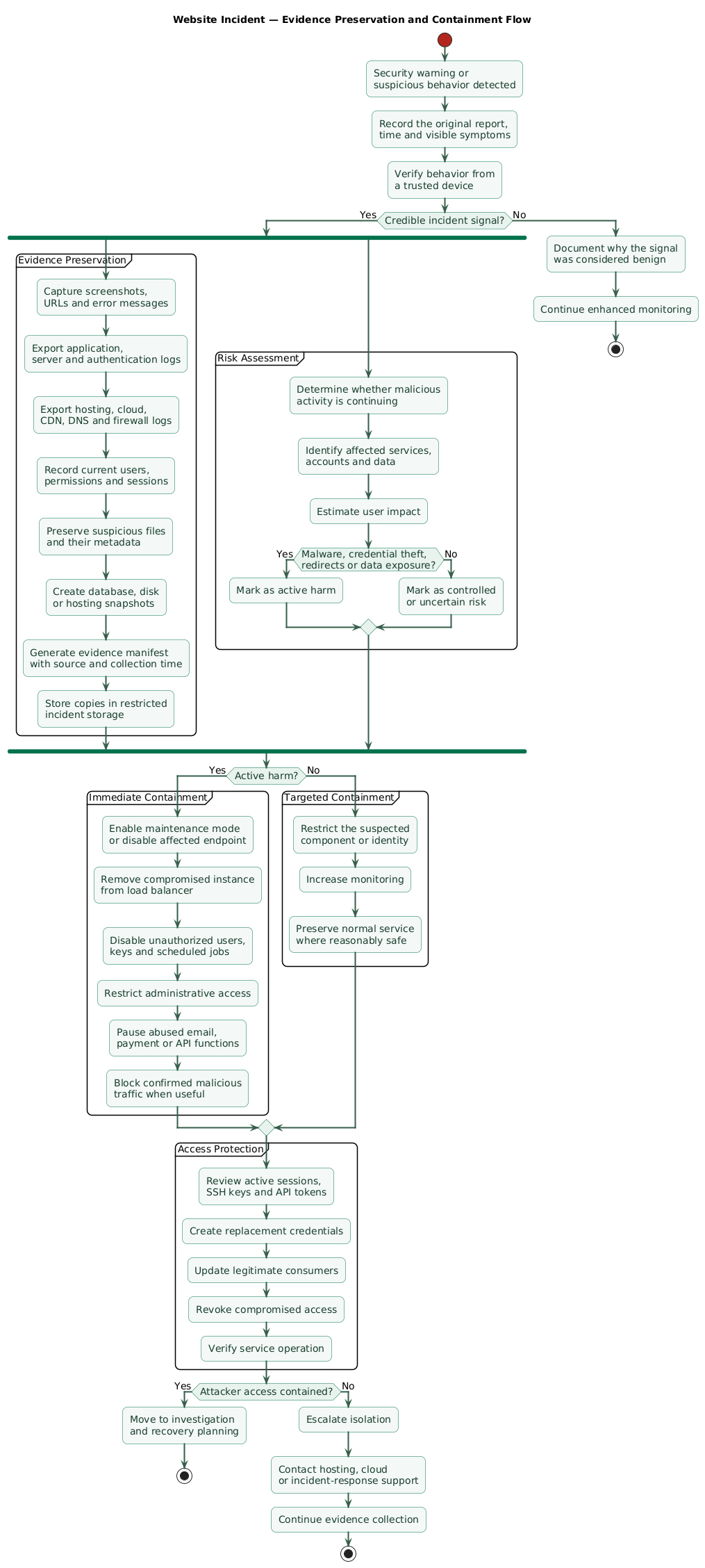
4. Minutes 15–25: preserve evidence before changing everything
Every administrative change can alter timestamps, logs, running processes, caches, and attacker artifacts. Preserve enough information to understand the incident and support later investigation.
Evidence and containment flow (diagram)
Preserve what is available
- Application, web-server, authentication, and database logs.
- Hosting, cloud, CDN, DNS, firewall, and load-balancer logs.
- Source-control, CI/CD, package-registry, and deployment logs.
- Administrative user lists and recent authentication events.
- Current application files and file metadata.
- Database snapshots or exports when safe and authorized.
- Virtual-machine, disk, container, or hosting snapshots.
- Relevant alerts, emails, support tickets, and screenshots.
- Current DNS, firewall, routing, and access-control settings.
Store preserved evidence in a restricted location separate from the affected website. Record who collected it, when it was collected, and from which system.
Example evidence manifest
Evidence ID: E-001
Collected at: 2026-08-02T18:22:00Z
Collected by: Incident responder
Source: Production web server
Item: /var/log/nginx/access.log
Time range: 2026-08-01T00:00:00Z to 2026-08-02T18:20:00Z
Destination: Restricted incident storage
Checksum: [record checksum if available]
Notes: Copied before maintenance mode was enabled
Do not run random cleanup tools first
An unverified cleaner may delete evidence, remove legitimate files, change timestamps, or miss persistence. Preserve the current state and understand the likely compromise path before relying on automated cleanup.
5. Minutes 25–40: contain active harm
Containment should reduce attacker access and user impact while preserving a path to investigation and recovery.
Choose the least destructive effective action
| Observed risk | Possible containment | Important caution |
|---|---|---|
| Malicious redirect or injected script | Maintenance mode, CDN rule, firewall block, isolate deployment | Preserve affected files and logs before replacing them |
| Stolen admin account | Disable account, revoke sessions, require fresh authentication | Confirm recovery email and other privileged users |
| Exposed API key | Issue replacement, update consumers, revoke old key | Review usage and resources accessible to the key |
| Compromised server | Remove from load balancer or isolate network access | Do not assume deleting one file removes persistence |
| Compromised DNS | Lock registrar, restore approved records, enable stronger access | Check nameservers, delegation, API tokens, and email recovery |
| Data actively exposed | Disable affected endpoint or application function | Preserve access logs and determine what was accessible |
Useful containment options
- Enable a static maintenance page.
- Remove an affected instance from the load balancer.
- Restrict administrative access to trusted locations.
- Block known malicious IP addresses or request patterns.
- Disable a vulnerable plugin, route, integration, or upload function.
- Pause outgoing email, API, or payment activity if it is being abused.
- Temporarily make a storage location private.
- Disable an affected account or service identity.
- Stop an unauthorized scheduled job or deployment pipeline.
Contain the boundary, not only the symptom
A malicious JavaScript file may be the visible symptom. The real compromise may involve a stolen deployment token, vulnerable plugin, database administrator, hosting account, or CI workflow. Containment should address the likely access path.
6. Minutes 40–50: protect accounts, credentials, and sessions
Attackers often maintain access through accounts, API keys, sessions, recovery addresses, deployment tokens, or newly created credentials. Removing malware without addressing identity access can allow an immediate return.
Prioritize the control plane
- Primary email and password-manager accounts.
- Domain registrar and DNS provider.
- Hosting, cloud, CDN, and storage accounts.
- Source-control, CI/CD, package registry, and deployment platform.
- Website and content-management administrators.
- Database users and connection credentials.
- Payment, email, analytics, support, and other third-party APIs.
For each critical account
- Verify the recovery email address and telephone number.
- Review recent logins and active sessions.
- Remove unknown users, devices, keys, and application authorizations.
- Reset the password from a trusted device.
- Enable or re-enroll strong multifactor authentication.
- Revoke active sessions where supported.
- Rotate API keys, tokens, and service-account credentials.
- Review permissions and reduce unnecessary administrator access.
Rotate without creating a second outage
- Create a new credential from a trusted administrative session.
- Restrict it to the required service and permissions.
- Update legitimate applications and deployment systems.
- Verify successful operation.
- Revoke the old credential.
- Monitor attempts to use the revoked credential.
Changing one password may not be enough
Existing sessions, application passwords, personal access tokens, SSH keys, OAuth grants, deployment keys, API tokens, and recovery methods may continue working after the main password changes.
7. Minutes 50–60: communicate and prepare the next phase
By the end of the first hour, document what is known, what has been contained, what remains uncertain, and who needs an update.
Prepare an internal status summary
Incident status at [time]

Known facts:
-

Current user impact:
-

Systems believed affected:
-

Containment completed:
-

Credentials or sessions revoked:
-

Evidence preserved:
-

Unknowns:
-

Next actions:
-

Next update time:
-
Notify external parties when necessary
- Hosting, cloud, CDN, domain, or security provider.
- Payment processor or ecommerce platform.
- Cyber-insurance or external incident-response provider.
- Clients or business partners whose systems may be affected.
- Legal or privacy advisers when personal data may be involved.
- Law enforcement or relevant authorities when appropriate.
Notification requirements depend on location, contracts, industry, affected data, and service-provider rules. Record the time the incident was detected and when important facts became known.
Communicate known facts, not theories
Example holding statement
“We are investigating a security issue affecting our website. We have temporarily restricted parts of the service while we assess the impact. We will provide another update when we have confirmed information and any actions users need to take.”
Do not claim that no data was accessed until the investigation supports that conclusion. Do not publish technical details that would interfere with containment or help an attacker.
8. What not to do during the first hour
- Do not panic-delete files: preserve suspicious files, metadata, and logs before removal when safe.
- Do not immediately restore over the affected system: you may destroy evidence or restore the same vulnerability.
- Do not trust the affected system: administrative tools, logs, and files may have been modified.
- Do not reuse passwords: create unique replacement credentials from a trusted device.
- Do not change everything without recording it: every action should have a timestamp, owner, and result.
- Do not communicate speculation: separate confirmed facts, working hypotheses, and unknowns.
- Do not assume one removed account ends access: check tokens, sessions, SSH keys, OAuth grants, API keys, and recovery paths.
- Do not reconnect an isolated server casually: verify its state and recovery plan first.
- Do not rebuild from unverified source: inspect dependencies, deployment credentials, plugins, and configuration.
A clean-looking homepage proves very little
Attackers may leave backdoors, administrator accounts, scheduled tasks, stolen credentials, modified dependencies, database triggers, or cloud resources. The visible website can appear normal while access remains.
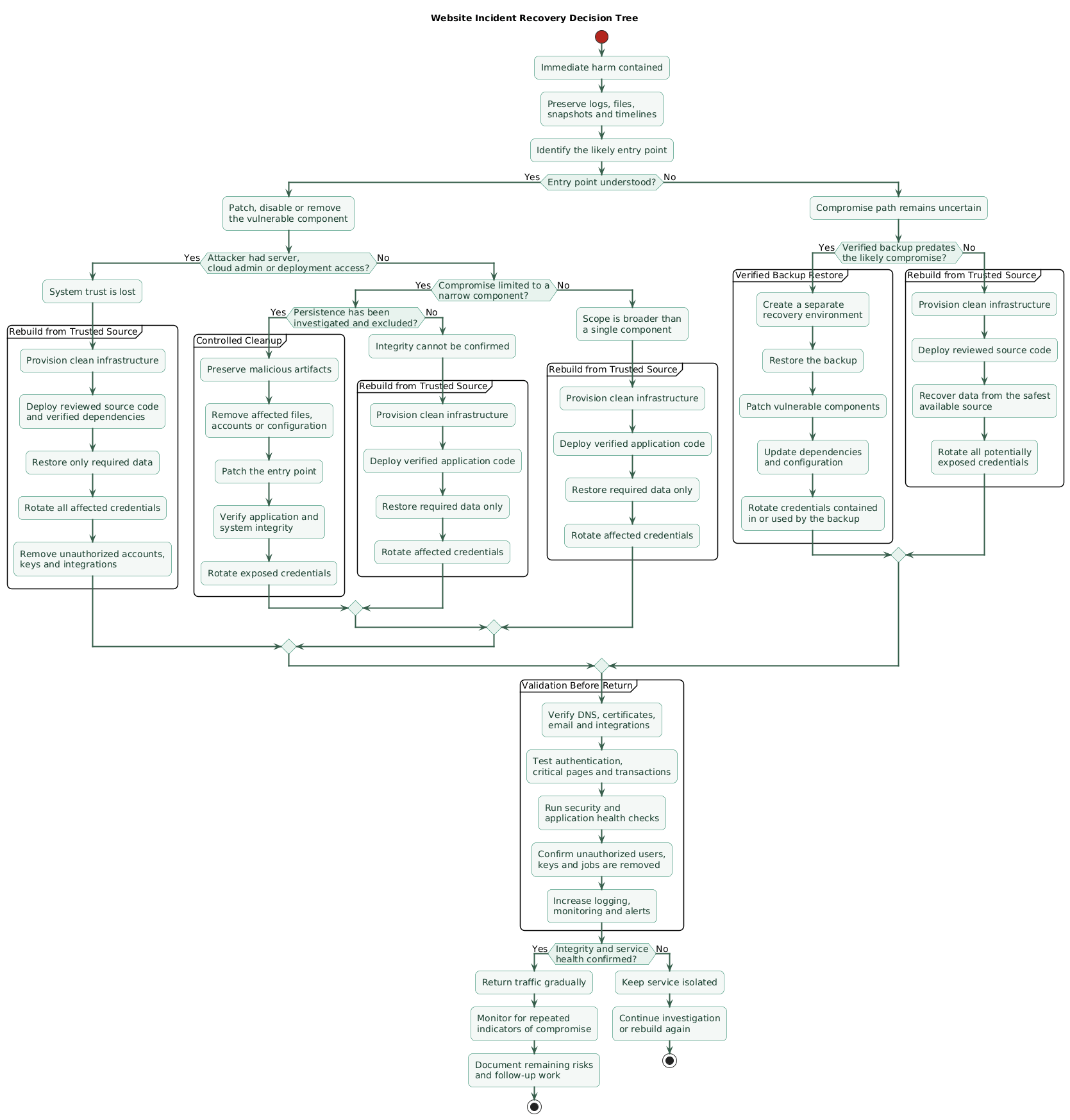
9. Decide whether to clean, rebuild, or restore
Recovery should begin only after the immediate incident is stable and the team has a reasonable theory about the entry point, affected systems, and persistence.
Recovery decision tree (diagram)
Clean in place only when confidence is high
Controlled cleanup may be reasonable when the affected component is narrow, the entry point is understood, persistence has been investigated, and the system's integrity can be verified.
Rebuild when system trust is lost
Rebuilding from trusted source code and clean infrastructure is generally safer when an attacker had server-level, cloud-administrator, deployment-system, or broad application access.
Restore only from a verified backup
Confirm when the compromise probably began, whether the backup predates it, whether the vulnerable component remains present, and whether credentials included in the backup have been rotated.
Before returning to normal traffic
- Patch or remove the exploited weakness.
- Rotate affected credentials and invalidate sessions.
- Remove unauthorized accounts, keys, jobs, and integrations.
- Verify source code, dependencies, plugins, and deployment artifacts.
- Check DNS, certificates, email settings, and external integrations.
- Run security tests and application health checks.
- Increase logging, monitoring, and alerting.
- Watch for repeated indicators of compromise.
- Document residual risk and required follow-up work.
10. Copy/paste first-hour checklist
Small website incident response: first hour

Minutes 0–5: take control
- Treat the warning as a potential incident.
- Assign one incident lead.
- Assign technical, communication, and recording responsibilities.
- Start a timestamped incident log.
- Use a trusted device and separate communication channel.
- Record the initial symptoms and reporter.

Minutes 5–15: confirm and scope
- Verify the website behavior from a clean browser or device.
- Check whether users are being redirected, infected, or asked for credentials.
- Review recent deployments and administrative changes.
- Review hosting, cloud, CDN, firewall, DNS, and application alerts.
- Check administrator accounts and recent authentication events.
- Check source-control and CI/CD activity.
- Identify potentially affected systems and identities.
- Assign an initial severity.

Minutes 15–25: preserve evidence
- Capture screenshots, URLs, timestamps, errors, filenames, and account names.
- Export relevant application, server, authentication, and database logs.
- Preserve hosting, cloud, CDN, DNS, firewall, and deployment logs.
- Record current users, permissions, sessions, keys, and DNS records.
- Create safe snapshots or copies when available.
- Store evidence away from the affected system.
- Record who collected each item and when.

Minutes 25–40: contain active harm
- Place the site in maintenance mode if users are at risk.
- Isolate affected servers, containers, routes, plugins, or integrations.
- Remove affected instances from the load balancer where appropriate.
- Disable unauthorized accounts and suspicious scheduled tasks.
- Restrict administrative access.
- Block confirmed malicious traffic or request patterns.
- Pause abused email, payment, API, or storage functions.
- Preserve suspicious files before removal when safe.

Minutes 40–50: protect identity and access
- Secure the primary email and password-manager accounts.
- Secure the domain registrar and DNS provider.
- Secure hosting, cloud, CDN, storage, and deployment platforms.
- Review active sessions, devices, SSH keys, OAuth grants, and API tokens.
- Revoke unknown or compromised access.
- Rotate database passwords, API keys, deployment tokens, and service credentials.
- Enable or re-enroll strong multifactor authentication.
- Verify account-recovery settings.

Minutes 50–60: communicate and prepare
- Summarize confirmed facts, impact, containment, and unknowns.
- Identify providers, partners, advisers, or authorities that may need notice.
- Prepare a factual holding statement if users are affected.
- Verify that backups exist and restrict access to them.
- Decide whether the next phase is investigation, rebuild, or verified restore.
- Set the next update time and assign follow-up actions.

Do not
- Do not delete evidence without recording and preserving it.
- Do not immediately restore over the affected system.
- Do not assume changing one password removes all access.
- Do not rely on the affected server as the only source of truth.
- Do not communicate unverified claims.
- Do not return the site to normal traffic before closing the access path.
11. FAQ
Should I immediately take a hacked website offline?
Take it offline, place it in maintenance mode, or restrict affected functions when the website is actively harming visitors, distributing malware, stealing credentials, processing fraudulent transactions, or exposing sensitive data. Preserve useful evidence first when that can be done safely, but do not leave active harm running for the sake of perfect evidence collection.
Should I restore a backup during the first hour?
Usually not as the first action. The backup may contain the same vulnerability or attacker persistence, and restoring immediately may overwrite useful evidence. Preserve the current state, estimate when the compromise began, verify the backup, close the entry path, and then perform a controlled recovery.
Which passwords and credentials should be changed first?
Start with accounts that control everything else: primary email, password manager, domain registrar, DNS, hosting, cloud, source control, CI/CD, and deployment platforms. Then rotate website administrators, database credentials, API keys, payment integrations, email services, storage tokens, SSH keys, and credentials stored on the affected system.
Should I delete malware files as soon as I find them?
Do not depend on deleting the first suspicious file. Record its path, timestamps, ownership, and related events. Preserve a copy or snapshot when safe. Investigate related files, accounts, scheduled jobs, plugins, deployment credentials, and persistence mechanisms before declaring the system clean.
Can I trust the website logs after a compromise?
Logs remain valuable, but an attacker with sufficient access may alter, delete, or disable them. Compare application logs with external sources such as CDN, firewall, cloud, identity-provider, DNS, payment, email, source-control, and deployment logs.
When should users be notified?
Notify users promptly when they need to protect themselves or when legal, contractual, payment-provider, hosting-provider, or regulatory obligations apply. State what is known, what users should do, and when another update will be provided. Avoid unsupported claims about the absence or extent of data access.
Key terms (quick glossary)
- Security incident
- An event that threatens or compromises the confidentiality, integrity, or availability of systems, accounts, services, or information.
- Incident lead
- The person coordinating decisions, priorities, assignments, and status updates during the response.
- Containment
- Actions that limit active harm, attacker access, or further spread without yet completing full recovery.
- Evidence preservation
- Collecting and protecting logs, files, snapshots, records, and other information that may explain what happened.
- Indicator of compromise
- An observable sign associated with malicious activity, such as an unauthorized account, file, domain, IP address, process, or request.
- Persistence
- A method that allows an attacker to maintain or regain access after the original entry point is removed.
- Credential rotation
- Replacing a password, token, key, certificate, or other credential with a new value and invalidating the previous one.
- Session revocation
- Invalidating active authenticated sessions so users or attackers must authenticate again.
- Eradication
- Removing malicious artifacts, attacker access, persistence mechanisms, and the weakness used to enter the environment.
- Recovery
- Restoring services from a trusted state, validating their security, and monitoring for repeated malicious activity.
Worth reading
Recommended guides from the category.
