“Serverless vs containers?” is usually not a technology question—it is a risk and constraints question. For a small API, both can be correct. The right answer depends on your latency SLO, traffic shape, deployment maturity, and whether your API needs special runtime or networking behavior.
This guide gives you a practical checklist. If you fill it out honestly, you will end up with a clear choice and a fallback plan if your needs change.
Rule of thumb
If your traffic is spiky and you want minimal ops, serverless is often the fastest path. If you need predictable low latency, long-lived connections, or custom system behavior, containers usually win.
1. Quick answer (when each wins)
| Choose… | When this is true | Why it works well | Typical trade-off |
|---|---|---|---|
| Serverless | Spiky/low traffic, simple request-response, event-driven tasks, small team, you want “pay per use” | Scales automatically, minimal infrastructure management, good for rapid iteration | Cold starts, limits/timeouts, less control over runtime and networking |
| Containers | Steady traffic, tight latency SLOs, websockets/streaming, heavy dependencies, custom runtime needs | Predictable performance, more control, easier to standardize across services | More operational surface area (build pipeline, scaling config, capacity planning) |
Example: the typical “small API” that fits serverless
A CRUD API with a few endpoints, moderate authentication, and short-running handlers (tens to hundreds of ms). The workload is idle at night and spiky during the day. Serverless often provides the best cost/ops trade-off.
2. Decision drivers: latency, traffic shape, ops
Most decisions reduce to three drivers. If you only evaluate these, you still get a good result.
Driver 1: latency and “tail risk”
- Average latency matters, but p95/p99 matters more for user experience.
- Cold starts and scale-out events mainly hurt p95/p99.
- If your API sits behind a UI, tail latency is often the limiting factor, not throughput.
Driver 2: traffic shape (spiky vs steady)
- Spiky/idle workloads favor pay-per-use execution.
- Steady/high utilization workloads can be cheaper on containers because you pay for capacity anyway.
- Batch jobs triggered by events are often ideal for serverless.
Driver 3: operational maturity
- If you do not want to manage scaling, patching, and “always on” services, serverless reduces operational burden.
- If you already have a container platform (or want standardized deployment), containers can reduce cognitive overhead.
- Observability and debugging are solvable on both—but you must design for them.
Common mistake
Choosing containers “because it’s more professional” or choosing serverless “because it’s simpler” without testing the latency tail and networking constraints. For APIs, the wrong choice shows up as p99 latency spikes or operational pain.
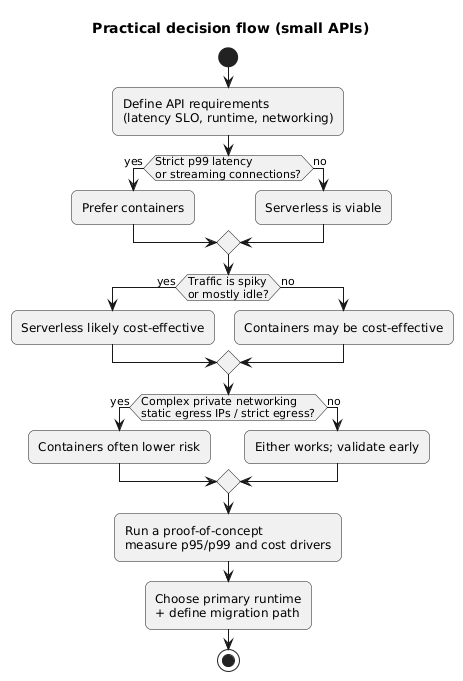
Decision checklist flow (diagram)
3. Reference architectures (serverless vs containers)
For small APIs, you typically choose one of these two shapes. The key difference is where scaling and instance management lives.
Architecture comparison (diagram)

Serverless shape
- API Gateway (or equivalent) terminates HTTP and routes to functions.
- Auth is often handled at the edge (JWT authorizers / managed identity).
- Functions call managed services (DB, cache, queues) and emit logs/metrics.
- Scaling is per-invocation with concurrency controls.
Container shape
- Load balancer routes to a service running one or more containers.
- Autoscaling is based on CPU, requests, or custom metrics.
- You control the runtime: web server, connection pooling, background threads.
- You can support long-lived connections and streaming more naturally.
Example: hybrid approach for small APIs
Keep the API itself in containers for stable latency, but move asynchronous work (image processing, report generation, webhook retries) to serverless. This reduces container load and keeps peak work pay-per-use.
4. Latency & cold starts (what to measure)
Cold starts are not “bad” by default. They are bad when they break your user-facing SLOs. Your decision should be based on measured tail latency, not anecdotes.
What actually causes cold start pain
- Large dependencies and slow initialization code (ORM boot, big DI containers, large ML libs).
- VPC networking overhead (where applicable).
- Concurrency ramp-up during traffic spikes.
- External calls inside the handler (auth introspection, DB connection setup) that amplify tail latency.
How to make serverless feel “fast”
Keep handlers small, reuse clients across invocations, minimize cold-path work, and avoid per-request connection setup. If you must guarantee low p99, use provisioned/min instances (accepting the extra cost).
5. Cost model for small APIs (spiky vs steady)
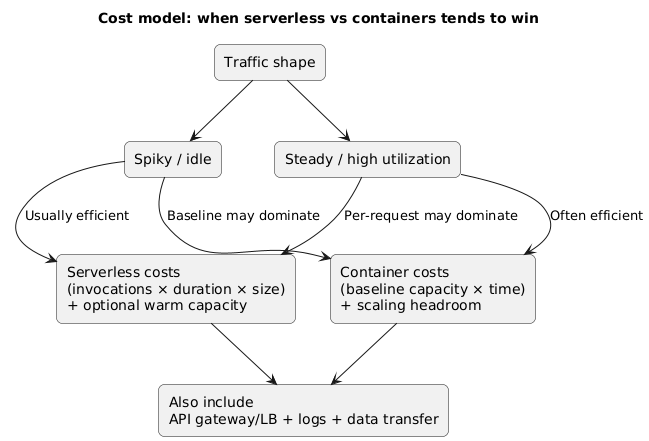
The cost comparison is straightforward once you translate traffic into compute seconds and always-on capacity. You should estimate both a quiet month and a busy month.
Cost comparison model (diagram)
What to include in the estimate
- Serverless: invocations, average duration, memory/CPU tier, provisioned concurrency (if used).
- Containers: minimum task count, instance size, autoscaling headroom, load balancer costs.
- Both: logs/metrics ingestion, API gateway/load balancer requests, data transfer, secrets, DB costs.
Example: the “steady traffic” breakpoint
If your API runs continuously at moderate utilization, containers often become cheaper because you pay a stable baseline and amortize overhead. If your API is idle for long periods or sees short spikes, serverless often wins because you pay per use.
6. Networking & VPC access (the real gotchas)
Networking is where many teams regret an untested choice. The questions below are usually decisive.
Ask these questions
- Does the API need private access to databases or internal services?
- Will you use NAT? If yes, do you understand the egress cost and failure modes?
- Do you need static outbound IPs (partner allowlists)?
- Do you need inbound from private networks (VPN, peering, corporate network)?
Networking reality check
If your API needs complex private networking (multiple internal services, strict egress control, static IPs), containers often reduce surprises because you control network placement directly. Serverless can still work, but you must validate VPC integration and cold start impact early.
7. Observability and debugging under pressure
Small APIs fail in predictable ways: timeouts, auth issues, dependency failures, and resource exhaustion. Your runtime choice affects what you can observe and how quickly you can respond.
Minimum observability you should have either way
- Structured logs with request id, user id (if safe), and endpoint name.
- Metrics: latency (p50/p95/p99), error rate, throttles, dependency latency.
- Tracing across API → DB → third-party calls (especially when timeouts matter).
- Alarms for increased error rate, increased tail latency, and dependency timeouts.
Example: diagnosing “timeouts” quickly
If p99 latency increases, you want to know whether it’s cold starts, database connection saturation, third-party API latency, or throttling. Without traces and per-dependency metrics, teams often misdiagnose and over-scale.
8. Deployment & operations checklist
For small APIs, operational friction is often more expensive than compute. Use this checklist to avoid hidden workload.
Serverless ops checklist
- Cold start measured for your runtime and package size.
- Concurrency and throttling limits reviewed.
- Retries configured intentionally (avoid duplicate side effects).
- Timeouts set per endpoint (do not use one global timeout blindly).
- Provisioned/min instances considered if p99 is strict.
Container ops checklist
- Health checks (liveness/readiness) defined and tested.
- Autoscaling policy defined (CPU + request rate + custom metrics if needed).
- Rolling deploy behavior validated (no traffic black holes).
- Resource limits and connection pooling tuned.
- Patch strategy and base image updates planned.
Practical ops advice
If you choose containers, use a managed container runtime (serverless containers / managed platform) unless you explicitly need to manage nodes. For a small API, running your own cluster is rarely the best use of time.
9. Start here, migrate later (safe path)
Many teams start with serverless to ship fast, then move to containers when they hit one of these triggers: strict p99 latency, consistent throughput, complex networking, or runtime constraints. You can make that migration easy with one design rule:
Design rule
Keep your business logic independent from the hosting glue. Your handler should adapt request/response formats, call application code, and return. If you do this, moving from serverless to containers is mostly packaging.
10. Copy/paste decision checklist
Fill this out for your API. A clear “yes” in the container column for several items usually indicates containers are the safer choice. A clear “yes” in the serverless column for most items usually indicates serverless is the faster, cheaper path.
Serverless vs Containers decision checklist (small APIs)

Latency / UX
- Our API requires strict p99 latency (e.g., < 300–500ms) and cannot tolerate cold spikes.  [Containers]
- Occasional cold-start latency is acceptable for our users.                           [Serverless]
- We need websockets/streaming/long-lived connections.                                [Containers]

Traffic shape
- Traffic is spiky, unpredictable, or low most of the time.                            [Serverless]
- Traffic is steady and high enough to keep services busy continuously.                [Containers]

Runtime constraints
- We need custom binaries, heavy dependencies, or special OS-level behavior.           [Containers]
- Our handlers are short-lived and mostly I/O bound.                                   [Serverless]

Networking
- We need complex private networking, static outbound IPs, strict egress control.      [Containers]
- We mostly call managed services or public APIs; networking is simple.                [Serverless]

Operations
- We want minimal ops and fast iteration; team is small.                               [Serverless]
- We already run containers and have standardized CI/CD + observability.               [Containers]

Scaling and limits
- We expect extreme concurrency bursts and must control throttling carefully.          [Depends]
- We need fine control over concurrency, connection pools, and warm instances.         [Containers]

Cost
- Paying per request is likely cheaper due to idle time.                               [Serverless]
- Paying for baseline capacity is likely cheaper due to steady utilization.            [Containers]

Decision
- Primary choice:
- Risks to validate (cold start, VPC access, scaling):
- Rollback / migration plan:
11. FAQ
Is serverless always cheaper for small APIs?
No. Serverless is often cheaper for spiky or low traffic, but containers can be cheaper for steady utilization. You should estimate both quiet and busy months, including gateway/load balancer and observability costs.
Do containers always have better latency?
Not automatically, but they usually have more predictable tail latency because you keep instances warm. Poor autoscaling, slow startup, or un-tuned connection pools can still create latency spikes.
What is the simplest “container” option for a small API?
Use a managed container platform (serverless containers / managed service with autoscaling). You get container control without the operational overhead of managing nodes and clusters.
Key terms (quick glossary)
- Cold start
- The extra initialization time when a new runtime instance is created to handle requests.
- Tail latency (p95/p99)
- Latency percentiles that capture worst-case user experiences; often the real SLO driver.
- Autoscaling
- Automatically increasing/decreasing capacity based on load or metrics.
- Concurrency
- How many requests a single runtime instance can process at the same time (differs by platform).
- Managed container platform
- A service that runs containers without you managing servers or nodes, typically with built-in scaling.
- Provisioned / minimum instances
- Paying for always-warm capacity to reduce cold starts (common in serverless and some container platforms).
Worth reading
Recommended guides from the category.
