Database costs can quietly dominate cloud spend, and “just one size up” decisions compound over time. Right-sizing is often the highest-leverage optimization you can do—but it is also one of the easiest ways to cause downtime if you change capacity without a plan.
This playbook is designed for managed cloud databases (Postgres/MySQL and similar). The goal is simple: reduce cost or improve performance while keeping availability and rollback under control.
The safe mental model
Treat right-sizing as a deployment: measure a baseline, create a candidate, run canary validation, switch deliberately, and keep rollback easy.
1. Why right-sizing is high leverage (and risky)
Right-sizing can mean scaling down (saving money), scaling up (stopping incidents), or changing storage/IOPS to match real usage. The risk comes from changing resources that your application depends on for latency and throughput.
- CPU bound: queries slow under load, background tasks fall behind.
- Memory bound: cache hit rate drops, reads hit storage, latency spikes.
- IOPS bound: storage latency increases, write stalls, checkpoint pressure.
- Connection bound: too many client connections, pool misconfig, timeouts.
- Replication bound: lag increases, failovers become risky.
Example: “scaling down broke us”
Teams often scale down based on average CPU (e.g., 15–20%) and ignore p95/p99 latency during peak hours. The smaller instance has less headroom, so short bursts cause queueing and tail latency spikes that look like outages.
2. Baseline first: what to measure for a safe change
Before you change anything, capture a baseline across a representative window (at least a busy day; ideally a week). You are looking for both “typical” behavior and “worst case” behavior.
Baseline metrics map (diagram)
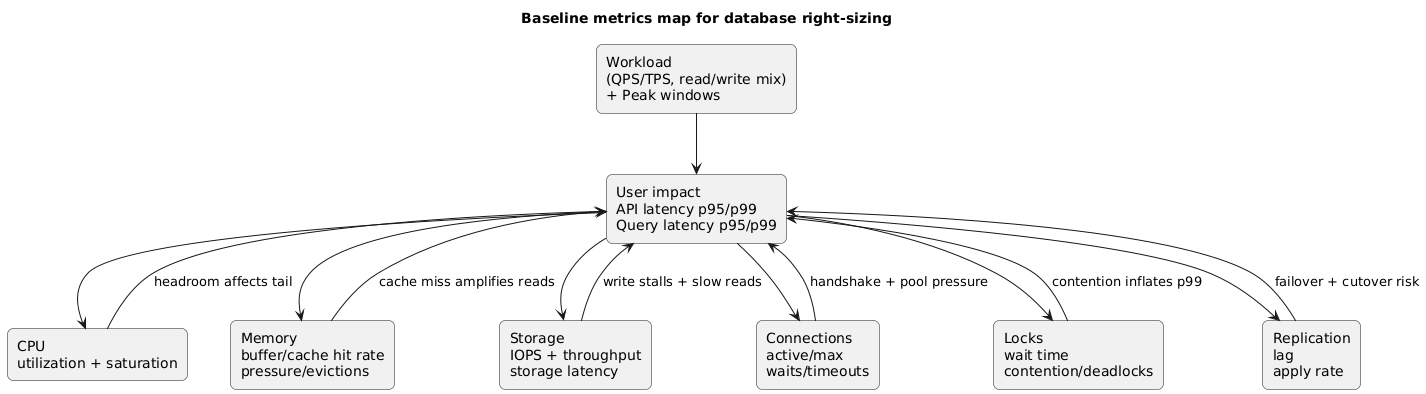
Collect these metrics (minimum)
| Area | Metric | Why it matters | Red flag |
|---|---|---|---|
| Latency | p50/p95/p99 query latency, API latency correlated | Shows user impact and headroom | p99 rises sharply at peak |
| CPU | Utilization + saturation (run queue / throttling) | CPU headroom for spikes | Frequent sustained high CPU |
| Memory | Cache hit rate, eviction, free memory | Memory drives read amplification | Cache hit rate drops at peak |
| Storage/IOPS | IOPS, throughput, storage latency | IO is often the hidden bottleneck | High storage latency under writes |
| Connections | Active connections, max connections, waits | Connection storms cause outages | Connections near max, timeouts |
| Locks | Lock wait time, deadlocks | Scaling can change timing | Lock waits during peak |
| Replication | Replica lag (if used) | Key for safe switchover | Lag grows during bursts |
Baseline mistake
Do not baseline only CPU. CPU can be low while storage latency or lock contention dominates user-visible latency. Always baseline latency percentiles and storage latency.
3. Choose a strategy: in-place resize vs blue/green
There are two common approaches. The “best” one depends on how much downtime you can tolerate and how risky the change is. Even if your provider supports “online” resizing, a replica-based cutover often gives you better control and rollback.
| Strategy | How it works | Best for | Trade-offs |
|---|---|---|---|
| In-place resize | Change instance class / storage in the same DB resource | Low-risk changes, tolerant maintenance window | May involve restart/failover; rollback can be slower |
| Blue/green via replica | Bring up a new instance, sync, then controlled switchover | Zero/near-zero downtime goals, safer rollback | Extra temporary cost and operational steps |
Default recommendation
If you need “no downtime” in practice, use a blue/green approach with replicas and an explicit switchover step. It keeps rollback simple and makes validation possible before committing.
4. Preparation checklist (one-time work that prevents outages)
The majority of right-sizing incidents are caused by predictable operational gaps: connection storms, aggressive retries, missing observability, and untested endpoint switching. Treat preparation as mandatory, not optional.
What to prepare before resizing
- Connection pooling: ensure your app uses pooling; avoid one connection per request/user.
- Timeouts: request timeouts and DB statement timeouts should be intentional and observed.
- Retries: confirm retry backoff and idempotency for writes to prevent duplicate side effects.
- Capacity headroom: define acceptable headroom (p99 stable; CPU peak under target; IO latency stable).
- Endpoint switch: validate DNS TTL assumptions and client reconnect behavior.
- Observability: dashboards and alerts ready for latency, saturation, and error rate.
- Rollback triggers: define thresholds that automatically stop the change and switch back.
Example: pooling is “rightsizing insurance”
Many outages during resizing are not caused by CPU—they are caused by connection storms and slow handshakes. A pooler (or well-tuned app pool) smooths failovers and reduces the impact of restarts.
5. Step-by-step execution runbook (no downtime)
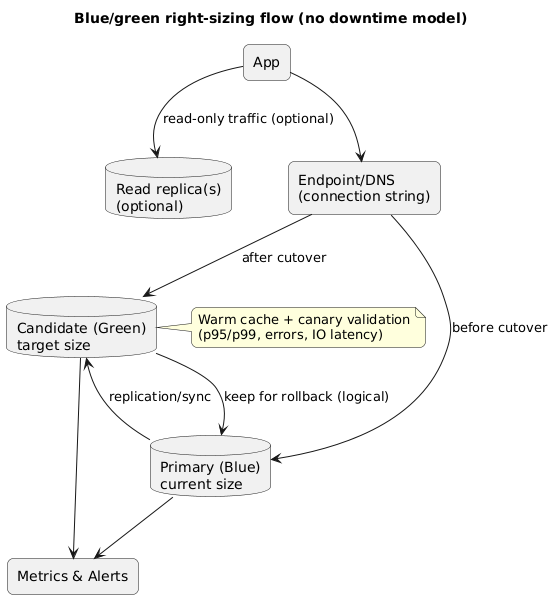
This runbook assumes a safe blue/green approach using a replica or cloned instance. Adjust the naming and mechanics to your provider, but keep the structure: create candidate → sync → validate → switch → observe → decide.
Blue/green right-sizing flow (diagram)
Runbook
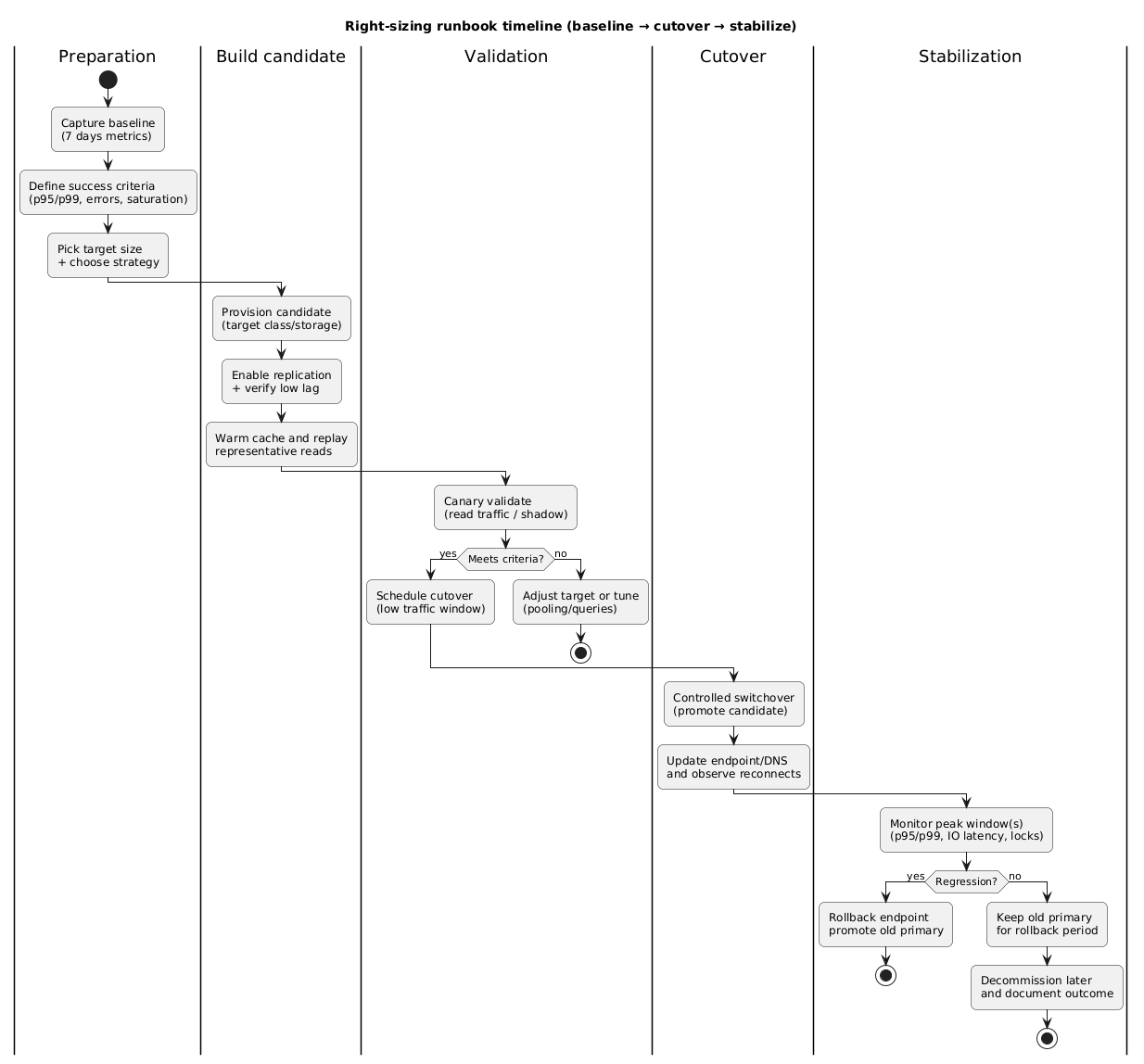
- Write the change plan: target size/storage, success criteria, rollback triggers, cutover window, on-call owner.
- Create the candidate: provision a new database with the target sizing (instance class and storage/IOPS). Mirror configuration (parameter settings, encryption, auditing, extensions).
- Sync data: establish replication from current primary to candidate. Monitor replication lag continuously.
- Warm caches safely: run controlled read traffic (or replay) so your first real traffic is not a cold-cache test.
- Canary validation: route read-only traffic or shadow queries. Validate latency percentiles, storage latency, and error rate.
- Prepare cutover: freeze risky deploys, ensure connection pools can drain/reconnect, and lower DNS TTL ahead of time (if applicable).
- Controlled switchover: promote candidate to primary and update endpoint/DNS/connection string. Watch reconnect and error rate.
- Monitor and stabilize: compare dashboards against baseline. Keep the old primary available and ready for quick rollback.
Cutover risk
Most “no downtime” failures happen during cutover because of connection handling, DNS TTL assumptions, or application retry behavior. Practice the endpoint switch and confirm how quickly clients reconnect.
6. Validate performance and correctness (before you celebrate)
Validation should confirm both performance and correctness. Performance can look “fine” on averages while being worse under peak. Correctness issues show up as transaction errors, replication anomalies, or timeouts.
Validation checklist
- Latency: p95/p99 for top endpoints and top queries; compare to baseline under similar load.
- Errors: DB timeouts, deadlocks, connection errors, throttling, transaction aborts.
- Throughput: QPS/TPS, queue depth (if applicable), and commit rate under peak.
- IO: storage latency, IOPS, throughput during write-heavy windows.
- Locks: lock wait time and deadlock frequency (timing changes can expose contention).
- Plans: critical query plans did not regress (index usage, scans, sort behavior).
Example: what a “false win” looks like
After scaling down, average latency stays flat, but p99 doubles during peak because the smaller instance has less CPU headroom. If you only look at averages, you declare success and ship an incident into next week.
7. Rollback plan that actually works
Rollback is not a paragraph—it is an executable plan with a time bound. Your rollback plan should be: fast, low-risk, and tested.
Rollback principles
- Keep the old primary: do not delete it until the new primary proves itself under peak traffic.
- Switch endpoints, not code: rollback should be a routing change, not a redeploy.
- Define triggers: p99 regression threshold, error rate threshold, IO latency threshold, connection failures.
- Practice: run a dry-run in staging with realistic client reconnect behavior.
Rollback gotcha
If you allow writes to both databases, rollback becomes a data consistency problem. Prefer a single-writer model with a clear primary at any time.
Right-sizing runbook timeline (diagram)
8. Rightsizing without resizing: quick wins
Sometimes the best right-sizing move is reducing demand. If you can lower CPU/IOPS/connection pressure, you unlock smaller instances safely.
High ROI optimizations
- Query tuning: fix slow queries and missing indexes; reduce scans.
- Connection pooling: reduce handshake overhead and max connection pressure.
- Caching: cache read-heavy endpoints; reduce DB reads.
- Batching: avoid per-item writes in loops; use bulk operations.
- Background work: move heavy reports/jobs off the primary window.
Practical sequence
Optimize demand first, then right-size. This reduces risk because you create headroom before you shrink capacity.
9. Copy/paste checklist
Right-sizing cloud databases without downtime (checklist)

Baseline
- Collect 7 days of metrics (p95/p99 latency, CPU saturation, memory/cache, IOPS + storage latency, connections, locks, replication lag).
- Identify peak windows and top queries/endpoints.

Decision
- Define success criteria (p95/p99 must not regress; error rate unchanged; storage latency within bounds).
- Choose approach: in-place resize (acceptable restart) OR blue/green (preferred for "no downtime").
- Decide target instance/storage/IOPS with headroom.

Preparation
- Connection pooling verified; max connections reviewed.
- Timeouts and retries audited (avoid duplicate writes).
- Monitoring + alert thresholds prepared.
- Rollback step documented (endpoint switch back).

Execution (blue/green)
- Provision candidate at target size.
- Establish replication and verify low lag.
- Warm cache and run representative load.
- Canary validate on candidate (reads first).
- Controlled switchover to candidate.
- Monitor p95/p99, CPU, IOPS latency, locks, connections.

Post-change
- Keep old primary for rollback during peak window(s).
- Confirm stability; then decommission old primary later.
- Record outcome and update runbook.
10. FAQ
Should I scale down aggressively to save cost?
Only if you preserve headroom for spikes. Scale-down failures usually happen when teams right-size to the average instead of the peak. Use p95/p99 and saturation signals to keep safe headroom.
How do I pick the new instance size?
Use peak metrics and define target headroom. For example: keep peak CPU below a threshold, keep storage latency stable, and verify that p99 latency does not regress during the busiest window.
Can I do this for any database engine?
The playbook applies broadly to managed relational databases. The mechanics differ (replication tooling, switchover steps), but the safety structure—baseline, candidate, canary, cutover, rollback—remains the same.
Key terms (quick glossary)
- Right-sizing
- Adjusting compute/storage capacity to match workload needs with appropriate headroom.
- Blue/green
- Running a “new” environment alongside the current one, then switching traffic with rollback available.
- Replication lag
- The delay between primary writes and replica applying them; critical for safe switchovers.
- p95/p99 latency
- Latency percentiles that capture tail behavior and user-visible “worst cases.”
- IOPS / storage latency
- Disk performance measures; high latency is a common hidden bottleneck.
- Connection pooling
- Reusing database connections to reduce overhead and avoid connection storms during failovers.
Worth reading
Recommended guides from the category.
