Startups often begin with one cloud account because it is fast. Then one day a dev runs a production change, a billing spike goes unnoticed, or a compromised credential has access to everything. A multi-account setup is not “enterprise bureaucracy”—it is a way to reduce blast radius, isolate cost, and make production access intentional.
Practical goal
You do not need a complex “landing zone” to start. You need a small, opinionated structure that enforces: separate environments, centralized logs, and least-privilege access with auditable role assumption.
1. Why multi-account matters (even for small teams)
- Blast radius reduction: a mistake in dev should not affect production resources.
- Billing isolation: you can attribute spend to product areas and stop runaway costs early.
- Security separation: logs and security tooling live in a place attackers cannot easily delete.
- Cleaner permissions: “dev access” and “prod access” are fundamentally different.
- Operational clarity: separate accounts force clear environment boundaries and deployment paths.
Example: the common startup failure mode
One shared account. Everyone is “admin” for speed. A compromised laptop token results in full account access, including billing, production data, and logs. Multi-account does not solve everything, but it dramatically limits damage.
2. The minimal startup account layout
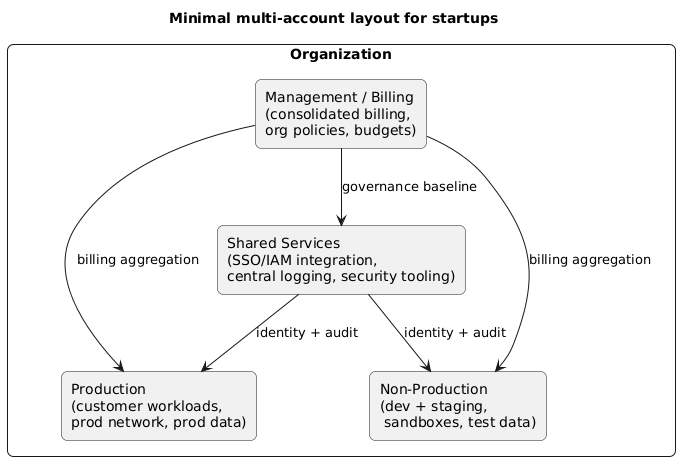
The simplest setup that gives you real benefits is usually four accounts (or projects): Management/Billing, Shared Services, Production, and Non-Production. This is enough to isolate spend and protect prod while keeping operations manageable.
Recommended account layout (diagram)
What goes where
| Account | Purpose | Typical contents | Who has access |
|---|---|---|---|
| Management/Billing | Org + consolidated billing | Budgets, invoices, org policies | Founders/finance + limited admins |
| Shared Services | Central identity + tooling | SSO/IAM integration, logging, security tools | Platform/security maintainers |
| Production | Customer workloads | Prod VPC/VNet, prod DB, prod secrets | Limited; role-based, audited |
| Non-Production | Dev + staging | Dev/stage workloads, sandboxes, test data | Broader developer access |
Scaling later
When you grow, split Non-Production into Staging and Dev, and add a dedicated Security account if you need stronger separation of duties.
3. Billing isolation: budgets, tagging, and chargeback
Billing isolation is not only about invoices; it is about making cost visible and actionable. The goal is to answer: who is spending money, on what, and why.
Start with these billing controls
- Account-level budgets: separate budgets for prod and non-prod, with alert thresholds (e.g., 50/80/100%).
- Project/service tags: enforce tags like
service,environment,owner,cost-center. - Spending guardrails: policies that restrict expensive instance types in non-prod unless approved.
- Cost anomaly alerts: alerts when spend deviates from historical patterns.
- Monthly cost review: lightweight review of top services and top accounts.
Example: a simple tagging standard
Require environment (prod/stage/dev), service (api, worker, data), and owner (team/person). Then build a dashboard that shows spend by environment and service weekly.
4. Access control: least privilege without slowing the team
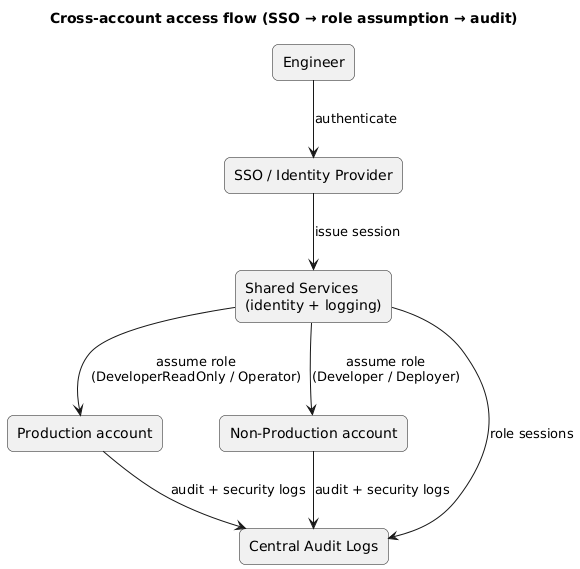
The core access pattern for multi-account is: users authenticate centrally (SSO), then assume roles into workload accounts. Avoid long-lived access keys. Make elevated access time-bound and auditable.
Central identity and cross-account access (diagram)
Recommended role types
- DeveloperReadOnly: view resources in prod (logs/metrics) without modification rights.
- Deployer: scoped permissions for CI/CD to deploy specific services (not full admin).
- Operator: limited operational actions (restart service, scale, rotate secrets) with audit.
- BreakGlassAdmin: emergency only, MFA required, time-bound, heavily monitored.
What to avoid
Avoid “everyone is admin” and avoid sharing root/admin credentials. If one credential is compromised, multi-account does not help unless privileges are scoped.
5. CI/CD access patterns (safe deployments)
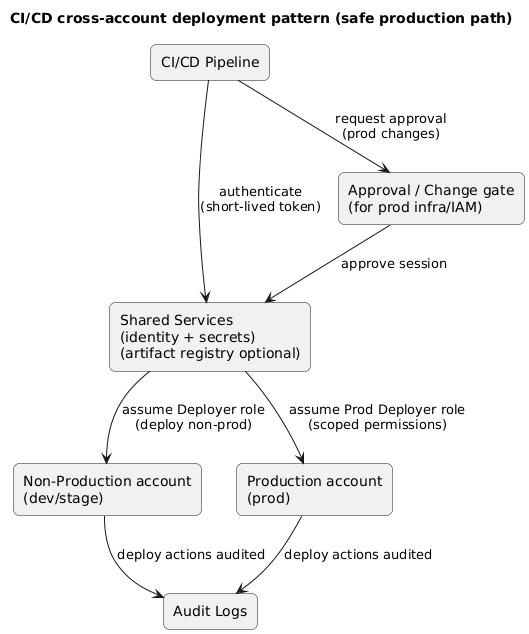
CI/CD is often the most privileged “user” in the environment, so it needs careful scope. The right model is: CI/CD assumes a deployment role in each account, with permissions limited to the specific services it deploys.
CI/CD deployment pattern (diagram)
Operational controls that prevent accidents
- Separate pipelines: non-prod pipeline can be fast; prod pipeline requires approvals.
- Environment-specific roles: prod deploy role cannot be used by dev jobs.
- Scoped permissions: pipeline can deploy service A but cannot modify billing, IAM, or unrelated services.
- Change windows: optional but useful for high-risk infra changes.
- Audit trails: every deploy is attributable to a pipeline run and role session.
Example: “deploy-only” permissions
Your deploy role should have permissions to update the target compute service, push a new image or artifact reference, update config maps/secrets references, and read logs/metrics. It should not have blanket IAM write permissions.
6. Centralized logging and security monitoring
Centralized logging is the difference between “we can investigate” and “we lost the evidence.” Keep security logs and audit logs in a separate account so workload admins cannot delete them casually.
What to centralize
- Audit logs: who did what, where, and when (role assumptions, policy changes).
- Service logs: application logs and platform logs (ingested with retention policy).
- Security alerts: suspicious access, anomalous behavior, policy violations.
- Configuration snapshots: periodic “state” exports for forensic analysis.
Retention guidance
Keep at least 30–90 days of searchable logs for small teams, and longer retention for audit logs if you handle customer data. Use lifecycle policies to control cost rather than deleting everything early.
7. Guardrails to prevent production mistakes
Guardrails are policies and workflow constraints that make the safe path the easiest path. For startups, the highest ROI guardrails are simple.
High ROI guardrails
- MFA required for any role that can change production resources.
- Time-bound elevation: short-lived sessions for high privilege (with justification).
- Separate break-glass: stored securely, monitored, used only in emergencies.
- Prod change approvals: required for infra and IAM changes (not necessarily for app deploys).
- Default deny in prod: start restrictive; explicitly grant necessary actions.
- Budget alarms: spend spikes should page someone, not wait for month-end.
Guardrail anti-pattern
If guardrails are so strict that teams bypass them with shared credentials, you end up worse off. Aim for minimal friction: least privilege, clear roles, and fast-but-audited escalation paths.
8. Step-by-step setup checklist (copy/paste)
Multi-account cloud setup for startups (checklist)

Accounts
- Create: Management/Billing, Shared Services, Production, Non-Production.
- Apply org policies / guardrails baseline (where supported).

Identity & access
- Integrate SSO in Shared Services.
- Define roles: DeveloperReadOnly (prod), Operator (prod), Deployer (per account), BreakGlassAdmin.
- Require MFA for elevated roles; prefer short-lived role sessions.
- Remove long-lived keys; disallow root/admin day-to-day use.

Billing isolation
- Enable consolidated billing in Management/Billing.
- Create budgets per account (prod vs non-prod) with 50/80/100% alerts.
- Enforce tagging: environment, service, owner, cost-center.
- Enable cost anomaly detection and weekly cost review.

CI/CD
- Create separate deploy roles for prod and non-prod.
- CI/CD assumes roles; no static keys.
- Add approvals for prod infra/IAM changes.
- Ensure deployments are auditable per pipeline run.

Logging & security
- Centralize audit logs and security alerts in Shared Services (or Security).
- Apply retention policies and immutable storage where possible.
- Create dashboards: p95/p99 latency, error rates, auth failures, spend anomalies.

Validation
- Run access review: can devs reach prod admin? (should be no)
- Test break-glass and rollback procedures in a safe environment.
- Document ownership: who manages IAM, budgets, logs, and guardrails.
9. FAQ
Isn’t this too much process for a startup?
It is only “too much” if you copy enterprise patterns. The minimal four-account layout is usually a net time saver because it prevents incidents and makes billing and access clearer.
Should staging be separate from dev?
If staging is used as a pre-prod gate with production-like data and permissions, separate it. If it is just another dev environment, keep it inside non-prod until it causes confusion or risk.
What should be the first account split if we are currently single-account?
Split production first: create a prod account and move customer-facing workloads there. Then add shared services/logging. The biggest immediate win is limiting who can change production.
Key terms (quick glossary)
- Multi-account
- Using multiple cloud accounts/projects to separate environments, billing, and access boundaries.
- Blast radius
- The maximum scope of damage caused by a mistake or compromised credential.
- Least privilege
- Granting only the permissions required to perform a task, nothing more.
- Role assumption
- Temporarily acquiring permissions by assuming a role, typically with an auditable session.
- Break-glass
- Emergency access path used only during incidents, usually heavily monitored and MFA protected.
- Shared services
- A dedicated account that hosts identity integration, centralized logging, and security tooling.
Worth reading
Recommended guides from the category.
