Infrastructure as Code can sound like something that requires a platform engineering department, a private module registry, a policy engine, and several layers of automation. Most small teams need far less.
A safe starting point is a version-controlled repository, a protected remote state backend, separate state for each environment, automatic plans in pull requests, and a controlled production apply. Add short-lived cloud credentials and a few inexpensive checks, and you already have a workflow that is substantially safer than managing infrastructure through a cloud console.
The small-team principle
Prefer a workflow that everyone on the team can inspect and recover over a sophisticated platform that only one person understands.
1. Why Infrastructure as Code matters for small teams
Small teams are particularly vulnerable to infrastructure knowledge becoming concentrated in one person. A manually created database, DNS record, network rule, or storage bucket may work perfectly, but the team can struggle to reproduce or safely modify it later.
Infrastructure as Code, or IaC, moves the desired infrastructure configuration into text files that can be reviewed, versioned, tested, and applied through a repeatable process. Tools such as Terraform and OpenTofu compare the declared configuration with their recorded state and the real provider resources, then produce a plan describing the proposed changes.
What a small team gains
- Reviewability: infrastructure changes can be discussed in the same pull request workflow as application code.
- Repeatability: staging and production can be created from the same definitions with controlled differences.
- Recoverability: the repository records how important resources are intended to be configured.
- Accountability: Git history shows who proposed, reviewed, and merged each change.
- Reduced console drift: fewer resources depend on undocumented manual configuration.
IaC is not an automatic safety guarantee
Infrastructure code can delete production resources just as reliably as it can create them. The safety comes from protected state, reviewable plans, limited credentials, and a controlled apply process.
2. The minimal safe architecture
A small team does not need to solve every possible infrastructure problem on day one. It needs a clear ownership model and a short path from proposed code to a reviewed deployment.
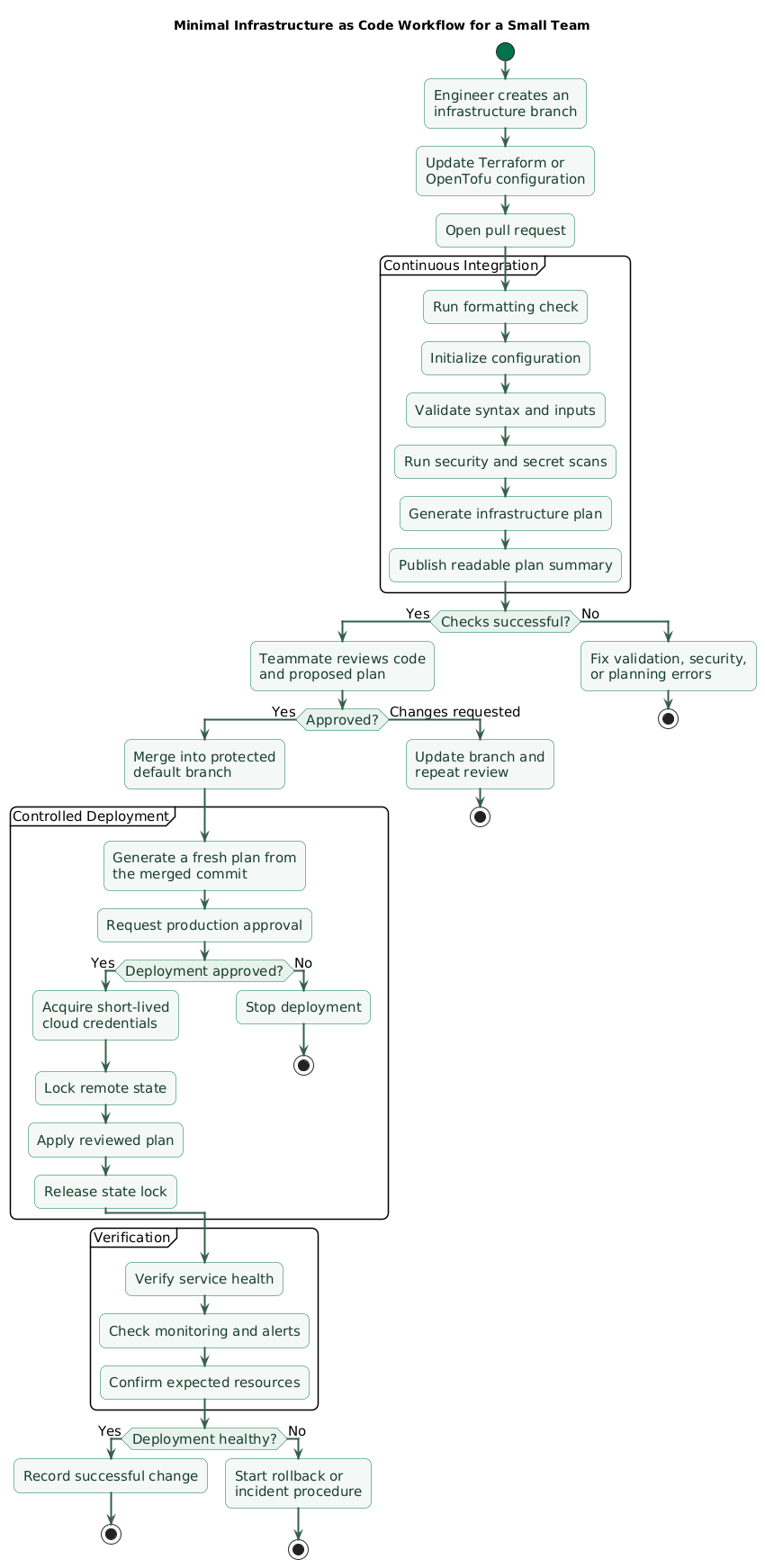
Minimal IaC workflow (diagram)
| Component | Minimal choice | Safety property |
|---|---|---|
| Source control | One Git repository with protected default branch | Reviewable history and controlled merging |
| IaC tool | Terraform or OpenTofu, standardized across the team | Consistent planning and application workflow |
| State | Remote backend with locking and version history | Prevents conflicting writes and supports recovery |
| Environments | Separate root directories and separate state | Limits the blast radius of mistakes |
| Validation | Format, validate, security scan, and plan on pull requests | Finds mistakes before merge |
| Deployment | Apply from the default branch after explicit approval | Prevents unreviewed production changes |
| Authentication | OIDC or another short-lived identity mechanism | Avoids permanent cloud keys in CI secrets |
| Drift detection | Scheduled read-only plan | Surfaces manual or unexpected changes |
What you can postpone
A private module registry, policy-as-code platform, self-service portal, multi-stage orchestration system, and custom deployment controller can all wait until the team has a demonstrated need.
3. Use a repository structure people can understand
Repository structure should make the ownership and blast radius of a change obvious. For a small setup, separate root configurations for staging and production are usually easier to reason about than one heavily parameterized root configuration.
Recommended starter layout
infrastructure/
├── README.md
├── .gitignore
├── .terraform-version
├── modules/
│   ├── application/
│   │   ├── main.tf
│   │   ├── variables.tf
│   │   └── outputs.tf
│   └── database/
│       ├── main.tf
│       ├── variables.tf
│       └── outputs.tf
└── environments/
    ├── staging/
    │   ├── backend.tf
    │   ├── main.tf
    │   ├── providers.tf
    │   ├── variables.tf
    │   ├── outputs.tf
    │   └── terraform.tfvars.example
    └── production/
        ├── backend.tf
        ├── main.tf
        ├── providers.tf
        ├── variables.tf
        ├── outputs.tf
        └── terraform.tfvars.example
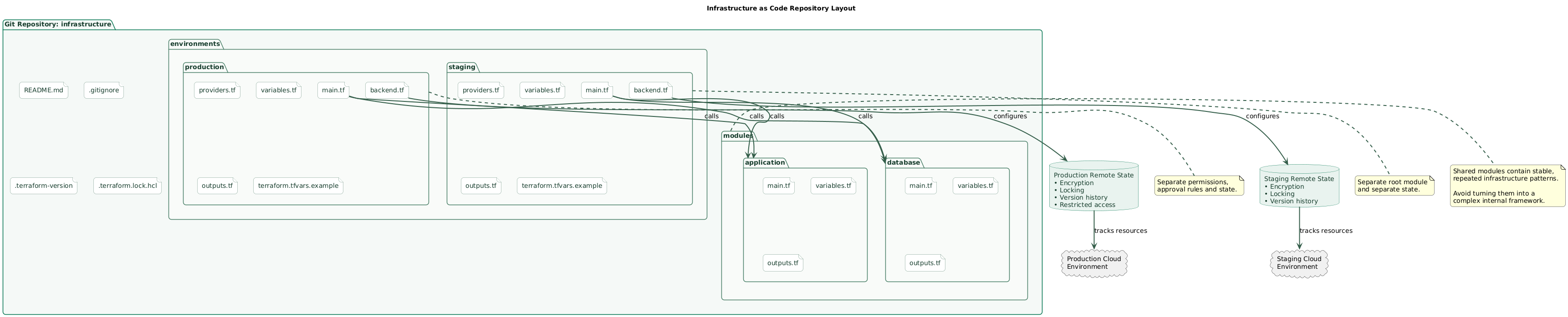
The environment directories are root modules. They define provider configuration, backend configuration, environment-specific variables, and calls to reusable local modules. The modules directory contains repeated building blocks, but it should not become a framework.
Repository layout (diagram)
Rules that keep the repository maintainable
- Keep the root configuration readable without requiring a generated documentation site.
- Add a module only after a pattern is genuinely repeated or needs a clear ownership boundary.
- Give variables and outputs useful descriptions.
- Keep examples and operating instructions in the repository README.
- Commit the dependency lock file generated by Terraform or OpenTofu.
- Never commit state files, plan files, credentials, or real secret variable files.
Avoid premature module abstraction
A module with dozens of optional flags can be harder to operate than a few explicit resources. Small teams benefit from direct code until reuse or policy consistency clearly justifies an abstraction.
4. Protect state before automating anything
State is the mapping between the resources declared in code and the objects managed in the cloud. Losing, corrupting, or exposing it can create operational and security problems.
Local state may be acceptable for a disposable experiment, but it is a poor default for shared infrastructure. Team environments should use a remote backend that supports state locking. Locking prevents two operators or automation jobs from writing to the same state concurrently.
State backend requirements
- Remote storage: no state file stored on a laptop.
- Locking: concurrent write operations must be prevented.
- Encryption: encrypt the backend at rest and in transit.
- Version history: retain previous state versions for controlled recovery.
- Restricted access: only the CI identity and approved operators should read or write state.
- Logging: record access and administrative changes where the backend supports it.
Treat state as sensitive data
Marking an output as sensitive can hide it from normal terminal output, but sensitive values may still exist in state. Protect the backend as carefully as a secrets system.
Use one state per meaningful boundary
Staging and production should not share one state file. Separate state reduces the number of resources affected by a mistake and allows different access rules for production.
Additional state separation may make sense when infrastructure has different owners, credentials, failure domains, or deployment frequencies. Do not split state for every individual resource. Too many tiny states create dependency and orchestration overhead.
5. Separate environments without duplicating everything
Small teams often choose between two bad extremes: copy every resource into separate directories or build one universal configuration with many conditionals. A practical middle ground is to use separate root modules that call a small set of shared modules.
Keep these separate
- Remote state and locking configuration.
- Cloud accounts, subscriptions, projects, or credentials.
- Production approval and apply permissions.
- Environment-specific capacity and availability settings.
- Values that represent different risk decisions.
Share these when appropriate
- Reusable application infrastructure patterns.
- Common naming and tagging conventions.
- Baseline logging, encryption, and network controls.
- Variable validation and safe defaults.
Prefer explicit production differences
A production database with deletion protection, backups, replicas, and longer retention represents a different risk decision. Keep those differences visible instead of hiding them behind several layers of defaults.
6. The pull request, plan, and apply workflow
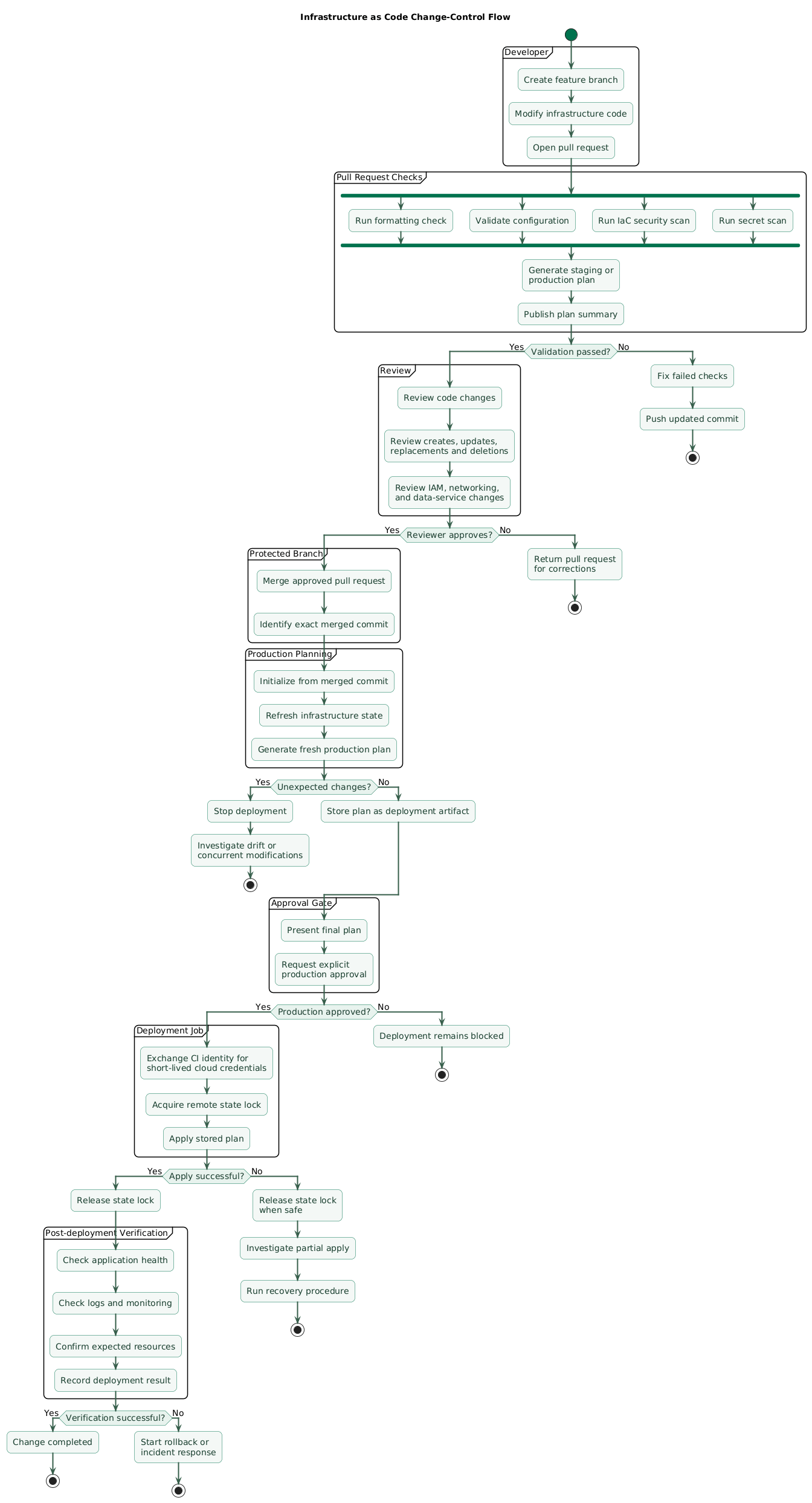
The core workflow should be understandable without reading CI platform internals: branch → validate → plan → review → merge → apply → verify .
On every pull request
- Run the formatter in check mode so generated formatting changes do not surprise reviewers.
- Initialize without changing infrastructure.
- Validate syntax, types, provider arguments, and module inputs.
- Run a lightweight IaC misconfiguration scan.
- Generate a plan for each affected environment using read-only or planning permissions.
- Publish a readable plan summary for reviewers without exposing sensitive values.
After review and merge
- Re-run validation using the merged commit.
- Generate a fresh production plan.
- Require an explicit production approval or manual deployment action.
- Apply the reviewed plan using a narrowly scoped deployment identity.
- Record logs and the final result.
- Verify service health, monitoring, and expected resource changes.
Change-control flow (diagram)
Do not apply an unrelated plan
Infrastructure may change between planning and deployment. Generate the production plan from the exact commit being deployed, and keep the interval between approval and apply short.
Minimal command sequence
# Use "tofu" instead of "terraform" when the team standardizes on OpenTofu.

terraform fmt -check -recursive
terraform init
terraform validate
terraform plan -out=tfplan
terraform show tfplan

# Apply only after review and approval.
terraform apply tfplan
Avoid routine use of targeted applies, forced state unlocking, disabled locking, or automatic approval from developer laptops. These are exceptional recovery tools, not the normal deployment workflow.
Illustrative GitHub Actions structure
name: infrastructure

on:
  pull_request:
    paths:
      - "environments/**"
      - "modules/**"
  workflow_dispatch:

permissions:
  contents: read
  id-token: write
  pull-requests: write

jobs:
  validate-and-plan:
    runs-on: ubuntu-latest
    steps:
      # Replace placeholders with reviewed full commit SHAs.
      - uses: actions/checkout@<full-commit-sha>

      - name: Configure short-lived cloud credentials
        uses: cloud-provider/oidc-auth-action@<full-commit-sha>

      - name: Format
        run: terraform fmt -check -recursive

      - name: Initialize
        run: terraform -chdir=environments/staging init

      - name: Validate
        run: terraform -chdir=environments/staging validate

      - name: Plan
        run: terraform -chdir=environments/staging plan -no-color
The example is intentionally incomplete. Authentication actions, backend configuration, environment protection, and permissions must be adapted to the selected cloud provider and CI platform.
7. Use short-lived credentials and least privilege
A CI system needs cloud access to generate useful plans and apply infrastructure. Storing a permanent administrator access key in repository secrets is convenient, but it creates a long-lived credential that may be copied, leaked, or forgotten.
Where supported, use OpenID Connect or another workload identity mechanism so the CI platform exchanges a signed identity token for temporary cloud credentials. Restrict the trust policy to the expected repository, branch, workflow, and deployment environment.
Separate planning from deployment permissions
| Identity | Purpose | Typical access |
|---|---|---|
| Pull request planner | Initialize, refresh, and create a plan | Read infrastructure and state; no production writes |
| Staging deployer | Apply reviewed staging changes | Write access limited to staging resources and state |
| Production deployer | Apply approved production changes | Production access available only to the protected job |
| Human break-glass role | Emergency recovery | Audited, time-limited, and not used for normal changes |
Start practical, then tighten
Perfect least-privilege policies can be difficult to create immediately. Begin with separate staging and production identities, remove broad administrator access, monitor permission usage, and narrow policies as the infrastructure stabilizes.
8. Pin versions and keep modules boring
Infrastructure behavior depends on the IaC CLI, providers, modules, and CI actions. Uncontrolled upgrades can change schemas, defaults, or runtime behavior during an otherwise unrelated infrastructure change.
Pin the important layers
- Define an allowed Terraform or OpenTofu version range in the configuration.
- Define provider version constraints and commit the generated dependency lock file.
- Pin external modules to an explicit version, tag, or immutable commit.
- Pin third-party CI actions to reviewed full commit SHAs.
- Upgrade dependencies in dedicated pull requests with a visible plan.
terraform {
  required_version = "~> 1.0"

  required_providers {
    example = {
      source  = "vendor/example"
      version = "~> 5.0"
    }
  }
}
Replace the illustrative constraints with versions supported by your selected tool and providers. The goal is not to avoid upgrades. The goal is to make upgrades intentional, reviewable, and reversible.
When to create a module
- The same resource pattern appears in multiple environments.
- The component has a stable input and output boundary.
- The module enforces an important default or policy.
- The abstraction is easier to understand than the raw resources.
When not to create a module
- The resources are used only once and remain easy to read.
- The proposed module mainly forwards dozens of provider arguments.
- The interface changes with every application requirement.
- Only one team member understands the abstraction.
A useful small module
A database module that consistently enables encryption, backup retention, deletion protection, monitoring, and required tags can reduce risk. A universal “cloud resource” module with fifty switches usually increases it.
9. Add lightweight checks and drift detection
Validation does not need to become a separate engineering project. A few fast checks catch common mistakes before they reach production.
Recommended pull request checks
-
Formatting: enforce canonical formatting with
fmt. - Validation: run the built-in configuration validator.
- Plan: review proposed creates, updates, replacements, and deletions.
- Misconfiguration scan: check for public exposure, missing encryption, excessive permissions, and unsafe defaults.
- Secret scan: reject accidentally committed keys, tokens, and private material.
Configure scanners to fail on findings the team has agreed are deployment blockers. A tool that produces hundreds of ignored warnings does not improve safety. Record exceptions with an owner and an expiration or review date.
Detect drift with a scheduled plan
Run a scheduled plan for staging and production using a read-only or planning identity. If the plan reports changes when no infrastructure pull request is active, investigate the cause.
Drift may indicate:
- A manual emergency change that was never added to code.
- A cloud service modifying a managed property.
- A resource created outside the IaC workflow.
- A provider behavior change after an upgrade.
- An unauthorized or compromised account changing infrastructure.
Do not automatically overwrite every drift
An unexpected difference is evidence that needs investigation. Automatically applying the repository state may remove a legitimate emergency fix or make an active incident worse.
Operational rules for console changes
- Use console changes only when the situation genuinely requires them.
- Record who changed what, why, and when.
- Create a follow-up pull request immediately.
- Import or update the resource definition as needed.
- Run a plan and confirm that drift has been reconciled.
10. Copy/paste implementation checklist
Infrastructure as Code for a small team (checklist)

Foundation
- Choose Terraform or OpenTofu and standardize the team workflow.
- Store all managed infrastructure code in Git.
- Protect the default branch and require review for infrastructure changes.
- Document ownership, normal deployment steps, and emergency access.

Repository
- Create separate root directories for staging and production.
- Use shared modules only for stable, repeated patterns.
- Add README instructions for initialization, planning, applying, and recovery.
- Commit the dependency lock file.
- Ignore state files, plan files, credentials, and real secret variable files.

State
- Configure remote state before managing shared resources.
- Enable state locking.
- Enable encryption and restrictive access controls.
- Enable object versioning or state history.
- Use separate state for staging and production.
- Test how an authorized operator can recover a previous state version.

Pull requests
- Run format checks.
- Initialize and validate the configuration.
- Run an IaC misconfiguration scan.
- Run secret scanning.
- Generate a plan for each affected environment.
- Review replacements, deletions, IAM changes, network exposure, and data services.

Deployment
- Apply only from the protected default branch.
- Generate the production plan from the exact commit being deployed.
- Require explicit approval for production.
- Use a dedicated deployment identity.
- Keep state locking enabled.
- Record deployment logs and verify service health after apply.

Credentials
- Prefer OIDC or another short-lived workload identity.
- Do not store permanent administrator keys in CI secrets.
- Separate planning and deployment identities.
- Separate staging and production permissions.
- Maintain an audited break-glass process for emergencies.

Dependencies
- Constrain the IaC CLI version.
- Constrain provider versions.
- Pin external module versions.
- Pin third-party CI actions to full commit SHAs.
- Upgrade dependencies through dedicated pull requests.

Operations
- Run scheduled read-only plans to detect drift.
- Investigate unexpected drift before applying.
- Reconcile emergency console changes back into code.
- Review unused resources, permissions, and exceptions regularly.
- Practice recovery from a failed apply and damaged state.
11. FAQ
Is Infrastructure as Code worth it for only two or three people?
Yes. The value is not limited to large organizations. A small team gains a shared record of infrastructure, repeatable deployments, safer review, and less dependence on one person remembering how resources were configured.
Should a small team choose Terraform or OpenTofu?
Both support a similar declarative infrastructure workflow. Evaluate provider compatibility, licensing requirements, existing tooling, and team experience. The operationally important decision is to standardize the selected CLI, version constraints, lock file, and CI workflow.
Can we run apply commands from developer laptops?
Keep normal staging and production applies in CI so credentials, approvals, logs, and the exact deployed commit are controlled. Local commands remain useful for development and troubleshooting, but direct production applies should be treated as an exceptional recovery path.
Do we need a separate repository for every environment?
Usually not. One repository with separate environment root directories and separate remote state is sufficient for many small teams. Separate repositories become useful when ownership, permissions, release cycles, or compliance boundaries are genuinely different.
Should production apply automatically after a merge?
It can, but automatic production apply is not required for a good IaC workflow. A small team can automate validation and planning while keeping production behind an explicit approval or manually triggered deployment job.
How often should drift detection run?
Run it often enough to identify unexpected changes before the next planned deployment. Daily is a practical starting point for important environments. Less critical or rarely changed environments may use a lower frequency.
Key terms (quick glossary)
- Infrastructure as Code
- Managing infrastructure through version-controlled declarative or procedural configuration instead of undocumented manual changes.
- State
- Data used by Terraform or OpenTofu to associate declared resources with real infrastructure objects and track relevant metadata.
- Remote backend
- A shared service used to store state outside a developer's local filesystem.
- State locking
- A mechanism that prevents multiple operations from writing to the same state at the same time.
- Plan
- A preview of the infrastructure actions the IaC tool proposes to perform.
- Apply
- The operation that executes the approved infrastructure changes.
- Drift
- A difference between the infrastructure represented by code and state and the configuration currently present in the provider.
- OIDC
- OpenID Connect, commonly used by CI systems to obtain short-lived cloud credentials without storing permanent access keys.
- Root module
- The top-level Terraform or OpenTofu configuration from which an environment is planned and applied.
- Dependency lock file
- A committed file that records selected provider versions and checksums to make dependency installation more predictable.
Worth reading
Recommended guides from the category.
