
Tagging is one of the highest-leverage governance controls in cloud environments—when it’s done correctly. It enables cost allocation, clear ownership, incident routing, security controls, and automation. It also fails in most organizations because tags are treated as optional metadata instead of a required part of resource creation.
This guide shows a tagging strategy that works for small teams and scaling startups: a small required tag set, controlled values, enforcement at creation time, and a reporting + cleanup loop that makes cost allocation credible.
The only rule that matters
If you cannot enforce tags at resource creation, you do not have a tagging strategy—you have a tagging wish.
1. Why tagging fails (and what “works” looks like)
Most tagging programs collapse under two forces: inconsistent values (free-text chaos) and lack of enforcement. A working program has clear outcomes and operational guardrails.
Failure modes you can recognize immediately
- Too many required tags: engineers bypass or invent values.
- Free-text values: “Payments”, “payments”, “paymnts” become three cost centers.
- Retroactive tagging: backlog grows forever; cost allocation never stabilizes.
- No owner field: nobody can clean up or approve spend.
- No exception process: teams either block delivery or ignore policy.
What “good” looks like in practice
New resources cannot be created without a valid owner and cost allocation tags. Dashboards show “untagged spend” trending toward zero. Shared platform costs are allocated using a documented rule and reviewed monthly.
2. Build a tag taxonomy you can enforce
A taxonomy is a small set of tag keys with clear meaning and allowed values. It should be stable across accounts and regions and should map to how your company actually operates: teams, services, environments, and cost centers.
Tag taxonomy and governance loop (diagram)
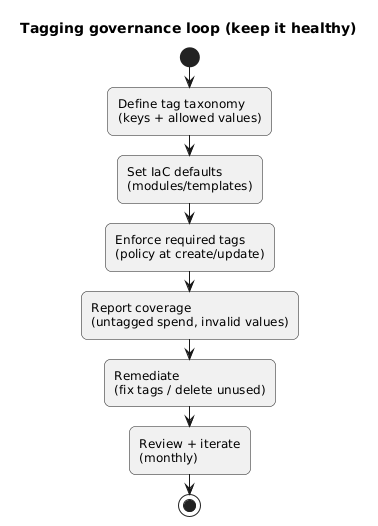
Design principles
- Small required core: 4–6 tags max as hard gates.
- Everything else optional: optional tags can grow over time without blocking.
- Use controlled values: pick lists where possible; avoid free-text for cost keys.
- Separate “what it is” from “who owns it”: service tags and ownership tags serve different purposes.
- Prefer stability over perfection: changing keys breaks reporting historically.
Taxonomy trap
Do not create different tag standards per team. If you need different semantics, you need different tag values, not different keys.
3. The minimum required tags for cost + ownership
The goal of required tags is to make every resource attributable to a responsible owner and a budget line. Start with the minimum set and expand only when you are sure you can enforce and report on it.
| Tag key | Purpose | Example values | Notes |
|---|---|---|---|
| owner | Human accountable for spend and cleanup | norbert.sowinski | Email/username; avoid names that change |
| team | Org unit routing incidents and ownership | platform, payments, data | Controlled list |
| cost_center | Billing allocation / chargeback | cc-1201, growth, r&d | Match finance mapping |
| environment | Operational context and cleanup | prod, staging, dev | Hard gate; prevents “prod dev” ambiguity |
| service | What the resource supports | api, auth, web, ml-pipeline | Controlled list; maps to app inventory |
Optional but high value
Add data_classification (public/internal/confidential) only if you have a real security workflow that uses it. Otherwise it becomes another ignored field.
4. Controlled values, naming rules, and anti-patterns
Values matter more than keys. Bad values destroy reporting. Your tagging policy should include clear formatting rules: lowercase, hyphen-separated, no spaces, no emojis, and no “misc”.
Value normalization rules (recommended)
- Lowercase only:
paymentsnotPayments. - Hyphen separators:
ml-pipelinenotml_pipeline(pick one and enforce it). - Stable identifiers: prefer controlled
team/servicelists over codenames. - No “temporary” without expiry: if
ttl_daysexists, enforce cleanup automation.
Example: a strict-but-usable value policy
environment ∈ {prod, staging, dev}; team ∈ {platform, payments, data, security};
service must be in the service catalog; owner must match corporate username format.
5. Enforcement: IaC defaults + policy guardrails
Enforcement has two layers: make “good tags” the default (IaC modules), then block missing/invalid tags at creation time (policy). Relying on humans alone does not scale.
Enforcement architecture (diagram)
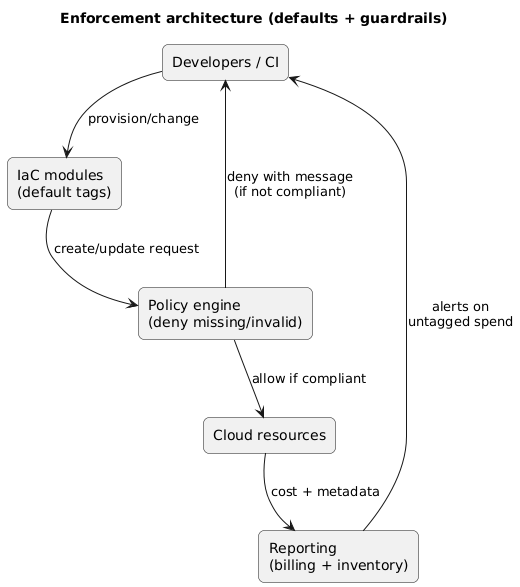
Practical enforcement steps
- IaC modules set defaults: environment, team, service derived from repo/workspace metadata.
- Policy enforces required tags: deny create if required tags are missing or invalid.
- Exceptions are explicit: break-glass role or approved exemption list with expiry.
- Retroactive remediation: scheduled jobs tag legacy resources where safe, and alert owners otherwise.
Enforcement gotcha
Many resources are created indirectly (managed services, autoscaling, controllers). Your tag strategy must account for propagation (inherit tags) and for services that do not support tags consistently.
6. Shared resources: allocation keys and chargeback rules
Shared resources are where cost allocation breaks: VPCs, NAT gateways, shared clusters, shared observability stacks, and platform-managed services. Treat shared costs as a first-class category with explicit allocation rules.
Shared cost allocation model (diagram)
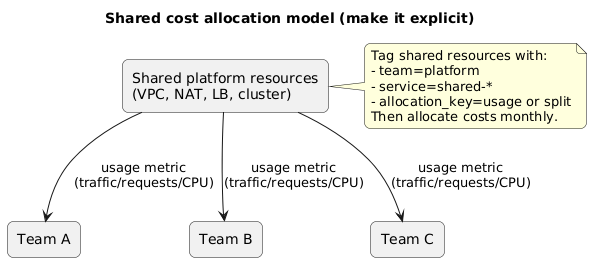
Two allocation strategies that work
- Fixed split: allocate by a documented ratio agreed monthly. Easy, less accurate.
- Usage-based: allocate by measurable usage (requests, bytes, CPU hours). More accurate, more work.
Example: tagging shared costs
Tag the shared load balancer with team=platform, service=shared-edge, and add
allocation_key=traffic. Then distribute monthly costs across teams using request counts from metrics.
7. Reporting: from tags to cost allocation dashboards
Your tagging program is only “real” when it produces a monthly view that finance and engineering both trust. The simplest KPI is untagged spend and the fastest win is making that number visible.
Reporting KPIs (minimum)
- Untagged spend (% and €/$): by account and service.
- Invalid tag values: values not in allowed lists.
- Top unowned resources: high-cost resources missing owner/team.
- Shared cost bucket: clearly separated and allocated by rule.
Operational habit
Do a 15-minute tagging review every month: top untagged spend, top invalid values, and the shared-cost allocation report. Tagging only stays healthy when it is treated as routine operations.
8. Operating model: ownership, reviews, and cleanup loops
A working tagging strategy needs clear ownership and a light governance loop. Keep it simple: one owner for taxonomy, team owners for compliance, and automation for detection.
Suggested roles
- Taxonomy owner: defines keys/allowed values, manages changes, documents rules.
- FinOps/finance partner: ensures cost_center mapping matches billing reality.
- Team owners: respond to missing tags and remediate resources.
- Platform team: maintains policy enforcement and IaC modules.
Change control matters
Changing tag keys breaks historical reporting. Prefer adding new keys over renaming. If you must rename, run a migration and keep both keys during a transition window.
9. Templates (copy/paste)
9.1 Tag taxonomy (YAML example)
tag_keys:
  required:
    owner:
      format: "username"
    team:
      allowed: ["platform", "payments", "data", "security"]
    cost_center:
      format: "string"
    environment:
      allowed: ["prod", "staging", "dev"]
    service:
      format: "service-catalog"
  optional:
    data_classification:
      allowed: ["public", "internal", "confidential"]
    ttl_days:
      format: "integer"
9.2 Policy rule (pseudo)
Deny resource creation if:
- any required tag missing
- environment not in allowed list
- team not in allowed list
- owner does not match username format
9.3 Monthly reporting email (copy/paste)
Monthly tagging report
- Untagged spend: X% (down/up from last month)
- Top missing tags: owner (N resources), cost_center (M resources)
- Invalid values: team (K), environment (L)
- Shared costs: $Y allocated by rule: <rule>
Action: team owners to fix top 10 untagged resources by next Friday.
10. Tagging checklist
- Outcomes: cost allocation + ownership reporting defined and agreed.
- Taxonomy: 4–6 required tags, documented meaning and allowed values.
- Defaults: IaC modules apply tags automatically.
- Enforcement: policy denies missing/invalid required tags.
- Shared costs: explicit allocation rule exists and is reviewed monthly.
- Reporting: untagged spend tracked; owners alerted.
- Cleanup: monthly review loop + remediation backlog is small and shrinking.
11. FAQ
Should we tag everything?
Aim to tag everything that shows up on billing reports, but start by enforcing tags on the most expensive services and accounts. Coverage improves fastest when you focus on spend, not resource count.
What if a service doesn’t support tags well?
Use account/project separation and naming conventions as a fallback. Also track those services explicitly in reporting as “non-taggable” and allocate costs by account or usage.
How strict should enforcement be?
Strict on the required core tags (owner/team/cost_center/environment/service). Keep everything else optional until you have a workflow that uses it and you can enforce it without blocking delivery.
Key terms (quick glossary)
- Cost allocation
- Assigning cloud spend to a team, product, or cost center.
- Chargeback / showback
- Chargeback bills teams for their spend; showback reports spend without billing.
- Taxonomy
- A stable set of tag keys and allowed values used consistently across the cloud estate.
- Untagged spend
- Cloud costs that cannot be attributed due to missing or invalid tags.
- Policy enforcement
- Preventing resource creation or updates that violate required tag rules.
Worth reading
Recommended guides from the category.
