Cloud migration is often oversimplified as “move servers to AWS/Azure/GCP”. In practice, successful migration is a program: you standardize identity and networking, enforce security defaults, map dependencies, migrate in waves with rehearsed cutovers, and then operate with clear ownership, monitoring, and cost controls.
This guide is intentionally execution-focused: what to do, what to decide, what to measure, and what to avoid. Use it as a playbook for a small team or as a reference framework for larger organizations.
Success definition (practical)
A migration is successful when availability and performance are stable, security guardrails are enforced by default, ownership is clear (build/run/cost), and cloud spend is predictable with budgets and alerts.
Migration program lifecycle (diagram)

1. What Cloud Migration Is (And What It Is Not)
Cloud migration is the process of moving applications, data, and supporting services from on-premises (or another hosting environment) into a cloud platform. Importantly, migration is a spectrum:
- Rehost to cloud VMs quickly (fastest path, often least change).
- Replatform to managed services where it reduces ops burden (DBaaS, managed caches, managed queues).
- Refactor when the architecture is the bottleneck (scalability, resiliency, deployment speed).
- Repurchase when SaaS is the best ROI (commodity capabilities like ticketing/CRM/HR).
What cloud migration is not: a pure copy/paste exercise. The hard parts are discovery, security defaults, networking, operational readiness, and cutover discipline.
Common misconception
“We migrated” does not mean “we are cloud-native.” Many teams lift-and-shift and then discover they also moved on-prem complexity into a pay-as-you-go billing model.
2. When You Should Migrate (And When You Shouldn’t)
Cloud migration tends to pay off when you need:
- Speed: standardized environments, automation, faster provisioning and deployments.
- Elasticity: scale to meet demand without hardware lead times.
- Reliability: multi-zone designs, managed services, improved DR patterns.
- Security baseline: centralized IAM, auditing, policy enforcement.
- Modern platform capabilities: CI/CD, observability, managed data services.
You should pause (or narrow scope) if:
- You cannot define a concrete business objective beyond “cloud is the future”.
- Application ownership is unclear (no accountable owner = no stable ops).
- Dependencies are unknown (cutovers will fail or cause partial outages).
- You plan to migrate systems that should be retired or replaced with SaaS.
3. Step 1: Define Goals, Scope & Success Metrics
Start with outcomes and decision constraints. You want alignment on what “done” looks like before you invest in the landing zone and migration waves.
- Business outcomes: faster delivery, exit a data center, reliability, compliance, global expansion.
- Scope boundaries: which apps are in scope, which are out, and why.
- Constraints: data residency, regulatory controls, latency, integration requirements.
- Non-functional targets: availability, RTO/RPO, peak throughput, latency budgets.
Good success metrics are measurable and owner-assigned, for example:
- Provisioning time drops from days to hours using IaC modules.
- MTTR improves after standardizing monitoring, runbooks, and incident response.
- Deployment frequency increases after CI/CD and environment parity.
- Cloud spend is tagged to owners and remains within budget thresholds with alerts.
One-sentence scope statement
“Migrate 12 customer-facing services and 3 internal services in 3 waves, replace the legacy ticketing tool with SaaS, retire 2 unused batch jobs, and retain the mainframe workload until phase 2.”
4. Step 2: Discovery, Inventory & Dependency Mapping
Discovery is the migration “truth layer.” Without it, wave planning becomes guesswork and cutovers become risky. Build an inventory that is operationally useful—not a static spreadsheet nobody reads.
Minimum inventory fields per application:
- Owner: business owner + technical owner (accountability for uptime and cost).
- Criticality: revenue impact, customer impact, compliance impact.
- Runtime: language/runtime, OS, container/VM, batch schedules, peak patterns.
- Data: databases, file stores, data classification, retention, RPO/RTO.
- Dependencies: upstream/downstream services, network flows, DNS dependencies, third parties.
- Ops readiness: dashboards, alerts, logs, runbooks, on-call rotation.
Two artifacts that prevent outages
(1) A dependency map that you can review during cutover, and (2) a wave plan with explicit sequencing and owners.
Practical inventory template (copy/paste as columns)
App | Business Owner | Tech Owner | Criticality | Data Class | RTO | RPO | Dependencies | 6R Strategy | Wave | Cutover Window | Monitoring Ready | Runbook Ready | Cost Owner
5. Step 3: Choose a Strategy (The 6Rs)
The 6Rs help avoid a single “one-size-fits-all” approach. Assign an R per application with a short rationale. Your goal is to maximize learning and value while controlling risk.
6Rs decision guide (diagram)
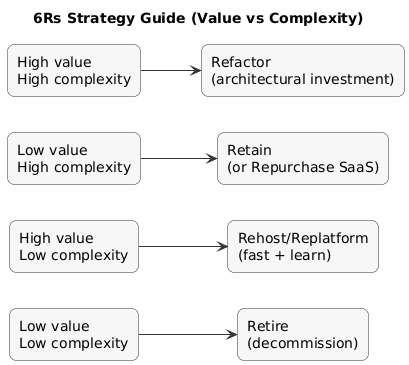
- Rehost (lift-and-shift): best for quick moves, stable apps, limited change tolerance.
- Replatform: best when managed services reduce ops effort without big rewrites.
- Refactor: best when architecture limits reliability, scale, or delivery speed.
- Repurchase: best when SaaS replaces commodity capability with better ROI.
- Retire: best when usage is low or system is obsolete.
- Retain: best when constraints block migration for now (legal, vendor, technical).
Early-wave selection rule
Avoid early waves for apps with unclear ownership, unknown dependencies, or no runbooks. Start with workloads that teach you landing zone + operations patterns with low blast radius.
6. Step 4: Build a Secure Cloud Landing Zone
A landing zone is a standardized foundation where every workload inherits the same baseline: identity, networking, logging, security guardrails, and governance. Without it, each team “builds their own cloud,” which quickly becomes unmanageable.
Minimal landing zone components:
- Account/subscription structure: prod vs non-prod separation, shared services, security account.
- Identity: SSO integration, MFA enforcement, privileged access model.
- Networking baseline: VPC/VNet design, subnets, routing, egress controls.
- Logging & auditing: centralized logs + audit trails + retention.
- Guardrails: policy-as-code (encryption required, no public buckets by default, tagging required).
- IaC: modules/templates + code review + drift detection.
Landing zone quality test
A first migration should feel “boring”: networking works, logs exist, access is controlled, and dashboards are in place before the first user request hits production.
7. Step 5: Identity, Security & Compliance Controls
Security is easiest when enforced as defaults and policies—not as “manual checks.” Establish a baseline early:
- IAM: least privilege, short-lived access where possible, no shared admin credentials.
- MFA + SSO: mandatory for privileged roles and sensitive actions.
- Secrets management: vault/managed secret stores, rotation, audit access.
- Encryption: at rest and in transit, with key management ownership defined.
- Audit logging: who did what, when, from where (and where logs are retained).
- Compliance mapping: data classification, retention, access reviews, approvals.
Predictable failure pattern
Teams migrate workloads first and “do security later.” The result is public exposure risk, fragmented logging, and painful retrofits. Guardrails first, workloads second.
8. Step 6: Networking, Connectivity, DNS & Certificates
Networking is where migrations often stall because it impacts everything: identity, integration, latency, and cutovers. Plan explicitly, document decisions, and validate with rehearsals.
- Connectivity: VPN or dedicated connectivity (if hybrid is required).
- Addressing: IP ranges that do not overlap with current networks.
- Routing/egress: define where NAT, firewalls, and inspection live.
- DNS strategy: internal vs external zones, TTL approach for cutover windows.
- TLS certificates: issuance, renewals, and ownership of certificate lifecycle.
Cutover-friendly DNS practice
If appropriate, lower DNS TTL ahead of cutover windows to speed up traffic switching, then increase TTL after stability is confirmed.
9. Step 7: Data Migration (Databases, Files, Backups)
Data migration is usually the highest-risk part. Decide on a pattern based on downtime tolerance and complexity:
- Offline migration: stop writes → export/import → start in cloud (simpler, but downtime).
- Online replication: continuous sync → short cutover window (more complex, less downtime).
- Hybrid period: selective dual-write or phased read models (highest complexity, use sparingly).
Validation should be explicit (not “looks OK”):
- Row counts and checksums for large tables/datasets.
- Sampling queries for correctness + performance baselines.
- Application-level validation for top user journeys.
- Restore drills (prove RTO/RPO realistically).
Non-negotiable
Backups are not real until you have successfully restored them in a rehearsal. Schedule restore tests early, not after go-live.
10. Step 8: Migrate Applications in Waves (Execution)
Migrate in waves to reduce blast radius and improve repeatability. Waves should group workloads with manageable dependencies and similar cutover constraints.
- Wave 0 (foundation): landing zone + IAM + networking + logging + CI/CD baseline.
- Wave 1 (learning): low-risk apps to validate patterns.
- Wave 2 (scale): broader portfolio with more dependencies.
- Wave 3 (critical): highest criticality after operations model is proven.
Wave readiness criteria
Owner assigned, dependencies mapped, monitoring and runbook ready, rollback rehearsed, cutover window agreed. If one item is missing, delay the app—not the entire program.
11. Step 9: Testing, Cutover & Rollback Planning
Cutover is where migration becomes real. The goal is not only switching traffic—it is switching with measurable safety thresholds and a rollback path you can execute quickly.
Cutover runbook flow (diagram)

Minimum testing layers:
- Functional: top user journeys.
- Integration: queues, webhooks, third-party APIs, internal dependencies.
- Performance: latency and throughput baselines (before and after).
- Security: IAM checks, secret usage, exposure scanning.
- Operational: alerts, dashboards, paging, runbook handoffs.
Practical cutover runbook must include:
- Roles on the call and decision authority (who can call rollback).
- Exact steps with timestamps and “pause points”.
- Go/no-go criteria (error rate, latency, saturation signals).
- Rollback triggers and rollback steps that were tested.
Cutover example (high-level)
1) Deploy freeze + change freeze
2) Final data sync (or stop writes + export/import)
3) Switch traffic (DNS / load balancer / routing)
4) Run smoke tests (top journeys)
5) Monitor SLOs (errors, latency, saturation)
6) If thresholds breach for X minutes: rollback
12. Step 10: Operate, Monitor & Optimize (FinOps + Reliability)
The first 30–90 days after a wave is where value is realized or lost. Treat operations and cost as engineering metrics.
Operational excellence
- Observability: logs, metrics, traces, dashboards tied to SLOs.
- Incident response: on-call, runbooks, postmortems, action tracking.
- Vulnerability management: clear patch ownership and cadence.
- Backup/restore drills: scheduled and measured (actual RTO/RPO).
FinOps basics (cost control that actually works)
- Tagging standards: owner, environment, system, cost center (enforced by policy).
- Budgets + alerts: early warning before spend surprises.
- Right-sizing: reduce overprovisioned compute and storage after measuring.
- Autoscaling: align capacity with demand when it’s predictable.
- Commitment discounts: reserved/savings plans for steady workloads.
Cloud cost myth
Cloud is not automatically cheaper. It becomes cost-effective when you manage utilization, decommission old resources, and assign cost ownership.
13. Governance & Change Management (People Side)
Migration changes how teams work. Treat it as an operating-model change: “who owns what” and “how change ships” matters as much as the infrastructure.
- Ownership: service owners accountable for build/run/cost.
- Standardized delivery: CI/CD + IaC patterns + review rules.
- Enablement: training, docs, templates, internal office hours.
- Automatic enforcement: guardrails as code instead of manual policing.
14. Common Migration Mistakes (And How to Avoid Them)
- Skipping discovery: hidden dependencies break cutovers. Fix: inventory + dependency mapping is mandatory.
- No landing zone: inconsistent networks and weak controls. Fix: build baseline first.
- Migrating critical apps first: high blast radius. Fix: learn in early waves.
- Ignoring operations: nobody can support workloads. Fix: monitoring + runbooks before cutover.
- Cost surprise: no tagging/ownership, no right-sizing. Fix: FinOps from day one.
- Not decommissioning old systems: paying twice. Fix: explicit retirement plan per wave.
15. Cloud Migration Checklist
- Goals: outcomes, scope, success metrics agreed and owned.
- Inventory: owners + dependencies documented for in-scope apps.
- Strategy: each app assigned an R (6Rs) with rationale.
- Landing zone: identity, networking, logging, policies, IaC patterns ready.
- Security: IAM baseline, secrets management, encryption, audit logs.
- Networking: connectivity, routing, DNS, cert lifecycle tested.
- Data: migration pattern chosen; validation + restore tests planned.
- Wave plan: sequencing, cutover windows, communications plan.
- Cutover: runbook + rollback triggers rehearsed.
- Post-migration: SLO dashboards + incident process + FinOps controls.
- Decommission: legacy resources retired to avoid double spend.
16. FAQ: Cloud Migration
What are the 6Rs of cloud migration?
Rehost, Replatform, Refactor, Repurchase, Retire, and Retain. Use them per workload, not as a single global rule.
How do I choose which applications to migrate first?
Start with low-risk apps with clear owners and manageable dependencies. Use early waves to validate landing zone and operations.
What is a landing zone and why does it matter?
It is the standardized foundation (identity, networking, logging, guardrails). It reduces risk and makes migrations repeatable.
How do I reduce downtime during migration?
Use replication where feasible, rehearse cutovers, lower DNS TTL (where appropriate), and enforce a tested rollback plan with thresholds.
Why do cloud costs spike after migration?
Overprovisioning, idle resources, missing tagging/ownership, and no right-sizing. Solve it with FinOps basics and monthly reviews.
Key cloud terms (quick glossary)
- Landing Zone
- A standardized cloud foundation for identity, networking, logging, guardrails, and governance.
- 6Rs
- Rehost, Replatform, Refactor, Repurchase, Retire, Retain—migration strategy options per workload.
- RTO / RPO
- Recovery Time Objective (recovery time) and Recovery Point Objective (acceptable data loss).
- Cutover
- The controlled switch from the old environment to the new one (traffic + data finalization).
- Rollback
- A planned reversal if cutover criteria are not met or stability thresholds are breached.
- FinOps
- Cloud cost management discipline with shared accountability across engineering, finance, and product.
- Infrastructure as Code (IaC)
- Provisioning and managing cloud resources via versioned code rather than manual console changes.
Worth reading
Recommended guides from the category.
