“We have backups” is not a disaster recovery plan. Disaster recovery (DR) is the ability to restore a defined set of services within defined time and data-loss limits—under realistic failure conditions. In cloud environments, DR is less about buying a tool and more about selecting a pattern that fits your RTO/RPO, budget, and operational maturity.
Core idea
Define targets first (RTO/RPO), then choose the lightest DR pattern that meets them, then test it regularly. Most teams fail because they skip the “prove it” step.
1. RTO vs RPO (and why teams mix them up)
RTO and RPO are simple definitions, but teams confuse them because both are “time-based” and both impact business outcomes. You need both to choose an architecture.
| Term | Definition | What it answers | What it drives |
|---|---|---|---|
| RTO | Maximum acceptable downtime | “How long can we be offline?” | Automation level, standby capacity, traffic cutover design |
| RPO | Maximum acceptable data loss (time) | “How much data can we lose?” | Backup frequency, replication method, data consistency choices |
Example: why “daily backups” may be unacceptable
If your product takes orders all day, an RPO of 24 hours is effectively “we can lose a full day of orders.” Many businesses cannot tolerate that, which forces either more frequent backups or replication.
2. Define scope: what you are recovering
DR scope is what turns a vague goal into a plan. Without scope, teams plan to “recover the cloud” and end up recovering nothing. Start with tiers: what must be back first, what can wait, and what can be rebuilt from source.
Minimum recovery inventory
- Critical user journeys: login, checkout, core API flows.
- Data stores: primary database, object storage, caches (rebuildable), queues.
- Identity: SSO/IAM, break-glass access, secrets access path.
- Networking: DNS, load balancer config, TLS certs, WAF rules.
- Deploy system: container registry/artifacts, IaC state, CI/CD credentials.
- Observability: logs/metrics so you can validate recovery, not guess.
Scope pitfall
If the only thing you can restore is a database snapshot, you may still be down because you cannot deploy, cannot access secrets, or cannot route traffic safely.
3. Turn business needs into measurable targets
Targets should be stated per system or tier, not “the whole company.” A common approach is to define two tiers: Tier 1 (revenue/critical) and Tier 2 (supporting). Each tier gets RTO/RPO and testing cadence.
| Tier | Examples | Typical RTO | Typical RPO | Test cadence |
|---|---|---|---|---|
| Tier 1 | API, auth, payments, primary DB | 15–120 minutes | 0–60 minutes | Quarterly full drill + monthly restores |
| Tier 2 | Analytics, internal tools, batch jobs | 4–24 hours | 4–24 hours | Quarterly restores or tabletop exercises |
Good targets are expensive on purpose
Aggressive RTO/RPO forces cost and complexity. That is not a bug—it's the trade-off. Your job is to pick the cheapest architecture that meets real business needs.
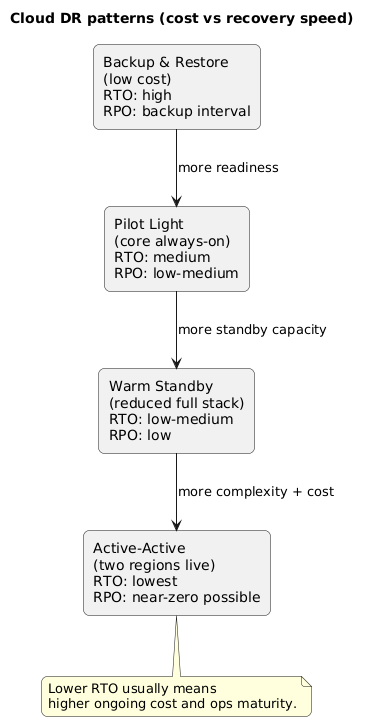
4. DR patterns: backup/restore, pilot light, warm standby, active-active
Most cloud DR strategies fall into four patterns. The right choice depends on how quickly you need to recover and how much data loss is acceptable.
DR patterns overview (diagram)
Pattern summary
| Pattern | How it works | Strength | Typical weakness |
|---|---|---|---|
| Backup & restore | Rebuild infra, restore data from backups | Lowest cost | Slow recovery; human-heavy; RPO limited by backup schedule |
| Pilot light | Minimal always-on core (e.g., DB replication + small footprint), scale up on failover | Balanced cost vs speed | Failover requires scaling actions; can fail if automation is weak |
| Warm standby | Reduced-capacity full stack running in secondary region; scale to full on failover | Predictable recovery | Ongoing cost; drift risk if not deployed continuously |
| Active-active | Two regions live; traffic distributed; failover is mostly routing | Lowest RTO | Highest complexity: data consistency, conflicts, higher cost |
Example: “pilot light” that actually works
Keep database replication continuously running to the secondary region, keep secrets and IaC ready, and run only the minimal services needed to validate health. On failover, you scale compute and enable full routing. This avoids paying full active-active costs while meeting mid-range RTO/RPO.
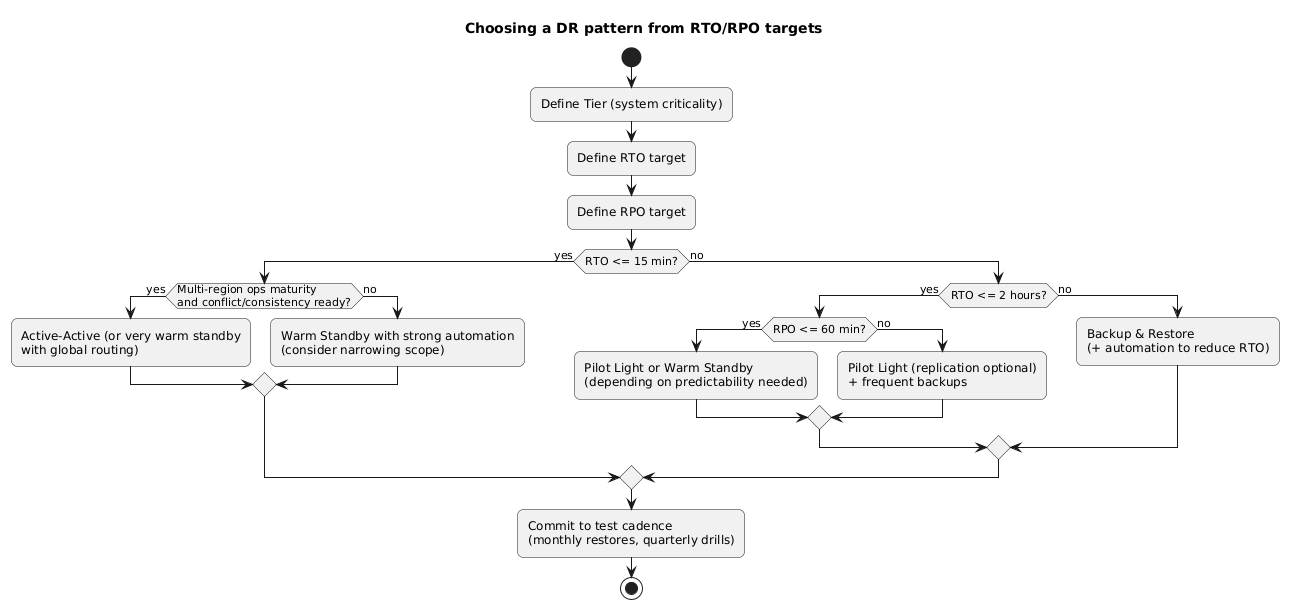
5. Choosing a pattern: decision rules + cost trade-offs
Use RTO/RPO as hard constraints, then choose based on operational simplicity. For many small teams, the practical progression is: backup/restore → pilot light → warm standby, and only then active-active.
RTO/RPO → pattern mapping (diagram)
Cost drivers to model (even roughly)
- Standby compute: always-on instances in secondary region (warm standby/active-active).
- Data replication: cross-region replication and storage.
- Networking: egress and cross-region data transfer (often surprises teams).
- Operational overhead: time spent maintaining automation, testing, and drift control.
- Tooling: monitoring, security, backup tooling, runbook automation.
Hidden cost
Active-active often fails not because it is “too expensive,” but because it introduces data consistency and conflict problems that teams are not ready to operate. Complexity is a cost multiplier.
6. Data strategy: replication, backups, and consistency
Data is the hard part of DR. Compute can be recreated; data correctness is what determines if your business survives the event. Your data strategy should combine replication (for RPO) and backups (for safety and point-in-time recovery).
Practical data rules
- Backups are mandatory even if you replicate. Replication can replicate corruption and deletes.
- Know your replication mode: asynchronous replication improves performance but allows some loss (RPO > 0).
- Design for “single writer” first: multi-writer active-active databases require careful conflict handling.
- Define consistency expectations: what can be eventually consistent vs what must be strongly consistent.
- Immutable backups: keep at least one backup copy immune to deletion (ransomware resistance).
Low-effort improvement
If you are currently “backup only,” adding frequent incremental backups and testing restore speed often improves both RPO and RTO before you invest in multi-region compute.
7. Traffic strategy: DNS, load balancers, and cutover
You need a safe way to move traffic to the recovery environment and back. DR failures commonly happen due to DNS TTL assumptions, TLS/cert mismatches, or clients that do not reconnect cleanly.
Common traffic cutover options
- DNS failover: simple, but TTL and caching can delay cutover.
- Global load balancing: faster routing control, better health checks, more operational setup.
- Feature-flag style routing: for APIs behind gateways; useful for canarying recovery.
Example: make failover a routing change, not a deploy
If DR requires you to change application code under pressure, recovery time increases and risk spikes. Prefer a design where failover is an infrastructure routing change supported by existing automation.
8. Failover and failback runbook (copy/paste)
Failover/failback sequence (diagram)
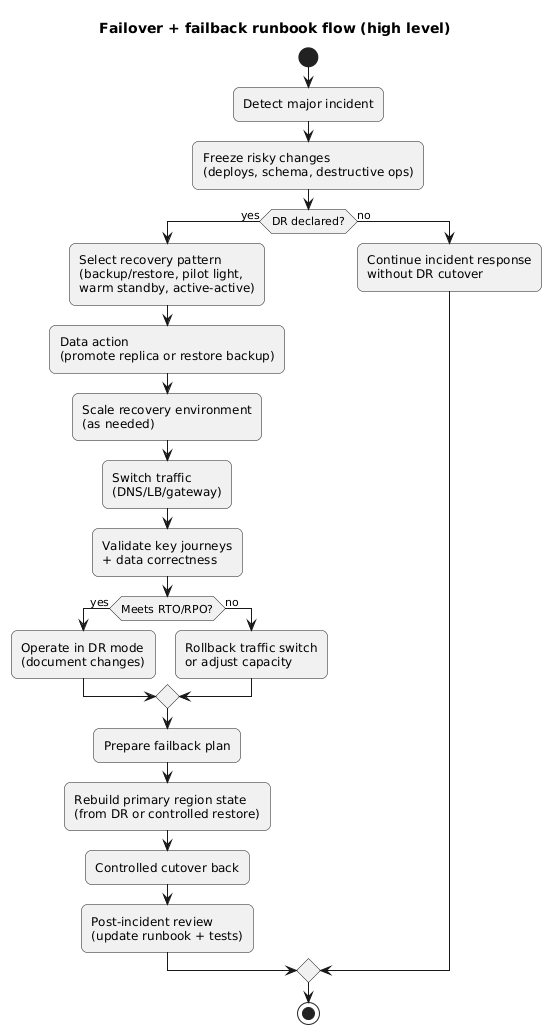
A good runbook is explicit and time-bound. It names owners, defines stop/rollback triggers, and separates “decision” steps from “execution” steps.
Disaster Recovery Runbook (template)
Roles
- Incident commander (IC): owns decisions and timeline
- Infra lead: executes infrastructure + traffic changes
- Data lead: executes data recovery/replication steps
- App lead: validates application health and correctness
- Comms: customer/status updates
Triggers
- Region outage or critical dependency failure
- Data corruption / ransomware containment event
- Prolonged unavailability exceeding RTO risk threshold
0) Stabilize
- Pause risky deploys
- Freeze schema changes and destructive operations
- Confirm monitoring/telemetry visibility
1) Declare DR (IC)
- State: "DR declared at Failback is harder than failover
Many teams can fail over once, but failback safely is where data divergence and change control break down. Plan failback before you ever run a real failover.
9. DR testing: drills that prove recovery
DR testing should be treated like a release pipeline: frequent, incremental, and measurable. Testing should produce evidence: actual recovery time, actual recovery point, and a list of runbook issues fixed.
Recommended testing ladder
- Monthly: restore tests (database + object storage) into isolated environment.
- Quarterly: failover drill (full or partial) with traffic cutover and validation.
- After major changes: run a targeted test (new DB engine, networking, IAM changes, migration).
Measure, don’t guess
Capture timestamps during drills to compute actual RTO. Record the recovery point used to compute actual RPO. Update targets or architecture based on evidence, not assumptions.
10. Quick checklist
- Targets: RTO/RPO defined per tier and approved by stakeholders.
- Scope: inventory includes data, identity, secrets, networking, and deploy pipeline.
- Pattern: chosen based on targets and operational maturity.
- Data safety: backups + tested restores; immutable backup copy recommended.
- Traffic cutover: DNS/LB approach documented and tested.
- Runbook: owners, steps, and triggers explicit; failback included.
- Testing: schedule exists; results are recorded; gaps are fixed.
11. FAQ
Do we need multi-region DR from day one?
Not always. If your RTO/RPO are relaxed, you may start with strong backups, immutability, and fast restore automation. Move to pilot light or warm standby when business requirements justify it.
What’s the most common DR failure for small teams?
Untested recovery: backups exist but restores fail, access is missing, or the runbook is outdated. Second is routing: DNS TTL and client reconnect behavior are misunderstood until an incident.
Is active-active worth it?
It can be, but only when you need very low RTO and can afford the operational complexity—especially around data consistency and multi-region operational readiness.
Key terms (quick glossary)
- Disaster recovery (DR)
- A plan and implementation for restoring services after a major outage or loss event.
- RTO
- Maximum acceptable downtime before the impact becomes unacceptable.
- RPO
- Maximum acceptable data loss measured in time (how far back you can recover).
- Pilot light
- A DR pattern with minimal always-on components and on-demand scaling during failover.
- Warm standby
- A DR pattern where a reduced-capacity full stack runs continuously in a secondary region.
- Active-active
- A DR pattern where multiple regions actively serve traffic, requiring more complex data and routing design.
Worth reading
Recommended guides from the category.
