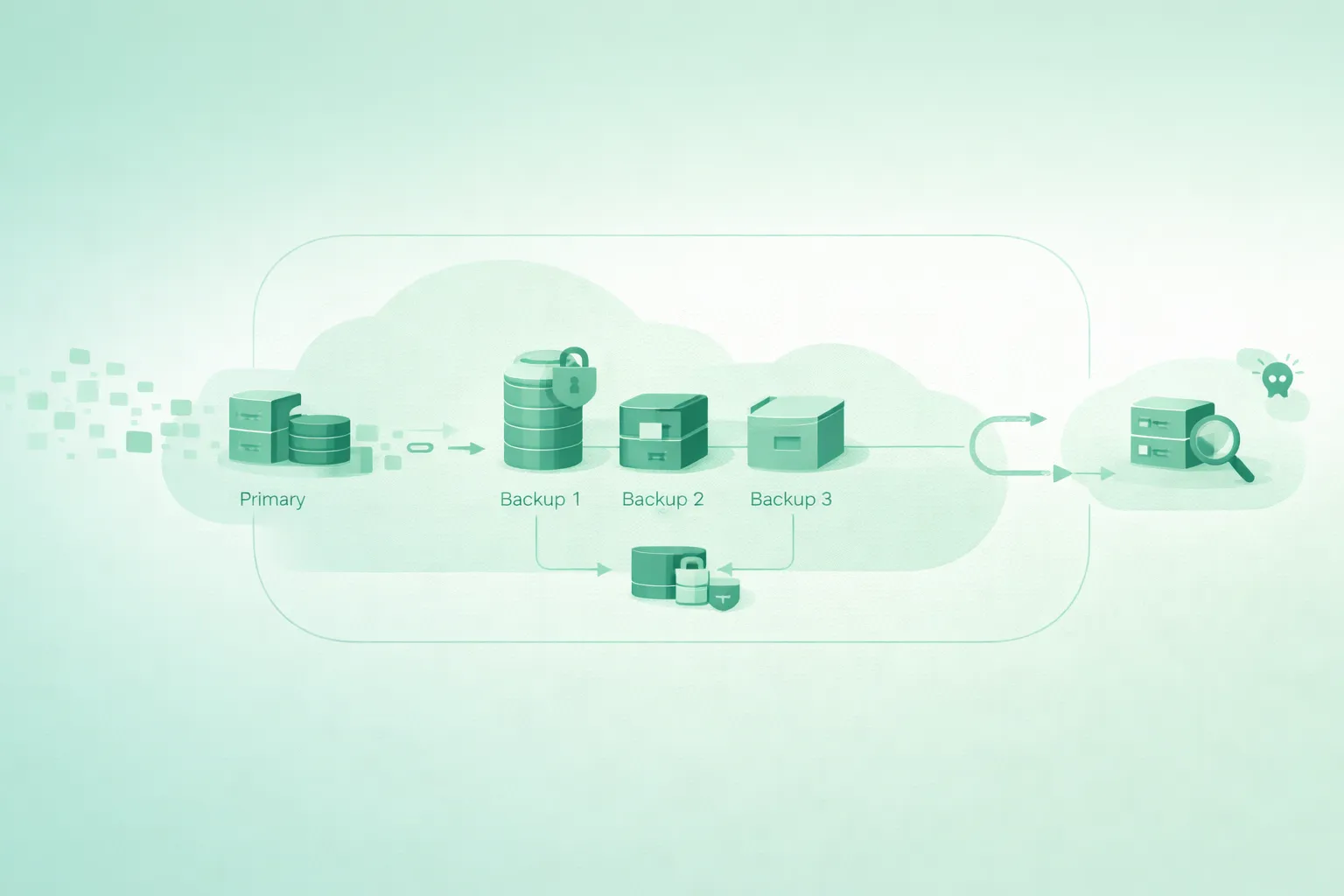
Backups fail silently. Jobs “succeed,” storage bills increase, and then the day you need a restore you discover: the backup was incomplete, the credentials are gone, or ransomware encrypted both production data and your backups.
This guide gives small teams a practical strategy: implement 3-2-1, add immutability (WORM), isolate backups from production credentials, and run restore testing so you can prove recoverability.
If you do only one thing
Make one backup copy immutable and stored in a separate account or boundary. That single decision changes the outcome of most ransomware events.
1. Start with recovery goals (RPO/RTO)
Before choosing tools, define your recovery targets. Otherwise you will either overpay or still fail when an incident hits.
| Goal | Meaning | Example question | Small-team default |
|---|---|---|---|
| RPO (Recovery Point Objective) | Maximum acceptable data loss (time) | “How much data can we lose?” | 1–24 hours (depends on writes) |
| RTO (Recovery Time Objective) | Maximum acceptable downtime | “How long can we be down?” | 1–8 hours for many SaaS teams |
Example: translating RPO into schedule
If your RPO is 4 hours, a daily backup is insufficient. You need at least one backup every 4 hours, and your restore process must be tested to meet RTO.
2. What to back up (and what people forget)
Teams usually back up “the database” and forget everything required to rebuild the system around it. Backups should cover data and state.
Critical backup inventory
- Databases: full backups + transaction logs (or incremental equivalents) when supported.
- Object storage: user uploads, generated assets, critical buckets.
- Secrets: vault exports/keys (with strict protection), encryption key material as required.
- Infrastructure as Code state: state files, modules, and deployment manifests.
- Config: environment variables, feature flags, service configs.
- Identity and access: role definitions and SSO/IAM configuration snapshots.
- Recovery documentation: runbooks, contact lists, and “where the backups live.”
Common gap
If you cannot restore encryption keys or secret material (where applicable), your backups may be unusable. Treat key management as part of the backup strategy.
3. 3-2-1 in cloud terms (with real isolation)
3-2-1 is a principle, not a product. In cloud terms, it should translate to: production data + a backup copy in a different storage boundary + an offsite/isolated copy you can’t delete.
3-2-1 cloud layout (diagram)
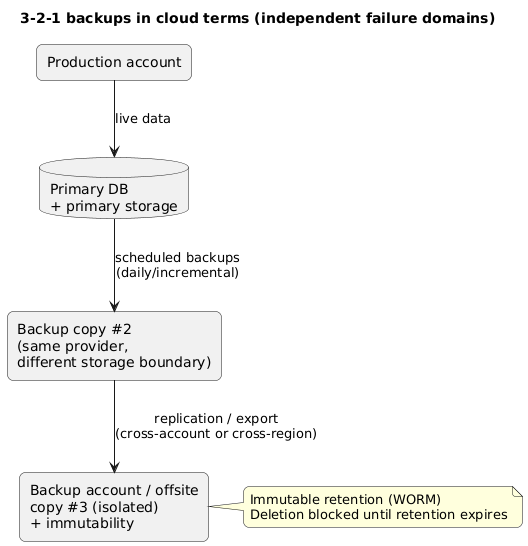
The key is independence. If the same credentials can delete production and backups, you do not have a 3-2-1 setup—you have three copies that fail together.
Example: a minimal small-team 3-2-1
Copy 1: production database + primary storage. Copy 2: automated daily backups to a backup bucket. Copy 3: replicated backup bucket in a separate account with object lock enabled and policy preventing deletion.
4. Immutability (WORM) and ransomware resistance
Immutability means backups cannot be changed or deleted until a retention window expires. This is often implemented with object lock / WORM retention. It’s the difference between “we got ransomware” and “we can recover.”
Immutable backups threat model
- Accidental deletion: operator deletes the wrong bucket/snapshot.
- Compromised credentials: attacker deletes backups to maximize damage.
- Ransomware: encrypts data and tries to destroy restore paths.
- Insider threat: malicious actor attempts to remove evidence and backups.
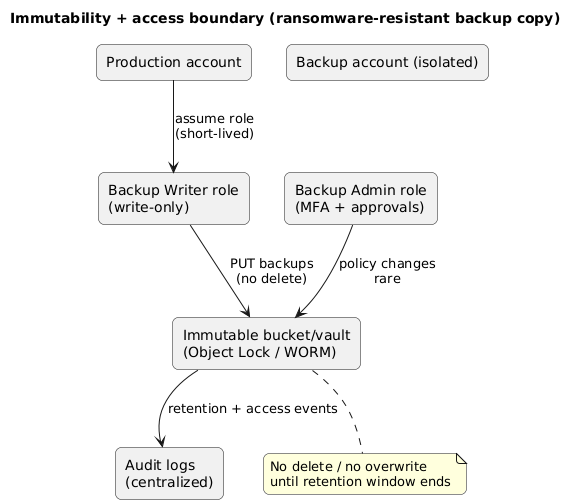
Immutability and access boundaries (diagram)
Design rule
The account that runs production should not be able to delete the immutable backup copy. Make backup deletion a separate administrative path with strong controls.
5. Retention tiers that balance cost and safety
Retention is where backup strategies usually become expensive. The solution is to keep short retention in “fast” storage and move older copies to cheaper tiers while preserving immutability requirements where needed.
Common small-team retention model
| Tier | Frequency | Retention | Use case |
|---|---|---|---|
| Hot | Hourly / every 4 hours | 48–72 hours | Fast restores after mistakes |
| Warm | Daily | 14–30 days | Operational recovery |
| Cold | Weekly or monthly | 3–12 months | Disaster recovery / compliance |
Retention trap
Long retention without restore testing creates a false sense of security. Keep retention only as long as you can realistically restore and validate.
6. Securing backup credentials and permissions
Backups fail when credentials are too powerful (attackers delete everything) or too fragile (nobody can access them during an incident). Use least-privilege roles and separate administrative domains.
Minimum permission model
- Backup writer role: can write new backups, cannot delete or change retention policies.
- Restore reader role: can read backup data for restores, cannot delete.
- Backup admin role: rare use; can change policies with MFA and approvals.
- Break-glass: emergency-only access, monitored and time-bound.
Credential hygiene
Avoid static long-lived keys. Prefer short-lived tokens, role assumption, and strong audit trails. Store secrets in a vault and restrict who can read them.
7. Restore testing and recovery drills
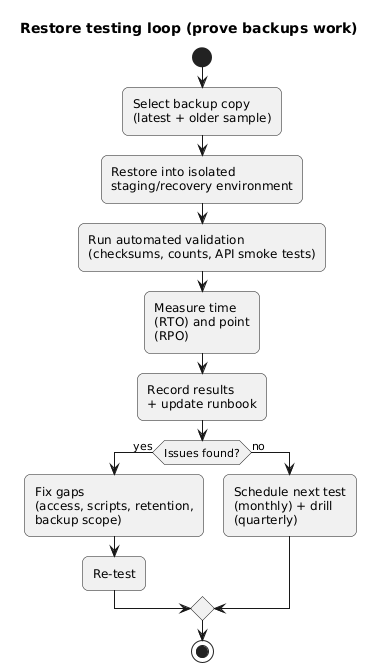
A backup without a tested restore is not a backup—it is an expensive assumption. Testing should include: automated verification and human recovery drills.
Restore testing loop (diagram)
What to test (practical)
- Restore to isolated environment: never test on production.
- Data integrity checks: record counts, checksums, or application-level invariants.
- App boots successfully: can the app connect to the restored database and serve basic requests?
- Measure RTO: how long does restore take end-to-end?
- Document steps: update runbook with exact commands, access paths, and owners.
Example: a lightweight monthly drill
Once a month: restore the latest backup into a staging account, run a scripted health check (API + DB queries), and record the total time. If restore time exceeds your RTO, adjust the plan (smaller datasets, faster tiers, better automation).
8. Copy/paste runbook and checklist
Cloud backup strategy for small teams (runbook)

1) Define goals
- Set RPO (max data loss) and RTO (max downtime) per system.

2) Inventory
- List systems: databases, object storage, configs, secrets, IaC state, identity config.
- For each: backup method, frequency, retention, restore owner.

3) Implement 3-2-1
- Copy 1: production data.
- Copy 2: backup copy in separate storage boundary.
- Copy 3: isolated offsite/cross-account copy with immutability.

4) Add immutability
- Enable object lock/WORM on the isolated copy.
- Ensure production roles cannot delete or change retention.

5) Secure access
- Backup writer: write-only, no delete.
- Restore reader: read-only for restores.
- Backup admin: MFA + approvals, limited use.
- Break-glass: emergency only, monitored.

6) Retention tiers
- Hot: frequent, short retention.
- Warm: daily, moderate retention.
- Cold: weekly/monthly, long retention.

7) Restore testing
- Monthly restore test into isolated environment.
- Quarterly end-to-end recovery drill.
- Record results, update runbooks, fix gaps.

8) Monitoring
- Alert on backup job failures, missed schedules, anomaly changes in backup size.
- Alert on retention/immutability policy changes.
9. FAQ
Do snapshots count as backups?
Sometimes, but only if they are independent enough to survive the same failure or compromise that hits production. For ransomware resistance, you usually need an isolated and immutable copy.
How much does immutability cost?
The storage cost can be modest, but the operational discipline is the real cost: you cannot “clean up” by deleting immutable copies early. Plan retention carefully and use lifecycle tiers to control spend.
What should we test first?
Test the restore of your primary database first, then object storage, then the full system rebuild path. Most teams learn that access and runbooks are the limiting factors, not storage.
Key terms (quick glossary)
- 3-2-1
- Three copies of data, on two different storage types/boundaries, with one copy offsite/isolated.
- Immutability / WORM
- Write-once-read-many retention that prevents deletion or modification until retention expires.
- RPO
- Maximum acceptable data loss measured in time.
- RTO
- Maximum acceptable time to restore service.
- Restore test
- A controlled recovery of backups into an isolated environment to validate recoverability and measure timing.
- Recovery drill
- An end-to-end exercise of the recovery process, including people, access, tooling, and validation.
Worth reading
Recommended guides from the category.
