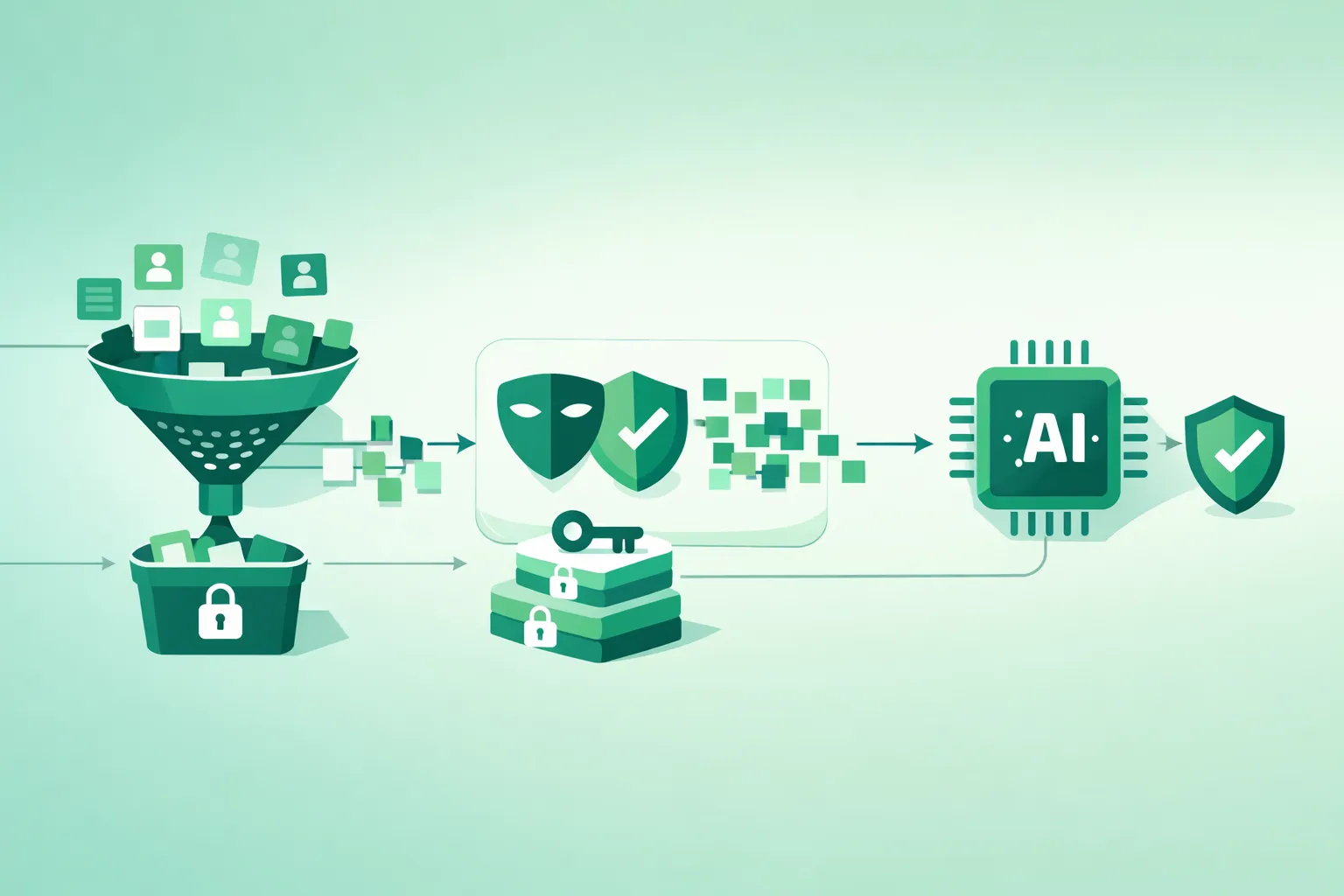
If you build AI products long enough, you learn a hard truth: personal data rarely leaks because one engineer typed something reckless. It leaks because the system quietly creates many “secondary” copies of user content: prompts, retrieval chunks, debug logs, evaluation sets, cached responses, vendor tickets, and analytics events. Each copy is a new exposure surface.
This guide is a practical privacy engineering playbook for AI and LLM projects. The goal is simple: minimize PII exposure across the full lifecycle (collection → storage → training → inference → logging → retention). You will learn what to do, why it matters, and how to implement it step by step in a way that remains operationally realistic.
Important note
This is a technical guide, not legal advice. Privacy obligations differ by jurisdiction, sector, and contract. Use this as an engineering baseline and validate decisions with your privacy counsel or compliance team.
The mindset that prevents most incidents
Treat PII as a toxic asset: keep as little of it as possible, keep it for as short as possible, move it through as few systems as possible, and make access auditable and hard to misuse.
1. Where PII leaks in real AI systems
“PII exposure” is not one threat. It is a portfolio of failure modes. If you only defend against one (for example, “don’t train on customer data”), you can still leak PII through half a dozen other routes.
1.1 The most common exposure paths
- Prompt content: users paste emails, resumes, medical notes, contracts, addresses, or account details into chat. If your system forwards prompts to third parties, the exposure boundary expands immediately.
- RAG retrieval: retrieval can pull personal data from internal documents and place it into model context. A single over-broad query can bring sensitive content into the prompt.
- Logs and traces: raw prompts and model outputs are tempting to log for debugging. Observability tools can become accidental PII data lakes.
- Caches: response caches, vector caches, and retrieval caches can persist personal data longer than intended when TTLs are missing or keys are too broad.
- Evaluation sets: teams copy real user conversations into “test fixtures” that then spread into repos, notebooks, CI logs, and vendor tooling.
- Model memory risks: fine-tuning or continual learning on raw personal data can increase memorization and regurgitation risk.
- Prompt injection and tool abuse: attackers may attempt to exfiltrate data by forcing retrieval, overriding instructions, or abusing tools.
- Human workflows: support, sales, and engineering may paste user data into vendor tickets or playgrounds. People are part of the system.
A realistic “small” leak
A developer enables debug logging for a week to investigate latency. Logs include raw prompts and RAG context. Logs are shipped to a third party, retained for 90 days, and searchable by hundreds of employees. Nothing was “hacked,” but the exposure boundary grew dramatically.
1.2 The privacy threat model you should write down
Before you implement controls, define what you are protecting against. A practical privacy threat model for AI projects usually includes:
- External attackers: exfiltration via prompt injection, broken ACLs, leaked credentials, insecure endpoints.
- Insider misuse: employees/contractors accessing raw user content beyond legitimate need.
- Vendor exposure: third-party systems storing or processing prompts, outputs, logs, or tickets.
- Accidental propagation: PII copied into weak-governance systems (logs, spreadsheets, notebooks, backups).
- Model leakage: memorization, regurgitation, membership inference, or inversion risks.
2. Start with a privacy-first data flow model
Most privacy failures happen because teams do not have a shared picture of where data travels. Your first deliverable should be a data flow map that matches real services and real storage locations.
A privacy-first AI data flow (diagram)
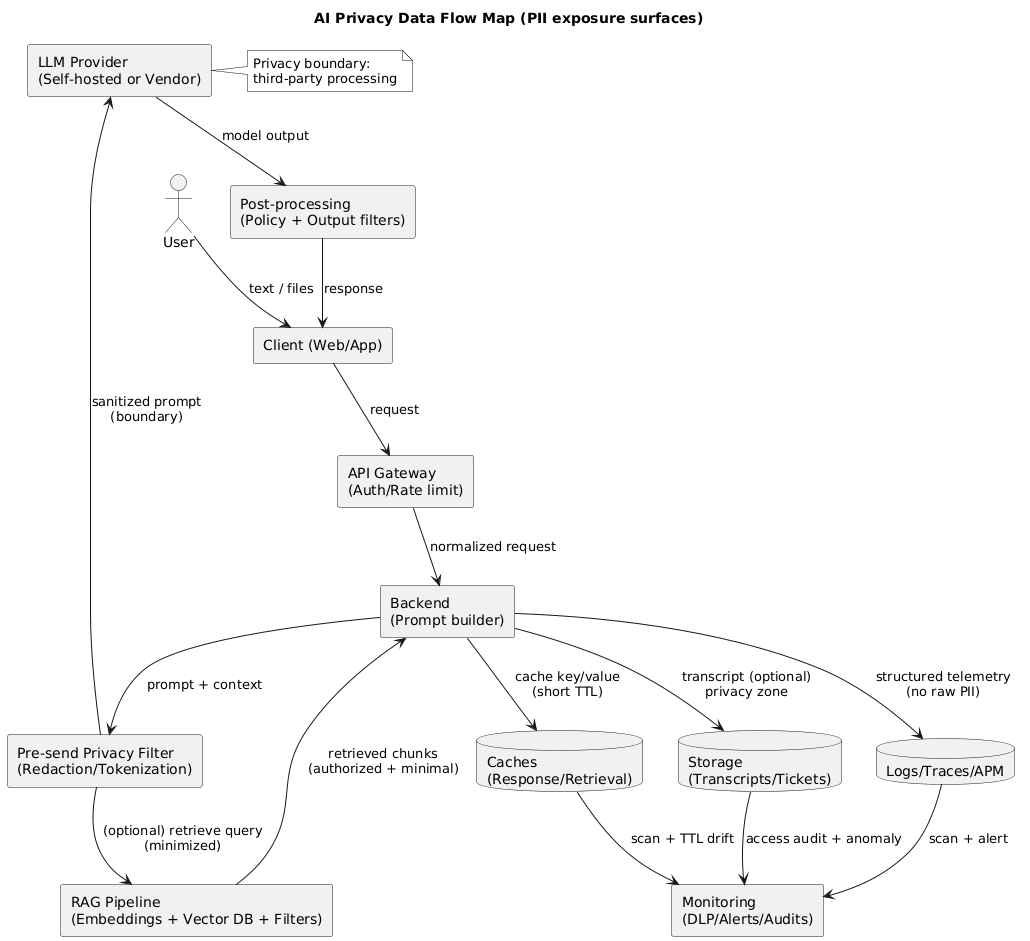
2.1 A practical AI data flow map
Draw the end-to-end flow for one user request. Include every system that can see user content:
- Client: web/app UI, browser storage, mobile logs.
- API gateway and backend: auth, rate limiting, request normalization.
- Prompt construction: system templates, user input, conversation history, tool outputs.
- RAG: embeddings, vector DB, retrieval filters, doc store, chunking pipeline.
- LLM call: hosted model or vendor API boundary.
- Post-processing: parsing, policy filters, redaction, safety checks.
- Observability: logs, traces, APM, error reporting, analytics events.
- Storage: transcripts, tickets, caches, backups.
2.2 Define “privacy boundaries” explicitly
A privacy boundary is where you lose direct control over data handling. Typical boundaries include:
- Third-party LLM APIs and their sub-processors.
- Managed logging/APM vendors where payloads can be stored.
- Analytics tools that capture event properties or session replay.
- External ticketing systems and communication channels.
Good boundary design
If a boundary is unavoidable, reduce what crosses it. Send tokens or masked data instead of raw identifiers. Prefer derived signals (labels, intents, policy flags) over raw text. Make “raw text leaving our boundary” a conscious exception with documented justification.
3. Step 0: Inventory and classify personal data
You cannot minimize what you have not identified. In AI projects, the inventory must include prompts, retrieved text, tool outputs, logs/traces, caches, evaluation sets, and embeddings.
3.1 Build a pragmatic PII taxonomy (3 tiers)
- Tier 0 (No personal data): aggregated metrics, synthetic test inputs, non-identifying telemetry.
- Tier 1 (PII / personal data): names, emails, phone numbers, user IDs, IPs, account-linked content.
- Tier 2 (Sensitive / regulated): government IDs, payment data, medical info, auth secrets, children’s data.
3.2 Identify PII across AI-specific artifacts
- Prompts and chat history (including “hidden” system context if user-specific values are injected).
- RAG corpora (CRM exports, ticket histories, transcripts, PDFs, emails, call notes).
- Embeddings (treat as derived personal data if linkable to a person or source).
- Fine-tuning datasets (examples, preference labels, human feedback, synthetic augmentations).
- Evaluation datasets (golden prompts often contain real user content without discipline).
- Operational copies (caches, backups, exports).
3.3 Add data labels at ingestion (not later)
Label data at ingestion where you have the best context: the product surface and the API boundary. Those labels should drive: logging behavior, storage location, retention, access controls, and whether content can cross privacy boundaries.
Do not rely on “we won’t store it”
Even if you do not intentionally store raw text, your observability stack might. Inventory must include logs, traces, crash reports, analytics events, and vendor tooling. If it can capture payloads, it can store PII.
4. Step 1: Minimization and purpose limitation
Data minimization is the highest-leverage privacy control. Every time you remove personal data from a pipeline, you reduce risk across storage, access, monitoring, breach impact, and compliance scope.
4.1 Decide what the model actually needs
- Replace identity-bearing inputs with purpose-limited attributes (plan type, region, account status).
- Prefer categories over raw values (country instead of address; age range instead of birthdate).
- Keep “raw identifiers in prompts” as an explicit exception with documented justification.
4.2 Prefer server-side joins over prompt-side joins
A common anti-pattern is passing raw personal data to the model and asking it to “figure it out.” A safer pattern is: resolve context in your backend, then provide the model only minimal facts needed.
4.3 Establish retention rules early
- How long you retain raw prompts/outputs (if at all).
- How long you retain derived artifacts (embeddings, summaries, classifications).
- How deletion propagates into caches and backups (or how TTL makes deletion effective).
5. Step 2: Redaction, tokenization, and pseudonymization
Minimization answers “do we need this data at all?” De-identification answers “if we need something, can we reduce identifiability?” In AI pipelines, de-identification must be applied consistently across prompts, RAG corpora, logs, and evaluation sets.
5.1 Choose the right technique
-
Redaction (masking): remove sensitive spans (e.g.,
[EMAIL]) when exact value is not needed. -
Pseudonymization: stable aliases (e.g.,
User_48291) for coherence without identity exposure. - Tokenization: reversible tokens stored in a secure vault for workflows that must re-identify under strict control.
- Generalization: bucket precise values (address → city/country; timestamp → date).
Tokenization vault architecture (diagram)
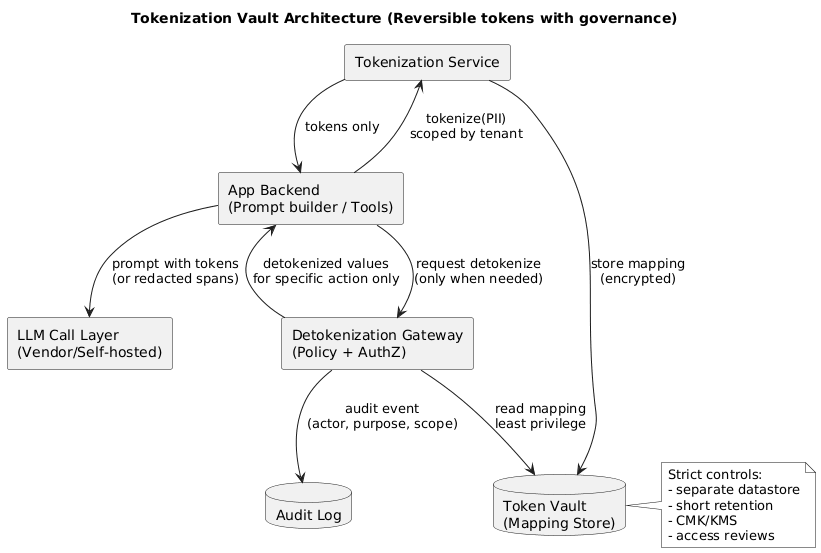
5.2 Build a deterministic tokenization service (the safe way)
- Deterministic tokens: same input → same token within a scope (tenant/environment) for consistency.
- Scoped tokens: tokens from Tenant A must not be resolvable in Tenant B.
- Separate vault: mappings in a dedicated, access-controlled datastore with audit logs.
- Short retention: mappings kept only as long as business purpose requires.
- Strict detokenization policy: only specific services, only for specific actions, with authorization and audit events.
The most common tokenization mistake
Teams tokenize data but then log the token mapping (or store it in the same database as application logs). That collapses the separation and destroys the value of tokenization. Token mapping storage must be logically and operationally separate.
5.3 Apply de-identification before RAG and embeddings
If your embeddings and vector DB contain raw PII, you have created a long-lived copy of personal data. In many applications, embedding redacted text preserves retrieval quality while dramatically reducing exposure.
5.4 De-identify evaluation and training sets by default
Evaluation sets spread fast (repos, notebooks, CI logs, vendor tools). A strong default is: evaluation sets contain only redacted or synthetic content. If you truly need real examples, store them in a restricted, auditable location with short retention.
6. Step 3: Storage, access, and key management
Once you have minimized and de-identified data, you still need robust security controls. Privacy also requires: purpose limitation, access justification, and traceability for personal data use.
6.1 Enforce least privilege for AI pipeline components
- RAG retriever access only to needed collections.
- Separate read vs write capabilities for tools (especially record updates).
- Tenant-scoped permissions in multi-tenant systems (avoid global keys).
- Break-glass access for raw PII with extra approvals and logging.
6.2 Encrypt everywhere, but focus on key governance
- Central KMS: rotation, limited usage, logged key access.
- Separate by environment: dev must not decrypt prod PII.
- Separate by sensitivity: token vault keys more restricted than app keys.
- Protect backups: encryption keys access-controlled and audited.
6.3 Log access to personal data, not just system events
- Audit reads of raw prompts/transcripts.
- Audit detokenization operations.
- Audit bulk exports and admin tooling actions.
- Alerts for unusual access patterns (time, volume, scope).
A useful operational split
Store raw user content in a “privacy zone” with restricted access and short retention. Store non-sensitive derived signals in a “product analytics zone” with broader access. Treat cross-zone movement as an explicit, logged action.
7. Step 4: Safe training and fine-tuning practices
If you fine-tune, continually learn, or store long-term memory, treat the dataset as a regulated artifact: provenance, access controls, versioning, and deletion rules.
7.1 Decide whether you truly need fine-tuning
- Prompt/system design often solves consistency issues.
- RAG grounds answers without memorizing user-specific facts.
- Tooling should handle sensitive actions deterministically.
7.2 If you do fine-tune, remove PII first
A safe default policy is: no raw PII in training data. Replace/remove identifiers. If a use case truly requires identity (rare), use tokenization with strict governance and evaluate leakage risk explicitly.
7.3 Reduce memorization risk
- Deduplicate training examples (repetition increases memorization risk).
- Prefer patterns/templates over real customer instances.
- Store personalization in external memory stores, not in weights.
- Never cross-train across tenants.
7.4 Add privacy testing to your evaluation plan
- Regurgitation probes: prompts attempting to extract secrets/training examples.
- Red-team scenarios: prompt injection and retrieval abuse attempts.
- Canary strings: seeded markers in test corpora to detect unintended propagation.
8. Step 5: Inference-time guardrails (prompts, RAG, logs)
Inference is where real user data flows. If you get inference-time privacy right, you can prevent most incidents even if training pipelines are imperfect.
8.1 Add a pre-send privacy filter before every model call
- Detect/redact high-risk patterns (emails, phone numbers, IDs, credentials).
- Apply allowlists (only approved fields can cross a privacy boundary).
- Block sending when content is too sensitive and return a safe UX response.
- Produce a redaction report for auditing (what was removed, why).
8.2 Harden RAG: retrieval privacy is prompt privacy
- Access-controlled retrieval: enforce authorization in code (filters), not in prompts.
- Tenant/user scoping: missing tenant filters is a critical incident class.
- Minimal context injection: top-k only, trim to shortest supporting span.
- Prompt injection defense: treat retrieved text as untrusted input.
8.3 Logging: replace raw text with structured telemetry
- Metadata: request ID, tenant ID, route.
- Performance: latency, time-to-first-token, retries.
- Usage: token counts, model name/version.
- Policy signals: redaction counts, safety flags.
- Pseudonymous IDs: hashed/tokenized identifiers, not emails/names.
If you must store any text for quality, constrain it:
- Default-off sampling enabled explicitly.
- Redact first (store redacted versions only).
- Short retention (days, not months).
- Restricted access with auditing.
- Separate storage from general logs/analytics.
8.4 Caches: control the “silent persistence” layer
- Short TTLs for anything derived from user text.
- Scope caches by tenant and user where personalization exists.
- Avoid caching outputs that include Tier 2 data unless strongly justified.
9. Step 6: Vendor, contract, and compliance controls
Even excellent engineering can be undermined by weak vendor governance. If personal data crosses into third-party services, your contract and configuration must match your privacy posture.
9.1 Ask the right questions of AI and observability vendors
- Data usage: is data used to train/improve models? is opt-out available? what is the default?
- Retention: how long are prompts/outputs stored? can you set retention to days?
- Access: who at the vendor can access your data? is access audited?
- Sub-processors: who handles the data and where is it processed?
- Security: encryption, isolation, incident response SLAs, attestations.
- Deletion: can you delete specific records and prove deletion?
9.2 Align internal documentation with reality
- Claiming “we do not store prompts” while logs store them.
- Claiming “deleted on request” while backups/caches persist for months.
- Claiming “no third parties” while analytics/APM/ticketing receives identifiers.
9.1 Monitoring, detection, and privacy testing
Mature privacy programs assume leaks can happen and invest in early detection. The goal is to detect issues quickly, reduce blast radius, and generate audit-quality evidence of what happened.
9.1.1 What to monitor (high-signal, low-noise)
- PII scans in logs/traces: continuous sampling with pattern + ML detectors.
- Detokenization events: alert on unusual volume, time, tenant scope, or actor.
- RAG retrieval anomalies: spikes in retrieved chunk length, cross-tenant hits, or sensitive collections.
- Storage access: raw transcript reads, bulk exports, admin tooling use.
- Retention drift: TTL misconfigurations and “forever” buckets.
9.1.2 Practical privacy tests you can automate
- Canary strings: insert unique markers into test corpora and verify they never appear in logs or outputs.
- Prompt injection regression: run known jailbreak/exfil patterns against the system weekly.
- RAG authorization tests: unit tests that prove tenant/user filters are always applied.
- Leakage probes: prompts that try to elicit “previous user message” or “system prompt” content.
Operational tip
Track a single metric that leadership understands: cost per safe, successful request is great for performance; for privacy, a useful counterpart is percentage of sampled requests with zero raw PII in logs.
9.2 Incident response playbook for AI data leaks
If you discover or suspect that personal data leaked through an AI pipeline, speed matters. Your playbook should be actionable for engineering and privacy teams, not just a policy document.
Incident response flow (diagram)
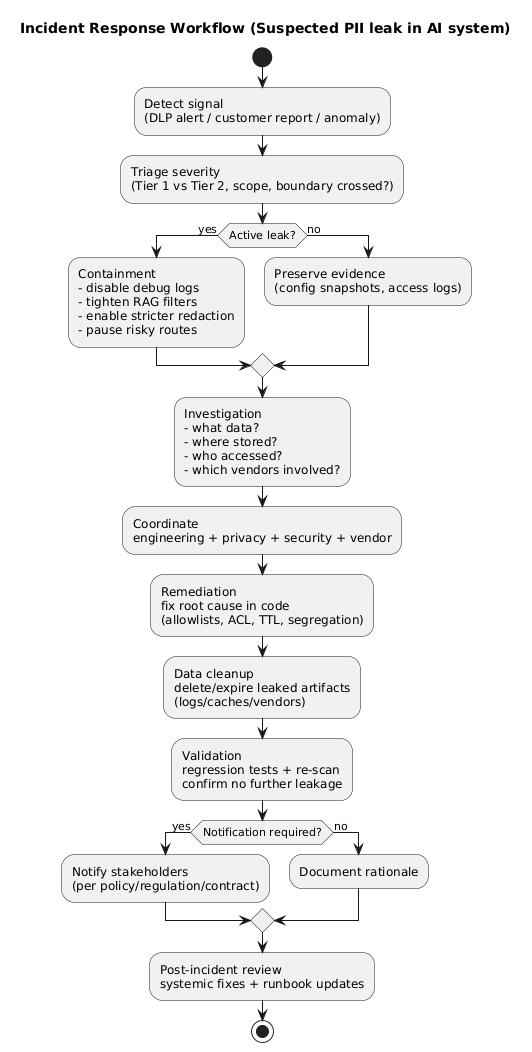
9.2.1 Triage and containment (first hours)
- Stop the bleeding: disable debug logging, reduce sampling, pause risky routes or providers.
- Contain scope: tighten RAG filters, reduce context injection, enforce stricter pre-send redaction.
- Preserve evidence: snapshot relevant configs and access logs (with controlled access).
- Establish an incident channel: single owner, clear decision log, time-stamped actions.
9.2.2 Investigation (next 24–72 hours)
- Identify what data was exposed (Tier 1 vs Tier 2), where it traveled, and who could access it.
- Verify vendor retention windows and deletion capabilities for affected data.
- Determine root cause: missing filters, logging misconfig, vendor misrouting, ACL bug, tool abuse, human process failure.
9.2.3 Remediation and prevention
- Implement guardrails in code (not prompts): allowlists, hard blocks, and tenant scoping.
- Reduce raw text retention and segregate sensitive stores.
- Add regression tests for the specific failure mode (RAG ACL, logging, detokenization).
- Run a post-incident review focused on system fixes, not blame.
10. Practical checklist (copy/paste)
- Map the data flow (client → backend → RAG → model → logs → storage). Mark every privacy boundary.
- Define a PII taxonomy (Tier 0/1/2) and label data at ingestion (prompts, tool outputs, RAG docs, embeddings).
- Minimize inputs: replace identifiers with attributes, prefer server-side joins, enforce purpose limitation.
- Pre-send filtering: redact/tokenize high-risk patterns; block sending when content is too sensitive.
- De-identify RAG: store redacted retrieval text; gate raw access with authorization and auditing.
- Tokenization governance: separate vault, scoped tokens, audited detokenization, short retention.
- Lock down access: least privilege, tenant scoping, break-glass access, audit reads and exports.
- Safe training: remove PII, deduplicate, avoid unique identifiers, add privacy-focused tests.
- Fix logging defaults: structured telemetry, not raw text; if text is needed, redact and restrict.
- Control caches: short TTLs, correct scoping, avoid caching sensitive outputs.
- Vendor controls: validate retention, access, sub-processors, training usage, deletion workflows.
- Monitor continuously: PII scans, alerts for anomalies, regular red-team and regression runs.
- Incident readiness: playbook, owners, evidence capture process, vendor escalation paths.
11. Frequently Asked Questions
What counts as PII in AI and LLM projects?
Treat any information that can identify a person directly or indirectly as PII/personal data, including names, emails, phone numbers, IDs, precise location, user account identifiers, and combinations of attributes. In LLM workflows, PII can appear in prompts, retrieved documents, logs, evaluation datasets, and tool outputs.
How do I stop PII from being sent to an external LLM API?
Use data minimization and a pre-send redaction/tokenization layer. Apply allowlists for fields that can leave your boundary, block or mask sensitive patterns, and prefer server-side RAG that returns only the minimal text required. Enforce policy in code, not in prompts.
Is anonymization realistic, or should I use tokenization/pseudonymization?
True anonymization is difficult because AI datasets often contain quasi-identifiers that can re-identify people when combined. In most production settings, tokenization or pseudonymization with strict access controls is more practical, because it reduces exposure while preserving utility and supports reversibility under controlled conditions.
Can fine-tuning cause a model to memorize personal data?
It can. The risk depends on the size and uniqueness of the data, the training method, and evaluation. Reduce risk by removing PII before training, limiting training data to what is necessary, avoiding raw identifiers, and validating with privacy tests and red-team prompts.
What should I log for debugging without collecting PII?
Log metadata and structured signals rather than raw text: request IDs, timestamps, token counts, latency, route decisions, safety flags, and hashed/pseudonymous user IDs. If you must log text, redact first, separate access, set short retention, and restrict who can view it.
Key terms (quick glossary)
- PII / Personal data
- Information that identifies a person directly (name, email) or indirectly (account ID, device identifiers, unique combinations of attributes).
- Data minimization
- A privacy principle: collect and process only the minimum personal data needed for a defined purpose, and keep it only as long as necessary.
- Purpose limitation
- Using personal data only for specific, explicit purposes and preventing “secondary” use without a valid basis.
- Redaction
-
Removing or masking sensitive data (e.g., replacing an email address
with
[EMAIL]) so it no longer appears in prompts, logs, or stored artifacts. - Pseudonymization
- Replacing identifiers with pseudonyms to reduce identifiability while keeping some linkage under controlled conditions.
- Tokenization
- Replacing sensitive values with reversible tokens and storing the mapping in a separate, access-controlled vault.
- Privacy boundary
- A point where data leaves your direct control (e.g., a vendor API, managed logging platform, analytics provider).
- RAG
- Retrieval-Augmented Generation: augmenting model prompts with retrieved context from a document store or vector database.
- Prompt injection
- An attack where malicious input attempts to override instructions or force the system to reveal sensitive data or call tools in unsafe ways.
- Retention
- How long data is stored before deletion. Short retention reduces privacy risk by reducing the volume of personal data available to be exposed.
Worth reading
Recommended guides from the category.
