
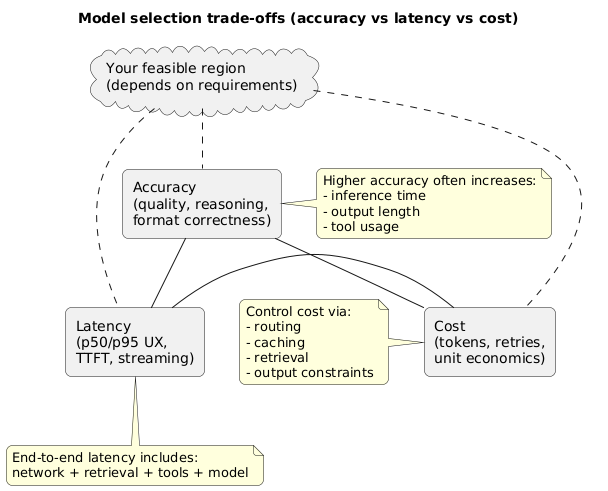
Choosing an AI model is not just “pick the smartest model.” It’s a product decision: your users feel latency, finance feels cost, and your team owns accuracy and reliability. The best teams treat model selection like any other engineering trade-off: define targets, measure outcomes, and ship with guardrails.
This guide gives you a practical workflow to balance accuracy, latency, and cost without guessing. You’ll also see how routing, caching, and retrieval can get you “good enough” quality at a fraction of the price—while keeping UX snappy.
The simplest rule that works
Define a minimum quality bar first. Then choose the cheapest setup that consistently meets it under your latency budget—using routing and fallbacks to handle edge cases.
1. Start with product requirements (not model names)
“Accuracy” means different things across features. For a customer support assistant, it’s factual correctness and policy compliance. For a writing helper, it’s tone and structure. For an extraction feature, it’s schema compliance and low error rates.
Define your acceptance criteria
- Primary task: what is the feature supposed to do (in one sentence)?
- Quality bar: what is a pass vs fail (examples beat vague statements)?
- UX constraint: what is the end-to-end p95 response time you can tolerate?
- Unit economics: what is the maximum cost per successful outcome?
- Reliability: what happens when the provider is slow or errors?
Common mistake
Teams optimize for “best model quality” and later discover their p95 latency is too high, cost explodes under peak traffic, and retries turn one request into three billable calls.
Model selection trade-offs (diagram)
2. Build a latency budget (end-to-end, not just model time)
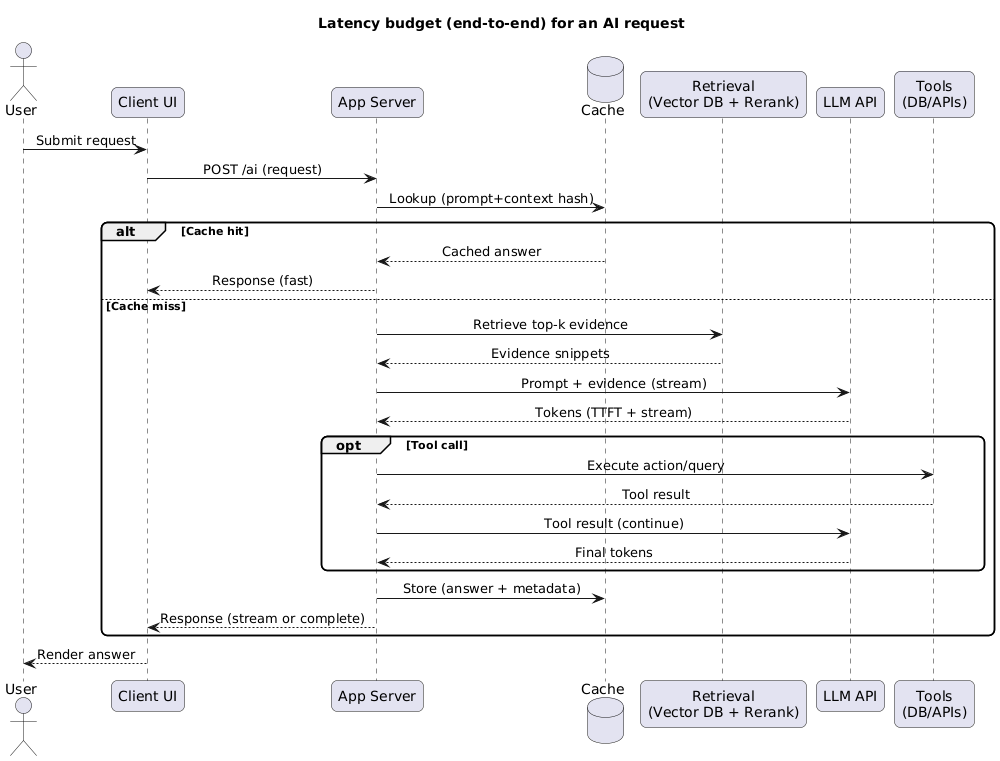
Users don’t experience “model latency.” They experience the total time from click to useful output. That includes: network, auth, retrieval, tool calls, safety checks, streaming, and UI rendering.
Latency budgeting (what to include)
- Client + network: DNS/TLS, mobile variability, retries, slow connections.
- Server overhead: auth, prompt assembly, logging, queueing.
- Retrieval: vector search, reranking, document fetch, chunking.
- Model: time-to-first-token, tokens/second, and completion time at p95.
- Tools: API calls, database queries, webhooks, timeouts.
- Post-processing: parsing, schema validation, redaction, UI formatting.
Latency budget and system design (diagram)
UX trick that changes everything
If you stream tokens, “time to first token” matters more than total time. Many apps feel fast when the first meaningful output arrives quickly—even if the full answer takes longer.
3. Estimate cost (the math that matters)
LLM cost is usually token-based, but what kills budgets is variance: long contexts, retries, tool loops, and verbose outputs. Cost estimation is not about a single number— it’s about understanding your distribution.
Cost model (simple and useful)
Expected cost per request ≈
  (avg_input_tokens × input_price)
+ (avg_output_tokens × output_price)
+ (avg_tool_calls × tool_cost)
+ retry_factor
Where cost typically comes from
- Prompt bloat: oversized system prompts, duplicated policies, repeated examples.
- Context bloat: sending entire documents instead of retrieved excerpts.
- Unbounded outputs: no caps, no structure, no stop conditions.
- Retries: format failures, tool-call errors, timeouts.
- Evaluation drift: prompt changes silently increasing average tokens.
Practical cost controls that don’t ruin quality
- Constrain output: require a format, max length, and “answer first” structure.
- Cache what’s stable: embeddings, retrieval results, and deterministic summaries.
- Use retrieval: send the most relevant excerpts, not the whole knowledge base.
- Two-pass patterns: draft with a cheap model; validate/upgrade only when needed.
- Token caps: pick a max that matches your UX (and enforce it).
4. Measure accuracy with a small eval (you don’t need thousands of cases)
You can’t choose wisely without measurement. The minimum viable approach is a small, representative evaluation set and a few metrics that reflect real production outcomes.
Build a “gold” mini-eval in a day
- 30–50 typical cases: common user flows.
- 10–20 edge cases: ambiguity, long inputs, missing details.
- 10–20 failure cases: real regressions you’ve seen (format breaks, wrong tool usage).
- Hard gates: JSON/schema validity, refusal correctness (where relevant), tool-call correctness.
Example scoring approach
| Metric | Type | Why it matters | How to measure |
|---|---|---|---|
| Task success rate | Hard/soft | Did the output solve the user’s need? | Rules + small rubric |
| Format pass rate | Hard gate | Prevents parser/tool failures | Strict validator |
| Hallucination risk | Soft | Wrong facts break trust | Spot-check + “unknown” handling |
| p95 latency | Hard gate | UX consistency | Production-like test runs |
| Cost per success | Hard gate | Unit economics | Tokens + retries + tool costs |
Decision-quality signal
The most useful output of an eval is not a single score—it’s a ranked list of failures. If Model A fails schema compliance twice as often as Model B, your “accuracy” debate is over.
5. Context length, retrieval, and grounding
If your app relies on internal knowledge (docs, tickets, policies), model choice is tightly coupled to your retrieval strategy. A weaker model with strong retrieval often beats a stronger model with poor context.
When you should prioritize stronger reasoning
- Multi-step planning: the model must synthesize constraints, compare options, or debug.
- Complex transformations: long-form rewriting, refactors, structured extraction from messy text.
- Tool orchestration: the model must call tools in the correct order and recover from errors.
When you can lean on retrieval instead
- Answering from known sources: manuals, FAQs, internal docs, knowledge bases.
- Consistent templates: emails, summaries, reports with stable structure.
- Simple classification: tagging, triage, routing, spam detection.
Grounding failure mode
Sending “everything” as context often reduces accuracy: it dilutes relevant evidence and increases cost. Prefer retrieval + small, high-signal excerpts and ask follow-up questions when needed.
6. Reliability, fallbacks, and rate limits
Production success depends on what happens on a bad day: slow responses, timeouts, throttling, or provider incidents. Your model strategy should include graceful degradation.
Reliability techniques that pay off
- Timeouts with partial results: return a short answer with an option to “continue.”
- Fallback models: route to a cheaper/available model when the primary errors.
- Idempotent tool calls: avoid double-charging or duplicate actions on retries.
- Rate limit protection: queueing + backoff + per-user throttling.
- Schema validation: fail fast, then auto-repair or re-ask with tighter constraints.
7. Strategies to hit accuracy, latency, and cost together
Most teams win by combining multiple techniques rather than relying on one “perfect” model. Below are patterns that show up repeatedly in successful AI apps.
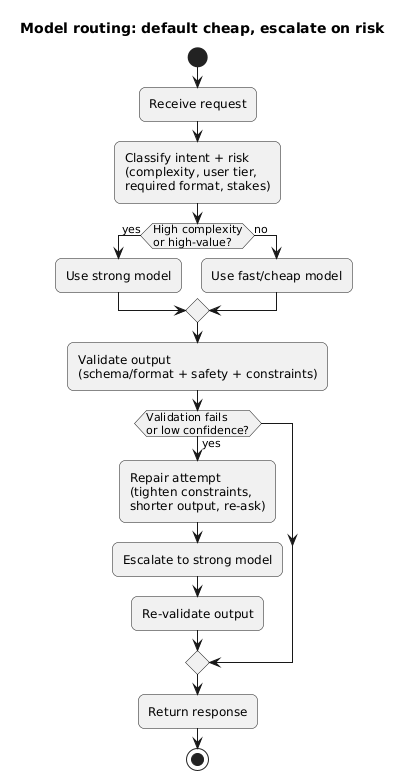
7.1 Route requests (default cheap, escalate when needed)
Use a small model for the majority of requests and escalate to a stronger model when the request is complex, high-value, or the output fails validation. This keeps average cost low while protecting quality.
Model routing strategy (diagram)
7.2 Use “structured outputs” to reduce retries
- Define strict schemas: JSON keys, enums, required fields.
- Validate and repair: attempt automatic repair before a full re-generation.
- Separate content from metadata: keep the “answer” distinct from “reasoning fields” (if any).
7.3 Cache intelligently
- Semantic cache: reuse answers for near-duplicate queries (with freshness rules).
- Prompt fragments: cache stable system instructions and examples server-side.
- Retrieved snippets: cache retrieval results for popular docs/queries.
7.4 Reduce context before you send it
- Summarize long threads: keep a rolling summary instead of resending the full history.
- Chunk + rerank: send only the top-ranked evidence.
- Use citations internally: track which snippets informed the answer for debugging.
8. A practical decision matrix
Use this table to align model choice with feature type. Treat it as a starting point, not a universal rule. Your eval set should make the final call.
| Feature type | Primary constraint | What usually works | Key guardrail |
|---|---|---|---|
| Chat UX assistant | Latency + perceived speed | Streaming + mid-tier model + routing | p95 time + fallback |
| Structured extraction | Accuracy + format compliance | Smaller model + strict schema + validation | JSON/schema pass rate |
| Support / knowledge base | Grounding + correctness | Retrieval + shorter context + citations | Hallucination handling |
| Complex reasoning | Accuracy | Stronger model + tighter prompts + tests | Eval success rate |
| Background processing | Cost | Batching + cheaper model + retries allowed | Cost per success |
9. A 7-step pilot plan (copy/paste)
Model selection pilot (7 steps)
1) Define acceptance criteria (quality + format + safety + UX)
2) Set budgets: p95 latency target + max cost per success
3) Build a mini-eval: 50–100 representative cases
4) Benchmark 2–4 candidate models with the same prompt + settings
5) Add routing + validation + caching; re-run the benchmark
6) Choose default + fallback models; define escalation rules
7) Launch canary; monitor: failures, p95, token spend, retries, user feedback
What to monitor in production
Track: format failures, retries per request, p95 latency, tokens per request, tool-call error rate, and “escalation rate” (how often you upgrade to the expensive model). These tell you exactly where to optimize.
10. Model selection checklist
- Requirements: success criteria defined with pass/fail examples.
- Latency: end-to-end budget set (p50 and p95) including retrieval and tools.
- Cost: estimated average + p95 token usage; retry factor included.
- Eval: mini test set built and stored with stable IDs.
- Guardrails: format validation, timeouts, and fallbacks in place.
- Routing: escalation rules defined (complexity, confidence, validation failures).
- Monitoring: dashboards for spend, latency, failures, and escalation rate.
- Change control: prompt/model changes require re-running the eval.
11. FAQ: choosing models
Which is more important: accuracy, latency, or cost?
Start with a minimum quality bar (accuracy + reliability). Then enforce a latency budget for the UX and a cost budget for your unit economics. If you can’t hit all targets with one model, route and escalate.
How can I reduce cost without lowering quality?
Reduce context size with retrieval, constrain output structure, and introduce routing: default to a cheaper model and escalate only on hard cases or validation failures. Caching also helps more than most teams expect.
Do I need a strong model if I have good retrieval?
Often, no. Retrieval can dramatically improve factual correctness for knowledge-heavy features. Stronger reasoning models matter most for multi-step synthesis, complex tool orchestration, and tricky transformations.
What’s the fastest way to choose between two models?
Run both against the same mini-eval (50–100 cases) and compare: task success rate, schema pass rate, p95 latency, and cost per success. The trade-offs usually become obvious quickly.
Key terms (quick glossary)
- Latency budget
- A planned allocation of time across components (network, retrieval, model, tools, parsing) to meet a target end-to-end response time.
- Cost per success
- The average spend required to produce a successful outcome, including retries, tool calls, and long-context cases.
- Routing
- Selecting different models based on request type, complexity, confidence, user tier, or validation outcomes.
- Fallback model
- An alternative model used when the primary model is slow, unavailable, or fails validation.
- Mini-eval (gold set)
- A small set of representative test cases used to compare models and prompts and catch regressions early.
Worth reading
Recommended guides from the category.
