Artificial intelligence (AI) powers tools you already use daily: spam filters, navigation, photo enhancement, and content recommendations. The goal of this guide is to explain AI in plain English, with practical examples and safe habits—so you can use AI productively without being misled by hype.
Beginner mindset
Treat AI like a helpful assistant. It can be fast and surprisingly useful, but it can also be wrong. Your job is to give clear instructions, review the output, and verify anything important.
1. What is artificial intelligence (AI)?
Artificial intelligence is a broad term for software that performs tasks that normally require human intelligence—like understanding language, recognizing images, or making predictions from data. Most AI you encounter today is designed for specific tasks (for example: detecting spam).
In simple terms, AI is often:
- Pattern recognition at scale (finding signals in huge amounts of data)
- Prediction (guessing the most likely next result based on past examples)
- Automation (doing repetitive tasks faster and more consistently)
2. AI vs machine learning vs generative AI (plain English)
People often use “AI” as a catch-all term. Here is the practical difference:
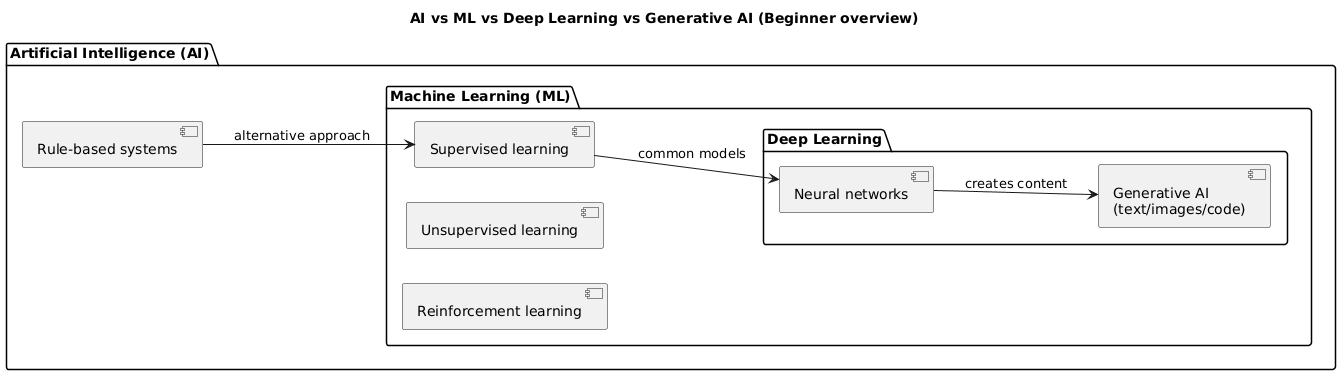
- AI: the broad field (everything from rule-based systems to machine learning).
- Machine learning (ML): a subset of AI where models learn patterns from examples instead of being programmed with every rule.
- Generative AI (GenAI): models that can create new content (text, images, code) based on patterns learned from large datasets.
Simple analogy
AI is the whole “toolbox.” Machine learning is one set of tools inside that box. Generative AI is a specific kind of machine-learning tool focused on creating new content.
3. Main types of AI you’ll hear about
- Narrow AI (Weak AI): specialized systems (most AI today).
- General AI (AGI): hypothetical AI that could learn any task like a human (does not exist today).
- Supervised learning: learns from labeled examples (spam vs not spam).
- Unsupervised learning: finds structure in unlabeled data (grouping similar customers).
- Reinforcement learning: learns via trial and error with rewards (game-playing agents).
- Natural language processing (NLP): language understanding and generation.
- Computer vision: image/video understanding.
4. How AI works step by step
The math can be complex, but the workflow is easy to understand. Most ML systems follow this lifecycle:

- Collect data: gather examples (text, images, numbers).
- Prepare: clean, remove duplicates, label if needed.
- Train: the model learns patterns by adjusting internal parameters.
- Evaluate: test on new data to measure accuracy and avoid overfitting.
- Deploy: integrate into an app so people can use it.
- Monitor: track performance and update when reality changes.
Important limitation
Many AI systems do not “understand” like humans. They detect patterns and produce likely outputs. This is why verification matters—especially for generative AI.
5. Real-world examples of AI you already use
- Smartphones: face unlock, photo enhancement, voice assistants.
- Email: spam and phishing detection.
- Streaming: personalized recommendations.
- Maps: route suggestions based on traffic prediction.
- Banking: fraud detection and anomaly alerts.
- Customer support: chatbots handling common questions.
6. Try AI tools as a beginner (starter prompts)
You can get immediate value from AI without building anything. The key is giving clear instructions. Use this prompt structure:
Role: who should the AI act as?
Goal: what do you want?
Context: what information matters?
Constraints: what to avoid / include?
Format: bullets, table, steps, checklist, etc.
6.1 Copy-and-paste prompt examples
-
Learning:
Explain [topic] like I’m 14. Then give 5 examples and a short quiz. -
Writing help:
Rewrite this paragraph to be clearer for beginners. Keep it under 120 words. -
Planning:
Create a 7-day study plan for learning AI basics with 30 minutes per day. -
Work email:
Draft a polite email asking for an update. Tone: friendly,
              professional. Length: 80–120 words.
7. Benefits of AI (when used well)
- Automation: repetitive tasks, summaries, categorization.
- Speed: faster research and drafting (with review).
- Personalization: tailored recommendations and learning support.
- Decision support: spotting trends in data.
8. Risks, limitations & what AI cannot do
- Hallucinations: confident answers that are wrong.
- Bias: models can reflect bias in training data.
- Privacy: sensitive information can leak if mishandled.
- Over-reliance: accepting outputs without critical thinking.
- Not professional advice: medical/legal/financial decisions require qualified experts.
9. Safe AI checklist (privacy + verification)

9.1 Privacy rules (simple and practical)
- Do not paste passwords, ID numbers, or confidential client data.
- Redact names and sensitive details when you only need the structure.
- Assume that anything you paste could be stored or reviewed depending on the tool and settings.
9.2 Verification rules (avoid being misled)
- Double-check numbers, dates, laws, and health info using trusted sources.
- Ask the AI to list assumptions and uncertainties.
- For important claims, request citations or a “what would you check next?” checklist.
Fast safety habit
Before you trust an answer, ask: “What could be wrong here?” and “What source would confirm this?” That one extra step prevents most beginner mistakes.
10. Practical beginner use cases (templates)
10.1 Summarize a long text
Summarize this in 8 bullet points for a busy reader.
Then add: (1) key risks, (2) open questions, (3) next steps.
10.2 Turn notes into a structured document
Turn these notes into a clear document with headings:
- Keep the tone professional
- Add a short executive summary
- Add a checklist at the end
10.3 Learn faster with a mini-lesson
Teach me [topic] in 10 minutes:
- simple explanation
- 5 examples
- 5-question quiz
- answers with explanations
11. Learning path (if you want to build AI)
- Step 1: basics of data, probability, and evaluation.
- Step 2: learn Python fundamentals.
- Step 3: core ML concepts: training/testing, overfitting, metrics.
- Step 4: small projects: classification, regression, text analysis.
- Step 5: deeper topics: neural networks, NLP, computer vision.
- Step 6: build a portfolio and iterate with feedback.
You can explore more resources in the Artificial Intelligence guides section.
12. AI at work: future-proof your career
- Use AI as a productivity tool: drafts, summaries, analysis—with review.
- Develop human strengths: communication, judgment, creativity, leadership.
- Understand workflows: identify tasks that can be assisted (not blindly automated).
- Stay adaptable: tools change quickly; principles change slowly.
13. FAQ: artificial intelligence for beginners
Do I need advanced math to understand AI?
For everyday use of AI tools, you do not need advanced math. If you want to build AI systems, basic algebra and probability help, but you can start with intuitive explanations and learn gradually.
Is AI always correct?
No. AI can be wrong, biased, or incomplete. Generative AI can also hallucinate, producing confident answers that are not true. Verify important information using trusted sources.
What is the difference between AI, machine learning, and generative AI?
AI is the broad field. Machine learning is a subset where systems learn patterns from data. Generative AI is a type of AI that creates new content (text, images, code) based on learned patterns.
Is it safe to paste my data into AI tools?
Be cautious. Avoid highly sensitive personal data or confidential business information. Check each tool’s privacy policy, use redaction when needed, and treat AI outputs as suggestions, not ground truth.
How can a beginner get better results from AI chatbots?
Be specific about your goal, audience, constraints, and format. Ask for a structured output, provide examples, and request a checklist or step-by-step plan. Always review and edit the final result.
14. Final thoughts & next steps
AI is already part of daily life, and you do not need to be an expert to benefit from it. Start small, stay critical, and use AI as a supportive tool—not a source of unquestioned truth.
Next step: pick one task you do weekly (writing, planning, research, summarizing) and test a simple prompt template. You’ll learn faster by experimenting than by reading definitions alone.
Key AI terms (quick glossary)
- Artificial Intelligence (AI)
- Software that performs tasks that normally require human intelligence (language, images, decisions).
- Machine Learning (ML)
- A subset of AI where models learn patterns from data rather than being programmed with fixed rules.
- Generative AI
- AI that creates new content (text, images, code) based on patterns learned from large datasets.
- Model
- The mathematical “engine” that learns from data and makes predictions or generates outputs.
- Training
- The process of learning patterns from data by adjusting internal parameters.
- Inference
- Using a trained model to produce an output in the real world (answering, classifying, generating).
- Prompt
- The instruction you give to a generative AI tool to guide its output.
Worth reading
Recommended guides from the category.
